

Last updated: September 22, 2026
Monitor response time describes how quickly pixels transition between states. Slow transitions leave visible trails behind moving objects, while overly aggressive overdrive can create bright or dark inverse trails. A single advertised 1ms number does not describe every transition or every refresh rate.
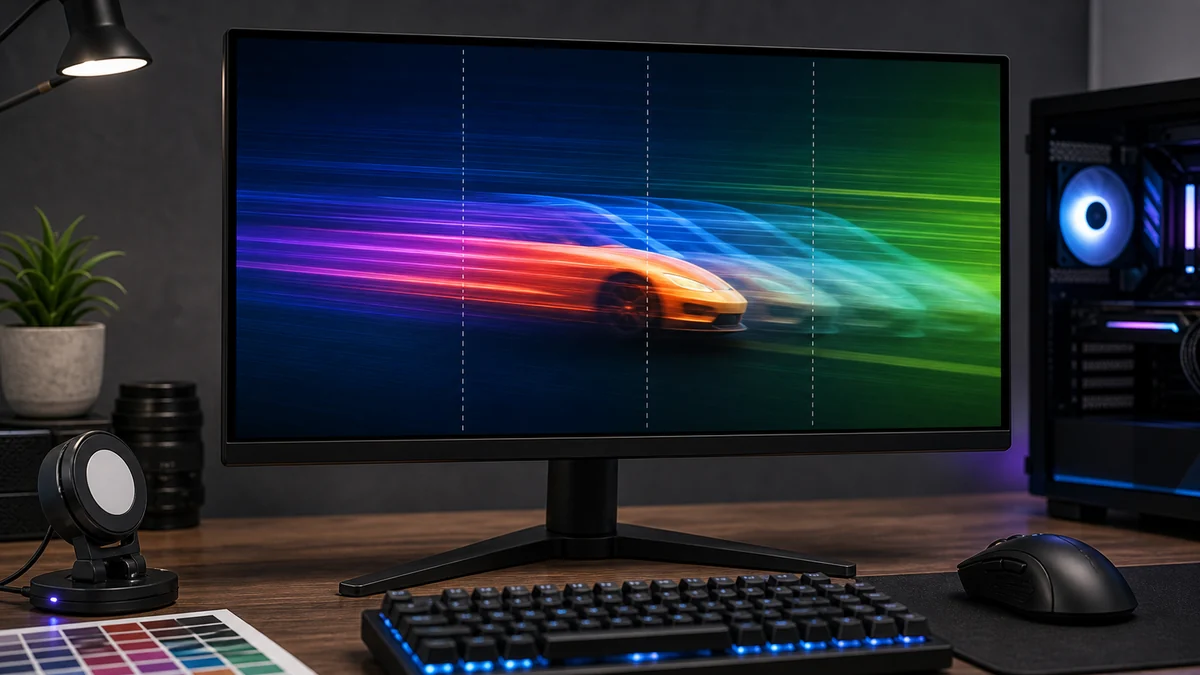
GtG usually refers to gray-to-gray pixel transitions. MPRT describes motion-picture response and is often associated with backlight strobing. These measurements are not interchangeable, and MPRT mode may reduce brightness or disable adaptive sync.
| Term | What it describes | Important limitation |
|---|---|---|
| GtG | Pixel transition speed | Varies by transition and overdrive setting |
| MPRT | Perceived motion persistence | Often requires backlight strobing |
| Overshoot | Transition passes the target value | Can create inverse ghosting |
| Refresh rate | Image updates per second | Does not guarantee fast pixel transitions |
How pixel response affects moving images
Panel Technology
Panel technology determines how quickly pixels can change color, which directly impacts what is response time performance. IPS panels typically offer better color accuracy but slower pixel transitions compared to TN panels. For most users seeking balanced performance, modern IPS options provide acceptable response times around 1-5ms according to manufacturer specifications.
VA panels often fall between these extremes with deeper blacks but potential smearing in dark scenes. When evaluating monitors, compare the advertised response time alongside panel type rather than relying on the number alone. This makes it a strong option for users who prioritize image quality over pure speed.
Refresh Rate Impact
Higher refresh rates reduce the time available for each frame, making fast response times more important to avoid motion artifacts. A 144Hz monitor benefits from 1ms response time more than a 60Hz display because the pixels must update more frequently. Based on available product data, pairing high refresh rates with low response times improves perceived smoothness in gaming scenarios.
Consider your GPU capabilities when matching these specifications. Overdriving pixels beyond the panel’s natural capability can introduce overshoot artifacts. Compare it with related specifications instead of judging it alone for optimal results.
Pixel Response Time Measurement
Manufacturers measure response time using different methods such as GtG (gray-to-gray) or BtW (black-to-white), leading to inconsistent marketing claims. A monitor rated at 1ms may actually perform closer to 4-5ms in real transitions depending on the testing methodology. Check whether what is response time affects the way you actually use your PC by reviewing independent specification breakdowns.
Look for monitors that list both average and maximum response times across various gray levels. This provides a more complete picture than a single headline number. Make sure the product is compatible with your current system before finalizing any purchase.
Overdrive Settings
Overdrive functions accelerate pixel transitions but can cause inverse ghosting if set too aggressively. Most monitors offer multiple overdrive levels that users can adjust through the OSD menu. For competitive gaming, the fastest setting often works best while content creators may prefer balanced modes to preserve image accuracy.
Test different overdrive options with your specific content to find the right balance. Consider whether the feature improves performance, comfort, reliability, or long-term value before committing to a particular monitor.
Impact on Gaming
Low response times reduce motion blur and ghosting during fast camera movements in games. This becomes especially noticeable in esports titles where precise tracking matters. For most users, response times under 5ms deliver noticeable improvements over slower panels when combined with high refresh rates.
Avoid paying extra for features that do not match your workload if you primarily consume media rather than play competitively. Response time matters less for office work or general productivity tasks.
Motion Blur Reduction
Technologies like backlight strobing further enhance motion clarity beyond what response time alone can achieve. These features work best with low response time panels to minimize additional artifacts. Compare motion blur reduction capabilities alongside what is response time when reviewing monitor options.
Users sensitive to flicker may prefer standard operation without strobing. Always verify compatibility with your GPU’s variable refresh rate technology for best results.
Color and HDR Considerations
HDR content can influence perceived response time because higher brightness levels sometimes slow pixel transitions. Monitors with strong HDR implementations often maintain good response times across brightness ranges. Consider color accuracy needs if your work involves photo or video editing alongside gaming.
Balance these factors against your primary use case to avoid overspending on unnecessary features. Check whether what is response time affects the way you actually use your PC before making decisions.
Quick Comparison
| Term | What It Means | Why It Matters | Who Should Care |
|---|---|---|---|
| What Is Response Time | A key hardware concept or specification | Helps compare real-world usability and performance | PC builders, gamers, creators, and upgraders |
| Compatibility | How well it works with your system | Prevents upgrade problems | Anyone building or upgrading a PC |
| Value | Performance and usefulness relative to cost | Helps avoid overspending | Budget-conscious buyers |
What to Look For When Buying
- Check whether what is response time affects the way you actually use your PC.
- Compare it with related specifications instead of judging it alone.
- Make sure the product is compatible with your current system.
- Consider whether the feature improves performance, comfort, reliability, or long-term value.
- Avoid paying extra for features that do not match your workload.
Common Mistakes to Avoid
One common mistake is assuming that a higher number or newer feature always means better performance. In many cases, real-world value depends on the full product design, compatibility, software support, and how the hardware is used. You can review additional context in our optical vs mechanical mouse switches comparison.
Another mistake is ignoring your own workload. A feature that matters for competitive gaming may not matter as much for office work, content creation, or general PC use. See our high DPI mouse buying guide for 2026 for similar decision-making principles.
Why You Should Trust PCGearWiki
PCGearWiki explains hardware concepts using practical examples, available specifications, compatibility research, and real-world buying context. Our goal is to help readers understand what matters before choosing PC components or peripherals. We focus on objective product comparison, specification research, and feature evaluation without claiming hands-on testing.
Transparency around affiliate recommendations remains a priority so you can make informed decisions based on your specific needs and budget.
Final Thoughts
What Is Response Time is worth understanding because it can affect performance, compatibility, comfort, or long-term value depending on the product category. When comparing hardware, use it as one part of the decision rather than the only factor. Explore more in our PCIe 4.0 vs PCIe 5.0 SSD buying guide for 2026.
For most users, monitors with 1ms to 5ms response times paired with 144Hz or higher refresh rates offer strong everyday performance. Budget-conscious buyers should prioritize verified specifications over marketing claims while enthusiasts may explore advanced overdrive options for competitive edges.
Frequently Asked Questions
What does what is response time mean?
What is response time refers to a hardware concept or specification that can affect how a product performs, fits, or feels in real-world use. It measures how quickly display pixels change color.
Does what is response time matter for gaming?
It can matter for gaming depending on the category. Some specifications affect latency, responsiveness, visual quality, or overall performance more than others. Check our mouse grip styles explained for related input device considerations.
Should I choose hardware based only on what is response time?
No. You should compare what is response time alongside compatibility, build quality, performance, features, and overall value.
What is the best what is response time in 2026?
The best choice depends on your specific monitor use case, refresh rate needs, and panel technology preferences rather than a single universal winner. Compare multiple specifications before deciding.
How much should I spend on a what is response time focused monitor?
Spending depends on your workload. Most users find good performance in the mid-range segment while competitive gamers may justify higher investments for the lowest response times available.
Response time must match refresh rate
At 144Hz, a new refresh begins about every 6.94ms; at 240Hz, about every 4.17ms. Pixel transitions that regularly exceed the refresh window can blur into following frames. This does not mean every transition must equal the advertised minimum, but average behavior should be fast enough for the selected rate.
How to choose an overdrive setting
Use a middle overdrive mode first and inspect dark and bright moving edges. The fastest mode is often not the cleanest because overshoot increases. Variable-refresh users should also test at lower frame rates, where a mode tuned for maximum refresh can produce more artifacts.
- Compare reviews that show several transitions, not one best-case number.
- Check performance at both maximum refresh and common lower refresh rates.
- Do not confuse input lag with pixel response time.
- Treat backlight-strobing modes as separate operating modes with their own brightness and timing limits.
- Pair this guide with our refresh-rate explainer.
Add PCGearWiki as a preferred source on Google
Sources and Verification
Research basis: Product identity, dimensions, interfaces, supported features, and warranty terms are checked against available manufacturer documentation and current retailer listings. Price, stock, and aggregate customer ratings can change after publication.
Testing disclosure: Unless this article explicitly states that PCGearWiki performed hands-on testing and describes the test setup, recommendations are research-based editorial evaluations rather than PCGearWiki laboratory measurements. Customer feedback is used to identify recurring ownership patterns, not as proof of technical performance.
Last source review: September 22, 2026. See our Review Methodology, Editorial Policy, and Corrections Policy.


Write Your Review
No reviews yet. Be the first to share your experience!