

Last updated: October 7, 2026
Quick answer: The best ultrawide monitor with USB-C charging depends on whether you prioritize gaming speed, laptop docking, or office features. The Pixio PXC348C Neo White leads for 180Hz gaming at 3440×1440, while the ASUS VA34VCPSR is better for demanding laptop docks because it supports up to 96W charging. The main constraint is whether your laptop needs more than 65W.

A USB-C ultrawide monitor can replace several desktop connections by carrying video, data, and power through one cable. The models in this comparison cover 34-inch 21:9 displays, one 49-inch Dual QHD option, refresh rates from 100Hz to 180Hz, and charging levels from 65W to 96W. Based on the available product data, these are better suited to different users rather than one universal buyer.
This PCGearWiki comparison sits within the Best Gaming Monitors category and focuses on verified manufacturer specifications, practical compatibility checks, and clear trade-offs. Listed prices and availability can change, and the supplied product records contain no written customer reviews, so this article does not treat the displayed ratings as meaningful owner-feedback evidence.
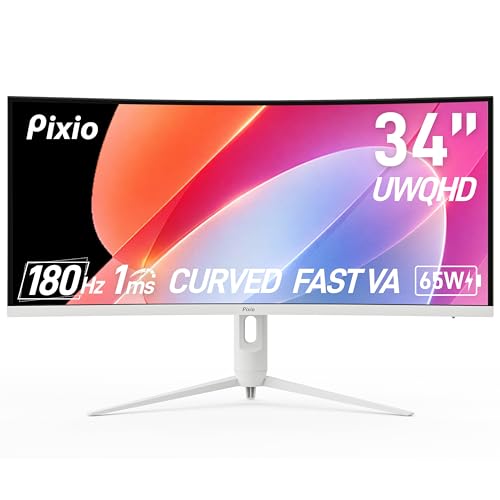
Pixio PXC348C Neo 34" Ultrawide Gaming Monitor


As an Amazon Associate we earn from qualifying purchases. Product prices and availability are accurate as of the date/time indicated.
Quick Verdict
For most users who want an ultrawide gaming monitor with laptop charging, the Pixio PXC348C Neo White 34″ 180Hz Refresh Rate has the strongest specification mix in the supplied data. It combines 3440×1440 resolution, a 180Hz refresh rate, USB-C DisplayPort Alt Mode, and 65W charging. Its limitation is that 65W may not fully power higher-performance laptops under sustained workloads.
The ASUS 34” Curved USB-C Docking Monitor (VA34VCPSR) is the more convincing office-docking choice because its USB-C port supports up to 96W charging and it includes an RJ45 LAN port, USB hub, DisplayPort, and ergonomic adjustment. The trade-off is a lower stated refresh rate than the gaming-focused Pixio models, with no gaming refresh specification supplied in the product record.
- Best for high-refresh gaming: Pixio PXC348C Neo White 34″ 180Hz Refresh Rate.
- Best for laptop docking: ASUS 34” Curved USB-C Docking Monitor (VA34VCPSR).
- Best for video meetings: Philips 34E1C5600HE 34″ UltraWide QHD 21:9 Monitor.
- Best for very wide productivity: Samsung 49” Business Curved Ultrawide Dual QHD.
- Best budget-oriented option: Philips 34 Inch Curved Computer Monitor UWQHD, subject to confirming the exact USB-C power-delivery behavior before checkout.

How We Evaluated
PCGearWiki evaluated the supplied monitor records by comparing resolution, aspect ratio, refresh rate, USB-C charging capacity, video inputs, docking features, ergonomics, and intended use. Manufacturer specifications are treated as specifications rather than independent measurements. We also separated clear product facts from editorial inferences and excluded unsupported claims about measured response, brightness, contrast, latency, or real-world image quality.
The supplied records show zero written reviews for the listed products, so there is not enough evidence to summarize recurring customer complaints or praise. We also cannot verify actual charging behavior across individual laptops, cables, operating systems, or firmware versions from the product data alone. For more detail on our research process, see the PCGearWiki review methodology.
What Matters Most When Choosing
USB-C power delivery is the first filter. A monitor advertised with 65W charging may suit many productivity laptops, but charging capacity is not the same as universal laptop compatibility. The ASUS model reaches 96W, Samsung lists 90W, and several 34-inch models list up to 65W. Check your laptop’s required USB-C charging level and whether its USB-C port accepts video through DisplayPort Alt Mode.
Video bandwidth determines the useful refresh rate. The white Pixio record specifies 3440×1440 at up to 180Hz through DisplayPort 1.4 and USB-C DisplayPort Alt Mode, while its HDMI 2.0 inputs are specified for up to 1440p at 100Hz. That distinction matters if a laptop, dock, or console connects through HDMI rather than USB-C or DisplayPort.
Screen format changes desk requirements. A 34-inch 21:9 monitor provides a wide workspace without the extreme horizontal footprint of a 49-inch 32:9 display. Samsung’s 49-inch model uses Dual QHD and a 1000R curve, making it a more specialized productivity screen. Confirm desk width, viewing distance, stand depth, and monitor-arm support before buying.
Docking features are not identical across USB-C monitors. Some records list only USB-C video and charging, while others add USB ports, an RJ45 network port, speakers, webcam hardware, Picture-by-Picture, or built-in smart-TV software. Decide whether you need a true desk dock or simply one-cable video and charging before paying for features that may not affect your setup.
Comparison and Trade-Offs
| Model | Display format | Refresh rate | USB-C charging | Best fit |
|---|---|---|---|---|
| Pixio PXC348C Neo White 34″ 180Hz Refresh Rate | 34-inch, 3440×1440, 1000R | 180Hz | 65W | High-refresh gaming |
| Pixio PXC348C Neo 34 inch 180Hz Refresh Rate UWQHD | 34-inch, 3440×1440, 1000R | 180Hz | 65W | Gaming with AMD FreeSync Premium |
| LG 34WR55QK-B 34-inch UltraWide WQHD (3440 x 1440) | 34-inch, 3440×1440 | 100Hz | Up to 65W | Office multitasking |
| Philips 34E1C5600HE 34″ UltraWide QHD 21:9 Monitor | 34-inch, 3440×1440, 1500R | 100Hz | Up to 65W | Remote work and meetings |
| LG 34SR63QA-W 34 inch Smart Curved Monitor | 34-inch, 3440×1440, 1800R | 100Hz | Up to 65W | Streaming and home offices |
| ASUS 34” Curved USB-C Docking Monitor (VA34VCPSR) | 34-inch, 3440×1440, 1500R | Not specified in supplied data | Up to 96W | Full laptop docking |
| Samsung 49” Business Curved Ultrawide Dual QHD | 49-inch, 32:9, Dual QHD, 1000R | 120Hz | 90W | Maximum desktop workspace |
| Philips 34 Inch Curved Computer Monitor UWQHD | 34-inch, 3440×1440, 1500R | 100Hz | USB-C PD | Lower-cost gaming and productivity |
| SAMSUNG Viewfinity S65UA Series 34-Inch Ultrawide | 34-inch, 21:9, 1000R | 100Hz | 90W | Office comfort and laptop charging |
The two Pixio listings share the same central 34-inch 180Hz gaming specification, but they are separate ASIN records and should not be treated as interchangeable. The first is explicitly the White variant and lists Adaptive Sync, while the second lists AMD FreeSync Premium. Verify the exact variant, color, included accessories, and return terms on the product page before ordering.
The 34-inch office models trade some gaming speed for workspace features. LG adds OnScreen Control and Picture-by-Picture, Philips adds a 5MP Windows Hello webcam, and ASUS adds higher USB-C power delivery plus RJ45 networking. Samsung’s 49-inch display offers the most horizontal space but also requires a larger desk and a stronger graphics output for demanding full-resolution applications.
Design and Build Quality
The supplied models use curved panels rather than flat screens. Curvature ranges from 1500R on the Philips and ASUS options to 1800R on the LG smart monitor, while the Pixio and Samsung models use a tighter 1000R curve. A tighter curve can make the edges feel more visually aligned from a centered seating position, but it also makes desk placement and viewing distance more important.
Stand adjustability varies. The LG 34WR55QK-B lists tilt and height adjustment, the ASUS VA34VCPSR lists tilt, swivel, and height adjustment, and the Samsung Viewfinity S65UA lists a height-adjustable stand. The LG 34SR63QA-W record lists tilt adjustment. These differences matter for long work sessions because USB-C convenience does not compensate for a screen that cannot be positioned correctly.
Several designs also function as workspace hubs. ASUS lists a USB hub and RJ45 LAN port, LG lists USB ports and a headphone jack, and the Samsung business model includes built-in speakers. The Philips 34E1C5600HE integrates a webcam, microphone, and speakers, which can reduce the number of accessories placed above or below the monitor.
Performance and Real-World Use
For gaming, the Pixio PXC348C Neo White is the strongest match on paper. Its 3440×1440 ultrawide resolution gives compatible games a wider field of view, while the stated 180Hz refresh rate and 1ms response-time claim target fast motion. DisplayPort 1.4 supports the listed 1440p-at-180Hz mode; HDMI 2.0 is listed at up to 1440p and 100Hz. The product record also lists HDR and Adaptive Sync.
The standard Pixio PXC348C Neo offers a similar gaming proposition, including AMD FreeSync Premium, HDR, 1ms response time, 180Hz refresh, and USB-C DisplayPort Alt Mode with 65W charging. Because it is a separate ASIN from the White version, buyers should select the exact listing that matches their preferred variant rather than assuming the records have identical accessories or support terms.
For office multitasking, 3440×1440 gives a 21:9 display enough horizontal room for side-by-side windows without requiring two separate panels. The LG 34WR55QK-B is particularly focused on this use case because its OnScreen Control software supports screen splitting and Picture-by-Picture from two input sources. Its 100Hz refresh rate is suited to smoother scrolling, but it is not positioned as the fastest gaming choice here.
The Philips 34E1C5600HE is the most self-contained meeting monitor in the group. Its supplied specifications include a built-in 5MP webcam, noise-canceling microphone, stereo speakers, Windows Hello support, and USB-C docking with up to 65W Power Delivery. The practical benefit is fewer desk accessories; the limitation is that the record does not provide independent image, microphone, or speaker measurements.
The LG 34SR63QA-W is aimed at users who want a monitor and streaming screen in one device. Its webOS platform provides access to listed streaming services and cloud applications, while AirPlay 2, HomeKit, and screen sharing broaden its use with compatible Apple devices. It is less suitable for buyers whose priority is maximum gaming refresh rate or a high-power laptop dock.
Samsung’s 49-inch business model is the outlier. Its 32:9 Dual QHD layout can replace a multi-monitor arrangement for users who need a continuous canvas for timelines, spreadsheets, or multiple application windows. Its 120Hz refresh rate, 90W USB-C charging, built-in speakers, and DisplayHDR 400 support add flexibility, but the larger chassis and higher system-display workload make it a poor fit for compact desks or modest graphics hardware.
Compatibility
USB-C charging works only when the host device, cable, and monitor negotiate compatible USB Power Delivery. Video also requires a USB-C port with DisplayPort Alt Mode or another supported display protocol. A USB-C port that provides power or data only may not drive the monitor. Confirm both capabilities in your laptop’s documentation before relying on a single-cable setup.
- Check your laptop’s charging requirement against the monitor’s stated 65W, 90W, or 96W maximum. Higher-wattage laptops may charge slowly, maintain charge, or require their original power adapter during demanding workloads.
- Confirm the video path. The white Pixio model lists DisplayPort 1.4 at 1440p and 180Hz, HDMI 2.0 at up to 1440p and 100Hz, and USB-C DisplayPort Alt Mode for the listed high-refresh mode.
- Verify that your graphics hardware can render the chosen ultrawide resolution at the desired refresh rate. The product data does not provide GPU requirements or game-specific performance results.
- Measure desk width and depth, especially for the Samsung 49-inch 32:9 model. Curved screens also need a centered seating position and sufficient viewing distance.
- Check whether you need Ethernet, USB peripherals, speakers, a webcam, Picture-by-Picture, or smart-TV software. These features differ substantially between models.
- Confirm the exact ASIN, size, color, model suffix, stand, warranty, and retailer return policy before checkout. The two Pixio PXC348C Neo listings are separate records, not one interchangeable product.
Pros and Cons
Strengths across the shortlist
- Most models provide 3440×1440 resolution in a 34-inch 21:9 format.
- USB-C charging ranges from 65W to 96W, with 90W options from Samsung.
- The Pixio models offer the highest stated refresh rate at 180Hz.
- Several monitors add useful docking features, including USB hubs, RJ45 networking, or Picture-by-Picture.
- The Philips 34E1C5600HE integrates a webcam, microphone, and speakers for remote work.
- The Samsung 49-inch model provides a substantially wider Dual QHD workspace than the 34-inch displays.
Limitations to consider
- 65W charging may not replace the power adapter for every laptop.
- The supplied data does not include independent measurements for brightness, contrast, color accuracy, input lag, or response behavior.
- HDMI connectivity may offer a lower refresh ceiling than DisplayPort or USB-C on some models.
- The 49-inch Samsung requires considerably more desk space than a conventional 34-inch ultrawide.
- The product records contain no written review evidence, so owner reliability patterns cannot be confirmed here.
Who Should Buy It?
Choose the Pixio PXC348C Neo White 34″ 180Hz Refresh Rate if gaming speed is your deciding factor and your laptop can use USB-C DisplayPort Alt Mode while accepting 65W charging. Its combination of 3440×1440, 180Hz, 1000R curvature, HDR, and Adaptive Sync is more gaming-oriented than the office-focused alternatives. Skip it if you need more than 65W or a built-in webcam, speakers, and Ethernet.
Choose the standard Pixio PXC348C Neo 34 inch 180Hz Refresh Rate UWQHD if you want the same broad high-refresh gaming concept with AMD FreeSync Premium listed in its record. Skip it if you are uncertain about the exact variant, since the supplied data identifies it as a separate ASIN from the White model.
Choose the ASUS VA34VCPSR if your monitor is primarily a laptop dock. Up to 96W USB-C charging, RJ45 LAN, a USB hub, multiple video inputs, and a fully adjustable stand give it the most complete connectivity package in this comparison. Skip it if a 180Hz gaming refresh rate is essential or if you do not need docking features.
Choose the Philips 34E1C5600HE for remote work, video calls, and a clean desk. The integrated 5MP Windows Hello webcam, noise-canceling microphone, speakers, and 65W USB-C docking are specific advantages. Skip it if you already own high-quality meeting equipment or want the highest gaming refresh rate available in this shortlist.
Choose the LG 34WR55QK-B when window management and mixed-input productivity matter more than gaming speed. OnScreen Control and Picture-by-Picture make its 34-inch canvas useful for multiple applications or sources. Skip it if your laptop needs more than 65W or your games benefit from a refresh rate above 100Hz.
Choose the LG 34SR63QA-W if you want streaming apps and smart-monitor features without keeping a separate TV or streaming box connected. Its webOS, AirPlay 2, HomeKit, speakers, and 65W USB-C charging suit a home office or entertainment room. Skip it if smart features are irrelevant and you want stronger docking or gaming specifications.
Choose Samsung’s 49-inch Business Curved Ultrawide Dual QHD if your work benefits from a continuous 32:9 workspace and your desk can accommodate a 49-inch screen. Its 90W charging and built-in speakers add practical convenience. Skip it if you need a compact setup, conventional 21:9 compatibility, or a lower-cost ultrawide.
Choose the Philips 346E2CUAE when the goal is a lower-cost 34-inch UWQHD screen with 100Hz refresh, Adaptive-Sync, and USB-C Power Delivery. Skip it if you require a specified charging wattage, integrated webcam, or advanced docking features, because those details are not fully established in the supplied record.
Choose the Samsung Viewfinity S65UA for office work where 90W charging, 1000R curvature, HDR10, height adjustment, and eye-care features are more important than 180Hz gaming. Skip it if you want a built-in webcam, smart-TV platform, or the most affordable entry point.
Who Should Skip It?
Skip a 34-inch USB-C ultrawide if your laptop requires substantially more power than the monitor provides, if its USB-C port lacks DisplayPort Alt Mode, or if you need a guaranteed high-refresh connection through HDMI. Also consider a different display category if you need OLED contrast, 4K pixel density, or a flat panel for a specific color-critical workflow. For broader gaming alternatives, compare our 1440p gaming monitor recommendations and curved gaming monitor guide.
Alternatives to Consider
The Best Gaming Monitors comparison is useful if your priority is gaming rather than USB-C docking. Within the supplied shortlist, the ASUS VA34VCPSR is the clearest alternative to the Pixio models for laptop users, while the Philips 34E1C5600HE is the better alternative for video conferencing. The Samsung 49-inch model is the alternative for buyers who specifically want a single 32:9 desktop canvas.
Why You Should Trust PCGearWiki
PCGearWiki builds this type of comparison from the supplied product records, matching each ASIN to its stated model, size, interface, feature set, and intended use. We compare the attributes that change the buying decision, including USB-C power delivery, display bandwidth, refresh rate, docking ports, screen format, and ergonomic features.
Our value analysis is editorial rather than a measured benchmark. We do not claim hands-on testing, independent laboratory results, or customer-feedback trends when those records are not supplied. Affiliate links may earn PCGearWiki a commission at no additional cost to the reader, which does not change the technical criteria used in this comparison.
Final Verdict
The Pixio PXC348C Neo White 34″ 180Hz Refresh Rate is the leading choice for gamers who want an ultrawide 3440×1440 display, high refresh rate, USB-C video, and 65W laptop charging in one monitor. The deciding factor is gaming speed, not docking depth. Choose ASUS instead when 96W charging, Ethernet, and USB hub functionality matter more. Choose Philips or LG for meeting and smart-office features, and Samsung for a much larger 32:9 workspace.
Is this category worth buying? Yes, provided your laptop supports USB-C display output and the monitor’s charging level matches your workload. Buyers should not assume that every USB-C monitor is a full docking station or that a stated refresh rate applies equally through every input. Confirm those two compatibility points before checkout.
Frequently Asked Questions
Is the best ultrawide monitor with USB-C charging worth it?
It is worth considering when you want one cable for laptop video and charging while gaining a 21:9 workspace. The value depends on whether 65W, 90W, or 96W meets your laptop’s needs. It is less compelling if your computer cannot output video through USB-C or if you need a full-speed gaming connection through HDMI.
Who is the best ultrawide monitor with USB-C charging best for?
It is best for laptop users, hybrid workers, creators managing multiple windows, and gamers who want a wider field of view. The Pixio models target gaming, ASUS targets docking, Philips targets video meetings, LG targets office and smart-screen use, and Samsung targets very wide productivity.
Is a USB-C ultrawide monitor good for gaming?
Yes, especially when the monitor supports a high refresh rate and the computer can drive 3440×1440 at that rate. The Pixio models list 180Hz, HDR, Adaptive Sync or AMD FreeSync Premium, and 1ms response-time claims. Those are manufacturer specifications, not independent measurements, and the available refresh rate can vary by input.
Can 65W USB-C charging power every laptop?
No. A 65W monitor can suit many productivity laptops, but higher-performance systems may need more power or may continue using their original adapter during demanding work. Compare your laptop’s required USB Power Delivery level with the monitor’s stated output, and use a suitable USB-C cable.
What should I compare before buying a USB-C ultrawide monitor?
Compare USB-C wattage, DisplayPort Alt Mode support, refresh rate by input, resolution, screen size, curve, stand adjustment, USB hub or Ethernet availability, and desk space. Also verify the exact model suffix and ASIN. The two Pixio PXC348C Neo records are separate variants, so their listings should not be assumed identical.
Add PCGearWiki as a preferred source on Google
Sources and Verification
Research basis: Product identity, dimensions, interfaces, supported features, and warranty terms are checked against available manufacturer documentation and current retailer listings. Price, stock, and aggregate customer ratings can change after publication.
Testing disclosure: Unless this article explicitly states that PCGearWiki performed hands-on testing and describes the test setup, recommendations are research-based editorial evaluations rather than PCGearWiki laboratory measurements. Customer feedback is used to identify recurring ownership patterns, not as proof of technical performance.
Last source review: October 7, 2026. See our Review Methodology, Editorial Policy, and Corrections Policy.


Write Your Review
No reviews yet. Be the first to share your experience!