

Last updated: September 22, 2026
A low-latency gaming mouse should report movement and clicks consistently, not merely advertise a high DPI number. Connection mode, polling stability, sensor implementation, firmware, debounce behavior, and the computer’s USB and CPU load all contribute to the delay between an input and the frame shown on screen.

This ranking focuses on responsiveness and consistency. For recommendations centered on low weight and fast physical movement, see our lightweight gaming mouse guide. Keeping these intents separate prevents a 50-gram shell from automatically outranking a better-tested 70-gram wireless design.
What low latency actually means
Polling rate sets the shortest interval at which USB reports can be sent, but it is not the same as total click latency. At 1000Hz, the theoretical report interval is 1ms; at 4000Hz it is 0.25ms; and at 8000Hz it is 0.125ms. Real end-to-end latency also includes switch processing, firmware, the USB stack, game input handling, rendering, and display refresh.
| Polling rate | Report interval | Practical consideration |
|---|---|---|
| 500Hz | 2ms | Adequate for general gaming and lighter CPU load |
| 1000Hz | 1ms | Best default for most gaming systems |
| 2000Hz | 0.5ms | Small improvement with moderate overhead |
| 4000Hz | 0.25ms | Most useful with high-refresh esports displays |
| 8000Hz | 0.125ms | Diminishing returns and higher CPU/USB demand |
Read our polling-rate explainer before paying extra for 4K or 8K support. Stable 1000Hz operation is preferable to an unstable higher mode.
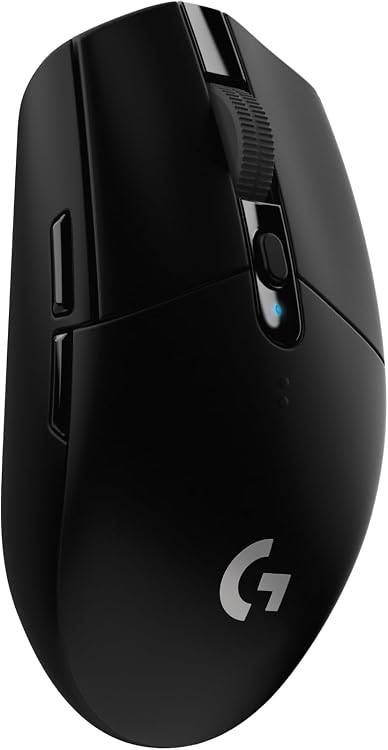
Pros
- Reliable low-latency LIGHTSPEED wireless for competition-level response
- Long battery life reduces interruptions during extended play
- Lightweight construction improves maneuverability and reduces fatigue
- High DPI range supports accurate aiming in fast-paced games
- Built-in receiver storage enhances portability
Cons
- Requires periodic AA battery replacement instead of built-in recharging
- Symmetrical shape may not suit all hand sizes or grip styles
- Advanced button programming needs separate software installation
| Connectivity Technology | USB |
|---|---|
| Additional Features | Wireless |
| Movement Detection | Optical |
| Button Quantity | 6 |
| Hand Orientation | Ambidextrous |
| Compatible Devices | Laptop, Personal Computer |
| Operating System | Microsoft Windows |
| Battery Average Life | 250 Hours |
| Number of Batteries | 1 AA batteries required. (included) |
| Hardware Platform | PC/Mac |
Best suited to shoppers comparing gaming mice products who specifically need gain lag-free wireless performance comparable to wired mice for responsive gameplay, Achieve precise tracking with the HERO sensor at up to 12000 DPI sensitivity.
Before buying, compare the exact model’s compatibility, dimensions, core specifications, warranty, recurring owner feedback, and current price against other gaming mice options. Retailer availability and pricing can change after publication.

Pros
- Exceptionally low weight for rapid movements in fast paced games
- Outstanding battery endurance reduces downtime during extended sessions
- Accurate sensor performs well across multiple surface types
- Dependable wireless connection with multi device support
- Durable switches ensure consistent tactile feedback over many uses
Cons
- Relies on replaceable AA batteries instead of a built in rechargeable cell
- Only six programmable buttons limit customization options compared to some rivals
- Maximum polling rate requires purchase of a separate dongle
| Connectivity Technology | USB |
|---|---|
| Additional Features | Wireless |
| Movement Detection | Optical |
| Button Quantity | 6 |
| Hand Orientation | Ambidextrous |
| Compatible Devices | Personal Computer |
| Operating System | Windows 11 |
| Battery Average Life | 280 Hours |
| Number of Batteries | 1 AA batteries required. (included) |
| Hardware Platform | Mac, PC |
Best suited to shoppers comparing gaming mice products who specifically need dominate competitive matches with an 82g balanced lightweight build that enables fast consistent swipes without fatigue, Power through long tournaments on a single AA….
Before buying, compare the exact model’s compatibility, dimensions, core specifications, warranty, recurring owner feedback, and current price against other gaming mice options. Retailer availability and pricing can change after publication.

Pros
- Multiple connectivity options including low-latency Slipstream wireless and Bluetooth
- Lightweight build with rubber side grips for all-day comfort
- Long battery life supporting extended wireless sessions
- High DPI sensor and programmable buttons for competitive accuracy
Cons
- Battery life rating applies only to Bluetooth mode and may decrease with wireless use
- Requires a separate USB adapter for Slipstream connection
- Six programmable buttons limit advanced macro options for complex games
| Connectivity Technology | Bluetooth |
|---|---|
| Additional Features | LED Lights, Lightweight, Programmable Buttons, Wireless |
| Movement Detection | Optical |
| Button Quantity | 6 |
| Hand Orientation | Ambidextrous |
| Compatible Devices | Gaming Console, Personal Computer |
| Operating System | Windows, macOS |
| Battery Average Life | 60 Hours |
| Number of Batteries | 1 Nonstandard Battery batteries required. (included) |
| Hardware Platform | PC |
Best suited to shoppers comparing mice products who specifically need dominate matches with hyper-fast Slipstream wireless delivering sub-1ms response for precise control, Game longer without fatigue thanks to the lightweight 99g construction and contoured….
Before buying, compare the exact model’s compatibility, dimensions, core specifications, warranty, recurring owner feedback, and current price against other mice options. Retailer availability and pricing can change after publication.

Pros
- Outstanding battery endurance across both wireless modes
- Highly portable lightweight construction for on-the-go use
- Accurate high-DPI sensor delivers responsive tracking
- Long switch lifespan supports heavy daily clicking
- Flexible dual wireless options adapt to different scenarios
Cons
- Requires periodic battery replacement instead of built-in recharging
- Compact form may feel small for users with larger hands
- Lacks additional programmable side buttons for complex macros
| Brand | Razer |
|---|---|
| Color | White |
| Connectivity Technology | Bluetooth |
| Special Feature | Lightweight, Portable, Touch Scroll, Wireless |
| Movement Detection Technology | Optical |
Best suited to shoppers comparing gaming mice products who specifically need play longer without fatigue thanks to an ultra-light 60g design that improves control during extended portable sessions, Toggle between Bluetooth for maximum battery savings….
Before buying, compare the exact model’s compatibility, dimensions, core specifications, warranty, recurring owner feedback, and current price against other gaming mice options. Retailer availability and pricing can change after publication.

Pros
- Advanced trigger system delivers measurable speed improvements over traditional switches
- Flexible customization options for actuation points and haptic intensity
- Durable lightweight construction with quality gliding feet for smooth control
- Strong wireless performance with high polling rates and solid battery endurance
Cons
- Advanced features require separate software installation for full access
- New inductive technology may involve a learning curve for some users
- Compatibility limited to PC and Mac platforms only
| Connectivity Technology | LIGHTSPEED Wireless, USB |
|---|---|
| Additional Features | Haptic Inductive Trigger System, Lightweight, Portable, Rechargeable, Wireless |
| Movement Detection | Laser |
| Button Quantity | 5 |
| Hand Orientation | Right |
| Compatible Devices | Personal Computer |
| Operating System | Windows;macOS |
| Battery Average Life | 60 Hours |
| Number of Batteries | 1 Nonstandard Battery batteries required. (included) |
| Hardware Platform | PC |
Best suited to shoppers comparing gaming mice products who specifically need achieve faster targeting with clicks that reduce latency for quicker in-game responses, Tailor each button's feel and travel distance to match individual play styles….
Before buying, compare the exact model’s compatibility, dimensions, core specifications, warranty, recurring owner feedback, and current price against other gaming mice options. Retailer availability and pricing can change after publication.

Pros
- Exceptional battery endurance across wireless modes
- Highly customizable controls via software
- Accurate and responsive optical sensor
- Comfortable ergonomic form for multiple grips
- Seamless mode switching between wireless options
Cons
- Full features require Razer Synapse software installation
- Size may not suit users with smaller hands
- Battery duration varies based on lighting and usage intensity
| Connectivity Technology | Bluetooth, USB |
|---|---|
| Additional Features | 285 Hr Battery for HyperSpeed Wireless, 535 Hr Battery for Bluetooth, 5G Advanced 18K Optical Sensor, 9 Programmable Controls, Chroma RGB, Mechanical Switches Gen-2 |
| Movement Detection | Optical |
| Button Quantity | 7 |
| Hand Orientation | Right |
| Compatible Devices | Mac, Personal Computer |
| Operating System | Windows, macOS |
| Battery Average Life | 285 Hours |
| Number of Batteries | 1 AA batteries required. (included) |
| Hardware Platform | PC |
Best suited to shoppers comparing gaming mice products who specifically need play longer with up to 285 hours of wireless battery life that supports marathon gaming sessions, Gain full command customization through 9 programmable buttons….
Before buying, compare the exact model’s compatibility, dimensions, core specifications, warranty, recurring owner feedback, and current price against other gaming mice options. Retailer availability and pricing can change after publication.

Pros
- Exceptional lightness improves agility for claw and fingertip grip users
- High polling rate and sensor accuracy suit professional competitive play
- Durable optical components reduce maintenance needs over time
- Versatile connectivity supports both wireless and wired modes
Cons
- Battery life drops sharply when using maximum 8K Hz polling
- Full customization requires installation of Razer Synapse software
- Symmetrical shape may not suit all hand sizes or palm grip preferences
| Connectivity Technology | 2.4Ghz Wireless, Wired USB Type C |
|---|---|
| Additional Features | 49g Ultra Lightweight, #1 pro-trusted shape, Frame Sync Technology, Max Speed 930IPS, 50K DPI, 90 G Acceleration, DPI Sensitivity Matcher, Up to 180 Hours of Battery Life, True 8000Hz Polling Rate Wired or Wireless, Optical Scroll Wheel and Mouse Switches, Wireless, 100% PTFE Feet |
| Movement Detection | Optical |
| Button Quantity | 6 |
| Hand Orientation | Right |
| Compatible Devices | Mac Desktop and Laptops, Personal Computer, Windows Desktop and Laptops |
| Operating System | Windows 11 |
| Battery Average Life | 180 Hours |
| Number of Batteries | 1 Nonstandard Battery batteries required. (included) |
| Hardware Platform | Mac, PC |
Best suited to shoppers comparing gaming mice products who specifically need delivers faster swipes and reduced fatigue during extended sessions thanks to its 49g ultra-lightweight build, Enables tournament-level responsiveness with true 8K Hz polling and….
Before buying, compare the exact model’s compatibility, dimensions, core specifications, warranty, recurring owner feedback, and current price against other gaming mice options. Retailer availability and pricing can change after publication.

Pros
- Extensive customization options for buttons and lighting
- High-precision sensor delivers crisp movement tracking
- Durable switches with fast actuation speed
- Comfortable ergonomic form with dedicated thumb support
Cons
- Requires Razer Synapse software for full feature access
- Wired design restricts movement compared to wireless alternatives
- Best suited for right-handed users due to the thumb rest layout
| Connectivity Technology | USB |
|---|---|
| Additional Features | Ergonomic Design |
| Movement Detection | Optical |
| Button Quantity | 11 |
| Hand Orientation | Right |
| Compatible Devices | Laptops, Personal Computer |
| Operating System | Windows 10, Windows 11 |
| Number of Batteries | 1 Lithium Ion batteries required. |
| Hardware Platform | Mac, PC |
| Power Source | Corded Electric |
Best suited to shoppers comparing gaming mice products who specifically need tailor controls to your style with 11 programmable buttons for faster in-game actions, Achieve precise tracking and quick responses using the high-accuracy 26K DPI….
Before buying, compare the exact model’s compatibility, dimensions, core specifications, warranty, recurring owner feedback, and current price against other gaming mice options. Retailer availability and pricing can change after publication.

Pros
- Iconic ergonomic shape reduces strain during long sessions
- Strong battery endurance minimizes interruptions
- Accurate sensor supports competitive precision
- Durable switches ensure long-term reliability
- Wireless freedom with low latency options
Cons
- Requires periodic AA battery replacement instead of built-in recharging
- May feel heavier than ultralight competitors due to battery compartment
- Button count is moderate compared to mice with more macros
| Connectivity Technology | Bluetooth |
|---|---|
| Additional Features | Wireless |
| Movement Detection | Optical |
| Button Quantity | 7 |
| Hand Orientation | Right |
| Compatible Devices | Personal Computer |
| Operating System | Windows, macOS, Linux |
| Battery Average Life | 235 Hours |
| Number of Batteries | 1 Lithium Polymer batteries required. (included) |
| Hardware Platform | PC |
Best suited to shoppers comparing gaming mice products who specifically need unparalleled comfort from the award-winning ergonomic shape trusted by millions including pros, Seamless ultra-low latency wireless play via HyperSpeed or flexible Bluetooth pairing.
Before buying, compare the exact model’s compatibility, dimensions, core specifications, warranty, recurring owner feedback, and current price against other gaming mice options. Retailer availability and pricing can change after publication.

Pros
- Extensive button customization tailored for MMO command access and efficiency
- Flexible wireless options balancing speed and battery conservation
- Long operational life reduces interruptions during extended sessions
- Sensor performs reliably on challenging surfaces like glass
- Durable switches provide consistent response over time
Cons
- Wireless performance requires careful dongle positioning near the mousepad to minimize interference
- Depends on replaceable batteries rather than internal recharging
- High button count creates a learning curve for users new to MMO mice
| Connectivity Technology | Bluetooth, USB |
|---|---|
| Additional Features | Focus Pro 30K Optical Sensor, HyperScroll Technology, Mechanical Mouse Switches Gen-2, Programmable Buttons, Up to 400 Hr Battery Life |
| Movement Detection | Optical |
| Button Quantity | 19 |
| Hand Orientation | Right |
| Compatible Devices | Personal Computer |
| Operating System | Windows |
| Battery Average Life | 250 Hours |
| Number of Batteries | 1 AA batteries required. (included) |
| Hardware Platform | PC |
Best suited to shoppers comparing gaming mice products who specifically need master complex MMO skill rotations instantly with 19 ergonomically placed programmable buttons for macros and commands, Maintain uninterrupted gameplay through low-latency HyperSpeed wireless or….
Before buying, compare the exact model’s compatibility, dimensions, core specifications, warranty, recurring owner feedback, and current price against other gaming mice options. Retailer availability and pricing can change after publication.

Pros
- Exceptional low latency for competitive gaming
- Precise optical sensor for accurate movements
- Highly durable construction
- Lightweight for reduced hand fatigue
- Smooth gliding with PTFE feet
Cons
- Wired design may restrict movement for some users
- Only three RGB zones limit advanced lighting effects
- Requires software for full customization which some find unnecessary
| Brand | SteelSeries |
|---|---|
| Color | Black |
| Connectivity Technology | USB |
| Special Feature | Gaming |
| Movement Detection Technology | Optical |
Best suited to shoppers comparing mice products who specifically need outpace opponents with near-instant 1.35ms click latency for quicker in-game reactions, Land accurate shots thanks to the TrueMove Core sensor providing true 1-to-1 tracking….
Before buying, compare the exact model’s compatibility, dimensions, core specifications, warranty, recurring owner feedback, and current price against other mice options. Retailer availability and pricing can change after publication.

How to choose a responsive gaming mouse
Choosing the right low-latency gaming mouse starts with understanding how you plan to use it. A good option for gaming may not be the best fit for productivity, content creation, portability, or long-term upgrade value. Before buying, consider your budget, performance expectations, compatibility needs, and the features that matter most for your setup.
Sensor Accuracy
Sensor accuracy determines how precisely a mouse translates physical movement into on-screen cursor or crosshair control. Models with high IPS ratings and DPI capabilities up to 44000 provide reliable tracking across various surfaces, including glass. For competitive play, sensors that maintain 1:1 tracking without acceleration or filtering deliver consistent results during fast flicks and micro-adjustments.
Compare the HERO 2 sensor in premium wireless options against the FOCUS PRO 30K or 5G Advanced 18K sensors found in other models. Real-world usage shows that forward sensor placement and intelligent functions help maintain accuracy on diverse mousepads. This makes high-end sensors a strong choice for gamers who need pixel-precise aim in fast-paced titles.
Click Latency and Polling Rate
Low click latency and high polling rates directly impact responsiveness in esports scenarios. Look for wireless mice supporting up to 8K polling with rapid trigger reset options and magnetic analog switches that allow 10-level actuation customization. These features can provide up to 30ms faster clicks compared to standard mechanical switches.
Wireless technologies such as LIGHTSPEED and HyperSpeed maintain sub-1ms response times when paired with compatible receivers. For most users, 1ms report rates combined with zero smoothing deliver competition-level performance without noticeable input lag. This category favors models engineered alongside professional athletes for peak execution consistency.
Weight and Shape
Ultra-lightweight designs between 60g and 99g reduce fatigue during extended sessions. Thin-wall construction and large UHMWPE feet enable effortless gliding, while ergonomic shapes support claw, fingertip, or palm grips. Mass-centralized designs prevent imbalance even with battery installed.
Portable options with hybrid battery slots accommodate AA or AAA cells for balanced weight distribution. Users who travel frequently benefit from compact builds with onboard receiver storage. Comparing these factors helps match the mouse to your preferred grip style and play duration.
Wireless Performance
Wireless stability matters for uninterrupted gameplay. Dual-mode connectivity allows switching between low-latency 2.4GHz and Bluetooth for productivity tasks. Multi-device support and strong interference resistance ensure reliable connections in crowded wireless environments.
Models with Slipstream or LIGHTSPEED technology maintain smooth performance even during intense matches. POWERPLAY compatibility adds wireless charging convenience for select users. This makes wireless mice viable alternatives to wired options for both gaming and general use.
Battery Life
Battery endurance varies widely, with some models offering 60-90 hours of active use and others reaching up to 950 hours on Bluetooth. Endurance modes extend runtime significantly on a single AA battery. Rechargeable options with USB-C charging provide flexibility for marathon sessions.
Consider your typical playtime when evaluating these specs. Lightweight mice with efficient sensors often achieve longer life without sacrificing performance. For most users, 250+ hours on a single charge strikes a practical balance between convenience and weight.
Software and Button Customization
Customization software enables DPI stage adjustments, macro assignment, and lighting effects. On-mouse DPI buttons allow quick sensitivity changes without interrupting gameplay. Programmable controls ranging from 6 to 11 buttons support complex command mapping for different genres.
Haptic feedback systems and adjustable click tension add immersion for specific playstyles. Users who value RGB synchronization or cross-device FLOW control find these features enhance daily workflows. Evaluate whether the included software meets your needs before finalizing a purchase.
Technical Comparison
| Model | Key Specification | Best For | Main Strength | Value Rating |
|---|---|---|---|---|
| Logitech G PRO X2 SUPERSTRIKE | HERO 2 sensor, <8K polling, 61g | Esports | Customizable rapid trigger and haptics | Premium |
| Razer Viper V3 HyperSpeed | FOCUS PRO 30K, 280hr battery, 82g | Competitive FPS | Lightweight and long battery | High |
| Logitech G502 Lightspeed | HERO 25K, 11 buttons, tunable weights | Productivity + gaming | Feature-rich with PowerPlay support | High |
| Razer Orochi V2 | 18K DPI, 950hr Bluetooth, 60g | Portable use | Ultra-light and versatile battery options | Excellent |
| Logitech G305 | HERO 12K, 250hr battery, 99g | Budget wireless | Affordable LIGHTSPEED performance | Best budget |
Why You Should Trust PCGearWiki
PCGearWiki evaluates products by comparing specifications, compatibility, feature sets, manufacturer information, market availability, user feedback, and overall value. Our goal is to help readers narrow down their options and make more confident buying decisions.
Because PC hardware changes quickly, we review product information and market trends regularly so our buying guides stay useful for gamers, PC builders, creators, and everyday users. See more in our Best Gaming Keyboards section for complementary peripherals.
Final Thoughts
The best low-latency gaming mouse depends on your budget, workload, system requirements, and performance expectations. Premium models may offer the highest performance, but many users will get better overall value from a well-balanced mid-range option.
Use the comparison table and product recommendations above to choose the model that fits your setup, upgrade plans, and long-term needs. Explore related content such as Best Processor For Gaming And Streaming Buying Guide for 2026 when building a complete setup.
Best Overall: Logitech G PRO X2 SUPERSTRIKE stands out for esports athletes needing fully customizable rapid trigger and haptic feedback with industry-leading sensor performance. Ideal for users prioritizing the lowest possible latency.
Best Value: Razer Viper V3 HyperSpeed delivers excellent lightweight design, long battery life, and strong sensor accuracy at a competitive price point for competitive gamers.
Best Budget: Razer Orochi V2 offers ultra-light portability, dual wireless modes, and exceptional battery life, making it a strong entry-level choice for both gaming and travel.
Best Premium: Logitech G PRO X2 SUPERSTRIKE again earns this distinction for its advanced Haptic Inductive Trigger System and pro-level customization options that justify the higher investment for dedicated competitors.
Frequently Asked Questions
What is the best low-latency gaming mouse in 2026?
The best low-latency gaming mouse depends on how you plan to use it. Gaming, productivity, content creation, and general use can require different features, so the right choice should match your workload and budget. Compare sensor specs and polling rates across the 11 models reviewed here.
How long does a low-latency gaming mouse typically last?
A quality low-latency gaming mouse can remain useful for several years when it matches your system requirements and is maintained properly. Actual lifespan depends on usage, build quality, software support, and how quickly your performance needs change.
How we evaluate low-latency mouse candidates
We separate manufacturer claims from directly comparable specifications. Our evaluation considers supported polling modes, wired and 2.4GHz operation, sensor generation, switch technology, firmware support, receiver placement, battery behavior, and reports of stutter or mode switching. Bluetooth is treated as a convenience mode rather than the preferred connection for competitive play.
- Use wired or the dedicated 2.4GHz receiver for latency-sensitive gaming.
- Place the receiver near the mouse pad with a clear line of sight when possible.
- Test 1000Hz before enabling 4000Hz or 8000Hz; higher rates can increase CPU usage in some games.
- Keep mouse firmware, chipset drivers, and the game updated before diagnosing inconsistent input.
- Compare click behavior and motion consistency, not maximum DPI alone.
When a higher polling rate is worth it
The improvement from 1000Hz to 4000Hz is easiest to notice on a 240Hz-or-faster display, with a fast CPU, a game running at a high and stable frame rate, and a player sensitive to motion clarity. On a 60Hz or 120Hz display, the upgrade is usually less meaningful than improving frame-time consistency or choosing a shape that supports accurate aim.
See our refresh-rate guide for the relationship between frame presentation and input updates. Our complete selection process is available in How We Evaluate Products.
Low-latency mouse FAQ
Does 8000Hz make a mouse eight times faster than 1000Hz?
No. It reduces the theoretical USB report interval from 1ms to 0.125ms, but total system latency includes many other stages. The real improvement is much smaller than an eightfold gain.
Is wired always faster than wireless?
Not automatically. Modern dedicated 2.4GHz implementations can be highly responsive, while Bluetooth generally adds more latency. The quality of the receiver, firmware, radio environment, and power mode determines actual consistency.
Can high polling rates cause stutter?
They can on CPU-limited systems or in games with poor high-rate input handling. If frame times become uneven, return to 1000Hz and retest before changing other settings.
Related PCGearWiki Guides
Sources and Verification
Research basis: Product identity, dimensions, interfaces, supported features, and warranty terms are checked against available manufacturer documentation and current retailer listings. Price, stock, and aggregate customer ratings can change after publication.
Testing disclosure: Unless this article explicitly states that PCGearWiki performed hands-on testing and describes the test setup, recommendations are research-based editorial evaluations rather than PCGearWiki laboratory measurements. Customer feedback is used to identify recurring ownership patterns, not as proof of technical performance.
Last source review: September 22, 2026. See our Review Methodology, Editorial Policy, and Corrections Policy.


Write Your Review
No reviews yet. Be the first to share your experience!