

Last updated: September 22, 2026
Quick answer: To check motherboard VRM quality, identify the voltage regulator module (VRM) controller and power stages, inspect the heatsink design, confirm the board supports your CPU, and compare independent VRM temperature tests when available. Do not judge a motherboard by phase count alone because power-stage current ratings, cooling, firmware, PCB design, and the processor’s power demand all affect real-world results.
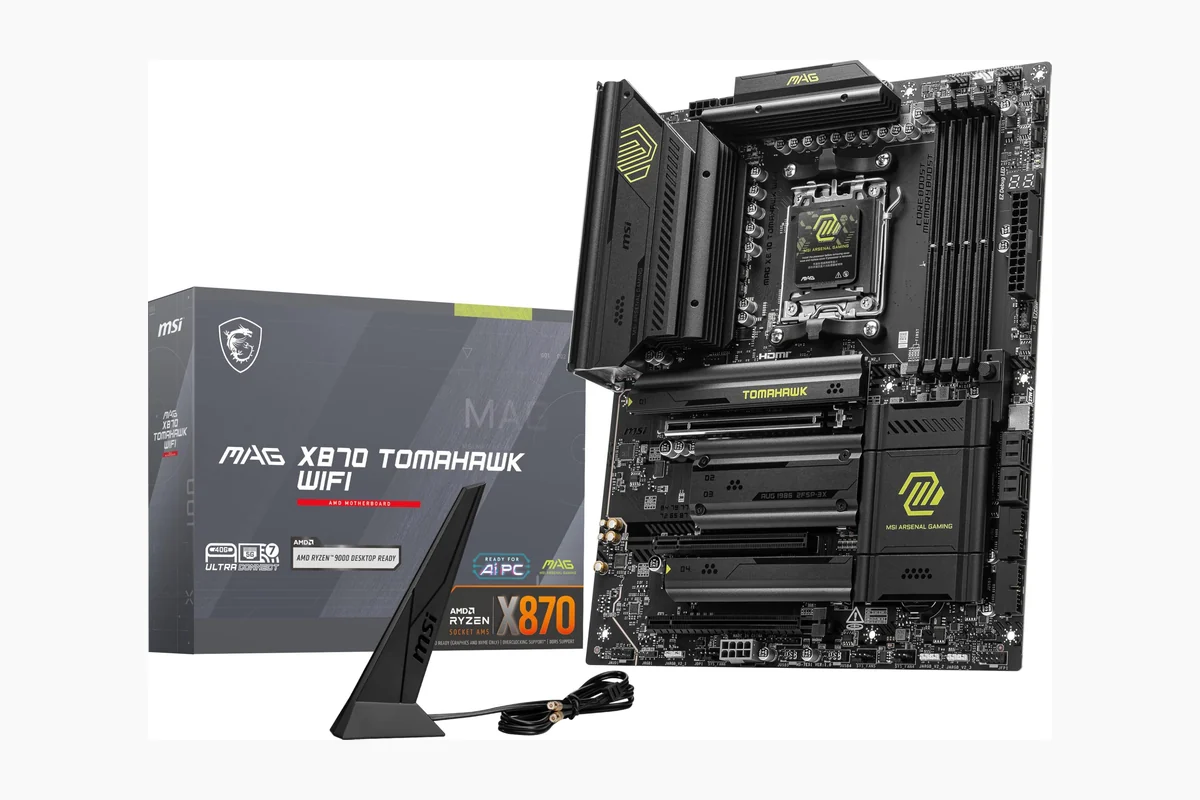
This focused guide explains how to check motherboard VRM quality for PC building and upgrades. It supports the Motherboard VRM Tier List: AM5 Buying Guide and belongs to the What Is a VRM? Motherboard Power Delivery Explained cluster. The goal is to help you evaluate motherboard specifications and reviews without confusing marketing labels with evidence.
For PC users comparing hardware in August 2026, VRM quality matters most when a motherboard must deliver sustained power to a high-performance CPU. A strong design can maintain stable voltage and reasonable temperatures under demanding workloads, while an undersized or poorly cooled design may reduce sustained performance, limit upgrade options, or create unnecessary thermal stress.
What Is How To Check Motherboard Vrm Quality?
How to check motherboard VRM quality means evaluating the circuit that converts power from the power supply into the lower, carefully controlled voltages required by the CPU. VRM stands for voltage regulator module. It is usually located around the CPU socket and contains a controller, power stages, inductors, capacitors, and one or more heatsinks.
The VRM does not simply switch power on and off. It rapidly adjusts voltage and current as the processor changes frequency and workload. During a short burst, the CPU may need a different electrical response than it does during a long render, compile, or stress test. A quality VRM design supplies that power consistently while controlling heat and electrical noise.
Checking VRM quality therefore requires more than counting visible components. The useful question is whether the motherboard can support the intended CPU at its expected power level, with adequate cooling and without avoidable limits. A budget processor and a flagship processor do not place the same demands on a motherboard, so VRM quality must always be judged in context.

Why How To Check Motherboard Vrm Quality Matters
VRM quality affects how reliably a motherboard supplies power during sustained CPU workloads. If the VRM becomes too hot, its power stages may operate less efficiently, and the motherboard firmware may reduce CPU power or clock behavior to protect the system. That does not mean every motherboard with a modest VRM will fail; it means the design should match the processor and workload.
Gaming
Most games produce variable CPU loads rather than keeping every CPU core fully occupied for long periods. A motherboard with a basic but adequate VRM can be perfectly suitable for a mid-range gaming processor. VRM quality becomes more important when using a high-core-count CPU, enabling aggressive default power limits, or pairing the board with a processor that sustains high power for extended sessions.
Productivity workloads
Video encoding, 3D rendering, software compilation, data processing, and heavy multitasking can keep the CPU under load for much longer than a typical game. These workloads expose VRM cooling and sustained-current capability more clearly. A board that appears fine during short bursts may be less suitable for repeated all-core workloads if its VRM temperature rises quickly.
Compatibility and upgrades
CPU socket compatibility alone does not guarantee that every processor is an equally good match for every motherboard. The chipset, BIOS support, CPU power limits, EPS power connectors, cooling arrangement, and manufacturer validation also matter. Checking VRM quality before buying can prevent a situation where a motherboard accepts a CPU electrically but cannot provide the desired sustained performance under heavy loads.
VRM quality can also affect long-term value. A board with adequate power delivery for today’s processor may offer a more practical upgrade path if it has stronger cooling and clearer support for higher-power CPUs. However, paying for an extreme VRM is not automatically good value if the system will always use a low-power processor.
How How To Check Motherboard Vrm Quality Works
A reliable evaluation combines specification research, physical inspection, CPU matching, and independent testing. Use the steps below in order rather than treating one specification as a final verdict.
1. Identify the VRM power stages
Power stages are the switching components that handle current for the CPU voltage rail. Motherboard specifications may list their rated current, configuration, or manufacturer, but the wording varies between brands. A higher current rating can indicate greater theoretical capacity, yet it does not prove that the complete motherboard performs better.
Look for the actual power-stage model when a manufacturer provides it. A specification that only says something such as a large number of power phases gives less useful information than a specification identifying the controller and power-stage arrangement. Independent motherboard teardowns and technical reviews can help confirm whether the advertised design matches the physical board.
2. Treat phase count as supporting information
VRM phase count describes how the power delivery is divided, but it is not a universal quality score. Some boards use true phases, while others use doublers or parallel power stages. A larger number can improve current sharing and ripple behavior in some designs, but the controller, power-stage capability, switching behavior, and cooling remain important.
Do not compare two motherboards solely because one advertises more phases. A board with fewer but higher-capability power stages and better heatsinks may be more suitable than a board with a larger advertised count and weaker cooling.
3. Inspect the VRM heatsinks
VRM heatsinks remove heat from the power stages and transfer it into the surrounding airflow. Check whether the heatsinks cover the main CPU power stages, have enough mass for the intended processor, and provide a sensible surface area. Fins or cutouts can improve heat dissipation, while a small decorative block may provide less cooling than its appearance suggests.
Heatsink contact also matters. A heatsink that does not make effective contact with the relevant components cannot cool them efficiently. For a deeper explanation of this part of the evaluation, read Do VRM Heatsinks Matter?
4. Check the CPU support list and power limits
Visit the motherboard manufacturer’s support page and check the CPU support list, required BIOS version, and any notes about processor support. Also look for documented CPU power settings and whether the board applies manufacturer-defined limits or allows higher automatic limits. These details help show how the motherboard is intended to operate with the processor you plan to install.
The CPU cooler and case airflow are part of the same decision. A powerful VRM cannot compensate for a poorly ventilated case, and a large CPU cooler may obstruct the VRM heatsink area or reduce airflow around it. Check the complete platform rather than viewing the motherboard in isolation.
5. Use independent thermal testing correctly
Independent reviews are often the most useful way to compare real VRM behavior. Look for reviews that report VRM temperature during a sustained CPU workload and explain the test conditions. The CPU model, ambient temperature, case airflow, fan speed, motherboard firmware, power limits, and sensor location can all change the result.
Compare results only when the testing methods are reasonably similar. A temperature recorded with an open test bench is not directly equivalent to one recorded inside a closed case. Likewise, a short test may not reveal the same behavior as a long sustained workload. Treat a review’s measurements as test-specific evidence, not as a permanent universal rating.
What to Look For When Buying
Use this checklist when comparing a motherboard for a particular CPU. The best choice is the board that provides adequate power delivery and useful features without charging for capacity your system will not use.
- Match the VRM to the CPU: Start with the processor’s class and expected workload. High-core-count CPUs and sustained all-core workloads require more VRM capacity and cooling than entry-level processors.
- Read beyond the phase count: Find the controller and power-stage information when available, then consider the complete design rather than one headline number.
- Inspect the heatsinks: Prefer substantial, well-positioned heatsinks that cover the CPU power stages and fit the board’s airflow plan.
- Confirm CPU and BIOS support: Check the official support list, minimum BIOS version, socket, chipset features, and any processor-specific restrictions.
- Check independent reviews: Give more weight to repeatable VRM temperature testing than to generic claims such as premium power design.
- Consider case airflow: A motherboard’s VRM behavior depends partly on the CPU cooler, case fans, room temperature, and sustained workload.
- Review upgrade plans: If you may install a higher-power CPU later, choose a board with documented capacity and cooling headroom rather than sizing it only for today’s processor.
- Balance the platform: Do not sacrifice needed memory support, storage connectivity, expansion slots, rear I/O, or BIOS features simply to obtain an oversized VRM.
Common Mistakes to Avoid
Assuming more phases always means better quality
Phase count is only one part of the design. The power-stage rating, controller behavior, heatsink, PCB layout, firmware, and workload all affect the outcome. Treat phase count as a clue that requires context, not as a standalone score.
Confusing VRM quality with CPU overclocking support
A strong VRM may provide useful headroom, but CPU overclocking also depends on the processor, firmware, cooling, silicon variation, and platform rules. A motherboard can have capable power delivery without making any particular overclock guaranteed.
Ignoring the heatsink and airflow
Power stages generate heat while converting and regulating power. Even a capable design can run hotter when the case has weak airflow or the CPU cooler does not move air across the motherboard. VRM quality is therefore a system-level consideration.
Using a single temperature figure as a universal result
A reported VRM temperature is meaningful only alongside the test setup. Differences in ambient temperature, CPU power, fan speed, case design, and measurement method can produce different results for the same board.
Buying the most expensive VRM for every build
Extra VRM capacity has diminishing practical value when the processor uses modest power. Money may be better spent on a more suitable CPU cooler, faster storage, additional memory, or features that directly affect your workload.
Quick Comparison
These terms describe different parts of a motherboard power-delivery evaluation. They should be considered together rather than used interchangeably.
| Term | What It Means | Why It Matters | Who Should Care |
|---|---|---|---|
| Power stage | A switching component that delivers current to the CPU voltage rail | Influences current capacity, efficiency, and heat generation | Anyone matching a motherboard to a demanding CPU |
| Phase count | How the CPU power delivery is divided or arranged | Provides design context but does not prove overall quality | Readers comparing specifications carefully |
| VRM heatsink | The thermal hardware attached near the CPU socket | Helps remove heat from the power stages during sustained load | Users with high sustained workloads or restricted airflow |
| VRM temperature test | An independent measurement under a stated workload and setup | Shows real behavior under specific conditions | Buyers choosing between boards for the same CPU |
Related Guides
For more motherboard research, explore PCGearWiki’s Motherboard Reviews category and the guide to ITX motherboard selection. Small-form-factor boards can require especially careful attention to heatsink clearance, case airflow, and CPU power limits.
If you are comparing a specific platform, the X570 motherboard guide with Wi-Fi 6 provides additional context about motherboard feature selection beyond the VRM alone.
Why You Should Trust PCGearWiki
PCGearWiki approaches motherboard topics as practical hardware education rather than a collection of marketing claims. The focus is on explaining what specifications mean, identifying compatibility limits, and separating manufacturer statements from independent measurements.
That approach matters for VRM research because no single specification describes the complete power-delivery system. A useful recommendation considers the CPU, workload, heatsink design, firmware behavior, case airflow, and available testing evidence together. When evidence is limited, the responsible conclusion is to describe the uncertainty instead of inventing a performance result.
Final Thoughts
The practical way to check motherboard VRM quality is to match the complete power-delivery design to your CPU and workload. Identify the power stages and controller when possible, inspect the heatsinks, verify CPU and BIOS support, account for case airflow, and use independent thermal tests performed under comparable conditions.
The specific bottom line is simple: choose a motherboard with documented, adequately cooled VRM hardware for the processor you will actually run. Do not buy based on phase count alone, and do not pay for extreme power delivery unless your CPU, sustained workload, or upgrade plan can use that extra capacity.
Frequently Asked Questions
Can I check motherboard VRM quality without removing the heatsink?
Usually, yes. Start with the manufacturer’s specifications, board photographs, CPU support list, and independent reviews. Removing a VRM heatsink can void a warranty, damage thermal pads, or provide incomplete information, so it is generally better to use documented teardowns and testing rather than disassembling a new motherboard.
Is a motherboard with more VRM phases always better?
No. Phase count does not reveal every detail of the controller, power stages, cooling, or firmware. A motherboard with fewer high-capability power stages and effective heatsinks can be a better match than one advertising a larger phase count with less capable hardware.
What VRM quality do I need for a gaming PC?
For a gaming PC, choose a VRM that the motherboard manufacturer and reputable independent reviews show is adequate for your chosen CPU. Mid-range processors typically place less sustained demand on the VRM than high-core-count processors, while aggressive power settings and long gaming or streaming sessions increase the value of stronger cooling.
Do VRM temperatures affect CPU performance?
They can. If the VRM becomes excessively hot, motherboard protection behavior or power-delivery limits may reduce sustained CPU operation. The effect depends on the motherboard, processor, firmware, workload, and cooling environment, so a temperature result must always be interpreted with its test conditions.
Should I prioritize VRM quality over every other motherboard feature?
No. VRM quality should be adequate for the CPU and workload, but the motherboard must also provide the required socket, memory support, storage connections, expansion slots, networking, rear I/O, and BIOS features. Once the power delivery is sufficient, other platform features may provide greater practical value.
Technical Sources
Use these primary technical references alongside the practical guidance above. Product-specific limits can vary by model and firmware.
Add PCGearWiki as a preferred source on Google
Sources and Verification
Research basis: Product identity, dimensions, interfaces, supported features, and warranty terms are checked against available manufacturer documentation and current retailer listings. Price, stock, and aggregate customer ratings can change after publication.
Testing disclosure: Unless this article explicitly states that PCGearWiki performed hands-on testing and describes the test setup, recommendations are research-based editorial evaluations rather than PCGearWiki laboratory measurements. Customer feedback is used to identify recurring ownership patterns, not as proof of technical performance.
Last source review: September 22, 2026. See our Review Methodology, Editorial Policy, and Corrections Policy.






Write Your Review
No reviews yet. Be the first to share your experience!