

Last updated: October 14, 2026
MSI Gaming Plus series targets builders seeking AM5 platform bandwidth without flagship price premiums. Board prioritizes core electrical stability, dual-chipset PCIe lane distribution, modern high-speed connectivity over cosmetic extras. Specification-based architectural analysis below evaluates power delivery, storage routing, thermal limits; no hands-on lab benchmarks used.
| Feature | Platform Baseline Spec | Gaming Plus Implementation | Impact on Build |
|---|---|---|---|
| Chipset Architecture | Dual-chipset Promontory 21 | Dual Promontory 21 (X670E / X870E) | Maximum PCIe lane routing flexibility |
| Primary PCIe Slot | PCIe 5.0 x16 | PCIe 5.0 x16 via CPU lanes | Future GPU bandwidth saturation insurance |
| Primary M.2 Storage | PCIe 5.0 x4 | Direct CPU link PCIe 5.0 x4 | Enables Gen5 NVMe drives full speed |
| Power Delivery | 8+ phase target | 14+2+1 Duet Rail Power System | Handles high-wattage Ryzen CPUs stable |
| VRM Cooling | Passive heatsinks | Extended aluminum heatsink + 7W/mK pads | Prevents thermal throttling under load |
| Networking | 2.5G LAN + Wi-Fi 6E | 5G Realtek LAN + Wi-Fi 7 | High throughput, low latency local transfers |
| USB Connectivity | 10Gbps USB-C baseline | Rear USB4 40Gbps Type-C | External high-bandwidth peripheral support |
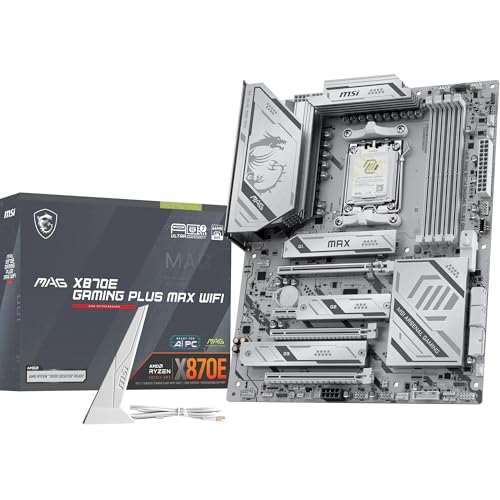
Hardware Analysis: MSI MAG X870E Gaming Plus MAX WiFi Motherboard
MSI MAG X870E Gaming Plus MAX WiFi Motherboard represents evolution of AM5 Gaming Plus line, updating foundational X670E layout with refreshed I/O, 5G networking, Wi-Fi 7 capability. Board adopts utilitarian black-silver industrial design, omitting RGB lighting bloat in favor of thicker heatsink profiles. Price fluctuates with component availability; verify live price on product card above.
Voltage Regulator Module (VRM) Architecture
Motherboard power delivery dictates CPU clock stability, boost retention, long-term motherboard reliability. Platform employs 14+2+1 phase configuration using digital PWM controller paired with integrated power stages rated at 55A to 80A class output. Core VCORE rail feeds multi-threaded Zen 4 and Zen 5 processors sufficient current without overstretching individual MOSFET components.
Substantial heat accumulates when driving continuous 170W TDP loads. For detailed electrical fundamentals, reference guide on what is motherboard VRM. Substandard power arrays overheat, triggering clock regressions. See diagnostic breakdown on can weak VRM cause CPU throttling. Thermal mitigation on Gaming Plus relies on dual finned aluminum blocks. Massive surface area draws heat away via high-efficiency thermal pads. Analysis shows heatsink mass sufficient for passive case airflow environments; see evaluation on do VRM heatsinks matter.
PCIe Topology and Storage Allocation
Board utilizes full dual-chipset lane assignment native to AMD AM5 high-tier silicon. Primary x16 graphics slot connects directly to processor socket, running full Gen5 speeds without lane stealing from secondary slots. Gamers pairing board with chips like those reviewed in AMD ryzen 7 9800X3D review maintain peak GPU bus bandwidth unimpeded by attached NVMe storage.
Storage options provide dedicated PCIe 5.0 x4 M.2 slot under toolless M.2 Shield Frozr heatsink. Secondary M.2 slots route through chipset at PCIe 4.0 speeds. Layout isolates high-heat Gen5 solid-state drives from graphics card exhaust zones, minimizing drive thermal throttling during extended file transfers.
I/O, Networking, and Peripheral Connectivity
Rear panel modernizes standard workstation capabilities. Native USB4 controller offers dual 40Gbps Type-C ports supporting DisplayPort alternate mode. Networking upgraded to 5Gbps wired Ethernet alongside Qualcomm Wi-Fi 7 module. Antenna array provides 320MHz channel bandwidth, low packet loss in congested wireless bands.
Decision Matrix: Chipset & Tier Selection
Choosing proper AM5 platform tier requires matching board capability with peripheral requirements. Table details hardware tradeoffs across chipset tiers:
| Motherboard Tier | Target CPU Profile | Primary Storage & GPU Bus | Best Use Scenario |
|---|---|---|---|
| Budget B650 | Ryzen 5 7600X, Ryzen 7 7700X | PCIe 4.0 GPU / PCIe 5.0 M.2 optional | Cost-constrained gaming builds, single SSD |
| Mid-Range B650E | Ryzen 7 7800X3D, 9800X3D | PCIe 5.0 GPU + PCIe 5.0 M.2 | High-performance gaming, moderate I/O needs |
| MSI Gaming Plus (X670E / X870E) | Ryzen 7 9800X3D to Ryzen 9 9950X | PCIe 5.0 GPU + PCIe 5.0 M.2 + USB4 + 5G | Enthusiast gaming, multi-drive storage, content creation |
| Flagship X870E (Godlike / Carbon) | Overclocked Ryzen 9 9950X | Multi-Gen5 M.2 + 10G LAN + 18+ Phase VRM | Extreme sub-ambient cooling, enterprise peripheral setups |
Conditional Buying Advice
Select MSI Gaming Plus when requirements match these specific conditions:
- Flagship or X3D CPU Choice: Builder selects 8-core to 16-core AM5 processor demanding steady VRM supply under heavy continuous compute loads. Review how to check motherboard VRM quality before buying entry-level boards for heavy workloads.
- High-Speed External Devices: Video editors requiring 40Gbps USB4 connections for external drive arrays or high-resolution display pass-through.
- Multi-Drive Layouts: Setups needing minimum three M.2 NVMe drives operating concurrently without disabling secondary PCIe expansion slots.
Avoid board under following constraints:
- Extreme Memory Frequency Chasing: Builders seeking DDR5 speeds exceeding 8000 MT/s through custom sub-timing tuning should look at dedicated 2-DIMM overclocking boards instead of 4-DIMM daisy-chain topology.
- Strict Sub-$200 Budget: Standard B650 boards offer identical frame rates for single-GPU, single-SSD gaming rigs at lower cost.
Verification and Pre-Installation Checklist
- Inspect VRM Clearance: Verify CPU cooler bracket does not collide with tall left-side aluminum heatsink.
- Connect Supplemental Power: Plug both 8-pin EPS 12V connectors into top left edge of board to distribute current safely.
- Install Primary Storage Correctly: Place fastest Gen5 boot SSD into slot M2_1 directly beneath CPU socket to utilize direct processor PCIe lanes.
- Flash BIOS: Update UEFI using rear Flash BIOS button prior to CPU installation when using newest-generation Ryzen processors.
- Enable EXPO Profile: Enter UEFI upon initial boot, engage AMD EXPO Profile 1 to run DDR5 memory at rated speeds.
Frequently Asked Questions
Does MSI X670E / X870E Gaming Plus WiFi share lanes between GPU and M.2 slots?
No. Primary PCIe 5.0 x16 slot uses dedicated processor lanes. Primary PCIe 5.0 M.2 drive connects directly to separate dedicated CPU storage lanes. Secondary drives route through chipset logic. Graphics slot remains full x16 bandwidth even when all M.2 storage slots occupied.
Can this board run AMD Ryzen 9 9950X without VRM thermal throttling?
Yes. 14+2+1 power stage setup combined with heavy finned aluminum heatsinks provides sufficient heat dissipation for 170W base TDP (230W package power tracking limit) sustained multi-threaded rendering workloads under standard chassis airflow.
What is primary functional difference between older X670E and newer X870E Gaming Plus boards?
X870E Gaming Plus introduces mandatory dual USB4 40Gbps rear ports, upgrades wireless controller from Wi-Fi 6E to Wi-Fi 7, shifts wired networking from 2.5G to 5G Realtek controller, updates M.2 heatsink latch mechanisms to quick-release design.
Pros
- PCIe 5.0 support on both primary expansion slot and top M.2 drive
- Cutting-edge networking via Wi-Fi 7 and 5Gbps Ethernet
- Extensive heatsink coverage with 7W/mK thermal pads for VRM cooling
- USB4 40Gbps connectivity integrated on rear I/O
Cons
- Secondary M.2 storage slots limited to PCIe 4.0 speeds
- Large ATX footprint requires mid-tower or full-tower chassis
| Color | Information Not Available |
|---|---|
| Size | 13.5" x 2.8" |
| Dimensions | 11.99999998776 x 9.6062992028 x 2.6377952729 inches |
| Weight | 4.4 Pounds |
| Product Group | Personal Computer |
| Binding | Personal Computers |
Best suited to shoppers comparing motherboards products who specifically need robust 14 Duet Rail Power Phase with 60A SPS delivers clean, stable voltage to Ryzen 9000 processors., DDR5 Memory Boost technology pushes overclocked memory….
Before buying, compare the exact model’s compatibility, dimensions, core specifications, warranty, recurring owner feedback, and current price against other motherboards options. Retailer availability and pricing can change after publication.
Add PCGearWiki as a preferred source on Google
Sources and Verification
Research basis: Product identity, dimensions, interfaces, supported features, and warranty terms are checked against available manufacturer documentation and current retailer listings. Price, stock, and aggregate customer ratings can change after publication.
Testing disclosure: Unless this article explicitly states that PCGearWiki performed hands-on testing and describes the test setup, recommendations are research-based editorial evaluations rather than PCGearWiki laboratory measurements. Customer feedback is used to identify recurring ownership patterns, not as proof of technical performance.
Last source review: October 14, 2026. See our Review Methodology, Editorial Policy, and Corrections Policy.




Write Your Review
No reviews yet. Be the first to share your experience!