

Last updated: September 22, 2026
Quick answer: Yes, VRM heatsinks matter when a motherboard supplies substantial CPU power for sustained periods. They are especially relevant with high-core-count CPUs, unlocked power limits, overclocking, compact cases, or restricted airflow. They usually do not increase gaming FPS by themselves, but they can help the motherboard maintain stable power delivery and avoid thermal limits.
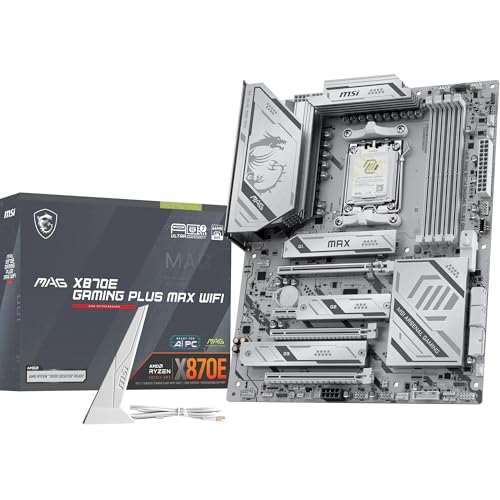
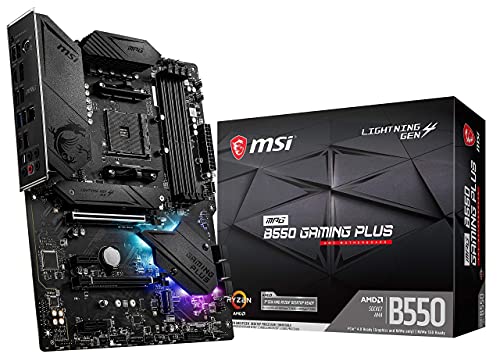
In practical Motherboard Reviews, VRM heatsinks are only one part of the power-delivery system. Their usefulness depends on the CPU, workload, power-stage design, heatsink contact, case airflow, and planned upgrade path. A large heatsink is not automatically better, but an uncovered or poorly cooled VRM can become a limitation in demanding systems.
What Is Do Vrm Heatsinks Matter?
VRM heatsinks are metal cooling components mounted over or beside a motherboard’s Voltage Regulator Module, or VRM. The VRM converts power from the power supply into the lower, tightly controlled voltage required by the CPU. Because power conversion is not perfectly efficient, some electrical energy becomes heat. The heatsink helps move that heat away from the power stages and into the surrounding case airflow.
The phrase “do VRM heatsinks matter?” is therefore mainly a question about sustained CPU power delivery. A heatsink does not add CPU cores, increase memory capacity, improve GPU rendering, or directly raise clock speed. It can give the motherboard more thermal headroom so the power-delivery circuit continues operating within its intended limits.
Why Do Vrm Heatsinks Matter Matters
VRM heatsinks matter because the motherboard must regulate significant electrical current before it reaches the CPU. The heat generated depends on CPU power, current, conversion efficiency, switching behavior, power-stage capability, thermal-pad contact, heatsink design, and airflow. As the power stages become hotter, the motherboard may reduce power or alter operation to protect the components.
Gaming workloads
For a typical gaming PC using a moderate CPU at default settings, adequate factory VRM cooling is usually sufficient. Many games place more consistent demand on the GPU than on every CPU core, so a larger VRM heatsink normally does not produce a direct frame-rate improvement. The graphics card, game engine, CPU performance, and memory configuration are usually more important to gaming performance.
VRM cooling becomes more important when a game consistently loads many CPU cores, the processor operates with high power limits, the system uses manual overclocking, or the case has limited ventilation. In those situations, effective cooling can help prevent the VRM from becoming the component that restricts sustained CPU behavior.
Productivity and sustained workloads
Long-running workloads are the clearest reason to care about VRM heatsinks. CPU rendering, code compilation, video encoding, simulation, virtualization, and other all-core tasks can keep current flowing through the VRM for extended periods. A well-contacted heatsink with access to moving air helps dissipate this heat and preserves thermal headroom during sustained operation.
Performance and reliability
VRM heatsinks do not guarantee higher performance, but they can help the motherboard deliver the power that the CPU is configured to use. If the power stages become thermally constrained, the board may reduce CPU power or operating behavior. The visible result could be lower sustained performance, instability, system shutdowns, or no noticeable effect at all, depending on the motherboard’s protections and workload.
Compatibility and upgrade decisions
A VRM heatsink does not make an incompatible motherboard compatible with a CPU. Socket support, firmware support, memory compatibility, manufacturer processor lists, and platform power limits still determine compatibility. However, VRM design affects whether a motherboard is a sensible match for a processor, particularly when upgrading from a lower-power CPU to a high-core-count model.
A board may support a CPU electrically and through firmware while offering limited thermal headroom under sustained loads. For a broader look at power stages, cooling, and motherboard selection, see the VRM motherboard comparison guide.
How Do Vrm Heatsinks Matter Works
A VRM heatsink uses passive heat transfer. It does not produce cooling on its own. Instead, it provides a conductive path from hot power-delivery components to a larger metal surface, where heat can spread and then transfer into moving air.
1. The VRM converts and regulates power
The power supply delivers voltage that is not suitable for direct CPU use. The motherboard’s VRM uses switching power stages, inductors, capacitors, and control circuitry to convert that input into a lower CPU voltage. This output must also respond quickly when the CPU changes from a light task to a heavy workload.
2. Power stages generate heat
Every power conversion process loses some energy as heat. Higher CPU current generally increases the thermal load, although the exact amount depends on the efficiency and operating conditions of the power stages. This is why the same motherboard can remain cool with one CPU and run warmer with another processor under the same workload.
3. The thermal pad transfers heat
A thermal pad sits between the VRM components and the heatsink. It fills small gaps caused by uneven surfaces and transfers heat into the metal. Correct pad thickness matters: a pad that is too thin may not contact the component, while one that is too thick can prevent proper heatsink mounting or create excessive pressure.
4. The heatsink releases heat into case airflow
Once heat reaches the heatsink, the heatsink must release it into the surrounding air. Fins, surface area, material, contact quality, and airflow all influence this step. A modest heatsink positioned in the path of a rear exhaust or CPU-cooler airflow can be more effective than a larger heatsink in a stagnant area.
Case temperature also matters. If the air around the motherboard is already warm, the heatsink has less opportunity to transfer additional heat. Front intake fans, rear or top exhaust fans, CPU cooler orientation, cable management, and graphics-card heat can therefore affect VRM temperature even when the heatsink itself has not changed.
What to Look For When Buying
When selecting a motherboard, evaluate VRM cooling as part of the complete power-delivery design. Do not choose only by heatsink appearance, advertised phase count, or decorative armor. The right choice depends on the CPU and the way the system will be used.
- Match the board to the CPU: Check the processor’s power class, supported socket, firmware requirements, and whether it will run at default settings, with expanded power limits, or with manual overclocking.
- Inspect heatsink coverage: The heatsink should contact the relevant power stages rather than merely covering an area for visual effect. Some boards also cool part of the VRM with a second heatsink near the rear I/O section.
- Consider airflow: A compact case, restricted front panel, top-mounted radiator, or large graphics card can reduce airflow around the VRM. Plan an intake and exhaust path that moves air across the motherboard.
- Look beyond phase count: Phase count is useful context, but it does not independently prove power-delivery quality. Power-stage ratings, efficiency, controller behavior, layout, heatsink contact, and independent documentation matter too.
- Plan the upgrade path: If a future CPU upgrade is likely, select a board with suitable power delivery and cooling now. A heatsink cannot compensate for power stages that are not appropriate for the intended processor.
- Verify replacement compatibility: For a damaged heatsink, confirm the exact motherboard or desktop model, mounting holes, thermal-pad thickness, component height, and clearance around the CPU socket, memory slots, and graphics card.
- Separate specifications from evidence: Manufacturer specifications describe design features, not guaranteed results in every case. PCGearWiki’s product evaluation methodology explains why practical suitability should be assessed separately from marketing claims.
Common Mistakes to Avoid
- Assuming a larger heatsink is always better: Size helps only when the heatsink has good contact and receives adequate airflow. Power-stage quality and efficiency are equally important.
- Expecting more gaming FPS: VRM heatsinks do not directly increase frame rates. They help prevent power-delivery temperatures from becoming a limit in workloads that stress the CPU for long periods.
- Judging the board by phase count alone: Phase numbers can be presented differently by manufacturers and do not describe every electrical or thermal characteristic of the VRM.
- Removing a factory heatsink unnecessarily: A motherboard may operate without dedicated VRM cooling under light loads, but removing the heatsink reduces thermal headroom and can create contact or mounting problems.
- Using a generic adhesive heatsink as a universal replacement: Small stick-on heatsinks may not contact the correct components, may have insufficient thermal capacity, or may interfere with nearby conductive parts.
- Ignoring case airflow: Even a substantial heatsink can become heat-soaked when the case has stagnant or already-warm air around the motherboard.
Quick Comparison
The importance of VRM heatsinks changes with the CPU, workload, and system design. This comparison provides a practical starting point rather than a universal performance guarantee.
| System situation | How much VRM cooling matters | Main reason | Practical priority |
|---|---|---|---|
| Office PC with a moderate CPU | Usually modest cooling is enough | Lower sustained CPU power demand | Low to medium |
| Gaming PC with a high-power CPU | More relevant under sustained CPU load | Higher current and heat production | Medium to high |
| Rendering, compiling, encoding, or virtualization | Important | Long all-core workloads expose thermal limits | High |
| Manual CPU overclocking | Very important | Higher voltage and power increase VRM stress | High |
| Compact or poorly ventilated case | More important than heatsink size alone suggests | Restricted airflow raises surrounding temperatures | Medium to high |
| Replacement for a proprietary desktop | Important, with fit as the first concern | Model-specific mounting and clearance control compatibility | High |
Related Guides
For compact systems, the ITX motherboard buying guide explains why limited space makes clearance and airflow more important. The HTPC motherboard compatibility guide is also useful for lower-power and space-constrained builds. If you are comparing platform features alongside power delivery, browse the current Motherboard Reviews category.
Why You Should Trust PCGearWiki
PCGearWiki treats PC hardware questions as practical decisions rather than specification contests. The educational approach is to define the component, explain its mechanism, identify the real bottlenecks, and connect the technical details to the reader’s workload and upgrade plans.
For VRM heatsinks, that means separating heatsink size from complete VRM quality, distinguishing manufacturer specifications from measured evidence, and considering CPU power, airflow, mounting, compatibility, and long-term use together. This produces recommendations that are more useful than assuming that more metal or a higher advertised phase count is automatically better.
Final Thoughts
VRM heatsinks matter most when the motherboard must deliver substantial CPU power for sustained workloads, when the system has restricted airflow, or when the CPU is overclocked. They matter less for a moderate office or gaming system that runs within default limits and has reasonable case ventilation.
The specific bottom line is simple: choose a motherboard whose complete VRM design matches the CPU and workload, then verify that the heatsink has proper contact and airflow. Do not pay for heatsink size alone, and do not treat a generic replacement as compatible without checking the exact board, mounting method, thermal interface, and surrounding clearance.
Frequently Asked Questions
Can a CPU run without VRM heatsinks?
Some motherboards can operate without dedicated VRM heatsinks under light or moderate loads, but removing the heatsink reduces thermal headroom. Sustained CPU power can make the MOSFETs and power stages significantly hotter, potentially contributing to reduced power limits or instability. Do not remove a factory heatsink unless the manufacturer provides a specific service procedure.
Do VRM heatsinks improve gaming FPS?
VRM heatsinks do not directly increase frames per second. They can help the motherboard maintain normal CPU power behavior if the VRM would otherwise become thermally limited. If the existing VRM cooling is already adequate, installing a larger heatsink usually does not create a separate gaming performance benefit.
Are VRM heatsinks necessary for overclocking?
Effective VRM cooling is strongly recommended for serious CPU overclocking because higher voltage and power increase heat in the power-delivery circuit. A heatsink alone is not sufficient, however. The motherboard also needs suitable power stages, firmware support, appropriate CPU settings, and airflow across the VRM area.
Can I use a generic heatsink on a motherboard VRM?
Only if its dimensions, thermal interface, mounting method, and clearance match the specific motherboard. Small adhesive heatsinks may work for exposed components designed for that type of installation, but they are not automatic replacements for a factory VRM heatsink. Confirm contact with the intended power stages and keep the part away from sockets, capacitors, memory, and other conductive components.
What matters more: VRM heatsink size or phase count?
Neither specification is sufficient on its own. Heatsink contact area and airflow affect temperature, while power-stage capability, efficiency, layout, and controller behavior affect how the VRM delivers power. For a demanding CPU, evaluate the complete design and credible evidence instead of selecting a motherboard solely by heatsink appearance or advertised phase count.
Technical Sources
Use these primary technical references alongside the practical guidance above. Product-specific limits can vary by model and firmware.
Add PCGearWiki as a preferred source on Google
Sources and Verification
Research basis: Product identity, dimensions, interfaces, supported features, and warranty terms are checked against available manufacturer documentation and current retailer listings. Price, stock, and aggregate customer ratings can change after publication.
Testing disclosure: Unless this article explicitly states that PCGearWiki performed hands-on testing and describes the test setup, recommendations are research-based editorial evaluations rather than PCGearWiki laboratory measurements. Customer feedback is used to identify recurring ownership patterns, not as proof of technical performance.
Last source review: September 22, 2026. See our Review Methodology, Editorial Policy, and Corrections Policy.






Write Your Review
No reviews yet. Be the first to share your experience!