

Last updated: September 22, 2026
A strong voltage regulator module, or VRM, matters because it controls how cleanly and consistently power reaches your CPU. In a VRM motherboard comparison, the goal is not simply to count power phases; it is to understand socket compatibility, power-stage quality, heatsink design, BIOS support, memory support, PCIe lanes, storage expansion, and how those choices affect gaming PCs, creator workstations, and enthusiast builds in July 2026.

This guide focuses on eligible motherboard models from the supplied product data, including AM5 boards for AMD Ryzen 9000, 8000, and 7000 series processors and an LGA 1700 option for Intel 14th, 13th, and 12th Gen Core CPUs. If you want a broader background on VRM classing before choosing a board, see our motherboard VRM tier list.
We evaluated each board using available manufacturer specifications, including VRM phase design, rated power stages where provided, cooling hardware, socket support, memory support, PCIe generation, M.2 slot configuration, USB support, networking, form factor, and warranty information when supplied. No hands-on thermal testing or benchmark measurements were provided, so this article treats advertised ratings and bandwidth figures as specifications rather than measured real-world performance.

Pros
- Robust 12+2+2 phase digital VRM for stable power delivery
- PCIe 5.0 M.2 slot enables next-generation SSD speeds
- Built-in AMD WiFi 6E for low-latency wireless connectivity
- DDR5 with EXPO and XMP support simplifies memory optimization
- USB 3.2 Gen2x2 Type-C and comprehensive rear I/O for modern peripherals
Cons
- Realtek GbE LAN lacks multi-gigabit speeds found on some rivals
- B650 chipset prioritizes value over extreme overclocking features of higher-end boards
- Limited independent long-term reliability data available for this specific model
Socket: AMD AM5 (LGA 1718) for Ryzen 9000/8000/7000 series processors.
Form Factor: ATX. Memory: 4x DDR5 DIMMs with AMD EXPO and Intel XMP support.
Storage: 1x PCIe 5.0 M.2 plus 2x PCIe 4.0 M.2 slots with M.2 Thermal Guard.
Power Design: 12+2+2 phases digital VRM with advanced thermal design.
Networking: AMD Wi-Fi 6E and Realtek Gigabit Ethernet LAN.
Connectivity: USB 3.2 Gen2x2 Type-C, Smart Fan 6, and Q-Flash BIOS utility.
| Processor Socket | Socket AM5 |
|---|---|
| Compatible Devices | Personal Computer |
| RAM Memory Technology | DDR5 |
| Compatible Processors | AMD Ryzen 7000 Series, AMD Ryzen 8000 Series, AMD Ryzen 9000 Series |
| Chipset Type | AMD B650 |
| Memory Clock Speed | 5200 MHz |
| Platform | Windows 11 |
| CPU Model | Others |
| Memory Storage Capacity | 128 GB |
| Ram Memory Maximum Size | 128 GB |
Best suited to shoppers comparing motherboards products who specifically need full support for AMD Ryzen 9000, 8000, and 7000 series processors on the AM5 socket for long-term upgrade paths, Four DDR5 DIMM slots with….
Before buying, compare the exact model’s compatibility, dimensions, core specifications, warranty, recurring owner feedback, and current price against other motherboards options. Retailer availability and pricing can change after publication.

Pros
- Strong power system supports overclocking on latest AMD processors
- Comprehensive high-speed I/O including 5G LAN and USB 20G Type-C
- Flexible storage expansion with four M.2 connectors and easy-install clips
- Integrated cooling solutions reduce thermal throttling risks
Cons
- New chipset may need BIOS update for full Ryzen 9000 compatibility
- ATX form factor requires a full-size case for installation
- Premium features increase overall build cost
| Processor Socket | Socket AM5 |
|---|---|
| Compatible Devices | Personal Computer |
| RAM Memory Technology | DDR5 |
| Compatible Processors | Supports AMD Ryzen 9000/7000 Series Desktop Processor |
| Chipset Type | B850 |
| Memory Clock Speed | 8400.0 |
| Platform | Windows 11 |
| CPU Model | Ryzen 7 |
| Memory Storage Capacity | 256 GB |
| Main Power Connector Type | 4+4-pin |
Best suited to shoppers comparing motherboards products who specifically need ensures stable high-performance operation for demanding Ryzen 9000 CPUs with an efficient 80A VRM design, Accelerates graphics and storage with PCIe 5.0 x16 and….
Before buying, compare the exact model’s compatibility, dimensions, core specifications, warranty, recurring owner feedback, and current price against other motherboards options. Retailer availability and pricing can change after publication.

Pros
- Premium thermal design supports sustained high loads
- Support for latest AMD Ryzen processors and DDR5 memory
- Wi-Fi 7 provides cutting-edge wireless speeds
- EZ PCIe mechanism eases hardware changes
Cons
- AM5 socket restricts use to recent AMD processors only
- Advanced features may complicate setup for beginners
- Requires compatible high-end components for full potential
| Processor Socket | Socket AM5 |
|---|---|
| Compatible Devices | Personal Computer |
| RAM Memory Technology | DDR5 |
| Compatible Processors | AMD Ryzen 9000/8000/7000 Series Processors |
| Chipset Type | AMD X870 |
| Memory Clock Speed | 7800 MHz |
| Platform | Windows 11 |
| CPU Model | Ryzen 9 |
| Memory Storage Capacity | 256 GB |
| Ram Memory Maximum Size | 256 GB |
Best suited to shoppers comparing motherboards products who specifically need unlock faster gaming with PCIe 5.0 delivering up to 128GB/s bandwidth for rapid data handling, Maintain peak performance through advanced cooling with heat-pipe heatsinks….
Before buying, compare the exact model’s compatibility, dimensions, core specifications, warranty, recurring owner feedback, and current price against other motherboards options. Retailer availability and pricing can change after publication.

Pros
- Strong power delivery designed for current and future Ryzen AM5 processors
- Two PCIe 5.0 M.2 slots and four total M.2 connectors provide excellent storage flexibility
- Includes modern Wi-Fi 7, Bluetooth 5.4, and 5Gbps Ethernet connectivity
- High DDR5 overclocking support and a reinforced PCIe 5.0 graphics slot suit enthusiast builds
Cons
- Advanced features such as Wi-Fi 7, PCIe 5.0 storage, and high-speed DDR5 may increase total system cost
- AM5 compatibility means it is not suitable for Intel processors or older AMD socket platforms
- Achieving the advertised memory speeds depends on compatible DIMMs, processor capability, and BIOS configuration
| Color | Grey |
|---|---|
| Dimensions | 11.99999998776 x 9.6062992028 x 2.6377952729 inches |
| Weight | 4.94 pounds |
| Product Group | Personal Computer |
| Binding | Personal Computers |
Best suited to shoppers comparing motherboards products who specifically need built to support AMD Ryzen 9000, 8000, and 7000 processors with a robust 14-phase 80A SPS VRM design for stable high-performance operation, Supports DDR5….
Before buying, compare the exact model’s compatibility, dimensions, core specifications, warranty, recurring owner feedback, and current price against other motherboards options. Retailer availability and pricing can change after publication.

Pros
- Strong power phases support stable overclocking on high-end Ryzen CPUs
- WiFi 7 and 2.5GbE provide excellent modern networking options
- PCIe 5.0 and multiple M.2 slots enable high-bandwidth expansions
- Thermal armor design effectively manages heat on VRM and storage
- User-friendly EZ-Latch features speed up assembly and upgrades
Cons
- B850 chipset omits some advanced overclocking tools found on X870 boards
- Only four DIMM slots limit maximum memory capacity options
- Requires discrete GPU as no integrated graphics outputs are included
| Processor Socket | Socket AM5 |
|---|---|
| Compatible Devices | Personal Computer |
| RAM Memory Technology | DDR5 |
| Compatible Processors | AMD Ryzen 7000 Series, AMD Ryzen 8000 Series, AMD Ryzen 9000 Series |
| Chipset Type | AMD B850 |
| Memory Clock Speed | 5200 MHz |
| Platform | Windows 11 |
| CPU Model | Others |
| Memory Storage Capacity | 128 GB |
| Ram Memory Maximum Size | 256 GB |
Best suited to shoppers comparing motherboards products who specifically need unlock peak Ryzen performance with a robust 14+2+2 VRM design that handles overclocking reliably., Achieve faster system response using DDR5 memory support up to….
Before buying, compare the exact model’s compatibility, dimensions, core specifications, warranty, recurring owner feedback, and current price against other motherboards options. Retailer availability and pricing can change after publication.

Pros
- Strong platform for Threadripper PRO 7000 workstation builds
- Fast and versatile connectivity with USB4, PCIe 5.0, Wi-Fi 7, and dual-speed wired LAN
- Robust digital VRM design suited to sustained high-load operation
- Thermal protection and EZ-Latch features simplify installation and component maintenance
Cons
- Requires an AMD sTR5 processor and compatible DDR5 R-DIMM memory, limiting component compatibility
- The E-ATX form factor requires a spacious, compatible PC case
- Its workstation-focused feature set may be excessive for standard gaming or everyday desktop builds
| Color | black |
|---|---|
| Size | 12" x 10.4" |
| Dimensions | 3.1 x 13.6 x 11.6 Inches |
| Weight | 3.99918543268 Pounds |
| Product Group | Personal Computer |
| Binding | Personal Computers |
Best suited to shoppers comparing motherboards products who specifically need built for AMD Ryzen Threadripper PRO 7000 Series processors, providing a high-performance foundation for demanding workstation workloads., The 16+8+4-phase digital VRM design delivers stable….
Before buying, compare the exact model’s compatibility, dimensions, core specifications, warranty, recurring owner feedback, and current price against other motherboards options. Retailer availability and pricing can change after publication.

Pros
- Robust power delivery and cooling ready for the latest high-TDP Ryzen CPUs
- Future-proof connectivity with Wi-Fi 7, 5G Ethernet, and USB4
- Excellent memory overclocking headroom on dual-channel DDR5
- Gen5 M.2 support and premium thermal solutions for storage
- Compact Mini-ITX design packed with enthusiast-grade features
Cons
- Only two DIMM slots restrict total memory capacity versus larger ATX boards
- Limited expansion options inherent to the Mini-ITX form factor
- Dense layout can make cable management and airflow planning more challenging in small cases
Form Factor: Mini-ITX. Socket: AM5 supporting AMD Ryzen 9000, 8000, and 7000 series processors. Chipset: AMD X870.
Power Design: 8 Duet Rail Power System with 110A SPS VRM and Core Boost architecture for high-performance CPU support.
Memory: 2 x DDR5 DIMM SMT slots, dual-channel, overclocking support up to 10000+ MT/s (1DPC 1R). Graphics: 1 x PCIe 5.0 x16 SMT slot with Steel Armor (up to 128 GB/s).
Storage: 1 x M.2 Gen5 x4 (128 Gbps) plus 2 x M.2 Gen4 x4 (64 Gbps, one via XPANDER card), all with Shield Frozr cooling options. Networking: Wi-Fi 7, Bluetooth 5.4, Realtek 5G LAN.
Rear I/O highlights: USB4 Type-C 40 Gbps with 4K@60 Hz display output, Audio Boost 5 with 7.1 channel support and S/PDIF. Cooling extras: extended heatsink with heat-pipe, 7W/mK MOSFET pads, Combo-fan header (3A), and EZ M.2 Shield Frozr II. PCB: durable 12-layer server-grade design.
Choose this board if you are building a high-performance Mini-ITX or small form factor PC and want the latest AMD AM5 platform features without moving to a larger case. It pairs especially well with Ryzen 9000 series CPUs, fast DDR5 kits, PCIe 5.0 GPUs, and Gen5 NVMe drives.
Plan your cooling carefully. Although the board includes strong passive cooling, small cases often need good case airflow and a capable CPU cooler that fits ITX clearances. Use high-quality thermal paste and ensure the M.2 shields are installed for long-term SSD health.
Memory configuration is limited to two slots, so select a dual-rank or high-capacity kit that matches your target speed from the start. For networking, the onboard Wi-Fi 7 and 5G LAN reduce the need for extra adapters, which is helpful in tight builds. If you need more expansion cards or four DIMMs, consider an ATX or mATX alternative instead.
| Processor Socket | Socket AM5 |
|---|---|
| Compatible Devices | Personal Computer |
| RAM Memory Technology | DDR5 |
| Compatible Processors | Supports AMD Ryzen 9000/ 8000/ 7000 Series Desktop Processors |
| Chipset Type | AMD X870 |
| Memory Clock Speed | 8400 MHz |
| Platform | Windows 11 |
| Memory Storage Capacity | 128 GB |
| Ram Memory Maximum Size | 128 GB |
| Main Power Connector Type | 24-Pin |
Best suited to shoppers comparing motherboards products who specifically need 110A SPS Duet Rail VRM delivers stable high-current power for demanding Ryzen 9000 overclocks and multi-core workloads, DDR5 memory boost supports extreme speeds up….
Before buying, compare the exact model’s compatibility, dimensions, core specifications, warranty, recurring owner feedback, and current price against other motherboards options. Retailer availability and pricing can change after publication.

Pros
- Robust power design with DrMOS and Digi+ VRM supports demanding Intel CPUs stably
- Strong cooling package with multiple heatsinks and hybrid fan headers
- Versatile high-speed connectivity including PCIe 5.0, multiple Type-C ports, and Thunderbolt 4 header
- Solid networking stack with WiFi 6, 2.5Gb Ethernet, and TUF LANGuard protection
- Ready out of the box for 12th, 13th, and 14th Gen Intel processors plus Windows 11
Cons
- M.2 slots focus on PCIe 4.0 speeds rather than full PCIe 5.0 for storage
- Full ATX form factor will not fit compact mini-ITX or smaller cases
- Onboard WiFi 6 trails the newest WiFi 6E or WiFi 7 options in crowded wireless environments
Socket and CPU support: Intel LGA 1700 for 12th, 13th, and 14th Gen Core processors with out-of-box Windows 11 readiness.
Power and board design: 16+1 DrMOS stages, Digi+ VRM, ProCool sockets, alloy chokes, durable capacitors, and a six-layer PCB for thermal headroom.
Memory and storage: DDR5 with AEMP II overclocking profiles plus four M.2 slots supporting NVMe RAID and heatsinks.
Expansion and I/O: PCIe 5.0 graphics slot, USB 3.2 Gen 2x2 Type-C, front USB 3.2 Gen 2 Type-C header, and Thunderbolt 4 (USB4) header support.
Networking and extras: WiFi 6, Intel 2.5Gb LAN with TUF LANGuard, hybrid fan headers, Fan Xpert 4, and Aura Sync RGB lighting.
| Processor Socket | LGA 1700 |
|---|---|
| Compatible Devices | Personal Computer |
| RAM Memory Technology | DDR5 |
| Compatible Processors | 14th, 13th, 12th Gen |
| Chipset Type | Intel Z790 |
| Memory Clock Speed | 7200 MHz |
| Platform | Windows |
| CPU Model | Core i9 |
| Memory Storage Capacity | 192 GB |
| Ram Memory Maximum Size | 256 GB |
Best suited to shoppers comparing motherboards products who specifically need stable 16+1 DrMOS power stages deliver clean voltage for reliable overclocking and long gaming sessions, PCIe 5.0 and DDR5 support unlock next-gen GPU bandwidth….
Before buying, compare the exact model’s compatibility, dimensions, core specifications, warranty, recurring owner feedback, and current price against other motherboards options. Retailer availability and pricing can change after publication.

Pros
- Powerful 14+2 teamed power delivery with 90-amp stages
- Excellent networking with WiFi 6E and dual 2.5Gb LAN
- Four M.2 slots with integrated heatsinks
- Strong cooling design and extensive enthusiast-focused controls
- Broad connectivity including onboard Thunderbolt 4
Cons
- Compatible only with Intel LGA 1200 processors and DDR4 memory
- Its extensive feature set may be more than needed for basic gaming builds
- ATX form factor and large heatsinks require a compatible case with sufficient clearance
| Color | ROG; ROG gaming;Asus ROG motherboard;ROG Z590 |
|---|---|
| Dimensions | 14.57 x 12.28 x 4.25 Inches |
| Weight | 6.5 pounds |
| Product Group | Personal Computer |
| Binding | Personal Computers |
Best suited to shoppers comparing motherboards products who specifically need built for demanding Intel 10th and 11th Gen systems with a robust 14+2 power-stage design that supports stable performance under heavy workloads., AI overclocking….
Before buying, compare the exact model’s compatibility, dimensions, core specifications, warranty, recurring owner feedback, and current price against other motherboards options. Retailer availability and pricing can change after publication.

Pros
- Strong power delivery supports heavy overclocking demands
- Extensive high-speed ports including USB4 and 5G Ethernet enhance connectivity
- Innovative DIY features reduce build time and frustration
- Comprehensive thermal design protects high-performance components
Cons
- Advanced features require technical knowledge to fully optimize
- Platform limited to AM5 processors only
- Size and cooling elements may demand larger PC cases
| Processor Socket | Socket AM5 |
|---|---|
| Compatible Devices | Personal Computer |
| Compatible Processors | AMD Ryzen™ 9000 & 8000 & 7000 Series |
| Chipset Type | AMD X870 |
| Memory Clock Speed | 320 MHz |
| Platform | Windows 10, Windows 11 |
| CPU Model | Others |
| Memory Storage Capacity | 192 GB |
| Ram Memory Maximum Size | 192 GB |
| Main Power Connector Type | 24-Pin |
Best suited to shoppers comparing motherboards products who specifically need unlock peak CPU performance with AI Overclocking and Dynamic OC Switcher tools, Deliver stable power to multi-core processors via robust 110A-rated stages.
Before buying, compare the exact model’s compatibility, dimensions, core specifications, warranty, recurring owner feedback, and current price against other motherboards options. Retailer availability and pricing can change after publication.
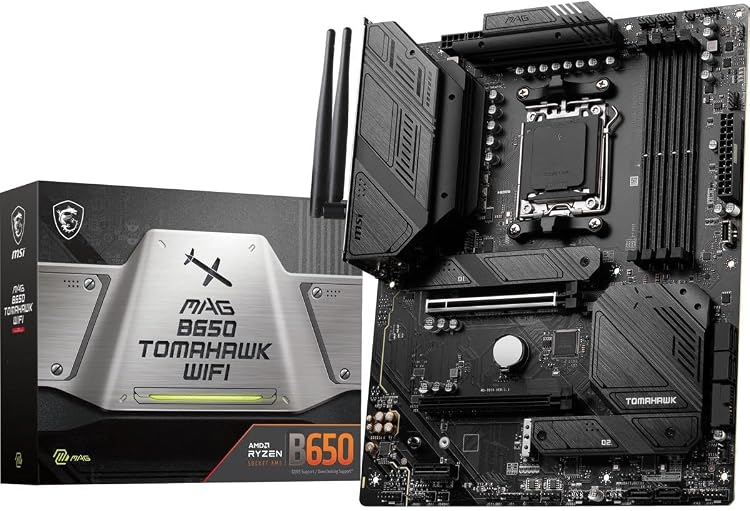
Pros
- Strong AM5 platform compatibility for current AMD Ryzen builds
- Fast DDR5 and PCIe 4.0 storage support
- Built-in Wi-Fi 6E, Bluetooth 5.3, and 2.5Gb LAN
- Robust cooling features for the chipset and M.2 SSD area
- Good feature balance for gaming and mainstream enthusiast PCs
Cons
- Does not offer PCIe 5.0 graphics or the full feature set of higher-end X670/X870 boards
- DDR5 overclocking results can vary depending on CPU, memory kit, and BIOS configuration
- ATX size may not fit compact PC cases
Platform: AMD AM5 socket motherboard for Ryzen 7000, 8000, and 9000 series processors.
Memory: DDR5 support with speeds up to 6400+ MHz when overclocked, depending on installed components and configuration.
Storage and Expansion: PCIe Gen 4 M.2 support for high-speed NVMe SSDs, plus SATA 6Gb/s support for additional storage drives.
Connectivity: Intel Wi-Fi 6E, Bluetooth 5.3, 2.5Gbps LAN, USB 3.2 Gen 2, HDMI, and DisplayPort support.
| Brand | msi |
|---|---|
| CPU Socket | Socket AM5 |
| Compatible Devices | Personal Computer |
| RAM Memory Technology | DDR5 |
| Compatible Processors | AMD Ryzen 8000/ 7000 |
| Chipset Type | AMD B650 |
| Memory Clock Speed | 7600 MHz |
| Platform | Windows 11 |
| Model Name | MAG |
| CPU Model | AMD Ryzen 7 |
Best suited to shoppers comparing motherboards products who specifically need aM5 socket support gives builders a modern platform for AMD Ryzen 7000, 8000, and 9000 series processors, DDR5 memory support up to 6400+ MHz….
Before buying, compare the exact model’s compatibility, dimensions, core specifications, warranty, recurring owner feedback, and current price against other motherboards options. Retailer availability and pricing can change after publication.

Pros
- Broad compatibility with Ryzen 3000, 4000, and 5000 series processors
- Dual M.2 slots and PCIe 4.0 support add useful storage and expansion flexibility
- Micro-ATX design fits compact and mainstream PC cases
- Four DDR4 memory slots support future RAM expansion
- Q-Flash simplifies BIOS updates without requiring a full operating system setup
Cons
- The entry-level 3+3 power phase design may be less suitable for heavily overclocked or high-end processors
- Micro-ATX form factor provides fewer expansion slots than larger ATX motherboards
- The feature set is focused on essentials and may not satisfy users seeking premium audio, wireless networking, or extensive rear I/O
| Size | mATX |
|---|---|
| Dimensions | 10.43 x 10.43 x 2.12 inches |
| Weight | 1.6755131912 pounds |
| Product Group | Personal Computer |
| Binding | Personal Computers |
Best suited to shoppers comparing motherboards products who specifically need supports AMD Ryzen 5000, 4000, and 3000 series processors for flexible AM4 system upgrades, Dual M.2 slots provide convenient support for fast NVMe storage….
Before buying, compare the exact model’s compatibility, dimensions, core specifications, warranty, recurring owner feedback, and current price against other motherboards options. Retailer availability and pricing can change after publication.

Pros
- Strong build quality with military-inspired durability elements
- Comprehensive high-speed connectivity including USB 4 and PCIe 5.0
- Effective thermal design for sustained high-end performance
- Versatile support for multiple Ryzen generations
Cons
- ATX form factor may not fit smaller cases
- Advanced features could exceed needs for basic users
- Requires compatible DDR5 memory for full functionality
| Processor Socket | Socket AM5 |
|---|---|
| Compatible Devices | Personal Computer |
| RAM Memory Technology | DDR5 |
| Compatible Processors | AMD Ryzen 9000/8000/7000 Series Processors |
| Chipset Type | AMD X870 |
| Memory Clock Speed | 7800 MHz |
| Platform | Windows 11 |
| CPU Model | AMD Ryzen 7 |
| Memory Storage Capacity | 128 GB |
| Ram Memory Maximum Size | 256 GB |
Best suited to shoppers comparing motherboards products who specifically need delivers lightning 40Gbps USB transfers for rapid file moves and device connections, Maintains peak processor speeds via extended heatsink cooling during intense sessions.
Before buying, compare the exact model’s compatibility, dimensions, core specifications, warranty, recurring owner feedback, and current price against other motherboards options. Retailer availability and pricing can change after publication.

Pros
- Strong 16+2+2 VRM with 80A stages handles high-power Ryzen CPUs reliably
- Extensive connectivity including dual USB4, WiFi 7, and 2.5GbE LAN
- Four M.2 slots with PCIe 5.0 and dedicated thermal guards
- EZ-Latch features speed up GPU and drive installation
- Five-year warranty backs long-term ownership
Cons
- High-end feature set may exceed needs of casual or budget-focused builders
- ATX form factor requires a mid-tower or larger case with good airflow
- WiFi 7 benefits require compatible routers and client devices to fully utilize
Socket: AMD AM5 (LGA 1718) supporting Ryzen 9000, 8000, and 7000 series CPUs.
Memory: 4x DDR5 DIMM slots with AMD EXPO support for high-speed kits.
Expansion and Storage: PCIe 5.0 support, 4x M.2 slots with thermal guards, multiple PCIe slots for GPUs and cards.
Connectivity: Dual USB4, front and rear USB-C, WiFi 7, 2.5GbE LAN, Sensor Panel Link.
Power and Cooling: 16+2+2 phase design with 80A Smart Power Stages, VRM thermal protection. Form factor: ATX. Warranty: 5 years.
Choose this board if you are building or upgrading an AMD AM5 system around a Ryzen 7000, 8000, or 9000 CPU and want strong VRM headroom plus modern I/O. It pairs especially well with high-core processors, multiple NVMe drives, and USB4 docks or external GPUs.
Ensure your case supports ATX motherboards and offers good airflow for the VRM and M.2 areas. Pair with DDR5 kits that support AMD EXPO for easy memory tuning. For networking, a WiFi 7 router unlocks the full wireless potential, though the 2.5GbE port remains excellent for wired setups.
Skip it if you only need basic connectivity or are on a tight budget; a mid-range B-series board may suffice. Otherwise this model delivers the power design, storage options, and warranty that serious builders value.
| Brand | GIGABYTE |
|---|---|
| CPU Socket | Socket AM5 |
| Compatible Devices | Personal Computer |
| RAM Memory Technology | DDR5 |
| Compatible Processors | AMD Ryzen 7000 series, AMD Ryzen 8000 series, AMD Ryzen 9000 series |
| Chipset Type | AMD X870E |
| Memory Clock Speed | 5600 MHz |
| Platform | Windows 10, Windows 11 |
| Model Name | X870E AORUS PRO ICE |
| CPU Model | Ryzen 7 |
Best suited to shoppers comparing motherboards products who specifically need full AMD Ryzen 9000, 8000, and 7000 support on Socket AM5 for long-term platform upgrades, 16+2+2 80A Smart Power Stage design delivers stable power….
Before buying, compare the exact model’s compatibility, dimensions, core specifications, warranty, recurring owner feedback, and current price against other motherboards options. Retailer availability and pricing can change after publication.

Pros
- Robust 16+2+2 VRM design supports demanding Ryzen 9000-series CPUs
- Excellent modern I/O with Wi-Fi 7, 2.5GbE, and dual USB4
- Four M.2 slots and PCIe 5.0 x16 provide strong future-proof storage and GPU bandwidth
- EZ-Latch tools make building and upgrading noticeably easier
- 5-year warranty adds long-term ownership confidence
Cons
- Full ATX size limits use in compact or ITX cases
- Elite-tier board omits some premium aesthetics and extras found on higher AORUS models
- Requires quality DDR5 RAM and a capable cooler to reach peak performance
Socket: AMD AM5 (LGA 1718) for Ryzen 9000, 8000, and 7000 series.
Form Factor: ATX with DIY-friendly EZ-Latch features.
Memory: 4x DDR5 DIMMs with AMD EXPO support, performance up to 8200MT/s.
Power Design: 16+2+2 Twin Digital VRM on 6-layer mid-loss 2X copper PCB.
Expansion and Storage: 1x PCIe 5.0 x16, 4x M.2 slots with PCIe 5.0 capability and M.2 Thermal Guard.
Networking: Wi-Fi 7 and 2.5GbE LAN for high bandwidth and low latency.
USB and Connectivity: Dual USB4 Type-C (up to 40Gbps each), front and rear USB-C, 8 total USB ports, Sensor Panel Link.
Cooling and Warranty: VRM Thermal Armor plus M.2 Thermal Guard, backed by a 5-year warranty.
| Processor Socket | Socket AM5 |
|---|---|
| Compatible Devices | Personal Computer |
| RAM Memory Technology | DDR5 |
| Compatible Processors | AMD Ryzen 7000 series, AMD Ryzen 8000 series, AMD Ryzen 9000 series |
| Chipset Type | AMD X870 |
| Memory Clock Speed | 8200 MHz |
| Platform | Windows 11 |
| CPU Model | Ryzen 7 |
| Memory Storage Capacity | 192 GB |
| Ram Memory Maximum Size | 256 GB |
Best suited to shoppers comparing motherboards products who specifically need stable high-power delivery from 16+2+2 twin digital VRM and 6-layer 2X copper PCB for confident Ryzen overclocking, Next-gen Wi-Fi 7 plus 2.5GbE LAN for….
Before buying, compare the exact model’s compatibility, dimensions, core specifications, warranty, recurring owner feedback, and current price against other motherboards options. Retailer availability and pricing can change after publication.
How to Choose the Right VRM Motherboard Comparison
VRM Quality and Power Delivery
VRM quality should be judged by the complete power-delivery design, not by phase count alone. A board with high-current smart power stages, substantial heatsinks, and sensible BIOS controls can be a better match for a high-core-count CPU than a board that lists many phases but provides limited cooling information. In the supplied data, the ASUS ROG Strix X870E-E Gaming WiFi stands out on paper with an 18 plus 2 plus 2 power solution rated for 110A per stage, while the GIGABYTE X870E AORUS PRO ICE lists a 16 plus 2 plus 2 design with 80A Smart Power Stage hardware.
For mainstream AM5 gaming builds, the MSI MAG B850 Tomahawk MAX WiFi is especially interesting because it lists a 14 Duet Rail Power System with 80A smart power stages and a broad heatsink package. That makes it a sensible candidate for builders pairing Ryzen 7 or Ryzen 9 CPUs with a modern GPU, provided the rest of the board matches your storage and I/O needs.
For Intel LGA 1700 systems, the ASUS TUF Gaming Z790-Plus WiFi lists a 16+1 DrMOS power design with ProCool sockets, TUF components, and Digi+ VRM control. That combination is more relevant to Intel 12th, 13th, and 14th Gen builders than AM5 buyers, so the first compatibility question is always CPU platform before VRM comparison.
Socket Compatibility and Platform Choice
Socket compatibility is the first hard filter in any VRM motherboard comparison. AM5 boards in this data support AMD Ryzen 9000, 8000, and 7000 series processors, while the ASUS TUF Gaming Z790-Plus WiFi supports Intel LGA 1700 processors from the 12th, 13th, and 14th Gen Core families. These platforms are not interchangeable, and no VRM advantage can compensate for buying the wrong socket.
For new AMD gaming builds, AM5 boards such as the GIGABYTE X870 AORUS Elite WIFI7, MSI MAG X870 Tomahawk WiFi, and MSI MAG B850 Tomahawk MAX WiFi offer modern platform features like DDR5, PCIe 5.0 support, and Wi-Fi 7 on selected models. Builders using Ryzen 7 X3D CPUs may also want to compare board options in our Ryzen 7 9800X3D motherboard guide.
For an existing Intel DDR5 system, the Z790 option can be a practical upgrade path if you already own an LGA 1700 CPU or want to reuse compatible hardware. However, if you are starting from scratch and care about longer platform continuity, AM5 may be the more attractive route depending on your CPU choice, BIOS support, and local motherboard pricing.
PCIe, M.2 Storage, and Expansion
PCIe and storage support affect how long a motherboard remains useful as GPUs and NVMe SSDs evolve. PCIe 5.0 x16 support is useful for builders who want maximum GPU slot bandwidth on paper, while PCIe 5.0 M.2 support matters more if you plan to use high-end Gen5 NVMe drives. Treat the advertised bandwidth as an interface specification, not a guarantee that every SSD or GPU will run faster in your workload.
The ASUS ROG Strix X870E-E Gaming WiFi provides five M.2 slots according to the supplied data, including three onboard PCIe 5.0 M.2 slots and two PCIe 4.0 M.2 slots. The MSI MAG B850 Tomahawk MAX WiFi also looks strong for storage-heavy builds, listing four M.2 connectors with two Gen5 x4 slots, one Gen4 x4 slot, and one Gen4 x2 slot.
If you are building around several NVMe drives for game libraries, video editing scratch disks, or virtual machines, prioritize the board’s slot count, heatsink coverage, and lane-sharing rules. The product data confirms slot counts, but you should still check the manufacturer manual before buying because using multiple M.2 drives can sometimes disable SATA ports or reduce PCIe lane allocation on certain boards.
Memory Support and Overclocking Headroom
Memory support is another practical differentiator, especially on DDR5 platforms. Most boards here use four DDR5 DIMM slots in ATX layouts, while the MSI MPG X870I Edge TI EVO WiFi uses two DDR5 DIMM slots because it is an ITX motherboard. Two-slot ITX boards can sometimes advertise very high memory overclocking speeds, but they trade that for reduced maximum module count and less expansion space.
The MSI MAG B850 Tomahawk MAX WiFi lists DDR5 Memory Boost up to 8400+ MT/s in an overclocked configuration, while the MSI MPG X870I Edge TI EVO WiFi lists up to 10000+ MT/s OC under its specified conditions. These are manufacturer overclocking specifications, not guaranteed plug-and-play results; CPU memory controller quality, BIOS maturity, memory kit choice, and module population all affect real-world stability.
For most gaming builds, a stable EXPO or XMP profile is more valuable than chasing the highest advertised memory number. If you are building an AM5 gaming PC, check the board’s qualified vendor list, update the BIOS before tuning memory, and favor capacity and stability over aggressive clocks when your system is used for work as well as games.
Connectivity, Networking, and USB
Connectivity determines how convenient a motherboard feels after the build is finished. Wi-Fi 7, 5Gb LAN, USB4, front USB-C, and high-speed rear USB-C ports matter if you use fast external SSDs, docks, capture devices, NAS storage, or modern wireless networking. If your network is limited to standard gigabit service, a 5Gb LAN port is still useful for local file transfers but may not improve internet speed by itself.
The MSI MAG X870 Tomahawk WiFi and MSI MPG X870E Carbon WiFi both list USB 40Gbps support, Wi-Fi 7, Bluetooth 5.4, and 5Gbps LAN. The GIGABYTE X870 AORUS Elite WIFI7 and X870E AORUS PRO ICE list Dual USB4 and Wi-Fi 7, while the ASUS ROG Strix X870E-E Gaming WiFi adds dual USB4 Type-C and extensive USB 10Gbps connectivity according to the product data.
For creators, USB4 and multiple high-speed USB ports can be more important than decorative RGB or extreme overclocking features. For gamers, stable networking, enough USB ports for peripherals, and a front-panel USB-C header may matter more day to day than having the absolute highest-end chipset.
Form Factor, Cooling, and Builder Convenience
Form factor affects expansion, airflow, installation, and case compatibility. Most highlighted models are ATX boards, which makes them easier to recommend for full-size gaming PCs with multiple M.2 drives, large graphics cards, capture cards, or extra fan headers. The MSI MPG X870I Edge TI EVO WiFi is the compact ITX option, better suited to small-form-factor builders who accept tighter cable routing and fewer expansion slots.
Cooling hardware is especially important for the VRM and M.2 slots. The supplied specifications mention extended heatsinks, MOSFET thermal pads, heat-pipe designs, M.2 Shield Frozr, M.2 Thermal Guard, and large integrated heatsinks depending on the model. These features do not replace case airflow, but they can help maintain stability when the CPU is under sustained gaming, compiling, rendering, or streaming loads.
Builder convenience features also matter. EZ-Latch, EZ M.2 clips, PCIe release buttons, Q-Release mechanisms, BIOS flashback features when present, and clearly placed fan headers can reduce installation frustration. If you swap GPUs often or build in a compact case, these features can be more valuable than a small difference in chipset tier.
| Model | Platform | VRM / Power Design | Storage Support | Best For |
|---|---|---|---|---|
| ASUS ROG Strix X870E-E Gaming WiFi | AMD AM5 | 18 plus 2 plus 2, 110A per stage | 5x M.2 | Premium AM5 gaming and creator builds |
| GIGABYTE X870E AORUS PRO ICE | AMD AM5 | 16 plus 2 plus 2, 80A Smart Power Stage | 4x M.2 | High-end AM5 builds with USB4 and Wi-Fi 7 |
| MSI MAG B850 Tomahawk MAX WiFi | AMD AM5 | 14 Duet Rail, 80A SPS | 4x M.2 | Value-focused AM5 builds with strong modern I/O |
| GIGABYTE X870 AORUS Elite WIFI7 | AMD AM5 | 16 plus 2 plus 2 | 4x M.2 | Balanced AM5 systems with Dual USB4 |
| MSI MAG X870 Tomahawk WiFi | AMD AM5 | Extended PWM heatsink design | M.2 Gen5 support | Gaming PCs needing USB 40Gbps and 5G LAN |
| ASUS TUF Gaming Z790-Plus WiFi | Intel LGA 1700 | 16+1 DrMOS | 4x M.2 | Intel 12th, 13th, and 14th Gen DDR5 builds |
| MSI MPG X870I Edge TI EVO WiFi | AMD AM5 ITX | 8 Duet Rail, 110A SPS | 3x M.2 listed | Compact high-performance AM5 systems |

Why You Should Trust PCGearWiki
PCGearWiki evaluates motherboard recommendations by separating verified specifications from assumptions. For this VRM motherboard comparison, we considered platform compatibility, VRM descriptions, rated power stages where available, cooling hardware, memory support, expansion slots, networking, USB features, and warranty details supplied in the product data.
We do not claim hands-on VRM temperature testing, oscilloscope measurements, or benchmark data when those results are not provided. Instead, our recommendations are editorial judgments based on available specifications and practical PC-building requirements. You can also browse more board coverage in our Motherboard Reviews section.
Some product links may be affiliate links, which can support PCGearWiki at no extra cost to you. Affiliate availability does not override compatibility, specification accuracy, or value analysis; a board is recommended only when its features make sense for a specific build type.
Final Thoughts
Best Overall: MSI MAG B850 Tomahawk MAX WiFi. This board offers a strong balance of modern AM5 support, a 14 Duet Rail 80A SPS VRM, PCIe 5.0 x16, two Gen5 M.2 slots, Wi-Fi 7, Bluetooth 5.4, and 5Gbps LAN. It is ideal for gamers and creators who want a current platform without immediately jumping to the most expensive enthusiast board.
Best Value: GIGABYTE X870 AORUS Elite WIFI7. Based on the supplied specifications, this board combines AM5 support, DDR5 with AMD EXPO support, a 16 plus 2 plus 2 power design, 4x M.2 slots, PCIe 5.0, Dual USB4, Wi-Fi 7, and a 5-year warranty listing. It is a smart target for builders who want premium connectivity without paying for every flagship feature.
Best Budget: MSI MAG B650 Tomahawk WiFi. This is the practical pick if you want AM5, DDR5, Wi-Fi 6E, 2.5Gbps LAN, and PCIe Gen4 NVMe support without prioritizing USB4 or PCIe 5.0 storage. It suits gaming builds where the CPU, GPU, and SSD budget matter more than the newest chipset features. For more B650-focused options, see our B650 motherboard buying guide.
Best Premium or Enthusiast Pick: ASUS ROG Strix X870E-E Gaming WiFi. This board is the standout premium option in the supplied data thanks to its 18 plus 2 plus 2 power solution rated for 110A per stage, five M.2 slots, dual USB4 Type-C ports, Wi-Fi 7, extensive USB connectivity, and advanced tuning features. It is best for high-end AM5 builders who will actually use the extra storage, I/O, and overclocking tools.
The right VRM motherboard comparison depends on your CPU socket first, then your power-delivery needs, storage plan, USB requirements, networking setup, and case size. Buy the board that supports your processor and workload cleanly, not the one with the longest spec sheet.
Frequently Asked Questions
What is the best VRM motherboard comparison in 2026?
The strongest overall pick from the supplied data is the MSI MAG B850 Tomahawk MAX WiFi because it balances AM5 support, an 80A SPS VRM design, PCIe 5.0 x16, Gen5 M.2 support, Wi-Fi 7, and 5Gbps LAN. Enthusiast users who want more premium features should consider the ASUS ROG Strix X870E-E Gaming WiFi.
How important is VRM quality on a motherboard?
VRM quality is important when you use a higher-power CPU, enable boost behavior, run long productivity workloads, or build in a case with limited airflow. For mainstream gaming, a well-cooled midrange board is usually enough, but weak VRM cooling can limit stability under sustained CPU load.
Should I choose B650, B850, X870, or X870E for an AM5 build?
Choose B650 when value matters most, B850 when you want newer mainstream features, X870 when USB4 and stronger connectivity are priorities, and X870E when you want a more enthusiast-oriented feature set. Ryzen builders can also compare CPU-specific motherboard recommendations in our Ryzen 7 motherboard guide.
Is phase count the same as VRM quality?
No. Phase count is only one part of VRM evaluation. Power-stage rating, controller design, heatsink mass, thermal pad quality, PCB layout, BIOS behavior, and case airflow all affect how well a motherboard powers the CPU.
Do I need PCIe 5.0 and USB4 on a motherboard?
You do not need PCIe 5.0 and USB4 for every gaming PC, but they can improve upgrade flexibility. PCIe 5.0 matters most for newer GPUs and Gen5 NVMe SSDs, while USB4 is useful for fast external storage, docks, and creator peripherals.
Add PCGearWiki as a preferred source on Google
Sources and Verification
Research basis: Product identity, dimensions, interfaces, supported features, and warranty terms are checked against available manufacturer documentation and current retailer listings. Price, stock, and aggregate customer ratings can change after publication.
Testing disclosure: Unless this article explicitly states that PCGearWiki performed hands-on testing and describes the test setup, recommendations are research-based editorial evaluations rather than PCGearWiki laboratory measurements. Customer feedback is used to identify recurring ownership patterns, not as proof of technical performance.
Last source review: September 22, 2026. See our Review Methodology, Editorial Policy, and Corrections Policy.


Write Your Review
No reviews yet. Be the first to share your experience!