

Last updated: November 19, 2026
The Logitech G Flight Yoke System makes sense if you want a PC yoke and a throttle quadrant you can position separately. The Turtle Beach VelocityOne Flight makes more sense if you want an integrated trim wheel and rudder controls without putting pedals on the floor. Before choosing either, look under your desk: an apron, drawer, or thick lip can decide the purchase before any feature does.
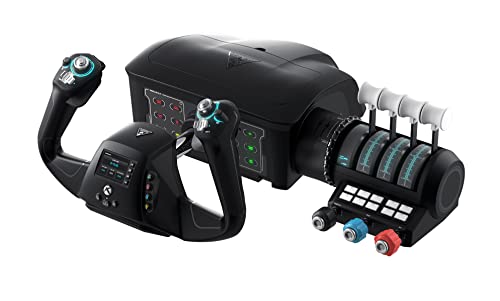
Pros
- All-in-one layout reduces need for separate yoke, throttle, and rudder hardware
- 12 analog axes support detailed aircraft control
- Modular throttle quadrant offers flexible lever and button configuration
- Integrated rudder and brake controls keep key inputs within reach
- Works with Xbox consoles and Windows 10 and 11 PCs
Cons
- Large 19.01 x 7.2 x 19.5-inch footprint needs substantial desk space
- 10 lb weight and clamping design may limit portability between setups
- Who should skip it: Players seeking a compact flight control or those who only need a basic joystick
| Color | Black |
|---|---|
| Dimensions | 19.01 x 7.2 x 19.5 inches |
| Weight | 10 pounds |
| Product Group | Video Games |
| Binding | Video Game |
Best suited to shoppers comparing flight controls products who specifically need control pitch, roll, throttle, trim, rudder, and braking from one integrated system, 180° yoke rotation with a non-contact Hall effect sensor supports precise aircraft….
Before buying, compare the exact model’s compatibility, dimensions, core specifications, warranty, recurring owner feedback, and current price against other flight controls options. Retailer availability and pricing can change after publication.
Pick by mounting and controls
| System | What you get | Best fit |
|---|---|---|
| Logitech G Flight Yoke System | Yoke with a separate three-lever quadrant; both units have mounting clamps. | A desk where you want to place the quadrant independently of the yoke. |
| Turtle Beach VelocityOne Flight | Yoke with built-in rudder controls and a modular quadrant with a trim wheel. | A mostly self-contained desk setup, especially if you do not yet own pedals. |
Logitech: a quadrant you can place where you need it
The Flight Yoke System includes the throttle quadrant; it is not the listing for the quadrant alone. In a piston aircraft, assign the three levers to throttle, propeller and mixture where those controls apply. For an aircraft without a propeller-pitch control, remap a spare lever rather than copying another plane’s profile. Independent mounting is useful if a center-mounted quadrant would crowd your mouse, but you still need a workable yaw input for taxi and crosswind practice.
VelocityOne: trim and rudder controls within reach
The VelocityOne Flight has a quadrant that slides into the yoke base, along with a trim wheel and interchangeable lever handles. Its rudder controls give you an alternative to pedals, but they do not reproduce the foot motion of an actual pedal set. The PC setup guide explains how the yoke and quadrant can appear separately in the simulator. If a lever seems unresponsive, check the quadrant’s profile before assuming the whole unit has disconnected.
Measure the desk and test the aircraft first
- Measure under the desktop. Record the top thickness, the distance from the edge to any crossbar, and the room above your knees. Compare that space with the clamp or mounting option in the manual.
- Check your reach. Sit at your usual distance and mimic full pullback. Leave room to use the keyboard and mouse without moving the yoke between flights.
- Bind a simple aircraft before a complex one. Set roll, pitch and throttle first. Confirm that each physical control moves the intended axis before assigning trim, mixture or reverse thrust.
If you spend most of your time flying an aircraft with a side-stick or switching between aircraft and space sims, a compact stick may be the better first purchase. Microsoft’s guide to simulator peripherals explains the different types. For computer rather than controller requirements, use our Flight Simulator 2024 PC guide.
How we compared: This is a specification and setup comparison, not a hands-on measurement of travel, resistance, or centering.
Add PCGearWiki as a preferred source on Google
Sources and Verification
Research basis: Product identity, dimensions, interfaces, supported features, and warranty terms are checked against available manufacturer documentation and current retailer listings. Price, stock, and aggregate customer ratings can change after publication.
Testing disclosure: Unless this article explicitly states that PCGearWiki performed hands-on testing and describes the test setup, recommendations are research-based editorial evaluations rather than PCGearWiki laboratory measurements. Customer feedback is used to identify recurring ownership patterns, not as proof of technical performance.
Last source review: November 19, 2026. See our Review Methodology, Editorial Policy, and Corrections Policy.


Write Your Review
No reviews yet. Be the first to share your experience!