

Last updated: September 30, 2026
A PC for Microsoft Flight Simulator 2024 should match the flying conditions and display setup you intend to use. Compare memory, storage, the CPU and GPU together, and request a test with representative aircraft and scenery. The two candidates here have 32GB RAM; neither is a factory-installed 64GB recommendation.
Verified configurations at a glance
| Configuration | CPU | GPU | RAM | Storage |
|---|---|---|---|---|
| MSI Codex Z2 A8NVP-436US | Ryzen 7 8700F | RTX 5070 | 32GB DDR5 | 2TB NVMe |
| Skytech King 95 | Ryzen 7 9800X3D | RTX 5070 Ti 16GB | 32GB DDR5-5600 | 1TB NVMe |
Recommended and ideal are different reference tiers
Microsoft lists 32GB RAM in its recommended tier and 64GB in its ideal tier. The recommended CPU examples are a Ryzen 7 2700X or Core i7-10700K, with an RTX 2080 or RX 5700 XT. Ideal examples include a Ryzen 9 7900X or Core i7-14700K and an RTX 4080 or RX 7900 XT. These references are not benchmarks of the new prebuilts below.
Do not read the ideal tier as a universal mandate for every flight, or the recommended tier as a guarantee for every add-on. Your aircraft, scenery, settings and background applications matter. Ask for a test that includes the conditions you care about, such as approaching a detailed airport, rather than only a quiet cruise. Check frame-time consistency alongside any average reported frame rate.
A 64GB shopping requirement needs an actual 64GB configuration or a verified upgrade plan. Both selected listings supply 32GB. Before adding memory, get the motherboard model, installed module layout, supported capacities and vendor guidance. Do not assume a spare slot or that combining kits will preserve the advertised speed. Include the upgrade and installation cost in your total budget.
Microsoft lists 50GB storage in its published requirements, but leave additional room for the operating system, updates, caches and your chosen extras. The appropriate reserve depends on what you install. The simulator also streams world data, so troubleshoot connection quality before blaming every scenery-loading issue on storage or the graphics card.
This comparison addresses a single conventional display, not a validated VR or triple-screen system. For those setups, request separate evidence with the actual headset or display arrangement. A specification that looks generous on paper does not by itself establish a satisfactory result in a different display workload.
Publisher or project reference: official requirements and documentation.
A 64GB upgrade is a condition, not an included feature

Pros
- Strong CPU and GPU combo for AAA titles and multitasking
- Ample RAM and storage included out of the box
- Effective multi-fan cooling system
- VR-ready with modern connectivity options
Cons
- Only two memory slots limit future upgrades
- Air cooling may require monitoring under extreme loads
- Prebuilt design offers fewer customization options than DIY builds
| Color | Black |
|---|---|
| Dimensions | 16 x 8.38 x 19 inches |
| Weight | 21.3 pounds |
| Product Group | Personal Computer |
| Binding | Personal Computers |
Best suited to shoppers comparing towers products who specifically need run demanding games smoothly with an 8-core CPU and next-gen GPU architecture for high frame rates., Handle streaming and background apps at once thanks….
Before buying, compare the exact model’s compatibility, dimensions, core specifications, warranty, recurring owner feedback, and current price against other towers options. Retailer availability and pricing can change after publication.
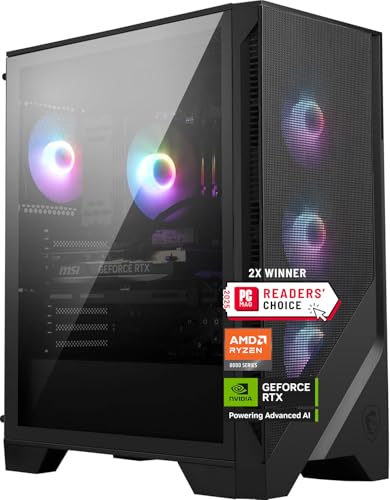
MSI Codex Z2 A8NVP-436US
The MSI Codex Z2 supplies a Ryzen 7 8700F, RTX 5070, 32GB DDR5 and a 2TB NVMe drive. Its larger storage capacity is a concrete advantage for someone maintaining a bigger library. The observed price exceeded $2000. Confirm the exact simulation result and a supported 64GB upgrade if that is your requirement.

Pros
- High-end CPU and GPU deliver excellent gaming performance at 1440p
- Effective 360mm liquid cooling supports sustained high loads
- Generous 32GB DDR5 RAM and fast SSD enable quick operation
- Upgradeable design with standard parts and spacious case
- Preinstalled OS and drivers simplify initial setup
Cons
- Graphics card brand may vary by build
- Prebuilt configuration limits initial customization options
- Full tower case requires significant desk space
| Color | King 95 White |
|---|---|
| Dimensions | 18.7 x 11.8 x 17.4 inches |
| Weight | 58.7 pounds |
| Product Group | Personal Computer |
| Binding | Personal Computers |
Best suited to shoppers comparing towers products who specifically need achieve smooth high-frame-rate 1440p gaming in demanding titles thanks to the RTX 5070 Ti graphics power., Handle multitasking and intense gameplay efficiently with the….
Before buying, compare the exact model’s compatibility, dimensions, core specifications, warranty, recurring owner feedback, and current price against other towers options. Retailer availability and pricing can change after publication.
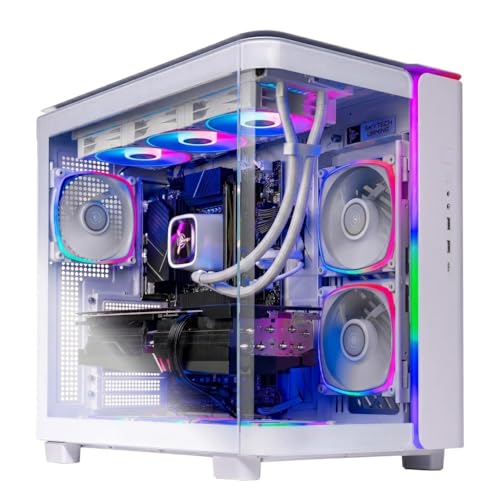
Skytech King 95
The Skytech King 95 lists a Ryzen 7 9800X3D, RTX 5070 Ti 16GB, 32GB DDR5-5600 and a 1TB NVMe drive. Its price was above $2500 at review. It is the higher-priced specification candidate, but it still does not arrive with 64GB RAM. Do not assume the CPU name proves a particular improvement at your chosen airport.
What to verify before ordering
Save the exact configuration and live price when ordering. Ask for the motherboard model, RAM module layout, power supply details, available expansion slots and warranty terms if they are not documented. A tower name may cover several variants, so a review of a differently equipped version is not sufficient evidence. Confirm the seller return policy in case the delivered machine does not match the description.
Compare the full purchase cost with your existing setup. Include any required memory or storage upgrade, display connection and installation service. When a particular component is undocumented, describe it as an open question rather than assuming a premium part is installed. The product cards show the approved ASINs, but the buyer should still confirm the selected variant at checkout.
Related buying and troubleshooting advice
- Best High End Gaming PC: Top Enthusiast Desktops for 2026
- Cpu Bottleneck Explained Buying Guide for 2026
Frequently asked questions
Are these PCs ready-made 64GB systems?
No. Both verified listings have 32GB. A buyer needing 64GB should choose an explicitly documented configuration or verify and budget a supported memory upgrade.
Does an RTX 5070 guarantee smooth 1440p flight?
We do not have an exact-configuration test establishing that result. Aircraft, scenery, graphics settings, other hardware and software all belong in the comparison.
For the broader purchase decision, compare prebuilt gaming PC brands and support options. The supplier warranty, exact configuration and service terms matter alongside the game-specific shortlist.
Sources and Verification
Research basis: Product identity, dimensions, interfaces, supported features, and warranty terms are checked against available manufacturer documentation and current retailer listings. Price, stock, and aggregate customer ratings can change after publication.
Testing disclosure: Unless this article explicitly states that PCGearWiki performed hands-on testing and describes the test setup, recommendations are research-based editorial evaluations rather than PCGearWiki laboratory measurements. Customer feedback is used to identify recurring ownership patterns, not as proof of technical performance.
Last source review: September 30, 2026. See our Review Methodology, Editorial Policy, and Corrections Policy.


Write Your Review
No reviews yet. Be the first to share your experience!