

Updated: . Added the MX Mechanical charging-versus-data distinction, Bolt receiver compatibility and a documented full-size desk-footprint reference.
Quick answer: Pick a mechanical keyboard by the keys you need every day, then switch feel, noise, connection and software. The ASUS ROG Strix Scope II X covers a full-size wired layout, the AULA F75 Pro and ASUS ROG Azoth are compact alternatives, and Logitech MX Mechanical is a low-profile option for mixed work. These are different use-case candidates, not interchangeable winners.
Products discussed in this guide
These listings are comparison references, not a guarantee of price or stock. We may earn a commission from qualifying purchases.


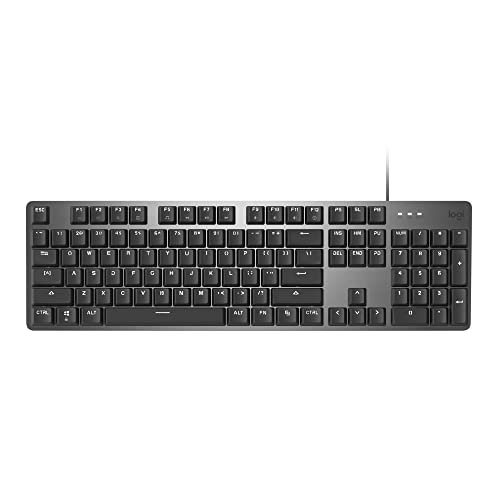
The shortlist below contains conventional mechanical-switch keyboards. Logitech MX Keys S uses a different key mechanism and is no longer included as a mechanical recommendation. Hybrid and magnetic boards also need clear labels rather than being mixed into an unexplained ranking.
Choose a layout that does not interrupt your work
| Candidate | Primary reason to compare | What you give up or need to verify |
|---|---|---|
| ASUS ROG Strix Scope II X | Full-size wired layout for gaming and numpad work | More desk width; confirm the NX Snow V2 switch variant and regional layout |
| AULA F75 Pro | 75% wireless mechanical layout with a knob | No numpad; verify the exact switch, keycap legends and configuration support |
| ASUS ROG Azoth, NX Snow listing | Compact mechanical layout with multiple connection options | Check its software workflow and current bundle rather than assuming every Azoth variant is identical |
| Logitech MX Mechanical, Tactile Quiet | Low-profile mechanical keys for a work-oriented setup | Low-profile switch parts are not interchangeable with every full-height mechanical keyboard |
| Logitech K845, TTC Red listing | A straightforward full-size wired mechanical layout | Verify the desired switch option; do not assume switch hot-swap support |

Typing, gaming and shared-office needs differ
For spreadsheets or frequent numeric entry, a full-size layout can be worth the extra width. A separate numpad is another option, but include its cost and cable or receiver needs. For a smaller desk, 75% can preserve function keys and some navigation while giving the mouse more room.
For gaming, first check whether your familiar shortcuts and simultaneous key combinations are supported. A compact board that hides a commonly used key behind a layer can be inconvenient even when its switches are excellent. Wireless convenience should also be checked by mode: Bluetooth, a dedicated receiver and a USB cable are not the same configuration.
How to choose switch feel without inventing a sound test
Linear switches move without a deliberate tactile bump; tactile switches add feedback; clicky designs intentionally add a click mechanism. These categories help narrow the choice but do not describe every board’s final sound or feel. Keycaps, case construction, stabilizers, desk surface and typing force also matter.
A label such as “quiet” should not be read as silent. For a shared room, try a sample or listen to recordings that disclose their setup, keeping in mind that microphone placement changes the result. We have not recorded these keyboards in a controlled acoustic comparison and do not claim to have done so.
Hot-swap and replacement-parts checks
Confirm whether the exact keyboard supports switch replacement without soldering, and which switch footprints and pin arrangements its manufacturer supports. Check keycap stem compatibility and the lengths of nonstandard keys such as the spacebar and right Shift. A generic keycap kit can leave an otherwise usable board missing a correctly sized key.
Low-profile and magnetic switches need separate compatibility checks. Conventional MX-style fit does not make a low-profile switch universal, and magnetic sensing can require a particular supported switch family. Avoid buying a replacement set on the word “hot-swappable” alone.
MX Mechanical: USB-C charging is not wired input
Logitech’s MX Mechanical setup guide states that the USB-C cable is for charging only. You can type while charging, but input still uses a supported wireless connection. Plugging the charging cable into a PC does not turn this model into a wired gaming keyboard.
| Purchase requirement | Check for the linked full-size MX Mechanical |
|---|---|
| Wired-only workstation or gaming setup | Choose a keyboard with documented USB data input instead |
| Existing Logitech receiver | Confirm Logi Bolt; Unifying and Bolt are not cross-compatible |
| Desk width and reach | The full-size model is 433.85mm wide and 131.55mm deep, with 26.10mm height listed |
| Mac Mini or other variant | Recheck dimensions and box contents; do not transfer the full-size bundle specification |
Sources: Logitech’s full-size specification and Logitech’s receiver-compatibility statement. These are manufacturer specifications, not a measured wireless-latency comparison.
For your desk, mark out the keyboard’s footprint and place your mouse beside it. Confirm you can reach both without holding your arm at an uncomfortable angle. If a numpad is rarely used, compare the compact alternatives already listed above before buying solely on switch feel.
When a magnetic keyboard is the better category
If adjustable actuation or rapid reset is the reason for replacing your board, compare magnetic or analog optical models explicitly. They are not necessary for ordinary typing, and their setup adds another decision. Our rapid trigger keyboard guide separates sensing technology, version and calibration.
Razer’s analog optical explanation also illustrates why rapid trigger cannot be treated as a synonym for conventional contact-based mechanical switches. Choose the feature because your game benefits from the input behavior, not because every gaming keyboard needs it.
Software, comfort and ownership checks
- Confirm remapping support for your operating system and whether changes persist without the application running.
- Check keyboard height and wrist position with your chair and desk; a wrist rest should not force an awkward angle.
- Verify receiver contents, charging connection and whether the board can be used while charging.
- Inspect the exact regional layout, warranty and return terms. Product-family photos can conceal a different Enter key or legend arrangement.
Make the final choice
Choose the Scope II X or K845 when you need a full-size wired arrangement; compare F75 Pro and Azoth when compactness and wireless options matter; consider MX Mechanical when low-profile work use is the priority. Check current offers through the exact product links. There is no independent measured noise, latency or durability ranking established in this guide, and customer ratings are not a substitute for those tests.
Evidence and disclosure
This is an editorial buying or setup guide, not a PCGearWiki hands-on laboratory test. Manufacturer documentation is linked where used; specifications and listing identities are distinguished from measured performance. Product links identify the selected listing, and offers, configurations and sellers can change. See our review methodology and affiliate disclosure.
As an Amazon Associate I earn from qualifying purchases.


Write Your Review
No reviews yet. Be the first to share your experience!