

Last updated: August 8, 2026
Top Budget Mechanical Keyboard Picks at a Glance
Bottom line: Start with the AULA F75 for the best balance of layout and features. Choose the Redragon K617 Fizz when price and mouse space matter most, or select a 96% board when a number pad is essential. The price targets below are buying thresholds rather than guaranteed live prices; check the retailer before ordering.

| Model | Best for | Layout | Connection | Buy when | Main trade-off |
|---|---|---|---|---|---|
| AULA F75 | Best overall value | 75% | USB-C, 2.4GHz, Bluetooth | At or below $80 | No number pad |
| Redragon K617 Fizz | Budget FPS gaming | 60% | USB-C wired | At or below $50 | Navigation keys require shortcuts |
| Logitech G413 SE | Typing and traditional desks | Full-size | Wired | At or below $80 | Fewer enthusiast features |
| AULA F99 | Wireless with a number pad | 96% | USB-C, 2.4GHz, Bluetooth | At or below $80 | Larger than a 75% board |
| RK R98 Pro | Enthusiast feel with numpad | 96% | Wired | At or below $80 | No wireless flexibility |
| Kisnt KN85 | Compact multi-device setup | 75% | USB-C, 2.4GHz, Bluetooth | At or below $70 | Less established owner history |
How We Evaluated Budget Mechanical Keyboards
PCGearWiki compared switch type, connection mode, layout, hot-swap support, keycap material, stabilizer quality, software features, warranty information, and current price. We gave greater weight to features that improve daily typing and gaming rather than decorative extras. See our complete Review Methodology for the standards used across buying guides.
The best budget mechanical keyboards 2026 category matters because a keyboard affects every PC interaction: movement in games, shortcut-heavy creator work, long typing sessions, and general desktop comfort. In July 2026, budget buyers no longer have to settle for rattly boards with fixed switches; many affordable mechanical keyboards now offer hot-swappable sockets, pre-lubed linear switches, compact layouts, RGB lighting, and multi-device wireless support.
For this guide, we focused on supplied models that clearly match the main requirement: budget mechanical keyboards for gaming and everyday PC use. Based on available product data, we prioritized true mechanical switches, hot-swap support, layout practicality, wired or wireless connectivity, keycap quality, software features, and value within the $15.99 – $79.99 range. If you want a broader category view, our Best Gaming Keyboards page covers more keyboard types and performance tiers.

AULA F75 75% Tri-Mode Wireless Mechanical Keyboard Hot-Swappable Linear Switches RGB Gaming
Pros
- Versatile tri-mode connectivity for seamless multi-device switching
- Hot-swap design enables easy personalization for beginners and enthusiasts
- Effective five-layer dampening delivers pleasant sound and solid feel
- Multifunctional knob simplifies mode changes and media control
- Compact 75% layout retains arrow keys while saving desk space
Cons
- Keycaps lack shine-through legends limiting RGB visibility from above
- Advanced macros and lighting require separate driver software
- No onboard LCD screen for quick status information
| Compatible Devices | Gaming Console, Laptop, PC, Smartphone, Tablet |
|---|---|
| Connectivity Technology | 2.4GHz Wireless, BT5.0, USB-C |
| Additional Features | Backlit, Hot-Swappable, Programmable Keys, Rechargeable, Volume Roller |
| Keyboard Backlighting Color Support | RGB |
| Power Source | Battery Powered |
| Switch Type | Linear |
| Keyboard Layout | QWERTY |
| Hand Orientation | Ambidextrous |
| Compatible Amazon Tablet Models | Amazon Fire 7 12th Generation, Amazon Fire 7 5th Generation, Amazon Fire 7 7th Generation, Amazon Fire 7 9th Generation, Amazon Fire HD 10 11th Generation, Amazon Fire HD 10 13th Generation, Amazon Fire HD 10 5th Generation, Amazon Fire HD 10 7th Generation, Amazon Fire HD 10 9th Generation |
| Compatible Tablet Computer Models | AAUB P30 |
Best suited to shoppers comparing keyboards products who specifically need enjoy effortless smooth keystrokes from pre-lubed linear switches that create a creamy consistent feel during long sessions, Connect to multiple devices instantly with tri-mode….
Before buying, compare the exact model’s compatibility, dimensions, core specifications, warranty, recurring owner feedback, and current price against other keyboards options. Retailer availability and pricing can change after publication.
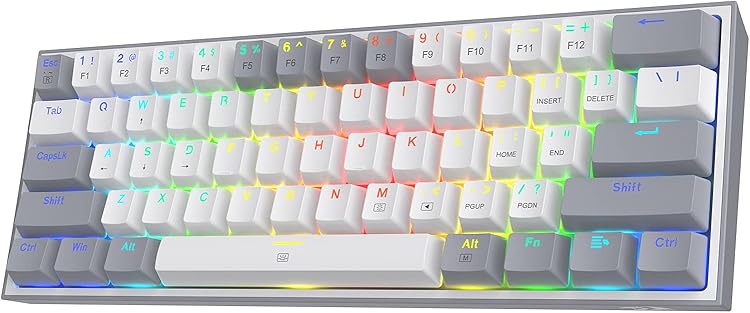
Pros
- Ultra-compact design saves valuable desk space for mouse-heavy gameplay
- Hot-swappable feature enables easy personalization without soldering
- Vibrant RGB options enhance immersion and can be controlled onboard
- Software support adds macro and lighting customization flexibility
Cons
- Missing keys require function layer shortcuts that may slow initial adaptation
- Wired-only connection reduces portability versus wireless alternatives
- Plastic construction feels less premium than higher-end metal keyboards
| Compatible Devices | PC |
|---|---|
| Connectivity Technology | USB-C |
| Additional Features | 60% Compact, Lightweight, MIxed Color Keycaps |
| Keyboard Backlighting Color Support | RGB |
| Language | English |
| Power Source | Corded Electric |
| Switch Type | Linear |
| Keyboard Layout | QWERTY |
| Hand Orientation | Ambidextrous |
| Button Quantity | 61 |
Best suited to shoppers comparing gaming keyboards products who specifically need free up desk space with a compact 60% layout that maximizes mouse movement for precise FPS aiming, Type smoothly and quietly using linear red….
Before buying, compare the exact model’s compatibility, dimensions, core specifications, warranty, recurring owner feedback, and current price against other gaming keyboards options. Retailer availability and pricing can change after publication.

Pros
- Durable aluminum construction enhances longevity
- Responsive tactile switches suit fast-paced gaming
- Reliable key rollover prevents missed inputs
- Simple white LED lighting focuses on functionality
Cons
- Requires a wired connection which restricts placement options
- Full-size layout occupies significant desk space compared to tenkeyless models
- Single-color lighting offers no customization options
| Compatible Devices | PC |
|---|---|
| Connectivity Technology | USB 2.0 |
| Additional Features | LED Lights |
| Keyboard Backlighting Color Support | Single Color |
| Language | English |
| Power Source | Corded Electric |
| Switch Type | Tactile |
| Keyboard Layout | QWERTY |
| Hand Orientation | Ambidextrous |
| Button Quantity | 12 |
Best suited to shoppers comparing gaming keyboards products who specifically need tactile mechanical switches deliver precise feedback to improve gaming accuracy and speed, Heat-resistant PBT keycaps maintain their texture and legends through extended use.
Before buying, compare the exact model’s compatibility, dimensions, core specifications, warranty, recurring owner feedback, and current price against other gaming keyboards options. Retailer availability and pricing can change after publication.
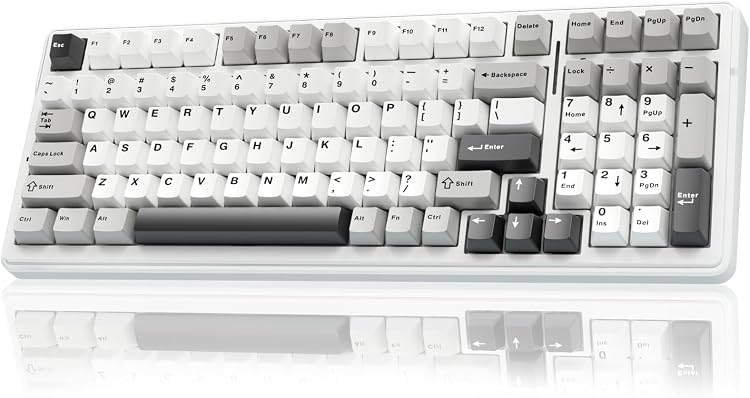
Pros
- Tri-mode options including Bluetooth, 2.4GHz, and wired for flexible device pairing
- Compact 96% layout retains arrow keys and numpad while conserving desk space
- RGB lighting with music rhythm effects and extensive color customization
- Durable PBT keycaps and large battery capacity for sustained daily operation
Cons
- Only linear switches included, limiting options for users who prefer tactile or clicky feedback
- Advanced macros and lighting require separate software installation
- No long-term user reviews available to confirm durability over months of use
| Compatible Devices | Gaming Console, Laptop, PC, Smartphone, Tablet |
|---|---|
| Connectivity Technology | 2.4GHz, BT5.0, USB-C |
| Additional Features | Backlit, Hot-Swappable, Integrated Stand, Programmable Keys, Rechargeable |
| Keyboard Backlighting Color Support | RGB |
| Number of Batteries Required | 1 |
| Power Source | Battery Powered |
| Switch Type | Linear |
| Keyboard Layout | QWERTY |
| Hand Orientation | Ambidextrous |
| Button Quantity | 99 |
Best suited to shoppers comparing gaming keyboards products who specifically need multi-device tri-mode connectivity enables instant switching between up to five devices for uninterrupted work and gaming flows., Hot-swappable design lets users replace switches and….
Before buying, compare the exact model’s compatibility, dimensions, core specifications, warranty, recurring owner feedback, and current price against other gaming keyboards options. Retailer availability and pricing can change after publication.
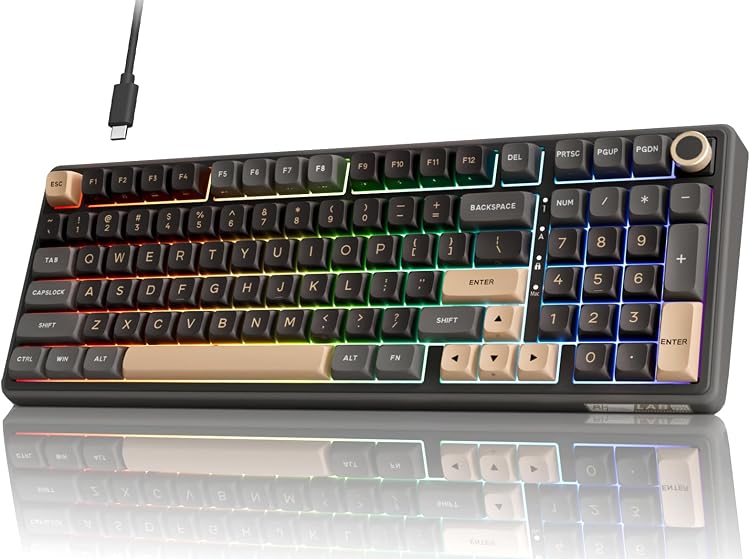
Pros
- Gasket structure provides stable keystrokes with reduced case ping
- Pre-lubed switches perform smoothly straight from the box
- Detachable USB-C cable supports reliable low-latency connection
- RGB modes include multiple static and dynamic options for personalization
- Indicator lights clearly display lock and mode status
Cons
- Wired design restricts placement flexibility compared to wireless models
- Advanced macro and lighting edits require driver software installation
- Compact 98-key layout omits some dedicated function keys found on full-size boards
| Compatible Devices | Gaming Console, Laptop, PC, Tablet |
|---|---|
| Connectivity Technology | USB-C |
| Additional Features | Backlit, Ergonomic, Hot-Swappable, Volume Roller |
| Keyboard Backlighting Color Support | RGB |
| Language | English |
| Power Source | Corded Electric |
| Switch Type | Linear |
| Keyboard Layout | QWERTY |
| Hand Orientation | Ambidextrous |
| Button Quantity | 98 |
Best suited to shoppers comparing gaming keyboards products who specifically need experience a smooth creamy typing feel from pre-lubed linear switches that minimize friction and deliver consistent feedback, Reduce typing noise and vibration with gasket….
Before buying, compare the exact model’s compatibility, dimensions, core specifications, warranty, recurring owner feedback, and current price against other gaming keyboards options. Retailer availability and pricing can change after publication.
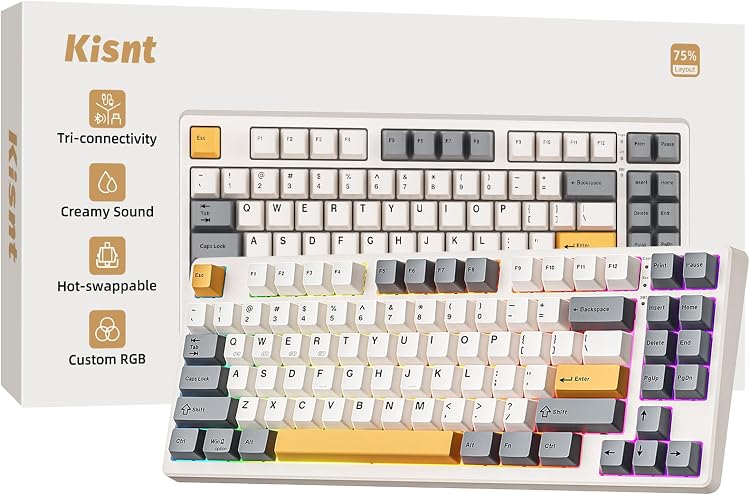
Pros
- Versatile tri-mode connectivity with low latency across platforms
- Hot-swappable design enables easy switch customization without soldering
- Gasket mount delivers creamy satisfying sound profile
- Long battery life supports full wireless use
- Compact layout balances essentials with space efficiency
Cons
- Key programming software available only for Windows
- Requires several hours of initial charging before wireless use
- Animated RGB lighting reduces battery duration
| Compatible Devices | Gaming Console, Laptop, Macbook, Smartphone, Tablet |
|---|---|
| Connectivity Technology | 2.4GHz Wireless, Bluetooth5.0, USB-C |
| Additional Features | 75% Layout, Creamy Sound, Hot-Swappable, Programmable, Rechargeable |
| Keyboard Backlighting Color Support | RGB |
| Number of Batteries Required | 1 |
| Power Source | Battery Powered/USB-C |
| Switch Type | Pre-lubed Linear Switch |
| Keyboard Layout | QWERTY |
| Hand Orientation | Ambidextrous |
| Button Quantity | 85 |
Best suited to shoppers comparing gaming keyboards products who specifically need experience smooth consistent keystrokes from pre-lubed linear switches that reduce finger fatigue during long sessions, Switch between devices instantly with tri-mode connectivity offering low-latency….
Before buying, compare the exact model’s compatibility, dimensions, core specifications, warranty, recurring owner feedback, and current price against other gaming keyboards options. Retailer availability and pricing can change after publication.
How to Choose the Best Budget Mechanical Keyboards 2026
Choosing a budget mechanical keyboard is not just about finding the lowest price. The right model should match your desk space, preferred switch feel, gaming style, typing workload, connection needs, and willingness to customize. The strongest options in this data set are not identical: some are compact FPS-focused boards, some are wireless productivity-friendly layouts, and others keep a number pad for spreadsheets, macros, and creator shortcuts.
Switch Type and Typing Feel
Switch type is the core mechanical keyboard decision. Linear switches, such as the red or pre-lubed linear switches listed on several models here, press smoothly without a tactile bump. That makes them popular for gaming because repeated key presses feel consistent and light. The Redragon K617 Fizz, Redragon K668, Redragon K671, AULA F75, AULA F99, Kisnt KN85, and RK R98 Pro all emphasize linear mechanical switches or pre-lubed linear designs.
Tactile switches are better if you want a noticeable bump for typing accuracy. The Logitech G413 SE is the main supplied option with tactile mechanical switches, so it suits users who prefer feedback while writing, coding, or using productivity shortcuts. It is less focused on enthusiast sound tuning than gasket-mounted boards, but its tactile switch choice and aluminum top case make it a practical full-size option.
For most gamers buying on a budget, pre-lubed linear switches are the safest starting point. They are smoother than many older entry-level mechanical switches and usually feel better for rapid strafing, ability rotations, and general typing. If you are sensitive to sound, look for foam-filled or gasket-mounted models rather than assuming every mechanical keyboard is loud.
Latency, Polling, and Connection Type
Connection type matters for gaming reliability. Wired USB-C models such as the Redragon K617 Fizz, Redragon K668, Redragon K671, Logitech G413 SE, and RK R98 Pro avoid battery management and are easy to recommend for desktop gaming PCs. A wired keyboard is also simpler if you regularly enter BIOS, troubleshoot a build, or use a KVM-style workstation setup.
Tri-mode wireless boards add flexibility. The AULA F75, AULA F99, and Kisnt KN85 support USB-C, 2.4GHz wireless, and Bluetooth according to manufacturer specifications. This is useful if you switch between a gaming PC, laptop, tablet, and console. For gaming, 2.4GHz or wired mode is generally the preferred choice, while Bluetooth is better for productivity and multi-device convenience.
Do not treat every wireless mode as equal. The Kisnt KN85 data lists different latency figures for USB, 2.4GHz, and Bluetooth, which reinforces the practical rule: use wired or 2.4GHz for games where timing matters, and use Bluetooth when convenience matters more than response consistency. If you mainly play competitive shooters, you may also want to compare this list with our Hall Effect keyboard guide for Valorant.
Layout and Desk Space
Layout determines how much mouse room you gain and which keys you give up. A 60% board like the Redragon K617 Fizz saves the most desk space and is especially appealing for FPS players who use low mouse sensitivity. The trade-off is that function keys, arrows, and navigation commands require layers or shortcuts, which can slow down productivity if you use those keys constantly.
A 75% layout, found on the AULA F75 and Kisnt KN85, is often the sweet spot for gaming and everyday use. You keep arrow keys and a function row while still freeing up space compared with a full-size keyboard. This is a strong choice for small desks, laptop docking setups, and creators who want compact gear without relying on layers for every shortcut.
Full-size and 96% layouts are better if you need a number pad. The AULA F99 and RK R98 Pro keep numpad functionality in a more compact footprint than a traditional full-size board, while the Logitech G413 SE and Redragon K668 provide more familiar full-size layouts. Choose these if you enter numbers often, use MMO keybinds, edit timelines, or prefer dedicated navigation keys.
| Model | Layout | Connection | Switch / Feel | Best For | Main Strength |
|---|---|---|---|---|---|
| AULA F75 | 75% | USB-C, 2.4GHz, Bluetooth | Pre-lubed linear | Gaming, typing, compact desks | Tri-mode wireless with hot-swap and knob |
| Redragon K617 Fizz | 60% | USB-C wired | Linear red | FPS players and minimal setups | Very compact hot-swappable design |
| Logitech G413 SE | Full-size | Wired | Tactile mechanical | Typing and traditional desktop use | Aluminum top case and PBT keycaps |
| RK ROYAL KLUDGE R98 Pro | 96% | Wired | Pre-lubed linear cream | Users who need a numpad | Gasket mount, PBT keycaps, volume knob |
| Kisnt KN85 | 75% | USB-C, 2.4GHz, Bluetooth | Pre-lubed Bsun linear | Wireless hybrid work and gaming | Compact tri-mode board with gasket sound tuning |
| AULA F99 | 96% | USB-C, 2.4GHz, Bluetooth | Pre-lubed linear | Gaming plus productivity | Large battery, numpad, hot-swap support |
| Redragon K668 | Full-size plus hotkeys | Wired | Linear red | Budget full-size gaming | Hot-swap sockets and sound-absorbing foam |
| Redragon K671 | Full-size | Wired | Linear red | Low-cost mechanical upgrade | Hot-swap switches, macros, anti-ghosting |
Build Quality, Mounting, and Sound Dampening
Budget mechanical keyboards vary widely in sound and feel. A basic tray-mounted board can still be useful, but gasket-mounted or foam-filled designs generally reduce hollow case noise and soften bottom-out feel. The AULA F75, AULA F99, Kisnt KN85, RK R98 Pro, and Redragon K668 all mention internal dampening, gasket structures, silicone pads, or sound-absorbing foam in their available specifications.
If you care about a deeper “thocky” or creamy sound, the RK R98 Pro, Kisnt KN85, AULA F75, and AULA F99 are the most relevant options in the supplied data. These boards emphasize pre-lubed switches, layered dampening, and enthusiast-style construction. They are better choices for shared rooms than an older clicky board, though no mechanical keyboard should be assumed silent unless the switches and case are specifically designed for quiet use.
The Logitech G413 SE takes a different approach. It focuses on a rigid aluminum-magnesium alloy top case, PBT keycaps, and a straightforward wired design rather than gasket acoustics or RGB-heavy customization. That makes it appealing if you want a sturdy keyboard with less visual clutter. For quieter alternatives beyond this exact budget mechanical list, see our silent gaming keyboard guide.
Keycaps, Stabilizers, and Hot-Swap Support
Keycaps affect texture, sound, and long-term wear. PBT keycaps are generally preferred over standard ABS because they resist shine better and tend to feel more durable. The Logitech G413 SE, RK R98 Pro, and AULA F99 specifically list PBT keycaps, while the RK R98 Pro also uses MDA profile keycaps for a more sculpted typing feel.
Hot-swap sockets are one of the most valuable budget features because they let you replace switches without soldering. The AULA F75, Redragon K617 Fizz, RK R98 Pro, Kisnt KN85, AULA F99, Redragon K668, and Redragon K671 all list hot-swappable switch support. If you are new to custom keyboards, choose a board that supports both 3-pin and 5-pin switches so you have more upgrade options later.
Stabilizers matter on large keys such as Space, Enter, Shift, and Backspace. The AULA F75 specifically mentions pre-lubricated stabilizers, and several gasket-style boards emphasize smoother, more consistent typing. If you type long documents or play rhythm-heavy games where larger keys are used often, stabilizer quality can be just as noticeable as the switch choice.
Software, Macros, RGB, and Media Controls
Software support is useful when you want macros, remaps, or custom lighting. The Redragon K617 Fizz, Redragon K668, Redragon K671, AULA F75, AULA F99, Kisnt KN85, and RK R98 Pro all list some form of driver, macro, or programmable support. This can help with MMO rotations, productivity shortcuts, streaming controls, or app-specific keybinds.
RGB should not be the main reason to buy a keyboard, but good lighting controls are still useful. If you play in a dark room, adjustable brightness and static color modes matter more than flashy effects. Wireless users should remember that animated RGB can reduce battery life, so boards like the AULA F75, AULA F99, and Kisnt KN85 are best used with lighting tuned to your battery expectations.
Media controls are a practical quality-of-life feature. The AULA F75 and RK R98 Pro include knob-based controls, while the Logitech G413 SE uses FN media controls. If you frequently adjust volume while gaming, streaming, or editing, a physical knob is easier than layered shortcuts. If you prefer low-profile typing or slimmer boards, our low profile mechanical keyboard guide may be a better fit.
Use Case: Gaming, Typing, Creation, and Hybrid Setups
For FPS gaming, prioritize mouse space and simple wired reliability. The Redragon K617 Fizz is the clearest compact FPS pick because its 60% layout keeps the keyboard away from broad mouse swipes. The AULA F75 and Kisnt KN85 are better if you still want arrows and function keys without returning to a full-size footprint.
For typing and productivity, consider comfort and dedicated keys. The Logitech G413 SE is strong if you prefer tactile switches and a conventional layout. The AULA F99 and RK R98 Pro are better if you want a number pad but still want a more modern enthusiast-style feel than a basic office keyboard.
For hybrid desk setups, tri-mode wireless is worth paying attention to. The AULA F75, AULA F99, and Kisnt KN85 can connect to multiple device types according to manufacturer specifications, which is useful if your desk includes a gaming PC, work laptop, and tablet. For a deeper look at cable-free options, see our wireless mechanical keyboard buying guide.
Why You Should Trust PCGearWiki
PCGearWiki evaluates buying-guide recommendations by comparing available specifications, compatibility details, feature sets, and value signals rather than relying on unsupported performance claims. For this article, we separated true mechanical keyboard candidates from supplied products that were membrane or only described as “mechanical feeling,” because those do not meet the same buyer intent.
We look at practical PC builder concerns: whether a keyboard uses mechanical switches, whether it supports hot-swap customization, how its layout affects mouse space, whether wireless modes are appropriate for gaming, and whether keycap and case features improve long-term use. When a feature comes from manufacturer specifications, we treat it as product data rather than first-party test evidence.
PCGearWiki may earn affiliate revenue from qualifying purchases, but recommendations are based on fit for the search intent, not on filling every slot with a product. If a supplied model does not clearly match best budget mechanical keyboards 2026, we avoid using it in verdicts and comparison tables.
Final Thoughts
The best budget mechanical keyboards 2026 shortlist depends on whether you value compact gaming space, wireless flexibility, number-pad productivity, or a sturdy traditional layout. Based on the supplied data, these are the clearest recommendations for different buyers.
- Best Overall: AULA F75. The AULA F75 combines a 75% layout, tri-mode connectivity, hot-swappable sockets, pre-lubed linear switches, layered dampening, RGB, macro support, and a multifunction knob. It is ideal for gamers and typists who want one compact keyboard for a PC, laptop, and console-style setup. The main trade-off is that users who need a number pad should choose a 96% or full-size board instead.
- Best Value: Kisnt KN85. The Kisnt KN85 stands out because it offers 75% sizing, USB-C, 2.4GHz, Bluetooth, hot-swap support, gasket mounting, RGB, and a rechargeable battery in a very feature-rich package. It is best for hybrid users who split time between work and gaming. The caveat is that its listed review count is not as established as several older models in the supplied data.
- Best Budget: Redragon K617 Fizz. The Redragon K617 Fizz is the strongest low-cost mechanical pick for FPS players who want a small wired keyboard with hot-swappable red switches and RGB. It is ideal for compact desks and low-sensitivity mouse users. The trade-off is the 60% layout, which requires shortcuts for many navigation and function commands.
- Best Premium or Enthusiast Pick: RK ROYAL KLUDGE R98 Pro. The RK R98 Pro is the most appealing choice if you want a compact number-pad layout with gasket mounting, PBT keycaps, pre-lubed cream switches, RGB, hot-swap support, and a volume knob. It suits creators, spreadsheet users, and gamers who want enthusiast-style sound tuning without giving up numpad functionality.
If your keyboard choice is part of a complete gaming setup, pairing it with the right peripherals matters. Our gaming mouse guide can help you balance keyboard layout with mouse space, while our keyboard guide for Fortnite focuses on competitive building and fast input needs.
Budget Mechanical Keyboard Price and Feature Benchmarks
A useful budget keyboard should provide consistent key registration and a layout that fits your workflow before adding cosmetic extras. Under $50, prioritize a reliable wired connection and replaceable keycaps. From $50 to $80, hot-swap sockets, better stabilizers, sound dampening, and 2.4GHz wireless become realistic. A higher list price is only justified when those features improve daily use.
| Budget | Features to expect | Reasonable compromise |
|---|---|---|
| Under $40 | Wired connection, basic switches, ABS keycaps | Limited software or louder stabilizers |
| $40-$60 | Compact layouts, RGB, detachable USB-C | Case materials may remain lightweight |
| $60-$80 | Hot-swap support, wireless options, dampening | Premium keycaps may still be absent |
For a wider view across price tiers, compare our best mechanical keyboards. Readers focused on switch technology should also see magnetic keyboard switches explained.
Budget Mechanical Keyboard Questions
What is the best budget mechanical keyboard for gaming?
The best budget mechanical keyboard for gaming combines consistent switches, a stable wired or low-latency 2.4GHz connection, anti-ghosting, and a layout that fits your desk. Hot-swap sockets and durable keycaps add more long-term value than decorative lighting alone.
Can an affordable mechanical keyboard be good for competitive games?
Yes. An affordable mechanical keyboard can perform well when it has reliable switches, full key rollover, stable firmware, and low input latency. Premium cases and elaborate displays affect price more than they affect competitive performance.
How much should you spend on a budget mechanical keyboard?
The strongest value is commonly found between about $40 and $80. Below that range, verify switch consistency and warranty support; above it, compare the board with mainstream models offering better stabilizers, acoustics, software, or wireless connectivity.
Related PCGearWiki resources: rapid trigger keyboards and mechanical keyboard guide.
Frequently Asked Questions
What is the best budget mechanical keyboard for most people?
Based on the supplied product data, the AULA F75 is the best overall fit for most buyers because it combines a compact 75% layout, tri-mode connectivity, hot-swap support, pre-lubed linear switches, dampening layers, RGB, and a control knob. It works well for gaming, typing, and multi-device setups.
How much should I spend on a budget mechanical keyboard?
The supplied products sit within the $15.99 – $79.99 range, but the best value depends on features. Spend less if you only need a wired board with linear switches, and spend more if you want wireless, gasket mounting, PBT keycaps, a number pad, or better sound dampening.
Is a 60% mechanical keyboard good for gaming?
A 60% mechanical keyboard is excellent for FPS gaming when you need more mouse space, and the Redragon K617 Fizz is the clearest supplied example. The downside is that arrows, function keys, and navigation commands require shortcuts, so it is less convenient for spreadsheet work, editing, and general productivity.
Should I buy wired or wireless for a budget mechanical keyboard?
Choose wired if you want the simplest setup, no charging, and consistent PC compatibility. Choose tri-mode wireless if you switch between a gaming desktop, laptop, tablet, or console. For more cable-free recommendations, read our wireless mechanical keyboard guide.
Are membrane or “mechanical feeling” keyboards the same as mechanical keyboards?
No. A true mechanical keyboard uses individual mechanical switches under the keys, while membrane and “mechanical feeling” keyboards simulate the feel with a different switch structure. For this guide’s recommendations, we focused on products that clearly list mechanical switches rather than treating membrane models as equivalent.
Sources and Verification
Research basis: Product identity, dimensions, interfaces, supported features, and warranty terms are checked against available manufacturer documentation and current retailer listings. Price, stock, and aggregate customer ratings can change after publication.
Testing disclosure: Unless this article explicitly states that PCGearWiki performed hands-on testing and describes the test setup, recommendations are research-based editorial evaluations rather than PCGearWiki laboratory measurements. Customer feedback is used to identify recurring ownership patterns, not as proof of technical performance.
Last source review: August 8, 2026. See our Review Methodology, Editorial Policy, and Corrections Policy.
Write Your Review
No reviews yet. Be the first to share your experience!