

Last updated: August 5, 2026
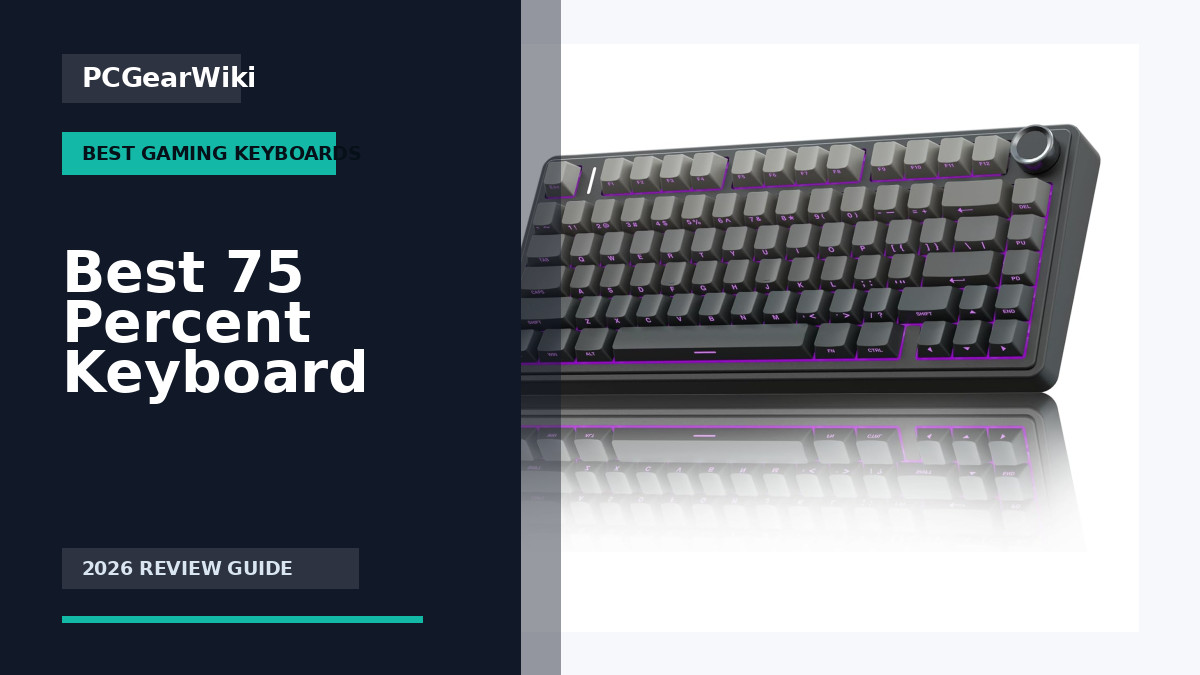
Quick answer: The best 75% keyboard keeps the function row, arrow keys, and a compact navigation cluster while saving more desk space than a TKL board. Choose by switch feel, latency, hot-swap support, keycap quality, wireless stability, and whether the compressed layout still provides the keys you use every day.
Key decision factors
| Factor | What it means | What to check |
|---|---|---|
| Layout | 75% with dedicated arrows | Confirm navigation-key placement before buying |
| Switches | Mechanical, optical, or Hall effect | Match noise, actuation, and repairability to your use |
| Connectivity | Wired, 2.4GHz, Bluetooth | Use wired or stable 2.4GHz for competitive gaming |
PCGearWiki separates manufacturer specifications from practical buying criteria. See our evaluation process and Review Methodology for how recommendations are assessed.
75 percent keyboards strike an excellent balance between the compact size of a tenkeyless layout and the added functionality of arrow keys and navigation cluster. They appeal to gamers who want a smaller desk footprint without sacrificing essential controls, as well as creators who need precise navigation for editing workflows. In this guide we examine 15 models from Womier, EPOMAKER, AULA and more to show what sets each option apart.
Whether you prioritize creamy thocky sound, tri-mode wireless connectivity, customizable screens, or premium aluminum builds, the current selection offers strong choices across every budget. You will learn which features matter most for different use cases and how to match a keyboard to your specific needs. For broader context on mechanical keyboards, see our Best Gaming Keyboards category page.
All recommendations are based on manufacturer specifications, user ratings, and feature comparisons as of June 2026. We focus on practical factors such as switch feel, build quality, battery life, and software support so you can make an informed purchase decision.

Pros
- Tri-mode connectivity with multi-device pairing
- Hot-swappable design for beginner-friendly customization
- Thocky build with effective noise dampening
- Programmable macros and N-key rollover support
- Long battery life and stylish side-printed keycaps
Cons
- Full RGB and macro features require driver installation
- 75% layout omits dedicated numpad and some function keys
- Advanced structure adds weight, reducing portability
| Compatible Devices | Gaming Console, Laptop, PC, Smartphone, Tablet |
|---|---|
| Connectivity Technology | 2.4GHz Wireless, BT5.0, USB-C |
| Additional Features | Backlit, Hot-Swappable, Programmable Keys, Rechargeable, Volume Roller |
| Keyboard Backlighting Color Support | RGB |
| Number of Batteries Required | 1 |
| Power Source | Battery Powered |
| Switch Type | Linear |
| Keyboard Layout | QWERTY |
| Hand Orientation | Ambidextrous |
| Button Quantity | 81 |
Best suited to shoppers comparing gaming keyboards products who specifically need switch seamlessly between up to five devices using Bluetooth, 2.4GHz or wired modes for flexible multi-platform use, Customize switches easily with hot-swap support and….
Before buying, compare the exact model’s compatibility, dimensions, core specifications, warranty, recurring owner feedback, and current price against other gaming keyboards options. Retailer availability and pricing can change after publication.

Pros
- Stable keystroke registration from the precision 1.2mm slotted PCB
- Strong versatility across gaming, office, and mobile desk setups
- Rich per-key lighting with simple FN-key adjustments
- Ongoing personalization supported by hot-swap and stabilizer tuning
Cons
- Key remapping software works only on Windows
- Volume knob requires a long-press mode switch before use
- Charge indicator must be manually turned off via key combination
| Compatible Devices | Laptop, PC |
|---|---|
| Connectivity Technology | BT |
| Additional Features | 3 Modes, Backlit, Customizable Display Keys, Ergonomic, Hot-Swappable |
| Keyboard Backlighting Color Support | RGB |
| Power Source | Battery Powered |
| Switch Type | Tactile |
| Keyboard Layout | QWERTY |
| Hand Orientation | Right |
| Button Quantity | 80 |
| Total USB 2.0 Ports | 1 |
Best suited to shoppers comparing gaming keyboards products who specifically need delivers fatigue-free typing with a flexible gasket mount and pre-lubed linear switches, Creates a deep quiet sound profile through five layers of targeted foam….
Before buying, compare the exact model’s compatibility, dimensions, core specifications, warranty, recurring owner feedback, and current price against other gaming keyboards options. Retailer availability and pricing can change after publication.

Pros
- Tri-mode connectivity supports multiple devices and easy switching
- Hot-swappable with pre-lubed switches for immediate customization
- Multifunctional knob enables quick mode and setting adjustments
- Five-layer structure delivers solid thocky feel with reduced noise
- Compact 75% layout saves space while keeping arrow keys
Cons
- Keycaps are not fully shine-through limiting RGB light diffusion
- Advanced macros and effects require separate driver installation
- Compact layout omits some keys requiring users to adapt
| Compatible Devices | Gaming Console, Laptop, PC, Smartphone, Tablet |
|---|---|
| Connectivity Technology | 2.4GHz Wireless, BT5.0, USB-C |
| Additional Features | Backlit, Hot-Swappable, Programmable Keys, Rechargeable, Volume Roller |
| Keyboard Backlighting Color Support | RGB |
| Language | English |
| Number of Batteries Required | 1 |
| Power Source | Battery Powered |
| Switch Type | Linear |
| Keyboard Layout | QWERTY |
| Hand Orientation | Ambidextrous |
Best suited to shoppers comparing gaming keyboards products who specifically need achieve smooth creamy keystrokes and fast response with pre-lubed Reaper linear switches for gaming or extended typing sessions, Connect to up to five devices….
Before buying, compare the exact model’s compatibility, dimensions, core specifications, warranty, recurring owner feedback, and current price against other gaming keyboards options. Retailer availability and pricing can change after publication.

Pros
- Gasket mount and foam layering create soft flexible typing with excellent sound dampening
- Tri-mode connectivity offers stable performance on Windows Mac Android and Linux
- Hot-swappable design enables quick customization without soldering
- Built-in screen displays connection status battery level and lock indicators clearly
- South-facing LEDs provide bright even RGB lighting across the board
Cons
- Software for key remapping and advanced RGB settings works only on Windows
- White and purple keycaps are not shine-through limiting RGB visibility compared to black keycaps
- Initial software pairing requires a wired USB connection
| Compatible Devices | Gaming Console, Laptop, PC, Smartphone, Tablet |
|---|---|
| Connectivity Technology | 2.4ghz Wireless, BT5.0, USB-C |
| Additional Features | 16.8 Million RGB Backlit, Backlit, Colorful Smart Display Screen, Hot-Swappable, Pre-lubed Cream Switches |
| Keyboard Backlighting Color Support | RGB |
| Switch Type | Linear |
| Keyboard Layout | QWERTY |
| Button Quantity | 80 |
| Water Resistance Level | Not Water Resistant |
| Minimum Required Operating System Version | Android 14.0 |
| Compatible Operating System Family | Android |
Best suited to shoppers comparing gaming keyboards products who specifically need achieve fatigue-free typing sessions with gasket mount construction and factory-lubed switches that deliver smooth consistent feedback, Switch seamlessly between up to five devices using….
Before buying, compare the exact model’s compatibility, dimensions, core specifications, warranty, recurring owner feedback, and current price against other gaming keyboards options. Retailer availability and pricing can change after publication.

Pros
- Customizable color screen shows GIFs status and settings at a glance
- Gasket mount delivers comfortable soft typing with reduced noise
- Hot-swappable PCB supports 3-pin and 5-pin switches for easy upgrades
- Strong RGB options with software control for macros and lighting
- Compact 75% layout with PBT keycaps saves space while retaining function keys
Cons
- Disassembly risks damaging delicate screen wires and is not recommended
- Wired connection only with no wireless options available
- Advanced features like GIF uploads require installing proprietary driver software
| Compatible Devices | Gaming Console |
|---|---|
| Connectivity Technology | USB-C |
| Additional Features | 75% Keyboard, Animation Kanagawa Theme, Backlit, Color Multimedia Display, Hot-Swappable |
| Keyboard Backlighting Color Support | RGB |
| Power Source | Wired |
| Switch Type | Linear |
| Keyboard Layout | QWERTY |
| Hand Orientation | Ambidextrous |
| Button Quantity | 82 |
| Water Resistance Level | Not Water Resistant |
Best suited to shoppers comparing keyboards products who specifically need personalize your setup with custom GIFs and real-time status on the angled color display, Enjoy a soft responsive feel from the gasket mount with….
Before buying, compare the exact model’s compatibility, dimensions, core specifications, warranty, recurring owner feedback, and current price against other keyboards options. Retailer availability and pricing can change after publication.

Pros
- Compact 75% form factor frees up space for larger mouse movements
- Multiple wireless options ensure low-latency performance across platforms
- Sound dampening enhances typing comfort and reduces fatigue
- Hot-swappable feature supports future upgrades without soldering
Cons
- The reduced layout requires users to adapt to missing keys like a full numpad
- Pre-installed switches are limited to the tactile variant
- New product with no user reviews available for long-term performance insights
| Compatible Devices | Gaming Console, Laptop, PC |
|---|---|
| Connectivity Technology | Bluetooth, USB-C, Wi-Fi |
| Additional Features | Backlit, Volume Roller |
| Keyboard Backlighting Color Support | RGB |
| Language | English |
| Power Source | USB Power |
| Switch Type | Tactile |
| Keyboard Layout | QWERTY |
| Hand Orientation | Ambidextrous |
| Button Quantity | 84 |
Best suited to shoppers comparing gaming keyboards products who specifically need maximize desk space with the compact 75% layout for enhanced mouse control during intense gaming sessions, Achieve satisfying typing feel with pre-lubricated MLX Fusion….
Before buying, compare the exact model’s compatibility, dimensions, core specifications, warranty, recurring owner feedback, and current price against other gaming keyboards options. Retailer availability and pricing can change after publication.

Pros
- Ultra-slim ergonomic profile improves comfort during long sessions
- Strong wireless performance with 1 ms LIGHTSPEED and 2:1 mouse pairing
- Solid customization options via G HUB and KEYCONTROL
- Durable PBT keycaps with premium anti-oil feel
- Quiet operation from factory-lubed switches and layered dampening
Cons
- Battery life tops out at 36 hours and requires periodic recharging
- Tenkeyless layout omits the numeric keypad for productivity tasks
- Low-profile switches may feel less satisfying to users who prefer full-height mechanicals
| Compatible Devices | Laptop, PC |
|---|---|
| Connectivity Technology | RF, USB-A |
| Additional Features | Lightweight, Portable, Rechargeable |
| Keyboard Backlighting Color Support | RGB |
| Power Source | Battery Powered |
| Switch Type | Linear |
| Keyboard Layout | QWERTY |
| Hand Orientation | Ambidextrous |
| Button Quantity | 87 |
| Compatible Operating System Family | Windows |
Best suited to shoppers comparing gaming keyboards products who specifically need achieve quicker reactions with low-profile switches that deliver fast 1.3 mm actuation for competitive play, Maintain wireless freedom using LIGHTSPEED 1 ms connectivity with….
Before buying, compare the exact model’s compatibility, dimensions, core specifications, warranty, recurring owner feedback, and current price against other gaming keyboards options. Retailer availability and pricing can change after publication.

Pros
- Premium aluminum top cover and multi-layer foam construction for solid build quality
- Extensive included accessories for immediate customization without extra purchases
- Versatile tri-mode connectivity with excellent wireless battery life when displays are off
- Intuitive OLED display and knob for convenient on-the-fly adjustments
Cons
- No wrist rest included in the package
- Hot-swapping switches requires the keyboard to be powered off to avoid damage
- RGB lighting and OLED significantly reduce the advertised battery life
| Compatible Devices | PC |
|---|---|
| Connectivity Technology | Bluetooth, RF 2.4GHz, USB 2.0 |
| Additional Features | Backlit |
| Keyboard Backlighting Color Support | RGB |
| Number of Batteries Required | 1 |
| Power Source | USB Powered |
| Switch Type | Linear |
| Keyboard Layout | QWERTY |
| Hand Orientation | Ambidextrous |
| Button Quantity | 75 |
Best suited to shoppers comparing gaming keyboards products who specifically need delivers a cushioned and consistent typing feel through the silicone gasket mount combined with three-layer dampening that reduces noise and vibration, Enables full customization….
Before buying, compare the exact model’s compatibility, dimensions, core specifications, warranty, recurring owner feedback, and current price against other gaming keyboards options. Retailer availability and pricing can change after publication.

Pros
- Hot swappable switches enable personalization
- Excellent sound profile from dampening features
- Strong RGB customization options
- Comfortable ergonomics with wrist rest
- Compact aluminum build quality
Cons
- 75 percent layout lacks a dedicated numpad which may limit productivity tasks
- Full customization requires separate purchase of compatible switches
- Premium build positions it at a higher price than basic mechanical keyboards
| Compatible Devices | PC |
|---|---|
| Connectivity Technology | USB-C to USB-A |
| Additional Features | Chroma RGB, Comfortable Wrist Rest, Hot-swappable Design - Compact & Durable, MF Roller & Media Keys, Orange Tactile Switches |
| Keyboard Backlighting Color Support | RGB |
| Language | English |
| Power Source | Corded Electric |
| Switch Type | Tactile |
| Keyboard Layout | QWERTY |
| Hand Orientation | Ambidextrous |
| Button Quantity | 81 |
Best suited to shoppers comparing keyboards products who specifically need easily customize switch types to match your ideal typing feel and response, Enhance gaming immersion through synchronized per-key and underglow RGB lighting.
Before buying, compare the exact model’s compatibility, dimensions, core specifications, warranty, recurring owner feedback, and current price against other keyboards options. Retailer availability and pricing can change after publication.

Pros
- Pre-lubed switches provide consistent smooth feel right away
- Extensive foam layering creates premium acoustic profile
- Hot-swappable sockets support easy future upgrades
- Browser driver enables cross-platform customization
- Double-shot keycaps resist wear from daily use
Cons
- Only linear switches included limiting tactile or clicky preferences
- Wired connection reduces portability versus wireless models
- Web-based driver may lack depth of dedicated desktop software
| Compatible Devices | Gaming Console, PC |
|---|---|
| Connectivity Technology | USB-C |
| Additional Features | Hot-Swappable, Gasket-Mount, Pre-Lubed Switches, Dedicated Multimedia Knob, RGB Ecosystem, Zero-Memory Web Driver |
| Power Source | USB Powered |
| Switch Type | Mechanical |
| Keyboard Layout | QWERTY |
| Hand Orientation | Ambidextrous |
| Mechanical Keyboard Switch Model | JI XIAN |
| Number of Keys | 104 |
| Color | White |
Best suited to shoppers comparing gaming keyboards products who specifically need experience deeper satisfying keystrokes from gasket mount paired with six sound-absorbing foam layers, Switch between switch types instantly using universal hot-swappable sockets for ongoing….
Before buying, compare the exact model’s compatibility, dimensions, core specifications, warranty, recurring owner feedback, and current price against other gaming keyboards options. Retailer availability and pricing can change after publication.

Pros
- Premium aluminum alloy exoskeleton delivers durability and distinctive aesthetics
- Advanced sound dampening produces a pleasant quiet acoustic experience
- Versatile tri-mode connectivity supports seamless multi-device workflows
- Extensive RGB customization enhances visual appeal and setup matching
Cons
- Compact 75% layout omits dedicated arrow keys that some users prefer
- Full lighting and function customization requires companion software installation
- Wireless range and stability can fluctuate in environments with heavy interference
| Compatible Devices | Android, Mac, PC, ios |
|---|---|
| Connectivity Technology | Bluetooth, USB-C, Wi-Fi |
| Additional Features | Backlit, Customizable Display Keys, Ergonomic, Hot-Swappable, Volume Roller |
| Keyboard Backlighting Color Support | RGB |
| Number of Batteries Required | 1 |
| Power Source | USB Powered |
| Switch Type | Linear |
| Keyboard Layout | QWERTY |
| Hand Orientation | Ambidextrous |
| Button Quantity | 79 |
Best suited to shoppers comparing gaming keyboards products who specifically need achieve precise fast inputs with low-actuation linear switches optimized for gaming reactions, Minimize typing fatigue and noise through gasket mounting with multiple foam dampening….
Before buying, compare the exact model’s compatibility, dimensions, core specifications, warranty, recurring owner feedback, and current price against other gaming keyboards options. Retailer availability and pricing can change after publication.

Pros
- Tri-mode connectivity for flexibility across devices
- Hot-swappable and pre-lubed for immediate customization
- Compact yet functional 75% layout
- Durable PBT keycaps with clear backlighting
Cons
- Screen customization requires wired Windows connection
- Software support limited to Windows systems
- Power must be disabled before replacing switches
| Brand | AULA |
|---|---|
| Compatible Devices | Gaming Console, Laptop, PC, Smartphone, Tablet |
| Connectivity Technology | 2.4GHz Wireless, BT5.0, USB-C |
| Keyboard Description | Mechanical |
| Recommended Uses For Product | Business, Education, Everyday Use, Gaming, Multimedia, Personal, Photo Editing, Programming, Student, Video Editing See more |
| Special Feature | Backlit, Hot-Swappable, Programmable Keys, Rechargeable, Volume Roller |
| Color | Gradient Black |
| Keyboard backlighting color support | RGB |
| Style | Contemporary |
| Material | Plastic |
Best suited to shoppers comparing gaming keyboards products who specifically need customize functions effortlessly using the LCD screen and multi-function knob for quick access to settings and visuals, Connect to up to five devices seamlessly….
Before buying, compare the exact model’s compatibility, dimensions, core specifications, warranty, recurring owner feedback, and current price against other gaming keyboards options. Retailer availability and pricing can change after publication.

Pros
- Extensive customization of actuation, macros, and triggers through the web launcher
- Versatile multi-mode connectivity supports gaming and productivity across platforms
- Premium build with aluminum frame and rosewood accents delivers solid feel
- Magnetic switches enable fine control unavailable on standard mechanical keyboards
Cons
- Keycap legends are not shine-through and may be hard to read in low light
- Hot-swapping works only with Gateron Double-Rail Magnetic switches, limiting options
- 75% layout omits some keys that full-size users may miss
| Compatible Devices | Laptop, PC, Smartphone, Tablet |
|---|---|
| Connectivity Technology | 2.4 GHz Wireless, Bluetooth 5.2, USB-C |
| Additional Features | 2.4 GHz & Bluetooth 5.2, Magnetic Switch, QMK, Adjustable Actuation Point, Metal & Wood Frame, PBT Keycaps |
| Keyboard Backlighting Color Support | RGB |
| Language | English |
| Power Source | Battery Powered |
| Switch Type | Linear |
| Keyboard Layout | QWERTY |
| Hand Orientation | Ambidextrous |
| Button Quantity | 84 |
Best suited to shoppers comparing gaming keyboards products who specifically need gain a competitive edge in games through rapid trigger that responds instantly to key movement without full release, Personalize every key's actuation point with….
Before buying, compare the exact model’s compatibility, dimensions, core specifications, warranty, recurring owner feedback, and current price against other gaming keyboards options. Retailer availability and pricing can change after publication.

Pros
- Premium walnut wood shell provides unique natural aesthetics and solid build quality
- Tri-mode connectivity offers versatile wired and wireless options with multi-device support
- QMK/VIA programmability enables deep customization of keys and lighting
- POM linear switches deliver a smooth creamy feel with good sound profile
- Large battery supports long wireless sessions without frequent charging
Cons
- Key remapping and programming must be done in wired mode only
- 75% layout lacks dedicated navigation cluster which may not suit all users
- Wood construction adds noticeable weight compared to standard plastic keyboards
| Compatible Devices | Devices Laptop, PC, Tablet, Smartphone, Mac |
|---|---|
| Connectivity Technology | 2.4G, Bluetooth, USB-C |
| Additional Features | 75% Creamy Keyboard, Hot-Swappable Wireless Keyboard, QMK/VIA Support, Walnut Wood Shell |
| Language | English, English |
| Keyboard Layout | QWERTY |
| Button Quantity | 75 |
| Water Resistance Level | Water Repellent |
| Mechanical Keyboard Switch Model | POM Linear |
| Total USB 2.0 Ports | 1 |
| Compatible Operating System Family | Linux, Windows |
Best suited to shoppers comparing gaming keyboards products who specifically need experience natural luxury and ergonomic comfort from a seamless walnut wood shell that elevates any desk setup., Stay productive for extended periods with an….
Before buying, compare the exact model’s compatibility, dimensions, core specifications, warranty, recurring owner feedback, and current price against other gaming keyboards options. Retailer availability and pricing can change after publication.

Pros
- Tri-mode connectivity supports multiple devices simultaneously
- Hot-swappable design enables easy personalization
- High-capacity battery delivers weeks of wireless use
- Compact layout balances portability with essential keys
- PBT keycaps provide solid durability and feel
Cons
- Knob mode switching requires deliberate action which may interrupt workflow
- Bluetooth mode can show minor latency in some environments compared to wired
- Macro customization may depend on external tools not provided
| Compatible Devices | Gaming Console, Laptop, PC, Smartphone, Tablet |
|---|---|
| Connectivity Technology | 2.4G, Bluetooth, USB-C |
| Additional Features | Backlit, Ergonomic, Hot-Swappable, Hotkeys and Media Keys, Volume Roller |
| Keyboard Backlighting Color Support | RGB |
| Power Source | Battery Powered |
| Switch Type | Linear |
| Keyboard Layout | QWERTY |
| Hand Orientation | Ambidextrous |
| Compatible Amazon Tablet Models | Amazon Fire 7 12th Generation, Amazon Fire HD 10 13th Generation, Amazon Fire HD 8 12th Generation |
| Compatible Operating System Family | Windows |
Best suited to shoppers comparing gaming keyboards products who specifically need stay connected across devices using reliable tri-mode wireless options without cable clutter, Customize switch preferences instantly via hot-swap sockets compatible with most 3-pin and….
Before buying, compare the exact model’s compatibility, dimensions, core specifications, warranty, recurring owner feedback, and current price against other gaming keyboards options. Retailer availability and pricing can change after publication.
How to Choose the Best 75 Percent Keyboard
Switch Type and Typing Feel
Linear switches dominate the 75 percent category because they deliver smooth, consistent actuation ideal for both gaming and extended typing. Models like the GravaStar Mercury K1 use custom GravaStar x Kailh linear switches with 40 gf actuation force and 1.5 mm pre-travel, providing quick response while reducing accidental presses. Pre-lubed options such as LEOBOG Reaper switches in several AULA and EPOMAKER boards offer a creamy feel straight out of the box.
For users who prefer a deeper, thockier sound, gasket-mounted keyboards with multiple layers of foam and silicone padding excel. The EPOMAKER x Aula F75 and AULA S75 PRO both feature five-layer dampening that softens bottom-out and minimizes case ping. If you plan to experiment with different switches later, confirm the board supports 3-pin or 5-pin hot-swap sockets before purchasing.
Connectivity and Wireless Performance
Tri-mode connectivity (wired USB-C, 2.4 GHz, and Bluetooth) has become standard on most best 75 percent keyboard options. The AULA F75 and EPOMAKER F75 support up to five simultaneous device pairings with easy side-button switching, making them suitable for users who alternate between PC, laptop, and tablet. Polling rates of 1000 Hz in wireless modes ensure low latency for competitive gaming.
Battery capacity directly affects how often you need to recharge. Boards with 4000 mAh cells typically last several days of heavy use, while the Womier WD75 V2 reaches 8000 mAh for extended sessions without cables. Always check whether the keyboard maintains stable 2.4 GHz performance when multiple devices share the same wireless channel.
Build Quality and Mounting Style
Gasket mounting provides a flexible typing experience that absorbs keystroke impact and reduces fatigue during long sessions. The Womier SK80 and DIERYA DK81E both use gasket structures paired with EVA or Poron foam for a soft yet stable feel. Aluminum alloy frames, such as the GravaStar Mercury K1, add durability and a premium appearance at the cost of slightly higher weight.
Front height and adjustable kickstands influence ergonomics. Keyboards with a 19.5 mm front height and two-stage risers, like the GravaStar model, accommodate different wrist angles better than fixed designs. Double-shot PBT keycaps resist shine and maintain legends longer than ABS alternatives found on budget boards.
Customization Features and Screens
Integrated screens and rotary knobs add convenience for media control and real-time status monitoring. The AULA S75 PRO and EPOMAKER F75 MAX include LCD or TFT displays that show battery level, connection mode, and custom GIFs. These features require software configuration in wired mode but enhance daily usability once set up.
QMK/VIA support on models like the Womier WD75 V2 allows deep key remapping and macro creation without proprietary drivers. Browser-based configurators, such as the one for the Keychron K2 HE, eliminate software installation entirely while still offering rapid trigger and adjustable actuation on magnetic switches.
RGB Lighting and Software Support
South-facing LEDs paired with shine-through or side-printed keycaps deliver even illumination across the keycaps. Most boards in this category offer 16.8 million colors and 16–19 lighting effects, with music sync modes available on Womier and AULA models. Software should allow per-key customization and macro recording; note that some drivers only function in wired mode.
Users who prefer minimal software reliance can choose boards with onboard controls or web-based configurators. The Keychron K2 HE and DIERYA DK81E both emphasize browser-based customization to avoid bloatware while still providing full RGB and macro functionality.
Battery Life and Long-Term Value
Larger batteries and efficient wireless chips extend time between charges. The 4000 mAh cells in AULA and EPOMAKER models support multi-day wireless use, while the Womier WD75 V2 doubles that capacity. Factor in hot-swap longevity and keycap durability when calculating long-term ownership cost.
Entry-level options like the DIERYA DK81E and MIKIBY Y75 deliver solid gasket performance and 1000 Hz polling at lower prices, making them attractive for first-time buyers. Premium builds with aluminum cases and advanced screens justify higher costs for enthusiasts seeking distinctive aesthetics and features.
Technical Comparison
| Model | Mounting | Connectivity | Special Features | Rating |
|---|---|---|---|---|
| GravaStar Mercury K1 | Gasket | Tri-mode | Aluminum case, custom switches | 4.8/5 |
| Womier SK80 | Gasket | Wired | Color multimedia screen | 4.7/5 |
| AULA S75 PRO | Gasket | Tri-mode | LCD screen and knob | 4.7/5 |
| EPOMAKER F75 MAX | Gasket | Tri-mode | TFT screen and knob | 4.7/5 |
| DIERYA DK81E | Gasket | Wired | 6-layer foam, web driver | 4.6/5 |
Why You Should Trust PCGearWiki
We evaluate best 75 percent keyboard options by cross-referencing manufacturer specifications, published ratings, and feature lists. Our process includes checking compatibility across Windows, Mac, and Linux, verifying wireless polling rates, and comparing build materials such as gasket mounting and foam layering.
Recommendations prioritize transparent value assessment. When a model includes affiliate links we clearly note that relationship while still highlighting genuine strengths and trade-offs based on available data. This approach helps you select a keyboard that matches your budget and workflow without unnecessary upsells.
Final Thoughts
The GravaStar Mercury K1 stands out as the best overall choice for users seeking premium build quality and distinctive aesthetics. Its aluminum exoskeleton, custom linear switches, and tri-mode connectivity deliver a refined experience suitable for both intense gaming and daily productivity.
For best value, the DIERYA DK81E offers gasket mounting, six layers of dampening foam, and a browser-based configurator at an accessible price point. Beginners and budget-conscious buyers will appreciate its solid construction and 1000 Hz polling rate without compromising core performance.
The MIKIBY Y75 represents a strong budget pick with tri-mode connectivity, hot-swap sockets, and a large battery at the lowest price in the group. The AULA S75 PRO earns the premium pick for its customizable screen and knob combination that adds practical utility beyond standard RGB effects. Explore additional options in our best mechanical keyboards collection for more layout variations.
Frequently Asked Questions
What makes a good best 75 percent keyboard?
A strong best 75 percent keyboard combines gasket mounting for comfort, reliable tri-mode connectivity, and durable double-shot PBT keycaps. Hot-swap support and quality stabilizers further improve longevity and customization potential for most users.
How much should I spend on a best 75 percent keyboard?
Entry-level gasket models start around $32 while premium aluminum builds with screens reach $130 or more. Determine your priorities first—basic gaming performance is achievable under $60, but advanced features like magnetic switches or wood accents justify higher spending.
Is it worth upgrading your best 75 percent keyboard in 2026?
If your current board lacks hot-swap capability, wireless stability, or modern foam layering, upgrading can noticeably improve typing feel and convenience. Newer models also offer better battery life and software options that enhance daily use.
Which brands make reliable best 75 percent keyboard options?
Womier, EPOMAKER, and AULA consistently deliver well-reviewed gasket keyboards with strong feature sets. GravaStar and Keychron focus on premium materials and unique designs that appeal to enthusiasts seeking distinctive aesthetics.
How long does a best 75 percent keyboard typically last?
With proper care, a quality mechanical keyboard can last five to ten years. Hot-swap sockets and replaceable keycaps extend usability, while pre-lubed switches rated for 50 million actuations ensure consistent performance over time. See our best keyboards guide for additional longevity tips.
Sources and Verification
Research basis: Product identity, dimensions, interfaces, supported features, and warranty terms are checked against available manufacturer documentation and current retailer listings. Price, stock, and aggregate customer ratings can change after publication.
Testing disclosure: Unless this article explicitly states that PCGearWiki performed hands-on testing and describes the test setup, recommendations are research-based editorial evaluations rather than PCGearWiki laboratory measurements. Customer feedback is used to identify recurring ownership patterns, not as proof of technical performance.
Last source review: August 5, 2026. See our Review Methodology, Editorial Policy, and Corrections Policy.
Write Your Review
No reviews yet. Be the first to share your experience!