

Last updated: August 27, 2026
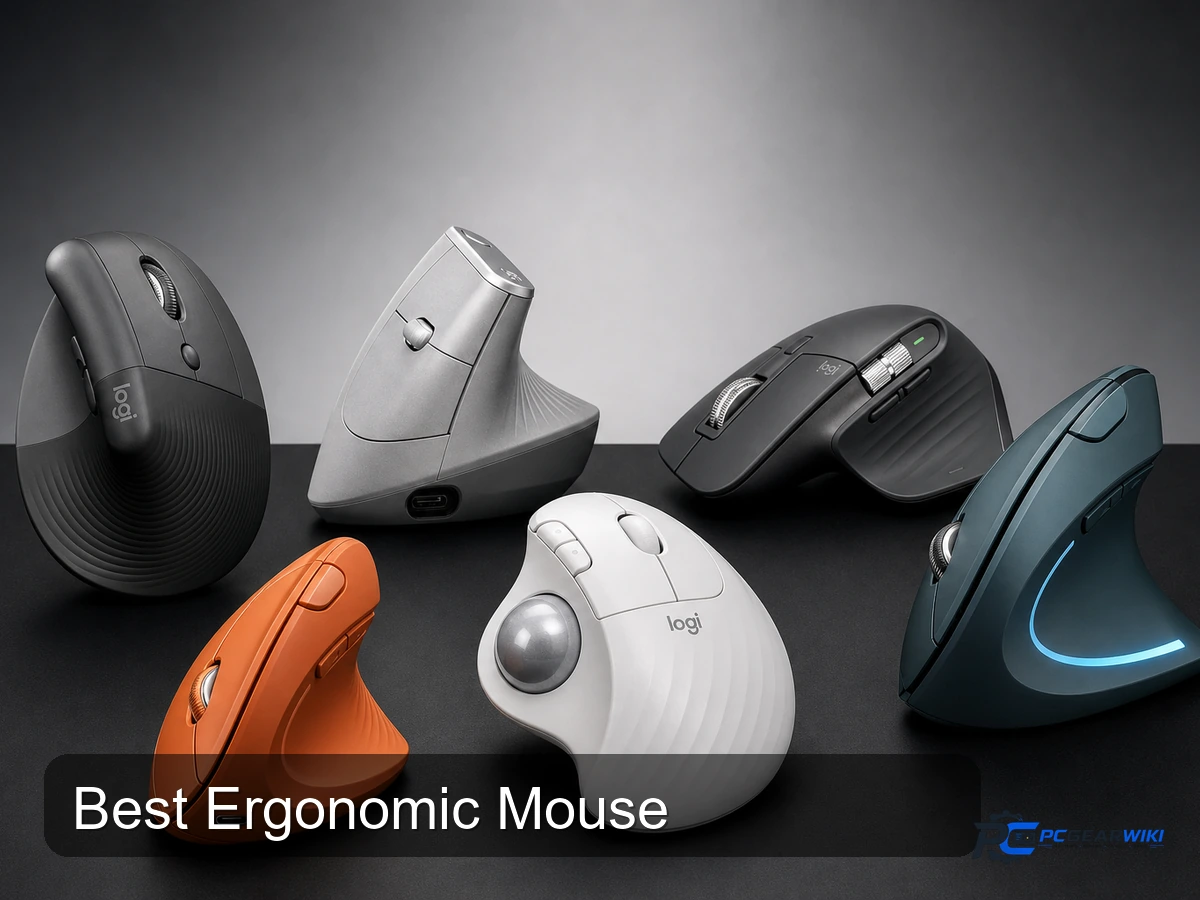
Quick answer: The best ergonomic mouse supports a relaxed grip, places primary controls within easy reach, and matches your hand size and preferred posture. Compare shape before sensor specifications: a vertical, tilted, or sculpted mouse can reduce awkward wrist angles for some users, but no single design is comfortable for every hand.
How to choose an ergonomic mouse
Start with hand size, handedness, grip style, and the amount of forearm rotation that feels natural at your desk. A tall vertical mouse changes wrist orientation more aggressively, while a mildly tilted productivity shape usually requires less adaptation. Check where the thumb rest, side buttons, and wheel sit because controls that require stretching can undermine the benefit of a supportive shell.
For daily work, compare scroll-wheel modes, horizontal navigation, multi-device switching, receiver and Bluetooth support, onboard profiles, and software compatibility. Weight matters differently than it does for competitive gaming: stability and low-effort movement are usually more valuable than the lowest possible gram figure. Treat comfort claims as individual fit guidance, not a medical promise.
| Decision area | What to compare | Important limitation |
|---|---|---|
| Shape and hand fit | Hand size, handedness, tilt, thumb support, and grip position | A shape can feel supportive to one user and restrictive to another |
| Controls | Wheel modes, side-button reach, horizontal scroll, and remapping | Software and operating-system support vary |
| Connectivity | USB receiver, Bluetooth, wired mode, and device switching | Check wake behavior, battery type, and receiver storage |
How PCGearWiki evaluated these options
We rank ergonomic mice by fit options, control accessibility, consistent tracking, scrolling, connectivity, software, build quality, warranty, and recurring owner feedback. We do not award a higher position solely for a steeper vertical angle or a larger number of buttons.
Continue your research: mouse grip styles, general mouse recommendations, and our review methodology.

Pros
- Reduces wrist and forearm discomfort via the vertical ergonomic angle
- Supports long battery runtime with minimal maintenance needs
- Offers broad OS compatibility for flexible use across devices
- Includes reliable wireless range and easy connectivity choices
Cons
- Limited to small and medium hand sizes excluding larger users
- Advanced customization and multi-device features require extra software
- Right-hand model dominates with fewer left-hand variants available
| Connectivity Technology | Bluetooth |
|---|---|
| Additional Features | Ergonomic Design, Touch Scroll, Wireless |
| Movement Detection | Optical |
| Button Quantity | 6 |
| Hand Orientation | Right |
| Compatible Devices | Laptop, Personal Computer, Tablet |
| Operating System | Chrome OS, Windows 10, Windows 11, iPadOS 14, macOS 10.15 |
| Battery Average Life | 24 months |
| Number of Batteries | 1 Lithium Polymer batteries required. (included) |
| Hardware Platform | Mac, PC |
Best suited to shoppers comparing mice products who specifically need promotes natural wrist posture to ease forearm strain during extended desk work, Delivers whisper-quiet clicks and smooth scrolling to support uninterrupted focus.
Before buying, compare the exact model’s compatibility, dimensions, core specifications, warranty, recurring owner feedback, and current price against other mice options. Retailer availability and pricing can change after publication.

Pros
- Effective ergonomic design that promotes better posture
- High precision tracking suitable for detailed work
- Flexible multi device connectivity options
- Long lasting rechargeable battery
- Build quality that feels premium and durable
Cons
- Not suitable for users with smaller hands
- Requires an adjustment period to adapt to the vertical orientation
- Depends on charging rather than replaceable batteries
| Connectivity Technology | USB |
|---|---|
| Additional Features | Wireless |
| Movement Detection | Optical |
| Button Quantity | 4 |
| Hand Orientation | Right |
| Compatible Devices | Windows + macOS + iPadOS |
| Operating System | Windows 10, 11 or later, Linux, Chrome OS, macOS, iPadOS, Android |
| Battery Average Life | 4 months |
| Number of Batteries | 1 Lithium Polymer batteries required. (included) |
| Hardware Platform | Laptop, PC |
Best suited to shoppers comparing mice products who specifically need reduces muscle strain with a natural handshake grip position for comfortable all day use, Optimizes wrist posture through its unique 57 degree vertical angle.
Before buying, compare the exact model’s compatibility, dimensions, core specifications, warranty, recurring owner feedback, and current price against other mice options. Retailer availability and pricing can change after publication.

Pros
- Exceptional tracking accuracy on diverse surfaces including glass
- Comfortable ergonomic shape for extended use
- Strong multi-device and multi-OS compatibility
- Long battery life with fast USB-C top-ups
- Quiet clicks without loss of responsive feel
Cons
- Full-size body may feel large for users with smaller hands
- Advanced customization requires separate software installation
- Premium build comes at a higher cost than basic mice
| Connectivity Technology | Radio Frequency, USB, Wi-Fi |
|---|---|
| Additional Features | Lightweight, Portable, Rechargeable, Wireless |
| Movement Detection | Optical |
| Button Quantity | 7 |
| Hand Orientation | Left |
| Compatible Devices | Laptop, Personal Computer |
| Operating System | Multi OS |
| Battery Average Life | 70 days |
| Number of Batteries | 1 Lithium Polymer batteries required. (included) |
| Hardware Platform | Mac, PC |
Best suited to shoppers comparing mice products who specifically need navigate documents at high speed with near-silent MagSpeed scrolling that stops precisely on any pixel, Work confidently on glass or any surface thanks to….
Before buying, compare the exact model’s compatibility, dimensions, core specifications, warranty, recurring owner feedback, and current price against other mice options. Retailer availability and pricing can change after publication.

Pros
- Significant reduction in muscle strain during prolonged use
- Versatile connectivity options including Bluetooth and USB receiver
- Long-lasting battery performance
- Quiet operation with reduced click noise
- Sustainable construction using recycled materials
Cons
- Not rechargeable, requiring periodic battery replacement
- Full customization features depend on installing additional software
- Users accustomed to traditional mice may need time to adapt to trackball operation
| Connectivity Technology | Bluetooth, USB |
|---|---|
| Additional Features | Lightweight, Portable, Wireless |
| Movement Detection | Optical |
| Button Quantity | 2 |
| Hand Orientation | Right |
| Compatible Devices | Personal Computer, Tablet |
| Operating System | Windows, macOS |
| Battery Average Life | 18 months |
| Number of Batteries | 1 AA batteries required. (included) |
| Hardware Platform | PC |
Best suited to shoppers comparing mice products who specifically need experience reduced forearm strain with a certified ergonomic design that supports natural hand positioning, Control the cursor precisely using thumb movements without lifting or….
Before buying, compare the exact model’s compatibility, dimensions, core specifications, warranty, recurring owner feedback, and current price against other mice options. Retailer availability and pricing can change after publication.

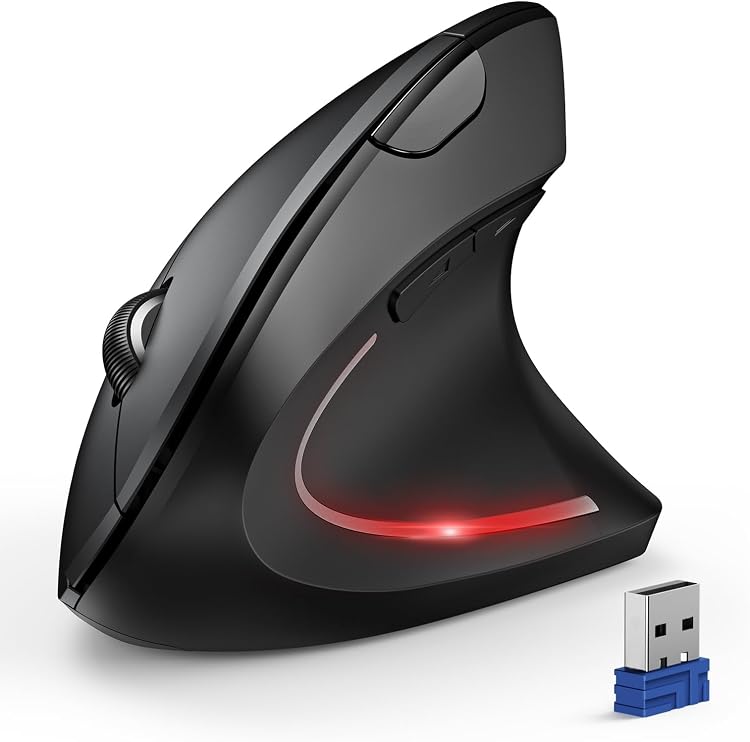
Pros
- Comfortable vertical grip that supports natural hand posture
- Versatile DPI adjustments for different tasks
- Hassle-free wireless setup
- Extra buttons for productivity
- Durable and lightweight construction
Cons
- Exclusively for right-handed individuals
- Potential signal interference near USB 3.0 ports
- Batteries not included in the package
| Connectivity Technology | USB |
|---|---|
| Additional Features | Wireless |
| Movement Detection | Optical |
| Button Quantity | 6 |
| Hand Orientation | Right |
| Compatible Devices | Laptop |
| Operating System | Linux, Windows 10 |
| Battery Average Life | 8 minutes |
| Number of Batteries | 2 AAA batteries required. |
| Hardware Platform | Mac |
Best suited to shoppers comparing mice products who specifically need reduces wrist and arm strain with its vertical ergonomic shape for extended work periods, Offers precise tracking across surfaces thanks to adjustable DPI settings….
Before buying, compare the exact model’s compatibility, dimensions, core specifications, warranty, recurring owner feedback, and current price against other mice options. Retailer availability and pricing can change after publication.
Pros
- Supports multiple connection modes for flexibility
- High DPI range for accurate tracking
- Reduces wrist pain with ergonomic design
- Quiet clicks for minimal disturbance
Cons
- Only compatible with right-handed users
- Side buttons do not work on macOS
- Requires two AAA batteries not included in the package
| Connectivity Technology | 2.4GHZ, Bluetooth |
|---|---|
| Additional Features | Bluetooth, Ergonomic Design, Wireless |
| Movement Detection | Optical |
| Button Quantity | 6 |
| Hand Orientation | Right |
| Compatible Devices | Personal Computer |
| Operating System | Windows, Mac, Chrome, Linux |
| Battery Average Life | 24 months |
| Number of Batteries | 2 AAA batteries required. |
| Hardware Platform | PC |
Best suited to shoppers comparing mice products who specifically need seamless switching between three devices improves multitasking efficiency without extra hardware, Adjustable DPI levels from 800 to 4800 allow precise control for various tasks….
Before buying, compare the exact model’s compatibility, dimensions, core specifications, warranty, recurring owner feedback, and current price against other mice options. Retailer availability and pricing can change after publication.

Pros
- Effective vertical shape helps maintain relaxed forearm position
- Reliable three-device connectivity simplifies device switching
- Rechargeable power and solid optical tracking performance
- Quiet clicks reduce distractions in office settings
Cons
- Initial learning period needed to adapt to vertical grip
- Not ideal for users with hands longer than 7.5 inches
- Forward and back buttons lack Mac OS compatibility
| Connectivity Technology | 2.4G USB-A Receiver, Bluetooth |
|---|---|
| Additional Features | Ergonomic Design, Multi-Device, Rechargeable, Vertical Design, Wireless |
| Movement Detection | Optical |
| Button Quantity | 7 |
| Hand Orientation | Right |
| Compatible Devices | Personal Computer, Smartphone, Tablet |
| Operating System | Android 4.3 or higher, Mac OS X 10.12 or higher, Windows 8, Windows 10 or higher |
| Battery Average Life | 1 months |
| Number of Batteries | 1 Lithium Ion batteries required. (included) |
| Hardware Platform | Windows,Linux |
Best suited to shoppers comparing mice products who specifically need promotes natural wrist alignment to reduce strain and discomfort from long computer sessions, Switches seamlessly between three devices using dual Bluetooth and 2.4GHz options….
Before buying, compare the exact model’s compatibility, dimensions, core specifications, warranty, recurring owner feedback, and current price against other mice options. Retailer availability and pricing can change after publication.

Pros
- Effectively reduces wrist pain for many users after a short adjustment
- Long-lasting battery eliminates frequent replacements
- Simple setup works across Windows, Mac, and Linux systems
- Multiple DPI settings adapt to precision needs
- Compact wireless receiver stores inside the mouse
Cons
- Requires several days to adapt to the vertical grip
- Limited to right-handed users only
- May not fit smaller hands comfortably
| Connectivity Technology | Wireless USB Connection |
|---|---|
| Additional Features | Ergonomic Design, Rechargeable, Soundless, Wireless |
| Movement Detection | Optical |
| Button Quantity | 6 |
| Hand Orientation | Right |
| Compatible Devices | Desktop, Laptop, Notebook, Personal Computer |
| Operating System | Windows 2000 / XP / 95 / 98 / Vista / 7 / 8 / 10 / 11/ Linux / Mac OS |
| Battery Average Life | 150 Hours |
| Number of Batteries | 1 Lithium Polymer batteries required. (included) |
| Hardware Platform | Desktop, Laptop, PC |
Best suited to shoppers comparing mice products who specifically need encourages healthy wrist posture to minimize strain and prevent injuries like carpal tunnel, Provides over 150 hours of use per charge with convenient Type-C….
Before buying, compare the exact model’s compatibility, dimensions, core specifications, warranty, recurring owner feedback, and current price against other mice options. Retailer availability and pricing can change after publication.

Pros
- Versatile multi-device connectivity reduces need for extra hardware
- Silent clicks support quiet work environments
- Horizontal scroll improves navigation in spreadsheets and wide apps
- Long battery life with emergency fast charging option
- Adjustable DPI adapts to varied tasks and surfaces
Cons
- Available only in a right-handed configuration
- Advanced button customization requires separate software
- May need a mouse pad for optimal tracking on some surfaces
| Brand | PHILIPS |
|---|---|
| Color | Black |
| Connectivity Technology | Bluetooth |
| Special Feature | Ergonomic Design |
| Movement Detection Technology | Laser |
Best suited to shoppers comparing mice products who specifically need relieve wrist strain during long sessions with a contoured right-handed shape and anti-slip thumb rest., Switch instantly between three devices using Bluetooth or the….
Before buying, compare the exact model’s compatibility, dimensions, core specifications, warranty, recurring owner feedback, and current price against other mice options. Retailer availability and pricing can change after publication.

Pros
- Promotes healthier hand posture during computer use
- Versatile multi-device connectivity options
- Extended battery runtime between charges
- Quiet performance suitable for offices or libraries
- Durable construction for prolonged reliability
Cons
- Designed primarily for small to medium sized hands
- Certain navigation buttons do not function on Mac operating systems
- Needs occasional recharging to maintain operation
| Connectivity Technology | Bluetooth, USB |
|---|---|
| Additional Features | Ergonomic Design, Rechargeable, Soundless, Wireless |
| Movement Detection | Optical |
| Button Quantity | 6 |
| Hand Orientation | Right |
| Compatible Devices | Personal Computer, Tablet |
| Operating System | Android, Chrome OS, Linux, Windows 11, iOS |
| Battery Average Life | 2 months |
| Number of Batteries | 1 Nonstandard Battery batteries required. (included) |
| Hardware Platform | Linux, Mac |
Best suited to shoppers comparing mice products who specifically need reduces wrist strain with a natural 52 degree vertical grip for extended comfortable use, Connect to up to three devices effortlessly via Bluetooth 5.0….
Before buying, compare the exact model’s compatibility, dimensions, core specifications, warranty, recurring owner feedback, and current price against other mice options. Retailer availability and pricing can change after publication.
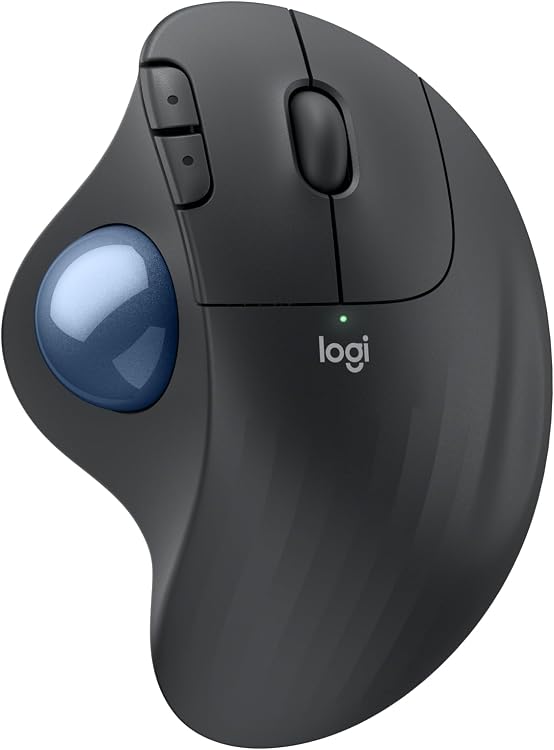
Pros
- Promotes relaxed forearm posture for long sessions
- Functions smoothly on any surface with no mouse movement needed
- Fits a wide range of hand sizes for inclusive comfort
- Supports both Windows and macOS with basic functions available out of the box
Cons
- Trackball requires periodic removal and cleaning to stay responsive
- Full button customization and shortcuts need separate app installation
- Depends on replaceable AA batteries instead of a built-in rechargeable pack
| Connectivity Technology | Bluetooth, USB |
|---|---|
| Additional Features | Lightweight, Portable, Wireless |
| Movement Detection | Optical |
| Button Quantity | 2 |
| Hand Orientation | Right |
| Compatible Devices | Personal Computer, Tablet |
| Operating System | Windows, macOS |
| Battery Average Life | 18 months |
| Hardware Platform | PC |
| Power Source | Battery Powered |
Best suited to shoppers comparing mice products who specifically need reduces forearm muscle strain by 25 percent through an ergonomist-certified shape that supports natural hand and arm positioning all day, Enables precise cursor control….
Before buying, compare the exact model’s compatibility, dimensions, core specifications, warranty, recurring owner feedback, and current price against other mice options. Retailer availability and pricing can change after publication.

Pros
- Comfortable ergonomic build for right-handed users
- Extended battery life with quick USB-C charging
- Versatile dual Bluetooth pairing
- Programmable controls for personalization
Cons
- Only suitable for right-handed users
- Advanced features require software installation
- Lacks a wired mode for backup connectivity
| Connectivity Technology | Bluetooth |
|---|---|
| Additional Features | Ergonomic Design, Rechargeable, Wireless |
| Movement Detection | Optical |
| Button Quantity | 6 |
| Hand Orientation | Right |
| Compatible Devices | Laptop, Personal Computer |
| Operating System | Windows |
| Battery Average Life | 3 months |
| Number of Batteries | 1 Lithium Polymer batteries required. (included) |
| Hardware Platform | Mac, PC |
Best suited to shoppers comparing mice products who specifically need maximize comfort with a right-handed ergonomic design featuring a supportive thumb rest and soft grip materials for extended use, Enhance productivity through customizable buttons….
Before buying, compare the exact model’s compatibility, dimensions, core specifications, warranty, recurring owner feedback, and current price against other mice options. Retailer availability and pricing can change after publication.

Pros
- Comfortable ergonomic shape for all-day use
- Reliable multi-device pairing
- Precise cursor control on various surfaces
- Long battery life with easy recharging
- Durable build quality
Cons
- Larger size may not suit users with smaller hands
- Advanced features require initial setup time
- Limited customization options without additional software
| Connectivity Technology | Bluetooth |
|---|---|
| Additional Features | Ergonomic Design |
| Movement Detection | Trackball |
| Button Quantity | 7 |
| Hand Orientation | Right |
| Compatible Devices | Personal Computer |
| Operating System | Windows 10, Windows 8 |
| Battery Average Life | 1680 Hours |
| Number of Batteries | 1 CR123A batteries required. (included) |
| Hardware Platform | Laptop, PC |
Best suited to shoppers comparing mice products who specifically need enables seamless switching between three computers to boost workflow efficiency, Hyper-fast scrolling allows quick navigation through extensive documents and web pages.
Before buying, compare the exact model’s compatibility, dimensions, core specifications, warranty, recurring owner feedback, and current price against other mice options. Retailer availability and pricing can change after publication.

Pros
- Effective ergonomic vertical design
- Long-lasting battery performance
- Versatile wireless connectivity options
- Accurate tracking for everyday tasks
- Cross-platform compatibility
Cons
- Exclusively designed for right-handed users
- Requires adaptation time for the vertical grip
- Maximum 4000 DPI may limit advanced gaming applications
| Brand | Logitech |
|---|---|
| Color | Black |
| Connectivity Technology | Bluetooth, Radio Frequency, USB |
| Special Feature | Ergonomic Design |
| Movement Detection Technology | Optical |
Best suited to shoppers comparing mice products who specifically need promotes natural hand position to minimize wrist strain during extended use, Offers reliable wireless connection through Bluetooth or USB receiver.
Before buying, compare the exact model’s compatibility, dimensions, core specifications, warranty, recurring owner feedback, and current price against other mice options. Retailer availability and pricing can change after publication.

Pros
- Precise any-surface tracking including glass
- Fast and quiet MagSpeed scrolling performance
- Strong multi-device and cross-platform support
- Comfortable ergonomic design for extended use
Cons
- No USB receiver or charging cable included in the box
- Advanced customization requires separate software installation
- Bluetooth only with no compatibility for Logi Bolt receivers
| Connectivity Technology | Bluetooth |
|---|---|
| Additional Features | Portable, Programmable Buttons, Rechargeable, Soundless, Wireless |
| Movement Detection | Optical |
| Button Quantity | 7 |
| Hand Orientation | Right |
| Compatible Devices | Personal Computer |
| Operating System | Windows, macOS, Linux, Chrome OS, iPadOS, Android |
| Battery Average Life | 70 days |
| Number of Batteries | 1 Nonstandard Battery batteries required. (included) |
| Hardware Platform | Linux, Mac, PC |
Best suited to shoppers comparing mice products who specifically need work precisely on glass and other surfaces with customizable 8000 DPI tracking for accurate cursor control, Scroll documents and web pages at high speed….
Before buying, compare the exact model’s compatibility, dimensions, core specifications, warranty, recurring owner feedback, and current price against other mice options. Retailer availability and pricing can change after publication.
How to Choose the Right Ergonomic Mouse
Choosing the right ergonomic mouse starts with understanding how you plan to use it. A good option for gaming may not be the best fit for productivity, content creation, portability, or long-term upgrade value. Before buying, consider your budget, performance expectations, compatibility needs, and the features that matter most for your setup.
How long does an ergonomic mouse typically last?
A quality ergonomic mouse can remain useful for several years when it matches your system requirements and is maintained properly. Actual lifespan depends on usage, build quality, software support, and how quickly your performance needs change.
Sources and Verification
Research basis: Product identity, dimensions, interfaces, supported features, and warranty terms are checked against available manufacturer documentation and current retailer listings. Price, stock, and aggregate customer ratings can change after publication.
Testing disclosure: Unless this article explicitly states that PCGearWiki performed hands-on testing and describes the test setup, recommendations are research-based editorial evaluations rather than PCGearWiki laboratory measurements. Customer feedback is used to identify recurring ownership patterns, not as proof of technical performance.
Last source review: August 27, 2026. See our Review Methodology, Editorial Policy, and Corrections Policy.




Write Your Review
No reviews yet. Be the first to share your experience!