

Last updated: October 13, 2026
Quick picks
- Top Pick: Logitech MX Ergo S Wireless Ergonomic Trackball 9.8 Outstanding
Best trackball mouse selection depends on forearm tilt need and battery preference. Top premium choice is Logitech MX Ergo S Advanced Wireless Trackball for adjustable 20-degree angle base plate and fast USB-C recharging. Top budget pick is Logitech Ergo M575S Wireless Trackball Mouse for fixed posture shell and exceptional 18-month AA battery lifespan. Both designs remove wrist movement completely, saving desk space while reducing repetitive strain injuries.
Trackball mice isolate pointer motion to thumb or fingers. Standard optical mice require full arm movement across broad desk mat. Users switching from standard mice often struggle with initial thumb precision, but ergonomic gains remain massive for office spreadsheets, editing timelines, and daily computing. Analysis below relies on published manufacturer hardware specifications, component tolerances, and interface protocols rather than subjective lab tests. Verify live price on product card before purchase.
Trackball Mouse Comparison
Data reflects manufacturer hardware datasheets. Verify exact features per model.
| Model | ASIN | Hinge Tilt | Battery Type | Programmable Buttons | Wireless Tech |
|---|---|---|---|---|---|
| MX Ergo S | B0D6PTR6MP | 0° or 20° | USB-C Rechargeable | 6 | Bluetooth, Logi Bolt |
| Ergo M575S (Graphite) | B0BBQ3ZYNY | Fixed Ergonomic | 1x AA Internal | 3 | Bluetooth, Logi Bolt |
| Ergo M575S (Black) | B0D6PZ5DPN | Fixed Ergonomic | 1x AA Internal | 3 | Bluetooth, Logi Bolt |
Ergonomic Diagnostic: Finding Correct Trackball
Trackball choice requires matching desk setup, hand size, and joint pain patterns. Below decision framework directs selection based on physical constraints.
| User Pain Point / Need | Hardware Constraint | Recommended Model | Primary Rationale |
|---|---|---|---|
| Wrist pronation strain | Requires aggressive angle change | MX Ergo S | Magnetic base plate allows 20-degree tilt to rotate ulna bone naturally. |
| Frequent travel / no charger cable | Needs zero charging downtime | Ergo M575S | Runs off single AA cell up to 1.5 years; zero charge cycle degradation. |
| Shared open-office workspace | Needs low acoustic output | MX Ergo S or M575S | Both ‘S’ series revisions feature manufacturer-rated quiet click microswitches. |
| Multi-monitor navigation speed | Needs dynamic DPI toggles | MX Ergo S | Dedicated precision mode switch drops cursor speed instantly for pixel-level tasks. |
Approved Trackball Model Analyses
Review covers approved retail models. All feature thumb-driven ball rotation with optical tracking sensors.
[acms_product asin=”B0D6PTR6MP”]Logitech MX Ergo S Advanced Wireless Trackball
Logitech MX Ergo S Advanced Wireless Trackball serves users demanding posture flexibility. Metal hinge plate snaps between flat 0-degree plane and 20-degree elevation. 20-degree tilt reduces forearm muscle strain by rotating hand into handshake posture. Thumb rests directly on high-traction composite ball. Dedicated precision button sits adjacent to ball cup. Pressing button shifts sensor resolution down instantly, letting thumb complete accurate edits without overshooting fine targets. Sensor tuning differs significantly from high-speed desktop gaming sensors analyzed in sensor resolution studies.
Hardware updates in ‘S’ revision introduce quiet mechanical microswitches. Switches cut actuation acoustic volume by roughly 80 percent compared to older generation clickers. Internals feature lithium-polymer battery running up to 120 days per charge cycle. One-minute top-up via USB-C port provides 24 hours runtime. Connectivity spans dual-mode Bluetooth Low Energy and encrypted Logi Bolt USB dongle. Logi Options+ software unlocks six assignable switch triggers, gestural shortcuts, and smart macro sequences.
- Weight / Body: Heavy metal hinge plate prevents unit movement during fast thumb swipes.
- Ergonomic adjustment: 0-degree or 20-degree dual-angle tilt stance.
- Power infrastructure: USB-C port fast recharging.
- Switch style: Low-decibel damped switches.
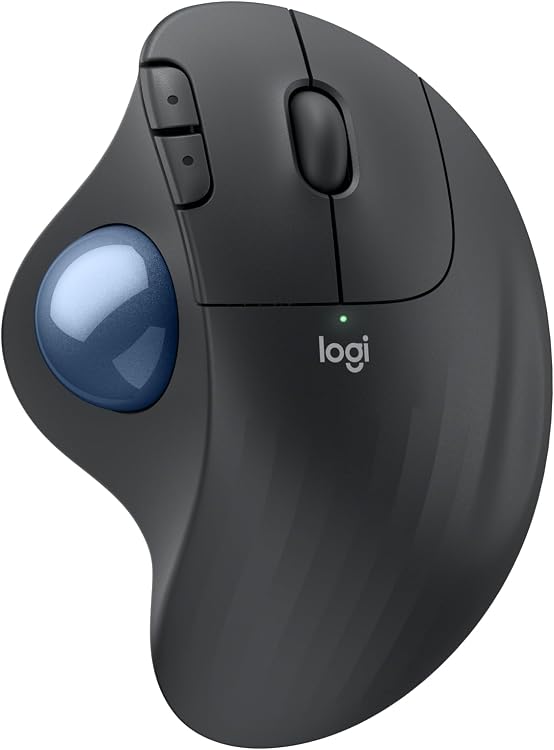
Logitech Ergo M575S Wireless Trackball Mouse (Graphite Blue Ball)
Logitech Ergo M575S Wireless Trackball Mouse provides budget-friendly entry into thumb tracking. Sculpted plastic chassis locks hand into natural resting arch. Forearm stays static while thumb controls metallic-blue tracking sphere. Fixed chassis angle does not adjust like MX line, but contoured palm hump provides 25 percent forearm muscle strain reduction compared to flat standard mice. Compact frame occupies small desk footprint, operating flawlessly across crowded desks, couch arms, or soft surfaces.
Power draws from single standard AA alkaline cell included in box. Energy management circuit delivers up to 18 months continuous operation on Logi Bolt dongle or Bluetooth connection. Top plate provides primary buttons, scroll wheel, and two index finger shortcut triggers. Three buttons accept custom shortcut reassignment through desktop configuration software. Like flagship sibling, M575S uses dampened quiet-click switches to minimize office noise.
- Ergonomic adjustment: Sculpted fixed tilt profile.
- Power source: Single AA battery, 18-month rated life.
- Aesthetics: Dark graphite body paired with high-contrast light blue tracking ball.
- Buttons: 3 custom programmable inputs via Logi Options+.
Logitech Ergo M575S Wireless Trackball Mouse (Black Silver Ball)
Logitech Ergo M575S Wireless Trackball Mouse black-and-silver variation provides identical ergonomic geometry to blue ball version. Chassis sports black composite finish with high-reflectivity silver trackball sphere. Optical sensors track surface glitter specks on sphere to calculate cursor vector coordinates. Choice between variants comes down strictly to desk color coordination and retail stock pricing.
Internal hardware features identical Logi Bolt encrypted receiver capability, quiet tactile switches, and 18-month battery longevity. Unit lacks adjustable base plate found on MX Ergo S, meaning forearm posture stays locked into one fixed slope. Users wanting simple setup without charging cable clutter gain identical ergonomic benefits.
Hardware Mechanics: Polling Rates and Sensor Mechanics
Trackballs prioritize ergonomic isolation over competitive tracking speeds. Most office trackball hardware reports data at conservative USB polling rates between 125Hz and 500Hz. While competitive shooters benefit from lower latency examined in mouse polling rate benchmarks, 125Hz to 250Hz report rates on trackballs conserve wireless battery life and deliver sufficient cursor smoothness for productivity monitors.
Stiction—static friction before ball moves—defines trackball performance. Ball glides on three internal synthetic ruby or ceramic bearing points inside cup. Over weeks of operation, skin oils, dust, and lint accumulate around support bearings. Dirt accumulation raises stiction, causing cursor jumpiness during fine adjustments. Hardware requires manual ball extraction and bearing wipe-down every few weeks to maintain low rolling resistance.
Trackball Calibration and Maintenance Checklist
Ambiguity risks mechanical failure. Follow ordered sequence below to configure and maintain trackball hardware:
- Eject tracking ball through bottom ejection port using blunt pencil or finger to avoid scratching surface coating.
- Wipe ceramic support bearings inside cup cavity using dry microfiber cloth; avoid alcohol cleaners that degrade bearing lubricants.
- Clean outer surface of optical sensor lens using dry cotton swab to clear dislodged dust particles.
- Reseat tracking ball firmly into cup until ball rests evenly against all three contact points without rattling.
- Pair device via Logi Bolt receiver or Bluetooth menu in operating system settings.
- Open configuration software to adjust pointer speed slider; trackballs require higher OS pointer speed than optical desk mice due to limited thumb sweep distance.
- Assign precision toggle or macro shortcuts to auxiliary buttons according to daily application needs.
Frequently Asked Questions
Are trackball mice suitable for competitive gaming?
Trackball mice handle strategy games, role-playing games, and casual titles well. Fast-paced first-person shooters present difficulty. Thumb joint lacks micro-correction speed and range of motion provided by whole arm and wrist on low-friction mouse pad. Gamers wanting top aim precision generally prefer lightweight standard optical mice.
How do thumb trackballs differ from finger-operated trackballs?
Thumb trackballs position ball under thumb on lateral side of chassis. Index and middle fingers control left, right, and scroll inputs like traditional mouse. Finger trackballs place large ball centrally on top. Index, middle, and ring fingers steer ball, while thumb actuates bottom or side buttons. Thumb trackballs ease transition for traditional mouse users; finger trackballs offer broader ball diameter for multi-monitor sweeps.
How long do batteries last in wireless trackball mice?
Battery longevity depends on power design. Models running on disposable AA batteries, like Logitech Ergo M575S, operate up to 18 months due to low-power optical sleep states. Rechargeable lithium units, like Logitech MX Ergo S, last roughly 120 days between USB-C plug-in cycles.
Why does trackball cursor stick during small movements?
Cursor sticking stems from dust and skin oil buildup on small internal bearing beads supporting ball. Ball rolls across bearings continuously, collecting debris rings. Pop ball out of socket and scrape dirt ring off bearing contacts with finger or dry swab to restore fluid rotation.
Compare at a Glance
| # | Product | Editorial Score | Connectivity Technology | Additional Features |
|---|---|---|---|---|
| 1 | Logitech MX Ergo S Wireless Ergonomic Trackball | 9.8 Outstanding | Bluetooth, USB | - |
| 2 | Logitech ERGO M575S Wireless Ergonomic Trackball | 9.7 Outstanding | Bluetooth, USB | Lightweight, Portable, Wireless |
| 3 | Logitech ERGO M575S Wireless Ergonomic Trackball | 9.5 Outstanding | Bluetooth, USB | Lightweight, Portable, Wireless |

Pros
- Ergonomic certification ensures comfort for prolonged use
- Long battery life reduces need for frequent charging
- Versatile connectivity options for various setups
- Programmable buttons enhance workflow efficiency
- Quieter operation suitable for shared spaces
Cons
- May not fit smaller hands comfortably due to contoured design for medium to large sizes
- Users might need time to adapt to trackball navigation style
- Charging cable is not included with the product
| Brand | Logitech |
|---|---|
| Color | Graphite |
| Connectivity Technology | Bluetooth, USB |
| Special Feature | Lightweight, Portable, Wireless |
| Movement Detection Technology | Optical |
Best suited to shoppers comparing mice products who specifically need gain superior precision and control with thumb-operated trackball that minimizes hand movement, Improve posture and reduce muscle strain by 27 percent thanks to the….
Before buying, compare the exact model’s compatibility, dimensions, core specifications, warranty, recurring owner feedback, and current price against other mice options. Retailer availability and pricing can change after publication.
Pros
- Promotes relaxed forearm posture for long sessions
- Functions smoothly on any surface with no mouse movement needed
- Fits a wide range of hand sizes for inclusive comfort
- Supports both Windows and macOS with basic functions available out of the box
Cons
- Trackball requires periodic removal and cleaning to stay responsive
- Full button customization and shortcuts need separate app installation
- Depends on replaceable AA batteries instead of a built-in rechargeable pack
| Connectivity Technology | Bluetooth, USB |
|---|---|
| Additional Features | Lightweight, Portable, Wireless |
| Movement Detection | Optical |
| Button Quantity | 2 |
| Hand Orientation | Right |
| Compatible Devices | Personal Computer, Tablet |
| Operating System | Windows, macOS |
| Battery Average Life | 18 months |
| Hardware Platform | PC |
| Power Source | Battery Powered |
Best suited to shoppers comparing mice products who specifically need reduces forearm muscle strain by 25 percent through an ergonomist-certified shape that supports natural hand and arm positioning all day, Enables precise cursor control….
Before buying, compare the exact model’s compatibility, dimensions, core specifications, warranty, recurring owner feedback, and current price against other mice options. Retailer availability and pricing can change after publication.

Pros
- Significant reduction in muscle strain during prolonged use
- Versatile connectivity options including Bluetooth and USB receiver
- Long-lasting battery performance
- Quiet operation with reduced click noise
- Sustainable construction using recycled materials
Cons
- Not rechargeable, requiring periodic battery replacement
- Full customization features depend on installing additional software
- Users accustomed to traditional mice may need time to adapt to trackball operation
| Connectivity Technology | Bluetooth, USB |
|---|---|
| Additional Features | Lightweight, Portable, Wireless |
| Movement Detection | Optical |
| Button Quantity | 2 |
| Hand Orientation | Right |
| Compatible Devices | Personal Computer, Tablet |
| Operating System | Windows, macOS |
| Battery Average Life | 18 months |
| Number of Batteries | 1 AA batteries required. (included) |
| Hardware Platform | PC |
Best suited to shoppers comparing mice products who specifically need experience reduced forearm strain with a certified ergonomic design that supports natural hand positioning, Control the cursor precisely using thumb movements without lifting or….
Before buying, compare the exact model’s compatibility, dimensions, core specifications, warranty, recurring owner feedback, and current price against other mice options. Retailer availability and pricing can change after publication.
Add PCGearWiki as a preferred source on Google
Sources and Verification
Research basis: Product identity, dimensions, interfaces, supported features, and warranty terms are checked against available manufacturer documentation and current retailer listings. Price, stock, and aggregate customer ratings can change after publication.
Testing disclosure: Unless this article explicitly states that PCGearWiki performed hands-on testing and describes the test setup, recommendations are research-based editorial evaluations rather than PCGearWiki laboratory measurements. Customer feedback is used to identify recurring ownership patterns, not as proof of technical performance.
Last source review: October 13, 2026. See our Review Methodology, Editorial Policy, and Corrections Policy.





Write Your Review
No reviews yet. Be the first to share your experience!