

Updated: . Added model-specific battery and receiver constraints so a battery-life headline is not mistaken for performance at every polling rate.
Quick answer: Start with a reliable wired or dedicated 2.4GHz connection and a shape you can control comfortably. The Logitech G305 is a straightforward battery-powered wireless candidate; the Razer Viper V3 HyperSpeed adds a high-polling upgrade path. Neither is declared the fastest mouse here: this guide does not contain a controlled click- or motion-latency test.
Products discussed in this guide
These listings are comparison references, not a guarantee of price or stock. We may earn a commission from qualifying purchases.
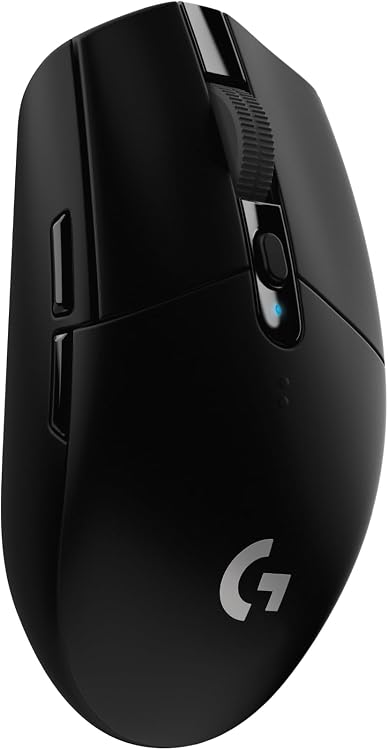


A mouse can advertise a short USB reporting interval while still having other sources of delay. Switch processing, sensor behavior, firmware, the game and the display all affect what reaches your screen. Buying solely on an 8,000Hz label can miss the problem you are trying to solve.
Choose a connection before a headline number
| Candidate | Connection to use for gaming | Why consider it | Reason to choose differently |
|---|---|---|---|
| Logitech G305 LIGHTSPEED | Included LIGHTSPEED receiver | Compact design and replaceable AA battery; no charging cable to manage | Not a rechargeable or multi-kilohertz model; check whether the rounded shell fits your grip |
| Razer Viper V3 HyperSpeed | HyperSpeed receiver | Wireless gaming with an optional HyperPolling receiver upgrade | Price the receiver separately and verify supported firmware before paying for a higher rate |
| Razer Orochi V2 | 2.4GHz receiver, rather than Bluetooth, for the gaming comparison | Small portable shape and separate Bluetooth convenience mode | Small bodies can feel cramped with a large palm grip; modes are not latency-equivalent |
| Razer Basilisk V3 | USB cable | A wired option for buyers who prefer a sculpted right-handed body and more controls | Cable routing and shell size matter; this is not an ultralight symmetrical design |

Polling interval is not end-to-end latency
The nominal interval between reports is 1,000 divided by the polling rate in Hz. That produces 2ms at 500Hz, 1ms at 1,000Hz, 0.25ms at 4,000Hz and 0.125ms at 8,000Hz. These are calculated intervals, not measured response times for any mouse in the table.
A higher report rate can deliver more frequent movement updates, but it does not remove switch processing or guarantee an equal improvement on screen. Game support, CPU load, frame pacing and display refresh all matter. Compare one rate at a time in the game you actually play; keep the lower setting if the higher one introduces instability.
Razer’s Viper V3 HyperSpeed documentation describes higher polling with a separately sold HyperPolling dongle. Do not assume that every retail bundle includes it. Logitech’s G305 page identifies its LIGHTSPEED connection and AA-battery design; manufacturer response claims are not our laboratory measurements.
Receiver upgrades also change the battery trade-off
Razer’s current Viper V3 HyperSpeed support sheet lists up to 280 hours at 1,000Hz and up to 50 hours at 8,000Hz. The higher-rate mode needs the supported HyperPolling receiver and firmware; the ordinary included receiver should not be assumed to provide that maximum. These are manufacturer battery claims, not runtime measured by PCGearWiki.
The same sheet distinguishes 82g with the supplied AA battery from 59g without a battery. The battery-free figure is not a usable playing weight. Compare mice with their required batteries installed, and compare runtime only at the rate you intend to use.
Source: Razer Viper V3 HyperSpeed RZ01-0491 technical support. Firmware and receiver support can change, so confirm the current instructions before buying an accessory.
For a practical purchase comparison, write down mouse price + any required receiver + battery or charging needs. A higher report rate is an optional configuration to evaluate, not a reason to compare one product’s best-case runtime with another’s highest-performance mode.
Fit can outweigh a small reporting difference
Use your current mouse as a reference. Note where your palm touches, whether you can lift it without squeezing, and whether side buttons can be reached without changing your aim. A shell that forces extra grip pressure can make long sessions uncomfortable even when its electronics are excellent.
For a small fingertip grip, compare the Orochi’s compact body with the G305 rather than assuming both feel alike. For a larger claw grip, compare the Viper shape in person where possible. The Basilisk suits a different priority: a right-handed sculpted body with more controls. None of those fit judgments can be settled by a customer star score.
Before replacing your mouse, run this check
- Record the mouse model, firmware, connection mode, polling rate, game and display refresh. Keep DPI and in-game sensitivity fixed.
- Charge the battery or fit a fresh one. Put the receiver near the mouse pad using the manufacturer’s extension arrangement, away from obvious interference.
- Compare the dedicated receiver mode with the same mode after moving the receiver. Do not mix Bluetooth and 2.4GHz results.
- Try 1,000Hz before higher rates. Check repeated movement, clicks and frame-time behavior, not just a polling-rate website.
- Restore one changed setting at a time. If stutter remains, investigate game and system behavior before assuming the sensor is faulty.
Which should you buy?
Choose the G305 when replaceable batteries, simplicity and its shape match your needs. Consider the Viper V3 HyperSpeed when its shell suits you and you want the option of a receiver upgrade. Choose the Orochi for a deliberately compact setup, or the wired Basilisk for its sculpted controls. Check the current seller, bundle and return policy through the product links; there is no universal latency winner established by the evidence in this guide.
For a wider comparison of controls and grip, see our gaming mouse buying guide. If cursor movement feels artificially straightened, use the angle-snapping troubleshooting guide before changing hardware.
Evidence and disclosure
This is an editorial buying or setup guide, not a PCGearWiki hands-on laboratory test. Manufacturer documentation is linked where used; specifications and listing identities are distinguished from measured performance. Product links identify the selected listing, and offers, configurations and sellers can change. See our review methodology and affiliate disclosure.
As an Amazon Associate I earn from qualifying purchases.


Write Your Review
No reviews yet. Be the first to share your experience!