

Last updated: August 5, 2026
Quick answer: The best lightweight mouse is not simply the model with the lowest listed weight. A suitable shell shape, balanced weight distribution, reliable sensor, low-latency connection, durable switches, and feet that suit your mouse pad matter more than saving the final few grams. Start with hand size and grip style.
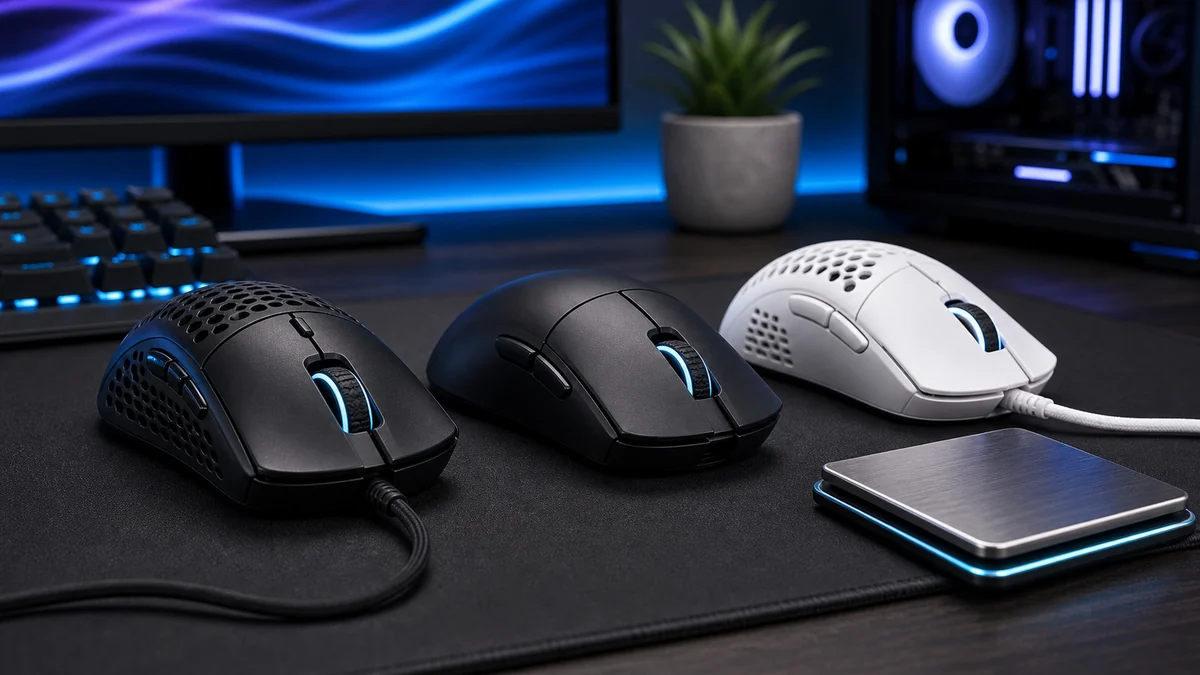
Key decision factors
| Factor | What it means | What to check |
|---|---|---|
| Under 60 g | Very low inertia | Fingertip and fast competitive aiming |
| 60–70 g | Light with more control | Claw grip and mixed FPS use |
| 70–85 g | Balanced, familiar feel | Palm/claw users and general gaming |
PCGearWiki separates manufacturer specifications from practical buying criteria. See our evaluation process and Review Methodology for how recommendations are assessed.
A lightweight gaming mouse reduces the effort needed for repeated flicks and direction changes, but weight alone does not make a mouse good. Shape, balance, sensor behavior, click feel, wireless stability, and the position of the side buttons determine whether a model remains comfortable after several hours.
This guide is specifically about low-mass mice for FPS and fast-paced games. It is separate from our low-latency mouse guide, which prioritizes report consistency, polling behavior, and connection performance. A mouse can be light without being especially fast, and a fast mouse can still be too heavy or poorly shaped for a particular grip.
Quick answer: what counts as a lightweight mouse?
For gaming, under 70 grams is a useful lightweight target, 70 to 85 grams is a balanced middle ground, and models above roughly 90 grams usually feel substantial during rapid movements. These ranges are guidelines rather than pass-or-fail rules because a well-balanced 80-gram mouse may feel easier to control than a rear-heavy 65-gram model.
| Weight class | Typical feel | Best fit |
|---|---|---|
| Under 60 g | Very quick and low inertia | Fingertip grip, competitive FPS, low sensitivity |
| 60-70 g | Light with more control | Claw grip and mixed competitive games |
| 70-85 g | Balanced and familiar | Palm/claw users and general gaming |
| Above 85 g | More planted | Productivity, MMO controls, users who prefer stability |
Before choosing a model, compare your hand size and grip with our palm, claw, and fingertip grip guide. The correct shell width and hump position matter more than saving the final five grams.
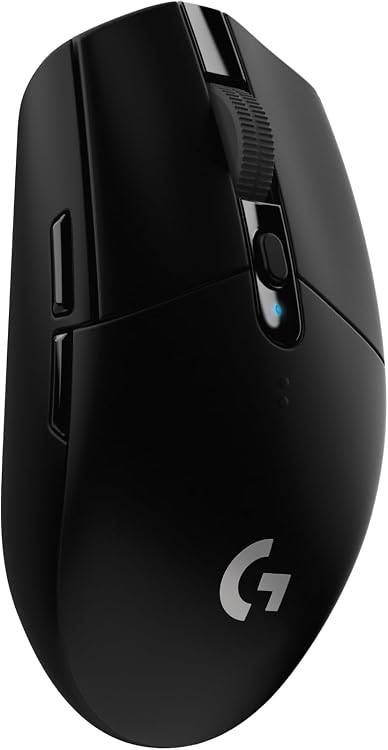
Pros
- Reliable low-latency LIGHTSPEED wireless for competition-level response
- Long battery life reduces interruptions during extended play
- Lightweight construction improves maneuverability and reduces fatigue
- High DPI range supports accurate aiming in fast-paced games
- Built-in receiver storage enhances portability
Cons
- Requires periodic AA battery replacement instead of built-in recharging
- Symmetrical shape may not suit all hand sizes or grip styles
- Advanced button programming needs separate software installation
| Connectivity Technology | USB |
|---|---|
| Additional Features | Wireless |
| Movement Detection | Optical |
| Button Quantity | 6 |
| Hand Orientation | Ambidextrous |
| Compatible Devices | Laptop, Personal Computer |
| Operating System | Microsoft Windows |
| Battery Average Life | 250 Hours |
| Number of Batteries | 1 AA batteries required. (included) |
| Hardware Platform | PC/Mac |
Best suited to shoppers comparing gaming mice products who specifically need gain lag-free wireless performance comparable to wired mice for responsive gameplay, Achieve precise tracking with the HERO sensor at up to 12000 DPI sensitivity.
Before buying, compare the exact model’s compatibility, dimensions, core specifications, warranty, recurring owner feedback, and current price against other gaming mice options. Retailer availability and pricing can change after publication.

Pros
- Ultra low weight enables faster movements and less fatigue in prolonged gaming.
- Lightspeed wireless delivers lag-free performance for reliable tournament use.
- HERO sensor provides high precision and efficiency for confident aiming.
- Durable construction retains integrity without unnecessary holes or added weight.
Cons
- Only five buttons may restrict advanced macro customization for some users.
- Wireless connection requires a USB receiver rather than native Bluetooth support.
- Battery life duration is not detailed, requiring periodic recharging.
| Connectivity Technology | Proprietary Wireless |
|---|---|
| Additional Features | Lightweight, Programmable Buttons, Rechargeable, Wireless |
| Movement Detection | Optical |
| Button Quantity | 5 |
| Hand Orientation | Right |
| Compatible Devices | Desktop |
| Operating System | Windows 8 |
| Battery Average Life | 70 Hours |
| Number of Batteries | 1 Lithium Polymer batteries required. (included) |
| Hardware Platform | PC |
Best suited to shoppers comparing mice products who specifically need reduce hand fatigue during long sessions with an ultra-lightweight build under 63 grams for quicker reactions., Maintain uninterrupted focus using reliable Lightspeed wireless technology….
Before buying, compare the exact model’s compatibility, dimensions, core specifications, warranty, recurring owner feedback, and current price against other mice options. Retailer availability and pricing can change after publication.

Logitech G PRO X Superlight 2 Wireless Gaming Mouse 60g with HERO 2 Sensor 8kHz Polling
Pros
- Exceptionally low weight improves movement speed and control
- High polling rate and advanced sensor enhance real-time responsiveness
- Long battery life reduces downtime between charges
- Durable hybrid switches offer reliable tactile feedback
Cons
- Only five programmable buttons limit customization options
- Symmetrical shape may not fit all hand sizes or grip styles
- Wireless performance requires line-of-sight to receiver for peak results
| Connectivity Technology | Radio Frequency, USB |
|---|---|
| Additional Features | Lightweight, Portable, Rechargeable, Wireless |
| Movement Detection | Optical |
| Button Quantity | 5 |
| Hand Orientation | Right |
| Compatible Devices | Personal Computer |
| Operating System | Windows, macOS |
| Battery Average Life | 95 Hours |
| Number of Batteries | 1 Lithium Polymer batteries required. (included) |
| Hardware Platform | PC |
Best suited to shoppers comparing gaming mice products who specifically need ultra-light 60g build enables quicker flicks and reduced fatigue during long sessions, HERO 2 sensor delivers pinpoint accuracy at up to 44,000 DPI with….
Before buying, compare the exact model’s compatibility, dimensions, core specifications, warranty, recurring owner feedback, and current price against other gaming mice options. Retailer availability and pricing can change after publication.

Pros
- Ultra-lightweight construction enables quick movements with less wrist strain
- Tri-mode connectivity offers flexibility for PC, laptop, and Mac use
- High-spec sensor provides reliable tracking even at maximum speeds
- Extended battery runtime supports uninterrupted long gaming sessions
- Custom software allows detailed adjustments for personalized performance
Cons
- Software interface may need updates to access all customization options
- Extremely light weight can feel less substantial in hand for some players
- Bluetooth connection introduces minor added latency compared to 2.4GHz mode
Dimensions measure 4.67 x 2.4 x 1.56 inches with a symmetrical ergonomic shape suited for claw or fingertip grips.
Sensor is the PixArt PAW3395 offering up to 26,000 DPI, 650 IPS, and 50g acceleration at 1000Hz polling rate.
Connectivity includes Bluetooth 5.2, 2.4GHz wireless via USB receiver, and USB-C wired mode with charging support.
Battery life reaches up to 200 hours depending on usage and lighting settings, with Kailh GM 8.0 switches rated for over 80 million clicks.
| Connectivity Technology | Bluetooth |
|---|---|
| Additional Features | Wireless |
| Movement Detection | Optical |
| Button Quantity | 6 |
| Hand Orientation | Ambidextrous |
| Compatible Devices | Laptop, Personal Computer |
| Operating System | Windows, macOS, iPadOS |
| Battery Average Life | 200 Hours |
| Power Source | Battery Powered |
| Mouse Maximum Sensitivity | 26000 Dots per Inch |
Best suited to shoppers comparing gaming mice products who specifically need achieve faster target tracking and reduced fatigue with an ultra-light 49g design for precise flicks, Switch seamlessly between devices using Bluetooth 5.2, 2.4GHz wireless,….
Before buying, compare the exact model’s compatibility, dimensions, core specifications, warranty, recurring owner feedback, and current price against other gaming mice options. Retailer availability and pricing can change after publication.

Pros
- Exceptionally low weight for rapid movements in fast paced games
- Outstanding battery endurance reduces downtime during extended sessions
- Accurate sensor performs well across multiple surface types
- Dependable wireless connection with multi device support
- Durable switches ensure consistent tactile feedback over many uses
Cons
- Relies on replaceable AA batteries instead of a built in rechargeable cell
- Only six programmable buttons limit customization options compared to some rivals
- Maximum polling rate requires purchase of a separate dongle
| Connectivity Technology | USB |
|---|---|
| Additional Features | Wireless |
| Movement Detection | Optical |
| Button Quantity | 6 |
| Hand Orientation | Ambidextrous |
| Compatible Devices | Personal Computer |
| Operating System | Windows 11 |
| Battery Average Life | 280 Hours |
| Number of Batteries | 1 AA batteries required. (included) |
| Hardware Platform | Mac, PC |
Best suited to shoppers comparing gaming mice products who specifically need dominate competitive matches with an 82g balanced lightweight build that enables fast consistent swipes without fatigue, Power through long tournaments on a single AA….
Before buying, compare the exact model’s compatibility, dimensions, core specifications, warranty, recurring owner feedback, and current price against other gaming mice options. Retailer availability and pricing can change after publication.

Pros
- Outstanding battery endurance across both wireless modes
- Highly portable lightweight construction for on-the-go use
- Accurate high-DPI sensor delivers responsive tracking
- Long switch lifespan supports heavy daily clicking
- Flexible dual wireless options adapt to different scenarios
Cons
- Requires periodic battery replacement instead of built-in recharging
- Compact form may feel small for users with larger hands
- Lacks additional programmable side buttons for complex macros
| Brand | Razer |
|---|---|
| Color | White |
| Connectivity Technology | Bluetooth |
| Special Feature | Lightweight, Portable, Touch Scroll, Wireless |
| Movement Detection Technology | Optical |
Best suited to shoppers comparing gaming mice products who specifically need play longer without fatigue thanks to an ultra-light 60g design that improves control during extended portable sessions, Toggle between Bluetooth for maximum battery savings….
Before buying, compare the exact model’s compatibility, dimensions, core specifications, warranty, recurring owner feedback, and current price against other gaming mice options. Retailer availability and pricing can change after publication.

Pros
- Pro-tested form factor optimized for claw grip esports players
- Industry-leading sensor accuracy with minimal deviation
- Long battery life supporting marathon gaming sessions
Cons
- Designed exclusively for right-handed users
- Requires initial setup with Aim Lab software to utilize full optimization features
- RGB lighting may impact maximum battery duration
| Connectivity Technology | Bluetooth, Radio Frequency, USB |
|---|---|
| Additional Features | 54 G ULTRALIGHT DESIGN, ROG AIMPOINT OPTICAL SENSOR, ROG SPEEDNOVA WIRELESS TECHNOLOGY |
| Movement Detection | Optical |
| Button Quantity | 5 |
| Hand Orientation | Right |
| Compatible Devices | Personal Computer |
| Operating System | Windows 10, Windows 11 |
| Battery Average Life | 90 Hours |
| Number of Batteries | 1 AA batteries required. (included) |
| Hardware Platform | Windows 10 and Windows 11 |
Best suited to shoppers comparing gaming mice products who specifically need personalize your mouse settings with Aim Lab's optimizer for improved FPS performance, Achieve pinpoint accuracy using the high-precision 36,000 DPI optical sensor.
Before buying, compare the exact model’s compatibility, dimensions, core specifications, warranty, recurring owner feedback, and current price against other gaming mice options. Retailer availability and pricing can change after publication.

Pros
- Quiet operation suits offices libraries or late-night use
- Multi-device connectivity streamlines workflows across gadgets
- Extended battery life cuts down on frequent replacements
- Portable contoured design offers comfort during extended sessions
- Programmable buttons allow tailored shortcuts for daily tasks
Cons
- Bluetooth pairing may need occasional troubleshooting on older hardware
- Full button customization requires installing companion software
- Compact form may feel small for users with larger hands
| Brand | Logitech |
|---|---|
| Color | Mist |
| Connectivity Technology | Bluetooth |
| Special Feature | Lightweight, Portable, Soundless, Wireless |
| Movement Detection Technology | Optical |
Best suited to shoppers comparing mice products who specifically need stand out with a stylish modern design that expresses personality and enhances workspace aesthetics, Switch seamlessly between three devices using one button for efficient….
Before buying, compare the exact model’s compatibility, dimensions, core specifications, warranty, recurring owner feedback, and current price against other mice options. Retailer availability and pricing can change after publication.
How to choose a lightweight gaming mouse
Choosing the right lightweight gaming mouse starts with understanding how you plan to use it. A good option for gaming may not be the best fit for productivity, content creation, portability, or long-term upgrade value. Before buying, consider your budget, performance expectations, compatibility needs, and the features that matter most for your setup.
How long does a lightweight gaming mouse typically last?
A quality lightweight gaming mouse can remain useful for several years when it matches your system requirements and is maintained properly. Actual lifespan depends on usage, build quality, software support, and how quickly your performance needs change.
How we evaluated lightweight mice
PCGearWiki compares listed weight, shell dimensions, grip compatibility, sensor class, wireless modes, battery design, feet, cable flexibility, button placement, warranty, and recurring owner feedback. Weight is considered without the cable and, where applicable, with the required battery installed. We do not treat RGB lighting or maximum DPI as substitutes for shape and tracking quality.
- Shape first: the mouse must support the intended hand size and grip without forcing the fingers outward.
- Balance second: weight concentrated at the rear or front can make a light shell feel slower than expected.
- Sensor and connection: look for stable tracking, sensible lift-off behavior, and a reliable 2.4GHz receiver for competitive play.
- Durability: examine wheel consistency, side-button movement, shell flex, feet, and replacement availability.
- Value: a slightly heavier mouse may be the better buy when it includes stronger switches, better warranty support, or a more suitable shape.
Our process is described in How We Evaluate Products and the PCGearWiki Review Methodology. Product specifications and availability can change, so confirm the current weight and included accessories on the manufacturer’s page before ordering.
Lightweight mouse FAQ
Is a lighter mouse always better for FPS games?
No. Lower mass can make repeated flicks easier, but an unsuitable shape, unstable sensor, poor feet, or excessive shell flex can reduce control. The best weight is the lightest option that still fits your grip and feels stable.
Can a lightweight mouse work for palm grip?
Yes, provided the shell is long and wide enough to support the palm. Many ultralight models are small or low-profile, so palm users should check dimensions rather than relying on the weight figure.
Do honeycomb shells collect dust?
Open-shell designs can expose more surface area to dust and moisture. Solid-shell lightweight mice are now common and are usually easier to clean, although construction quality matters more than the presence of holes alone.
Sources and Verification
Research basis: Product identity, dimensions, interfaces, supported features, and warranty terms are checked against available manufacturer documentation and current retailer listings. Price, stock, and aggregate customer ratings can change after publication.
Testing disclosure: Unless this article explicitly states that PCGearWiki performed hands-on testing and describes the test setup, recommendations are research-based editorial evaluations rather than PCGearWiki laboratory measurements. Customer feedback is used to identify recurring ownership patterns, not as proof of technical performance.
Last source review: August 5, 2026. See our Review Methodology, Editorial Policy, and Corrections Policy.
Write Your Review
No reviews yet. Be the first to share your experience!