

Last updated: August 22, 2026
The best lightweight wireless mouse under $50 is the Razer Orochi V2 for most users because it combines very low listed weight, dual wireless modes, and unusually long claimed battery life. The trade-off is that its weight excludes the battery, while compatibility and software features vary across Windows, Mac, Bluetooth, and USB receiver setups.
This Best Gaming Mouse roundup compares four eligible wireless mice using the supplied product specifications and current listed prices below the $50 budget. The shortlist ranges from the 49 g tri-mode ATTACK SHARK X3 to the larger 82 g Razer Viper V3 HyperSpeed, so grip style, battery design, and connection type matter as much as sensor resolution.

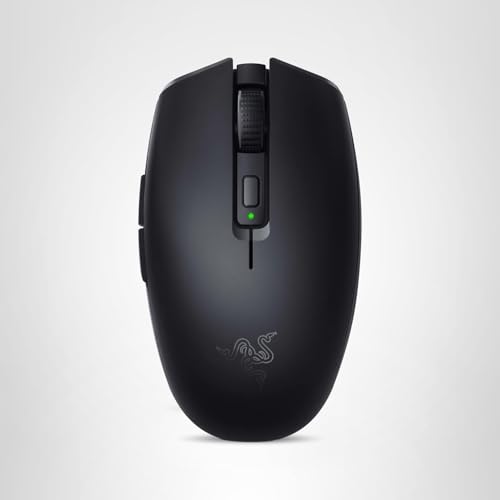
Razer Orochi V2 Wireless Gaming Mouse


As an Amazon Associate we earn from qualifying purchases. Product prices and availability are accurate as of the date/time indicated.
Quick Verdict
The Razer Orochi V2 Wireless Gaming Mouse is the strongest all-round pick for buyers who want a compact, travel-friendly mouse that can switch between Bluetooth for everyday work and Razer HyperSpeed Wireless for gaming. Its under-$50 listing, ambidextrous shape, and claimed battery figures make it versatile, but the advertised sub-60 g weight excludes the battery.
Choose the ATTACK SHARK X3 Lightweight Wireless Gaming Mouse if minimum weight and tri-mode connectivity are more important than brand familiarity. Choose the Razer Viper V3 HyperSpeed Wireless Esports for a larger competitive-gaming shape, centralized mass, and a 30K DPI sensor. The Logitech G305 remains a practical value option, but its 3.4 oz listed weight is higher than the lightest alternatives.
Buy this category if you want wireless freedom without exceeding the budget and you are comfortable using AA batteries or charging through USB-C, depending on the model. Skip the shortlist if you need a truly featherweight mouse with the battery included, a fully ergonomic right-handed shell, or independently verified performance measurements.
Key Specifications
The following comparison uses manufacturer or supplied listing specifications. Battery life, click ratings, sensor resolution, polling rate, and wireless performance figures are theoretical or maximum claims rather than PCGearWiki measurements.
| Mouse | Weight or listed weight | Connection | Sensor and controls | Battery specification |
|---|---|---|---|---|
| Razer Orochi V2 Wireless Gaming Mouse | Under 60 g, excluding battery | Bluetooth and Razer HyperSpeed Wireless | Razer 5G Advanced 18K DPI optical sensor; ambidextrous design | Up to 950 hours over Bluetooth or 425 hours over HyperSpeed with a AA lithium battery |
| ATTACK SHARK X3 Lightweight Wireless Gaming Mouse | 49 g | Bluetooth 5.2, 2.4 GHz wireless, and USB-C wired | PixArt PAW3395, up to 26,000 DPI; programmable controls | Up to 200 hours |
| Razer Viper V3 HyperSpeed Wireless Esports | 82 g | Razer HyperSpeed Wireless | Focus Pro 30K optical sensor; up to eight programmable controls | Up to 280 hours on one AA battery |
| Logitech G305 Lightspeed Wireless Gaming Mouse | 3.4 oz listed weight | Logitech LIGHTSPEED wireless | HERO optical sensor, 200–12,000 DPI; six programmable buttons | Up to 250 hours; Endurance mode can extend the claimed battery period |
The Logitech M510 Wireless Mouse is not included in the recommendation ranking because the supplied record describes it as a full-size productivity mouse rather than a lightweight gaming model. It may suit office work, but using it as a top pick for this query would blur the difference between an everyday comfort mouse and a lightweight wireless gaming mouse.
Best Lightweight Wireless Mouse Under $50 Picks
Razer Orochi V2 Wireless Gaming Mouse: Best Overall for Travel and Mixed Use
Razer Orochi V2 Wireless Gaming Mouse is the most flexible option in this group. Razer specifies an ambidextrous, portable design weighing under 60 g without the battery, two wireless modes, an 18K DPI optical sensor, and second-generation mechanical switches rated for up to 60 million clicks. Its listed price is $29.99.
The key reason to choose the Orochi V2 is its ability to serve two roles. Bluetooth is positioned for longer battery life and general work, while Razer HyperSpeed Wireless is intended for lower-latency gaming. That combination is useful for laptop owners, students, and players who move between a desk, a shared workspace, and a travel setup.
According to the supplied manufacturer specifications, the mouse can last up to 950 hours over Bluetooth or up to 425 hours over HyperSpeed when measured with a AA lithium battery. The hybrid battery slot accepts one AA or AAA battery, and Razer says the slot is positioned for balanced weight distribution.
The meaningful limitation is that the advertised weight excludes the battery. The installed battery therefore increases the carrying weight, and buyers who want a rechargeable internal battery will need to look elsewhere. The compact shell may also be less suitable for users who prefer a large palm grip.
Choose it for: travel, mixed work and gaming, ambidextrous handling, and long claimed battery life.
Skip it if: you require a rechargeable USB-C battery, a large ergonomic body, or a weight figure that includes the power source.
ATTACK SHARK X3 Lightweight Wireless Gaming Mouse: Best for Minimum Weight and Tri-Mode Use
The ATTACK SHARK X3 is the lightest listed model in this comparison at 49 g. Its strongest feature set is connectivity: it supports Bluetooth 5.2, 2.4 GHz wireless, and USB-C wired operation. The supplied listing also specifies a PixArt PAW3395 sensor with up to 26,000 DPI, programmable controls, and a claimed battery life of up to 200 hours.
This mouse is the clearest fit for players who make large, fast swipes and want to minimize hand effort. Its symmetrical design, PTFE feet, included griptape, and programmable settings target users who want to tune lift-off distance, polling rate, DPI, remaps, and macros through the supplied software.
The X3 also has a practical advantage over the battery-powered Razer and Logitech models: the product record explicitly includes USB-C wired use. That gives users a fallback connection when the battery is low or when wireless performance is undesirable. The trade-off is that the supplied data does not establish the software experience, long-term support, or measured wireless consistency.
Its listed price is $38.69, placing it below the budget ceiling while offering more connection modes and a lower listed weight than the other gaming models here. However, buyers should treat its 26K DPI, 1000 Hz polling, 650 IPS, and 50 g acceleration figures as manufacturer specifications, not independent test results.
Choose it for: the lowest listed weight, flexible Bluetooth/2.4 GHz/USB-C connectivity, and extensive software customization.
Skip it if: you prefer a more established ecosystem or want evidence beyond the supplied specifications about firmware, software, and durability.
Razer Viper V3 HyperSpeed Wireless Esports: Best for Competitive Claw or Fingertip Grip
The Razer Viper V3 HyperSpeed Wireless Esports is the performance-focused alternative. Razer describes its 82 g body as optimized for claw or fingertip grip styles and designed around centralized mass for consistent swipes. The mouse includes a Focus Pro 30K optical sensor, HyperSpeed Wireless, Gen-2 mechanical switches rated for up to 60 million clicks, on-mouse DPI control, and up to eight programmable controls.
Compared with the Orochi V2, the Viper V3 is heavier but has a shape and feature list aimed more directly at competitive play. Its 30K DPI sensor specification exceeds the resolution listed for the Orochi, although sensor DPI alone does not prove better practical accuracy. The deciding factor is more likely to be the shell shape, grip preference, and need for extra controls.
Razer specifies up to 280 hours of high-performance gaming on one AA battery. The top-mounted DPI button can switch among five DPI stages or be reassigned to another command. HyperSpeed Wireless also supports multi-device use according to the supplied product data.
At $44.99, this is the most expensive gaming mouse in the shortlist while remaining under the budget limit. Its main weakness for lightweight buyers is the 82 g listed weight, which is considerably higher than the X3 and higher than the Orochi’s battery-free figure. It is also less compelling for users who need Bluetooth or wired USB-C operation.
Choose it for: claw or fingertip grip, competitive-style swiping, on-mouse DPI control, and a larger Razer esports shape.
Skip it if: the lowest possible weight, Bluetooth connectivity, or USB-C wired fallback is your priority.
Logitech G305 Lightspeed Wireless Gaming Mouse: Best Value for Traditional AA Battery Use
The Logitech G305 Lightspeed Wireless Gaming Mouse is a straightforward gaming option with a HERO optical sensor, 200–12,000 DPI sensitivity, LIGHTSPEED wireless, six programmable buttons, onboard memory, and a single-AA battery design. Logitech lists up to 250 hours of continuous gameplay and a 3.4 oz weight. Its supplied price is $29.99.
The G305 makes sense for buyers who want a compact wireless gaming mouse from a familiar peripheral ecosystem without paying near the top of the budget. LIGHTSPEED wireless and the HERO sensor give it a clearly gaming-oriented specification set, while the built-in nano receiver storage helps with laptop travel.
Compared with the Razer Orochi V2, the G305 offers a higher listed weight but a simpler product proposition. Compared with the X3, it has fewer connection modes and a lower listed sensor resolution, but the supplied data identifies onboard memory and Logitech G HUB Endurance mode as useful configuration features.
The principal limitation is the battery-powered design and the fact that 3.4 oz is not the lightest figure in this group. Buyers seeking the absolute minimum weight should start with the X3, while users wanting Bluetooth should consider the Orochi instead.
Choose it for: affordable 2.4 GHz gaming wireless, a replaceable AA battery, onboard memory, and a compact receiver-storage design.
Skip it if: you need Bluetooth, USB-C wired operation, or a lighter design than its 3.4 oz specification.
Design and Build Quality
Lightweight does not describe one universal shape. The Orochi V2 is compact and ambidextrous, making it easier to pack and handle from either side, but its battery changes the final carry weight. The X3 uses a symmetrical 49 g shell and adds griptape and larger PTFE feet in the supplied specification, which should appeal to users who value low-friction movement and a secure hold.
The Viper V3 HyperSpeed takes a different approach. Its 82 g body uses a centralized mass design intended to make swipes feel consistent, and its shape is specifically associated with claw and fingertip grips. That makes it a better fit for controlled competitive movements than for buyers whose first priority is portability.
The G305 uses a compact design with built-in nano receiver storage and a replaceable AA battery. Its 3.4 oz listed weight places it behind the X3 and potentially behind the Orochi depending on the installed battery, but the design may suit users who prefer a familiar battery-powered wireless setup over tri-mode flexibility.
No supplied source provides independent durability testing, shell measurements, switch noise measurements, or long-term owner-feedback analysis. The click-cycle figures should therefore be read as manufacturer ratings rather than a guarantee of service life in a particular environment.
Performance and Real-World Use
For gaming, the relevant distinction is not simply the highest DPI number. Wireless mode, grip comfort, sensor configuration, button placement, and weight influence how easily a player can control the cursor. The Razer models use dedicated HyperSpeed Wireless connections, the G305 uses Logitech LIGHTSPEED, and the X3 provides both 2.4 GHz wireless and a USB-C wired fallback.
The X3 is the most attractive option for low-sensitivity players who make broad arm movements. Its 49 g specification, PTFE feet, programmable settings, and stated 1000 Hz polling capability create a strong feature match for fast tracking and flick-oriented play. Those figures describe what the product is designed to support; they do not represent PCGearWiki benchmark results.
The Orochi V2 is better balanced for mixed use. Bluetooth can reduce the need for a receiver when paired with a compatible computer, while HyperSpeed Wireless is intended for gaming. Its compact, ambidextrous design may be especially practical for laptop users, though larger hands should confirm the dimensions and grip fit before buying.
The Viper V3 HyperSpeed is the most purpose-built competitive option in the group. Its forward sensor placement, Focus Pro 30K specification, centralized mass, and on-mouse DPI control are aimed at players who already know their preferred grip and sensitivity. Its 82 g weight means it should not be selected solely because it appears in a lightweight category.
The G305 is the value-oriented gaming baseline. Its HERO sensor supports up to 12,000 DPI, and Logitech specifies a 1 ms report rate for LIGHTSPEED wireless. The supplied data supports describing it as a gaming-focused wireless mouse, but it does not support claims about measured latency, frame-rate improvement, or competitive advantage.
Compatibility
Compatibility depends on the connection mode rather than the product category alone. Before buying, check whether your computer has Bluetooth, an available USB-A port for the wireless receiver, or a USB-C port for wired use. The X3 is the only model in this shortlist whose supplied record explicitly includes all three connection types.
The Orochi V2 requires one AA or AAA battery and supports Bluetooth or Razer HyperSpeed Wireless. The Viper V3 HyperSpeed uses one AA battery and is described with HyperSpeed Wireless and multi-device support. The G305 uses one AA battery and stores its nano receiver inside the mouse. Battery chemistry, wireless receiver placement, and available ports can affect convenience even when the mouse is otherwise compatible.
Software support is another consideration. The X3 record describes software controls for buttons, DPI, lift-off distance, polling rate, remaps, and macros. Razer Synapse is identified for optimizing the Razer models, while Logitech G HUB is identified for the G305. The M510 uses older Logitech SetPoint or Logitech Control Center references in its supplied data, which is another reason it is not ranked as a gaming pick.
Mac and PC compatibility is stated for the G305 and X3 records, while the Orochi V2 and Viper V3 data emphasizes wireless modes rather than a complete operating-system matrix. Verify current software support and receiver requirements for your specific operating system before purchase.
Pros and Cons
- Several genuine lightweight options are available below the $50 limit.
- The Orochi V2 combines Bluetooth and low-latency HyperSpeed Wireless.
- The ATTACK SHARK X3 has the lowest listed weight and three connection modes.
- The Viper V3 HyperSpeed provides a competitive-focused shape and on-mouse DPI control.
- The G305 offers replaceable-AA convenience, LIGHTSPEED wireless, and onboard memory.
- Battery-powered models become heavier than their battery-free or battery-excluded listings suggest.
- The Viper V3 HyperSpeed is relatively heavy for a lightweight-mouse shortlist.
- The supplied data does not include independent latency, durability, or comfort measurements.
- Software features and connection modes differ, so no single model is ideal for every PC or Mac setup.
Who Should Buy It?
Choose the Razer Orochi V2 if you want one small mouse for work, travel, and gaming and can accept a replaceable battery. It is the safest general recommendation because its dual wireless design addresses both laptop convenience and gaming connectivity.
Choose the ATTACK SHARK X3 if reducing weight is the deciding factor. It is also the best fit for users who need Bluetooth, 2.4 GHz wireless, and USB-C wired operation in one product, provided they are comfortable relying on the supplied software ecosystem.
Choose the Razer Viper V3 HyperSpeed if your grip is claw or fingertip and you prefer a larger, competition-oriented design over the lowest possible weight. Choose the Logitech G305 if you want an inexpensive, established-style wireless gaming mouse with AA power and receiver storage.
Who Should Skip It?
Skip the battery-powered Razer and Logitech models if you specifically want USB-C charging or a wired fallback. The X3 is the better match for that requirement, although its product record does not provide independent evidence about software quality or long-term firmware support.
Skip the X3 if you want a recommendation based on extensive third-party measurements, because the supplied evidence is primarily manufacturer specifications. Skip the Viper V3 if your definition of lightweight is closer to 50 g than 80 g, or if Bluetooth is essential for your laptop workflow.
Users with very large hands or a strong preference for a full-size ergonomic right-handed shell should also be cautious. The supplied product data emphasizes compact, symmetrical, ambidextrous, claw, or fingertip-oriented designs rather than a large palm-rest shape. Readers focused on small-hand fit can also compare the guidance in our small-hand gaming mouse guide.
Alternatives to Consider
Within the supplied product records, the alternatives are differentiated by use case rather than a universal ranking. The Orochi V2 is the best mixed-use option, the X3 is the lightest and most flexible, the Viper V3 is the most esports-oriented, and the G305 is the simplest value gaming model. The Logitech M510 is better treated as a productivity alternative, not a lightweight gaming recommendation.
For a broader look at how lightweight gaming shapes differ from optical-switch designs, see our guide to gaming mice with optical switches. If your priority is pairing a mouse with a wireless keyboard, our wireless keyboard and mouse combo guide addresses that separate buying decision.
How We Evaluated
We evaluated the supplied product records by checking whether each ASIN, model name, product type, wireless interface, and intended use matched the query. We then compared listed weight, connection options, sensor specifications, battery claims, controls, grip guidance, and the stated budget. This is research-based editorial analysis, not hands-on testing or independent benchmarking.
Manufacturer specifications and retailer-provided product data can describe capabilities, but they do not establish measured latency, actual battery endurance, switch reliability, comfort for every hand size, or long-term software support. Our recommendation therefore emphasizes decision fit and clearly identified trade-offs. See the PCGearWiki review methodology for more information about our research and comparison process.
Why You Should Trust PCGearWiki
PCGearWiki separates verified product specifications from editorial judgment. We check the supplied ASIN and model identity, compare features within the same product category, and examine compatibility details such as Bluetooth, receiver-based wireless, USB-C, operating-system support, and battery requirements.
Value analysis also considers what a buyer gives up at this price: the X3 offers very low weight and tri-mode connectivity, the Orochi V2 prioritizes mixed-use flexibility, the Viper V3 targets a specific competitive grip, and the G305 favors straightforward AA-powered gaming. PCGearWiki may earn a commission from qualifying affiliate purchases, but affiliate relationships do not change the stated limitations or product ranking logic.
Final Verdict
The Razer Orochi V2 Wireless Gaming Mouse is the best lightweight wireless mouse under $50 for most buyers because it offers the most balanced combination of compact design, ambidextrous handling, Bluetooth, HyperSpeed Wireless, and long claimed battery life. The deciding factor is versatility, not the highest sensor number.
Buy the ATTACK SHARK X3 instead when 49 g and tri-mode connectivity matter more than ecosystem familiarity. Buy the Viper V3 HyperSpeed when claw or fingertip grip and competitive-style control take priority. Buy the G305 when you want affordable LIGHTSPEED wireless with a replaceable AA battery and onboard memory. None should be called a measured performance winner because the supplied data contains no PCGearWiki testing or independent benchmarks.
Frequently Asked Questions
Is the best lightweight wireless mouse under $50 worth buying?
Yes, for most buyers who want wireless convenience without exceeding the budget. The available models provide meaningful differences in weight, wireless modes, sensors, and battery design. The purchase is less attractive if you need rechargeable power, a large ergonomic shell, or independently verified performance data.
Who is the best lightweight wireless mouse under $50 best for?
This category is best for PC and laptop users who game, work, or travel and want less cable clutter. The Orochi V2 suits mixed use, the X3 suits minimum-weight seekers, the Viper V3 suits claw and fingertip gamers, and the G305 suits buyers who prefer a simple AA-powered gaming mouse.
Is the best lightweight wireless mouse under $50 good for gaming?
Yes. The gaming models use dedicated optical sensors and gaming-oriented wireless systems according to the supplied specifications. The Razer models use HyperSpeed Wireless, the G305 uses LIGHTSPEED, and the X3 supports 2.4 GHz wireless and USB-C wired use. Actual latency and competitive performance will depend on the setup and are not measured here.
What should I compare before buying the best lightweight wireless mouse under $50?
Compare the complete in-use weight, grip shape, wireless modes, battery type, receiver requirements, software support, programmable controls, and operating-system compatibility. Do not compare DPI alone. A 49 g mouse with a poor grip fit may be less useful than an 82 g mouse that matches your hand and playing style.
Which model is the lightest in this comparison?
The ATTACK SHARK X3 has the lowest supplied weight at 49 g. The Razer Orochi V2 is listed at under 60 g, but that figure excludes the battery. The G305 is listed at 3.4 oz, and the Razer Viper V3 HyperSpeed is listed at 82 g.
Sources and Verification
Research basis: Product identity, dimensions, interfaces, supported features, and warranty terms are checked against available manufacturer documentation and current retailer listings. Price, stock, and aggregate customer ratings can change after publication.
Testing disclosure: Unless this article explicitly states that PCGearWiki performed hands-on testing and describes the test setup, recommendations are research-based editorial evaluations rather than PCGearWiki laboratory measurements. Customer feedback is used to identify recurring ownership patterns, not as proof of technical performance.
Last source review: August 22, 2026. See our Review Methodology, Editorial Policy, and Corrections Policy.







Write Your Review
No reviews yet. Be the first to share your experience!