

Last updated: July 14, 2026
Curved gaming monitors deliver deeper immersion by wrapping the screen around your field of view, reducing eye strain and making competitive titles and open-world adventures feel more cinematic. Whether you are a competitive FPS player chasing high frame rates, a content creator multitasking on an ultrawide panel, or a console gamer wanting console-friendly features, the right curved display can transform your setup. In this guide we break down exactly how to evaluate options so you can match resolution, refresh rate, curve radius, and panel type to your hardware and games.
We reviewed 15 curved gaming monitors spanning entry-level FHD models to premium QD-OLED ultrawides, including standout Alienware options, using manufacturer specifications, customer ratings, and real-world suitability for PC builders and enthusiasts. You will learn the key specs that matter, see a side-by-side comparison, and get clear recommendations for different budgets and use cases. For broader display advice, check our best gaming monitors category. Updated for July 2026, this guide keeps the focus on current performance tiers and value.

Pros
- Strong 165Hz refresh rate supports competitive and immersive gaming
- 1000R curve provides excellent peripheral immersion
- QHD resolution offers clear visuals without excessive GPU demand
- FreeSync reduces tearing effectively for AMD users
- Eye care features enable extended sessions
Cons
- VA panel can show color shift at wide angles
- No built-in speakers for audio output
- Lacks additional ports like USB hub for peripherals
The Samsung Odyssey G55C is a 32-inch QHD curved gaming monitor designed for players seeking an immersive visual experience. It targets gamers who value high refresh rates and curvature for action-oriented titles rather than general productivity or media consumption.
Standout features include the 165Hz refresh rate paired with a 1ms response time that delivers smooth motion with minimal blur in fast scenes. The 1000R curvature combined with HDR10 enhances depth and contrast while AMD FreeSync prevents tearing for consistent performance during extended play.
Build quality focuses on a glare-free VA panel with solid stand adjustments though it remains a standard desktop monitor without premium extras like height pivots in all configurations. Connectivity covers HDMI and DisplayPort for straightforward PC and console links.
Potential drawbacks involve typical VA panel limitations such as narrower viewing angles and the absence of speakers which may require separate audio solutions. These factors suit desk-based setups over multi-user or living room environments.
Overall this monitor earns a recommendation for dedicated gamers who prioritize curvature and refresh rate in a QHD package while accepting basic connectivity and panel tradeoffs.

Pros
- Smooth high-refresh visuals for competitive play
- Immersive ultrawide curvature enhances exploration
- Rich color reproduction with HDR support
- Eye-friendly features enable long sessions
- Solid ergonomic build with cable organization
Cons
- Ultrawide format requires game compatibility for optimal use
- Large size demands ample desk space
- High settings need a capable graphics card
The Alienware AW3425DWM is a 34-inch curved ultrawide gaming monitor designed for enthusiasts seeking an immersive experience. It targets gamers who appreciate expansive views and high-performance specs in their setup.
Standout features include the 180Hz refresh rate combined with 1ms response time which delivers fluid motion in fast-paced titles. The WQHD resolution on the 1500R curve provides detailed landscapes while 95% DCI-P3 color coverage ensures vibrant and accurate visuals during gameplay.
Build quality emphasizes ergonomics with an adjustable stand efficient ventilation and organized cable routing. The design supports marathon sessions through its low blue light implementation without compromising color fidelity.
One potential drawback is the need for a powerful graphics card to fully utilize the high refresh rate at WQHD. Additionally the curved ultrawide may not appeal to users focused on productivity tasks.
In conclusion this monitor excels for dedicated gamers prioritizing immersion and smoothness offering strong performance in the ultrawide category.

Pros
- Strong immersion from the 1000R curved VA panel
- Smooth high-frame-rate performance at 180Hz
- Tear-free gameplay with AMD FreeSync
- Practical gaming overlays including FPS counter and crosshair
- Versatile HDMI and DisplayPort connectivity
Cons
- Limited to tilt adjustment with no height or swivel options
- VA panel shows color shift when viewed from side angles
- No built-in speakers requiring separate audio setup
The LG 32GS60QC-B is a 32-inch curved QHD gaming monitor aimed at players who want an enveloping display for extended sessions. Its combination of resolution, curvature, and refresh rate appeals to those prioritizing visual wraparound over flat-screen precision.
The 180Hz refresh rate and 1ms GtG response support crisp motion in competitive titles, while AMD FreeSync reduces tearing during variable frame rates. HDR10 and near-full sRGB coverage add vibrancy to supported content, delivering noticeable clarity in dark scenes via the Black Stabilizer and low-lag Dynamic Action Sync features.
Design centers on a slim three-sided borderless layout that fits compact desks, with dual HDMI and DisplayPort inputs plus basic tilt adjustment on the stand. This keeps the focus on screen real estate without extra bulk.
Potential drawbacks include the VA panel's tendency for off-angle color shifts and the absence of height or swivel adjustments, which may limit ergonomic flexibility. Lack of integrated speakers also means users must add external audio.
In summary, the monitor suits gamers seeking curved immersion and high refresh performance at a practical price point, provided they accept its basic stand and panel viewing characteristics.

Pros
- Immersive curved screen enhances viewing depth
- Smooth 100Hz performance reduces motion issues
- Strong eye comfort certification for long use
- Versatile HDMI and D-Sub connectivity
Cons
- Requires manual adjustment to reach full 100Hz
- VA panel may show limited viewing angles
- No DisplayPort option for modern devices
The Samsung 27-inch S36GD is a curved FHD monitor designed for everyday computing tasks including browsing documents videos and light gaming. Its 1800R curve brings the screen closer to the user's field of view which improves engagement without overwhelming the space.
Standout performance comes from the adjustable 100Hz refresh rate that cuts down on lag during fast action sequences while Game Mode fine-tunes visuals for better clarity in shadows. Eye Saver Mode adds TÜV-certified protection that cuts blue light and flicker making it practical for multi-hour workdays.
Build quality focuses on simplicity with a slim profile and straightforward stand that fits most desks. Connectivity is handled through HDMI and D-Sub ports which cover most legacy and current setups though users needing higher bandwidth may need adapters.
One limitation is the need to manually change settings for the full refresh rate and the VA panel type trades some color consistency at wide angles for better contrast. Overall this monitor suits budget-conscious users seeking curved immersion without advanced gaming extras.
Pros
- High refresh rate delivers responsive gaming performance
- Broad connectivity options including USB-C simplify setups
- Ergonomic stand allows flexible positioning
- HDR and color gamut enhance visual quality
- Built-in speakers provide basic audio without extra hardware
Cons
- Full 240Hz requires compatible graphics card hardware
- Built-in speakers lack the depth of dedicated audio systems
- Limited real-world user feedback available due to new release
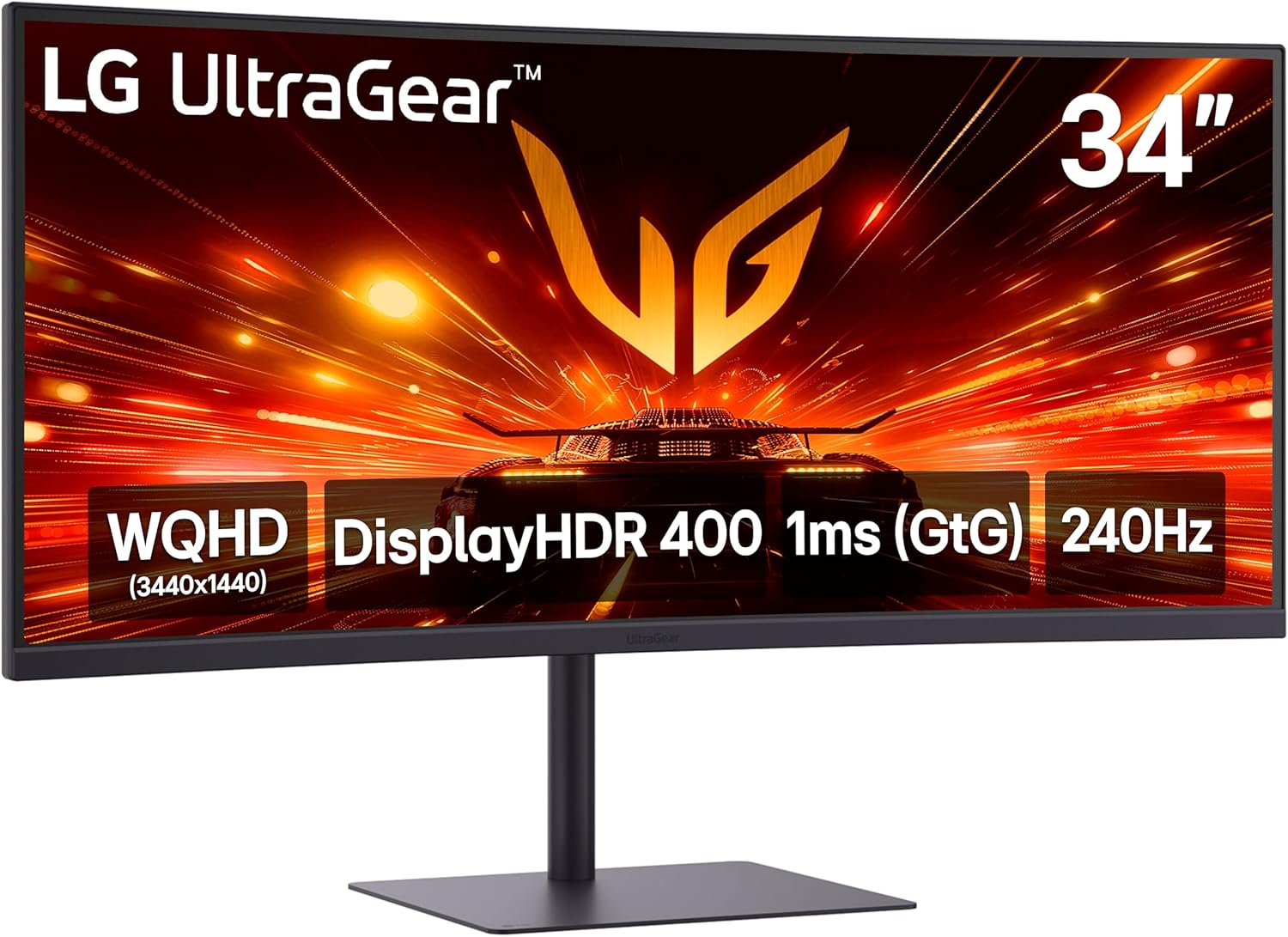
The LG 34G630A-B is a 34-inch curved Ultragear monitor designed for gamers who want an ultrawide WQHD display paired with high-speed performance. It targets competitive players and multitaskers seeking immersion without needing multiple screens.
Standout capabilities include the 240Hz refresh rate and 1ms response time which support quick reactions in fast-paced titles along with FreeSync Premium for tear-free visuals. HDR400 certification and high DCI-P3 coverage deliver rich colors while USB-C HDMI and DisplayPort ports enable flexible connections to PCs consoles and peripherals.
Build quality features a slim bezel design and an adjustable stand that frees desk space and supports ergonomic tweaks for extended use. The curved panel enhances peripheral awareness during gameplay.
Potential limitations involve the need for specific graphics hardware to unlock maximum refresh rates and the basic nature of the integrated speakers which may not satisfy users wanting premium sound.
Overall this monitor offers strong value for gamers prioritizing speed connectivity and screen real estate in a curved ultrawide format.

Pros
- Strong motion clarity supports high-frame-rate gaming without blur
- Reliable adaptive sync prevents stuttering across varied frame rates
- Ergonomic tilt and swivel plus VESA compatibility aid comfortable setups
- Durable TUF construction with multiple input options for versatility
Cons
- 1080p resolution on a 31.5-inch screen can show pixelation at close range
- Maximum refresh rate requires overclock activation and compatible hardware
- HDR implementation remains basic with limited contrast enhancement
The ASUS TUF Gaming VG32VQM5AZ functions as a 31.5-inch Full HD curved gaming monitor aimed at competitive players and enthusiasts who prioritize smooth high-speed performance over maximum resolution.
Standout capabilities include the overclocked 240Hz refresh rate and 0.5ms response time that deliver reduced lag and blur in shooters or racing games, while FreeSync Premium and ELMB Sync combine to remove tearing and ghosting for consistent gameplay.
Design elements feature a 1500R curve that promotes immersion, solid TUF-series build quality, and ergonomic tilt plus swivel adjustments for user comfort during long sessions.
Drawbacks center on the 1080p panel potentially appearing less sharp up close and the need for specific settings to unlock peak refresh rates, with HDR support offering only modest improvements.
In final assessment this monitor suits gamers focused on responsiveness and visual flow who accept standard resolution trade-offs for strong overall value.


Pros
- Strong immersion from 1000R curvature
- Competitive smoothness at 165Hz with low input latency
- Tear-free visuals via FreeSync Premium
- Wide view in one panel reduces bezel distractions
Cons
- No built-in speakers included
- VA panel can exhibit minor black smearing in dark scenes
- Lacks smart features or advanced connectivity options
The Samsung Odyssey G5 is a 34-inch ultrawide curved gaming monitor aimed at PC gamers who want expansive views and smooth performance in one unit. It targets players seeking immersion without managing multiple displays or cables.
Key strengths include the 165Hz refresh rate paired with 1ms response time for fluid motion handling and the 1000R curve that wraps visuals around the user. AMD FreeSync Premium reduces tearing while WQHD resolution and HDR10 deliver clear details and color accuracy in varied lighting conditions.
Build centers on a VA panel with HDMI and DisplayPort inputs for straightforward connections. The curved form supports eye comfort over long sessions but remains a standard monitor without additional smart functions.
Potential downsides are the lack of integrated speakers and possible minor black smearing typical of VA technology in fast dark transitions. It also omits advanced smart features found in some competitors.
Overall this monitor suits gamers prioritizing wide immersive curved displays and high refresh rates for competitive or story-driven play.


Pros
- Superior immersion from 1000R curve and ultrawide aspect ratio
- High refresh rate supports fast-paced gaming without blur
- HDR 600 improves visual fidelity in supported content
- Reliable adaptive sync reduces artifacts
- Versatile connectivity and display modes
Cons
- Large footprint requires ample desk space for optimal use
- Demands a capable PC to run games at full WUHD resolution and frame rates
- Curved screen can introduce minor distortion for non-gaming tasks like photo editing
The Samsung 40 inch Odyssey G7 G75F represents a premium curved gaming monitor aimed at serious gamers who want expansive visuals and high performance.
Its standout attributes include the 1000R curvature combined with WUHD resolution on a 21:9 panel, delivering an enveloping experience paired with 180Hz refresh and quick response times for fluid action.
The build incorporates an ergonomic stand for personalized positioning along with lighting features that extend the display ambiance into the room.
Potential drawbacks include the substantial size that may challenge smaller setups and the need for robust hardware to maximize its capabilities.
Overall this monitor earns a recommendation for dedicated gamers ready to invest in an ultrawide curved display for enhanced play.


Pros
- Outstanding DCI-P3 color coverage with precise accuracy
- Ultra-responsive motion handling for competitive advantage
- Curved ultrawide design boosts field of view immersion
- Multiple adaptive sync technologies ensure smooth gameplay
Cons
- Burn-in remains a consideration for static content use despite protections
- Demands high-end GPU to maximize full refresh rate potential
- Large footprint requires substantial desk space
The Alienware AW3425DW is a 34.2-inch ultrawide QD-OLED gaming monitor designed for serious gamers who want maximum immersion and speed. Its WQHD resolution and 1800R curve create a wide field of view suited to both competitive esports and cinematic experiences.
Performance stands out with a 240Hz refresh rate and 0.03ms response time that delivers crisp motion clarity. Adaptive sync support including NVIDIA G-SYNC Compatible and AMD FreeSync Premium Pro eliminates screen tearing while VESA DisplayHDR TrueBlack 400 and 99.3% DCI-P3 coverage produce vibrant accurate colors and perfect blacks.
Build quality features a sturdy curved chassis with ComfortView Plus eye comfort technology and multiple rear ports for flexible connectivity. The anti-burn-in measures including AI algorithms help extend panel life during typical use.
Potential drawbacks include the inherent risk of OLED burn-in with prolonged static HUD elements and the need for a strong graphics card to push maximum frame rates at this resolution.
Overall this monitor excels for enthusiasts prioritizing speed color and immersion in a single ultrawide display and earns a strong recommendation for high-performance gaming setups.


Pros
- Strong combination of high resolution, curvature, and refresh rate for engaging gameplay
- Effective HDR and sync features improve visual quality without added lag
- Lighting integration creates a more atmospheric gaming environment
- Flexible stand adjustments aid ergonomic positioning
Cons
- Large screen size requires ample desk space for proper viewing distance
- Pronounced curve can distort straight lines during productivity work
- Full performance demands a high-end graphics card to drive 4K at 165Hz
The Samsung Odyssey G7 G75F serves as a 37-inch curved gaming monitor aimed at players who want expansive, high-resolution visuals wrapped around their field of view. Its 1000R curvature and 4K UHD panel make it suitable for immersive single-player adventures and competitive matches alike.
Performance stands out with a 165Hz refresh rate and 1ms GtG response time that handle rapid motion cleanly. VESA DisplayHDR 600 adds contrast depth while AMD FreeSync Premium Pro maintains steady frame delivery, resulting in fluid sessions across demanding games.
Build quality includes an adjustable stand for tilt and height changes plus CoreLighting+ that projects matching colors outward. These elements contribute to a cohesive setup that feels purposeful for extended use.
Potential limitations include the monitor's footprint, which suits larger desks only, and the curve's tendency to alter text or line accuracy in non-gaming contexts. It also benefits most from powerful system hardware to maximize its capabilities.
In summary this monitor earns consideration for dedicated gamers who prioritize curved immersion and high refresh performance over versatility in other tasks.
How to Choose the Best Curved Gaming Monitor
Choosing the right curved gaming monitor starts with matching core specs to your GPU, desk space, and primary games. Below we cover the practical factors that separate average panels from excellent ones, with decision rules based on available product data.
Resolution and Screen Size
Resolution determines sharpness and GPU demand. Full HD (1920×1080) on a 32-inch panel like the ASUS TUF Gaming VG32VQM5AZ keeps frame rates high with mid-range GPUs and is ideal for esports where every millisecond counts. QHD (2560×1440) or WQHD (3440×1440) on 32-34-inch models, such as the LG 32GS60QC-B or Alienware AW3425DWM, balances detail and performance for modern AAA titles. 4K UHD or WUHD on 37-40-inch Samsung Odyssey G7 panels delivers maximum clarity but requires a strong GPU to maintain high refresh rates.
Screen size multiplies immersion on a curve. A 27-inch model suits compact desks and closer viewing, while 34-inch ultrawides (21:9) act like dual monitors without the bezel, perfect for racing sims or productivity-plus-gaming. Larger 37-40-inch options fill peripheral vision aggressively. Measure your seating distance: most users sit 2-3 feet away, so 32-34 inches hits the sweet spot for most setups without overwhelming a standard desk. Pair higher resolutions with adequate VRAM in your graphics card to avoid bottlenecks.
For multi-monitor or productivity users, ultrawide WQHD provides seamless horizontal space for chat, browsers, and game maps. If your GPU is older or you prioritize pure competitive speed, stay at FHD. Always verify the panel’s native resolution supports your intended content without heavy upscaling.
Refresh Rate and Response Time
Refresh rate controls how many frames the monitor can display per second. 165Hz and 180Hz panels, common on the Samsung Odyssey G55C and LG UltraGear models, feel fluid for most gaming and eliminate the choppiness of 60Hz. Competitive players should target 240Hz options like the ASUS TUF VG32VQM5AZ or LG 34G630A-B, which reduce motion blur and give a measurable edge in tracking fast targets. The Alienware AW3425DW reaches 240Hz on QD-OLED for elite smoothness.
Response time, listed as 0.5ms to 1ms GtG or MPRT on these models, minimizes ghosting. Lower numbers keep trails off moving objects. Manufacturer claims of 0.5ms or 1ms are theoretical minimums; real-world results depend on overdrive settings. Look for Extreme Low Motion Blur Sync or similar tech on ASUS models to further clean up motion. Pair high refresh with FreeSync Premium or Adaptive Sync so your GPU’s frame rate matches the panel without tearing.
If you mostly play single-player story games or use the display for media, 165Hz is plenty. Competitive or high-FPS users will notice the jump to 240Hz immediately. Confirm your GPU and cable (DisplayPort preferred) can drive the full rate at the chosen resolution.
Curve Radius and Immersion
Curve radius, measured in R (radius of the imaginary circle the panel forms), defines how aggressively the screen wraps. 1000R is steeper and more immersive, found on many Samsung Odyssey and LG UltraGear models; it matches natural human vision closely and pulls edges into view for racing or flight sims. 1500R, used on the ASUS TUF and Alienware AW3425DWM, offers a gentler curve that still immerses without distortion for text or office work. 1800R on the Alienware QD-OLED is milder still, suiting mixed use.
Steeper curves enhance peripheral awareness and reduce the need to move your head, which is why many gamers prefer 1000R for single-monitor battlestations. Gentler curves avoid warping on productivity tasks or when viewing from off-center. Desk depth and seating position matter: closer seating favors tighter curves. Test ergonomics if possible; a curve that feels natural for one user can feel excessive for another.
Ultrawide 21:9 panels amplify the curved effect because the wider canvas already expands your view. Combine a 1000R ultrawide with a good GPU and you get a cockpit-like experience without multi-monitor bezels. For pure immersion, prioritize 1000R on 32-inch-plus sizes.
Panel Technology and HDR Performance
Most curved gaming monitors use VA panels for high contrast and deep blacks, which excel in dark game scenes. The Samsung Odyssey series and many LG models rely on VA for this strength. The Alienware AW3425DW steps up to QD-OLED, delivering infinite contrast, near-instant response, and superior color volume. OLED brings perfect blacks and vibrant HDR but carries burn-in risk with static HUDs, so enable pixel-shift features and use screen savers.
HDR ratings indicate brightness and contrast capability. VESA DisplayHDR 400 is common and useful for brighter highlights; DisplayHDR 600 on the Samsung 37-inch and 40-inch Odyssey G7 models pushes more peak brightness and better tone mapping. TrueBlack 400 on the QD-OLED Alienware provides exceptional dark-scene detail. HDR10 support is nearly universal and improves compatible games and movies when the content is mastered for it.
For dark-room gaming, prioritize high-contrast VA or OLED. Bright rooms benefit from higher HDR peak brightness. If you edit video or design, confirm factory calibration or easy software tools like ASUS DisplayWidget. OLED owners should enable automatic brightness limiters and vary content to minimize burn-in risk over years of use.
Color Accuracy and Gamut
Color coverage determines how vibrant games and creative work look. Many models advertise 99% sRGB or 95% DCI-P3. The Alienware AW3425DWM covers 95% DCI-P3 with DisplayHDR 400, while the QD-OLED version reaches 99.3% DCI-P3 and Delta E less than 2 for excellent out-of-box accuracy. LG UltraGear panels often hit 99% sRGB, making colors pop in HDR10 content. Samsung Odyssey models with HDR10 bring vivid shades and strong shadow detail.
For pure gaming, wide gamut and HDR make environments more engaging without needing perfect accuracy. Creators benefit from higher DCI-P3 and low Delta E. Look for easy OSD or software controls (DisplayWidget, Black Stabilizer, game modes) that let you switch between sRGB and wide-gamut presets. Hardware low-blue-light filters on Alienware and TÜV-certified eye care on Samsung models reduce strain during long sessions while preserving color.
If color-critical work is secondary, prioritize gaming-oriented features. Calibrate once with free tools if the factory profile is slightly off. Ultrawide panels with strong gamut also improve media consumption and multitasking side-by-side with editing software.
Connectivity, Features, and Ergonomics
Ports matter for multi-device setups. Most models include HDMI and DisplayPort; the LG 34G630A-B adds USB Type-C with 15W power delivery for single-cable laptop docking. Dual HDMI plus DP on the LG 32GS60QC-B supports console and PC switching easily. Built-in speakers appear on some LG models for basic audio, though external solutions remain better.
Gaming extras such as crosshair overlays, FPS counters, Black Stabilizer, and Dynamic Action Sync on LG UltraGear reduce input lag and improve visibility in dark areas. FreeSync Premium or Premium Pro plus Adaptive Sync / G-SYNC Compatible keeps gameplay tear-free. Stands with height, tilt, and swivel adjustment improve ergonomics; VESA mounts are useful if you prefer an arm. Low-blue-light and flicker-free tech help during marathon sessions.
Console players should confirm HDMI 2.0 or higher and dedicated console modes. PC builders can pair these monitors with a solid power supply for gaming PC and ample RAM to drive high refresh rates. Cable management and desk depth also influence which stand or mount works best.
Budget, Value, and Longevity
Prices for eligible models range roughly from under $200 for capable 32-inch 240Hz FHD options to $700-plus for large 4K or QD-OLED ultrawides. The ASUS TUF VG32VQM5AZ at around $199 delivers exceptional refresh and response for the money. Mid-range QHD 180Hz models from LG sit near $240-360 and offer strong balance. Premium Samsung 37-40-inch and Alienware QD-OLED panels justify higher cost with resolution, HDR, or panel technology advantages.
Value comes from matching features to actual use rather than chasing the highest number. A 240Hz FHD panel can outperform a 4K 165Hz model if your GPU cannot sustain high frames at higher resolution. Warranties of three years (common on ASUS) and solid build quality support multi-year ownership. Factor in future GPU upgrades: a monitor that can already hit 180-240Hz leaves headroom.
For complete system planning, review our PC builds resources and ensure your case and cooling support the GPU needed to feed the panel. Eye-care features and sturdy stands improve daily comfort and longevity.
Technical Comparison Table
The table below summarizes key specifications from manufacturer data for selected models. Columns focus on size and resolution, refresh and response, curve, and best-use case to speed decision making.
| Model | Size / Resolution | Refresh / Response | Curve | Best For | Main Strength |
|---|---|---|---|---|---|
| ASUS TUF VG32VQM5AZ | 31.5″ Full HD | 240Hz / 0.5ms | 1500R | Competitive gaming | High refresh at accessible price |
| Alienware AW3425DWM | 34″ WQHD | 180Hz / 1ms | 1500R | Immersive ultrawide | Balanced performance and color |
| Samsung Odyssey G7 37″ | 37″ 4K UHD | 165Hz / 1ms | 1000R | High-resolution immersion | DisplayHDR 600 and large canvas |
| Samsung Odyssey G7 40″ | 40″ WUHD | 180Hz / 1ms | 1000R | Premium ultrawide | Massive 21:9 field of view |
| LG 32GS60QC-B | 32″ QHD | 180Hz / 1ms | 1000R | Everyday QHD gaming | Steep curve and FreeSync |
| LG 34G630A-B | 34″ WQHD | 240Hz / 1ms | Curved ultrawide | High-speed multitasking | 240Hz plus USB-C |
| Alienware AW3425DW | 34.2″ WQHD QD-OLED | 240Hz / 0.03ms | 1800R | Enthusiast visuals | QD-OLED contrast and color |
Why You Should Trust PCGearWiki
At PCGearWiki we focus on objective product comparison grounded in published specifications, compatibility checks, and feature evaluation rather than marketing hype. We cross-reference manufacturer data for resolution, refresh rates, curve ratings, HDR certifications, and connectivity so readers can match hardware to real workloads. Value assessments weigh price against usable performance tiers for gamers, creators, and builders.
Our process includes examining customer rating aggregates when available and highlighting recurring strengths and trade-offs without inventing benchmarks or claiming hands-on lab results that are not present in the source data. We maintain transparency around affiliate relationships: recommendations are chosen first for fit, then linked so you can check current pricing. For deeper methodology details visit our review process overview. This approach keeps every buying guide practical and free of unsupported claims.
Final Thoughts
The best curved gaming monitor depends on your resolution target, refresh needs, and budget. After evaluating the full set of 15 models, clear winners emerge in each category based on manufacturer specs and suitability.
Best Overall: The Alienware 34 Curved Gaming Monitor AW3425DWM stands out for most users. Its 34-inch WQHD 180Hz panel with 1500R curve, FreeSync Premium, Adaptive Sync, 95% DCI-P3, and DisplayHDR 400 delivers excellent immersion and fluidity without extreme cost. Ideal for mixed AAA and competitive play; the main trade-off is that pure esports players may want higher than 180Hz.
Best Value: The LG 32GS60QC-B UltraGear offers QHD 180Hz, 1ms, steep 1000R curve, FreeSync, and useful gaming features at a mid-range price. It suits builders who want sharp detail and immersion without overspending. Pair it with a capable mid-tier GPU for best results.
Best Budget: The ASUS TUF Gaming VG32VQM5AZ brings 31.5-inch Full HD 240Hz, 0.5ms, 1500R, FreeSync Premium, and ELMB Sync around the $200 mark. Competitive gamers and those with mid-range GPUs get high-end motion clarity. The lower resolution is the expected trade-off for speed and price.
Best Premium / Enthusiast Pick: The Alienware 34 240Hz QD-OLED AW3425DW delivers near-instant 0.03ms response, infinite contrast, 99.3% DCI-P3, TrueBlack 400 HDR, and 240Hz on a 34-inch WQHD 1800R panel. It is the choice for users who prioritize image quality and smoothness and can manage OLED care habits. Higher cost and the need for static-image precautions are the main considerations.
Match the panel to your GPU, desk, and games, then verify current pricing and stock. For complementary components explore our best RAM for gaming PC guide and full buying guides library to complete a balanced system.
Frequently Asked Questions
What is the best curved gaming monitor right now?
For most users the Alienware AW3425DWM offers the strongest overall balance of WQHD resolution, 180Hz refresh, immersion, and features based on available specifications. Competitive players may prefer the high-refresh ASUS TUF 32-inch model, while enthusiasts can step up to the QD-OLED Alienware for superior contrast and color.
How much should I spend on a curved gaming monitor?
Capable options start near $200 for high-refresh Full HD panels. Spending $250-400 typically unlocks QHD or WQHD with 165-240Hz and better curves. Premium 4K or QD-OLED models range higher. Choose based on your GPU’s ability to drive the resolution and refresh rate rather than the absolute highest price.
Is a 1000R curve better than 1500R?
1000R is steeper and more immersive for gaming, especially on larger ultrawides, because it better matches the human field of view. 1500R is gentler and often more comfortable for mixed work and play. Preference is personal; try both if possible or prioritize based on primary use.
Do I need FreeSync or G-SYNC on a curved gaming monitor?
Yes for tear-free gameplay. Most models here include AMD FreeSync Premium or Premium Pro and many also support Adaptive Sync or G-SYNC Compatible. These technologies keep the monitor’s refresh rate locked to your GPU’s output. Confirm your graphics card supports the standard you choose.
How long does a curved gaming monitor typically last?
With normal use and proper care, modern panels last many years. VA and IPS-style models often exceed five to seven years of daily gaming. OLED panels require burn-in mitigation but also last years when features like pixel refresh are used. Pair your monitor with a quality surge protector for gaming PC and good cooling in your system for maximum longevity.
How We Evaluated
PCGearWiki evaluates review and buying-guide recommendations by comparing product specifications, compatibility, real-world use cases, pricing, warranty coverage, and customer feedback patterns. Our goal is to explain not only which products look strong on paper, but which ones make sense for actual PC builds and daily use.
- Panel type, resolution, refresh rate, response time, input lag, VRR support, HDR capability, and color performance.
- Gaming fit by GPU class, desk ergonomics, connectivity, stand quality, warranty, and long-term value.
- Customer feedback patterns around motion clarity, brightness, backlight bleed, OLED care, and build quality.
You can read more about our editorial standards and scoring process in our Review Methodology.





Write Your Review
No reviews yet. Be the first to share your experience!