

Last updated: August 5, 2026
NVMe is a storage protocol designed for solid-state drives connected through PCI Express. It allows many parallel command queues and lower software overhead than older storage protocols designed around hard drives. NVMe describes communication, while M.2 describes a physical form factor.
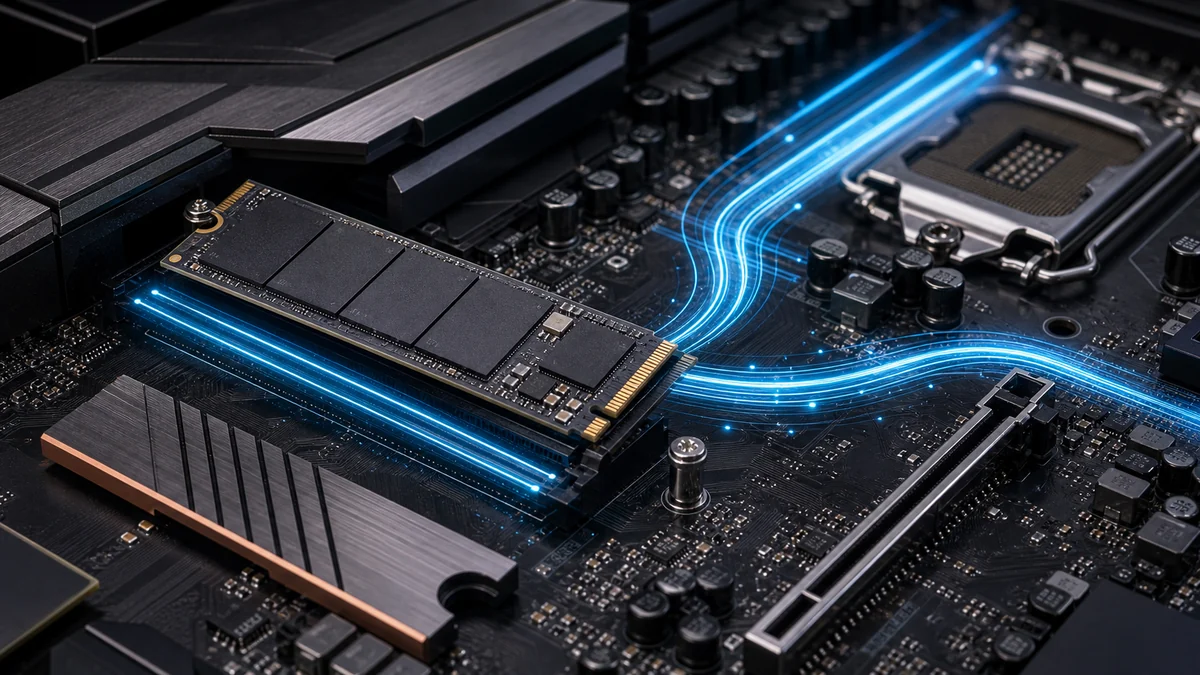
Most consumer NVMe drives use an M.2 2280 card, but not every M.2 slot supports PCIe NVMe. Some slots accept SATA M.2 drives, some share lanes with other ports, and some support only particular lengths or PCIe generations. The motherboard manual is the final compatibility reference.
| Term | Meaning | Do not confuse with |
|---|---|---|
| NVMe | Storage protocol over PCIe | M.2 physical size |
| M.2 2280 | 22mm by 80mm card | Guaranteed NVMe support |
| PCIe 4.0 x4 | Generation and four-lane link | The drive’s sustained real-world speed |
| SATA M.2 | SATA protocol in M.2 form | PCIe NVMe performance |
What Is NVMe?
NVMe refers to an important concept, feature, or specification that can affect how a PC component performs in real-world use. Understanding it helps you compare products more accurately and avoid choosing hardware based only on marketing claims. In storage, what is nvme defines a high-speed protocol built on PCIe lanes.
Why NVMe Matters
The importance of nvme depends on the category. For gaming, it may affect responsiveness, frame rates, image quality, or comfort. For productivity, it may affect speed, multitasking, reliability, or workflow efficiency. NVMe drives deliver lower latency than older SATA solutions, which matters during large file transfers or content creation tasks.
How NVMe Works
In practical terms, nvme should be understood alongside related specifications instead of in isolation. A single number or feature rarely tells the full story, so it is important to consider how it interacts with the rest of your system. NVMe uses parallel command queues that allow thousands of simultaneous operations, unlike legacy AHCI protocols limited to single queues.
How NVMe storage communicates with a PC
Understanding the NVMe Protocol
The NVMe protocol was designed specifically for flash storage and leverages PCIe bandwidth for direct communication with the CPU. This reduces overhead compared with older interfaces. When building a new system you should verify that your motherboard supports the required PCIe generation to unlock full speeds.
For most users running modern games or creative software, NVMe provides noticeable improvements in load times. Check the drive specifications against your motherboard manual to confirm lane availability before purchase.
NVMe vs SATA Performance Differences
Sequential read and write speeds represent one of the clearest advantages of NVMe over SATA SSDs. Real-world transfers of large video files or game installations complete faster on NVMe drives. Random performance also improves, which benefits operating system responsiveness and application launching.
Compare controller and NAND types listed in product data when evaluating options. Higher endurance ratings become important if you work with frequent large writes such as video editing projects.
Form Factor and Installation Options
M.2 2280 remains the most common NVMe form factor for desktop and laptop builds. Some motherboards also support M.2 22110 or add-in cards that use PCIe slots. Ensure your case and motherboard provide adequate clearance and heatsink support for sustained performance.
Thermal throttling can occur without proper cooling. Many current motherboards include M.2 heatsinks, but aftermarket solutions offer extra headroom during extended workloads.
Compatibility with Current Platforms
PCIe 4.0 and 5.0 NVMe drives require matching motherboard support for maximum bandwidth. Backward compatibility exists, yet you lose potential speed when pairing a PCIe 5.0 drive with older slots. Always cross-reference your CPU and chipset documentation before buying.
Users planning future upgrades should consider motherboards with extra M.2 slots and PCIe 5.0 support. This approach extends platform longevity without immediate drive replacement.
Capacity Planning and Endurance Ratings
Choose capacity based on your primary use case. Gamers often find 1 TB or 2 TB sufficient for current titles, while content creators may need 4 TB or larger drives. Endurance ratings measured in terabytes written indicate long-term reliability under heavy use.
Review manufacturer specifications for TBW values and warranty terms. Higher endurance models cost more but provide peace of mind for professional workloads.
Thermal Performance and Sustained Speeds
High-speed NVMe drives generate heat during extended transfers. Without adequate cooling, performance may drop after the first minute or two. Look for drives with graphene pads or bundled heatsinks when sustained performance matters.
Compare published temperature limits and throttling behavior across models. This detail helps avoid surprises during large render jobs or game library transfers.
Quick Comparison
| Term | What It Means | Why It Matters | Who Should Care |
|---|---|---|---|
| NVMe | A key hardware concept or specification | Helps compare real-world usability and performance | PC builders, gamers, creators, and upgraders |
| Compatibility | How well it works with your system | Prevents upgrade problems | Anyone building or upgrading a PC |
| Value | Performance and usefulness relative to cost | Helps avoid overspending | Budget-conscious buyers |
What to Look For When Buying
- Check whether nvme affects the way you actually use your PC.
- Compare it with related specifications instead of judging it alone.
- Make sure the product is compatible with your current system.
- Consider whether the feature improves performance, comfort, reliability, or long-term value.
- Avoid paying extra for features that do not match your workload.
Common Mistakes to Avoid
One common mistake is assuming that a higher number or newer feature always means better performance. In many cases, real-world value depends on the full product design, compatibility, software support, and how the hardware is used. Pairing a fast NVMe drive with an older PCIe slot wastes potential.
Another mistake is ignoring your own workload. A feature that matters for competitive gaming may not matter as much for office work, content creation, or general PC use. Review the Tech News category for the latest platform updates.
Why You Should Trust PCGearWiki
PCGearWiki explains hardware concepts using practical examples, available specifications, compatibility research, and real-world buying context. Our goal is to help readers understand what matters before choosing PC components or peripherals. We focus on objective comparisons drawn from manufacturer data and platform requirements.
Recommendations remain transparent regarding affiliate relationships. You receive clear guidance on compatibility, endurance, and value without unsubstantiated performance claims.
Final Thoughts
NVMe is worth understanding because it can affect performance, compatibility, comfort, or long-term value depending on the product category. When comparing hardware, use it as one part of the decision rather than the only factor. Explore additional insights in our Buying Guides section.
Frequently Asked Questions
What does nvme mean?
NVMe refers to a hardware concept or specification that can affect how a product performs, fits, or feels in real-world use. In storage terms, what is nvme describes the command protocol used by modern solid-state drives.
Does nvme matter for gaming?
It can matter for gaming depending on the category. Some specifications affect latency, responsiveness, visual quality, or overall performance more than others. Faster storage reduces game load times and improves texture streaming in open-world titles.
Should I choose hardware based only on nvme?
No. You should compare nvme alongside compatibility, build quality, performance, features, and overall value. Review the Comparisons section for side-by-side storage evaluations.
How does what is nvme compare with older interfaces?
NVMe offers significantly higher bandwidth and lower latency than SATA or AHCI solutions. This translates to quicker boot times and faster file operations in everyday use.
Is it worth upgrading storage to NVMe in 2026?
Many users see clear benefits when moving from SATA SSDs or HDDs. The upgrade improves system responsiveness and future-proofs your build for newer software titles.
PCIe generation and backward compatibility
A PCIe 4.0 NVMe SSD can usually operate in a compatible PCIe 3.0 slot, but it is limited by the slower link. A fast PCIe 5.0 drive may also need a substantial heatsink. Check lane sharing because installing an SSD can disable selected SATA ports or reduce another slot’s bandwidth on some motherboards.
What performance figures matter
Sequential read and write speeds describe large transfers under favorable conditions. Everyday responsiveness also depends on random access, latency, controller behavior, NAND type, cache, firmware, available free space, and thermal throttling. Sustained write speed can fall after a dynamic cache fills.
- Confirm the slot supports NVMe and the drive length.
- Check PCIe generation and lane allocation.
- Use a motherboard heatsink when the drive or workload requires it.
- Compare endurance, warranty, and sustained behavior rather than peak read speed alone.
- See NVMe vs SATA SSD for upgrade priorities.







Write Your Review
No reviews yet. Be the first to share your experience!