

Last updated: August 21, 2026
The best wireless mechanical keyboard under $100 depends on whether you prioritize a quiet typing feel, a full number pad, compact desk space, or deeper remapping. Tri-mode models offer the most flexibility, but buyers should verify the exact layout, switch variant, operating-system support, and wireless mode before checkout.
This Best Gaming Keyboards guide compares the supplied wireless mechanical keyboard records using manufacturer-listed features and practical buying criteria. The shortlist includes compact 75% boards, 96% layouts, and one full-size option, but it excludes the supplied wired models because they do not match wireless search intent.

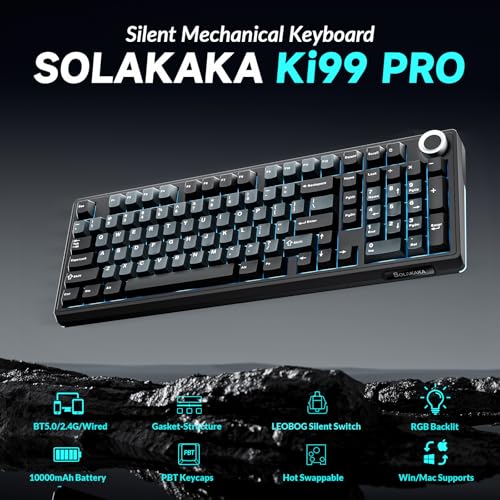
SOLAKAKA KI99 Pro Wireless Mechanical Keyboard


As an Amazon Associate we earn from qualifying purchases. Product prices and availability are accurate as of the date/time indicated.
Quick Verdict
For most users, the SOLAKAKA KI99 Pro Wireless Mechanical Keyboard is the strongest all-around pick because it combines a 96% layout, tri-mode connectivity, a stated 10,000mAh battery, silent switches, hot-swap support, RGB lighting, and a control knob. Choose the Keychron K10 Max for a true full-size layout and QMK remapping, or the AULA F75 for a smaller 75% design. Skip the wireless shortlist if you specifically need a wired-only keyboard, a verified console compatibility guarantee, or documented independent latency testing.
How We Evaluated
PCGearWiki evaluated the supplied product specifications, model names, layouts, switch descriptions, connection modes, battery claims, customization features, and stated platform compatibility. We separated manufacturer specifications from editorial inference and did not treat the supplied ratings as meaningful customer-feedback evidence because the records show zero reviews. We also did not perform hands-on testing or independent latency measurements. See the PCGearWiki review methodology for more detail.
Wireless gaming performance can vary with the connection mode, receiver placement, software configuration, and host device. A stated polling rate or Bluetooth version is a product specification, not proof of a particular in-game result. Prices and availability are changeable, so confirm the current listing and exact variant before purchasing.
What Matters Most When Choosing
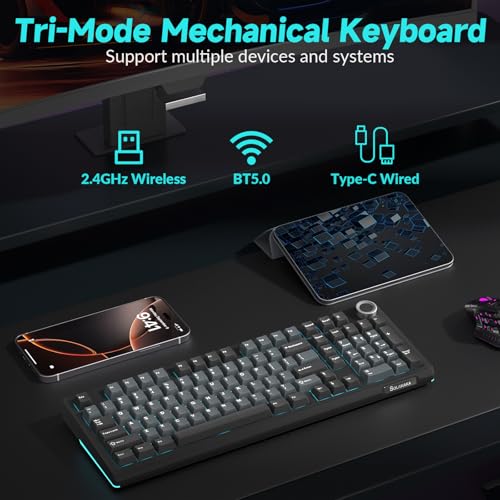
Connection options: Tri-mode keyboards use Bluetooth, 2.4GHz wireless, and USB wired connections. Bluetooth is useful for phones, tablets, and multi-device work, while 2.4GHz is generally the more relevant wireless mode for a desktop gaming setup. USB provides a fallback when the battery is low or wireless behavior is unsuitable.
Layout: A 75% keyboard keeps the arrow keys while removing the number pad and much of the navigation cluster. A 96% or 98% board preserves a number pad in a more compact arrangement. A 100% board is the safest choice for spreadsheets, accounting, data entry, and users who do not want to relearn key positions.
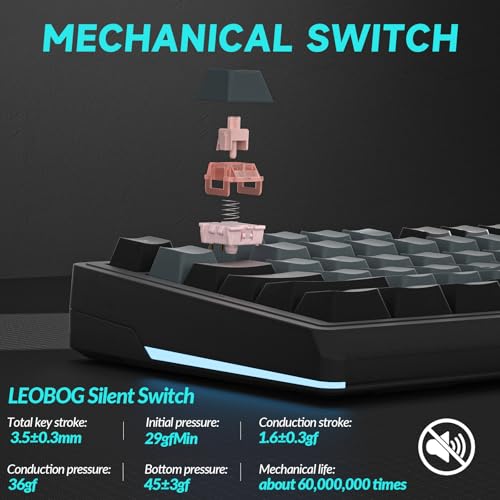
Switch type and acoustics: Linear switches provide a smooth press without a tactile bump, while tactile switches provide more physical feedback. Silent switches are the most relevant choice for shared rooms or office use, although manufacturer descriptions cannot guarantee a specific noise level in every environment. Gasket structures and multiple foam layers may reduce harshness and cavity noise, but they do not make a mechanical keyboard silent.
Customization: Hot-swap support lets users replace compatible 3-pin or 5-pin MX-style switches without soldering. Software support matters if you need remapping, macros, or lighting control. QMK and the Keychron Launcher offer a different level of firmware control from a proprietary driver, so advanced users should compare the software ecosystem rather than treating all hot-swap boards as equally configurable.
Battery and device support: A larger stated battery capacity can reduce charging frequency, but actual endurance depends on RGB brightness, connection mode, and usage. Buyers should also check whether the advertised compatibility applies to their operating system, console, phone, or tablet and whether software features are limited to Windows or require a wired connection.
Comparison and Trade-Offs
| Keyboard | Layout and switches | Wireless and customization highlights | Main trade-off |
|---|---|---|---|
| SOLAKAKA KI99 Pro | 96%; silent switches | Bluetooth 5.0, 2.4GHz, Type-C; 10,000mAh stated battery; hot-swap; knob | Less compact than a 75% board and no independent testing supplied |
| AULA F99 Tri-Mode | 96%; pre-lubed linear switches | Bluetooth 5.0, 2.4GHz, USB-C; up to five devices; 8,000mAh stated battery | Number pad remains, so it uses more horizontal desk space |
| Keychron K10 Max | 100%; tactile banana switches | 2.4GHz, Bluetooth 5.1, wired; QMK; Launcher; 1,000Hz stated polling rate in 2.4GHz and wired modes | Largest layout in the shortlist |
| AULA F75, Reaper variant | 75%; pre-lubed Reaper switches | Bluetooth 5.0, 2.4GHz, USB; hot-swap; knob; RGB | Smaller layout omits the number pad |
| RK ROYAL KLUDGE S98 | 96%; switch type not clearly specified in supplied data | Bluetooth 5.0, 2.4GHz, USB-C; smart display; knob; hot-swap | Display adds appeal but is not essential to typing or gaming |
| AULA F75, linear variant | 75%; pre-lubed linear switches | Bluetooth 5.0, 2.4GHz, USB; hot-swap; knob; RGB | Switch feel differs from the Reaper variant despite the shared model name |
| AULA F75 Pro | 75%; Reaper switches | Bluetooth 5.0, 2.4GHz, USB; side-printed PBT keycaps; hot-swap | Side-printed legends may not suit users who prefer conventional keycap legends |
| EPOMAKER X Aula F75 MAX | 75%; linear Reaper switches | Bluetooth, 2.4GHz, wired; TFT screen; knob; hot-swap; 1,000Hz stated polling rate in USB and 2.4GHz modes | More features mean more software and display complexity |
Top Wireless Mechanical Keyboard Picks
Best Overall: SOLAKAKA KI99 Pro Wireless Mechanical Keyboard
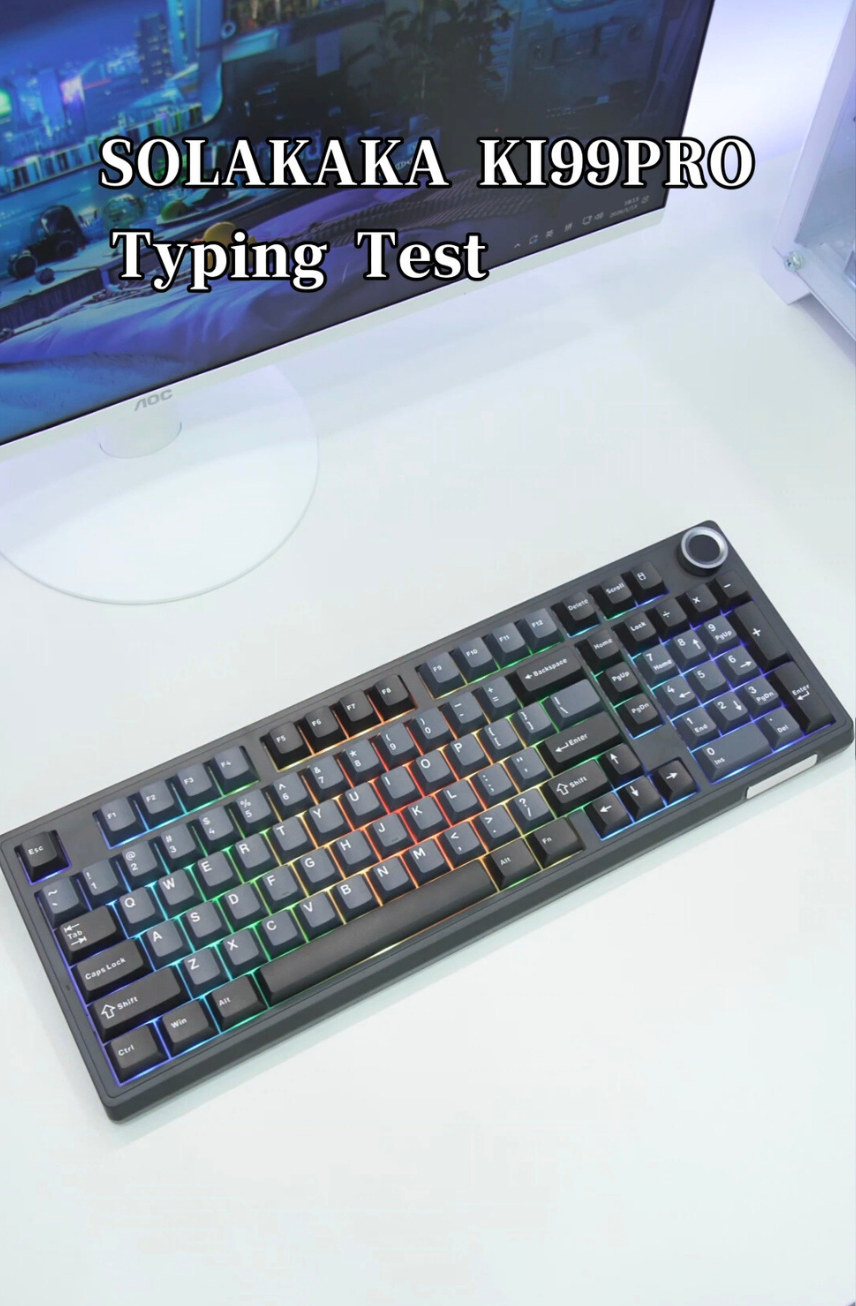
The SOLAKAKA KI99 Pro is the most balanced option in the supplied data. Its 96% layout retains a number pad while taking less space than a traditional full-size keyboard. Bluetooth 5.0, 2.4GHz, and Type-C connections cover desktop, mobile, and wired use, and the manufacturer lists compatibility with Windows, macOS, PCs, laptops, and smartphones.
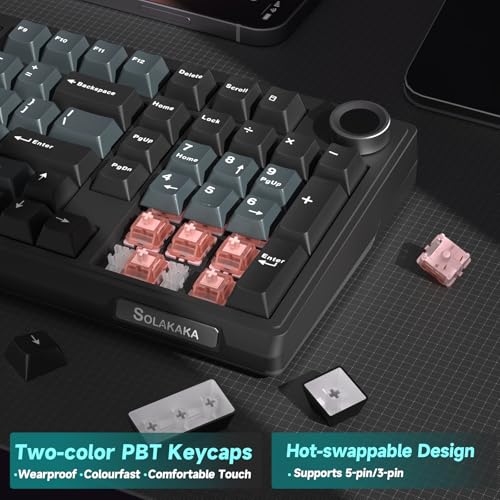
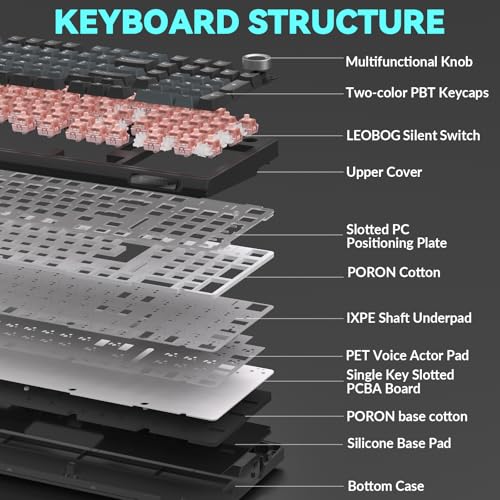
Its strongest differentiator is the combination of silent switches, a gasket structure, five noise-reducing layers, PBT keycaps, full-key hot-swap support, and a control knob. The stated 10,000mAh battery is also the largest listed capacity in this comparison. These features make the KI99 Pro a sensible fit for someone who wants one keyboard for office typing, gaming, and customization.
The limitation is that the supplied data does not provide independent measurements for wireless latency, acoustic output, or battery endurance. Choose it if quiet operation and a number pad matter more than the smallest possible footprint. Skip it if you want a compact 75% board or require independently verified gaming measurements.
Compare more wireless mechanical keyboard options if low-latency wireless behavior is your primary concern.
Best for Full-Size Productivity: Keychron K10 Max QMK Wireless Custom Mechanical
The Keychron K10 Max is the clearest choice for users who need all 108 keys. Its 100% layout avoids the compromises of compact number-pad designs, while 2.4GHz, Bluetooth 5.1, and wired connections support desktop, mobile, and tablet workflows. The keyboard is listed as compatible with macOS, Windows, and Linux.
QMK and the Keychron Launcher web app give it the strongest remapping story in the group. Users can assign keys or macros and create custom keymaps, which is more significant for productivity than decorative RGB. The board also uses tactile banana switches, hot-swap support for 3-pin and 5-pin switches, OSA double-shot PBT keycaps, acoustic foam, and a steel plate.
The meaningful drawback is physical size. It will not free as much mouse space as a 75% board, and users who prefer linear or silent switches may want to change the supplied switch type. Buy it for spreadsheets, programming, and full-layout gaming. Skip it if desk space or a quiet stock switch is the deciding factor.
Best Compact Value: AULA F75 75% Wireless Mechanical Keyboard
The AULA F75 with pre-lubed Reaper switches is a strong compact choice for gaming and general desktop use. Its 81-key 75% layout retains arrow keys while reducing the footprint of the keyboard. Tri-mode connectivity, hot-swap support for 3-pin and 5-pin switches, a multifunction knob, RGB lighting, and a stated 4,000mAh battery cover the features most buyers expect at this budget.
The manufacturer also lists support for up to five connected devices and compatibility with PCs, laptops, tablets, phones, PlayStation, and Xbox. That makes this variant appealing for users who switch between devices and do not use a number pad regularly. Its five-layer filling and gasket-style construction are intended to provide a softer feel and reduce cavity noise.
The limitation is the missing number pad. The supplied data also does not establish whether every macro or lighting feature works identically across all listed platforms. Choose this version if you want a compact board with a more tactile or creamy stock presentation. Skip it if you regularly enter numbers or want a full-size layout.
Best Compact Linear Alternative: AULA F75 75% Wireless Mechanical Keyboard, Linear Variant
The second AULA F75 record uses pre-lubed linear switches rather than the Reaper-switch description in the other F75 record. That distinction matters: the shared F75 name does not make the two ASINs identical. The linear variant is better suited to users who prefer a smooth keypress for fast repeated inputs and do not want a tactile bump.
It retains the 75% layout, tri-mode Bluetooth 5.0, 2.4GHz, and USB connectivity, 3-pin and 5-pin hot-swap support, a multifunction knob, RGB lighting, macro support, and a stated 4,000mAh battery. It is a practical alternative to the Reaper version when switch feel is more important than matching a particular colorway or sound profile.
Its meaningful limitation is that linear switches may provide less physical feedback for typing than tactile switches. The model also lacks a number pad. Buy it for compact gaming and smooth linear input. Skip it if you want tactile confirmation, silent switches, or dedicated numeric entry.
Best for a Built-In Display: RK ROYAL KLUDGE S98 Mechanical Keyboard
The RK ROYAL KLUDGE S98 differentiates itself with a smart display and a knob that can control volume, connection mode, backlight behavior, RGB settings, and other functions. Its 98-key, 96% layout keeps the number pad while reducing the gaps associated with a conventional full-size board. Bluetooth 5.0, 2.4GHz, and USB-C provide the expected three connection modes.
The display can show items such as a custom GIF, date, connection mode, Windows or Mac layout, and battery status according to the supplied product data. A top-mount design, IXPE dampener, silicone dampener, thicker sound-absorbing foam, double-shot PBT keycaps, and hot-swap support add practical value beyond the screen.
The product record does not clearly identify the supplied switch type, so buyers should confirm the exact listing before assuming a linear, tactile, or silent feel. The display is also a convenience feature rather than a performance advantage. Choose the S98 if status information and a compact number-pad layout appeal to you. Skip it if you want the simplest possible keyboard or need clearly documented stock switches.
Best for Side-Printed Keycaps: AULA F75 Pro Wireless Mechanical Keyboard
The AULA F75 Pro builds on the compact F75 format with side-printed PBT keycaps. The supplied data describes double-injection and heat-sublimation processes, side-engraved legends, RGB illumination through the fonts, tri-mode connectivity, 3-pin and 5-pin hot-swap support, and a stated 4,000mAh battery.
This version suits buyers who want a distinctive appearance without giving up the arrow keys, control knob, RGB lighting, and macro support. The listed LEOBOG Reaper switches are pre-lubed, and the board is described as compatible with PCs, laptops, tablets, phones, PlayStation, and Xbox.
Side-printed legends are a preference, not a universal improvement. They may be less familiar for users who rely on conventional top-printed labels, and the 75% layout still omits the number pad. Buy it for compact gaming and a visually different keycap arrangement. Skip it if standard legends or numeric entry are more important than appearance.
Best Feature-Rich Compact Option: EPOMAKER X Aula F75 MAX Wireless Mechanical
The EPOMAKER X Aula F75 MAX adds a TFT screen to the familiar 75% format. The screen can display GIFs and connection or battery information, while the knob handles volume and related controls. Its gasket mount, flex-cut PC plate, Cherry-profile keycaps, two-stage kickstand, foam layers, and silicone dampening target a softer and more controlled typing presentation.
The F75 MAX also lists Bluetooth, 2.4GHz, and wired connectivity, compatibility with Android, Windows, Mac, and Linux, NKRO, anti-ghosting, hot-swap support for 3-pin and 5-pin switches, and software for remapping and macros. The manufacturer states a 1,000Hz polling rate in USB and 2.4GHz modes, but no independent latency result is supplied.
The main drawback is complexity: a screen and additional software create more features to configure without improving every user’s typing experience. Choose it if you want a compact board with a display and extensive customization. Skip it if you want a conventional, low-maintenance keyboard or require a number pad.
Key Specifications
| Specification | Details | Why It Matters |
|---|---|---|
| Wireless modes | Bluetooth and 2.4GHz on the wireless shortlist | Bluetooth supports mobile and multi-device use; 2.4GHz is the relevant receiver-based option for many gaming desktops. |
| Wired connection | USB, USB-C, or Type-C depending on model | Provides a fallback connection and may be required for firmware or advanced configuration. |
| Layouts | 75%, 96%, or 100% | Determines whether you retain a number pad and how much mouse space the keyboard leaves. |
| Hot-swap support | Most listed custom models support 3-pin and 5-pin switches | Allows switch changes without soldering, subject to physical compatibility. |
| Battery claims | 4,000mAh, 8,000mAh, or 10,000mAh depending on model | Capacity provides context, but it does not establish real-world runtime. |
| Software | Proprietary drivers, QMK, Keychron Launcher, or online RK driver depending on model | Software determines remapping, macros, RGB control, and firmware flexibility. |
Design and Build Quality
The shortlist is dominated by compact custom-style keyboards rather than conventional gaming boards. Gasket structures, silicone layers, switch dampeners, flex-cut plates, and acoustic foam appear repeatedly in the product data. These features are intended to influence key feel and internal resonance, but the descriptions should be read as design specifications rather than independent proof of a particular sound or comfort level.
Layout is the most visible design decision. The 75% AULA and EPOMAKER models leave more room for a mouse, while the 96% SOLAKAKA, AULA F99, and RK S98 retain numeric entry. The Keychron K10 Max is the only clearly identified full-size wireless model in the shortlist. PBT keycaps appear on several models and are specified as wear-resistant or double-shot, but keycap legends, profile, and switch variant still differ by ASIN.
Performance and Real-World Use
In practical use cases, 2.4GHz connectivity is the most relevant feature for a wireless gaming setup because it uses a dedicated receiver rather than a general Bluetooth pairing. The supplied records do not include independent latency or dropout measurements, so this comparison cannot rank these keyboards by measured response time. The EPOMAKER F75 MAX and Keychron K10 Max list a 1,000Hz polling rate in specified modes, but that remains a manufacturer specification.
For office work, the KI99 Pro’s stated silent switches are more directly aligned with shared-space typing than the linear or unspecified switch options. For numeric entry, the 96% and 100% layouts reduce the need for a separate number pad. For gaming, 75% boards can improve mouse clearance, while NKRO and anti-ghosting claims may be useful for games that require simultaneous key presses. Neither feature guarantees a particular competitive advantage.
Hot-swap support changes the long-term ownership experience. A user can start with the supplied switches, then experiment with compatible 3-pin or 5-pin replacements. However, hot-swap compatibility does not mean every switch, stabilizer, keycap, or firmware feature is interchangeable. Confirm the socket, plate, stabilizer, and keycap requirements before buying replacement parts.
Compatibility
- Confirm whether your device supports Bluetooth, 2.4GHz USB receiver connections, or the keyboard’s wired USB mode.
- Check the exact layout before purchase. A 75% keyboard omits the number pad, while a 96% board keeps it in a compressed arrangement.
- Verify the exact ASIN and switch variant. The two AULA F75 records use different switch descriptions, and the S98 record does not clearly identify its stock switch type.
- Check software support for your operating system. QMK, Keychron Launcher, proprietary drivers, and online configurators do not provide identical workflows.
- Console compatibility is listed for several AULA products, but the supplied data does not establish that every macro, lighting, or remapping feature works on every console.
- Confirm whether the product includes the receiver, cable, puller, or other accessories expected for your setup; the supplied records do not provide a complete accessory inventory for every model.
- Review the retailer’s current return policy and the manufacturer’s warranty terms before checkout because warranty information was not supplied in the product data.
Pros and Cons
Across the eligible wireless models, these are the main category-level advantages and limitations.
- Tri-mode connectivity is available on the main custom-style models.
- Several boards retain a number pad without using a traditional full-size footprint.
- Hot-swap support makes switch experimentation possible without soldering.
- Gasket structures and acoustic materials are common in the shortlist.
- RGB lighting, knobs, and macro support provide useful desktop customization.
- Independent latency, battery-runtime, acoustic, and durability measurements are not supplied.
- Switch feel varies substantially between silent, linear, tactile, and Reaper variants.
- 75% layouts are not suitable for users who depend on dedicated numeric entry.
- Software and platform support may differ between wired, Bluetooth, and 2.4GHz modes.
Who Should Buy It?
Choose the SOLAKAKA KI99 Pro if you want the broadest combination of quiet typing, a number pad, wireless flexibility, battery capacity, and hot-swap customization. It is the most suitable single-board recommendation for a mixed office-and-gaming desk based on the supplied specifications.
Choose the Keychron K10 Max if your workflow depends on a full-size layout, QMK remapping, or Linux support. Choose an AULA F75 if mouse space and compact dimensions matter more than a number pad. Select the AULA F75 Pro or EPOMAKER F75 MAX when side-printed keycaps or a built-in display are deciding features.
Choose the AULA F99 or RK S98 if you want a compact number-pad layout. The F99 emphasizes its stated battery capacity and multi-device switching, while the S98 adds a smart display and multi-function knob.
Who Should Skip It?
Skip the wireless shortlist if you need a wired-only keyboard with no battery or radio-related considerations. The supplied Logitech G413 SE and RK ROYAL KLUDGE R98 Pro are wired products, so they are not suitable substitutes for this wireless search intent even though they may fit a different buying brief.
Users who require verified competitive-gaming latency should wait for independent measurements or compare products with documented testing. Users who need a full number pad should avoid the 75% models, while users in shared spaces should avoid assuming that a gasket mount or foam package makes a keyboard silent.
Alternatives to Consider
The best budget mechanical keyboard comparisons can help if wireless connectivity is optional. Within the supplied records, the Keychron K10 Max is the most relevant alternative to the KI99 Pro for full-size productivity, while the AULA F75 is the more compact alternative for gaming desks. The AULA F99 and RK S98 are better matched to users who want to keep a number pad in a compressed layout.
For broader switch, layout, and work-versus-gaming guidance, consult the mechanical keyboard buying guide. These alternatives should not be treated as identical versions: the AULA F75 ASINs use different switch descriptions, and the EPOMAKER F75 MAX adds a TFT screen and a different feature set.
Why You Should Trust PCGearWiki
PCGearWiki bases this comparison on the supplied product records, including model titles, ASINs, layouts, connection standards, switch descriptions, battery claims, software features, and stated compatibility. We check whether a product actually matches the wireless mechanical keyboard category before including it and avoid using wired models as substitutes.
Final Verdict
The SOLAKAKA KI99 Pro Wireless Mechanical Keyboard is the best overall recommendation for most buyers who want a wireless mechanical keyboard below the stated budget. Its decisive advantages are the quiet-switch configuration, 96% number-pad layout, tri-mode connectivity, stated 10,000mAh battery, control knob, and hot-swap support. The main constraint is evidence: no independent latency, sound, or battery-runtime testing is supplied.
Buy the KI99 Pro for a mixed work-and-gaming setup. Buy the Keychron K10 Max if full-size keys and QMK matter more. Buy an AULA F75 if compact mouse space is the priority, selecting the Reaper or linear variant according to switch preference. The deciding factor is not RGB or display features; it is whether you need a number pad and which switch feel suits your workspace.
Frequently Asked Questions
Is the best wireless mechanical keyboard under $100 worth it?
Yes, for many users. The supplied shortlist includes tri-mode connectivity, hot-swap switch support, PBT keycaps, gasket-style construction, RGB lighting, control knobs, and layouts ranging from 75% to 100%. The trade-off is that budget listings may not provide independent measurements for latency, acoustic output, battery endurance, or long-term durability.
Who is the best wireless mechanical keyboard under $100 best for?
It is best for buyers who want mechanical switches, wireless flexibility, and customization without moving into a higher price tier. The SOLAKAKA KI99 Pro is particularly suited to mixed office and gaming use because it combines silent switches with a 96% layout. Compact AULA models are better for users who prioritize mouse space.
Is the best wireless mechanical keyboard under $100 good for gaming?
These keyboards can suit gaming when used through their 2.4GHz wireless or wired modes, and several records list anti-ghosting, N-key rollover, or a 1,000Hz polling rate. Those are specifications rather than independent performance results. Competitive players should verify measured latency and connection stability before replacing a proven gaming keyboard.
What layout should I choose?
Choose 75% if you want arrow keys and more mouse space but rarely use a number pad. Choose 96% or 98% if you need numeric entry in a smaller footprint. Choose 100% if you want every conventional key and do not want to adjust to a compressed layout.
What should I compare before buying the best wireless mechanical keyboard under $100?
Compare the exact ASIN and switch variant, layout, Bluetooth and 2.4GHz support, wired fallback, operating-system compatibility, software requirements, battery claim, hot-swap socket type, and return policy. Also check whether the advertised console compatibility includes the features you need, because basic key input and full macro or RGB control may not be equivalent.
Sources and Verification
Research basis: Product identity, dimensions, interfaces, supported features, and warranty terms are checked against available manufacturer documentation and current retailer listings. Price, stock, and aggregate customer ratings can change after publication.
Testing disclosure: Unless this article explicitly states that PCGearWiki performed hands-on testing and describes the test setup, recommendations are research-based editorial evaluations rather than PCGearWiki laboratory measurements. Customer feedback is used to identify recurring ownership patterns, not as proof of technical performance.
Last source review: August 21, 2026. See our Review Methodology, Editorial Policy, and Corrections Policy.


Write Your Review
No reviews yet. Be the first to share your experience!