

Last updated: August 21, 2026
Quick answer: The best rapid trigger keyboard under $150 depends on whether you prioritize wireless flexibility, competitive FPS controls, or a familiar tenkeyless layout. Keychron offers the broadest connectivity, Razer emphasizes onboard esports adjustments, and Logitech delivers a focused wired design, but each has different software and layout limitations.
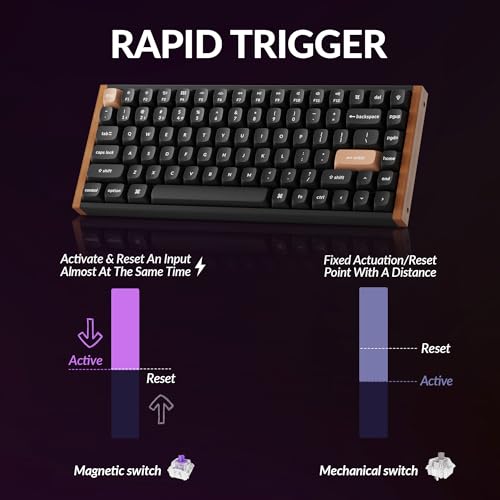
Rapid trigger keyboards use magnetic or analog sensing to detect key movement continuously rather than relying only on a conventional actuation point. That allows the key to reactivate as soon as it moves upward, which can benefit repeated strafing, counter-strafing, tapping, and other movement-heavy inputs. This roundup evaluates three products listed in the Best Gaming Keyboards category using the supplied manufacturer specifications and product records.
The shortlist stays within the stated budget based on the supplied product prices, ranging from the Razer Huntsman V3 Pro TKL Esports Gaming Keyboard at $124.99 to the Logitech G PRO X TKL Rapid at $149.99. Prices and availability can change, and the supplied records do not include warranty terms, independent measurements, or written customer feedback.

Keychron K2 HE Magnetic Wireless Keyboard




As an Amazon Associate we earn from qualifying purchases. Product prices and availability are accurate as of the date/time indicated.
Quick Verdict
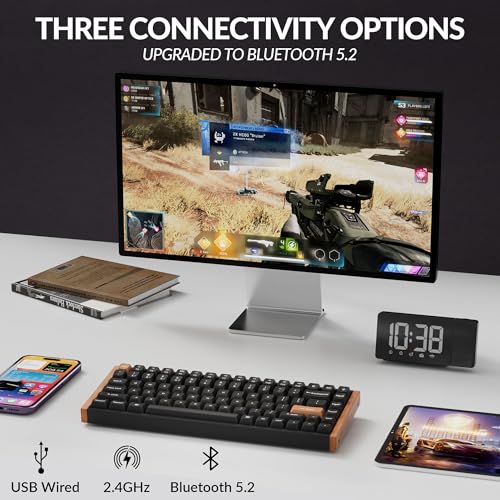
For most users who want one rapid trigger keyboard for gaming, typing, and multiple devices, the Keychron K2 HE Rapid Trigger Wireless Custom is the most flexible pick. Its 75% layout, adjustable magnetic switches, browser-based configurator, and 2.4 GHz, Bluetooth 5.2, and Type-C connectivity cover more use cases than the wired alternatives.
The Razer Huntsman V3 Pro TKL is the stronger match for competitive FPS players who value dedicated controls, onboard adjustments, Snap Tap, and an included wrist rest. The Logitech G PRO X TKL Rapid is a sensible choice for buyers who want a wired tenkeyless board with magnetic analog switches, Rapid Trigger, a volume roller, and Logitech G HUB support.
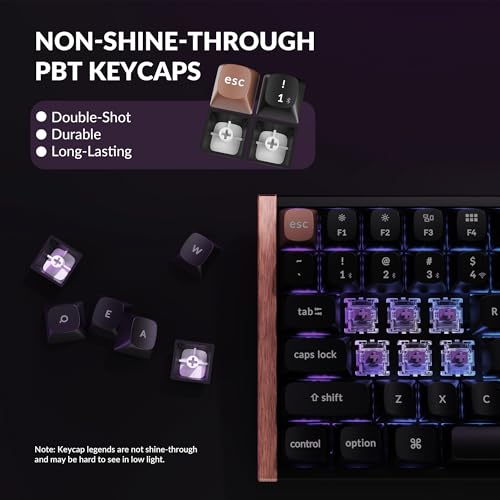
The main limitation is that none of these keyboards is universally superior. Keychron’s keycaps have non-shine-through legends and its hot-swap support is limited to compatible Gateron Double-Rail Magnetic switches. Razer’s Snap Tap requires the latest firmware update, while Logitech’s advanced KEYCONTROL features require Logitech G HUB. Choose based on layout, connectivity, and configuration requirements rather than the Rapid Trigger label alone.
How We Evaluated
PCGearWiki compared the supplied product records for switch type, Rapid Trigger implementation, actuation adjustment, layout, connectivity, configuration method, and gaming controls. We separated manufacturer specifications from editorial inference and did not treat listed features as independent performance measurements. No PCGearWiki hands-on testing, latency testing, benchmark results, or written review data was supplied for these exact ASINs.
We also checked whether each product directly matches the search intent: a complete gaming keyboard with magnetic or analog switches and Rapid Trigger functionality, priced below the stated budget in the supplied data. For methodology details, see the PCGearWiki Review Methodology.
Key Specifications
| Keyboard | Switch and Rapid Trigger details | Layout and connectivity | Configuration and controls | Why it matters |
|---|---|---|---|---|
| Keychron K2 HE Rapid Trigger Wireless Custom | Gateron Double-Rail Magnetic switches; adjustable actuation from 0.2 to 3.8 mm; 0.1 mm sensitivity | 75% layout; 2.4 GHz wireless, Bluetooth 5.2, and Type-C; up to three Bluetooth devices; listed 1000 Hz polling rate | Keychron Launcher web configurator; remapping, macros, actuation, and Rapid Trigger setup | Best for users who want adjustable magnetic input without giving up wireless device switching or a compact navigation-focused layout |
| Razer Huntsman V3 Pro TKL Esports Gaming Keyboard | Gen-2 Analog Optical Switches; adjustable actuation from 0.1 to 4.0 mm; Rapid Trigger; 100 million keystroke manufacturer-rated lifespan | TKL layout; supplied data does not specify the connection interface | Onboard LED adjustment display, digital dial, dedicated media and macro buttons, Snap Tap, magnetic leatherette wrist rest | Best for FPS players who want physical controls and quick settings changes on the keyboard |
| Logitech G PRO X TKL Rapid | Magnetic analog Hall Effect switches; Rapid Trigger; 35g actuation force listed by the manufacturer | Tenkeyless layout; wired; detachable USB-C cable | FN key modes for on-the-fly settings; Logitech G HUB and KEYCONTROL for advanced customization; volume roller and media buttons | Best for buyers who prefer a straightforward wired TKL setup and Logitech’s software ecosystem |
The table shows why the shortlist divides into three distinct categories rather than three interchangeable boards. Keychron is the connectivity pick, Razer is the competition-oriented control pick, and Logitech is the wired TKL alternative. The listed actuation ranges are manufacturer specifications; they do not establish a measured latency advantage between the products.
What Matters Most When Choosing a Rapid Trigger Keyboard
Rapid Trigger adjustment: Rapid Trigger changes how quickly a key can reset and activate during partial movement. A wider actuation range gives users more room to choose between accidental-input resistance and early activation. Keychron lists a 0.2–3.8 mm adjustable range, while Razer lists 0.1–4.0 mm. Logitech confirms adjustable actuation and sensitivity but does not provide a complete actuation range in the supplied data.
Switch architecture: Keychron uses Gateron Double-Rail Magnetic switches, Razer uses Gen-2 Analog Optical Switches, and Logitech uses magnetic analog Hall Effect switches. These are not interchangeable technologies or switch ecosystems. In particular, Keychron’s hot-swap feature is limited to Gateron Double-Rail Magnetic switches, so buyers should not assume that ordinary mechanical or unrelated magnetic switches will fit.
Layout: A 75% keyboard such as the Keychron K2 HE retains a compact form while keeping a function row and navigation cluster. TKL models such as the Razer and Logitech remove the number pad but preserve a more conventional full-width gaming arrangement. The better layout depends on whether you need compact desk space, dedicated navigation keys, or familiarity with a tenkeyless board.
Connection and configuration: Wireless gaming requires more than simply seeing a Bluetooth logo. Keychron specifies 2.4 GHz wireless, Bluetooth 5.2, Type-C operation, a listed 1000 Hz polling rate, and connections for up to three devices. Logitech is explicitly wired with a detachable USB-C cable. The supplied Razer record emphasizes onboard controls but does not identify its connection interface, so buyers should verify that detail before checkout.
Firmware and software requirements: Keychron’s Launcher is browser-based, Logitech’s advanced features require G HUB, and Razer’s Snap Tap requires the latest firmware update. These requirements affect shared computers, tournament setups, and users who prefer to save settings directly on the keyboard. A feature is only useful if the buyer can update, configure, and maintain it on the intended system.
Comparison and Trade-Offs
All three products provide a Rapid Trigger feature, but their priorities differ. Keychron offers the most versatile physical connectivity and a 75% layout. Razer puts more emphasis on competitive FPS controls and onboard adjustment. Logitech keeps the configuration path familiar for users already invested in G HUB and wants a wired TKL format.
- Choose Keychron when wireless flexibility, multi-device use, Mac and Windows compatibility, or a 75% layout matters most.
- Choose Razer when dedicated controls, onboard visual adjustment, Snap Tap, and a wrist rest are more important than wireless details that are not specified in the supplied record.
- Choose Logitech when a wired connection, detachable USB-C cable, 35g listed actuation force, and Logitech G HUB integration fit your setup.
The supplied ratings are 4.4/5 for Keychron, 4.3/5 for Razer, and 4.0/5 for Logitech, but each record shows zero reviews. These ratings should therefore not be interpreted as a reliable customer-feedback pattern. There are no written reviews in the supplied data to support claims about long-term reliability, sound, stabilizer quality, or typing comfort.
Design and Build Quality
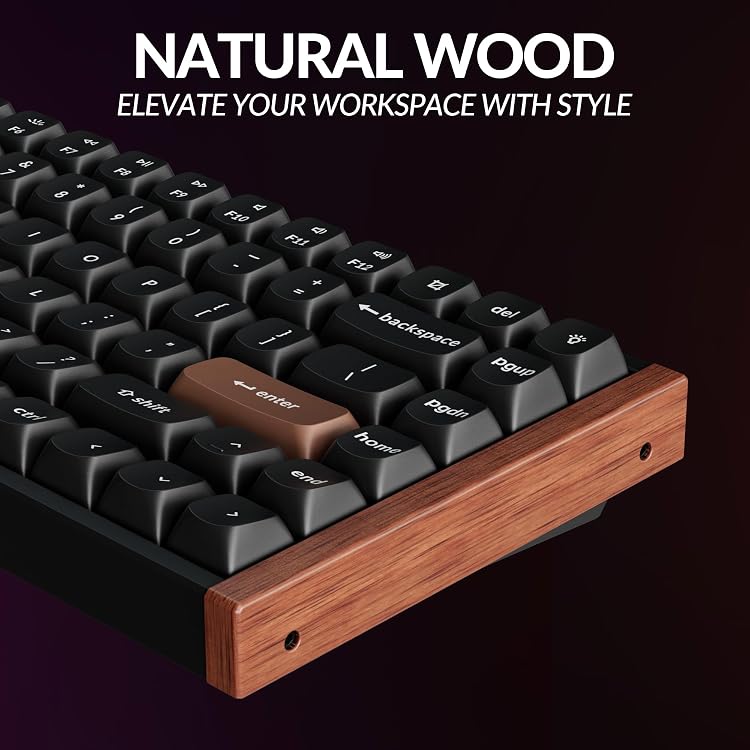
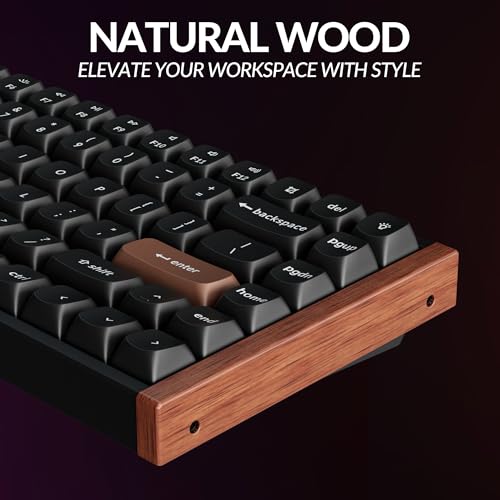
The Keychron K2 HE combines an aluminum and wood design with rosewood siding, double-shot PBT keycaps, and a 75% layout. The keycaps are described as non-shine-through, which can make legends harder to see in low light despite the RGB lighting. That is a practical usability limitation for users who type without looking at the keys in a dim room.
The Razer Huntsman V3 Pro TKL uses textured double-shot PBT keycaps and includes a magnetic firm leatherette wrist rest. Its digital dial and dedicated control buttons give the top-right area a more control-oriented design than the Keychron. The supplied data does not provide dimensions, weight, mounting details, or a measured build-quality assessment, so those attributes should be verified separately.
The Logitech G PRO X TKL Rapid follows a conventional tenkeyless gaming format with a detachable USB-C cable, volume roller, media buttons, and LIGHTSYNC RGB. Its wired design avoids the need to choose between Bluetooth and 2.4 GHz modes, but it also makes cable placement part of the desk setup. No supplied dimensions, weight, plate material, or acoustic measurements are available.
Performance and Real-World Use
In practical use cases, Rapid Trigger is most relevant to games where quick directional changes and repeated key presses matter. The feature can reduce the amount of upward travel needed before a key becomes active again, which is why these keyboards are aimed especially at competitive first-person shooters. It does not automatically improve aim, movement decisions, or frame rate.
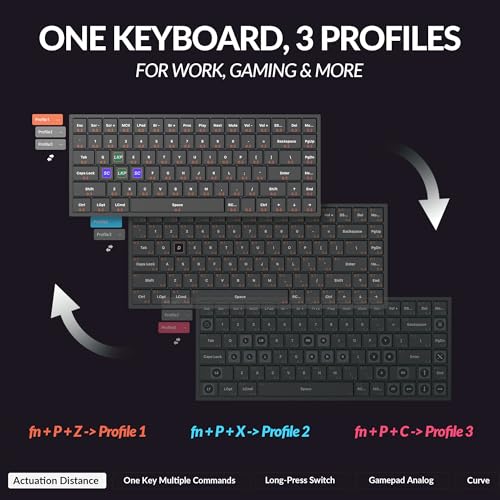
The Keychron K2 HE is the most adaptable option for mixed use. Its adjustable actuation, Rapid Trigger setup, macros, and remapping are available through the Keychron Launcher web configurator. The 75% layout leaves more desk room than a full-size keyboard while retaining navigation functionality. For writing and general desktop work, its wireless modes and support for up to three devices are more consequential than the gaming feature alone.
The Razer Huntsman V3 Pro TKL is more narrowly optimized for FPS play. Its Rapid Trigger feature, 0.1–4.0 mm adjustable actuation range, Snap Tap, dedicated controls, and onboard LED array support frequent changes without relying entirely on desktop software. Snap Tap requires the latest firmware update, and buyers should confirm that the feature is permitted in the games or competitive environments they use.
The Logitech G PRO X TKL Rapid targets players who want magnetic analog input in a familiar TKL design. Its Rapid Trigger mode supports key reactivation without a full release, while FN key modes allow actuation and switch-travel settings to be changed without software. Logitech G HUB adds more detailed customization, and KEYCONTROL supports multiple layers and commands, but advanced features require that software.
None of the supplied records includes independent latency measurements, switch consistency testing, sound analysis, or durability testing. Claims such as “instant” or “tournament-grade” should therefore be read as product positioning or manufacturer language, not as PCGearWiki measurement results.
Compatibility
- Keychron platforms: The supplied title identifies compatibility with Mac, Windows, and Linux. It connects through 2.4 GHz wireless, Bluetooth 5.2, or Type-C, and can connect with up to three devices through its stated multi-mode functionality.
- Razer connection details: The supplied product record confirms the keyboard’s gaming features and controls but does not state its connection interface or operating-system requirements. Verify the included cable or connection method before purchase.
- Logitech desktop requirements: The keyboard is wired and uses a detachable USB-C cable. Logitech G HUB is required for advanced features, so confirm that the intended computer supports the software and that downloading software is acceptable for the setup.
- Layout fit: Keychron uses a 75% layout, while Razer and Logitech use TKL formats. Check your preferred key positions, navigation cluster, function-row access, and desk width before ordering.
- Switch replacement: Keychron’s hot-swap feature supports Gateron Double-Rail Magnetic switches only. It should not be treated as universal hot-swap compatibility.
- Returns and warranty: Warranty coverage and return terms are not included in the supplied product data. Verify both directly on the product page before checkout, especially for firmware-dependent features and switch compatibility.
Pros and Cons
Keychron K2 HE Rapid Trigger Wireless Custom
- 75% layout balances compact size with navigation functionality.
- Supports 2.4 GHz wireless, Bluetooth 5.2, and Type-C modes.
- Offers adjustable actuation from 0.2 to 3.8 mm and 0.1 mm sensitivity.
- Works with Mac, Windows, and Linux according to the supplied product title.
- Includes browser-based remapping, macro, actuation, and Rapid Trigger configuration.
- Non-shine-through legends may be difficult to see in low light.
- Hot-swap support is limited to compatible Gateron Double-Rail Magnetic switches.
- Wireless and polling specifications are manufacturer claims rather than independent measurements.
Razer Huntsman V3 Pro TKL Esports Gaming Keyboard
- Strong feature match for competitive FPS movement.
- 0.1–4.0 mm adjustable actuation range.
- Onboard LED adjustment display reduces dependence on software for changes.
- Includes Snap Tap, a digital dial, dedicated buttons, and a magnetic wrist rest.
- Textured double-shot PBT keycaps are specified for durability.
- Snap Tap requires the latest firmware update.
- The supplied data does not specify the connection interface.
- Its TKL layout may not suit buyers who prefer a 75% board or wireless multi-device use.
Logitech G PRO X TKL Rapid
- Wired TKL format with a detachable USB-C cable.
- Magnetic analog Hall Effect switches and Rapid Trigger.
- 35g actuation force is listed in the supplied specifications.
- Provides a volume roller, media buttons, LIGHTSYNC RGB, and FN key modes.
- Supports deeper customization through Logitech G HUB and KEYCONTROL.
- Advanced features require Logitech G HUB.
- Wired operation is less flexible than Keychron’s multi-mode connectivity.
- The supplied data does not state a complete actuation range.
Who Should Buy Each Pick?
Buy the Keychron K2 HE if you want one keyboard for gaming, typing, and several devices. It is the clearest choice for Mac, Windows, or Linux users who value 2.4 GHz wireless, Bluetooth 5.2, Type-C operation, and the compact 75% layout. Skip it if you need shine-through legends, universal magnetic-switch compatibility, or a dedicated TKL arrangement.
Buy the Razer Huntsman V3 Pro TKL if competitive FPS movement is your priority and you want onboard adjustment controls. The digital dial, LED array, Snap Tap, dedicated buttons, and wrist rest make it the most purpose-built esports option in this comparison. Skip it if wireless multi-device connectivity or a fully documented connection interface is essential before purchase.
Buy the Logitech G PRO X TKL Rapid if you prefer a wired tenkeyless keyboard and already use Logitech G HUB. Its magnetic analog switches, Rapid Trigger, detachable USB-C cable, volume roller, and media buttons create a straightforward gaming setup. Skip it if you need Bluetooth, 2.4 GHz wireless, a 75% footprint, or extensive configuration without Logitech software.
Who Should Skip These Keyboards?
Skip this shortlist if you are looking for a conventional mechanical keyboard with ordinary hot-swappable switches. Rapid Trigger boards use specialized magnetic or analog switch systems, and Keychron specifically limits replacement-switch compatibility to its Gateron Double-Rail Magnetic family. A standard mechanical-keyboard guide may be a better starting point for broader switch choice and traditional typing behavior.
Users who need a number pad should also look elsewhere because the listed Keychron, Razer, and Logitech models use 75% or TKL layouts rather than full-size layouts. Likewise, buyers who require independently verified latency, sound, durability, or long-term owner feedback should wait for more evidence or consult additional sources before making a purchase.
Alternatives to Consider
The three products are alternatives to one another within this shortlist. The Keychron K2 HE Rapid Trigger Wireless Custom is the alternative to the wired models when connectivity and multi-device use matter most. The Razer is the alternative when onboard FPS controls take priority. The Logitech is the alternative for users who want a wired TKL board with Logitech software support.
For buyers who are not committed to Rapid Trigger, a broader mechanical keyboard comparison may provide more layout, switch, and connectivity choices. However, ordinary mechanical keyboards should not be assumed to offer the same adjustable actuation or reset behavior described for these magnetic and analog models.
Why You Should Trust PCGearWiki
PCGearWiki bases this comparison on the supplied product records, matching each ASIN to its exact model name, layout, switch type, connection method, and intended gaming use. We compared the features that directly change the buying decision: Rapid Trigger implementation, actuation adjustment, configuration requirements, physical layout, and wired or wireless operation.
Final Verdict
The Keychron K2 HE Rapid Trigger Wireless Custom is the best overall fit for most buyers seeking a rapid trigger keyboard under $150 because it combines adjustable magnetic switches, a 75% layout, broad device connectivity, and cross-platform compatibility. Its main drawbacks are the non-shine-through legends and limited Gateron magnetic-switch ecosystem.
Choose the Razer Huntsman V3 Pro TKL instead if competitive FPS controls, onboard adjustments, Snap Tap, and a wrist rest matter more than wireless flexibility. Choose the Logitech G PRO X TKL Rapid if a wired TKL design, detachable USB-C cable, 35g listed actuation force, and Logitech G HUB are the deciding factors. The correct purchase is determined by layout and configuration needs, not by Rapid Trigger branding alone.
Frequently Asked Questions
Is the best rapid trigger keyboard under $150 worth it?
It can be worth buying if you play movement-heavy competitive games and will actually use adjustable actuation or Rapid Trigger. The feature is less important for casual games, office typing, and users who prefer conventional mechanical switches. Within this shortlist, value depends mainly on whether you need wireless connectivity, onboard controls, or Logitech software.
Who is the best rapid trigger keyboard under $150 best for?
The Keychron K2 HE is best for mixed-use buyers and multi-device households. The Razer Huntsman V3 Pro TKL is best for competitive FPS players who want dedicated adjustment controls. The Logitech G PRO X TKL Rapid is best for wired TKL users who prefer Logitech G HUB and a familiar gaming control layout.
Is a rapid trigger keyboard good for gaming?
Rapid Trigger can be useful for fast directional changes, repeated presses, strafing, and counter-strafing because the key can reactivate during partial movement. It does not improve every type of game equally and cannot replace practice or affect unrelated factors such as graphics performance. Check game rules before using features such as Snap Tap in competitive play.
What should I compare before buying a rapid trigger keyboard?
Compare the actuation range, Rapid Trigger adjustment method, switch compatibility, layout, connection type, software requirements, and firmware conditions. Keychron’s 0.2–3.8 mm range and wireless modes suit flexible setups; Razer’s 0.1–4.0 mm range and onboard controls suit FPS-focused users; Logitech emphasizes wired operation, 35g listed actuation force, and G HUB customization.
Does Keychron’s hot-swap feature support regular mechanical switches?
No. The supplied specifications state that the Keychron K2 HE is compatible with Gateron Double-Rail Magnetic switches only. Its hot-swap capability should not be treated as support for standard mechanical switches or unrelated magnetic switch families. Verify replacement-switch compatibility before purchasing spares or planning a switch change.
Do these keyboards have independently verified latency results?
No independent latency measurements are included in the supplied product data. Keychron’s listed 1000 Hz polling rate, Razer’s responsiveness claims, and the Logitech and Razer Rapid Trigger descriptions are manufacturer specifications or product positioning. They should not be presented as PCGearWiki benchmark results.
Sources and Verification
Research basis: Product identity, dimensions, interfaces, supported features, and warranty terms are checked against available manufacturer documentation and current retailer listings. Price, stock, and aggregate customer ratings can change after publication.
Testing disclosure: Unless this article explicitly states that PCGearWiki performed hands-on testing and describes the test setup, recommendations are research-based editorial evaluations rather than PCGearWiki laboratory measurements. Customer feedback is used to identify recurring ownership patterns, not as proof of technical performance.
Last source review: August 21, 2026. See our Review Methodology, Editorial Policy, and Corrections Policy.


Write Your Review
No reviews yet. Be the first to share your experience!