

Last updated: August 22, 2026
The best hot-swappable keyboard with wireless connectivity depends on whether you prioritize a compact layout, a number pad, quiet typing, deep customization, or premium gaming features. The main trade-off is layout and price: budget models offer tri-mode connectivity and switch swapping, while premium boards add stronger software, displays, accessories, or gaming-focused wireless systems.
Based on available product data, the shortlist includes 75%, 96%, compact 1800, full-size, and premium gaming keyboards. Every recommended model supports hot-swappable mechanical switches and wireless connectivity, but the exact connection methods, switch compatibility, operating-system support, battery claims, and software features vary by product.

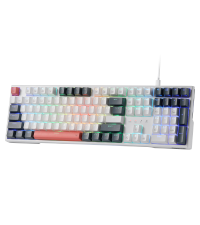
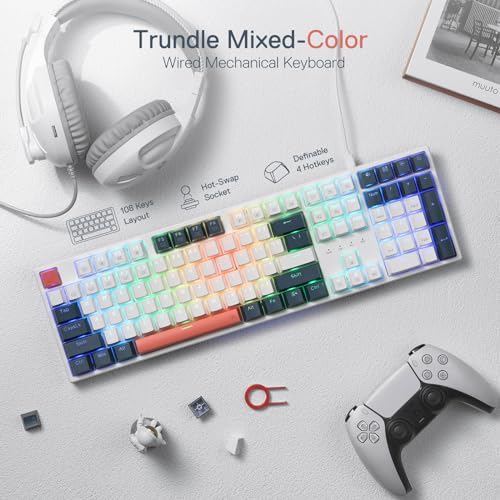
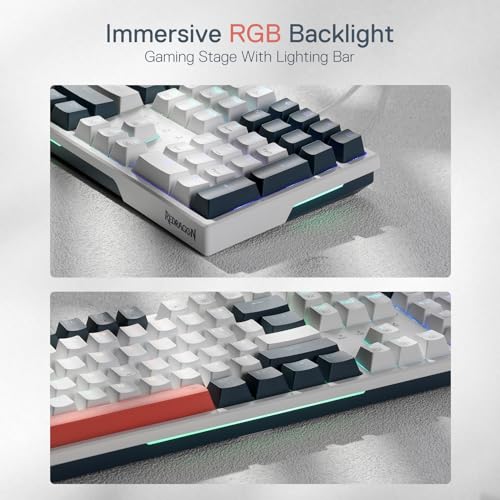
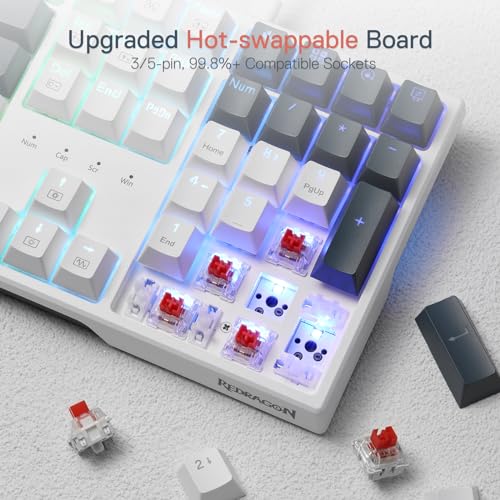
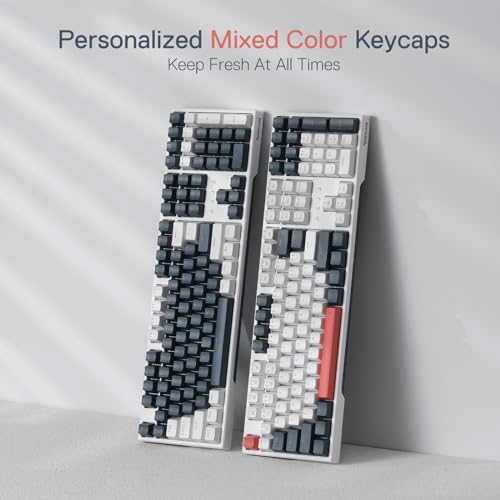
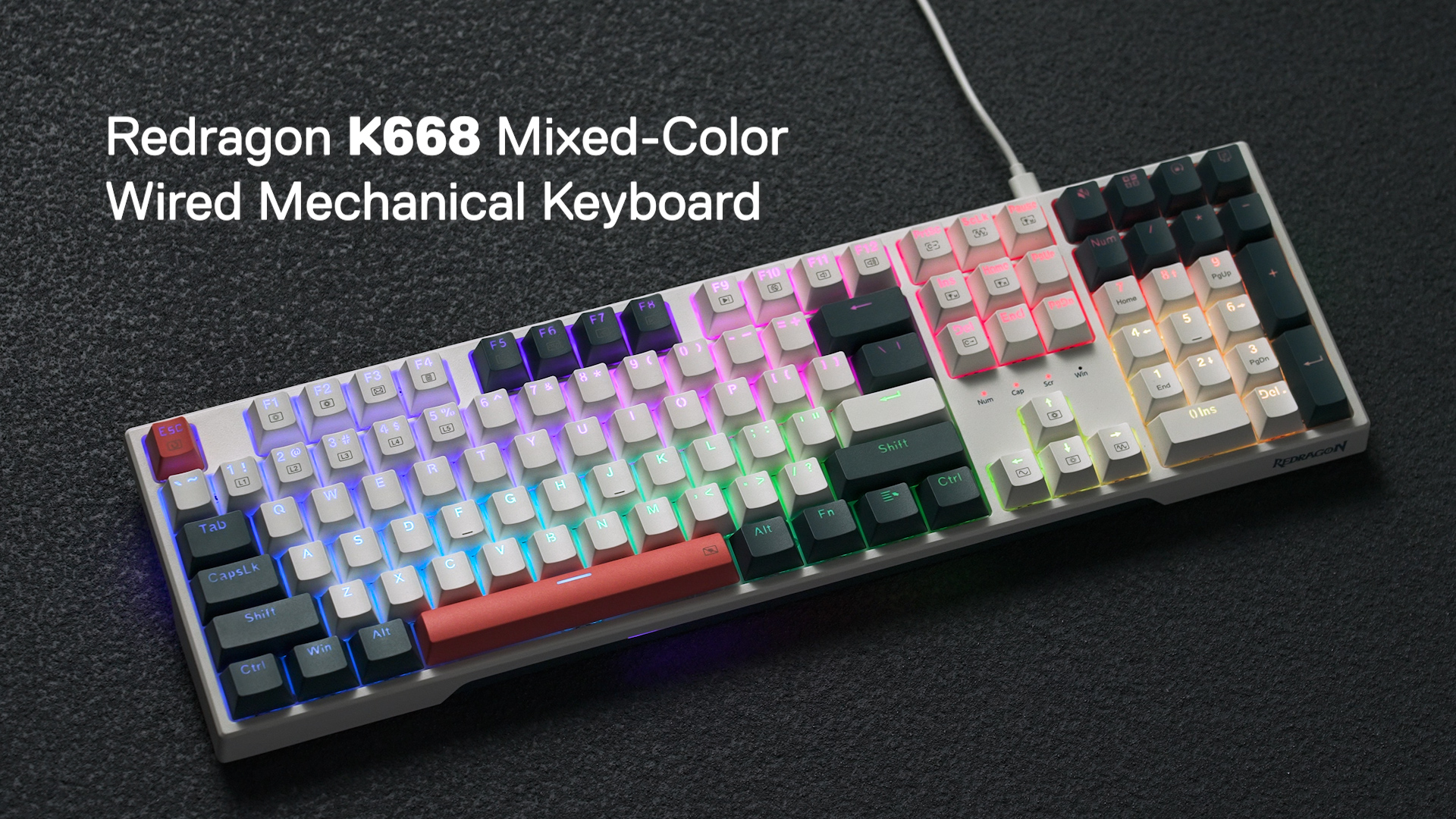
Redragon K668 RGB Mechanical Gaming Keyboard




As an Amazon Associate we earn from qualifying purchases. Product prices and availability are accurate as of the date/time indicated.
Quick Verdict
For most users, the best hot-swappable keyboard with wireless connectivity should combine 2.4 GHz wireless, Bluetooth, wired USB, a socket compatible with both 3-pin and 5-pin switches, and a layout that matches the workload. The Keychron K10 Max is the most flexible full-size option, while the AULA F75 and EPOMAKER x Aula F75 are better suited to compact desks.
The SOLAKAKA KI99 Pro stands out for users who want a compact 96% layout, a large claimed battery capacity, quiet switches, and a control knob. The EPOMAKER TH99 offers a similar space-saving number-pad layout with a strong acoustic focus. The ASUS ROG models are aimed at buyers willing to pay substantially more for premium gaming features and accessories. The main limitation across the category is that manufacturer specifications do not replace independent testing, so wireless behavior, sound, and long-term reliability should be treated cautiously.
How We Evaluated
PCGearWiki evaluated the supplied manufacturer specifications and product records rather than conducting hands-on testing. We compared connection modes, switch-socket compatibility, layouts, battery claims, keycap materials, software support, acoustic construction, operating-system support, and stated gaming features. We also separated verified specifications from editorial inference and did not treat listed ratings with zero written reviews as meaningful customer-feedback evidence.
Our approach follows the PCGearWiki review methodology. The principal limitation is that the supplied data does not include documented PCGearWiki measurements for latency, battery endurance, typing noise, wireless range, or durability.
What Matters Most When Choosing
Connection modes: Tri-mode keyboards normally combine Bluetooth, 2.4 GHz wireless, and wired USB. Bluetooth is useful for phones, tablets, and multi-device workflows, while 2.4 GHz is generally the more appropriate wireless mode for gaming when a receiver is available. Wired USB remains important for charging, configuration, or situations where wireless interference is undesirable.
Hot-swap socket compatibility: A board that accepts both 3-pin and 5-pin MX-style switches gives beginners and enthusiasts more replacement options. Compatibility still needs to be checked carefully because hot-swap support does not mean every switch format, optical switch, low-profile switch, or proprietary switch will fit.
Layout: A 75% board keeps the function row and arrow keys while removing the number pad. A 96% or compact 1800 layout retains a number pad in a narrower footprint than a conventional full-size design. A 100% keyboard is the safer choice for frequent data entry, spreadsheets, accounting, or workflows that rely on dedicated navigation and number-pad keys.
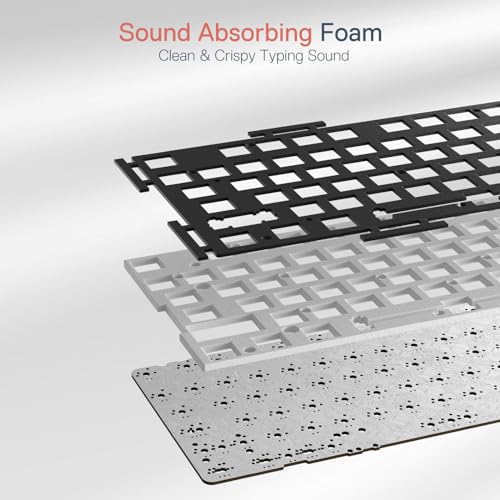
Switch and acoustic design: Pre-lubed switches, gasket structures, foam layers, silicone pads, and PBT keycaps can influence the expected typing feel and sound. These features describe construction, not a guaranteed noise level. A keyboard advertised with silent switches may still transmit bottom-out or stabilizer noise depending on the desk, keycaps, and typing technique.
Software and platform support: Remapping and macro tools may require a Windows application, wired mode, or a specific connection mode. QMK and browser-based configuration can be more flexible than proprietary software, but setup may be more involved. Check whether the functions you need work on Windows, macOS, Linux, mobile devices, or consoles.
Comparison and Trade-Offs
| Keyboard | Layout | Wireless and wired connections | Hot-swap information | Best fit |
|---|---|---|---|---|
| SOLAKAKA KI99 Pro Wireless Mechanical Keyboard | 96% | Bluetooth 5.0, 2.4 GHz, Type-C | 3-pin and 5-pin; 1.2 mm flex-cut PCB | Quiet, compact number-pad setup |
| Redragon K668 RGB Gaming Keyboard | Full-size with four extra shortcut keys | Wired USB only according to supplied data | 3-pin and 5-pin | Lowest-cost full-size customization |
| Keychron K10 Max QMK Wireless Custom Mechanical | 100%, 108 keys | 2.4 GHz, Bluetooth 5.1, wired | 3-pin and 5-pin MX switches | Full-size productivity and QMK flexibility |
| EPOMAKER TH99 Tri-Mode Wireless Mechanical | Compact 1800, 102 keys | Bluetooth 5.0, 2.4 GHz, cable | Swappable keys; exact pin count should be confirmed before buying | Number-pad users who want a compact board |
| AULA F75 75% Wireless Mechanical Keyboard | 75%, 81 keys | Bluetooth 5.0, 2.4 GHz, USB | 3-pin and 5-pin | Compact gaming and general use |
| ASUS ROG Azoth Wireless Mechanical Gaming Keyboard | 75% | Bluetooth, ROG 2.4 GHz, USB | 3-pin; supplied DIY tools | Premium enthusiast and gaming setup |
| ASUS ROG Strix Scope II 96 Wireless Mechanical | 96% | Bluetooth, ROG 2.4 GHz, USB | Hot-swappable ROG NX switch options | Premium gaming with a number pad |
| EPOMAKER x Aula F75 Gasket Mechanical Keyboard | 75% | Bluetooth, 2.4 GHz, USB-C | Full-key hot-swap | Acoustic-focused compact setup |
| Kisnt KN85 Wireless Mechanical Keyboard | 75%, 85 keys | Bluetooth 5.0, 2.4 GHz, USB-C | 3-pin and 5-pin | Budget compact wireless customization |
| OIXOC AU75 Wireless RGB Gaming 75% Mechanical | 75% | Bluetooth 5.0, 2.4 GHz, USB-C | 3-pin and 5-pin | Entry-level gaming with a knob |
The largest practical divide is not RGB lighting but layout. The Keychron K10 Max and Redragon K668 retain full-size functionality, while the TH99, KI99 Pro, and ROG Strix Scope II 96 keep a number pad in a more compact arrangement. The 75% models save more desk space but require function-layer shortcuts or a separate numpad for spreadsheet-heavy work.
Design and Build Quality
The category offers three distinct physical approaches. The 75% boards prioritize mouse room and compact desks. The 96% and compact 1800 boards preserve a numpad while reducing the spacing found on many traditional full-size keyboards. The Keychron K10 Max and Redragon K668 use conventional full-size layouts, which remain preferable when dedicated navigation and numeric-entry keys are used constantly.
Gasket construction appears on several models, including the SOLAKAKA KI99 Pro, EPOMAKER TH99, AULA F75, EPOMAKER x Aula F75, and ASUS ROG Azoth. In practical use cases, gasket mounts and internal foam are intended to shape flexibility and acoustics, but they do not guarantee the same typing sound across desks, switches, or keycap sets. PBT keycaps are specified on many of the shortlisted models and are generally selected for resistance to shine and wear, although no durability test is supplied here.
Performance and Real-World Use
For gaming, 2.4 GHz wireless or wired USB is the sensible connection priority. The Keychron K10 Max, EPOMAKER TH99, ASUS ROG Azoth, ASUS ROG Strix Scope II 96, AULA F75, SOLAKAKA KI99 Pro, EPOMAKER x Aula F75, Kisnt KN85, and OIXOC AU75 all list 2.4 GHz support. Bluetooth remains useful for less latency-sensitive typing and for switching among computers, tablets, or phones.
The Keychron K10 Max is the most compelling work-focused option because QMK and the Keychron Launcher web app support remapping and macros across Windows, macOS, and Linux according to the supplied specifications. The smaller 75% boards are better when desk space and mouse movement matter. The TH99, KI99 Pro, and ROG Strix Scope II 96 are more suitable for data-entry users who still want a compact footprint.
Sound expectations should remain qualitative. Silent switches and multiple dampening layers suggest a quieter presentation than an untreated clicky board, while pre-lubed linear switches and gasket structures suggest a smoother feel. These are construction-based conclusions, not measured results. Buyers who need a genuinely quiet shared-office keyboard should confirm the exact switch variant and consider the sound of stabilizers and bottom-out impacts.
Compatibility
- Confirm the exact ASIN, layout, color, switch type, and variant before checkout. Similar names such as AULA F75 and EPOMAKER x Aula F75 do not identify the same product record.
- Check whether the keyboard connects through Bluetooth, a 2.4 GHz receiver, USB-C, or only wired USB. The Redragon K668 is wired according to the supplied data.
- Match the layout to the workload. A 75% keyboard omits the numpad, while 96% and compact 1800 boards retain one in a smaller arrangement.
- Verify switch compatibility before buying replacement switches. Several models support 3-pin and 5-pin MX-style switches, but the ASUS ROG Azoth record specifically states 3-pin support.
- Review operating-system and software requirements. Kisnt identifies Windows-only driver support for wired and 2.4 GHz modes, while Keychron lists QMK and Launcher support for Windows, macOS, and Linux.
- For consoles, verify the individual game and console behavior rather than relying only on a general compatibility statement. The AULA F75 and OIXOC AU75 list console compatibility, but the supplied data does not document every console feature.
- Check the current retailer return policy, warranty terms, included receiver, cable, and switch variant because these details can differ between listings even within one model family.
Pros and Cons
Category strengths
- Most shortlisted wireless models combine Bluetooth, 2.4 GHz, and wired USB.
- 3-pin and 5-pin hot-swap support is available on many budget and mid-range boards.
- 75%, 96%, compact 1800, and full-size layouts cover different desk and productivity needs.
- Several models use PBT keycaps, gasket structures, foam, silicone, or pre-lubed switches.
- Control knobs and programmable software are common in the mid-range and premium selections.
Category limitations
- Manufacturer battery, latency, and range claims are not independent PCGearWiki measurements.
- 75% layouts are less convenient for frequent numeric entry.
- Wireless and macro features may depend on a receiver, wired setup, or operating-system-specific software.
- Similar model names can conceal different switch, layout, or connection variants.
Who Should Buy It?
Choose the SOLAKAKA KI99 Pro if you want quiet typing, a compact number pad, a control knob, and broad tri-mode connectivity. Choose the Keychron K10 Max if full-size productivity and deep remapping are more important than desk space. Choose the AULA F75 or EPOMAKER x Aula F75 for a compact 75% setup with switch customization and RGB.
The EPOMAKER TH99 fits office users who need a number pad but prefer a more compact 1800 layout. The Kisnt KN85 and OIXOC AU75 are aimed at buyers who want to spend less while still receiving tri-mode wireless, a 75% layout, and 3-pin/5-pin switch support. Enthusiasts who want a display and a complete modification kit should consider the ASUS ROG Azoth. Gamers who want a premium compact number pad should consider the ROG Strix Scope II 96.
Who Should Skip It?
Skip the 75% options if your daily work involves spreadsheets, accounting, or frequent numeric entry. Skip the Redragon K668 if wireless connectivity is essential. Avoid premium ASUS models if their OLED display, gaming software, receiver technology, wrist rest, or included modification tools do not justify the higher purchase cost.
Users who require measured wireless latency, independently verified battery endurance, or long-term durability evidence should wait for documented testing or buy from a retailer with a clear return process. The supplied data supports feature comparisons, not laboratory conclusions.
Alternatives to Consider
Rapid-trigger keyboard comparisons may be more relevant for competitive gamers who prioritize adjustable actuation and rapid key reset over hot-swappable switch experimentation. That is a different buying goal, so it should not be confused with this wireless customization-focused shortlist.
Within this product set, the most useful alternative paths are straightforward: move from a 75% board to the Keychron K10 Max for a full-size workflow, move from a full-size board to the AULA F75 for more mouse space, or move from a budget model to an ASUS ROG keyboard for premium gaming integration. These changes address different constraints rather than representing a simple performance ranking.
Why You Should Trust PCGearWiki
PCGearWiki bases this comparison on the supplied product records, model names, ASINs, manufacturer-listed specifications, connection standards, layouts, switch support, software descriptions, and stated compatibility. We compare the features that change a keyboard purchase instead of treating RGB lighting or a high listed rating as proof of better performance.
Final Verdict
The Keychron K10 Max is the safest all-around recommendation for users who need a full-size wireless keyboard, broad switch compatibility, and QMK-based customization. The SOLAKAKA KI99 Pro is the better fit for quieter compact number-pad use, while the AULA F75 and EPOMAKER x Aula F75 make more sense for smaller desks. The EPOMAKER TH99 is the compact number-pad alternative.
Choose ASUS ROG only when premium gaming features, accessories, or the OLED display are decisive. Choose Kisnt or OIXOC when the budget is tight and a 75% tri-mode keyboard meets your needs. The deciding factor is layout first, connection method second, and switch/software flexibility third. For most buyers, that ordering prevents paying for features that do not solve the actual workspace problem.
Frequently Asked Questions
Is the best hot-swappable keyboard with wireless connectivity worth buying?
Yes, for users who want to change switches without soldering and use the same keyboard across wired, 2.4 GHz, and Bluetooth connections. The value depends on choosing the correct layout and confirming that the replacement switches fit the board’s socket standard.
Who is the best hot-swappable keyboard with wireless connectivity best for?
It is best for gamers, office users, programmers, and enthusiasts who want wireless flexibility and the ability to tune typing feel later. A 75% model suits compact desks, while a 96%, compact 1800, or full-size keyboard suits users who rely on a numpad.
Is a hot-swappable wireless keyboard good for gaming?
It can be. For gaming, prioritize a model with 2.4 GHz wireless and wired USB, then use Bluetooth mainly for less latency-sensitive devices. The supplied data identifies gaming-oriented features on several boards, but it does not include independent latency testing, so no measured gaming advantage should be assumed.
What should I compare before buying a hot-swappable wireless keyboard?
Compare the layout, connection modes, switch pin compatibility, operating-system support, software requirements, keycap material, battery claim, and included accessories. Also verify the exact ASIN and variant because products with similar names may have different layouts, switches, batteries, or wireless features.
Are all hot-swappable switches compatible with these keyboards?
No. Several models specify support for 3-pin and 5-pin MX-style switches, but that does not automatically include optical, low-profile, or proprietary switch designs. Check the keyboard’s socket type, plate clearance, switch orientation, and stabilizer compatibility before ordering replacements.
Sources and Verification
Research basis: Product identity, dimensions, interfaces, supported features, and warranty terms are checked against available manufacturer documentation and current retailer listings. Price, stock, and aggregate customer ratings can change after publication.
Testing disclosure: Unless this article explicitly states that PCGearWiki performed hands-on testing and describes the test setup, recommendations are research-based editorial evaluations rather than PCGearWiki laboratory measurements. Customer feedback is used to identify recurring ownership patterns, not as proof of technical performance.
Last source review: August 22, 2026. See our Review Methodology, Editorial Policy, and Corrections Policy.


Write Your Review
No reviews yet. Be the first to share your experience!