

Last updated: October 2, 2026
Select dual monitor docking station by matching host USB-C DisplayPort Alternate Mode revision to target display resolutions. Windows systems use Multi-Stream Transport (MST) to extend across two displays over single connection. macOS lacks MST support across standard USB-C, forcing mirrored external screens unless using separate display controller technologies.
Analysis below use manufacturer specifications, not hands-on laboratory benchmarks. Setup require careful attention to host video bandwidth, USB data rates, power delivery profiles. Review broader lineup across docking stations and USB hubs for specialized setups, or consult dual 4K monitor KVM switches if sharing displays across multiple computers.
Dual Monitor Docking Station Comparison
Review key technical specifications across approved models before selecting hardware:
| Model | Display Output Limits | Host Delivery Power | Downstream Ports | Host OS Limits |
|---|---|---|---|---|
| Anker Prime Docking Station | Dual 2K@60Hz (DP 1.4) / Dual 1080p@60Hz (DP 1.2) | 160W Total (Up to 100W upstream) | 14 Ports (10Gbps USB-C/USB-A) | Windows/ChromeOS extend; macOS mirror only; No Linux |
| Anker Laptop Docking Station Dual Monitor | Dual 4K@30Hz / Single 4K@60Hz | 85W Pass-through (100W PD input needed) | 8 Ports (5Gbps USB-A, SD, GbE) | Windows/ChromeOS extend; macOS mirror only; No Linux |
Technical Selection Criteria: Bandwidth, MST, Display Protocols
Host USB-C ports do not deliver identical video bandwidth. Video capability depends on underlying physical layer protocol implemented on laptop motherboard:
- DisplayPort 1.2 Alt Mode: Provide 17.28 Gbps raw link bandwidth (2-lane video drop bandwidth to 8.64 Gbps when sharing lines with USB 3.0 data). Support dual 1080p screens at 60Hz. Cannot drive dual 4K monitors without drop to low refresh rates or chroma subsampling.
- DisplayPort 1.4 Alt Mode: Provide 25.92 Gbps raw link bandwidth. Support Display Stream Compression (DSC). Enable dual 2K screens at 60Hz or dual 4K at lower refresh limits when shared with USB 10Gbps data streams.
- macOS MST Incompatibility: Apple macOS kernel limit standard USB-C DisplayPort output to Single-Stream Transport (SST). Dual external displays plugged into standard USB-C dock mirror desktop content. Extended dual desktops on Apple silicon require dedicated Thunderbolt controllers, dual direct host cables, or DisplayLink compression drivers.
Mounting displays on hardware like budget monitor arms or exploring options in monitor arms and laptop stands clean desk footprint, but correct video pipeline remain primary requirement.
[acms_product asin=”B0CW9249DK”]High-Performance Setup: Anker Prime Docking Station
Specification evaluation based on published manufacturer documentation:
Anker Prime Docking Station target workstation configurations needing fast peripheral data alongside multi-monitor output. Hardware use 14-in-1 layout driven by high-output integrated power brick. Total power budget reach 160W across all ports, delivering up to 100W directly to host laptop while charging mobile devices simultaneously at high speeds.
Video Pipeline and Constraints
Video output handle display routing via dual HDMI connections. Video capabilities remain tied directly to host system GPU and DisplayPort Alt Mode generation:
- DP 1.4 Host: Max dual display output reach 2K resolution (2560×1440) at 60Hz.
- DP 1.2 Host: Max dual display output drop to 1080p (1920×1080) at 60Hz.
- Display Restrictions: Hardware explicitly lack support for ultra-wide 5120×1440 panels. High refresh gaming displays (120Hz+) unachievable across dual connections.
OS Support Matrix
Full desktop extension across two monitors work on Windows 10, Windows 11, ChromeOS. System lack Linux compatibility. Apple macOS users receive mirrored video output across both external screens due to lack of MST handling inside macOS display stack. Check live pricing on product card above.
[acms_product asin=”B0874M3KW4″]Compact Budget Setup: Anker Laptop Docking Station Dual Monitor
Specification evaluation based on published manufacturer documentation:
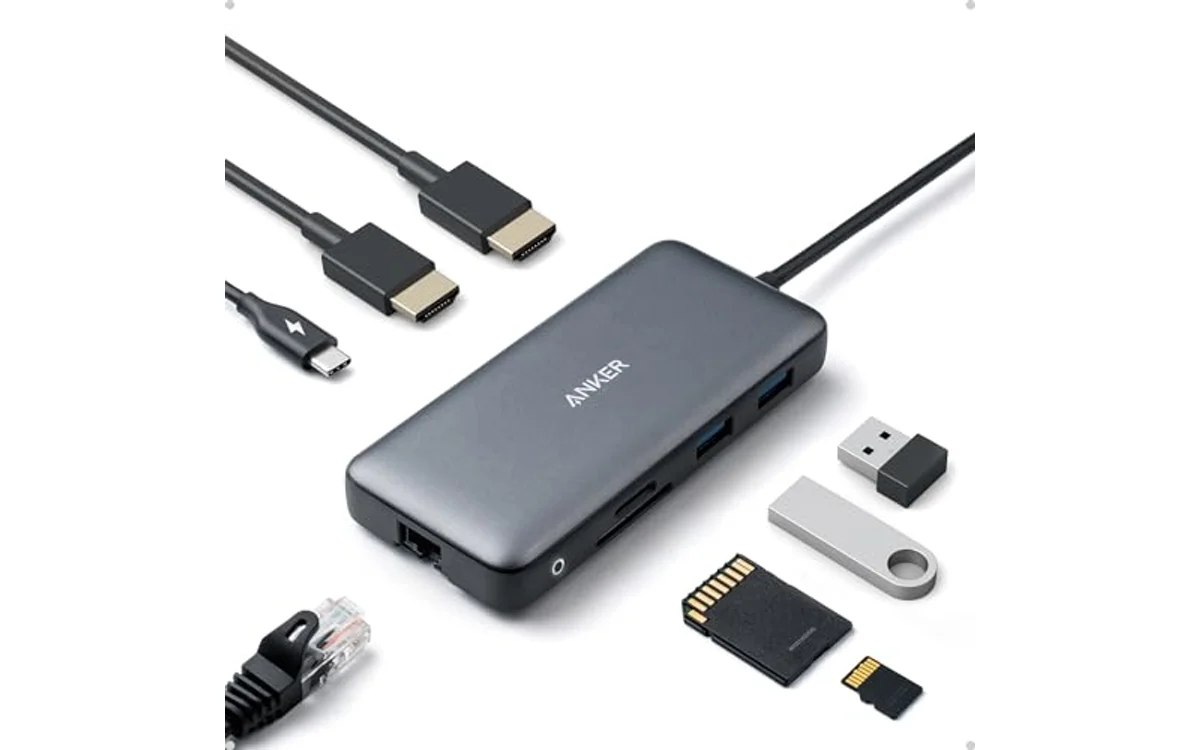
Anker Laptop Docking Station Dual Monitor provide 8-in-1 bus-and-passthrough architecture. Device omit integrated AC supply to reduce physical volume and price. Hardware require external 100W USB-C PD power adapter to achieve rated 85W pass-through charging to host machine; remaining 15W power internal dock logic, USB-A accessories, SD card slots, Gigabit Ethernet controller.
Display Bandwidth Trade-Offs
Video distribution use two full-sized HDMI ports. Resolution allocation split based on active monitor count:
- Single Display Mode: Drive single screen up to 4K resolution at 60Hz.
- Dual Display Mode: Drive two simultaneous screens capped at 4K resolution at 30Hz each.
- Refresh Rate Reality: 30Hz refresh rate create visible cursor latency in general desktop work. Users wanting fluid 60Hz movement must drop display output resolutions to 1080p or 1440p inside operating system display settings.
Compatibility Limitations
Unit support Windows 10/11 and ChromeOS with extended display workspaces. macOS duplicate external displays only. Linux kernel officially unsupported by manufacturer firmware. Check live pricing on product card above.
Diagnostic Decision Matrix: Laptop Matching
Match laptop port capabilities and workflow needs against dock limits:
| Laptop Port / Hardware Specs | Display Target | Recommended Path | Crucial Bottleneck |
|---|---|---|---|
| Windows with DP 1.4 USB-C / Thunderbolt | Dual 1440p @ 60Hz | High-tier multi-port dock (Anker Prime Dock) | Ensure host BIOS deliver DP 1.4, not 1.2 legacy. |
| Windows with DP 1.2 USB-C | Dual 1080p @ 60Hz | Pass-through dock (Anker 8-in-1 Hub) | Bandwidth limit prevent higher resolutions. |
| Apple Silicon MacBook (Base M1/M2/M3) | Dual Extended Displays | Do not buy standard MST dock | macOS limit USB-C to mirror mode. Need Thunderbolt dock or DisplayLink. |
| High-Draw Workstation (Needs >85W) | Dual Monitors + Accessories | Anker Prime Dock (Integrated 160W Supply) | Pass-through docks steal 15W, starve heavy laptop GPUs. |
Pre-Purchase and Setup Checklist
- Verify Video Protocol: Confirm laptop USB-C port manual state DisplayPort Alternate Mode (DP Alt Mode), USB4, or Thunderbolt 3/4. Pure USB-C data ports cannot output video.
- Audit Power Delivery Requirements: Check laptop barrel-charger or OEM brick wattage. If laptop require 90W+, choose dock with dedicated high-output power brick or pair pass-through hubs with minimum 100W wall adapter.
- Confirm DisplayPort Revision: Intel 11th Gen+ and AMD Ryzen 4000+ CPUs generally support DP 1.4. Older chipsets default to DP 1.2, limiting dual monitor maximum resolutions to 1080p.
- Check Operating System Restrictions: Avoid standard dual-HDMI USB-C docks if host computer run Linux or macOS and goal is extended multi-screen workflows.
- Cable Quality: Use high-speed HDMI 2.0 cables under 6 feet (2 meters) to avoid signal integrity drops, flicker, screen blanking.
Frequently Asked Questions
Why do dual monitors show identical desktop on MacBook?
macOS does not support DisplayPort Multi-Stream Transport (MST) over standard USB-C connections. Operating system assign only single video stream (SST) per port channel, forcing connected dock to clone output across HDMI ports.
Can USB-C dock run two 4K monitors at 60Hz simultaneously?
Standard USB-C docks sharing bandwidth between 4K video and USB 3.0 data lack sufficient lane speed for dual uncompressed 4K@60Hz without Display Stream Compression (DSC) on both host and hub. Basic pass-through hubs downgrade dual 4K setups to 30Hz.
Do these docks require driver installations?
Hardware using native DisplayPort Alternate Mode operate driverless. Video stream direct from host GPU through physical pins. DisplayLink or Silicon Motion hubs require third-party background software drivers; native DP Alt Mode hubs do not.
Can USB-A to USB-C adapter connect these docks to older PC?
No. Legacy USB-A ports lack physical DisplayPort wiring and Power Delivery circuitry. Video outputs and laptop charging functions will completely fail to operate through USB-A adapters.

| Color | Gray |
|---|---|
| Size | 8-in-1 USB C Hub |
| Dimensions | 4.64566 x 2.00787 x 0.688975 Inches |
| Weight | 0.2 Pounds |
| Product Group | Electronics |
| Binding | Personal Computers |
Best suited to shoppers comparing docking stations products who specifically need the Anker Advantage: Join the 50 million+ powered by our leading technology., Massive Expansion: Equipped with a USB C PD-IN charging port, 2 USB-A….
Before buying, compare the exact model’s compatibility, dimensions, core specifications, warranty, recurring owner feedback, and current price against other docking stations options. Retailer availability and pricing can change after publication.

Pros
- Substantial 160W total power allocation with multi-device fast charging
- Fast 10Gbps data throughput across peripheral ports
- Cleans desktop cable clutter with 14 versatile connections
- Includes a certified high-speed 100W upstream cable in the box
Cons
- macOS does not support extended desktop mode across dual displays
- Incompatible with Linux operating systems
- Does not support 5120x1440 ultrawide monitor resolutions
Total Ports: 14
Max Power Output: 160W Total (Up to 100W per USB-C, 12W USB-A)
Display Connections: Dual HDMI (Up to 2K@60Hz DP 1.4, 1080p@60Hz DP 1.2)
Data Speeds: Up to 10Gbps
Compatibility: Windows 10/11, ChromeOS (macOS mirror mode only; Linux unsupported)
Dimensions: 5.51 x 3.82 x 1.85 inches
Weight: 2.82 lbs
| Color | Grey |
|---|---|
| Dimensions | 5.511811018 x 3.8188976339 x 1.8503936989 inches |
| Weight | 2.8219169536 pounds |
| Product Group | Personal Computer |
| Binding | Electronics |
Best suited to shoppers comparing docking stations products who specifically need massive 160W total power output charges up to four devices at once with up to 100W single-port laptop delivery., Comprehensive 14-in-1 port array consolidates….
Before buying, compare the exact model’s compatibility, dimensions, core specifications, warranty, recurring owner feedback, and current price against other docking stations options. Retailer availability and pricing can change after publication.
Sources and Verification
Research basis: Product identity, dimensions, interfaces, supported features, and warranty terms are checked against available manufacturer documentation and current retailer listings. Price, stock, and aggregate customer ratings can change after publication.
Testing disclosure: Unless this article explicitly states that PCGearWiki performed hands-on testing and describes the test setup, recommendations are research-based editorial evaluations rather than PCGearWiki laboratory measurements. Customer feedback is used to identify recurring ownership patterns, not as proof of technical performance.
Last source review: October 2, 2026. See our Review Methodology, Editorial Policy, and Corrections Policy.


Write Your Review
No reviews yet. Be the first to share your experience!