

Last updated: August 21, 2026
The best hot swappable keyboard under $75 depends on whether you value a complete layout, wireless flexibility, compact desk space, or gaming-focused actuation controls. Based on the available product data, the main trade-off is straightforward: full-size models provide more keys, while compact and wireless boards provide greater flexibility. Check switch compatibility, operating-system support, and layout before buying.
This Best Gaming Keyboards roundup compares seven budget mechanical keyboards using supplied manufacturer specifications and listing information. The selection includes traditional mechanical switches, Hall Effect magnetic switches, wired and tri-mode wireless designs, 60%, 75%, 96%, 98%, and full-size layouts. Availability and pricing can change, so confirm the current listing before checkout.

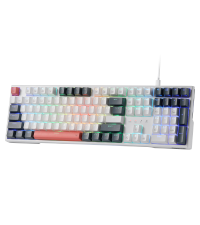
Redragon K668 RGB Mechanical Gaming Keyboard




As an Amazon Associate we earn from qualifying purchases. Product prices and availability are accurate as of the date/time indicated.
Quick Verdict
For most users, the Redragon K745 PRO Wireless Gasket RGB is the most versatile option in this comparison because it combines a full-size 108-key layout, hot-swap support, tri-mode connectivity, gasket construction, and multiple layers of sound dampening. It is best for buyers who want one keyboard for gaming, work, and wireless use. Skip it if you need a compact board or adjustable Hall Effect actuation.
The Redragon K668 is the simpler value pick for shoppers who want a wired full-size keyboard with extra shortcut keys. The Aula WIN60 HE is the specialist choice for FPS players interested in magnetic switches, rapid trigger functionality, and an 8000 Hz polling specification. The Kisnt KN85 and AULA F75 Pro are stronger compact wireless choices, while the HUO JI E-Yooso and RK ROYAL KLUDGE R98 Pro suit users who want a dense layout with a more cushioned typing design.
How We Evaluated
We evaluated the supplied product records by comparing layout, switch technology, hot-swap compatibility, connection options, software support, acoustic features, and intended use. Manufacturer specifications are treated as specifications rather than measured performance. We did not perform hands-on testing, latency measurements, sound measurements, durability testing, or independent benchmarks for these keyboards.
The recommendations also consider the practical consequences of each design. A 60% board can create more mouse room but requires function-layer shortcuts. A full-size board is easier for spreadsheets and frequent number entry but occupies more desk space. Wireless modes add flexibility but create additional pairing, charging, and software considerations. For more information about our research process, see the PCGearWiki review methodology.
Recommended Keyboards
Redragon K668 RGB Gaming Keyboard: Best Budget Full-Size Wired Pick
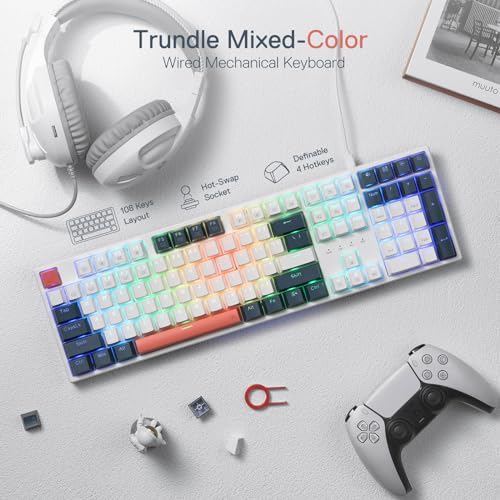
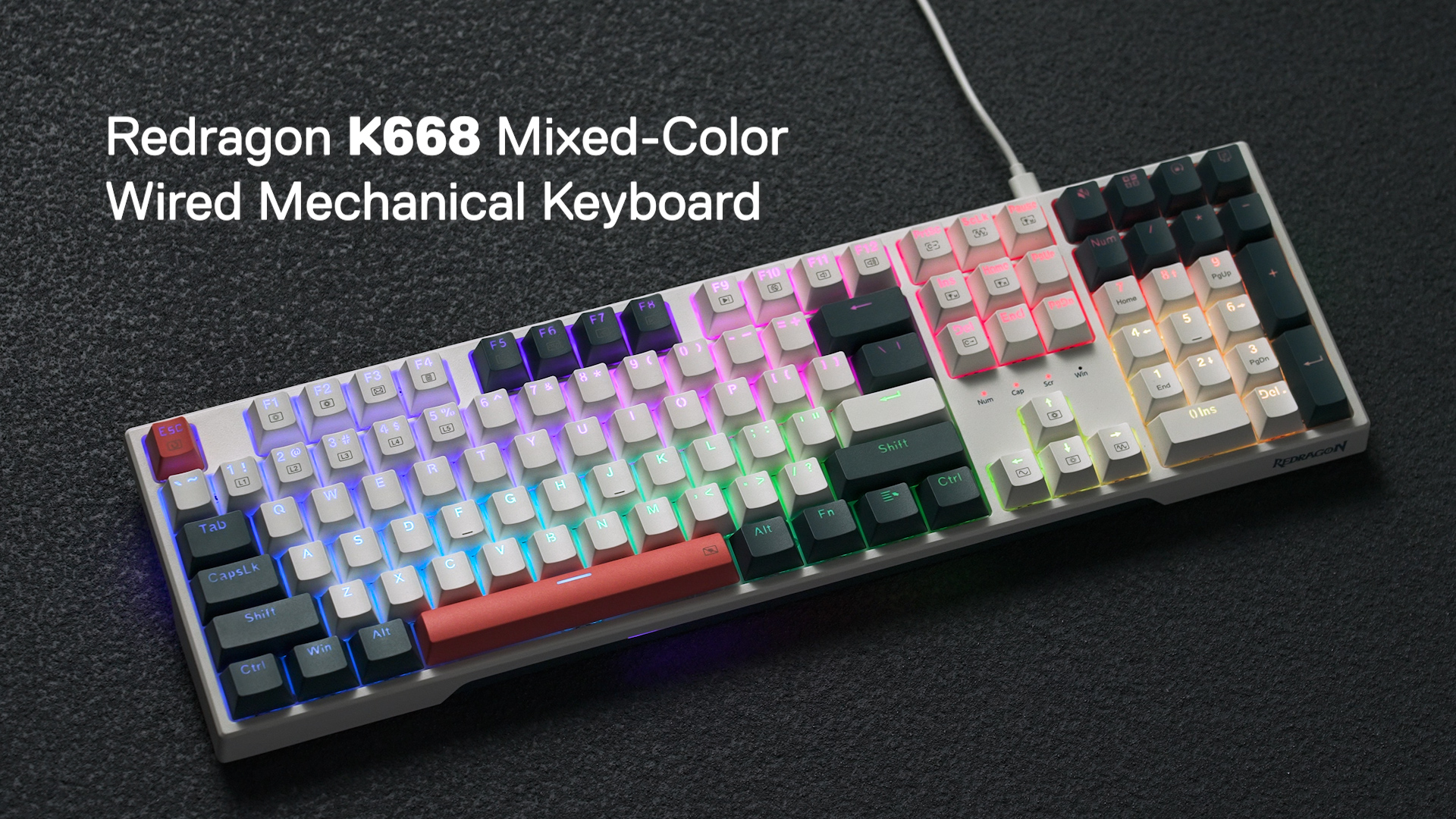
The Redragon K668 RGB Gaming Keyboard is the straightforward choice for buyers who want a conventional full-size board without giving up switch customization. Its 108-key layout includes the standard 104-key arrangement plus four extra shortcut keys. According to the supplied specifications, those shortcut keys can control mute, calculator, screen lock, and desktop functions by default, or be defined through software.
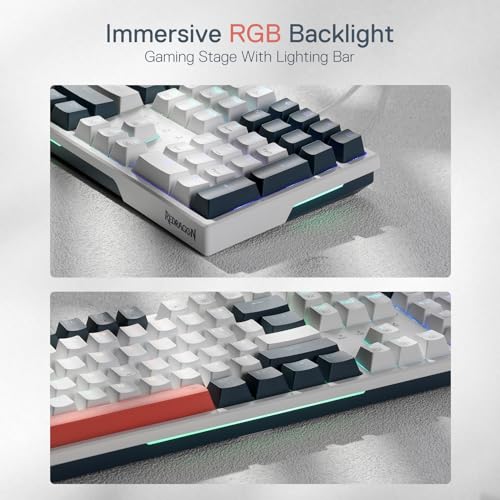
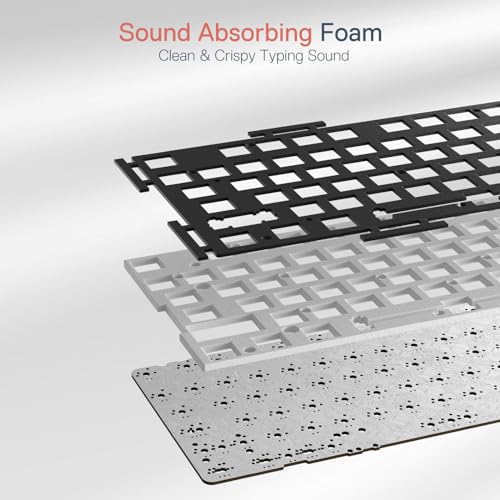
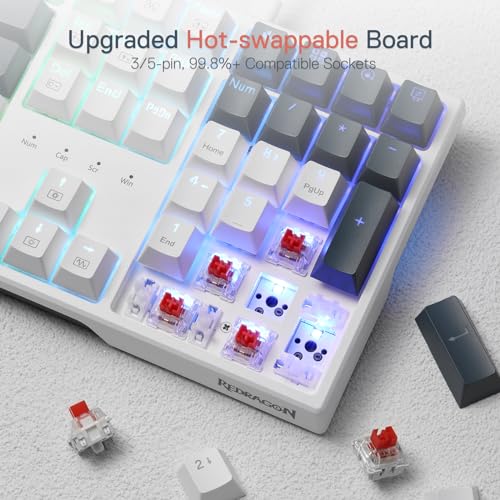
Its hot-swap socket is specified as compatible with 3-pin and 5-pin switches, giving beginners a practical way to experiment without soldering. The included red switches are described as quiet basic linear switches, and the keyboard adds 3.5 mm sound-absorbing foam. The board also provides up to 19 onboard RGB presets, adjustable brightness and speed, music-sync lighting, two-stage feet, and software support for macros and remapping.
The main reason to choose the K668 over the other wired models is its uncomplicated full-size format and extra shortcut row. It is useful for office work, games that benefit from dedicated keys, and users who regularly enter numbers. The meaningful limitation is connectivity: this is a wired keyboard, so it does not provide Bluetooth or 2.4 GHz flexibility. Skip it if you need a wireless board, a compact layout, or adjustable actuation.
Redragon K745 PRO Wireless Gasket RGB: Best Overall Flexibility
The Redragon K745 PRO Wireless Gasket RGB is the most balanced recommendation for buyers who want a full-size keyboard with modern customization options. It retains the 108-key layout and four additional shortcut keys, but adds USB-C wired mode, Bluetooth 3.0/5.0 support, and 2.4 GHz wireless connectivity. That combination makes it suitable for a desktop PC, laptop, tablet, or multi-device workspace, subject to each device supporting the selected connection.
The K745 PRO also has a more elaborate internal design than the K668. The supplied specifications describe a gasket structure, a Mint Mambo linear switch, and five sound-dampening elements including PO foam, IXPE switch foam, a PET sound pad, bottom socket foam, and a silicone bottom pad. Those features are intended to reduce hollow resonance and give the board a softer, cleaner typing character compared with a basic rigid-mounted design.
Choose this model when wireless capability and a full-size layout matter more than desk space. Its limitation is physical size: the number pad and four extra keys consume substantially more room than a 75% or 60% board. The supplied data also describes an upgraded socket as nearly compatible with all 3-pin and 5-pin switches, but buyers should still confirm the fit of unusual or nonstandard switches before purchasing. Skip it if you prefer a compact competitive-gaming board.
Aula WIN60 HE – 60% Mechanical Gaming Keyboard: Best for Adjustable Actuation
The Aula WIN60 HE – 60% Mechanical Gaming Keyboard targets a different buyer from the conventional mechanical models. It uses Hall Effect magnetic switches rather than ordinary contact-based mechanical switches, and the supplied specifications include adjustable actuation and rapid trigger functionality. The manufacturer also lists an 8000 Hz polling specification and an ultra-low rapid-trigger step distance of 0.02 mm.
Those features make the WIN60 HE particularly relevant to competitive FPS players who want to tune key response behavior. The product information specifically references games such as Valorant and CS2 and describes use cases involving quick stops, peeking, and rapid movement changes. Its web-based driver supports remapping, macros, and RGB customization without requiring a conventional software download.
The key compromise is the 60% layout. It saves desk space and leaves more room for mouse movement, but dedicated arrow keys, function-row keys, and navigation controls are omitted or accessed through layers. It also differs from the other products in switch technology, so buyers seeking a conventional 3-pin or 5-pin mechanical switch ecosystem should not assume that magnetic switches are interchangeable with standard mechanical switches. Skip it if you need a number pad or regularly use dedicated navigation keys.
Kisnt KN85 Wireless Mechanical Keyboard: Best Compact Wireless Value
The Kisnt KN85 Wireless Mechanical Keyboard is a 75% board that keeps the function row, arrow keys, and common shortcuts while removing the number pad. This layout is a practical middle ground for users who want a smaller footprint without adapting to the more aggressive compromises of a 60% keyboard. The supplied dimensions are 13.68 by 5.51 by 1.77 inches.
Connectivity is a major strength. The KN85 supports USB-C, 2.4 GHz wireless, and Bluetooth 5.0, with three Bluetooth channels listed in the product data. It includes a 4000 mAh rechargeable battery, RGB lighting with 20 preset effects, and a Windows driver for remapping and macros in wired or 2.4 GHz mode. Its pre-lubed Bsun linear switches support 3-pin and 5-pin replacement switches, and the gasket-mounted design uses multiple dampening layers.
The KN85 is best for students, hybrid workers, laptop users, and gamers who move between devices. Its most important limitation is that the software is not equally available in every connection mode: the supplied information specifies Windows-only driver support for wired and 2.4 GHz use. The keyboard is also described as creamier rather than silent, so it should not be treated as a genuinely silent board. Skip it if you require a number pad or broad cross-platform remapping.
AULA F75 Pro Wireless Mechanical Keyboard,75% Hot: Best Feature-Rich 75% Pick
The AULA F75 Pro Wireless Mechanical Keyboard,75% Hot combines the popular 75% layout with tri-mode connectivity, a control knob, hot-swap support, and several acoustic and lighting features. It supports Bluetooth 5.0, 2.4 GHz wireless, and USB wired connection, and the supplied specifications state that it can connect with up to five devices. It also includes a 4000 mAh rechargeable battery.
The board uses LEOBOG Reaper switches, pre-lubricated stabilizers, five layers of filling material, and an integrated silicone pad. Its 81-key layout retains arrow keys while reducing the footprint compared with full-size models. The multi-function knob can adjust lighting in gaming mode or volume and media playback in office mode. Side-printed PBT keycaps, RGB lighting, Windows-key lock, and programmable macros round out the feature set.
This is the better choice than the Kisnt KN85 when a knob, side-printed keycaps, and a more feature-heavy gaming presentation are priorities. Its limitation is value positioning: it sits near the top of the supplied budget range, so buyers focused only on basic hot-swap functionality may get what they need from a less expensive board. Skip it if you want a full-size number pad or the smallest possible keyboard.
HUO JI E-Yooso Creamy Mechanical Keyboard Wired: Best Dense Wired Layout
The HUO JI E-Yooso Creamy Mechanical Keyboard Wired uses a 99-key 96% layout. It preserves a broad set of dedicated keys while reducing the footprint compared with a traditional full-size keyboard. The supplied product information lists a detachable USB-C to USB-A cable, pre-lubed linear switches, 3-pin and 5-pin hot-swap support, and an included keycap and switch puller.
Its gasket structure and five layers of sound-absorbing foam are designed to reduce cavity noise and create a softer, more damped typing character. The board also provides full anti-ghosting, N-key rollover, RGB lighting with 15 backlight effects and eight solid colors, and double-shot injection PBT keycaps. These features make it a sensible wired option for people who want many keys without the full width of a conventional 104-key board.
The E-Yooso is best for mixed work and gaming where dedicated keys matter but desk space is not unlimited. Its limitation is the absence of wireless connectivity, and the supplied noise-reduction percentages should be treated as manufacturer claims rather than independent measurements. Skip it if you need Bluetooth, 2.4 GHz wireless, or a more established software ecosystem.
RK ROYAL KLUDGE R98 Pro Wired Mechanical Keyboard: Best Wired Number-Pad Alternative
The RK ROYAL KLUDGE R98 Pro Wired Mechanical Keyboard is a 98-key board that keeps a number pad, arrow keys, most navigation controls, and a detachable volume knob. Its 96% arrangement is aimed at buyers who want efficient use of desk space without giving up number entry. The board connects through a wired interface and is specified as compatible with Windows and macOS.
The R98 Pro uses pre-lubed linear cream switches, a gasket mount, five layers of sound-absorbing foam, MDA-profile PBT keycaps, and support for 3-pin and 5-pin switches. Its online driver supports key redefinition, macros, and RGB customization on Windows and Mac. Four indicator lights show Num Lock, Caps Lock, Win Lock, and Mac Mode, which is useful when switching between productivity and gaming tasks.
Choose the R98 Pro over the HUO JI model if the volume knob, MDA keycap profile, or Windows and Mac online-driver support is more important to you. The limitation is that it is wired only, and its supplied rating is lower than the other listed products; because the input provides no review text, that rating should not be interpreted as a detailed customer-feedback summary. Skip it if wireless operation or a smaller 75% layout is essential.
Key Specifications
| Specification | Details | Why It Matters |
|---|---|---|
| Hot-swap support | Most listed models support 3-pin and 5-pin mechanical switches; the WIN60 HE uses Hall Effect magnetic switches | Determines which replacement switch ecosystem is available |
| Layouts | 60%, 75%, 96%, 98%, 99%, and 108-key options | Controls desk space and access to number, function, and navigation keys |
| Wireless options | Tri-mode models use USB-C, Bluetooth, and 2.4 GHz | Allows desktop, mobile, laptop, and multi-device use when supported |
| Switch types | Linear red, Mint Mambo, Bsun linear, LEOBOG Reaper, cream linear, and Hall Effect magnetic switches | Changes the expected actuation style and customization path |
| Lighting | RGB effects, onboard presets, music-sync modes, or software customization depending on model | Useful for personalization but not a substitute for switch or layout fit |
| Acoustic construction | Foam, silicone dampers, gasket structures, or basic sound absorption depending on model | Can influence resonance and typing character, but supplied claims are not independent measurements |
Design and Build Quality
Layout is the most important physical distinction in this group. The Redragon boards provide a traditional full-size experience with extra shortcut keys, while the HUO JI and RK ROYAL KLUDGE models compress the number pad into denser 96% and 98% arrangements. The Kisnt and AULA boards remove the number pad but preserve arrow and function keys, whereas the Aula WIN60 HE removes even more dedicated controls to maximize compactness.
Gasket construction appears on the Redragon K745 PRO, Kisnt KN85, AULA F75 Pro, HUO JI E-Yooso, and RK R98 Pro. In practical terms, the manufacturer positions these structures as a way to provide cushioning and reduce rigid or hollow feedback. That does not guarantee identical sound or feel between models because switch lubrication, keycap profile, foam placement, and case design also contribute.
Ergonomics vary as well. The Redragon K668 and K745 PRO include two-stage adjustable feet, while the Kisnt KN85 lists a front height of 0.79 inches and notes that a wrist rest may be useful. Buyers should consider the keyboard’s front edge, keycap profile, and preferred wrist position rather than assuming that a gasket mount automatically makes a board comfortable.
Performance and Real-World Use
For ordinary typing and gaming, the biggest performance decision is switch and layout rather than RGB lighting. Linear switches are generally suited to users who prefer an uninterrupted press, while the supplied models differ in spring feel, lubrication, and acoustic treatment. Because no independent typing or gaming measurements were supplied, these keyboards should be compared by their stated construction and intended use rather than assumed latency or sound results.
The Aula WIN60 HE is the outlier for competitive gaming because its Hall Effect design supports adjustable actuation and rapid trigger features according to the manufacturer. Those controls may appeal to FPS players who want configurable movement inputs. They are less important for general office work, and the 60% layout may slow users who frequently rely on dedicated function, navigation, or arrow keys.
Full-size and near-full-size keyboards remain better suited to spreadsheets, coding workflows that use navigation keys, and frequent numeric entry. The K668 is the simplest wired implementation, while the K745 PRO adds wireless modes and a more extensively damped structure. The HUO JI and RK boards provide similar space-saving number-pad concepts, with the RK adding a volume knob and the HUO JI offering a 99-key arrangement.
For gaming setups where mouse room matters, the 75% models offer the most broadly useful compromise. The Kisnt KN85 emphasizes multi-device connectivity and a compact footprint. The AULA F75 Pro adds a knob, macro support, side-printed PBT keycaps, and a larger feature set. Both retain more dedicated controls than the 60% Aula, but neither supplies a number pad.
Compatibility
Before buying, confirm the physical layout you actually use. A 60% board may require function-layer shortcuts for arrows and the function row. A 75% board preserves those controls but removes the number pad. A 96% or 98% board retains number entry in a tighter arrangement, while the 108-key Redragon models provide the most familiar full-size spacing plus extra shortcut keys.
Switch compatibility also requires care. The Redragon K668, Redragon K745 PRO, Kisnt KN85, AULA F75 Pro, HUO JI E-Yooso, and RK R98 Pro are specified for 3-pin and 5-pin mechanical switches. The Aula WIN60 HE is a Hall Effect magnetic keyboard, so buyers should not assume that standard mechanical replacement switches will work in its socket. Confirm the replacement-switch standard for the exact board before purchasing a switch set.
Software support is not identical across these products. Redragon models use available Redragon software for modes, macros, and shortcuts. The WIN60 HE uses a web-based driver. The Kisnt driver is specified for Windows and wired or 2.4 GHz operation, while the AULA F75 Pro and RK R98 Pro provide driver-based customization in the supplied descriptions. Bluetooth pairing and remapping behavior may differ from wired operation.
For wireless models, check whether the target device supports Bluetooth or has an available USB port for the 2.4 GHz receiver. USB-C wired operation is the safest fallback when supported. Console compatibility is explicitly mentioned for the AULA F75 Pro, while the Kisnt listing references PCs, laptops, tablets, smartphones, and gaming consoles; buyers should still verify console-specific key mapping before relying on advanced macros.
Pros and Cons
- All seven listed keyboards provide a hot-swappable customization path, although the Aula WIN60 HE uses a different Hall Effect magnetic-switch system.
- The selection covers compact, near-full-size, and full-size layouts for different desk and work requirements.
- Several models combine wired, Bluetooth, and 2.4 GHz connectivity.
- Gasket structures and sound-dampening materials are available at the upper end of this budget category.
- RGB lighting, macros, remapping, and onboard controls are widely represented.
- None of the supplied data includes independent latency, sound, durability, or typing measurements.
- Compact layouts remove dedicated keys that some productivity users depend on.
- Wireless software and programming support can vary by operating system and connection mode.
- Manufacturer acoustic and response claims should not be treated as laboratory results.
- Full-size models require more desk space than 75% and 60% alternatives.
Who Should Buy It?
Choose the Redragon K745 PRO if you want one full-size keyboard for work, gaming, and wireless use. Choose the Redragon K668 if wired operation is acceptable and extra shortcuts are more useful than Bluetooth or 2.4 GHz connectivity.
Choose the Aula WIN60 HE if you specifically want Hall Effect switches, adjustable actuation, and rapid trigger functionality for FPS gaming. Choose the Kisnt KN85 or AULA F75 Pro if you need a compact wireless board that retains arrow and function keys. Choose the HUO JI E-Yooso or RK R98 Pro if a wired, space-saving layout with number-entry capability matters most.
Who Should Skip It?
Skip this category if you need a genuinely silent keyboard, because the supplied descriptions discuss dampened or creamier sound rather than verified silent operation. Also skip the compact models if you frequently use a number pad, dedicated navigation keys, or an uncluttered function row.
Buyers who require independently measured latency, long-term durability data, or a clearly documented cross-platform software ecosystem should seek stronger evidence before purchasing. The available records provide specifications but do not include PCGearWiki hands-on testing or third-party measurements.
Alternatives to Consider
If you are deciding between layouts and wireless features, the best wireless mechanical keyboard under $100 roundup may provide broader context. Readers focused on configurable actuation can compare the best gaming keyboards with adjustable actuation, while users who want compact gaming designs can review our guide to mechanical keyboards for gaming.
Within this supplied shortlist, the Redragon K745 PRO is the strongest alternative to almost every general-purpose model because it combines the broadest layout with tri-mode connectivity. The AULA F75 Pro is the more feature-oriented 75% alternative, and the Aula WIN60 HE is the more specialized option for players who prioritize magnetic-switch controls over conventional mechanical switch compatibility.
Why You Should Trust PCGearWiki
PCGearWiki recommendations are based on specification research, compatibility checks, feature comparison, and value analysis across the supplied product records. We separate manufacturer specifications from editorial inference and do not present listing claims as independent test results.
Final Verdict
The Redragon K745 PRO Wireless Gasket RGB is the best hot swappable keyboard under $75 for most buyers who want a full-size layout, wireless flexibility, gasket construction, and broad 3-pin and 5-pin switch support. Its deciding factor is versatility, not measured performance. Buy it if desk space is available and you want one keyboard for several devices.
Buy the Redragon K668 for the lowest-complexity full-size wired setup, the Aula WIN60 HE for Hall Effect and rapid trigger gaming, and the Kisnt KN85 or AULA F75 Pro for compact wireless use. The HUO JI E-Yooso and RK R98 Pro are sensible wired number-pad alternatives. Do not choose based only on RGB or “creamy” terminology; layout, connection method, software support, and switch standard should determine the purchase.
Frequently Asked Questions
Is the best hot swappable keyboard under $75 worth it in 2026?
Yes, the category is worth considering when you want switch customization without soldering and need to stay below a strict budget. The best value depends on the layout and connection method you need. Available specifications show that this price class can include tri-mode wireless, gasket structures, RGB control, and Hall Effect features, but independent testing is not supplied.
Who is the best hot swappable keyboard under $75 best for?
It is best for gamers, students, home-office users, and keyboard beginners who want to replace switches later. Full-size models suit spreadsheet and number-entry work, 75% boards suit compact desks, and the 60% Aula WIN60 HE suits FPS players who value adjustable actuation and rapid trigger controls.
Is the best hot swappable keyboard under $75 good for gaming?
Yes, all of the listed products are positioned for gaming, but they serve different gaming needs. The Aula WIN60 HE is the specialist FPS option because of its Hall Effect and rapid trigger specifications. The 75% models create more mouse room, while the full-size boards provide dedicated keys and number pads for users who also work or stream from the same desk.
What should I compare before buying the best hot swappable keyboard under $75?
Compare layout, switch technology, replacement-switch compatibility, connection modes, software support, and physical height. Confirm whether you need a number pad, dedicated arrow keys, Bluetooth, 2.4 GHz, or wired USB-C. Also distinguish conventional 3-pin and 5-pin mechanical hot-swap sockets from Hall Effect magnetic-switch systems.
Are all hot-swappable keyboard switches interchangeable?
No. Several keyboards in this comparison are specified for 3-pin and 5-pin mechanical switches, but the Aula WIN60 HE uses Hall Effect magnetic switches. Even within a stated pin standard, buyers should confirm physical fit, socket support, switch orientation, and compatibility with the exact keyboard revision before ordering replacements.
Sources and Verification
Research basis: Product identity, dimensions, interfaces, supported features, and warranty terms are checked against available manufacturer documentation and current retailer listings. Price, stock, and aggregate customer ratings can change after publication.
Testing disclosure: Unless this article explicitly states that PCGearWiki performed hands-on testing and describes the test setup, recommendations are research-based editorial evaluations rather than PCGearWiki laboratory measurements. Customer feedback is used to identify recurring ownership patterns, not as proof of technical performance.
Last source review: August 21, 2026. See our Review Methodology, Editorial Policy, and Corrections Policy.


Write Your Review
No reviews yet. Be the first to share your experience!