

Last updated: September 22, 2026
Quick answer: For most high-refresh gaming PCs, 1440p provides the better balance of image clarity, frame rate, and GPU cost. A 4K monitor is more suitable when maximum detail, a larger screen, or mixed gaming and productivity matter more than maintaining very high frame rates in demanding games.

Key decision factors
| Factor | What it means | What to check |
|---|---|---|
| 1440p | Higher FPS for a given GPU | Competitive and mixed gaming at 27 inches |
| 4K | Sharper image and more workspace | Premium GPUs, larger screens, and detail-focused games |
| Upscaling | Can improve performance at either resolution | Compare image quality by game and quality mode |
PCGearWiki separates manufacturer specifications from practical buying criteria. See our evaluation process and Review Methodology for how recommendations are assessed.
This comparison explains 1440p vs 4K monitor for gaming, the main differences, practical trade-offs, and which option makes the most sense for different PC users in.
Choosing between 1440p and 4K gaming monitors can be confusing when specifications sound similar but real-world results differ. This guide explains 1440p vs 4K monitor for gaming in practical terms so you can understand the trade-offs and choose the better option for your setup. We reviewed 15 models from brands including Dell, KOORUI, and KTC within the $159.99 – $399.99 price range to provide clear recommendations.
Whether you prioritize high frame rates for competitive play or sharp visuals for immersive single-player titles, understanding these differences helps you build a better gaming PC experience. For more options in related categories, check our best 1440p gaming monitor buying guide.

Quick Answer
The better choice depends on your use case. 1440p monitors often deliver higher refresh rates and smoother gameplay on mid-range GPUs, while 4K options provide superior detail and future-proofing for high-end systems. One option may be better for gaming, another may offer stronger productivity value, and another may make more sense for budget-focused builds or long-term upgrades.
1440p vs 4K for Gaming: The Practical Choice
1440p is usually the better balance for players who want high refresh rates without moving into the most expensive GPU tier. 4K makes the most sense when image sharpness, a larger display, and single-player visual detail matter more than maximizing frame rate. The decision should start with your monitor size and the performance level your graphics card can maintain.
At 27 inches, 1440p remains a strong all-purpose gaming resolution. At 32 inches and above, 4K provides noticeably denser detail for games, media, and productivity. Competitive players may prefer 1440p at a higher refresh rate, while cinematic and creator-focused setups often benefit from 4K.
What We Check in a Resolution Comparison
- Frame-rate headroom: We compare the resolution with the GPU performance needed for your target games and settings.
- Screen size and clarity: Pixel density changes how text, UI elements, and fine in-game detail look at normal desk distance.
- Refresh rate and adaptive sync: A good monitor needs a refresh target that your system can actually sustain.
- Total setup cost: The monitor, GPU, display cable, and future upgrade path all affect the better value.
Use this guide alongside our best gaming monitors and best GPUs coverage to build a matched display and graphics setup.
Pros
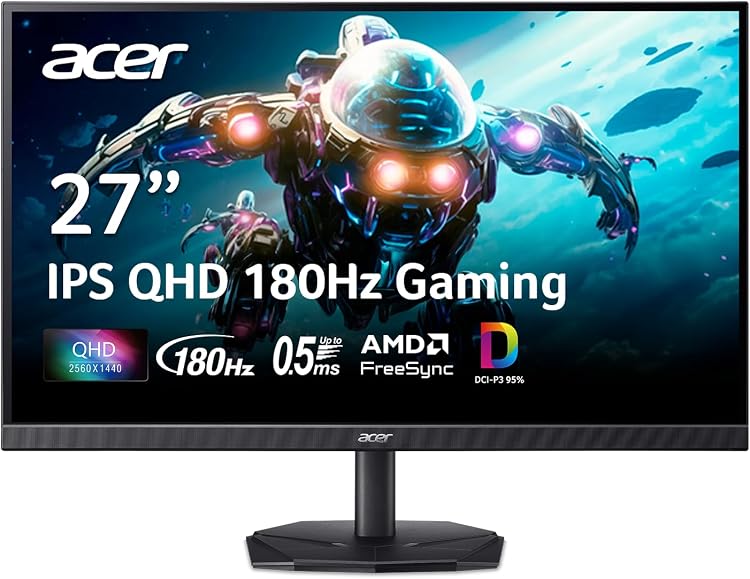
- High 180Hz refresh delivers excellent motion clarity for fast-paced games
- Strong color gamut supports accurate visuals beyond basic gaming needs
- AMD FreeSync ensures tear-free performance with compatible graphics cards
- Zero-frame design allows seamless multi-monitor arrangements
Cons
- HDR10 support is basic and lacks the impact of premium HDR displays
- No built-in speakers require separate audio setup
- VESA mount compatibility details are not specified in product data
| Aspect Ratio | 16:9 |
|---|---|
| Screen Finish | Matte |
| Contrast Ratio | 1000:1 |
| Refresh Rate | 180 Hz |
| Display Type | LCD |
| Display Technology | QHD |
| Viewing Angle | 178 Degrees |
| Brightness | 250 candela_per_square_meter |
| Has Color Screen | Yes |
| Picture Quality Enhancement Technology | DCI-P3 95%, HDR 10 Support |
Best suited to shoppers comparing monitors products who specifically need achieve fluid competitive play with 180Hz refresh that cuts motion blur and input lag, Eliminate screen tearing via AMD FreeSync for seamless frame syncing….
Before buying, compare the exact model’s compatibility, dimensions, core specifications, warranty, recurring owner feedback, and current price against other monitors options. Retailer availability and pricing can change after publication.

Pros
- Strong immersion from the 1000R curved VA panel with deep blacks.
- Smooth high-refresh performance suitable for fast-paced gaming.
- Helpful built-in gaming overlays for precision and monitoring.
- Multiple input options support flexible multi-device setups.
- Borderless design maximizes screen real estate on smaller desks.
Cons
- Only tilt adjustment limits ergonomic flexibility for long sessions.
- VA panel can show minor motion blur in very rapid movements versus IPS alternatives.
- No integrated speakers require separate audio solutions.
| Aspect Ratio | 16:9 |
|---|---|
| Screen Finish | Matte |
| Contrast Ratio | 1000:1 |
| Refresh Rate | 180 Hz |
| Display Type | LED |
| Display Technology | LCD |
| Viewing Angle | 178 Degrees |
| Brightness | 300 |
| Pixel Pitch | 109.0 |
| Color Gamut | 95.0 |
Best suited to shoppers comparing monitors products who specifically need immerse deeper in games with a steep 1000R curve that extends your peripheral vision for a surround-like experience., React faster and maintain smooth visuals….
Before buying, compare the exact model’s compatibility, dimensions, core specifications, warranty, recurring owner feedback, and current price against other monitors options. Retailer availability and pricing can change after publication.

Pros
- Flexible dual refresh rate modes
- High speed performance for esports
- Ergonomic adjustments
- Strong console compatibility
- Good color reproduction
Cons
- Demands a capable GPU to run 4K at 160Hz effectively
- Mode switching requires manual intervention which could disrupt sessions
- Stand base may occupy significant desk space
| Aspect Ratio | 16:9 |
|---|---|
| Screen Finish | Matte |
| Contrast Ratio | 1000:1 |
| Refresh Rate | 320 Hz |
| Display Type | IPS |
| Display Technology | 4K |
| Viewing Angle | 178 Degrees |
| Brightness | 350 Candela per Square Meter |
| Color Gamut | 99 |
| Has Color Screen | Yes |
Best suited to shoppers comparing monitors products who specifically need switch between 4K 160Hz for detailed immersive gaming and FHD 320Hz for ultra responsive esports action in one display., Experience fast pixel response with….
Before buying, compare the exact model’s compatibility, dimensions, core specifications, warranty, recurring owner feedback, and current price against other monitors options. Retailer availability and pricing can change after publication.

Pros
- 180Hz refresh rate paired with ELMB Sync produces exceptionally fluid motion
- Wide 130% sRGB gamut delivers vibrant colors suitable for both gaming and content work
- Adaptive Sync technologies work seamlessly across AMD and NVIDIA hardware
- Flicker-free and blue light filters support comfortable extended viewing
- GamePlus tools provide practical in-game aids for skill improvement
Cons
- HDR-10 implementation offers only modest contrast improvements over standard SDR
- Integrated speakers deliver basic audio that serious users will likely replace
- Full 180Hz at QHD resolution requires a strong graphics card to utilize fully
| Aspect Ratio | 16:9 |
|---|---|
| Screen Finish | Matte |
| Contrast Ratio | 1000:1 |
| Refresh Rate | 180 Hz |
| Display Type | LED |
| Display Technology | Fast IPS |
| Viewing Angle | 178 Degrees |
| Brightness | 856.5 lm |
| Pixel Pitch | 0.233 |
| Color Gamut | 130.0 |
Best suited to shoppers comparing monitors products who specifically need eliminate ghosting and tearing for sharp high-frame-rate gameplay with simultaneous ELMB Sync and Adaptive Sync, Experience richer immersive visuals from 130% sRGB coverage and….
Before buying, compare the exact model’s compatibility, dimensions, core specifications, warranty, recurring owner feedback, and current price against other monitors options. Retailer availability and pricing can change after publication.

Pros
- High 180Hz refresh rate enables fluid competitive play
- QHD resolution provides crisp detailed visuals
- Ergonomic stand improves long-session comfort
- Black Equalizer offers practical in-game visibility boost
- HDR10 adds noticeable depth to supported content
Cons
- Lacks flicker-free certification which may increase eye fatigue during extended use
- VA panel offers narrower viewing angles than IPS alternatives
- FreeSync support limits compatibility with NVIDIA G-Sync systems
| Aspect Ratio | 16:9 |
|---|---|
| Screen Finish | Matte |
| Contrast Ratio | 3000:1 |
| Refresh Rate | 180 |
| Display Type | LCD |
| Display Technology | VA |
| Viewing Angle | 178 Degrees |
| Brightness | 300 cd/㎡ Candela per Square Meter |
| Color Gamut | 0.72 |
| Has Color Screen | Yes |
Best suited to shoppers comparing monitors products who specifically need enjoy sharper more realistic game worlds with QHD resolution that packs 1.7 times the detail of Full HD, Immerse deeper in vivid scenes thanks….
Before buying, compare the exact model’s compatibility, dimensions, core specifications, warranty, recurring owner feedback, and current price against other monitors options. Retailer availability and pricing can change after publication.
Pros
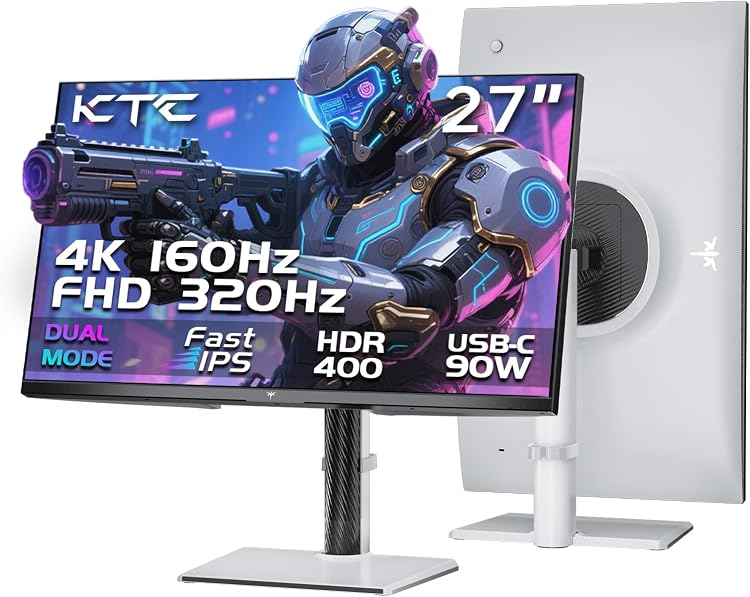
- Flexible dual-mode refresh rates adapt to gaming or productivity needs
- Strong multi-device connectivity including 90W power delivery
- Full ergonomic adjustments with KVM support for efficient workflows
- Fast IPS panel delivers good color accuracy and motion clarity
- VESA compatibility enables custom mounting solutions
Cons
- No built-in speakers requiring external audio solutions
- High power draw up to 168W increases energy use
- Optimal 4K performance demands a capable graphics card
| Aspect Ratio | 16:9 |
|---|---|
| Screen Finish | Matte |
| Contrast Ratio | 1000:1 |
| Refresh Rate | 160 Hz |
| Display Type | LCD |
| Display Technology | Fast IPS |
| Viewing Angle | 178 Degrees |
| Brightness | 400 Candela |
| Pixel Pitch | 0.15 |
| Color Gamut | 125 |
Best suited to shoppers comparing computers & accessories products who specifically need switch between ultra-sharp 4K 160Hz for immersive detail or 320Hz FHD for competitive speed in any game, Eliminate tearing and stuttering with Adaptive Sync….
Before buying, compare the exact model’s compatibility, dimensions, core specifications, warranty, recurring owner feedback, and current price against other computers & accessories options. Retailer availability and pricing can change after publication.

Pros
- Strong motion handling for fast action games
- Effective adaptive sync and blur reduction
- Solid connectivity and eye comfort features
- Curved design improves immersion
- VESA mountable for custom setups
Cons
- Ergonomics limited to tilt and swivel without height adjustment
- Curved panel may distort straight lines for non-gaming tasks
- Built-in speakers deliver basic audio quality
| Aspect Ratio | 16:9 |
|---|---|
| Screen Finish | Matte |
| Contrast Ratio | 3,000:1 |
| Refresh Rate | 165 Hz |
| Display Type | LCD |
| Display Technology | LCD, LED |
| Viewing Angle | 178 Degrees |
| Brightness | 250 |
| Pixel Pitch | 0.272 |
| Color Gamut | 120.0 |
Best suited to shoppers comparing monitors products who specifically need immersive 1500R curved screen enhances depth and comfort for extended gaming sessions from wide angles, 165Hz refresh rate combined with 1ms response time enables….
Before buying, compare the exact model’s compatibility, dimensions, core specifications, warranty, recurring owner feedback, and current price against other monitors options. Retailer availability and pricing can change after publication.

Pros
- High refresh rate and fast response deliver responsive competitive gaming
- Wide color gamut creates immersive visuals in supported games
- Multiple sync options ensure tear free performance across GPUs
- Software tools simplify customization and preset management
- Ergonomic stand supports flexible positioning and long term comfort
Cons
- Maximum 210Hz refresh rate requires overclocking which can reduce stability
- DisplayHDR 400 offers only basic HDR performance compared to higher tiers
- Integrated speakers provide minimal audio quality for serious use
| Aspect Ratio | 16:9 |
|---|---|
| Screen Finish | Matte |
| Contrast Ratio | 1300:1 |
| Refresh Rate | 210 Hz |
| Display Type | IPS |
| Display Technology | LCD, LED |
| Viewing Angle | 178 Degrees |
| Brightness | 1199.1 lm |
| Pixel Pitch | 0.233 |
| Color Gamut | 130.0 |
Best suited to shoppers comparing monitors products who specifically need achieve buttery smooth gameplay with 210Hz refresh rate that minimizes lag in fast paced titles, See sharp details and vibrant colors from 95% DCI-P3….
Before buying, compare the exact model’s compatibility, dimensions, core specifications, warranty, recurring owner feedback, and current price against other monitors options. Retailer availability and pricing can change after publication.
Pros
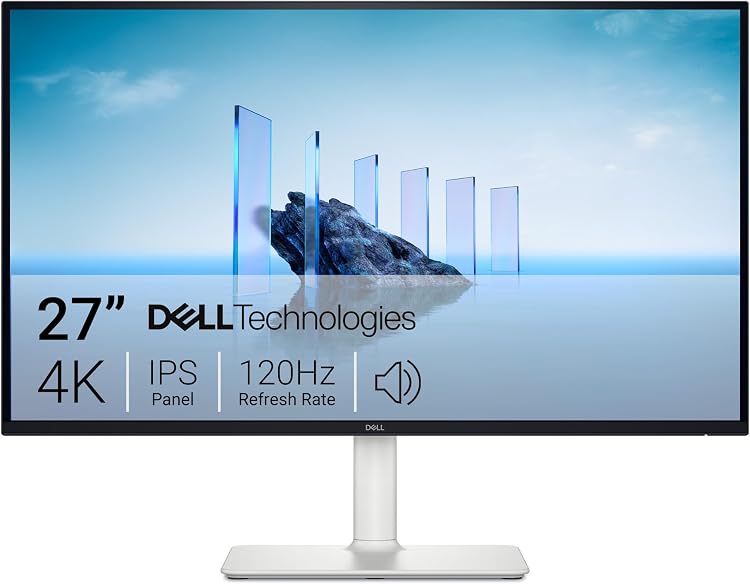
- High 4K resolution with 120Hz support for fluid performance
- Strong color gamut and ComfortView Plus for reduced eye strain
- Modern ash white design with thin bezels and easy port access
- Built-in speakers eliminate need for external audio in basic setups
- Energy efficient with eco-friendly packaging materials
Cons
- No customer reviews available to confirm real-world performance
- Contrast ratio of 1500:1 may limit depth in dark scenes compared to higher-ratio panels
- Only two HDMI ports limit connectivity options for multiple devices
| Aspect Ratio | 16:9 |
|---|---|
| Screen Finish | Matte |
| Contrast Ratio | 1500:1 |
| Refresh Rate | 120 Hz |
| Display Type | LED |
| Display Technology | LED |
| Viewing Angle | 178 Degrees |
| Brightness | 350 |
| Pixel Pitch | 163 |
| Color Gamut | 99 |
Best suited to shoppers comparing monitors products who specifically need delivers crisp 4K resolution for sharp visuals in work and entertainment, Provides smooth 120Hz refresh rate with tear-free gaming via AMD FreeSync Premium.
Before buying, compare the exact model’s compatibility, dimensions, core specifications, warranty, recurring owner feedback, and current price against other monitors options. Retailer availability and pricing can change after publication.

Pros
- High refresh rate enables smooth competitive gaming
- Curved 1500R panel boosts immersion and viewing comfort
- Zero-frame design supports easy multi-monitor expansion
- Multiple ports including DisplayPort for full feature access
- VESA mount compatibility aids ergonomic desk integration
Cons
- Ergonomics limited to tilt adjustment only
- HDMI ports restricted to 144Hz maximum refresh
- Integrated 2W speakers deliver basic audio quality
| Aspect Ratio | 16:9 |
|---|---|
| Screen Finish | Matte |
| Contrast Ratio | 2000:1 |
| Refresh Rate | 180 Hz |
| Display Type | LCD |
| Display Technology | LCD |
| Viewing Angle | 178 Degrees |
| Brightness | 250 Nit |
| Has Color Screen | Yes |
| Picture Quality Enhancement Technology | AMD FreeSync |
Best suited to shoppers comparing monitors products who specifically need immerse in gaming with a curved screen that maintains consistent viewing distance for reduced eye strain during extended sessions, Achieve fluid motion and competitive….
Before buying, compare the exact model’s compatibility, dimensions, core specifications, warranty, recurring owner feedback, and current price against other monitors options. Retailer availability and pricing can change after publication.

Pros
- Versatile dual refresh rate modes support varied gaming styles
- Strong color performance and connectivity including HDMI 2.1
- Ergonomic stand improves long-session comfort
- Low response time delivers crisp fast-paced action
Cons
- Full refresh rates require a high-end graphics card
- Entry-level HDR brightness limits impact in bright scenes
- 27-inch size feels compact next to larger gaming displays
| Aspect Ratio | 16:9 |
|---|---|
| Screen Finish | Matte |
| Contrast Ratio | 1000:1 |
| Refresh Rate | 180 Hz |
| Display Type | LED |
| Display Technology | IPS |
| Brightness | 400 Candela per Square Meter |
| Pixel Pitch | 0.1554 |
| Color Gamut | 95.0 |
| Has Color Screen | Yes |
Best suited to shoppers comparing monitors products who specifically need adapt gameplay instantly by switching between detailed 4K at 180Hz and ultra-responsive FHD at 360Hz, See vibrant colors and sharp contrast with 95 percent….
Before buying, compare the exact model’s compatibility, dimensions, core specifications, warranty, recurring owner feedback, and current price against other monitors options. Retailer availability and pricing can change after publication.

Pros
- Versatile dual refresh rate modes for varied gaming styles
- Ultra-fast response for clear high-speed action
- Wide color gamut supporting vivid detailed visuals
- Convenient software and connectivity features
- Solid three-year warranty coverage
Cons
- Maximum performance requires a high-end graphics card
- 27-inch size can feel small for some 4K users seeking larger immersion
- No built-in speakers included
| Brand | ASUS |
|---|---|
| Screen Size | 27 Inches |
| Resolution | 4K 2160P |
| Aspect Ratio | 16:9 |
| Screen Surface Description | Matte |
Best suited to shoppers comparing monitors products who specifically need switch between crisp 4K 160Hz immersion and ultra-responsive 324Hz FHD without needing separate displays, Achieve blur-free fast motion with 0.03ms response time from the….
Before buying, compare the exact model’s compatibility, dimensions, core specifications, warranty, recurring owner feedback, and current price against other monitors options. Retailer availability and pricing can change after publication.

Pros
- Dual refresh rate modes provide genuine versatility for different game types
- Single-cable 90W PD Type-C simplifies laptop connections effectively
- Full ergonomic adjustments plus eye care features support long use
- Solid color performance with HDR support enhances visual quality
- Multiple high-speed ports ensure broad device compatibility
Cons
- Maximum 4K 160Hz performance requires a capable graphics card
- No built-in speakers included for audio playback
- 27-inch size limits screen real estate compared to larger options
| Aspect Ratio | 16:9 |
|---|---|
| Screen Finish | Matte |
| Contrast Ratio | 1000:1 |
| Refresh Rate | 320 Hz |
| Display Type | LCD |
| Display Technology | LCD |
| Viewing Angle | 178 Degrees |
| Brightness | 400 Candela per Square Meter |
| Color Gamut | 125 |
| Has Color Screen | Yes |
Best suited to shoppers comparing monitors products who specifically need switch between sharp 4K immersion at 160Hz and ultra-fast 1080p at 320Hz to match any gaming style without extra hardware., Charge and connect laptops….
Before buying, compare the exact model’s compatibility, dimensions, core specifications, warranty, recurring owner feedback, and current price against other monitors options. Retailer availability and pricing can change after publication.
How to Choose the Right 1440p Vs 4K Monitor For Gaming
Resolution
Resolution determines image sharpness and pixel density. 1440p (2560×1440) offers a strong balance for most gamers, delivering 1.7 times the pixels of 1080p without the demanding performance requirements of 4K. Models like the ASUS TUF Gaming VG27AQ3A and Samsung Odyssey G5 excel here with high refresh rates that maintain smooth motion.
4K (3840×2160) provides significantly more detail, making it ideal for story-driven games and content creation. The LG 27G810A-B and KTC H27P6 support dual-mode operation, allowing you to switch between native 4K at 160-180Hz or FHD at 320-360Hz depending on the title. This flexibility helps when your GPU cannot sustain high frame rates at full resolution.
For most users running mid-range hardware, 1440p remains the practical sweet spot. If you have a high-end GPU and want maximum visual fidelity, consider 4K options from KOORUI or LG that include strong color coverage.
Refresh Rate
Higher refresh rates reduce motion blur and input lag, improving responsiveness in fast-paced games. 1440p monitors in this comparison reach up to 210Hz, such as the ASUS TUF Gaming VG27AQL5A, making them excellent for competitive esports where every millisecond counts.
4K models typically top out at 160-180Hz in native mode but offer dual-mode alternatives that push FHD to 320Hz or higher. The KOORUI G2741L and KTC H27P6 demonstrate this capability, letting you prioritize speed during competitive sessions while retaining 4K clarity for cinematic experiences.
Match the refresh rate to your GPU output. A 180Hz 1440p panel like the Acer Nitro KG271U pairs well with most modern cards for consistent high frame rates without forcing unnecessary expense.
Response Time
Fast response times minimize ghosting and smearing during rapid movement. Many IPS panels here achieve 0.5ms to 1ms GtG or MPRT ratings. The ASUS VG27AQL5A claims 0.3ms, while the Acer Nitro reaches up to 0.5ms, supporting crisp visuals in action titles.
4K dual-mode monitors maintain similar speeds across resolutions. The LG 27G810A-B uses 1ms GtG regardless of mode, ensuring consistent performance whether you play in 4K or switch to high-refresh FHD.
Look for monitors that combine low response times with adaptive sync technologies to eliminate tearing across the entire refresh range.
Panel Technology
IPS panels dominate this list for their color accuracy and wide viewing angles. Fast IPS variants in the ASUS TUF series and KTC H27P6 deliver the speed needed for gaming while preserving image quality. VA panels, such as the LG 27GS60QC-B curved model, offer deeper blacks and higher contrast for immersive single-player games.
Curved options like the ASUS VG32VQ1B (1500R) and LG 27GS60QC-B (1000R) enhance peripheral immersion. Flat panels from Dell and KOORUI suit productivity and competitive play where edge-to-edge accuracy matters more.
Choose IPS for vibrant colors and speed, or VA when contrast and curve appeal to your gaming style.
HDR Performance
HDR support enhances contrast and color volume for more lifelike scenes. Most models include HDR10 or VESA DisplayHDR 400 certification. The LG 27G810A-B and KTC H27P6 stand out with strong HDR400 implementation and high DCI-P3 coverage for richer highlights and shadows.
Entry-level HDR on 1440p panels like the Samsung Odyssey G5 still improves brightness and detail over SDR. True high-end HDR remains limited in this price range, so treat it as an enhancement rather than a primary decision factor.
Color Accuracy and Connectivity
Color gamut coverage affects how vibrant games and media appear. KOORUI and KTC models reach 95-97% DCI-P3 with factory calibration, while Dell emphasizes 99% sRGB for accurate work alongside gaming. ASUS Shadow Boost and Black Equalizer features further improve visibility in dark areas.
Connectivity varies by use case. The KTC H27P6 includes 90W USB-C, HDMI 2.1, and KVM support for console and laptop users. Most others provide HDMI 2.0/2.1 and DisplayPort for PC gaming. Verify port versions match your GPU and console requirements before purchase.
Side-by-Side Comparison
| Model | Key Specification | Best For | Main Strength | Value Rating |
|---|---|---|---|---|
| ASUS VG27AQL5A | 1440p, 210Hz, 0.3ms Fast IPS | Competitive gaming | Highest refresh rate | High |
| LG 27G810A-B | 4K 180Hz / FHD 360Hz Dual Mode | Versatile playstyles | Flexible resolution switching | High |
| KTC H27P6 | 4K 160Hz / FHD 320Hz, 90W USB-C | Console + PC setups | Ergonomics and connectivity | High |
| KOORUI G2741L | 4K 160Hz / FHD 320Hz Dual Mode | Budget dual-mode users | Affordable high refresh options | Excellent |
| Samsung Odyssey G5 | 1440p, 180Hz, 1ms | Value 1440p gaming | Height adjustable stand | Excellent |
| ASUS VG32VQ1B | 1440p Curved 165Hz | Immersive single-player | Curved design with ELMB | Good |
Which One Should You Choose?
Choose the option that best matches your workload, performance expectations, and upgrade plans. Gamers, creators, competitive players, and everyday users often need different features, so there is no single best answer for everyone. Pair your choice with a suitable GPU and consider future upgrades when deciding between 1440p and 4K.
Common Mistakes to Avoid
- Choosing based only on marketing claims.
- Ignoring compatibility with your current system and GPU output.
- Paying for features you will not use, such as excessive HDR on a budget panel.
- Assuming higher specifications always mean better real-world performance.
- Forgetting to consider long-term upgrade value and desk space requirements.
Why You Should Trust PCGearWiki
PCGearWiki compares hardware using available specifications, compatibility context, feature differences, user feedback, and value analysis. Our goal is to explain trade-offs clearly so readers can make better buying decisions without relying on unverified marketing language.
We focus on real product data from manufacturers and verified retailer listings to highlight practical differences that matter during daily use and long gaming sessions.
Final Thoughts
For most users, the right choice comes down to practical needs rather than the highest specification on paper. Compare your budget, workload, compatibility requirements, and long-term plans before choosing.
Best Overall: The ASUS TUF Gaming VG27AQL5A stands out for its 210Hz refresh rate and fast IPS panel, delivering excellent competitive performance at a reasonable price.
Best Value: The Samsung Odyssey G5 and Acer Nitro KG271U provide strong 1440p experiences near the lower end of the price range with reliable adaptive sync and solid build quality.
Best Premium: The LG 27G810A-B offers versatile dual-mode 4K/360Hz operation with strong HDR and color performance for users who want future-proof resolution options.
Best Budget Dual-Mode: KOORUI G2741L and KTC H27P6 deliver capable 4K high-refresh switching with ergonomic features that punch above their price point.
Explore additional recommendations in our best 4K gaming monitor buying guide or the Best Gaming Monitors category page.
Frequently Asked Questions
Which option is better for gaming?
The better gaming option depends on the category and the games you play. Competitive gamers may prioritize latency and responsiveness with high-refresh 1440p panels, while single-player gamers may care more about visual quality or overall performance from 4K dual-mode displays.
Which option offers better value?
The better value option is the one that delivers the features and performance you actually need at the lowest practical cost. Mid-range 1440p choices from ASUS and Samsung often provide the strongest balance in the current market.
What is the best 1440p vs 4K monitor for gaming?
It depends on your GPU and preferred resolution. High-refresh 1440p models like the ASUS VG27AQL5A suit most players, while dual-mode 4K monitors from LG and KTC provide flexibility for varied game libraries. See our related refresh rate comparison for more context.
How much should I spend on a 1440p vs 4K monitor for gaming?
Expect to spend between $159.99 and $399.99 for capable options. Strong 1440p monitors cluster around $160-$220, while feature-rich 4K dual-mode models approach the higher end of the range.
Is it worth upgrading your 1440p vs 4K monitor for gaming?
Upgrading makes sense if your current display lacks adaptive sync, has a low refresh rate, or cannot support your GPU’s output. Dual-mode 4K panels offer a compelling upgrade path for users seeking both clarity and speed in one device.
Add PCGearWiki as a preferred source on Google
Sources and Verification
Research basis: Product identity, dimensions, interfaces, supported features, and warranty terms are checked against available manufacturer documentation and current retailer listings. Price, stock, and aggregate customer ratings can change after publication.
Testing disclosure: Unless this article explicitly states that PCGearWiki performed hands-on testing and describes the test setup, recommendations are research-based editorial evaluations rather than PCGearWiki laboratory measurements. Customer feedback is used to identify recurring ownership patterns, not as proof of technical performance.
Last source review: September 22, 2026. See our Review Methodology, Editorial Policy, and Corrections Policy.


Write Your Review
No reviews yet. Be the first to share your experience!