

Last updated: October 2, 2026
Finding the best portable monitor under $150 requires balancing refresh rate, color space coverage, and physical form factor without exceeding tight power constraints. At this budget ceiling, panels typically offer 1080p resolution on IPS substrates, making interface compatibility and stand stability the primary differentiators. Buyers can secure high refresh rate displays suitable for mobile work and secondary gaming screens if they carefully verify device power output and signal support.

Budget Portable Monitor Comparison
Display quality under $150 depends heavily on panel choice and connector support. The table below outlines key hardware targets across typical budget categories based on published manufacturer specifications.
| Category | Target Resolution | Target Refresh Rate | Panel & Color | Primary Interface |
|---|---|---|---|---|
| Budget Gaming | 1920×1080 (FHD) | 144Hz | IPS, ~100% sRGB | Dual Type-C + Mini HDMI |
| Basic Office Productivity | 1920×1080 (FHD) | 60Hz | IPS, 45%–72% NTSC | Type-C (DP Alt Mode) |
| High-Density Productivity | 2560×1440 or 2560×1600 | 60Hz | IPS, 100% sRGB | Dual Type-C + Mini HDMI |
Top Pick: High-Refresh Value Under $150
Specification-based analysis identifies mobile displays prioritizing motion clarity and straightforward mounting as the strongest choices in this price tier. Rather than relying on lab-measured panel metrics, evaluating manufacturer technical sheets shows where cost-cutting occurs—often in variable refresh support or audio implementation rather than core panel speed.
[acms_product asin=”B0CH9WTW56″]ARZOPA 16.1” 144Hz Portable Gaming Monitor
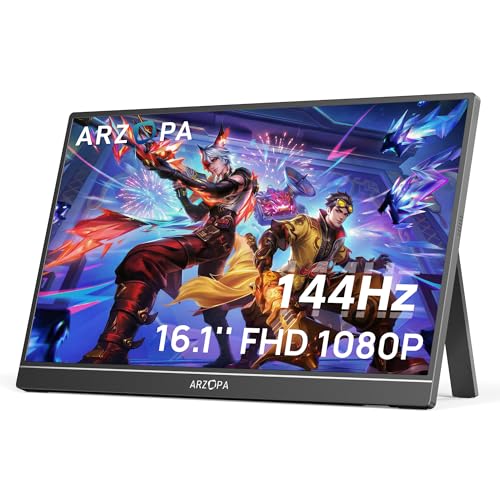
The ARZOPA Z1FC stands out in the sub-$150 bracket by offering a 16.1-inch IPS panel paired with a 144Hz refresh rate at 1080p resolution. Most entry-level travel screens cap output at 60Hz. This unit targets fluid motion for gaming consoles, laptops, and handheld systems. Manufacturer data specifies 106% sRGB coverage, delivering sufficient color saturation for daily office tasks and entertainment. For broader context on display vendor tiers, review our Arzopa portable monitor guide.
Hardware design includes an integrated kickstand, eliminating the need for flimsy magnetic folio cases that easily collapse on uneven surfaces. Connectivity consists of two full-function USB Type-C ports alongside a single Mini HDMI port. Important constraint: vendor documentation notes lack of native AMD FreeSync or adaptive sync support. Frame pacing relies entirely on source output matching panel refresh stages. Verify current pricing directly via the product card, as retail promotions fluctuate regularly below the $150 mark.
Under-$150 Technical Trade-Offs and Architecture
Monitors in this segment make specific engineering compromises to hit low price points. Understanding these trade-offs ensures the display matches your actual hardware environment.
Power Draw and Host Capabilities
Portable displays run without internal batteries, drawing power directly from host hardware via USB Type-C using DisplayPort Alternate Mode (DP Alt Mode). While high-end multi-protocol ports handle massive bandwidth—as explained in our guide on USB-C vs thunderbolt monitor—budget screens require steady 5V/2A to 5V/3A power delivery. If host laptop ports fail to output sufficient current, the display resets, flickers, or locks maximum brightness to 30%. Operating a 144Hz panel at peak luminance frequently requires plugging an external USB power bank or wall adapter into the second USB-C port.
Color Accuracy vs Gaming Motion
Budget panels advertised with wide gamut coverage (such as 100%+ sRGB) usually rely on basic 8-bit (6-bit + FRC) color depth. While adequate for everyday workflows, media consumption, and general gaming, they do not match precision calibration standards found in dedicated desktop hardware. Users exploring heavy visual work or motion tasks should inspect the broader landscape on our portable monitors hub or read about dedicated hardware across gaming monitors to understand panel behavior differences.
Buyer Verification Checklist
Before purchasing a portable display under $150, confirm your system meets these technical prerequisites:
- Port Signal Check: Confirm source laptop or console USB-C port outputs video (DisplayPort over Type-C), not data-only USB 3.0.
- HDMI Power Plan: If connecting via Mini HDMI, ensure a separate USB-A to USB-C or wall-plug power source is available to run display logic and backlight.
- Mounting Preference: Decide between an integrated kickstand (best for rigid tilt stability) and magnetic wrap cases (lighter profile, prone to slip).
- Refresh Expectations: Understand that budget 144Hz portable panels lack variable sync hardware; adjust internal in-game framerate caps to prevent visible tearing.
Frequently Asked Questions
Can a budget portable monitor run off a smartphone?
Smartphones supporting desktop video output (like Samsung DeX or devices with DP Alt Mode over USB-C 3.1/3.2) can power and drive portable monitors. However, phone batteries drain rapidly, so external power connected to the monitor second port is strongly recommended.
Why does the monitor turn off when turning up brightness?
The host USB port cannot deliver sufficient wattage for the backlight at higher luminance levels. Connecting an external 5V/2A or 5V/3A wall charger directly to the secondary power port on the display resolves this issue immediately.
Are built-in speakers sufficient on sub-$150 portable monitors?
Integrated speakers on budget ultra-slim panels are typically low-wattage drivers intended for basic system alerts. They lack dynamic range and bass. External headphones or dedicated laptop audio offer far superior sound output for games and video.
Pros
- Smooth 144Hz refresh rate for gaming and fast-moving content
- Vivid 106% sRGB IPS display with 1080p resolution and HDR support
- Built-in kickstand and portable design make setup convenient
- Useful as a second screen for laptops and compatible devices
- Multiple connection options including USB-C and Mini HDMI
Cons
- Does not support adaptive sync or FreeSync
- Console setup may require following the included connection instructions carefully
- 1080p resolution may look less detailed than higher-resolution portable monitors
| Color | Black |
|---|---|
| Size | 16.1" |
| Dimensions | 13.9763779385 x 8.661417314 x 0.36614173191 inches |
| Weight | 3.1305641204 pounds |
| Product Group | Personal Computer |
| Binding | Personal Computers |
Best suited to shoppers comparing monitors products who specifically need enjoy smoother gaming and clearer motion with a 144Hz refresh rate that helps reduce perceived input delay., View games, videos, and work content in….
Before buying, compare the exact model’s compatibility, dimensions, core specifications, warranty, recurring owner feedback, and current price against other monitors options. Retailer availability and pricing can change after publication.
Sources and Verification
Research basis: Product identity, dimensions, interfaces, supported features, and warranty terms are checked against available manufacturer documentation and current retailer listings. Price, stock, and aggregate customer ratings can change after publication.
Testing disclosure: Unless this article explicitly states that PCGearWiki performed hands-on testing and describes the test setup, recommendations are research-based editorial evaluations rather than PCGearWiki laboratory measurements. Customer feedback is used to identify recurring ownership patterns, not as proof of technical performance.
Last source review: October 2, 2026. See our Review Methodology, Editorial Policy, and Corrections Policy.


Write Your Review
No reviews yet. Be the first to share your experience!