

Last updated: October 2, 2026
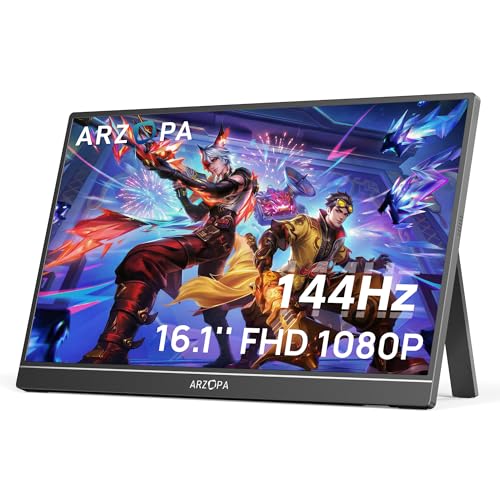
PlayStation 5 requires specific display handshakes for portable play. Best option uses native HDMI signaling, low input latency, and 120Hz timing support on 1080p resolutions. Specification analysis confirms ARZOPA 16.1” 144Hz Portable Gaming Monitor handles PS5 output parameters within travel-ready footprint.

PS5 Portable Monitor Display Specs Comparison
Data below reflects manufacturer hardware specifications. Panel performance claims rely on published factory timings, not destructive bench tests.
| Monitor Model | Panel Size & Resolution | Max Refresh Rate | Input Ports | PS5 120Hz Mode Match | Integrated Stand |
|---|---|---|---|---|---|
| ARZOPA Z1FC (16.1-inch) | 16.1-inch IPS, 1920×1080 | 144Hz | Mini HDMI, 2x USB-C | Supported (1080p SDR) | Built-in kickstand |
PS5 Video Output Constraints on Portable Displays
PlayStation 5 video output behaves differently than PC GPU. Console does not negotiate arbitrary refresh rates. Firmware supports fixed output brackets: 60Hz, 120Hz, and 4K VRR over HDMI 2.1. Most travel screens use HDMI 1.4 or HDMI 2.0 physical interfaces. Review our wider look at portable monitors for general panel categories.
Key display constraints include:
- VRR limitations: PS5 requires HDMI 2.1 Forum VRR. Console does not support VESA Adaptive-Sync or standard AMD FreeSync over HDMI 2.0. Budget portable monitors will lack variable refresh on PS5, locking output to fixed 60Hz or 120Hz sync.
- Audio pass-through: Built-in portable monitor speakers use low-wattage drivers (typically 1W to 2W). Connect headset directly to DualSense 3.5mm jack for accurate positional audio.
- Power negotiation: PS5 rear USB-A ports supply limited current (5V 1.5A max). Powering high-refresh screen through console port can cause boot loops, back-light flickering, or random blackouts. External USB-C PD power source recommended.
Diagnostic Guide: PS5 Match Matrix
| Console Target Mode | Required Port Spec | EDID Requirement | Power Draw Target | Expected Result |
|---|---|---|---|---|
| 1080p @ 60 FPS | HDMI 1.4 or higher | 1920×1080 @ 60Hz CEA-861 | 5V / 2.0A | Full compatibility, standard games |
| 1080p @ 120 FPS | HDMI 2.0 recommended | 1920×1080 @ 120Hz standard VESA/CTA timing | 5V / 3.0A | High frame rate in supported titles |
| 1440p @ 60/120 FPS | HDMI 2.0 | 2560×1440 timings verified | 9V / 2.0A or 5V / 3.0A | Downsamples to 1080p on FHD panels |
| HDR Output | HDMI 2.0+ | HDR10 static metadata flag | Display back-light max draw | Limited visual lift on sub-400 nit panels |
Top Recommendation: ARZOPA 16.1” 144Hz Portable Gaming Monitor (Z1FC)
Specification-based assessment identifies ARZOPA Z1FC as primary recommendation for travel PS5 setups. Check live price on product card above.
Hardware features 16.1-inch IPS panel with 1920×1080 native resolution. Panel covers 106% sRGB color space, preventing dull color rendering in standard console titles. 144Hz panel refresh headroom ensures standard 120Hz video packet sent by PS5 decodes cleanly over physical Mini HDMI interface. Read our broader Arzopa portable monitor guide for family comparisons.
Connectivity and Interface Configuration
Device uses two full-function USB Type-C connections alongside single Mini HDMI input. PS5 does not transmit video over USB-C data ports. Signal routing requires included Mini HDMI to full-size HDMI cable directly from PS5 video out. Screen requires separate power feed using secondary USB-C port connected to dedicated wall adapter.
Chassis and Deployment
Screen integrates fold-out kickstand into rear shell. Design eliminates separate magnetic origami folio covers that collapse on slick surfaces. Integrated hinge supports tilt angle adjustment for low table setups in hotel rooms or travel stations.
Caveats and Constraints
Display firmware does not feature active FreeSync support. Fast motion relies on panel pixel response and fixed frame sync. Panel specifies HDR support, but sub-400 nit brightness means HDR metadata mode clips highlight details. Best visual quality achieved by keeping PS5 video output set to SDR (Standard Dynamic Range).
PS5 Setup and Signal Verification Checklist
Follow exact sequence to avoid black-screen states or refresh rate locks:
- Connect external 5V/3A or USB-PD brick to monitor USB-C secondary power port.
- Verify monitor status LED illuminates before plugging display cable.
- Seat Mini HDMI jack firmly into monitor port. Insert full-size HDMI jack into PS5 rear port.
- Power on console. Navigate to Settings > Screen and Video > Video Output.
- Set Resolution to 1080p. Automatic mode may misread secondary EDID profiles.
- Set 120Hz Output to Automatic.
- Disable HDR setting (set to Off) to avoid crushed black levels on 8-bit travel panels.
- Launch supported 120 FPS game (example: Call of Duty, Fortnite). Open console Video Output Information screen to confirm 1920×1080 @ 120Hz active signal.
When to Choose Alternative Displays
Portable displays solve travel use-cases. They do not replace dedicated desk monitors. Competitive players needing sub-1ms response times, hardware G-Sync/FreeSync modules, or 4K high-density output should view stationary options in our 1080p travel displays analysis or main display index at monitors hub. Check dedicated comparison between standard protocol buses in our USB-C vs thunderbolt monitor.
Frequently Asked Questions
Can PS5 power portable monitor directly through front USB-C port?
No. PS5 USB-C port delivers power, but stability fluctuates during disk access or internal boost clocks. Attempting single-cable connections will cause display panel drops. Use external 15W+ wall adapter to feed monitor USB-C power port.
Why does PS5 display black screen when connected to portable monitor?
Occurs when console attempts unsupported resolution handshake (such as 4K HDR default) over HDMI 1.4/2.0 travel connection. Power down PS5 completely. Hold power button 7 seconds until second beep sounds to launch Safe Mode. Select Change Video Output, choose Change Resolution, and set fixed 1080p.
Does portable monitor support PS5 Variable Refresh Rate (VRR)?
No. Sony PS5 requires HDMI 2.1 Forum VRR specification. Portable screens in budget and mid-tier brackets utilize HDMI 2.0 or 1.4 controllers. FreeSync or G-Sync labels on portable monitors apply to PC DisplayPort over USB-C connections, not console HDMI streams.
Pros
- Smooth 144Hz refresh rate for gaming and fast-moving content
- Vivid 106% sRGB IPS display with 1080p resolution and HDR support
- Built-in kickstand and portable design make setup convenient
- Useful as a second screen for laptops and compatible devices
- Multiple connection options including USB-C and Mini HDMI
Cons
- Does not support adaptive sync or FreeSync
- Console setup may require following the included connection instructions carefully
- 1080p resolution may look less detailed than higher-resolution portable monitors
| Color | Black |
|---|---|
| Size | 16.1" |
| Dimensions | 13.9763779385 x 8.661417314 x 0.36614173191 inches |
| Weight | 3.1305641204 pounds |
| Product Group | Personal Computer |
| Binding | Personal Computers |
Best suited to shoppers comparing monitors products who specifically need enjoy smoother gaming and clearer motion with a 144Hz refresh rate that helps reduce perceived input delay., View games, videos, and work content in….
Before buying, compare the exact model’s compatibility, dimensions, core specifications, warranty, recurring owner feedback, and current price against other monitors options. Retailer availability and pricing can change after publication.
Sources and Verification
Research basis: Product identity, dimensions, interfaces, supported features, and warranty terms are checked against available manufacturer documentation and current retailer listings. Price, stock, and aggregate customer ratings can change after publication.
Testing disclosure: Unless this article explicitly states that PCGearWiki performed hands-on testing and describes the test setup, recommendations are research-based editorial evaluations rather than PCGearWiki laboratory measurements. Customer feedback is used to identify recurring ownership patterns, not as proof of technical performance.
Last source review: October 2, 2026. See our Review Methodology, Editorial Policy, and Corrections Policy.


Write Your Review
No reviews yet. Be the first to share your experience!