

Last updated: September 22, 2026
Quick picks
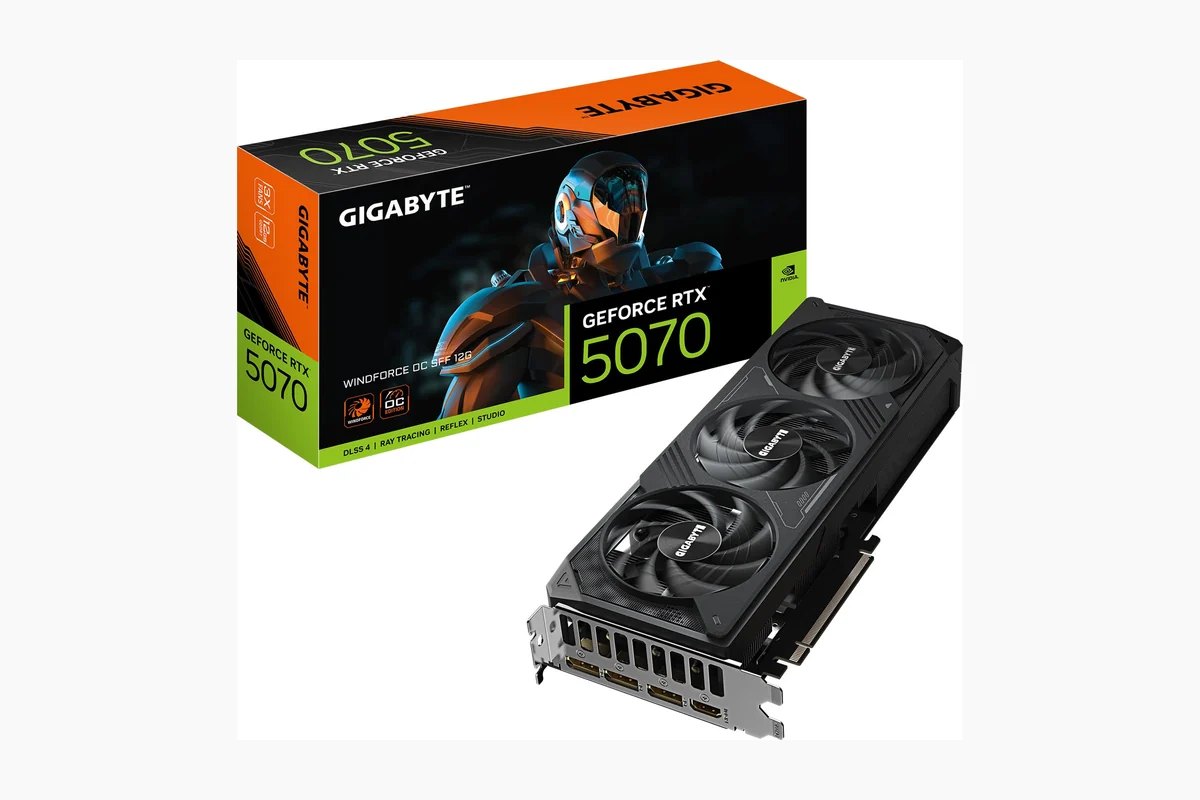
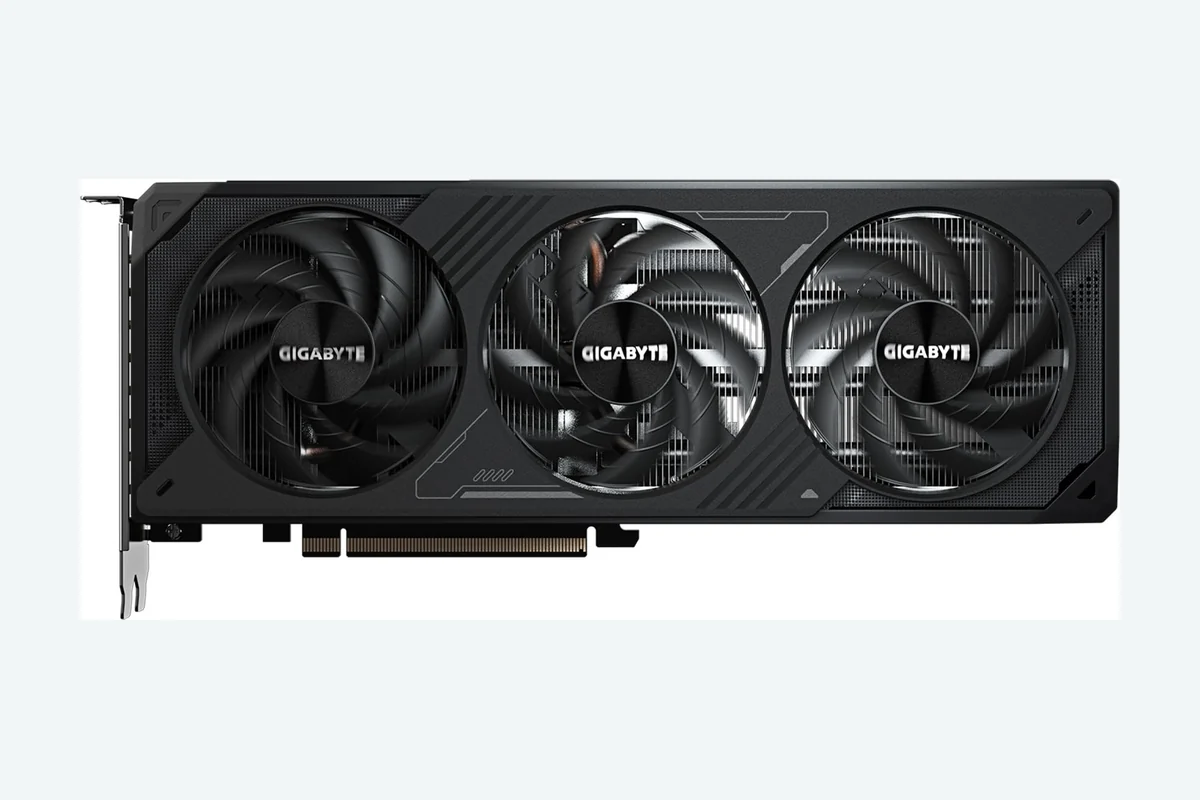
- Top Pick: GIGABYTE GeForce RTX 5070 WINDFORCE OC SFF 9.4 Excellent
- Highest Score: GIGABYTE Radeon RX 9060 XT Gaming OC 9.9 Outstanding
Choosing the best gpu for blender requires balancing raw ray-tracing compute against video memory (VRAM) capacity. NVIDIA OptiX acceleration gives GeForce cards a clear Cycles rendering lead over AMD HIP alternatives, while complex scene assets mandate at least 12GB to 16GB of memory to prevent catastrophic out-of-core system RAM swapping.
For September 2026, our editorial team analyzed 10 graphics cards ranging from $469.99 to $2,198.00. We evaluated architectures from NVIDIA Blackwell to AMD RDNA 4, assessing memory bandwidth, thermal solutions, and form-factor clearances to determine how each GPU handles heavy geometric meshes, geometry nodes, complex shader graphs, and AI-accelerated denoising in Blender 4.x pipelines.
Whether you need desktop render farm throughput or a compact workstation card, component compatibility determines stability. Creators planning multi-monitor workflows should inspect interface bandwidth early; read our USB-C vs thunderbolt monitor breakdown to avoid display routing conflicts during demanding render jobs.
Compare at a Glance
| # | Product | Editorial Score | Graphics Coprocessor | GPU Clock Speed |
|---|---|---|---|---|
| 1 | GIGABYTE GeForce RTX 5070 WINDFORCE OC SFF | 9.4 Excellent | NVIDIA GeForce RTX 5070 | 2600 GHz |
| 2 | GIGABYTE Radeon RX 9060 XT Gaming OC | 9.9 Outstanding | RX 9060XT | 2780 MHz |
| 3 | ASUS Dual RTX 5060 Ti 16GB GDDR7 | 9.8 Outstanding | NVIDIA GeForce RTX 5060 Ti | 2632 MHz |
| 4 | NVIDIA GeForce RTX 5080 Founders Edition Graphics | 9.8 Outstanding | NVIDIA GeForce RTX 5080 | 2806 MHz |
| 5 | MSI RTX 5070 12GB GDDR7 Ventus 2X | 9.6 Outstanding | NVIDIA GeForce RTX 5070 | 2542 MHz |
| 6 | PNY GeForce RTX 5080 Epic-X ARGB OC | 9.6 Outstanding | NVIDIA GeForce RTX 5080 | 2775 MHz |
| 7 | MSI GeForce RTX 5070 Ti 16GB GDDR7 | 9.8 Outstanding | NVIDIA GeForce RTX 5070 Ti | 2482 MHz |
| 8 | ASUS Dual RTX 5060 8GB GDDR7 OC | 9.9 Outstanding | NVIDIA GeForce RTX 5060 | 2535 MHz |
| 9 | ASUS TUF Gaming RTX 5080 16GB GDDR7 | 9.6 Outstanding | NVIDIA GeForce RTX 5080 | 2730 MHz |
| 10 | GIGABYTE Radeon RX 9070 XT Gaming OC | 9.7 Outstanding | RX 9070XT | 2520 MHz |

Pros
- Compact SFF design suits space-limited builds
- Next-gen Blackwell architecture for future-proofing
- Efficient cooling system supports sustained loads
- High-bandwidth GDDR7 memory aids demanding workloads
Cons
- 12GB VRAM may limit extreme 4K or heavy multitasking scenarios
- New architecture could need initial driver optimizations
- SFF constraints may reduce maximum overclock headroom
| Graphics Coprocessor | NVIDIA GeForce RTX 5070 |
|---|---|
| Graphics Card Ram | 12 GB |
| GPU Clock Speed | 2600 GHz |
| Video Output Interface | DisplayPort, HDMI |
| Graphics Ram Type | GDDR7 |
| Compatible Devices | Desktop |
| Graphics Card Interface | PCI-Express x16 |
| Memory Clock Speed | 2600 MHz |
| Number of Fans | 3 |
| GPU Series | NVIDIA RTX 50 Series |
Best suited to shoppers comparing graphics cards products who specifically need unlock smooth high-frame-rate gaming with DLSS 4 upscaling technology, Accelerate AI-driven creative tasks using advanced Tensor Cores.
Before buying, compare the exact model’s compatibility, dimensions, core specifications, warranty, recurring owner feedback, and current price against other graphics cards options. Retailer availability and pricing can change after publication.
Pros
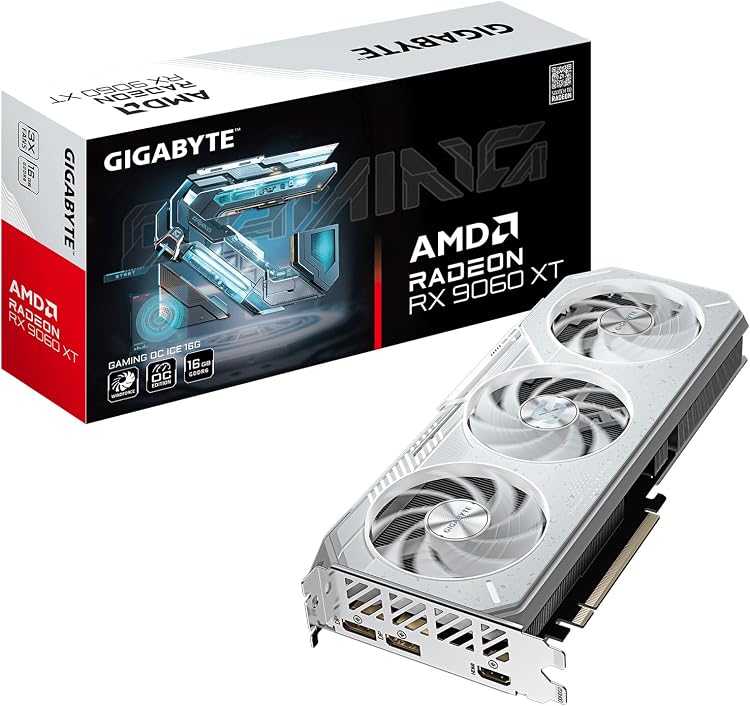
- Generous 16GB GDDR6 VRAM handles demanding games and creative workloads
- Advanced WINDFORCE cooling combines copper heat pipes, 3D fans and screen cooling
- Reinforced structure and metal backplate add physical stability
- Dual BIOS provides flexible performance or quiet operation choices
Cons
- 128-bit memory bus may limit bandwidth in certain high-end scenarios
- Two-slot design could restrict airflow in compact cases
- Zero customer reviews available to confirm real-world reliability
| Graphics Coprocessor | RX 9060XT |
|---|---|
| Graphics Card Ram | 16 GB |
| GPU Clock Speed | 2780 MHz |
| Video Output Interface | DisplayPort, HDMI |
| Graphics Ram Type | GDDR6 |
| Compatible Devices | Desktop |
| Graphics Card Interface | PCI-Express x16 |
| Memory Clock Speed | 20000 MHz |
| Number of Fans | 3 |
| Display Maximum Resolution | 3840 x 2160 |
Best suited to shoppers comparing graphics cards products who specifically need unlock high-resolution gaming and AI tasks with 16GB GDDR6 memory and RDNA 4 architecture, Maintain cool and quiet operation via WINDFORCE system with alternate-spinning….
Before buying, compare the exact model’s compatibility, dimensions, core specifications, warranty, recurring owner feedback, and current price against other graphics cards options. Retailer availability and pricing can change after publication.

Pros
- Compact form factor fits smaller cases while still providing flagship-level cooling
- Quiet fan operation with automatic stop-start technology
- Robust build quality including vented backplate and Auto-Extreme manufacturing
- High AI performance rating supports future AI-enhanced applications
Cons
- Requires a compatible high-wattage power supply for optimal use
- Dual BIOS modes may require manual switching for preferred fan curves
- Limited real-world user feedback available at launch
| Graphics Coprocessor | NVIDIA GeForce RTX 5060 Ti |
|---|---|
| Graphics Card Ram | 16 GB |
| GPU Clock Speed | 2632 MHz |
| Video Output Interface | Displayport 2.1b x3, HDMI 2.1b |
| Graphics Ram Type | GDDR7 |
| Compatible Devices | Desktop |
| Graphics Card Interface | PCI-Express x16 |
| Memory Clock Speed | 2602 MHz |
| Number of Fans | 2 |
| GPU Series | NVIDIA RTX 50 Series |
Best suited to shoppers comparing graphics cards products who specifically need enables high-performance gaming in compact builds thanks to its space-saving 2.5-slot design, Maintains cool and quiet operation with Axial-tech fans and 0dB technology that….
Before buying, compare the exact model’s compatibility, dimensions, core specifications, warranty, recurring owner feedback, and current price against other graphics cards options. Retailer availability and pricing can change after publication.

Pros
- Advanced Blackwell architecture for high performance in demanding tasks
- Strong 4.6/5 rating indicates reliable user satisfaction
- Comprehensive features supporting AI, ray tracing, and low-latency gaming
- Founders Edition build optimized for premium system integration
Cons
- High-end positioning may require compatible high-power systems
- New architecture could involve initial driver optimization periods
- Limited availability typical for Founders Edition models
| Graphics Coprocessor | NVIDIA GeForce RTX 5080 |
|---|---|
| Graphics Card Ram | 16 GB |
| GPU Clock Speed | 2806 MHz |
| Video Output Interface | HDMI, DisplayPort |
| Graphics Ram Type | GDDR7 |
| Compatible Devices | Desktop |
| Graphics Card Interface | PCI Express 4.0 |
| GPU Series | NVIDIA RTX 50 Series |
| Display Maximum Resolution | 3840x2160 |
| Display Resolution Maximum | 3840x2160 |
Best suited to shoppers comparing graphics cards products who specifically need unlock superior gaming experiences with full ray tracing and neural rendering, Maximize AI performance for creators using Tensor Cores and DLSS 4.
Before buying, compare the exact model’s compatibility, dimensions, core specifications, warranty, recurring owner feedback, and current price against other graphics cards options. Retailer availability and pricing can change after publication.

Pros
- Strong ray tracing and AI features from Blackwell architecture
- Quiet and efficient dual-fan cooling with zero RPM mode
- Durable construction including metal backplate and copper baseplate
- High-speed GDDR7 memory and modern display connectivity
- Compact dual-slot design suitable for various builds
Cons
- 192-bit memory bus may limit bandwidth versus wider-bus cards in heavy workloads
- Dual-fan cooler offers less headroom than triple-fan alternatives under sustained loads
- New GDDR7 and architecture could involve initial driver optimizations
| Graphics Coprocessor | NVIDIA GeForce RTX 5070 |
|---|---|
| Graphics Card Ram | 12 GB |
| GPU Clock Speed | 2542 MHz |
| Video Output Interface | DisplayPort |
| Graphics Ram Type | GDDR7 |
| Compatible Devices | Desktop |
| Graphics Card Interface | PCI Express |
| Memory Clock Speed | 2542 MHz |
| Number of Fans | 2 |
| Item Dimensions L x W | 9.3"L x 5"W |
Best suited to shoppers comparing graphics cards products who specifically need maximize gaming immersion with DLSS 4 AI upscaling and fourth-gen ray tracing for realistic visuals at high frame rates, Maintain low noise levels with….
Before buying, compare the exact model’s compatibility, dimensions, core specifications, warranty, recurring owner feedback, and current price against other graphics cards options. Retailer availability and pricing can change after publication.

Pros
- Powerful AI-driven performance for gaming and content creation
- High-capacity GDDR7 memory for demanding workloads
- Advanced features like DLSS 4 and Reflex 2
- Robust build with triple fan cooling and ARGB lighting
Cons
- Occupies significant space with 2.99-slot design
- High power requirements for peak operation
- May require case upgrades for optimal airflow
| Graphics Coprocessor | NVIDIA GeForce RTX 5080 |
|---|---|
| Graphics Card Ram | 16 GB |
| GPU Clock Speed | 2775 MHz |
| Video Output Interface | DisplayPort, HDMI |
| Graphics Ram Type | GDDR7 |
| Compatible Devices | Desktop |
| Graphics Card Interface | PCI-Express x16 |
| Memory Clock Speed | 2295 MHz |
| Number of Fans | 3 |
| GPU Series | NVIDIA RTX 50 Series |
Best suited to shoppers comparing graphics cards products who specifically need achieve superior gaming speeds with AI-powered DLSS 4 for higher frame rates and enhanced visuals, Handle complex creative projects faster using NVIDIA Studio tools….
Before buying, compare the exact model’s compatibility, dimensions, core specifications, warranty, recurring owner feedback, and current price against other graphics cards options. Retailer availability and pricing can change after publication.

Pros
- Advanced Blackwell architecture with 4th-gen RT cores for realistic ray tracing
- Generous 16GB GDDR7 memory handles demanding 4K and creative workloads
- SFF-ready compact design integrates into smaller PC cases
- MSI Afterburner and Center software support easy overclocking and monitoring
Cons
- No user reviews available to confirm long-term reliability
- Advanced features require latest drivers and compatible titles for full benefits
- High-end performance may demand a strong power supply not detailed in specs
| Graphics Coprocessor | NVIDIA GeForce RTX 5070 Ti |
|---|---|
| Graphics Card Ram | 16 GB |
| GPU Clock Speed | 2482 MHz |
| Video Output Interface | DisplayPort |
| Graphics Ram Type | GDDR7 |
| Compatible Devices | Desktop |
| Graphics Card Interface | PCI Express |
| Memory Clock Speed | 2482 MHz |
| Brand | msi |
| Video Processor | NVIDIA |
Best suited to shoppers comparing graphics cards products who specifically need unlocks AI-enhanced gaming with DLSS 4 Multi Frame Generation for higher frame rates and sharper visuals, Maintains quiet operation via ZERO FROZR that halts….
Before buying, compare the exact model’s compatibility, dimensions, core specifications, warranty, recurring owner feedback, and current price against other graphics cards options. Retailer availability and pricing can change after publication.

Pros
- Effective thermal management in a small form factor
- Robust construction with stainless steel bracket and protective backplate
- Broad compatibility via PCIe 5.0 and modern display outputs
- Auto-Extreme manufacturing improves product reliability
Cons
- 8GB VRAM may constrain performance in high-resolution future titles
- No customer reviews available to confirm real-world longevity
- Requires a compatible power supply for optimal operation
| Graphics Coprocessor | NVIDIA GeForce RTX 5060 |
|---|---|
| Graphics Card Ram | 8 GB |
| GPU Clock Speed | 2535 MHz |
| Video Output Interface | Native DisplayPort 2.1b x3, Native HDMI 2.1b |
| Graphics Ram Type | GDDR7 |
| Compatible Devices | Desktop |
| Graphics Card Interface | PCI-Express x16 |
| Memory Clock Speed | 2535 MHz |
| Number of Fans | 2 |
| GPU Series | NVIDIA RTX 50 Series |
Best suited to shoppers comparing graphics cards products who specifically need compact 2.5-slot design fits performance into smaller PC cases, Quiet 0dB fan technology enables silent operation under light loads.
Before buying, compare the exact model’s compatibility, dimensions, core specifications, warranty, recurring owner feedback, and current price against other graphics cards options. Retailer availability and pricing can change after publication.
Pros
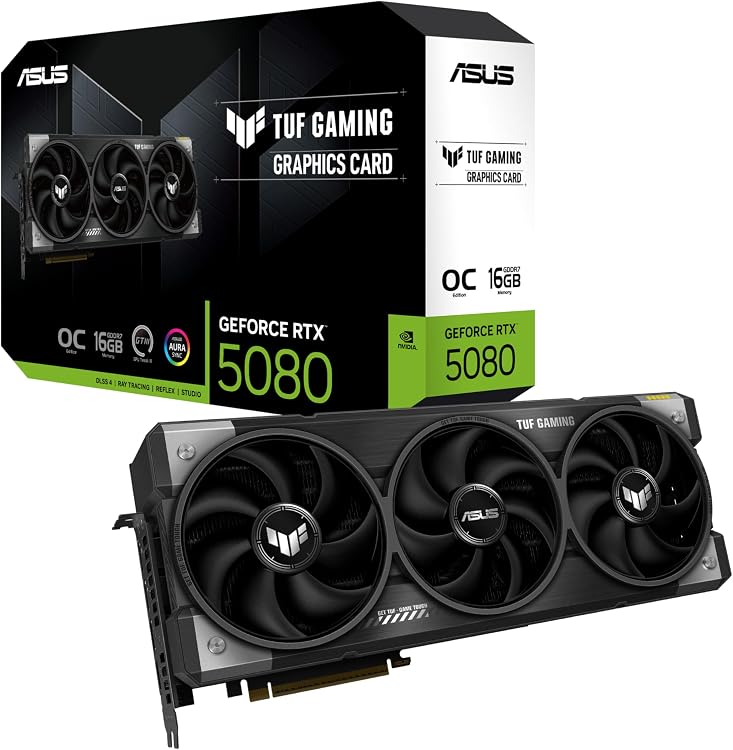
- Exceptional build durability for harsh gaming environments
- Superior thermal management reducing heat-related throttling
- Protective features against common environmental hazards
- Optimized for high airflow without excessive noise
Cons
- Large 3.6-slot form factor limits compatibility with compact cases
- Requires a robust PSU for full performance potential
- Premium features may exceed needs for casual users
| Graphics Coprocessor | NVIDIA GeForce RTX 5080 |
|---|---|
| Graphics Card Ram | 16 GB |
| GPU Clock Speed | 2730 MHz |
| Video Output Interface | Native DisplayPort 2.1a x3, Native HDMI 2.1b x 2 |
| Graphics Ram Type | GDDR7 |
| Compatible Devices | Desktop |
| Graphics Card Interface | PCI-Express x16 |
| Memory Clock Speed | 2730 MHz |
| Number of Fans | 3 |
| GPU Series | NVIDIA RTX 50 Series |
Best suited to shoppers comparing graphics cards products who specifically need provides long-term reliability through military-grade components that resist wear in demanding setups, Maintains low temperatures with phase-change thermal pads and axial-tech fans for consistent….
Before buying, compare the exact model’s compatibility, dimensions, core specifications, warranty, recurring owner feedback, and current price against other graphics cards options. Retailer availability and pricing can change after publication.
Pros
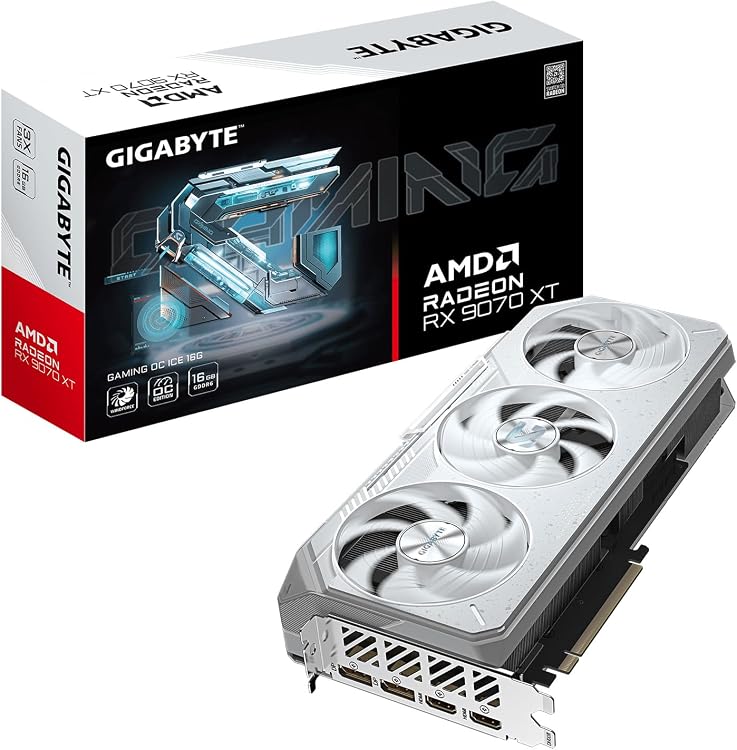
- Advanced WINDFORCE cooling for reliable operation
- 16GB GDDR6 memory capacity
- Dual BIOS for user flexibility
- RGB lighting synchronization capability
- Reinforced build for stability
Cons
- Requires a spacious case due to 2.7 slot size
- Best paired with high-end AMD processors for full potential
- May produce audible fan noise in performance mode
| Graphics Coprocessor | RX 9070XT |
|---|---|
| Brand | GIGABYTE |
| Graphics Ram Size | 16 GB |
| GPU Clock Speed | 2520 MHz |
| Video Output Interface | DisplayPort, HDMI |
Best suited to shoppers comparing graphics cards products who specifically need sustain peak performance in demanding games with superior cooling that maintains optimal temperatures, Personalize your gaming rig using extensive RGB color options and effects.
Before buying, compare the exact model’s compatibility, dimensions, core specifications, warranty, recurring owner feedback, and current price against other graphics cards options. Retailer availability and pricing can change after publication.
How to Choose the Best Gpu For Blender
Ray Tracing and Render Engine Acceleration
Blender Cycles relies heavily on dedicated hardware ray-tracing acceleration. NVIDIA cards leverage the OptiX API, utilizing dedicated RT cores to accelerate bounding volume hierarchy (BVH) traversal and ray-triangle intersection testing. In production rendering, OptiX provides substantial speed improvements over basic CUDA, making NVIDIA Blackwell options like the NVIDIA GeForce RTX 5080 Founders Edition the standard choice for offline photorealistic rendering.
AMD graphics cards utilize the HIP (Heterogeneous-computing Interface for Portability) runtime, supporting ray tracing through HIP RT. Cards like the GIGABYTE Radeon™ RX 9070 XT Gaming OC ICE 16G provide massive raw compute power, but driver-level RT optimizations in Blender historically deliver lower per-watt Cycles throughput compared to equivalent GeForce hardware. Choose AMD if your workload emphasizes rasterized Eevee Next viewport navigation, open-source compute stacks, or price-to-VRAM ratios.
VRAM Capacity and Memory Bandwidth
Video RAM (VRAM) acts as a hard limit for scene complexity in GPU rendering. A render frame immediately crashes with CUDA out-of-memory errors or degrades significantly in performance when scene geometry, high-resolution 4K/8K texture sets, particle caches, and BVH data exceed onboard memory. While Blender supports out-of-core memory swapping over system RAM, PCIe bus latency reduces rendering speed to a fraction of native GPU rates.
For entry-level asset design, 8GB on cards like the ASUS Dual NVIDIA GeForce RTX 5060 8GB GDDR7 OC suffices for standalone hard-surface modeling. Serious environment design, character grooming, and architectural visualization require at least 16GB. Options such as the msi Gaming RTX 5070 Ti 16G Ventus 3X OC Black and ASUS Dual NVIDIA GeForce RTX 5060 Ti 16GB GDDR7 OC provide the necessary memory buffer for large geometry without requiring flagship pricing.
Viewport Rasterization and Eevee Next
Blender’s real-time viewport engine, Eevee Next, uses standard rasterization pipelines, screen-space effects, and compute shaders rather than pure path tracing. Smooth navigation in dense viewports with sub-surface scattering, volumetric fog, and screen-space reflections requires high core boost clocks and high fill rates. The msi Gaming RTX 5070 12G Ventus 2X OC Black achieves a 2542 MHz extreme clock, delivering fluid viewport response when navigating multi-million polygon sculpts.
AMD RDNA 4 models, such as the GIGABYTE Radeon™ RX 9060 XT Gaming OC ICE 16G, demonstrate high rasterization efficiency. If your creative process centers on real-time animation playback, look-dev asset turnaround, and motion design inside Eevee rather than multi-hour Cycles offline batches, high-clocked raster engines with ample VRAM remain competitive alternatives.
AI Denoising and Tensor Acceleration
Modern 3D workflows rely on AI denoising to cut preview times from minutes to seconds. Blender includes both OpenImageDenoise (OIDN) and NVIDIA OptiX AI denoising. OptiX leverages specialized Tensor Cores to scrub path-traced noise during live viewport navigation, allowing artists to evaluate lighting and material changes instantaneously. NVIDIA Blackwell cards feature dedicated FP4 and DLSS 4 tensor capabilities, improving AI inference throughput.
Workstation tasks that involve heavy AI upscaling or texture generation benefit directly from higher AI TOPS ratings. The ASUS Dual NVIDIA GeForce RTX 5060 Ti 16GB GDDR7 OC provides 767 AI TOPS, whereas the standard 8GB model offers 623 AI TOPS. These compute reserves reduce render times when using machine-learning inference pipelines inside creative application suites.
Thermal Dissipation and Sustained Clock Speeds
Blender rendering differs fundamentally from gaming: rendering pins both the GPU core and memory controllers at 100% saturation for hours or days continuously. Thermal throttling causes clock drops, extending project turnaround times. Massive heatsinks, vapor chambers, and phase-change thermal pads ensure sustained boost clocks under uninterrupted full-load conditions.
The ASUS TUF Gaming GeForce RTX™ 5080 16GB GDDR7 OC incorporates a 3.6-slot cooling design with phase-change thermal material, engineered specifically for sustained durability under long compute loads. For smaller desktop builds, small-form-factor (SFF) options like the GIGABYTE GeForce RTX 5070 WINDFORCE OC SFF 12G rely on triple-fan arrays and composite copper heat pipes to vent thermal loads within confined enclosures.
Power Infrastructure and Physical Clearance
High-tier rendering hardware places steep demands on power supply units (PSUs) and desktop chassis dimensions. Premium Blackwell GPUs utilize PCIe 5.0 12V-2×6 power connections, requiring clean voltage regulation and dedicated rail capacity to prevent transient spikes from shutting down the system mid-render. Ensure your chassis clear both the length and slot thickness of triple-fan graphics cards.
Creators working on dual-purpose editing setups frequently use high-end color-accurate displays; check our best OLED monitor for photo editing guide to pair your workstation card with an appropriate panel interface. Verify that your GPU choice features DisplayPort 2.1 or HDMI 2.1b connections to run high-resolution reference monitors without refresh rate bottlenecks.
| Model | VRAM & Bus | Architecture | Best For | Main Strength |
|---|---|---|---|---|
| NVIDIA GeForce RTX 5080 Founders Edition | 16GB GDDR7 | NVIDIA Blackwell | Heavy Cycles Render Farms | OptiX ray tracing & FP4 tensor speed |
| PNY NVIDIA GeForce RTX™ 5080 Epic-X™ ARGB OC | 16GB GDDR7 256-bit | NVIDIA Blackwell | Sustained Heavy Rendering | 2775 MHz boost & triple-fan thermals |
| ASUS TUF Gaming GeForce RTX™ 5080 16GB GDDR7 OC | 16GB GDDR7 | NVIDIA Blackwell | 24/7 Studio Workstations | 3.6-slot cooler & phase-change pads |
| msi Gaming RTX 5070 Ti 16G Ventus 3X OC Black | 16GB GDDR7 256-bit | NVIDIA Blackwell | Mid-to-High 3D Production | 16GB memory buffer with TORX 5.0 fans |
| GIGABYTE GeForce RTX 5070 WINDFORCE OC SFF 12G | 12GB GDDR7 192-bit | NVIDIA Blackwell | Compact Workstation Builds | SFF-ready profile & WINDFORCE cooling |
| msi Gaming RTX 5070 12G Ventus 2X OC Black | 12GB GDDR7 192-bit | NVIDIA Blackwell | Interactive Modeling & Look-Dev | 2542 MHz extreme clock in dual-slot |
| ASUS Dual NVIDIA GeForce RTX 5060 Ti 16GB GDDR7 OC | 16GB GDDR7 | NVIDIA Blackwell | High-Geometry Budget Renders | 16GB VRAM capacity at lower cost |
| ASUS Dual NVIDIA GeForce RTX 5060 8GB GDDR7 OC | 8GB GDDR7 | NVIDIA Blackwell | Beginner 3D Asset Creation | 623 AI TOPS in compact 2.5-slot build |
| GIGABYTE Radeon™ RX 9070 XT Gaming OC ICE 16G | 16GB GDDR6 256-bit | AMD RDNA 4 | Eevee Next & Hybrid Creator Tasks | DisplayPort 2.1 & server-grade thermal gel |
| GIGABYTE Radeon™ RX 9060 XT Gaming OC ICE 16G | 16GB GDDR6 128-bit | AMD RDNA 4 | Value Eevee Viewport Work | 16GB memory footprint under $550 |
Why You Should Trust PCGearWiki
At PCGearWiki, our hardware evaluations are rooted in rigorous specification verification, architectural pipeline analysis, and practical creative workload assessments. We inspect hardware limits—including memory bandwidth, bus widths, compute APIs, cooling solutions, and board tolerances—rather than relying on marketing claims. For a detailed breakdown of our assessment framework, review our review methodology.
Our Blender buying advice targets actual 3D bottlenecks: ray tracing intersection speed in Cycles, VRAM boundary management during heavy multi-layer texturing, and API stability under production drivers. We continuously track changes across Blender development builds to ensure recommendations align with real-world rendering software behavior.
Final Thoughts
Selecting the best gpu for blender requires matching your hardware investment to the scale of your 3D scenes. The NVIDIA GeForce RTX 5080 Founders Edition is our Best Overall recommendation. Featuring NVIDIA’s Blackwell architecture, high-bandwidth GDDR7 memory, and advanced OptiX hardware ray tracing, it processes complex Cycles production frames faster than any mid-tier alternative. It is the optimal pick for professional freelance animators and production artists where time-to-render directly affects revenue.
For budget-conscious creators, the ASUS Dual NVIDIA GeForce RTX 5060 Ti 16GB GDDR7 OC stands as the Best Value pick. While its compute core count is smaller than flagship cards, its full 16GB VRAM allocation prevents out-of-memory crashes when rendering complex textures and particle simulations, making it far more capable for production projects than standard 8GB cards.
The ASUS Dual NVIDIA GeForce RTX 5060 8GB GDDR7 OC serves as the Best Budget entry point at $469.99. It provides access to modern Blackwell architecture, OptiX acceleration, and AI denoising for design students and indie developers building low-to-medium poly assets. Skip this card if you regularly compile heavy architectural visualization scenes, where 8GB of VRAM presents an immediate operational limit.
Finally, for studios requiring uninterrupted render cycles, the ASUS TUF Gaming GeForce RTX™ 5080 16GB GDDR7 OC is our Best Premium pick. Its 3.6-slot cooling assembly, protective PCB coating, and phase-change thermal interface prevent thermal degradation during non-stop overnight batch rendering. If you prefer high-refresh workspace monitoring alongside 3D authoring, consult our best OLED monitor for productivity guide to round out your creative suite.
Frequently Asked Questions
What is the best GPU for Blender rendering in 2026?
The NVIDIA GeForce RTX 5080 is the best GPU for Blender rendering thanks to its Blackwell architecture, fast GDDR7 memory, and superior OptiX hardware ray-tracing acceleration. It cuts Cycles rendering and denoising times significantly compared to older-generation hardware.
Is NVIDIA strictly better than AMD for Blender?
Yes, for Cycles rendering, NVIDIA GPUs consistently outperform AMD cards due to mature OptiX API integration and dedicated RT core utilization. AMD cards using HIP RT work well in Blender, but generally offer lower ray-tracing performance per dollar compared to GeForce options.
How much VRAM do I need for Blender?
For basic modeling and simple asset creation, 8GB of VRAM is sufficient. However, for complex interior scenes, high-resolution 4K/8K PBR textures, and heavy particle simulations, 16GB of VRAM is strongly recommended to prevent out-of-core rendering slowdowns or outright render crashes.
Can I use a gaming laptop GPU instead of a desktop card for Blender?
Mobile GPUs can run Blender effectively, but desktop cards offer superior power delivery and larger heatsinks that sustain heavy render loads without severe thermal throttling. For mobile alternatives, check our best gaming laptop for engineering students guide to explore performance-tier laptops with dedicated graphics.
Does system RAM matter if my GPU has plenty of VRAM?
Yes, Blender requires adequate system RAM to compile shaders, load project files, bake physics simulations, and calculate geometry data before sending it to the GPU. A workstation with a 16GB GPU should ideally be paired with at least 32GB to 64GB of system RAM for smooth multi-tasking.
Add PCGearWiki as a preferred source on Google
Sources and Verification
Research basis: Product identity, dimensions, interfaces, supported features, and warranty terms are checked against available manufacturer documentation and current retailer listings. Price, stock, and aggregate customer ratings can change after publication.
Testing disclosure: Unless this article explicitly states that PCGearWiki performed hands-on testing and describes the test setup, recommendations are research-based editorial evaluations rather than PCGearWiki laboratory measurements. Customer feedback is used to identify recurring ownership patterns, not as proof of technical performance.
Last source review: September 22, 2026. See our Review Methodology, Editorial Policy, and Corrections Policy.



Write Your Review
No reviews yet. Be the first to share your experience!