

Last updated: September 22, 2026
Quick answer: The best lightweight gaming mouse under $50 depends on whether you prioritize minimum weight, wireless battery life, or programmable controls. The ATTACK SHARK X3 is the lightest listed option at 49g, while the Razer Viper V3 HyperSpeed offers a more established esports-focused specification set. Check grip style, connection method, software support, and whether the listed price remains below your budget.

This Best Gaming Mouse guide compares six gaming mice priced below the supplied $50 ceiling, using available manufacturer specifications and product-record data. The shortlist includes ultra-light wireless models, ergonomic mice with extra controls, and established battery-powered designs. Because weight is not supplied for every model, products without a verified mass are presented as feature-focused alternatives rather than being described as the lightest choices.
Prices in the supplied product data range from $33.99 to $44.99 and may change. The recommendations below focus on practical gaming use cases instead of treating the highest DPI figure as proof of better aim.

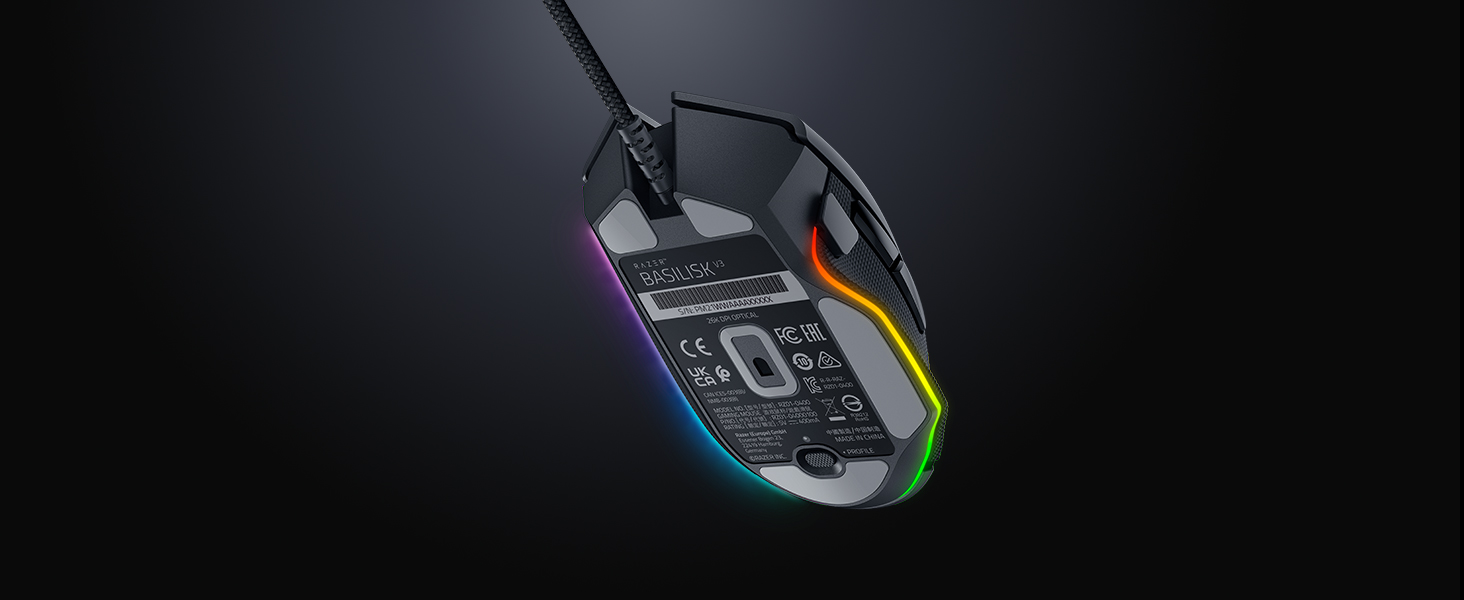
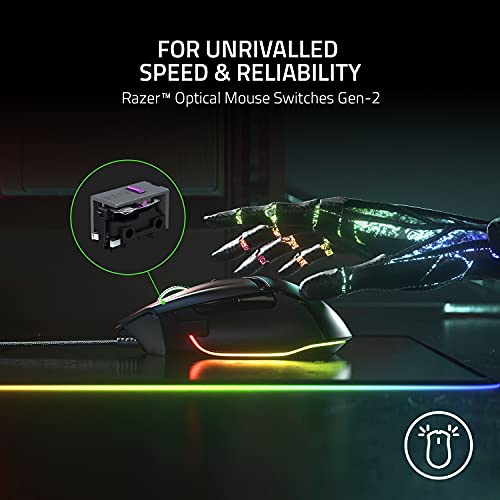
Razer Basilisk V3 Ergonomic Gaming Mouse with 26K





As an Amazon Associate we earn from qualifying purchases. Product prices and availability are accurate as of the date/time indicated.
Quick Verdict
For most users who specifically want a very light wireless gaming mouse, the ATTACK SHARK X3 Lightweight Wireless Gaming Mouse is the clearest match on the available data. Its verified 49g weight, three connection modes, 26,000 DPI PixArt PAW3395 sensor, and 200-hour maximum battery claim create a strong feature-to-price combination.
The Razer Viper V3 HyperSpeed is the better alternative for claw or fingertip users who prefer an esports-oriented shape, a 30,000 DPI sensor, and Razer HyperSpeed wireless. Its 82g weight is still light for gaming, but it uses a single AA battery rather than a rechargeable battery. The AOC GM401 also weighs 82g and adds tri-mode connectivity, a rechargeable battery, RGB, and a dedicated fire button.
Choose the Razer Basilisk V3 Customizable Ergonomic if extra controls and a thumb-rest design matter more than low weight. Choose the Basilisk V3 X HyperSpeed for wireless ergonomic control and long stated battery life. The Logitech G305 remains a straightforward option for buyers who want LIGHTSPEED wireless, a 12,000 DPI HERO sensor, and replaceable-AA convenience, although its supplied data does not provide a gram measurement.
Skip the ATTACK SHARK X3 if you need a large, heavily contoured palm-grip shell or want a rechargeable battery. Skip the Razer Viper V3 HyperSpeed if you do not want to manage a disposable AA battery. Buyers who need many side buttons should look first at the Basilisk models or the AOC GM401 rather than the minimalist esports shapes.

How We Evaluated
PCGearWiki evaluated the supplied product records by comparing verified weight figures, sensor specifications, connection modes, battery claims, programmable controls, grip guidance, and software details. Manufacturer claims are identified as specifications rather than independent measurements. We did not perform hands-on testing, latency testing, click testing, or battery testing for these products.
We also checked whether each product is a complete gaming mouse rather than an accessory, replacement part, bundle, or unrelated device. The main limitation is that dimensions, operating-system requirements, warranty terms, and exact connection details are not available for every model in the supplied data. Read the PCGearWiki review methodology for more information about our research-based evaluation process.
Key Specifications
| Model | Verified weight | Connection | Sensor specification | Controls or battery |
|---|---|---|---|---|
| ATTACK SHARK X3 | 49g | Bluetooth 5.2, 2.4GHz wireless, USB-C wired | PixArt PAW3395, up to 26,000 DPI | Programmable controls; up to 200 hours |
| Razer Viper V3 HyperSpeed | 82g | Razer HyperSpeed wireless | Focus Pro, up to 30,000 DPI | 8 programmable controls; up to 280 hours on one AA battery |
| AOC GM401 | 82g | 2.4GHz wireless, Bluetooth 5.0, USB-C wired | Up to 12,000 DPI; 1000Hz polling claim | 7 programmable buttons; up to 70 hours with RGB off |
| Logitech G305 | Not supplied | LIGHTSPEED wireless | HERO sensor, 200–12,000 DPI | 6 programmable buttons; up to 250 hours on one AA battery |
| Razer Basilisk V3 X HyperSpeed | Not supplied | Razer HyperSpeed wireless and Bluetooth | 5G Advanced, up to 18,000 DPI | 9 programmable controls; up to 285 hours on HyperSpeed |
| Razer Basilisk V3 | Not supplied | Connection type not specified in supplied record | Focus+, up to 26,000 DPI | 11 programmable buttons; optical switches rated up to 70 million clicks |
The table shows why there is no single winner for every buyer. The X3 has the lowest verified mass, the Viper V3 has the highest listed sensor ceiling, and the AOC GM401 offers the clearest rechargeable tri-mode setup. The Basilisk V3 provides the most programmable buttons in this group, but its weight is not stated in the supplied data.
What Matters Most When Choosing
Weight and balance: A lower-mass mouse can require less effort during broad sweeps, but weight alone does not determine comfort or control. The X3 is listed at 49g, while the Viper V3 and AOC GM401 are each listed at 82g. The Viper description specifically identifies a mass-centralized design and recommends claw or fingertip grip styles. Do not assume the Basilisk or G305 is lighter simply because the product title uses lightweight language without a gram figure.
Grip and shape: Shape affects aim consistency more directly than a headline DPI number. The Basilisk models use an ergonomic form with a thumb rest or thumb-oriented controls. The Viper V3 is aimed at claw and fingertip users, while the X3 uses a symmetrical shape. AOC describes its GM401 as ergonomic, but the supplied record does not provide dimensions, so shoppers should verify physical fit before ordering.
Connection type: Dedicated 2.4GHz wireless is the primary gaming connection on the Viper V3, G305, and Basilisk V3 X. Bluetooth is useful for lower-power or multi-device use, but the supplied data does not provide a direct performance measurement comparing Bluetooth with 2.4GHz. The X3 and AOC GM401 add USB-C wired operation, which gives you a fallback when charging or when wireless is undesirable.
Battery design: Battery claims are manufacturer maximums and vary with usage, lighting, connection mode, and settings. The X3 lists up to 200 hours, the Viper V3 up to 280 hours on one AA battery, the G305 up to 250 hours on one AA battery, and the Basilisk V3 X up to 285 hours on HyperSpeed or up to 535 hours on Bluetooth. The AOC GM401 lists up to 70 hours with RGB off and 45 hours with RGB on.
Controls and software: Extra buttons are valuable in massively multiplayer online games, MOBAs, productivity shortcuts, and push-to-talk setups, but they can add complexity and affect hand placement. Razer models use Synapse for configuration, the X3 provides software-based remapping, and the AOC GM401 uses a web-based driver according to its product data. Confirm that the software works with your operating system and that onboard profiles are supported if you move between computers.
Comparison and Trade-Offs
The wireless gaming setup guide is useful if you are choosing a mouse alongside other wireless peripherals, but these products should still be judged individually. The most important trade-off here is not simply wired versus wireless; it is minimum weight versus shape, controls, battery type, and software ecosystem.
- Best for minimum weight: ATTACK SHARK X3, with a verified 49g design and tri-mode connectivity.
- Best for claw or fingertip competitive play: Razer Viper V3 HyperSpeed, with an 82g mass-centralized design and 30,000 DPI Focus Pro sensor specification.
- Best for rechargeable multi-device use: AOC GM401, with 2.4GHz, Bluetooth, USB-C, and a built-in battery.
- Best for many commands: Razer Basilisk V3 Customizable Ergonomic, with 11 programmable buttons and a tilt wheel.
- Best for ergonomic wireless control: Razer Basilisk V3 X HyperSpeed Customizable, with 9 controls and dual-mode wireless.
- Best for simple AA-powered wireless use: Logitech G305, with six programmable buttons and onboard receiver storage.
Design and Build Quality
The ATTACK SHARK X3 prioritizes low mass and a symmetrical shell. Its listed dimensions are approximately 11.85 by 6.1 by 3.97cm, and the product includes grip tape. The large PTFE feet are described as wider and rounder than the previous design, while Kailh GM 8.0 switches and a TTC encoder target a crisp click and precise scroll feel. These are manufacturer or product-listing specifications, not independently verified durability results.
The Razer Viper V3 HyperSpeed uses a mass-centralized 82g design. Its shape is optimized for claw or fingertip grip, making it a more focused choice than the broader Basilisk form. The on-mouse DPI control can switch among five DPI stages or be reassigned to another command through software.
The Basilisk V3 and Basilisk V3 X HyperSpeed use an ergonomic design with a thumb rest or thumb-oriented layout. The wired Basilisk V3 lists 11 programmable buttons, a dual-mode HyperScroll tilt wheel, and 11 Chroma RGB lighting zones. The wireless Basilisk V3 X reduces the control count to 9 and adds HyperSpeed wireless and Bluetooth.
The AOC GM401 is listed at 82g and combines an ergonomic shape with RGB lighting, a dedicated fire button, and seven programmable buttons. Its built-in 700mAh battery is rechargeable through USB-C. The Logitech G305 uses a compact classic shape, mechanical switches, a single AA battery, and storage for its USB wireless receiver.
Performance and Real-World Use
For competitive first-person shooters, the X3 and Viper V3 are the most directly aligned with the supplied data. The X3 offers the lowest listed mass and a claimed 1000Hz polling rate in its product record. The Viper V3 offers an 82g body, a forward sensor placement, 30,000 DPI capability, on-mouse DPI control, and Razer HyperSpeed wireless. These specifications support a low-drag, low-adjustment setup, but they do not establish a measured advantage in latency or accuracy.
The AOC GM401 suits players who want one mouse for gaming and general device switching. Its tri-mode connection can serve a desktop, laptop, or tablet, while the dedicated fire button targets rapid repeated inputs in shooter-style games. The limitation is battery endurance: its stated maximum is lower than the long-life AA-powered Razer and Logitech models, especially when RGB is enabled.
The Basilisk V3 models are better suited to games where commands, macros, and thumb access matter more than rapid low-weight swipes. Eleven buttons on the Basilisk V3 can accommodate actions such as push-to-talk, pings, or ability shortcuts. The V3 X gives up two controls but adds wireless flexibility and a long manufacturer-stated battery claim.
The Logitech G305 is a practical fit for users who prefer a replaceable AA battery and a compact receiver that stores inside the mouse. Its HERO sensor supports 200 to 12,000 DPI, which is ample for ordinary gaming settings even though its headline specification is below the Razer and X3 sensor ceilings. DPI capacity should not be treated as a direct measure of in-game performance.
Compatibility
Before buying, confirm the connection mode you actually need. The X3 and AOC GM401 explicitly support 2.4GHz wireless, Bluetooth, and USB-C wired use. The Viper V3 uses Razer HyperSpeed wireless, while the Basilisk V3 X supports HyperSpeed wireless and Bluetooth. The G305 uses Logitech LIGHTSPEED wireless and includes a USB receiver. The supplied record does not clearly identify the Basilisk V3 connection type, so verify the exact listing before checkout.
- Check that your PC, laptop, or Mac has the required USB port for the wireless receiver or USB-C cable.
- Use the 2.4GHz receiver for gaming when the product supports both 2.4GHz and Bluetooth; the supplied data does not verify equivalent performance across modes.
- Confirm the software requirement before relying on macros, DPI stages, RGB profiles, lift-off distance, or polling-rate controls.
- Verify the exact color and model variant. The G305 record identifies the White version, while the Razer records identify Classic Black versions.
- Check current return terms and warranty coverage on the product page because those details are not supplied here and can differ by seller or listing.
- Do not treat an 82g mouse as equivalent to a 49g mouse simply because both are marketed as lightweight.
Pros and Cons
ATTACK SHARK X3 Lightweight Wireless Gaming Mouse
- Verified 49g weight is the lowest in this comparison.
- Supports Bluetooth 5.2, 2.4GHz wireless, and USB-C wired operation.
- Lists a PAW3395 sensor with up to 26,000 DPI and a claimed 1000Hz polling rate.
- Includes grip tape and PTFE feet.
- Skip it if you prefer a strongly contoured palm-rest design or want a rechargeable battery.
Razer Viper V3 HyperSpeed Wireless Esports
- 82g mass-centralized design is targeted at claw and fingertip grip styles.
- Focus Pro sensor specification reaches 30,000 DPI.
- Manufacturer claims up to 280 hours on one AA battery.
- Has eight programmable controls and on-mouse DPI control.
- Skip it if you require USB-C charging or a rechargeable internal battery.
AOC GM401 Wireless RGB Gaming Mouse, 12000 DPI
- Tri-mode operation supports PC, laptop, and tablet-oriented setups.
- 82g listed weight and ergonomic design target longer sessions.
- Dedicated fire button is unusual at this price point.
- Rechargeable battery and RGB lighting are configurable through the web driver.
- Skip it if maximum battery life or the lowest possible weight is your priority.
Other Strong Alternatives
- Razer Basilisk V3 Customizable Ergonomic: Choose it for 11 programmable buttons, a thumb rest, tilt scrolling, and Chroma RGB. Skip it if you need a verified ultra-light weight or wireless operation.
- Razer Basilisk V3 X HyperSpeed Customizable: Choose it for nine controls, ergonomic support, dual-mode wireless, and long stated battery life. Skip it if you want the lowest mass or USB-C charging.
- Logitech G305 Lightspeed Wireless Gaming Mouse: Choose it for simple LIGHTSPEED wireless, a 12,000 DPI HERO sensor, onboard receiver storage, and replaceable-AA convenience. Skip it if you require tri-mode connectivity or a verified sub-80g weight.
Who Should Buy Each Pick?
Buy the ATTACK SHARK X3 if minimum weight is the deciding factor and you want the flexibility of Bluetooth, 2.4GHz wireless, and USB-C wired use. Its limitation is that the supplied data does not document the software ecosystem, warranty, or long-term owner experience. Skip it if you cannot confirm support for your operating system or prefer a larger ergonomic shell.
Buy the Razer Viper V3 HyperSpeed if your priority is a competitive FPS mouse for claw or fingertip grip. Its 30,000 DPI sensor specification and mass-centralized 82g design are more relevant to that use case than a large button count. Skip it if a cable-free rechargeable design is non-negotiable.
Buy the AOC GM401 if you want a rechargeable mouse that can move between wireless, Bluetooth, and wired modes. The dedicated fire button and seven programmable buttons make it more versatile for shooter and general gaming profiles. Skip it if RGB-enabled battery life or the 82g weight does not suit your preferences.
Buy the Razer Basilisk V3 if MMO-style commands, productivity shortcuts, and thumb support outweigh the need for a verified lightweight design. Its 11-button layout is the main reason to choose it. Skip it if the exact connection type is not confirmed or if you primarily play low-sensitivity FPS games with large swipes.
Buy the Razer Basilisk V3 X HyperSpeed if you want the Basilisk shape without a cable and need nine programmable controls. Its battery claims are strong, but the supplied record does not provide weight or USB-C charging information. Skip it if low mass is more important than ergonomic button access.
Buy the Logitech G305 if you prefer a familiar compact shape, AA battery replacement, LIGHTSPEED wireless, and simple onboard receiver storage. Its limitation is less connectivity variety and no supplied gram measurement. Skip it if you need Bluetooth, USB-C charging, or a verified ultra-light chassis.
Why You Should Trust PCGearWiki
PCGearWiki bases this comparison on specification research, model and ASIN matching, compatibility checks, feature comparison, and market/value analysis. We separate manufacturer specifications from editorial inference and do not present theoretical DPI, click-life, polling, or battery figures as independent test results.
Final Verdict
The ATTACK SHARK X3 is the strongest match for the narrowest interpretation of best lightweight gaming mouse under $50 because its 49g weight is explicitly verified in the supplied data and it adds three connection modes. The deciding factor is weight, not its 26,000 DPI ceiling. Choose the Razer Viper V3 HyperSpeed instead if grip shape, Razer software, and an esports-oriented design matter more than rechargeable USB-C power.
The AOC GM401 is the practical alternative for buyers who want a rechargeable tri-mode mouse with a dedicated fire button. The Basilisk models are better for command-heavy games and ergonomic thumb support, while the Logitech G305 is a sensible AA-powered wireless option. None should be selected solely because of a high DPI number; fit, weight, connection, and battery design determine the better purchase.
Frequently Asked Questions
Is the best lightweight gaming mouse under $50 worth it?
Yes, for most users who want lower mouse mass without paying premium pricing. The ATTACK SHARK X3 provides the lowest verified weight in this group, while the Razer Viper V3 and AOC GM401 provide verified 82g designs. Buyers should still confirm shape, software, connection mode, and current price before ordering.
Who is the best lightweight gaming mouse under $50 best for?
It is best for PC gamers who prefer lighter swipes, especially in first-person shooters and other games that involve frequent repositioning. The ideal model depends on grip: the Viper V3 targets claw and fingertip users, the X3 uses a symmetrical design, and the Basilisk models suit users who want ergonomic thumb support.
Is the best lightweight gaming mouse under $50 good for gaming?
The listed products provide gaming-oriented sensors, wireless modes, programmable controls, or low-weight designs. The X3 and Viper V3 are the most directly suited to fast FPS movement based on their supplied specifications. However, specifications do not replace measured testing, so this guide does not claim a specific latency or accuracy advantage.
What should I compare before buying the best lightweight gaming mouse under $50?
Compare verified weight, grip shape, connection method, battery type, charging options, button count, software support, and the return or warranty terms shown on the current listing. Also check the exact variant: the Logitech model here is White, the Razer models are Classic Black, and Bluetooth performance should not be assumed to match 2.4GHz wireless.
Is a higher DPI rating better for gaming?
Not necessarily. DPI describes sensitivity range, not measured tracking quality, latency, or player performance. A 12,000 DPI sensor can be sufficient for common gaming settings, while a 26,000 or 30,000 DPI specification gives more adjustment headroom. Consistent shape, controlled lift-off behavior, suitable weight, and personal sensitivity matter more in practical use cases.
Add PCGearWiki as a preferred source on Google
Sources and Verification
Research basis: Product identity, dimensions, interfaces, supported features, and warranty terms are checked against available manufacturer documentation and current retailer listings. Price, stock, and aggregate customer ratings can change after publication.
Testing disclosure: Unless this article explicitly states that PCGearWiki performed hands-on testing and describes the test setup, recommendations are research-based editorial evaluations rather than PCGearWiki laboratory measurements. Customer feedback is used to identify recurring ownership patterns, not as proof of technical performance.
Last source review: September 22, 2026. See our Review Methodology, Editorial Policy, and Corrections Policy.





Write Your Review
No reviews yet. Be the first to share your experience!