

Last updated: July 7, 2026
best 1440p gaming monitor options deliver sharp 2560×1440 resolution combined with high refresh rates, making them ideal for gamers and creators who want detailed visuals without the full cost of 4K. In July 2026 these displays suit competitive players needing smooth motion as well as content creators who value color accuracy for photo and video work.
This guide examines 15 models from KOORUI, INNOCN, Kado and more to help you match panel technology, response time, and ergonomics to your setup. You will learn which features matter most for different budgets and use cases while exploring real specifications from current products.
Read on for a detailed comparison and practical buying advice. For more monitor recommendations see our monitor buying guide.

Pros
- 180Hz refresh rate paired with ELMB Sync produces exceptionally fluid motion
- Wide 130% sRGB gamut delivers vibrant colors suitable for both gaming and content work
- Adaptive Sync technologies work seamlessly across AMD and NVIDIA hardware
- Flicker-free and blue light filters support comfortable extended viewing
- GamePlus tools provide practical in-game aids for skill improvement
Cons
- HDR-10 implementation offers only modest contrast improvements over standard SDR
- Integrated speakers deliver basic audio that serious users will likely replace
- Full 180Hz at QHD resolution requires a strong graphics card to utilize fully
The ASUS TUF Gaming VG27AQ3A is a 27-inch QHD monitor built around a Fast IPS panel running at 180Hz. It targets competitive gamers who want high refresh rates and accurate colors without stepping up to larger or more expensive displays.
Standout performance comes from ELMB Sync, which combines motion blur reduction with variable refresh rate support so that both AMD FreeSync Premium and NVIDIA G-Sync compatible modes remain active. Variable overdrive further tunes pixel response to current frame rates, keeping fast-moving scenes clear in FPS and racing titles while the 130% sRGB gamut and HDR-10 support produce punchy, saturated colors.
Build quality follows the TUF series emphasis on durability with a sturdy stand and straightforward cable management. The DisplayWidget Center software replaces most on-screen menus, letting users switch GameVisual presets or enable GamePlus overlays directly from the desktop for quick adjustments during play.
Drawbacks include entry-level HDR that does not reach the brightness or local dimming of higher-tier panels, and modest built-in speakers that most users will bypass with headphones or external audio. Achieving consistent 180Hz at 1440p also demands a capable graphics card.
Overall the VG27AQ3A earns a strong recommendation for gamers seeking smooth 1440p gameplay and reliable color performance at a mid-range price point, provided expectations for HDR and audio remain realistic.

Pros
- Fast 240Hz refresh rate supports high-frame-rate gaming
- IPS panel ensures wide viewing angles and color fidelity
- Versatile ergonomic adjustments for comfortable long sessions
- Multiple ports including DisplayPort 1.4 for full speed
Cons
- Built-in 2W speakers provide only basic sound output
- HDMI ports restrict refresh rate to 144Hz
- Requires DisplayPort to reach maximum 240Hz performance
The Acer Nitro XV272U is a 27-inch WQHD IPS gaming monitor designed for users who demand high refresh rates and responsive performance in their gaming setup.
Its standout capability lies in the up to 240Hz refresh rate over DisplayPort paired with a 0.5ms response time, delivering fluid motion and reduced blur that benefits fast-paced esports titles.
The monitor features an ergonomic stand supporting tilt, height, swivel, and pivot adjustments along with VESA mounting, allowing users to optimize positioning for extended play sessions. Color reproduction reaches 99% sRGB with HDR400 support enhancing visual depth.
While the dual 2-watt speakers offer convenient audio, they fall short for users seeking powerful sound, and achieving peak refresh rates necessitates the DisplayPort connection rather than HDMI.
In conclusion, this monitor stands out as a strong choice for gamers focused on speed and visual quality within an accessible price range.

Pros
- High refresh rate boosts gaming smoothness and responsiveness
- Strong connectivity supports multi-device and multi-monitor use
- Eye-care features promote comfortable extended viewing
- Flexible mounting options aid space management
Cons
- No built-in speakers included
- 75x75mm VESA pattern limits some mounting hardware choices
- Brand support response times can vary
This Gawfolk 27 inch monitor combines QHD resolution with a 260Hz refresh rate in an IPS panel, making it suitable for gamers and office professionals alike who need fluid visuals and clear imagery.
The standout performance comes from the high refresh rate and quick response time paired with AMD FreeSync, which minimizes screen tearing during intense gaming sessions while the wide viewing angles keep colors accurate even off-center.
Its design features a slim bezel and eye protection technologies like flicker-free and low blue light, allowing extended use without discomfort, and the dual HDMI and DisplayPort inputs facilitate easy connections to computers, consoles, and more.
One drawback is the absence of integrated speakers, requiring external audio solutions, and the smaller VESA mount size might not suit all wall mounting setups.
In conclusion, this monitor offers strong value for those prioritizing high-speed gaming and productivity features in a compact 27 inch form.

Pros
- High refresh rate enables smooth high-performance gaming
- Ultrawide curved design boosts immersion and multitasking
- Strong color coverage delivers vivid accurate visuals
- Adaptive sync and eye care features improve usability
- Multiple connectivity options add setup flexibility
Cons
- Maximum 200Hz refresh rate requires DisplayPort cable
- Built-in speakers offer basic audio only
- Warranty limited to 12 months
The Gawfolk 34-inch ultrawide curved monitor targets gamers and content consumers who want an immersive wide-screen experience without premium pricing. Its 1500R curve and 21:9 aspect ratio create a wraparound effect that enhances peripheral vision during gameplay and expands workspace for productivity tasks.
Standout performance comes from the 200Hz refresh rate paired with adaptive sync which maintains smooth frame delivery and prevents tearing even in demanding titles. The 120% sRGB coverage and 4000:1 contrast produce saturated colors and deep blacks that make games and media look punchy while the 1ms response time keeps fast motion sharp.
Build quality focuses on practicality with a curved panel that reduces edge distortion and supports wall mounting for clean desk setups. Connectivity includes DisplayPort for full speed and HDMI for broader compatibility though users must select the right cable to unlock higher refresh rates.
Potential drawbacks include the need for DisplayPort to reach 200Hz and reliance on basic integrated speakers rather than dedicated audio. The one-year warranty also falls short of some competitors.
In summary this monitor delivers solid value for users prioritizing ultrawide immersion and high refresh gaming on a practical budget while remaining suitable for everyday productivity use.

Pros
- High 200Hz refresh rate delivers competitive smoothness in FPS titles
- Strong color gamut supports accurate visuals for gaming and editing
- Fully adjustable stand reduces physical strain effectively
- Multiple ports enable flexible device connections
Cons
- No built-in speakers included
- Screen warranty limited to one year
- Requires capable hardware to maximize 200Hz at QHD
The KOORUI G2722P is a 27-inch gaming monitor designed for users who want QHD resolution combined with a high 200Hz refresh rate. It targets competitive gamers and content creators who need fluid performance and solid color reproduction without excessive cost.
Key strengths include the Fast IPS panel that achieves quick pixel transitions and wide viewing angles, allowing consistent image quality from different positions. Adaptive Sync integration keeps gameplay free of tearing during rapid movements, while HDR400 adds depth to highlights and shadows for more engaging visuals in supported titles.
Build quality focuses on practicality with an ergonomic stand offering height, tilt, and pivot options to support proper posture over long hours. The slim profile and VESA compatibility help maintain an organized workspace, though the absence of speakers means users must rely on external audio setups.
One limitation is the one-year screen warranty, which may concern buyers seeking longer-term coverage. Overall the monitor performs reliably for its intended uses and offers a balanced choice for those prioritizing refresh rate and adjustability.

Pros
- Extensive port selection including USB-C power delivery
- High refresh rate supports competitive gaming
- Ergonomic stand with multiple adjustments
- Ultrawide resolution boosts multitasking efficiency
- Strong color gamut for media consumption
Cons
- VA panel technology can show black smearing in dark scenes
- Integrated speakers deliver only basic sound quality
- Full resolution and refresh rate require a high-end graphics card
The INNOCN 49C1S serves as a 49-inch curved ultrawide gaming monitor aimed at users who want to combine high-performance gaming with efficient multitasking on a single screen.
Its standout attributes include the 5120x1440 resolution paired with a 240Hz refresh rate and Adaptive Sync, which delivers fluid gameplay and reduces screen tearing for fast-paced titles.
Build quality features a VA panel with 1800R curvature that enhances immersion while aiding eye comfort, complemented by an adjustable stand and robust connectivity options such as USB-C 65W, HDMI 2.1, and DisplayPort inputs.
One limitation involves the demands placed on graphics hardware to drive this high pixel density at maximum settings, and the built-in audio lacks the depth of external solutions.
In conclusion this monitor provides solid value for immersive setups where space and versatility matter most.

Pros
- Provides ergonomic curved design for reduced neck and eye fatigue
- Offers dual monitor convenience in one package for easy setup
- Includes built-in speakers for space-saving audio
- Supports VESA mounting for versatile placement
- Delivers true-to-life colors suitable for multimedia
Cons
- Refresh rate of 75Hz may limit performance in high-speed competitive gaming
- Built-in speakers provide basic audio without rich bass tones
- 1080p resolution on curved panels might show limitations in highly detailed visuals compared to higher resolutions
This Kado dual monitor 2-pack consists of two 24-inch curved displays tailored for users balancing office work and gaming. The setup targets individuals seeking an affordable way to expand their screen real estate with a panoramic feel.
The standout 1500R curvature wraps around the user's view to reduce peripheral distortion while the 75Hz refresh rate ensures smoother motion during video playback and light gaming sessions. Color performance reaches 98 percent sRGB which supports accurate visuals for photo editing and media consumption.
Build quality emphasizes ergonomics through the curved form that eases strain on the neck and eyes allowing extended use. VESA compatibility enables mounting on walls or arms and built-in speakers eliminate the need for external audio devices.
Potential drawbacks include the modest 75Hz rate which falls short for esports enthusiasts and speakers that deliver functional but not audiophile-grade sound. The 1080p resolution remains standard rather than cutting-edge.
In conclusion this monitor pack serves well for casual users and multitaskers who value comfort and convenience in a dual setup over premium high-refresh features.

Pros
- Exceptional motion handling with high refresh and low response
- Vibrant color performance suitable for both gaming and media
- Flexible connectivity options including latest HDMI standard
- Ergonomic stand design improves comfort
- Additional gaming aids like crosshair and stabilizer
Cons
- Stand does not offer swivel adjustment for positioning
- No built-in speakers requiring separate audio solution
- Performance benefits fully realized only with high-end graphics hardware
The LG 27GR83Q-B UltraGear monitor is a high-performance display designed for gamers who demand speed and visual quality in their setup. It targets competitive gamers and enthusiasts looking for a balance of resolution and refresh rate.
Standout features include the 240Hz refresh rate paired with 1ms response time which delivers buttery smooth gameplay with minimal blur. The IPS panel provides wide viewing angles and solid color reproduction up to 95% DCI-P3 with HDR400 certification making in-game worlds pop.
Build quality features a sleek borderless design with ergonomic stand adjustments for height tilt and pivot allowing users to optimize their viewing position. Connectivity via HDMI 2.1 and DP ensures compatibility with modern GPUs for full feature set.
Potential drawbacks include the absence of swivel on the stand and lack of integrated speakers which might require additional peripherals. Some users may find the OSD menu less intuitive compared to other brands.
In conclusion this monitor is a strong choice for gamers prioritizing performance and color accuracy offering excellent capabilities in the QHD high-refresh segment.

Pros
- High 180Hz refresh rate enables fluid competitive play
- QHD resolution provides crisp detailed visuals
- Ergonomic stand improves long-session comfort
- Black Equalizer offers practical in-game visibility boost
- HDR10 adds noticeable depth to supported content
Cons
- Lacks flicker-free certification which may increase eye fatigue during extended use
- VA panel offers narrower viewing angles than IPS alternatives
- FreeSync support limits compatibility with NVIDIA G-Sync systems
The Samsung Odyssey G5 27-inch monitor targets gamers who need balanced performance at an accessible level. It combines QHD resolution with a fast 180Hz panel to create engaging gameplay for both casual and competitive players.
Key strengths include the high refresh rate paired with a quick 1ms response time that keeps motion clear during intense moments. AMD FreeSync works well to maintain smoothness while HDR10 improves highlight and shadow detail for more atmospheric visuals in supported titles.
Build quality centers on a practical ergonomic stand that lets users fine-tune height tilt and pivot for better posture. Additional tools such as Black Equalizer and Virtual Aim Point provide tactical advantages in darker game environments.
Some limitations exist. The panel does not carry flicker-free certification and uses VA technology with narrower side viewing angles than many IPS models. These factors are worth considering for multi-user setups or very long daily sessions.
In summary this monitor delivers strong value for gamers focused on speed resolution and basic ergonomics without unnecessary extras.

Pros
- High refresh rate and fast response deliver smooth responsive gaming
- Strong color coverage and HDR support enhance visual immersion
- Low blue light solution helps with extended comfortable play
- Versatile connectivity options for PC and console setups
Cons
- No built-in speakers included for audio output
- Stand offers limited ergonomic adjustments per listed specs
- Performance relies on compatible graphics hardware for full adaptive sync benefits
The Alienware AW2725DM is a 27-inch QHD gaming monitor built around a fast IPS panel. It targets gamers who want high resolution combined with smooth motion performance for both competitive and story-driven titles.
Standout capabilities include the 180Hz refresh rate paired with 1ms response time which keeps action clear and responsive. DCI-P3 95% color coverage and VESA DisplayHDR 400 certification add vibrancy while adaptive sync options from NVIDIA and AMD prevent tearing across supported systems.
Build quality focuses on practical gaming needs with a compact footprint 360-degree ventilation and straightforward cable routing. The design supports marathon sessions through dedicated console mode and hardware low blue light filtering that preserves color accuracy.
Potential drawbacks include the absence of integrated speakers and a stand with fewer adjustment options than some premium alternatives. Full adaptive sync benefits also depend on matching graphics hardware.
Overall this monitor provides reliable QHD performance for gamers who prioritize speed and visual clarity in a mid-size display without unnecessary extras.

Pros
- Strong 165Hz refresh rate supports competitive and immersive gaming
- 1000R curve provides excellent peripheral immersion
- QHD resolution offers clear visuals without excessive GPU demand
- FreeSync reduces tearing effectively for AMD users
- Eye care features enable extended sessions
Cons
- VA panel can show color shift at wide angles
- No built-in speakers for audio output
- Lacks additional ports like USB hub for peripherals
The Samsung Odyssey G55C is a 32-inch QHD curved gaming monitor designed for players seeking an immersive visual experience. It targets gamers who value high refresh rates and curvature for action-oriented titles rather than general productivity or media consumption.
Standout features include the 165Hz refresh rate paired with a 1ms response time that delivers smooth motion with minimal blur in fast scenes. The 1000R curvature combined with HDR10 enhances depth and contrast while AMD FreeSync prevents tearing for consistent performance during extended play.
Build quality focuses on a glare-free VA panel with solid stand adjustments though it remains a standard desktop monitor without premium extras like height pivots in all configurations. Connectivity covers HDMI and DisplayPort for straightforward PC and console links.
Potential drawbacks involve typical VA panel limitations such as narrower viewing angles and the absence of speakers which may require separate audio solutions. These factors suit desk-based setups over multi-user or living room environments.
Overall this monitor earns a recommendation for dedicated gamers who prioritize curvature and refresh rate in a QHD package while accepting basic connectivity and panel tradeoffs.

Pros
- High 180Hz refresh delivers excellent motion clarity for fast-paced games
- Strong color gamut supports accurate visuals beyond basic gaming needs
- AMD FreeSync ensures tear-free performance with compatible graphics cards
- Zero-frame design allows seamless multi-monitor arrangements
Cons
- HDR10 support is basic and lacks the impact of premium HDR displays
- No built-in speakers require separate audio setup
- VESA mount compatibility details are not specified in product data
The Acer Nitro KG271U is a 27-inch QHD IPS monitor designed for gamers who want high refresh rates and solid color performance in a mid-range package. It targets competitive players seeking smooth gameplay without investing in top-tier hardware.
Standout features include the 180Hz refresh rate paired with up to 0.5ms response time and AMD FreeSync which together minimize tearing and stuttering during intense sessions. The DCI-P3 95% color coverage adds value for users who also edit photos or video alongside gaming.
Build quality emphasizes a space-saving zero-frame design that supports side-by-side monitor arrays while maintaining comfortable viewing through flicker-free and low blue light options. Connectivity covers modern needs with one DisplayPort 1.2 and two HDMI 2.0 inputs.
Potential drawbacks include basic HDR10 implementation that does not deliver the vibrancy of higher-end panels and the absence of integrated speakers which means external audio is necessary. Overall the monitor provides reliable performance for its price point.
In final verdict the KG271U stands as a strong choice for gamers prioritizing refresh rate and color accuracy in a compact 27-inch form though buyers should plan for separate audio solutions.

Pros
- Vivid color gamut and deep black levels for immersive experiences
- Ultra-fast performance ideal for esports and high-speed gaming
- Robust burn-in protection features extend panel longevity
- Premium metal construction with flexible ergonomics
- Accurate color reproduction suitable for content creation alongside gaming
Cons
- Lacks built-in speakers requiring separate audio equipment
- Limited connectivity without USB ports or additional inputs
- Some protective features restricted to non-PC modes
The Samsung 27-inch Odyssey OLED G6 (G61SH) is a QD-OLED gaming monitor aimed at competitive and immersive gamers who demand high refresh rates and superior color performance in a compact size.
Its standout features include a 240Hz refresh rate paired with a 0.03ms response time that delivers exceptionally smooth motion and reduced blur during fast-paced action. The QD-OLED panel provides vibrant colors, deep blacks, and Pantone validation for accurate reproduction, while HDR10 adds depth to visuals. Real-world performance benefits from AMD FreeSync Premium to eliminate tearing and stuttering.
Build quality stands out with a slim profile and premium metal finish that feels durable and stylish. The height-adjustable stand offers tilt, pivot, and swivel adjustments for ergonomic comfort during long sessions, and glare-free technology maintains clarity under various lighting conditions.
Potential drawbacks include the absence of built-in speakers, which means users will need external audio solutions. Additionally, some advanced thermal features activate only in specific picture modes, and the monitor relies on DisplayPort and HDMI connections without extras like USB hubs.
In conclusion, this monitor is a strong choice for gamers prioritizing OLED advantages like instant response and color vibrancy, especially those who value burn-in safeguards and ergonomic design in their setup.
Pros
- High refresh rate enables smooth competitive play
- IPS panel provides wide viewing angles and color accuracy
- Adaptive-Sync works with both major GPU platforms
- Multiple connectivity options for versatile setups
Cons
- Only tilt adjustment limits ergonomic flexibility
- No speakers included for audio output
- HDR performance remains basic compared to premium displays
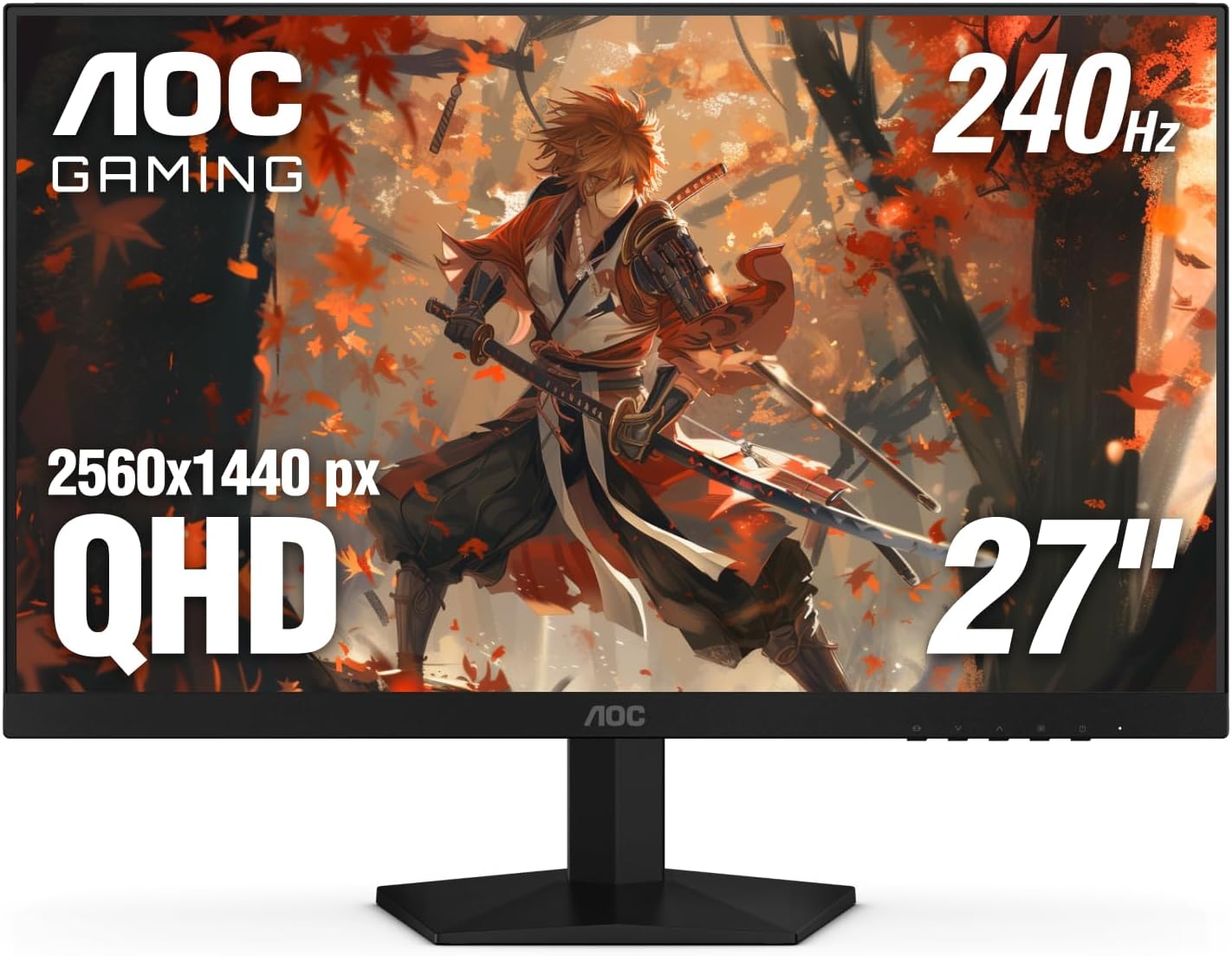
The AOC Q27G41ZE serves as a 27-inch QHD IPS gaming monitor aimed at players who prioritize speed and clarity in fast-paced titles. It fits competitive esports enthusiasts and those exploring detailed game worlds who need reliable performance without excessive cost.
Key strengths include the 240Hz refresh rate paired with Adaptive-Sync, which minimizes screen tearing and supports both AMD and NVIDIA graphics cards. The 0.3ms response time helps maintain clarity during rapid movements, while Game Mode presets and Shadow Control allow quick tweaks to match different scenarios.
Build quality features a three-sided frameless design in black and red tones that suits modern gaming desks. The panel offers solid brightness and contrast for most environments, and VESA compatibility adds setup options, though the stand provides only basic tilt.
Potential limitations include restricted height and swivel adjustments along with basic HDR capabilities that do not match dedicated HDR monitors. Audio requires external speakers since none are built in.
Overall this monitor delivers strong value for gamers focused on refresh rate and resolution, making it a practical choice for setups emphasizing responsiveness over advanced ergonomics.

Pros
- Ultra-fast 0.03ms response time eliminates motion blur effectively.
- High color accuracy with 99% DCI-P3 supports both gaming and editing tasks.
- Advanced cooling and software protections help maintain long-term panel quality.
- Multiple ports enable broad compatibility with modern PCs and consoles.
Cons
- OLED technology carries ongoing burn-in risk if static images are displayed for very long periods despite protections.
- 26.5-inch size limits screen real estate compared to larger monitors preferred by some users.
- Full 360Hz performance requires high-end graphics hardware to utilize effectively.
The ASUS ROG Strix XG27ACDNG is a 26.5-inch QHD QD-OLED gaming monitor targeted at competitive gamers and enthusiasts who require rapid refresh rates along with strong contrast performance.
Its key strengths lie in the 360Hz refresh rate and 0.03ms response time that produce fluid, low-latency gameplay suitable for high-speed titles, while the QD-OLED panel supplies deep blacks and wide color coverage for engaging visuals in both games and media.
Build quality emphasizes thermal management through a custom heatsink and top vents that work with OLED Care+ functions to lower operating temperatures and mitigate burn-in concerns over time.
Potential users should note that careful content variation remains advisable with any OLED display, and the compact size may not match preferences for expansive screens. Overall this monitor delivers strong results for those prioritizing speed and color fidelity in a focused gaming setup.
How to Choose the Best 1440p gaming monitor
Resolution and Panel Size
QHD resolution on a 27-inch panel strikes an excellent balance between sharpness and pixel density. According to manufacturer specifications, this size avoids the scaling issues sometimes seen on smaller screens while keeping text and UI elements crisp for both gaming and productivity.
For most users a 27-inch display provides immersive gameplay without requiring excessive desk space. Larger 32-inch options exist but may push pixel density lower unless viewed from farther away, making 27-inch models the practical choice for typical setups.
Refresh Rate and Response Time
High refresh rates reduce motion blur and input lag during fast-paced scenes. Models offering 180Hz or 240Hz deliver noticeably smoother gameplay compared with 144Hz panels, especially when paired with GPUs that can sustain those frame rates.
Response times of 1ms or lower help eliminate ghosting. Based on available product data, IPS panels in this range maintain clarity during rapid camera movements common in shooters and racing titles.
Panel Technology Options
IPS panels provide wide viewing angles and strong color reproduction suitable for both gaming and creative work. QD-OLED alternatives offer deeper blacks and faster pixel response but carry higher price tags and require careful burn-in management.
When comparing competing models, Fast IPS variants from brands like Alienware and ASUS combine speed with color coverage above 95 percent DCI-P3, making them versatile for mixed use.
HDR Performance and Color Accuracy
VESA DisplayHDR 400 certification ensures brighter highlights without washing out details. Look for panels claiming 95 percent or higher DCI-P3 coverage if color-critical tasks form part of your workflow.
Pantone validated screens, such as certain Samsung Odyssey models, reproduce lifelike skin tones and over 2100 colors, benefiting creators who edit photos or video alongside gaming sessions.
Adaptive Sync and Connectivity
AMD FreeSync Premium and NVIDIA G-SYNC Compatible support eliminate screen tearing across a wide frame-rate range. HDMI 2.1 and DisplayPort 1.4 ports future-proof connections to next-generation consoles and high-end GPUs.
Ergonomic stands with height, tilt, and pivot adjustments reduce neck strain during long sessions. VESA mount compatibility allows users to pair monitors with arms for cleaner desk layouts.
Value Considerations Across Price Ranges
Options between $132.99 – $749.99 cover entry-level 180Hz IPS models up to premium 360Hz QD-OLED units. For most users, mid-range panels with strong reviews deliver the best balance of performance and longevity.
Compare warranty coverage and included accessories such as cables or software bundles when evaluating total ownership cost.
Technical Comparison Table
| Model | Key Specification | Best For | Main Strength | Value Rating |
|---|---|---|---|---|
| Alienware AW2725DM | 27″ QHD 180Hz IPS | Balanced gaming | 95% DCI-P3 and G-SYNC | High |
| ASUS TUF VG27AQ3A | 27″ QHD 180Hz IPS | Competitive play | ELMB Sync support | High |
| Samsung Odyssey OLED G6 | 27″ QHD 240Hz QD-OLED | Premium visuals | 0.03ms response | Medium |
| KOORUI G2722P | 27″ QHD 200Hz IPS | Budget builds | Adjustable stand | High |
| LG 27GR83Q-B | 27″ QHD 240Hz IPS | Esports focus | HDMI 2.1 ports | Medium |
Why You Should Trust PCGearWiki
Our team focuses on objective product comparison through specification research, compatibility checks, and feature evaluation. We assess value by cross-referencing manufacturer data with user feedback patterns across multiple retailers.
Recommendations remain transparent about affiliate relationships, allowing readers to make informed decisions based on their specific hardware and budget constraints. This approach ensures advice stays practical rather than promotional.
Final Thoughts
The Alienware AW2725DM stands out as Best Overall thanks to its 4.8 rating, strong color coverage, and console-friendly features that suit a wide range of gamers. Its 180Hz IPS panel and hardware low-blue-light solution make it reliable for extended sessions.
For Best Value, the KOORUI G2722P offers 200Hz performance and an ergonomic stand at an accessible price point, ideal for builders upgrading from 1080p displays. The ASUS TUF VG27AQ3A also earns consideration for its ELMB Sync technology and extensive review volume.
Premium buyers seeking maximum speed should examine the ASUS ROG Strix XG27ACDNG with its 360Hz QD-OLED panel. Explore additional options in our 15 Best 1440p gaming monitor for 2026 roundup.
Frequently Asked Questions
What is the best 1440p gaming monitor in 2026?
The Alienware AW2725DM currently leads with top user ratings and balanced specs including 180Hz refresh and excellent color accuracy. Choice ultimately depends on whether you prioritize speed, HDR, or budget constraints.
How much should I spend on a best 1440p gaming monitor?
Expect to invest between $132.99 – $749.99 for capable options. Mid-range models around $160-$250 typically deliver the strongest performance-to-price ratio for most gamers.
Is it worth upgrading your best 1440p gaming monitor in 2026?
Upgrading makes sense if your current display lacks adaptive sync or runs below 144Hz. Newer panels with faster response and higher refresh rates noticeably improve competitive play and visual clarity.
Which brands make reliable best 1440p gaming monitor options?
KOORUI, Alienware, ASUS, Samsung, and LG consistently appear in high-rated selections. Check warranty terms and return policies when purchasing from lesser-known sellers.
How long does a best 1440p gaming monitor typically last?
With proper care, quality panels remain functional for five to seven years. Features like OLED burn-in mitigation and sturdy stands extend usable lifespan in demanding environments. Pair your new display with a gaming mouse guide for a complete setup.
How We Evaluated
PCGearWiki evaluates review and buying-guide recommendations by comparing product specifications, compatibility, real-world use cases, pricing, warranty coverage, and customer feedback patterns. Our goal is to explain not only which products look strong on paper, but which ones make sense for actual PC builds and daily use.
- Panel type, resolution, refresh rate, response time, input lag, VRR support, HDR capability, and color performance.
- Gaming fit by GPU class, desk ergonomics, connectivity, stand quality, warranty, and long-term value.
- Customer feedback patterns around motion clarity, brightness, backlight bleed, OLED care, and build quality.
You can read more about our editorial standards and scoring process in our Review Methodology.




Write Your Review
No reviews yet. Be the first to share your experience!