Menu

We independently review PC hardware. Purchases made through our links may earn us a commission. Learn more ›

Mice

Best Gaming Mouse compares gaming mice by sensor, weight, shape, grip style, wireless latency, polling rate, switches, and budget.Best Gaming MouseBest Wireless Gaming MouseBest Low Latency MouseBest High DPI MouseWhat Is DPI?What Is Polling Rate?Wired vs Wireless Gaming Mouse

13+ Reviews
Updated daily
Claw vs Palm Grip: Performance and Shape Guide

Claw vs Palm Grip: Performance and Shape Guide

Palm grip maximizes contact for stability and comfort, while claw grip arches fingers to unlock rapid vertical micro-adjustments. Choose based on hand dimensions, mouse hump geometry, and mechanical game demands.

Oct 13, 2026
800 DPI vs 1600 DPI: Gaming Performance Guide

800 DPI vs 1600 DPI: Gaming Performance Guide

1600 DPI cut initial movement latency compared to 800 DPI by registering physical motion faster. Match effective sensitivity by halving in-game values to gain responsiveness without altering muscle memory.

Oct 2, 2026
800 vs 1600 DPI for Valorant: Best Setting Guide

800 vs 1600 DPI for Valorant: Best Setting Guide

1600 DPI cuts initial motion latency and improves micro-adjustment smoothness in Valorant compared to 800 DPI. Pair 1600 DPI with halved in-game sensitivity to preserve muscle memory while maximizing sensor responsiveness.

Oct 2, 2026
1000Hz vs 4000Hz Mouse Polling Rate Guide

1000Hz vs 4000Hz Mouse Polling Rate Guide

4000Hz mouse polling cuts report latency from 1.0ms to 0.25ms, delivering smoother cursor updates on 240Hz+ displays. Hardware demands rise sharply, consuming more CPU cycles and battery life compared to stable 1000Hz setups.

Oct 2, 2026
800 vs 1600 DPI for CS2: Technical Breakdown

800 vs 1600 DPI for CS2: Technical Breakdown

1600 DPI reduces input latency and eliminates micro-motion delay compared to 800 DPI in Counter-Strike 2. Matching your in-game sensitivity to maintain identical eDPI delivers smoother micro-adjustments without altering muscle memory.

Oct 2, 2026
500Hz vs 1000Hz Polling Rate on Low-End PC

500Hz vs 1000Hz Polling Rate on Low-End PC

500Hz polling rate prevents micro-stutter on low-end CPUs by cutting hardware interrupt calls in half. 1000Hz offers negligible 1ms latency gains but causes severe frame drops when system resources max out.

Oct 2, 2026
1000Hz vs 8000Hz Mouse Polling Rate Compared

1000Hz vs 8000Hz Mouse Polling Rate Compared

1000Hz polling rate updates mouse data every 1ms, while 8000Hz cuts reporting delay to 0.125ms for smoother high-refresh tracking. Upgrading to 8000Hz requires high CPU overhead, high DPI, and modern game engine support to prevent frame stutter.

Oct 2, 2026
2.4GHz vs Bluetooth Gaming Mouse

2.4GHz vs Bluetooth Gaming Mouse

Compare 2.4GHz and Bluetooth wireless mice across latency, battery life, receiver dependency, and device pairing to pick right connection mode.

Sep 30, 2026

PCGearWiki / Editorial Picks

Top Picks in This Category

The most-read buying guides in this category, plus the top-ranked products from the lead guide.

Independent editorial Published methodology Updated for 2026 Pros and cons

Top-ranked in Best Low-Latency Gaming Mice for 2026: Fast Picks

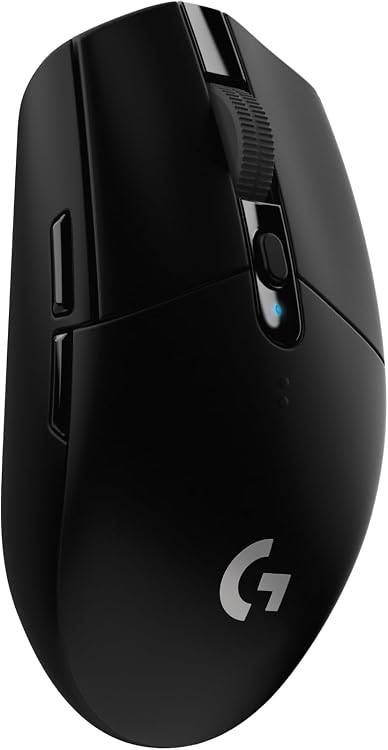
#1 in this guide Logitech G305 Lightspeed Wireless Gaming Mouse Logitech G305 Lightspeed Wireless Gaming Mouse 9.6/10 Editorial Score Check price on Amazon
#2 in this guide Razer Viper V3 HyperSpeed Wireless Gaming Mouse Razer Viper V3 HyperSpeed Wireless Gaming Mouse 9.8/10 Editorial Score Check price on Amazon
#3 in this guide Corsair Harpoon Wireless RGB Gaming Mouse Corsair Harpoon Wireless RGB Gaming Mouse 9.9/10 Editorial Score Check price on Amazon
#4 in this guide Razer Orochi V2 Wireless Gaming Mouse Razer Orochi V2 Wireless Gaming Mouse 9.5/10 Editorial Score Check price on Amazon
Read the full guide and buying criteria