

Last updated: September 22, 2026
Choosing the best QD-OLED monitor requires balancing pixel density, motion clarity, and GPU driving cost. High-end 4K 240Hz panels deliver peak sharpness and color purity but demand heavy graphics power, while 1440p displays maximize refresh rates on mainstream graphics cards. Your choice depends on whether your workload favors competitive frame rates or ultra-dense visual fidelity.

Quantum Dot OLED panels eliminate traditional backlights by combining self-emissive organic pixels with a quantum dot layer. This design yields true black levels, infinite contrast, and broad color volume without blooming artifacts. Buyers moving from standard IPS displays will notice instantaneous 0.03ms pixel response times, though sub-pixel arrangements require consideration if static desktop work dominates your use case. Check our analysis of OLED monitor text clarity to understand the desktop trade-offs.
For this September 2026 guide, we analyzed specifications and manufacturer records across 7 eligible models from brands including AOC, Alienware, ASUS, MSI, and Samsung. We evaluated panel generations, cooling implementations, interface bandwidth, and burn-in prevention systems to help identify the best QD-OLED monitor for your rig.

Pros
- Exceptional contrast and 99% DCI-P3 color for standout HDR gaming
- Reliable burn-in reduction through multiple cooling and software protections
- Versatile connectivity and ergonomic flexibility for varied setups
- G-SYNC compatible with FreeSync Premium Pro for tear-free play
Cons
- OLED panel requires regular use of care features to minimize burn-in risk
- Peak brightness can vary after factory calibration
- Large size may not fit smaller desk setups comfortably
| Aspect Ratio | 16:9 |
|---|---|
| Screen Finish | Matte |
| Contrast Ratio | 1500000:1 |
| Refresh Rate | 240 Hz |
| Display Type | OLED |
| Display Technology | QD-OLED |
| Viewing Angle | 178 Degrees |
| Brightness | 1000 Candela per Square Meter |
| Pixel Pitch | 0.18 |
| Color Gamut | 100.0 |
Best suited to shoppers comparing monitors products who specifically need immerse in lifelike 4K gaming with vibrant QD-OLED colors and perfect blacks for enhanced depth, Gain competitive edge through 240Hz smooth motion and 0.03ms….
Before buying, compare the exact model’s compatibility, dimensions, core specifications, warranty, recurring owner feedback, and current price against other monitors options. Retailer availability and pricing can change after publication.

Pros
- Exceptional response time and refresh rate for competitive edge
- Strong color reproduction with Pantone validation
- Built-in safeguards against common OLED issues like burn-in
- Compatible with both NVIDIA and AMD sync technologies
Cons
- New model lacks established user feedback on longevity
- May require a high-end graphics card to maximize QHD performance at 180Hz
- OLED brightness can vary in extremely lit environments despite glare reduction
| Aspect Ratio | 16:9 |
|---|---|
| Screen Finish | Matte |
| Contrast Ratio | 1000000:1 |
| Refresh Rate | 180 Hz |
| Display Type | OLED |
| Display Technology | OLED |
| Brightness | 280 cd/㎡ Candela per Square Meter |
| Has Color Screen | Yes |
| Picture Quality Enhancement Technology | OLED Panel, Free-Sync, G-Sync Compatible |
| Screen Size | 27 Inches |
Best suited to shoppers comparing monitors products who specifically need delivers unmatched color accuracy and brightness for immersive gaming sessions with QD-OLED panel technology., Prevents burn-in effectively through thermal modulation and detection systems for….
Before buying, compare the exact model’s compatibility, dimensions, core specifications, warranty, recurring owner feedback, and current price against other monitors options. Retailer availability and pricing can change after publication.

Pros
- Exceptional color vibrancy and true black levels from the QD-OLED panel
- High 240Hz refresh rate supports competitive 4K gaming
- Versatile ports including 90W USB-C power delivery and HDMI 2.1
- Silent fanless design with effective thermal management
- Ergonomic 4-way stand and smart app-based controls
Cons
- OLED technology carries inherent burn-in risk with prolonged static images
- Text clarity can require optimization for productivity tasks
- Advanced features may demand initial calibration for best results
| Aspect Ratio | 16:9 |
|---|---|
| Screen Finish | Glossy |
| Contrast Ratio | Extremely high |
| Refresh Rate | 240 Hz |
| Display Type | OLED |
| Display Technology | OLED |
| Viewing Angle | 178 Degrees |
| Brightness | 250 nits |
| Pixel Pitch | 0.1814 |
| Color Gamut | 97 |
Best suited to shoppers comparing monitors products who specifically need experience buttery-smooth 4K gameplay without blur thanks to the 240Hz refresh rate and instant 0.03ms response time., Immerse in rich, accurate visuals with Quantum….
Before buying, compare the exact model’s compatibility, dimensions, core specifications, warranty, recurring owner feedback, and current price against other monitors options. Retailer availability and pricing can change after publication.

Pros
- Industry-leading 240Hz refresh and 0.03ms GtG response deliver exceptional motion clarity for fast-paced gaming
- QD-OLED panel produces infinite contrast, deep blacks, and highly accurate 10-bit color with Delta E ≤2
- Built-in Adaptive-Sync supports both AMD FreeSync Premium and NVIDIA G-SYNC Compatible for smooth tear-free play
- OLED Care 2.0 suite plus advanced graphene heatsink enhance panel longevity and durability
- Ergonomic stand with full tilt height swivel pivot adjustments and versatile high-bandwidth connectivity
Cons
- OLED technology still carries a risk of temporary image retention or burn-in with prolonged static content despite protective software
- Peak brightness limited to 400 nits may reduce HDR impact or outdoor-room visibility compared to brighter LCD alternatives
- 26.5-inch screen size prioritizes focus over expansive multitasking real estate preferred by some productivity users
Panel Type: 26.5-inch Quantum Dot OLED with anti-glare coating
Resolution: 2560 x 1440 WQHD (16:9)
Refresh Rate: 240Hz
Response Time: 0.03ms GtG
Color Depth: 10-bit, 1.07 billion colors, 99% DCI-P3, Delta E ≤2
Brightness: Up to 400 nits peak
Contrast Ratio: 1,500,000:1 native
Adaptive Sync: AMD FreeSync Premium, NVIDIA G-SYNC Compatible
Ports: DisplayPort 1.4a, HDMI 2.1 with CEC
Stand: 4-way adjustable (height, tilt, swivel, pivot), VESA 100mm
Extra Features: MSI OLED Care 2.0, AI Vision, Less Blue Light Pro, Smart Crosshair, Gaming Intelligence software
| Aspect Ratio | 16:9 |
|---|---|
| Screen Finish | Glossy |
| Contrast Ratio | 1,500,000:1 |
| Refresh Rate | 240 Hz |
| Display Type | OLED |
| Display Technology | Quantum Dot OLED |
| Viewing Angle | 178 Degrees |
| Brightness | 1370.4 |
| Color Gamut | 98 |
| Has Color Screen | Yes |
Best suited to shoppers comparing monitors products who specifically need immerse yourself in perfect blacks and vibrant 1.07 billion colors with Quantum Dot OLED self-lit pixels covering 99% DCI-P3, Dominate competitive matches with 240Hz….
Before buying, compare the exact model’s compatibility, dimensions, core specifications, warranty, recurring owner feedback, and current price against other monitors options. Retailer availability and pricing can change after publication.

Pros
- Outstanding DCI-P3 color coverage with precise accuracy
- Ultra-responsive motion handling for competitive advantage
- Curved ultrawide design boosts field of view immersion
- Multiple adaptive sync technologies ensure smooth gameplay
Cons
- Burn-in remains a consideration for static content use despite protections
- Demands high-end GPU to maximize full refresh rate potential
- Large footprint requires substantial desk space
| Aspect Ratio | 21:9 |
|---|---|
| Screen Finish | Matte |
| Contrast Ratio | 1,500,000:1 |
| Refresh Rate | 240 Hz |
| Display Type | OLED |
| Display Technology | oled |
| Viewing Angle | 178 Degrees |
| Brightness | 250 |
| Pixel Pitch | 110.0 |
| Color Gamut | 99.30 |
Best suited to shoppers comparing monitors products who specifically need immerse yourself in expansive ultrawide gameplay with rich QD-OLED color vibrancy, Enjoy tear-free performance through adaptive sync and lightning-fast 240Hz refresh.
Before buying, compare the exact model’s compatibility, dimensions, core specifications, warranty, recurring owner feedback, and current price against other monitors options. Retailer availability and pricing can change after publication.
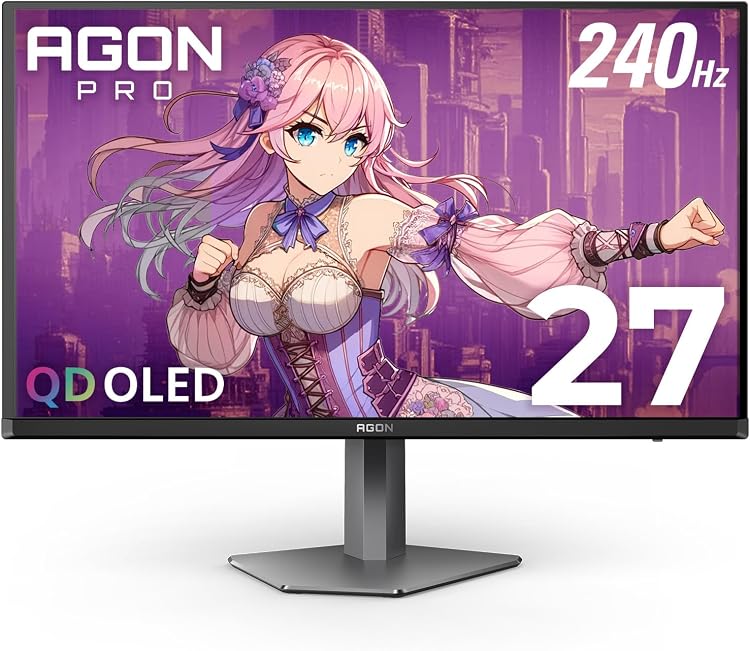
Pros
- Blazing 240Hz and near-instant 0.03ms response ideal for esports and fast shooters
- Outstanding OLED contrast with genuine blacks and wide color gamut
- Solid connectivity including DisplayPort, HDMI, and USB plus Adaptive Sync support
- Ergonomic height-adjustable stand and customizable rear lighting
- Console-friendly performance with high frame rates and low latency
Cons
- OLED panels can risk burn-in if static HUDs or UI elements stay on screen for very long periods
- Built-in speakers are convenient but basic and not a substitute for dedicated audio
- HDR400 peak brightness is solid for dark rooms but less impactful in very bright environments
Panel: 26.5-27 inch QD-OLED, self-emissive
Resolution: QHD 2560x1440
Refresh Rate: 240Hz
Response Time: 0.03ms GtG
HDR: HDR400 True Black
Color: over 1.07 billion colors, 101 percent DCI-P3, 136.7 percent sRGB
Sync: Adaptive Sync and G-Sync compatible
Connectivity: DisplayPort, HDMI, USB, built-in speakers
Ergonomics: height adjustable stand with rear multi-color lighting
Model: AG276QZD2
| Brand | AOC |
|---|---|
| Screen Size | 27 Inches |
| Resolution | QHD Ultra Wide 1440p |
| Aspect Ratio | 1.78:1 |
| Screen Surface Description | Glossy |
Best suited to shoppers comparing monitors products who specifically need 240Hz refresh rate and 0.03ms GtG response deliver ultra-fluid motion so competitive players can react faster with zero blur, QD-OLED self-emissive panel produces perfect….
Before buying, compare the exact model’s compatibility, dimensions, core specifications, warranty, recurring owner feedback, and current price against other monitors options. Retailer availability and pricing can change after publication.

Pros
- Very fast 240Hz refresh rate for fluid competitive gaming
- Extremely low 0.03ms GtG response time helps minimize motion blur
- QD OLED panel delivers deep blacks, high contrast, and vibrant colors
- QHD resolution offers a sharp image while remaining less demanding than 4K
- Adaptive-Sync and G-SYNC compatibility support smoother gameplay
Cons
- QD OLED displays can require extra care with prolonged static images because of potential image retention or burn-in concerns
- HDR performance is certified to HDR400 True Black, so it may not match the brightness of premium high-end HDR monitors
- The 240Hz refresh rate is most useful with a powerful gaming PC capable of producing high frame rates
| Color | Black |
|---|---|
| Size | 27" 240Hz AOC Gaming |
| Dimensions | 7.5 x 23.99 x 17.89 inches |
| Weight | 17.70091501598 pounds |
| Product Group | Personal Computer |
| Binding | Personal Computers |
Best suited to shoppers comparing monitors products who specifically need see sharper game detail with QHD 2560 x 1440 resolution on a spacious 27-inch display., Track fast-moving opponents more clearly with a 240Hz refresh….
Before buying, compare the exact model’s compatibility, dimensions, core specifications, warranty, recurring owner feedback, and current price against other monitors options. Retailer availability and pricing can change after publication.
How to Choose the Best QD-OLED Monitor
Resolution and GPU Overhead
Resolution dictates visual sharpness and system load. A 3840 x 2160 (4K) QD-OLED panel packs exceptional pixel density into a 31.5-inch or 32-inch diagonal, eliminating color-fringing concerns along high-contrast text edges. However, rendering contemporary games at 4K and native high refresh rates requires top-tier graphics hardware with adequate VRAM. Users building setups primarily for visual immersion or creative work gain the most benefit here.
Conversely, 2560 x 1440 (QHD) remains the standard target for competitive gaming. A 27-inch 1440p panel lets modern GPUs push sustained frame rates toward 240Hz without requiring aggressive upscaling. The pixel density is lower than 4K, but processing overhead drops significantly. Ultrawide alternatives, such as 3440 x 1440 (UWQHD) across a 34-inch footprint, deliver a 21:9 aspect ratio that fills peripheral vision while remaining easier to drive than native 4K.
Refresh Rates and Motion Clarity
OLED technology changes how refresh rates translate to perceived motion. Because QD-OLED pixels transition almost instantly—rated by manufacturers at 0.03ms Grey-to-Grey (GtG)—transitions avoid the ghosting and inverse overshoot common to overdrive-tuned LCDs. A 240Hz QD-OLED panel yields superior dynamic clarity compared to an equivalent 240Hz IPS panel because sample-and-hold blur is the primary limiting factor rather than slow liquid crystal response.
Entry-tier QD-OLED models frequently operate at 180Hz, which remains exceptionally fluid for fast-paced shooters while reducing cost. Monitors sporting VESA ClearMR certifications, such as ClearMR 13000, verify low blur through standardized optical testing. Synchronizing these refresh rates via NVIDIA G-SYNC Compatible or AMD FreeSync Premium pipelines prevents tearing without introducing input latency spikes.
HDR Performance and Luminance Behavior
True HDR capability distinguishes QD-OLED from traditional displays. Because every pixel dims independently, these screens deliver genuine zero-nit blacks alongside bright specular highlights, earning VESA DisplayHDR True Black 400 compliance. Small highlights can spike to 1000 nits on select panels, creating pronounced dynamic range in dark scenes.
Sustained full-screen brightness behaves differently. To protect self-emissive organic material from thermal breakdown and excessive power consumption, monitors use Automatic Brightness Limiting (ABL). In full-screen white scenes, peak brightness drops. Certain enthusiast displays offer uniform brightness toggles in their firmware menus to stabilize luminance during productivity, avoiding distracting dimming cycles while browsing or working across light spreadsheets.
Thermal Dissipation and Burn-In Mitigation
Thermal management directly affects panel longevity. Heat accelerates organic sub-pixel degradation, increasing the probability of image retention. High-end implementations employ custom passive heatsinks lined with graphene film to conduct heat away from the panel substrate without the noise and mechanical failure risks of internal fans.
Automated software suites—such as MSI OLED Care 2.0 or ASUS OLED Care—run preventative maintenance routines. Features like pixel shifting, static logo detection, border dimming, and automated pixel cleaning cycles preserve uniform wear across the matrix. Manufacturers backing their hardware with multi-year burn-in warranties offer better long-term reliability for users who display persistent UI elements.
Color Gamut and Factory Accuracy
The quantum dot layer in QD-OLED emits narrow spectral peaks for red, green, and blue. This creates a broader color gamut than standard white-OLED (WOLED) panels, frequently covering over 99% of DCI-P3 and surpassing 130% of sRGB. High color volume ensures vibrant saturation even at elevated brightness levels.
For hybrid users handling content creation, factory calibration matters. Models shipping with verified Delta E < 2 profiles provide accurate out-of-the-box color reproduction without mandatory hardware recalibration. If color-critical workloads take priority, check our dedicated roundup of the best OLED monitor for photo editing.
Connectivity, KVM Switches, and Bandwidth
High-resolution, high-refresh panels demand substantial display bandwidth. Native 4K at 240Hz requires DisplayPort 1.4 with Display Stream Compression (DSC) or HDMI 2.1 fixed-rate link interfaces. Console players using modern systems need full-spec HDMI 2.1 ports to leverage 4K 120Hz output with Variable Refresh Rate (VRR) and low latency.
For workstation setups, integrated USB Type-C connections streamline cable routing by carrying DisplayPort Alt Mode video and USB upstream data alongside USB Power Delivery (PD). Power delivery ratings reaching 90W allow single-cable docking for modern laptops. Integrated KVM switches let users share a single keyboard and mouse across multiple machines seamlessly. Compare interface differences further in our guide on USB-C vs Thunderbolt monitor features.
Technical Comparison
| Model | Panel Size & Resolution | Refresh Rate | Key Feature | Best For |
|---|---|---|---|---|
| ASUS ROG Swift (PG32UCDM) | 32″ 4K UHD (3840 x 2160) | 240Hz | Graphene heatsink, 90W USB-C, 3-Yr Warranty | Enthusiast gaming & production |
| MSI MPG 321URX QD-OLED | 31.5″ 4K UHD (3840 x 2160) | 240Hz | KVM switch, 90W Type-C, OLED Care 2.0 | Hybrid PC/Console power users |
| Alienware 34 (AW3425DW) | 34.2″ WQHD (3440 x 1440) | 240Hz | 1800R curve, 99.3% DCI-P3, FreeSync Premium Pro | Ultrawide immersive sim & gaming |
| Samsung Odyssey OLED G5 (G50SF) | 27″ QHD (2560 x 1440) | 180Hz | OLED Safeguard, Glare Free coating | Budget entry into QD-OLED |
| MSI MAG 274QP QD-OLED X24 | 26.5″ WQHD (2560 x 1440) | 240Hz | Fanless graphene cooling, ClearMR 13000 | Value 240Hz competitive play |
| AOC Agon PRO (AG276QZD2) | 26.5″ QHD (2560 x 1440) | 240Hz | Rear lighting, built-in audio, 101% DCI-P3 | Esports setups needing integrated I/O |
| AOC Q27GAZD | 27″ QHD (2560 x 1440) | 240Hz | HDR400 True Black, 110.2% DCI-P3 gamut | Pure high-refresh competitive gaming |

Why You Should Trust PCGearWiki
PCGearWiki produces data-driven hardware guides focused on objective technical analysis. We dissect manufacturer documentation, examine board schematics and panel data, and analyze real-world operating parameters rather than repeating marketing claims. Every recommendation is filtered through strict component compatibility criteria and interface bandwidth standards.
We do not accept paid product placements or vendor-scripted reviews. Display evaluations focus on panel generation, sub-pixel structures, thermal mitigation hardware, and driver support. Our research methodology is documented openly on our site, and we detail our evaluation criteria across our buying guides index to ensure transparency.
Final Thoughts
Selecting the right QD-OLED display boils down to your performance targets, physical desk space, and system hardware limitations. Because these panels share uniform 0.03ms pixel response times, picking between them centers on resolution, refresh ceilings, and peripheral connectivity.
- Best Overall: msi MPG 321URX QD-OLED, 32″ 4K UHD Quantum Dot. Offers an exceptional balance of native 4K 240Hz speed, high color accuracy (ΔE ≤2), integrated KVM switching, and 90W USB-C connectivity at a competitive price tier. Skip it if you lack a high-end GPU capable of handling native 4K rendering.
- Best Premium / Enthusiast Pick: ASUS ROG Swift 32” 4K OLED Gaming Monitor. Provides custom graphene cooling, an optional uniform brightness mode for productivity work, and an explicit 3-year warranty including burn-in coverage. Skip it if you are shopping on a strict budget.
- Best Value 240Hz: msi MAG 274QP QD-OLED X24 27-Inch WQHD. Delivers true 240Hz refresh rates and ClearMR 13000 motion clarity at 1440p without the premium price tag of 4K panels. Skip it if text sharpness for fine desktop productivity is your highest priority.
- Best Budget Entry: Samsung 27” Odyssey OLED G5 (G50SF). Lowers the cost barrier to quantum-dot contrast with a responsive 180Hz refresh rate and effective anti-reflective coating. Skip it if you demand native 240Hz esports performance or multi-host USB-C docking.
- Best Ultrawide: Alienware 34 240Hz QD-OLED Curved Gaming Monitor. Ideal for driving flight or racing simulators, combining a 3440 x 1440 resolution, 1800R curve, and 240Hz fluid motion. Explore more curved options in our roundup of the best OLED ultrawide monitor models.
Frequently Asked Questions
Are QD-OLED monitors prone to burn-in during regular desktop work?
Static elements like taskbars and application borders can cause uneven sub-pixel degradation over extended periods. Modern monitors mitigate this through graphene heatsinks, automated pixel shifting, and background refresh cycles. For mixed workloads, refer to our guide on using an OLED monitor for productivity safely.
How does QD-OLED differ from standard WOLED panels?
WOLED monitors use a white sub-pixel alongside color filters to boost luminance, which can dilute saturation at high brightness. QD-OLED uses blue self-emissive organic material passed through a layer of quantum dots to generate red and green light directly. This yields broader color volume and purer primary hues.
Can high ambient lighting affect QD-OLED black levels?
Yes. Because QD-OLED displays lack an internal polarizing layer to maximize light output, direct ambient light striking the quantum dot layer can cause it to excite passively. In brightly lit rooms, deep blacks can take on a slight magenta or purplish cast. Dimming room lights preserves deep perceived contrast.
Do I need DisplayPort 2.1 to run a 4K 240Hz QD-OLED?
No. Most 4K 240Hz QD-OLED displays leverage DisplayPort 1.4a with Display Stream Compression (DSC) or full-bandwidth HDMI 2.1 ports. DSC provides visually lossless signal compression, enabling high refresh rates and full color depth over existing standard GPU outputs.
Why are response times on QD-OLED monitors rated at 0.03ms?
OLED pixels do not rely on physical liquid crystals that take milliseconds to twist and rotate. The electrical signal switches the organic emitting material almost instantly, allowing transitions between colors in roughly 0.03 milliseconds without visual ghosting or reliance on aggressive overdrive voltage.
Sources and Verification
Research basis: Product identity, dimensions, interfaces, supported features, and warranty terms are checked against available manufacturer documentation and current retailer listings. Price, stock, and aggregate customer ratings can change after publication.
Primary references for this guide: VESA DisplayHDR testing and certification.
Testing disclosure: Unless this article explicitly states that PCGearWiki performed hands-on testing and describes the test setup, recommendations are research-based editorial evaluations rather than PCGearWiki laboratory measurements. Customer feedback is used to identify recurring ownership patterns, not as proof of technical performance.
Last source review: September 22, 2026. See our Review Methodology, Editorial Policy, and Corrections Policy.


Write Your Review
No reviews yet. Be the first to share your experience!