

Last updated: August 5, 2026
Quick answer: The best tenkeyless keyboard preserves the function row, navigation cluster, and arrow keys while removing the number pad to create more mouse space. Choose by switch behavior, measured input latency, keycap quality, layout compatibility, software, and connectivity rather than assuming every TKL board has the same dimensions or feature set.
Why choose a TKL keyboard
TKL layouts suit users who rarely enter long columns of numbers but still want dedicated arrows, navigation keys, and a function row. They can improve mouse positioning compared with a full-size board without the remapping required by many 60% layouts. Check the exact width, front height, case angle, bottom-row standard, and replacement-keycap support because compact cases and nonstandard layouts vary.
For gaming, compare measured latency, polling implementation, switch consistency, stabilizers, rollover, profile storage, and software reliability. For shared work and gaming setups, assess Bluetooth, low-latency receiver support, wired fallback, battery behavior, and device switching. Hot-swap sockets make switch changes easier, but socket compatibility and plate design still determine which switches fit.
| Decision area | What to compare | Important limitation |
|---|---|---|
| Layout and dimensions | Function row, navigation cluster, arrows, case width, and keycap standard | Some compact boards are called TKL despite unusual layouts |
| Switch and input | Switch type, latency, rollover, stabilizers, and hot-swap support | Polling claims need consistent implementation |
| Connectivity and software | Wired, receiver, Bluetooth, profiles, remapping, and updates | Check platform support and onboard storage |
How PCGearWiki evaluated these options
We compare TKL keyboards by layout accuracy, switch options, latency evidence, keycaps, stabilizers, construction, hot-swap support, software, connectivity, profile storage, warranty, and current value.
Continue your research: gaming keyboard hub, mechanical keyboard picks, and 60% keyboard alternatives.
See the complete PCGearWiki Review Methodology for our evidence standards and scoring process.

Pros
- Durable aluminum construction provides minimal flex and solid build quality
- Tactile mechanical switches deliver responsive performance for gaming
- PBT keycaps offer superior heat and wear resistance over standard materials
- Compact TKL layout frees desk space while retaining essential keys
- Anti-ghosting ensures reliable multi-key input in demanding scenarios
Cons
- Wired USB connection limits mobility compared to wireless alternatives
- White LED lighting offers no RGB color customization options
- Tenkeyless design omits the numeric keypad for users needing it
| Compatible Devices | Gaming Console |
|---|---|
| Connectivity Technology | wired |
| Additional Features | Anti-ghosting, Compact Keyboard, Heat Resistant, Hotkeys and Media Keys, Multi-key Rollover, Wear Resistant |
| Keyboard Backlighting Color Support | Single Color |
| Power Source | Corded Electric |
| Switch Type | Tactile |
| Keyboard Layout | QWERTY |
| Hand Orientation | Ambidextrous |
| Button Quantity | 104 |
| Compatible Operating System Family | MacOS, Windows |
Best suited to shoppers comparing gaming keyboards products who specifically need gain precise tactile feedback from mechanical switches to enhance accuracy in fast-paced games, Benefit from long-lasting PBT keycaps that resist heat and wear for….
Before buying, compare the exact model’s compatibility, dimensions, core specifications, warranty, recurring owner feedback, and current price against other gaming keyboards options. Retailer availability and pricing can change after publication.

Corsair K55 CORE TKL RGB Tenkeyless Gaming Keyboard with 8-Zone Lighting and Spill Resistance
Pros
- Compact TKL form factor frees up mouse movement area
- Effective spill resistance protects against common accidents
- Convenient built-in media and brightness controls
- High polling rate supports smooth gaming input
- Software support enables lighting customization
Cons
- Membrane switches deliver softer feedback than mechanical keyboards
- RGB lighting uses only 8 zones rather than per-key illumination
- NA layout restricts options for international users
| Compatible Devices | PC |
|---|---|
| Connectivity Technology | USB-A |
| Additional Features | Backlit, Hotkeys and Media Keys, Spill Proof, quiet |
| Keyboard Backlighting Color Support | RGB |
| Language | English, English, English, English, English |
| Power Source | USB Powered |
| Switch Type | Membrane |
| Keyboard Layout | QWERTY |
| Hand Orientation | Ambidextrous |
| Button Quantity | 87 |
Best suited to shoppers comparing keyboards products who specifically need maximize desk space and mouse accuracy with the compact tenkeyless layout for competitive gameplay, Personalize your setup using vibrant 8-zone RGB lighting that syncs….
Before buying, compare the exact model’s compatibility, dimensions, core specifications, warranty, recurring owner feedback, and current price against other keyboards options. Retailer availability and pricing can change after publication.
Pros
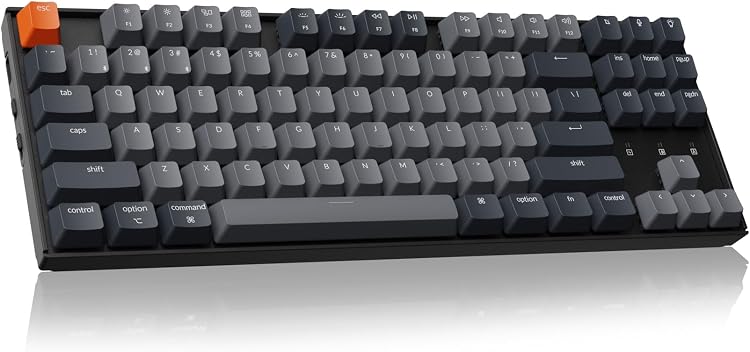
- Versatile Bluetooth and wired connectivity supports multiple devices and operating systems.
- Durable switches rated for 50 million keystrokes ensure long-term reliability.
- Compact layout and ergonomic design optimize space and comfort.
- Long battery life and included Mac/Windows keycaps enhance everyday usability.
- N-key rollover in wired mode supports accurate input during demanding use.
Cons
- Not hot-swappable, restricting switch customization options.
- Bluetooth connections can experience occasional latency or require resets.
- Limited to white backlight without RGB options for users seeking more lighting variety.
| Compatible Devices | Laptop: Macbook Pro, Macbook Air, Macbook, Mac Mini, Chromebook, Lenovo, Asus, Dell, Xiaomi, Huawei Matebook etc.. PC with Bluetooth antenna. Tablet: iPad, iPad Air, iPad Pro etc. Gaming console. Smartphone and more. See more |
|---|---|
| Connectivity Technology | Bluetooth, USB-C |
| Additional Features | Connects with up to 3 devices via Bluetooth, adjustable feet, rechargeable battery, white backlit, ergonomic |
| Keyboard Backlighting Color Support | Single Color |
| Language | English |
| Number of Batteries Required | 1 |
| Power Source | Battery-powered, corded electric |
| Switch Type | Tactile |
| Keyboard Layout | QWERTY |
| Hand Orientation | Ambidextrous |
Best suited to shoppers comparing gaming keyboards products who specifically need connect seamlessly to up to three devices via Bluetooth for effortless multitasking across Mac and Windows., Tactile brown switches deliver responsive feedback that reduces….
Before buying, compare the exact model’s compatibility, dimensions, core specifications, warranty, recurring owner feedback, and current price against other gaming keyboards options. Retailer availability and pricing can change after publication.

SteelSeries Apex 3 TKL RGB Tenkeyless Gaming Keyboard with IP32 Resistance and Quiet Switches
Pros
- Tenkeyless form factor maximizes desk space for competitive play.
- Switches deliver quiet operation paired with high durability.
- IP32 resistance adds practical protection in real gaming environments.
- Multi-platform compatibility supports console and PC users alike.
Cons
- Missing numeric keypad limits suitability for productivity work.
- Product listing contains unrelated mouse description text.
- Zero customer reviews available to verify long-term performance.
| Compatible Devices | Gaming Console |
|---|---|
| Connectivity Technology | wired |
| Additional Features | Backlit, Lightweight, Volume Roller |
| Keyboard Backlighting Color Support | RGB |
| Language | English |
| Power Source | Wired |
| Switch Type | Whisper Quiet |
| Keyboard Layout | QWERTY |
| Hand Orientation | Ambidextrous |
| Button Quantity | 87 |
Best suited to shoppers comparing keyboards products who specifically need gain desk space and mouse precision with the compact tenkeyless layout favored by esports professionals., Type silently during long sessions thanks to low-friction switches….
Before buying, compare the exact model’s compatibility, dimensions, core specifications, warranty, recurring owner feedback, and current price against other keyboards options. Retailer availability and pricing can change after publication.

Pros
- Solid aluminum construction ensures long-term durability and stability
- Bright customizable per-key RGB lighting enhances immersion
- Long-lasting switches support extended gaming sessions
- Onboard memory stores custom profiles for use without software
Cons
- Wired connection only with no wireless option available
- Media controls limited to secondary key functions
- Advanced customization requires initial software setup on PC
| Compatible Devices | Gaming Console |
|---|---|
| Connectivity Technology | USB |
| Additional Features | Backlit, Portable |
| Keyboard Backlighting Color Support | RGB |
| Power Source | USB Powered |
| Switch Type | Linear |
| Keyboard Layout | QWERTY |
| Hand Orientation | Ambidextrous |
| Button Quantity | 87 |
| Minimum Required Operating System Version | Windows 10 |
Best suited to shoppers comparing gaming keyboards products who specifically need maximize desk space for mouse movement with the compact tenkeyless design, Achieve fast accurate keystrokes with responsive HyperX Red switches built for durability.
Before buying, compare the exact model’s compatibility, dimensions, core specifications, warranty, recurring owner feedback, and current price against other gaming keyboards options. Retailer availability and pricing can change after publication.

Pros
- Ultra-slim design improves portability without performance loss
- Tri-mode connectivity provides flexible wired or wireless options
- Factory-lubed tactile switches deliver smooth feedback and speed
- Extensive RGB customization and key remapping enhance control
- Solid build with PBT keycaps supports intense daily use
Cons
- Tenkeyless layout lacks a numpad for productivity tasks
- RGB lighting reduces overall battery runtime in practice
- Initial G HUB setup is needed to unlock full customization
| Compatible Devices | Laptop, PC |
|---|---|
| Connectivity Technology | RF, USB-A |
| Additional Features | Lightweight, Portable, Rechargeable |
| Keyboard Backlighting Color Support | RGB |
| Number of Batteries Required | 1 |
| Power Source | Battery Powered |
| Switch Type | Tactile |
| Keyboard Layout | QWERTY |
| Hand Orientation | Ambidextrous |
| Button Quantity | 104 |
Best suited to shoppers comparing gaming keyboards products who specifically need gain faster reaction times through 1.3 mm actuation distance in low-profile switches, Switch effortlessly between LIGHTSPEED wireless, Bluetooth, and wired modes for any setup.
Before buying, compare the exact model’s compatibility, dimensions, core specifications, warranty, recurring owner feedback, and current price against other gaming keyboards options. Retailer availability and pricing can change after publication.
Pros
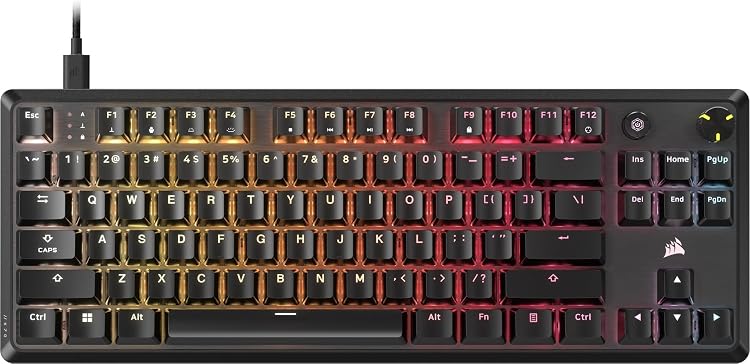
- Space-saving design ideal for tight setups
- Smooth linear switches for comfortable extended typing and gaming
- Effective noise reduction from the dampening foam
- Easy customization through software
- Sturdy construction with quality keycaps
Cons
- Requires a wired connection limiting mobility
- ABS keycaps can develop shine with prolonged use
- Absence of a numeric keypad may inconvenience users needing number entry
| Compatible Devices | Gaming Console, Laptop, PC |
|---|---|
| Connectivity Technology | USB-A, USB-C |
| Additional Features | Backlit, Hotkeys and Media Keys, Programmable Keys, Volume Roller |
| Keyboard Backlighting Color Support | RGB |
| Language | English |
| Power Source | Wired |
| Switch Type | Linear |
| Keyboard Layout | QWERTY |
| Hand Orientation | Ambidextrous |
| Button Quantity | 87 |
Best suited to shoppers comparing gaming keyboards products who specifically need compact tenkeyless layout provides extra room for precise mouse movements during gameplay, Pre-lubed MLX Red v2 switches deliver smooth and responsive keystrokes without wobble.
Before buying, compare the exact model’s compatibility, dimensions, core specifications, warranty, recurring owner feedback, and current price against other gaming keyboards options. Retailer availability and pricing can change after publication.

Pros
- Ergonomic low-profile layout reduces hand fatigue effectively
- Hybrid switches deliver versatile feel for gaming and typing tasks
- Solid build with spill resistance and durable keycap coating
- Convenient media keys and customizable lighting enhance usability
- Compact tenkeyless form saves desk space without losing core functionality
Cons
- Advanced features like Snap Tap require separate software setup
- Tenkeyless design lacks a numeric keypad for data entry work
- Mecha-membrane feel may not match preferences of dedicated mechanical switch users
| Compatible Devices | PC |
|---|---|
| Connectivity Technology | USB-A, wired |
| Additional Features | Backlit Media Keys - 8-Zone RGB Lighting - Spill-Resistant, Low-Profile Key, Mecha-Membrane Switches, UV-Coated Keycaps, Wrist Rest |
| Keyboard Backlighting Color Support | RGB |
| Power Source | Corded Electric |
| Switch Type | Clicky |
| Keyboard Layout | QWERTY |
| Hand Orientation | Ambidextrous |
| Button Quantity | 87 |
| Water Resistance Level | Not Water Resistant |
Best suited to shoppers comparing gaming keyboards products who specifically need achieve natural hand positioning for long sessions with reduced strain from slim keycaps and shorter switches, Gain precise satisfying keystrokes through the hybrid clicky….
Before buying, compare the exact model’s compatibility, dimensions, core specifications, warranty, recurring owner feedback, and current price against other gaming keyboards options. Retailer availability and pricing can change after publication.

Pros
- Ultra-responsive magnetic switches deliver precise control in high-stakes gaming
- Compact design frees space for aggressive mouse aiming without sacrificing core keys
- High polling rate and rapid trigger minimize delays for speed-focused users
- Durable construction supports extended sessions with minimal key wobble
Cons
- Full feature customization depends on installing CORSAIR iCUE software
- Tenkeyless layout omits the numpad which some productivity users may miss
- Wired connection only restricts flexibility versus wireless alternatives
| Compatible Devices | Gaming Console, Laptop, PC |
|---|---|
| Connectivity Technology | USB-A, USB-C |
| Additional Features | Backlit, Hotkeys and Media Keys, Programmable Keys, Volume Roller, Wrist Rest |
| Keyboard Backlighting Color Support | RGB |
| Language | English |
| Power Source | USB Powered |
| Switch Type | Linear |
| Keyboard Layout | QWERTY |
| Hand Orientation | Ambidextrous |
| Button Quantity | 87 |
Best suited to shoppers comparing gaming keyboards products who specifically need gain a competitive edge through instant key resets enabled by rapid trigger technology during fast-paced gameplay, Tailor each key's sensitivity from 0.4mm to 3.6mm….
Before buying, compare the exact model’s compatibility, dimensions, core specifications, warranty, recurring owner feedback, and current price against other gaming keyboards options. Retailer availability and pricing can change after publication.

Pros
- Exceptional speed and input precision suited to professional esports demands
- Onboard memory and adjustments eliminate software dependency during tournaments
- Premium materials deliver consistent feel and resistance to wear
- Compact design improves ergonomics for competitive mouse-heavy setups
Cons
- Adjustable features involve a learning curve before full benefits are realized
- Tenkeyless layout removes the numpad which limits versatility for non-gaming tasks
- Primarily benefits competitive players rather than those focused on general typing
| Compatible Devices | Laptop, PC |
|---|---|
| Connectivity Technology | Detachable USB Type C Cable |
| Additional Features | 0.1 – 4.0 mm Adjustable Actuation, Analog Input, Fully programmable keys with on-the-fly macro recording, Rapid Trigger Mode, Razer Snap Tap, Up to 8000 Hz Polling Rate |
| Keyboard Backlighting Color Support | RGB |
| Language | English |
| Power Source | Corded Electric |
| Switch Type | Analog Optical Switches Gen-2 Linear |
| Keyboard Layout | QWERTY |
| Button Quantity | 87 |
| Water Resistance Level | Not Water Resistant |
Best suited to shoppers comparing keyboards products who specifically need gain split-second advantages in games through 8000 Hz polling that registers inputs faster than standard keyboards, Customize switch sensitivity from 0.1 to 4.0 mm….
Before buying, compare the exact model’s compatibility, dimensions, core specifications, warranty, recurring owner feedback, and current price against other keyboards options. Retailer availability and pricing can change after publication.

Pros
- Tournament-proven wireless speed and reliability
- Durable mechanical construction with premium keycaps
- Versatile connectivity options
- Compact design for better ergonomics
- Pro-level customization and controls
Cons
- Tenkeyless layout omits the numeric keypad
- Wireless requires battery management
- Switch options limited to GX Brown tactile in this model
| Compatible Devices | Gaming Console |
|---|---|
| Connectivity Technology | USB,RF |
| Additional Features | Portable, Rechargeable, Wireless |
| Keyboard Backlighting Color Support | RGB |
| Number of Batteries Required | 1 |
| Power Source | Battery Powered |
| Switch Type | Tactile |
| Keyboard Layout | QWERTY |
| Hand Orientation | Ambidextrous |
| Button Quantity | 104 |
Best suited to shoppers comparing gaming keyboards products who specifically need achieve championship performance with LIGHTSPEED wireless technology for ultra-responsive gameplay, Gain precise control from GX Brown tactile switches ideal for both gaming and typing….
Before buying, compare the exact model’s compatibility, dimensions, core specifications, warranty, recurring owner feedback, and current price against other gaming keyboards options. Retailer availability and pricing can change after publication.

Pros
- Exceptional polling rate for competitive edge in gaming
- Broad customization through QMK and VIA
- Long lasting factory lubed switches
- Ergonomic adjustments and durable keycaps
Cons
- Limited to wired connection only
- TKL layout excludes numeric keypad
- Advanced programming needs a computer with web access
| Compatible Devices | PC |
|---|---|
| Connectivity Technology | USB-C |
| Additional Features | Backlit, Hot-Swappable, Shine-Through Keycaps |
| Keyboard Backlighting Color Support | RGB |
| Language | English |
| Power Source | Wired |
| Switch Type | Linear |
| Keyboard Layout | QWERTY |
| Hand Orientation | Ambidextrous |
| Mechanical Keyboard Switch Model | Keychron Super Red Switch |
Best suited to shoppers comparing keyboards products who specifically need benefit from ultra fast input response thanks to the 8000 Hz polling rate that minimizes lag during intense gaming sessions., Remap keys and create….
Before buying, compare the exact model’s compatibility, dimensions, core specifications, warranty, recurring owner feedback, and current price against other keyboards options. Retailer availability and pricing can change after publication.

Pros
- Extensive hardware and software customization options
- Cross-platform OS compatibility with dedicated keycap sets
- Hot-swappable sockets for easy switch upgrades
- Stable screw-in stabilizers reduce wobble on large keys
- Durable PBT keycaps with good oil resistance
Cons
- Wired connection only requires constant USB cable access
- Heavy 1120 g build reduces portability for travel
- Tactile brown switches may not suit users preferring linear or clicky types out of box
| Compatible Devices | Laptop, Mac, PC |
|---|---|
| Connectivity Technology | USB-C |
| Additional Features | QMK/VIA, Fully Customizable, Hot-swappable, RGB, Wired |
| Keyboard Backlighting Color Support | RGB |
| Power Source | Rechargeable Battery |
| Switch Type | Tactile |
| Keyboard Layout | QWERTY |
| Hand Orientation | Ambidextrous |
| Button Quantity | 87 |
| Compatible Operating System Family | Linux, MacOS, Windows |
Best suited to shoppers comparing gaming keyboards products who specifically need customize keys and macros with QMK/VIA for workflows tailored across Mac Windows and Linux, Hot-swap switches without soldering to match preferred feel and maintain….
Before buying, compare the exact model’s compatibility, dimensions, core specifications, warranty, recurring owner feedback, and current price against other gaming keyboards options. Retailer availability and pricing can change after publication.

Pros
- Responsive linear switches
- Sturdy aluminum build
- Customizable RGB effects
- Portable with detachable cable
- Anti-ghosting for accurate inputs
Cons
- Lacks wireless connectivity
- Tenkeyless design omits numeric keypad
- Limited user feedback available
| Brand | Turtle Beach |
|---|---|
| Compatible Devices | Laptop, PC |
| Connectivity Technology | USB 2.0 or higher |
| Keyboard Description | Gaming |
| Recommended Uses For Product | Gaming |
| Special Feature | Per-Key AIMO RGB Lighting |
| Color | Black |
| Keyboard backlighting color support | RGB |
| Style | Contemporary |
| Product Dimensions | 15.12"L x 1.73"W x 6.81"H |
Best suited to shoppers comparing keyboards products who specifically need compact tenkeyless form factor enables quicker mouse movement and desk space efficiency for esports competitors, Titan linear switches deliver consistent smooth keystrokes for rapid….
Before buying, compare the exact model’s compatibility, dimensions, core specifications, warranty, recurring owner feedback, and current price against other keyboards options. Retailer availability and pricing can change after publication.

Pros
- Clicky green switches deliver satisfying response for both gaming and typing accuracy
- Extensive RGB customization integrates well with other gear for cohesive lighting
- Compact size supports minimalist or space-constrained gaming stations effectively
- Robust metal build provides long-term reliability under frequent keystrokes
Cons
- Renewed condition can include minor cosmetic variations from prior ownership
- Missing number pad restricts suitability for tasks requiring heavy numerical entry
- Full macro and lighting features require installation of companion software
| Compatible Devices | PC |
|---|---|
| Connectivity Technology | USB |
| Additional Features | Backlit |
| Keyboard Backlighting Color Support | RGB |
| Language | English |
| Power Source | DC power supply |
| Switch Type | Clicky |
| Keyboard Layout | QWERTY |
| Hand Orientation | Ambidextrous |
| Button Quantity | 87 |
Best suited to shoppers comparing gaming keyboards products who specifically need gain precise control during intense gaming sessions through tactile green switches that offer clear feedback and reliable actuation., Create immersive setups by syncing millions….
Before buying, compare the exact model’s compatibility, dimensions, core specifications, warranty, recurring owner feedback, and current price against other gaming keyboards options. Retailer availability and pricing can change after publication.
How to Choose the Right Tenkeyless Keyboard
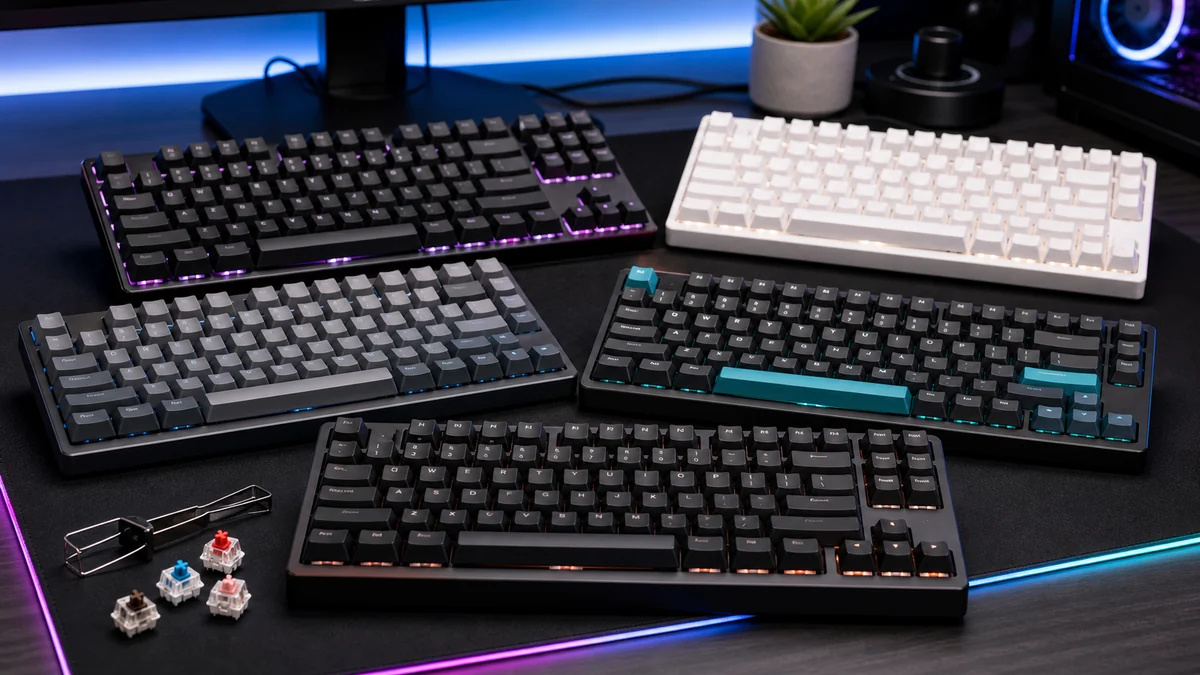
Choosing the right tenkeyless keyboard starts with understanding how you plan to use it. A good option for gaming may not be the best fit for productivity, content creation, portability, or long-term upgrade value. Before buying, consider your budget, performance expectations, compatibility needs, and the features that matter most for your setup.
How long does a tenkeyless keyboard typically last?
A quality tenkeyless keyboard can remain useful for several years when it matches your system requirements and is maintained properly. Actual lifespan depends on usage, build quality, software support, and how quickly your performance needs change.
Sources and Verification
Research basis: Product identity, dimensions, interfaces, supported features, and warranty terms are checked against available manufacturer documentation and current retailer listings. Price, stock, and aggregate customer ratings can change after publication.
Testing disclosure: Unless this article explicitly states that PCGearWiki performed hands-on testing and describes the test setup, recommendations are research-based editorial evaluations rather than PCGearWiki laboratory measurements. Customer feedback is used to identify recurring ownership patterns, not as proof of technical performance.
Last source review: August 5, 2026. See our Review Methodology, Editorial Policy, and Corrections Policy.
Write Your Review
No reviews yet. Be the first to share your experience!