

Last updated: July 7, 2026
Stream Deck alternatives explained helps streamers, gamers, and content creators find controllers that automate tasks, trigger actions in OBS or Twitch, and streamline workflows. These devices matter in the Streaming Gear category because they replace keyboard shortcuts with customizable LCD keys and multi-action sequences. This guide compares 15 models from Elgato, AmpliGame, and VSDINSIDE so you can make informed buying decisions in 2026.
Whether you stream part-time or run full productions, understanding key differences in key count, software support, and extra controls prevents overspending on features you will not use. Readers will learn practical selection criteria, see a comparison table, and receive clear recommendations based on available product data. Check our Streaming Gear section for more tools that pair well with these controllers.

Pros
- Extensive plugin library expands functionality across many apps
- Clear LCD displays provide immediate visual status updates
- Works reliably with both Mac and Windows operating systems
- Compact size allows easy desk integration
Cons
- Initial configuration requires time investment to optimize key layouts
- Limited to wired USB connectivity
The Elgato Stream Deck MK.2 is a studio controller featuring 15 fully customizable LCD keys designed for triggering actions across various software and hardware. It appeals to live streamers, video producers, and productivity enthusiasts who require rapid access to macros and controls on Mac or PC.
Key strengths lie in its plugin ecosystem supporting OBS scene switching, Twitch stream management, YouTube interactions, and Discord controls. Real-world use shows reliable performance with instant action triggers and visual key feedback that reduces errors during dynamic sessions.
Build quality includes a sturdy frame and responsive keys with 72x72 pixel resolution displays. The included stand adds stability while keeping the footprint small at under five inches wide.
Setup involves some initial effort to map out preferred actions and profiles. The wired USB interface also restricts positioning compared to wireless alternatives.
In conclusion this controller excels for users invested in live production workflows and offers expandable options that enhance daily operations.

Pros
- Broad compatibility with essential work and creative apps improves daily efficiency
- Compact lightweight design fits any desk setup with minimal footprint
- LCD keys display custom icons for fast recognition unlike static macro pads
- Integrated USB cable provides reliable plug-and-play connectivity
Cons
- Only six keys require profile switching for users with many commands
- Initial setup needs software installation and configuration time
- Fixed cable length limits flexible device placement options
The Elgato Stream Deck Mini is a compact macro controller equipped with six customizable LCD keys. It appeals to office workers, streamers, and creatives who want to simplify interactions with software such as Zoom, Teams, PowerPoint, and Adobe applications on Mac or PC systems.
Users benefit from assigning shortcuts to individual keys which eliminates errors and speeds up common actions. The multi action feature allows sequencing of commands with timed delays enhancing efficiency during live streams or presentations.
Build quality is solid with a small form factor that integrates well into any workspace. The LCD screens provide clear custom icons making it easy to identify functions at a glance.
However the restriction to six keys means frequent profile changes for advanced users and initial setup involves installing software to configure the device.
Ultimately this product excels at delivering convenient one touch control for everyday software tasks making it a solid choice for productivity enhancement.

Pros
- Extensive customization options for macros and visuals
- Broad compatibility with streaming and productivity software
- Eye-catching RGB effects to elevate streaming presence
- Cross-platform support for Windows and Mac users
- Multi-purpose use across various creative and professional tasks
Cons
- Must keep the companion software active for full operation
- Limited to PC and Mac, incompatible with consoles
- Requires a wired USB connection, reducing portability
The FIFINE AmpliGame D6 stream controller is a specialized keypad designed for streamers and content creators who need quick access to macros and controls. It targets users of OBS Studio and similar platforms on PC or Mac looking to optimize their workflow.
Standout features include the 15 customizable macro keys with LCD displays that show assigned functions, allowing direct visual confirmation and one-touch actions for scene changes or audio adjustments. This setup performs well in live environments by reducing the need to navigate multiple software windows.
The design incorporates a glowing RGB ring with multiple modes that can be tailored to user preferences, adding visual appeal to gaming setups. Build quality supports daily use in multi-tasking scenarios from streaming to editing.
However, the device depends on running software and a USB connection, which may not suit wireless preferences or console users. Firmware updates are recommended before first use.
In conclusion, the D6 offers practical benefits for enhancing streaming efficiency and is a solid choice for dedicated PC-based creators seeking reliable macro control.

Pros
- Versatile tactile controls combining visual LCD feedback with physical dials and touch input
- Strong integration with Wave Link and popular creative software for efficient audio management
- Compact build with reliable USB connectivity on both Mac and Windows platforms
- Extensive customization options and frequent plugin updates for evolving workflows
Cons
- Requires time to configure keys, profiles, and integrations for optimal use
- Operates exclusively via USB connection with no wireless support
- Advanced features depend on compatible Elgato software and specific OS versions
The Elgato Stream Deck + functions as a customizable audio mixer and studio controller aimed at content creators, streamers, and audio professionals who need precise command over multiple tools. It combines LCD keys with dials and a touch strip to handle tasks from volume mixing to app controls on Mac or PC systems.
Key strengths lie in its multi-action capabilities and smart profiles that adapt automatically to active software, paired with direct Wave Link support for routing and shaping audio sources. Performance feels responsive in real-world streaming and DAW environments, delivering visual confirmation on each command execution through the LCD elements.
Design emphasizes a compact footprint with solid tactile feedback from the encoders and touch panel, ensuring it fits typical desk setups while maintaining build durability. Connectivity stays limited to USB 2.0, which supports stable operation but excludes wireless flexibility.
Setup involves an initial learning period to map functions and profiles effectively. In summary, the Stream Deck + provides a practical control hub for users ready to invest in tailored workflows and software ecosystems.
Size measures 140 x 138 x 110 mm with a weight of 465 g. It includes 8 customizable LCD keys, 4 multifunction 360-degree dials, and a 108 x 14 mm LCD touch panel. Interface uses USB 2.0 with system requirements of Windows 10 64-bit or macOS 10.13 and newer.

Pros
- Intuitive customization through the free Stream Deck app
- Broad compatibility with productivity and creative applications
- Environmentally conscious design and packaging
- Quick setup with ready-to-use actions and profiles
- Additional touch points for expanded control options
Cons
- Requires a wired USB connection for operation
- Only eight physical keys may require switching between multiple pages for advanced users
- Full functionality depends on installing the companion software
The Elgato Stream Deck Neo serves as a compact control device featuring eight customizable LCD keys and two touch points. It targets professionals and creatives who handle repetitive computer tasks and seek to optimize their daily routines in applications such as video conferencing and document editing.
Users benefit from direct integration with tools like Zoom and Microsoft Office allowing one-press actions for muting or file access. The device performs reliably in automating workflows which leads to noticeable gains in efficiency during presentations and multitasking sessions.
Its build measures 107 by 26 by 78 millimeters and weighs 210 grams making it a sturdy yet portable addition to any workspace. The LCD keys provide clear visuals while the zero-plastic packaging reflects a commitment to sustainability.
Potential users should note the need for a constant USB link and the companion application to unlock all features. Those with highly complex setups might find the key count restrictive at times.
Overall the Stream Deck Neo delivers practical enhancements for productivity without unnecessary complexity and represents a solid choice for anyone looking to simplify their digital interactions.

Pros
- Extensive customization options enhance productivity across multiple applications
- RGB lighting and LCD visuals create an engaging user interface
- Broad software compatibility supports diverse user needs
- Value pricing delivers premium features without excessive cost
Cons
- Software setup may require disabling antivirus temporarily due to security prompts
- Demands direct USB connection and recent operating systems for optimal function
- No native support for older systems or Linux without additional development
The VSDINSIDE macro keypad functions as a versatile stream controller deck aimed at gamers, streamers, and professionals handling video editing or office tasks.
It excels through its 18 keys that support both single and multi-step macros, allowing rapid execution of complex commands in applications like OBS and Photoshop while the LCD screens display custom icons for easy recognition.
The build includes a surrounding RGB ring for aesthetic enhancement and uses durable materials to withstand regular use on any desk.
Potential users need to ensure their system meets the Windows 11 or macOS 11 requirements and connect via a direct USB port to prevent connectivity problems during operation.
In conclusion this product offers an effective solution for those wanting customizable control at a reasonable investment level.

Pros
- Strong native integrations with leading creative applications
- LCD keys deliver clear visual confirmation of assigned functions
- Tactile dial and roller enable accurate fine adjustments
- Sustainable construction using certified recycled plastics
- Flexible placement options via the included stand
Cons
- Full customization requires installation of the Logi Options+ app
- Operates on replaceable AAA batteries rather than a built-in rechargeable pack
- Initial profile setup involves a learning period for optimal results
The Logitech MX Creative Console functions as a dedicated control surface combining nine programmable LCD keys with a contextual dial and roller. It targets graphic designers, video editors, and other creative professionals who work extensively in applications such as Adobe Photoshop, Premiere Pro, Illustrator, and Figma.
Key strengths lie in the visual feedback provided by the full-color LCD keys and the tactile precision of the aluminum dial. These elements allow users to execute common commands, navigate timelines, and adjust parameters without shifting attention from the main screen, resulting in smoother real-world performance during extended editing sessions.
Build quality incorporates durable materials including certified post-consumer recycled plastic and a low-friction dial that supports fine control. The compact form factor with included stand permits flexible desk placement while maintaining compatibility with Bluetooth and USB-C connections.
Potential limitations include the need for companion software to unlock advanced features and the reliance on disposable batteries. Some users may also require time to configure profiles that match their specific workflows.
In summary, the device delivers tangible workflow improvements for those already invested in compatible creative tools and willing to invest initial setup effort.
Pros
- Centralizes controls from several apps into one device for reduced desk clutter
- Offers broad software compatibility including major streaming and editing programs
- Provides tactile dials and haptic feedback suited to live adjustments
- Includes plug-and-play support with existing plugins and icon packs
Cons
- Demands initial setup time to configure layouts and macros effectively
- Works best with listed compatible applications rather than all software
- Functions only on desktop PC or Mac systems with no mobile support
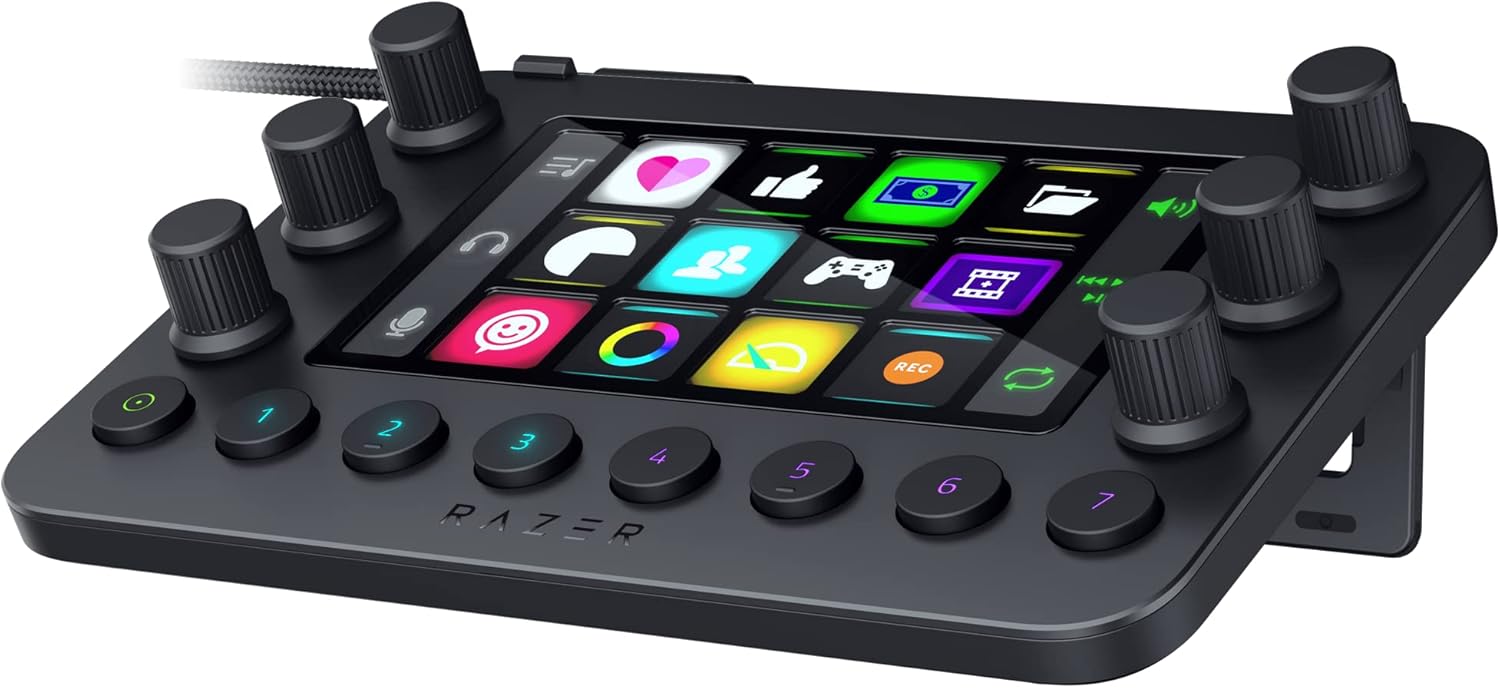
The Razer Stream Controller functions as a dedicated control surface that consolidates shortcuts, audio adjustments and layout switches for streamers and content creators on PC or Mac.
Key strengths lie in the twelve haptic keys that support custom icons and feedback levels, the six analog dials for on-the-fly audio management, and eight buttons that enable rapid profile changes or common actions during broadcasts.
Construction centers on an integrated LCD touchscreen that displays dynamic information, delivering a compact all-in-one unit that groups commands into layouts while maintaining compatibility with tools such as OBS Studio, Streamlabs, Photoshop and Final Cut Pro.
Drawbacks include the need for upfront configuration to realize full customization potential and reliance on supported applications, which may limit use for those working outside the listed ecosystem.
In summary this controller delivers practical value for users who manage intricate streaming or editing workflows and seek a streamlined physical interface to improve efficiency.


Pros
- Flexible widget grid supports extensive customization for diverse user tasks
- USB connection enables straightforward plug-and-play installation
- Compatible with popular system monitoring tools for detailed performance data
- Multiple pages allow organized access to different sets of controls
- Touch operation provides direct and intuitive PC management
Cons
- Compatible only with Windows 10 and 11 systems
- Full monitoring features may require separate third-party software licenses
- Fixed 7-inch size limits display real estate for complex layouts
The G.SKILL WigiDash PC Command Panel serves as a dedicated 7-inch touch display that lets Windows users manage shortcuts, media, and system data through customizable widgets. It fits well for gamers, content creators, and anyone who frequently switches between applications and needs faster access to controls than a keyboard or mouse can provide.
Standout capabilities include the 5x4 widget grid that holds up to 20 items per page along with support for HWiNFO and AIDA64 sensors. Users can build multiple pages and switch between them to handle tasks such as in-game commands, audio adjustments, or real-time hardware monitoring without leaving their primary workspace.
Build quality centers on a compact USB Type-C design that supplies both power and data through one cable, resulting in a clean desk setup. The 1024x600 resolution delivers clear visibility for widget labels and icons while the touch response supports reliable daily use.
Limitations include the Windows-only requirement and the potential need for extra software licenses to unlock advanced monitoring options. The screen size also restricts how many elements can appear simultaneously compared with larger secondary displays.
In summary the WigiDash delivers a practical way to add tactile control and monitoring to a PC setup for those who value quick, personalized access over standard input methods.


Pros
- Broad compatibility with professional tools including OBS, Adobe Premiere and Photoshop
- Versatile mix of keys, dials and touch controls for detailed workflow management
- Extensive customization for profiles and multi-actions supports complex setups
- Solid construction with LCD feedback suitable for daily studio use
Cons
- Large dimensions and weight demand dedicated desk space and limit portability
- Requires Windows 11 or macOS 13 plus a USB-C 3.0 port, excluding older systems
- Initial setup and configuration take time before full benefits are realized
The Elgato Stream Deck + XL functions as a centralized macro control platform aimed at content creators and production professionals. It consolidates dozens of customizable inputs into a single desktop unit, enabling users to manage broadcasts, edits and communications without constant keyboard or mouse interaction.
Performance shines through its deep integrations with OBS for scene and audio control, Adobe applications for timeline shortcuts, and Discord for chat management. The six dials deliver accurate adjustments during live mixes while the touch strip offers real-time data views and quick page navigation, keeping complex productions responsive and organized.
Design includes a sturdy integrated stand, membrane-style LCD keys and a compact yet stable footprint. Build quality feels appropriate for fixed studio environments where reliability matters more than mobility.
Drawbacks center on the sizable chassis that occupies substantial desk area and the requirement for recent operating systems plus a USB-C 3.0 connection. Full customization also involves an upfront time investment to map actions and profiles effectively.
Overall this controller provides dependable centralized command for users already embedded in professional creative pipelines, delivering measurable workflow improvements once configured to specific needs.

Pros
- Extensive customization options for keys and lighting
- Strong integration with streaming software like OBS
- Value pricing compared to similar devices
- Multi-platform support for Windows and Mac
Cons
- Limited to Windows 11 and macOS 11.0 or newer operating systems
- Potential need to configure antivirus software for installation
- Requires direct connection to a powered USB port for stable operation
The VSDINSIDE M18 is a programmable macro keypad tailored for content creators, streamers, and professionals who manage complex workflows on their computers. It features 18 keys, with 15 offering LCD screens for custom visuals, making it suitable for users of OBS, video editing software, and gaming setups.
Key strengths include the ability to assign single or multi-step macros to each key, along with support for custom images and animations on the displays. This setup enables quick scene changes, app launches, and sound effect triggers, enhancing efficiency during live sessions or editing tasks.
Build quality appears solid with a surrounding RGB light ring that can be customized for ambiance. The device connects via USB-C and integrates with both Windows and Mac systems, though it demands specific permissions during software setup.
Potential users should note compatibility restrictions to newer operating systems and the need for direct USB connections to prevent power-related malfunctions. Software may require adjustments with security tools for proper function.
Overall, this stream controller offers a capable and visually engaging tool for those looking to optimize their digital workflows at a competitive price point.

Pros
- Extensive key customization with animations and multi-action support
- Strong software compatibility across creative and office applications
- Plugin library adds clocks reminders and other desktop utilities
- Compact build with quality materials for the keycaps and dials
- Two-year warranty backs the purchase
Cons
- Requires recent operating systems limiting compatibility with older computers
- Wired USB-C connection only which restricts flexible placement
- No independent reviews exist yet to confirm durability over time
The ActionRing N3 functions as a programmable macro keypad aimed at content creators managing OBS Twitch or YouTube sessions and office workers automating repetitive tasks in applications like Excel or Photoshop.
Standout capabilities include the six LCD keys that display custom GIF icons together with the drag-and-drop system for creating action flows that execute multiple commands in order which supports real-world performance in live streaming and design sessions.
Design and build quality feature a compact footprint acrylic keycaps silicone switches aluminum dials and a 1.5 meter USB-C cable that connects reliably to compatible systems.
Potential drawbacks center on the need for Windows 10 64-bit or macOS 14 along with the wired-only design that may not suit every workspace or older hardware setup.
In final verdict the device delivers practical automation and visual feedback for users who value shortcut organization and plugin options in their content or productivity routines.

Pros
- Versatile three-mode operation not found in similar products
- Support for dynamic animated icons
- Extensive plugin marketplace for popular apps
- Compatible with both PC and Mac
Cons
- Requires connection to rear USB port to avoid power issues
- Spotify integration needs a Premium account
- Limited user reviews available for real-world validation
The TreasLin N1 Stream Controller Deck is a macro keypad built for content creators and streamers who need quick access to controls in OBS, Twitch, YouTube, and other apps. It provides 18 keys that users can assign to launch apps, trigger actions, or run automated sequences.
Standout capabilities include three switchable modes for custom macros, numeric entry, and calculations, plus support for dynamic animated icons that go beyond static images. The VSDinside marketplace supplies plugins and profiles for common tools, enabling real-world performance gains in live streaming and productivity sessions.
Design centers on a USB-C connection and included software for drag-and-drop customization of icons and functions. DIY skins allow adaptation to different setups, while the knob handles mode changes and rotation inputs when configured properly.
Users must connect to a rear USB port for stable power and need a Spotify Premium account for music integration. With no reviews posted yet, long-term durability and software stability lack independent confirmation.
In summary, the N1 offers strong value for streamers and power users who want mode flexibility and animation support, provided they follow the power and setup guidelines.
How to Choose the Right Stream Deck Alternatives Explained
Number of Customizable Keys
The number of keys directly affects how many actions you can trigger without switching pages. Models with 6 keys suit simple setups while 15-key or 18-key options handle complex scenes and multi-action sequences. Based on available product data, the Elgato Stream Deck MK.2 offers 15 LCD keys that support unlimited actions through folders and profiles.
For most users who switch between OBS, chat, and media playback, 8 to 15 keys provide enough flexibility without overwhelming the desk. Larger key counts also allow dedicated folders for different apps such as Zoom or Adobe tools. Compare your typical workflow before choosing a model with too few or too many keys.
LCD Display and Visual Feedback
LCD keys display custom icons so you instantly recognize each function. Products like the Elgato Stream Deck Mini use 6 LCD keys while the VSDINSIDE model adds 15 LCD keys plus 3 physical buttons. Visual feedback confirms commands executed, reducing errors during live streams.
Choose devices that accept JPG, PNG, or GIF icons if you want animated indicators. Some alternatives include built-in plugins for clock, weather, or stopwatch modules that appear on the keys themselves. This feature improves usability for office and streaming tasks alike.
Software Integration and Plugins
Strong plugin support determines compatibility with OBS Studio, Streamlabs, Twitch, YouTube, and creative apps. Elgato models include hundreds of official plugins while AmpliGame and VSDINSIDE options rely on drag-and-drop stores with similar third-party support. Test whether the software runs on both Windows and macOS before purchase.
Multi-action sequencing lets one key execute several steps in order. This capability matters for creators who launch scenes, mute microphones, and post social updates simultaneously. Review the latest plugin list on the manufacturer site because new integrations appear regularly.
Additional Controls Like Dials and Touch Strips
Some alternatives add dials, touch strips, or haptic keys for precise audio mixing and navigation. The Elgato Stream Deck + includes six multifunction dials and a touch strip while the Razer Stream Controller offers six tactile analog dials. These extras help adjust levels without leaving the main interface.
Users who manage live audio or video production benefit most from dials. Budget models focus on keys alone but still deliver strong macro performance. Consider whether your workflow needs analog control or if standard keys suffice.
Build Quality, RGB Lighting, and Extras
Sturdy construction and customizable RGB rings improve long-term durability and desk aesthetics. The FIFINE AmpliGame model features a glowing RGB ring with nine modes while the VSDINSIDE keypad includes an adjustable surround light. Solid materials reduce flex during heavy use.
Additional extras such as zero-plastic packaging or built-in plugins for reminders add value for eco-conscious buyers. Compare these details against your priorities before deciding on a premium or budget option.
Compatibility and Value Assessment
Confirm USB-C or USB-A connectivity and operating system support for your current PC or Mac. Most listed models work with Windows 11 and macOS 11 or newer. Value depends on matching key count and features to your actual workload rather than buying the highest specification.
Budget options from AmpliGame and VSDINSIDE deliver solid performance for under $65 while premium Elgato units justify higher cost through extensive plugin ecosystems. Cross-reference current prices and user ratings when making the final choice.
| Model | Key Specification | Best For | Main Strength | Value Rating |
|---|---|---|---|---|
| Elgato Stream Deck MK.2 | 15 LCD keys, extensive plugins | Full streaming productions | Visual feedback and multi-action support | High |
| Elgato Stream Deck Mini | 6 LCD keys, compact size | Beginner setups | Simple drag-and-drop setup | High |
| FIFINE AmpliGame D6 | 15 LCD keys, RGB ring | Gaming and streaming | Bright lighting and wide app support | High |
| VSDINSIDE Macro Keypad | 18 programmable keys | Budget multi-tasking | Built-in plugins and solid build | Medium-High |
| Elgato Stream Deck + XL | 36 keys, six dials, touch strip | Professional productions | Advanced tactile controls | Medium |
Why You Should Trust PCGearWiki
PCGearWiki compares products using manufacturer specifications, feature lists, compatibility details, and real-world usage context. We evaluate value by matching capabilities to common streaming and productivity workloads rather than relying on marketing claims alone.
Our recommendations remain transparent about affiliate relationships while prioritizing reader needs. Every model listed here appears in current product data so you can verify details directly with retailers or manufacturers.
Final Thoughts
Stream Deck alternatives explained shows that strong options exist across price points. The Elgato Stream Deck MK.2 stands out as Best Overall for its balance of 15 LCD keys, reliable plugin support, and high user ratings. It suits most streamers who need visual feedback and multi-action sequences.
For Best Value, the FIFINE AmpliGame Stream Controller delivers 15 keys, RGB lighting, and solid app compatibility at a lower price. Budget buyers should consider the VSDINSIDE Macro Keypad or ActionRing model for essential macro control without extras. The Elgato Stream Deck + XL serves as the Best Premium pick when dials and touch strips are required for live productions. Pair any choice with our capture card guide for a complete streaming setup.
Frequently Asked Questions
What does Stream Deck alternatives explained mean?
Stream Deck alternatives explained covers controllers that provide customizable macro keys, LCD displays, and software integration similar to the original Elgato devices but from multiple brands. These tools help automate streaming tasks and improve workflow efficiency.
Does Stream Deck alternatives explained matter for streaming?
Yes. The right controller reduces reliance on keyboard shortcuts and lets you trigger scenes, audio adjustments, and social posts with one press. Models with strong plugin support integrate directly with OBS, Twitch, and other tools listed in our best lighting for streaming recommendations.
How much should I spend on a Stream Deck alternatives explained?
Entry-level options start near the lower end of the $8.99 to $349.99 range while feature-rich models with dials reach the upper limit. Match spending to the number of keys and extra controls you actually need.
Which brands make reliable Stream Deck alternatives explained options?
Elgato remains the most established while AmpliGame and VSDINSIDE provide competitive alternatives with strong ratings and lower prices. All three brands appear in the 15 models compared here.
Is it worth upgrading your Stream Deck alternatives explained in 2026?
Upgrade only if your current device lacks needed keys, dials, or plugin support. Newer models add better RGB, eco-friendly packaging, or expanded compatibility that may justify the change for active creators.


Write Your Review
No reviews yet. Be the first to share your experience!