

Last updated: October 5, 2026
Palm, claw and fingertip describe where your hand contacts a mouse. They are useful labels for comparing shapes, not rankings of aiming skill. Most people use a mixture that changes with the task, and no grip label guarantees comfort, speed or injury prevention.
The three common contact patterns
| Grip | Typical contact | What to inspect on the mouse |
|---|---|---|
| Palm | More of the palm and fingers rests on the shell | Length, slope and support under your hand |
| Claw | Some palm contact with more arched fingers | Rear shape, button reach and side width |
| Fingertip | Mostly fingertips, with little or no palm contact | Side grip, button reach and room to move the shell |
| Hybrid | A mixture rather than a fixed category | Whether the shape supports your natural movement |
Those descriptions do not prescribe a mouse weight or sensitivity. A shape that feels natural to one person can force another to hold the buttons awkwardly. Hand length helps compare size, but width, finger position, hump location and button height also matter.
Assess your present mouse before replacing it
Start with the device you already own. Notice where your palm rests when you are not deliberately posing a grip. Then observe ordinary clicking, dragging and camera movement. If a grip only works while you consciously squeeze the mouse or stretch for a button, the shell may be a poor fit for that task.
Check your desk arrangement too. An obstructed mousepad, a cable catching the desk edge or an awkwardly placed keyboard can make a suitable mouse harder to use. Remove those constraints before attributing every problem to the grip category.
A practical shape comparison
- Measure your current mouse and note what feels too long, wide, tall or short. Treat the measurements as a reference, not a universal hand-size formula.
- Inspect the candidate from the top and side. Overall length does not reveal the height or location of the rear support.
- Check access to the main buttons, wheel and side buttons in your ordinary grip.
- For a wired option, account for cable placement. For a wireless option, check the required receiver or Bluetooth path.
- Where possible, try the shape or choose a retailer with suitable return terms. Specifications cannot tell you exactly how it will feel.
Weight is another comparison point, not a medical cutoff or an automatic quality rating. A lighter shell may suit your preference, while the shape and controls still determine whether you can hold it comfortably. Do not force an unfamiliar grip merely because a competitive player uses it.
Two concrete designs to compare, not universal grip winners
A wireless design to compare with your current shell
The Logitech G309 LIGHTSPEED offers LIGHTSPEED receiver and Bluetooth connections. Compare its shell dimensions and button positions with your present mouse rather than assigning it to every palm or claw user.
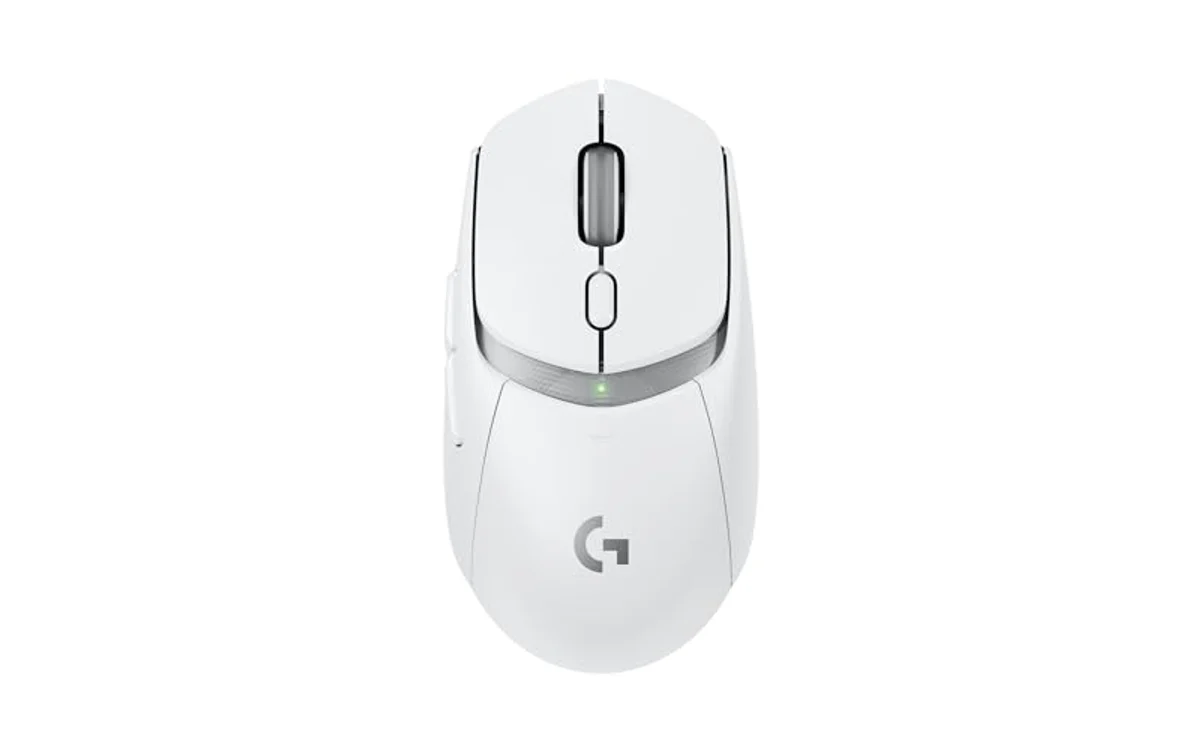
Its AA battery arrangement and connection options are part of the comparison. They do not establish comfort for your hand, and there is no USB wired-data fallback. Keep the same game turn distance when comparing how the shape feels.
Manufacturer documentation. Model details checked October 5, 2026; confirm the selected listing and installation requirements.
A separate wired shape and cable arrangement
The ENDGAME GEAR XM2 8k (original model) gives you a wired design to compare with the G309. Look at the side profile, rear support and button reach, then account for cable movement on your desk. This ASIN refers to the original XM2 8k, not the newer v2.

Use the original model documentation when checking features or configuration. A different shape or advertised reporting rate is not proof of improved aim or better fit. We have not measured either mouse for a comparative comfort ranking.
Manufacturer documentation. Model details checked October 5, 2026; confirm the selected listing and installation requirements.
Disclosure: product links are affiliate links. PCGearWiki may earn a commission from qualifying purchases, at no extra cost to you. These are specification-based examples, not hands-on test results.
Separate fit from input settings
A different shell may change how you move the mouse, but it does not automatically change sensor accuracy or remove processing delay. Keep sensitivity and polling settings consistent while comparing shapes. Otherwise a setting change can be mistaken for a grip improvement.
If your pointer stutters, investigate the connection and tracking surface. Grip advice cannot repair radio interference or a dirty sensor opening. If your goal is reaching desktop corners with less travel, sensitivity may be the relevant adjustment rather than a different grip.
Frequently asked questions
Which grip is best for FPS games?
There is no universal winner. Use a shape and contact pattern that lets you perform your usual movements consistently without forcing a posture.
Should fingertip users only buy an ultralight mouse?
No fixed weight limit applies to everyone. Compare weight with shape, controls, cable or battery arrangement and your own preference.
Can a product photo establish that a mouse fits my hand?
It helps show the profile, but does not replace dimensions or trying the device. Camera angle can hide side flare and button height.
Related checks: DPI versus sensitivity, receiver versus Bluetooth operation, and wireless mouse diagnostics. These product examples rely on manufacturer specifications; we have not performed a comparative comfort or aiming test.
Add PCGearWiki as a preferred source on Google
Sources and Verification
Research basis: Product identity, dimensions, interfaces, supported features, and warranty terms are checked against available manufacturer documentation and current retailer listings. Price, stock, and aggregate customer ratings can change after publication.
Testing disclosure: Unless this article explicitly states that PCGearWiki performed hands-on testing and describes the test setup, recommendations are research-based editorial evaluations rather than PCGearWiki laboratory measurements. Customer feedback is used to identify recurring ownership patterns, not as proof of technical performance.
Last source review: October 5, 2026. See our Review Methodology, Editorial Policy, and Corrections Policy.





Write Your Review
No reviews yet. Be the first to share your experience!