

Last updated: November 20, 2026
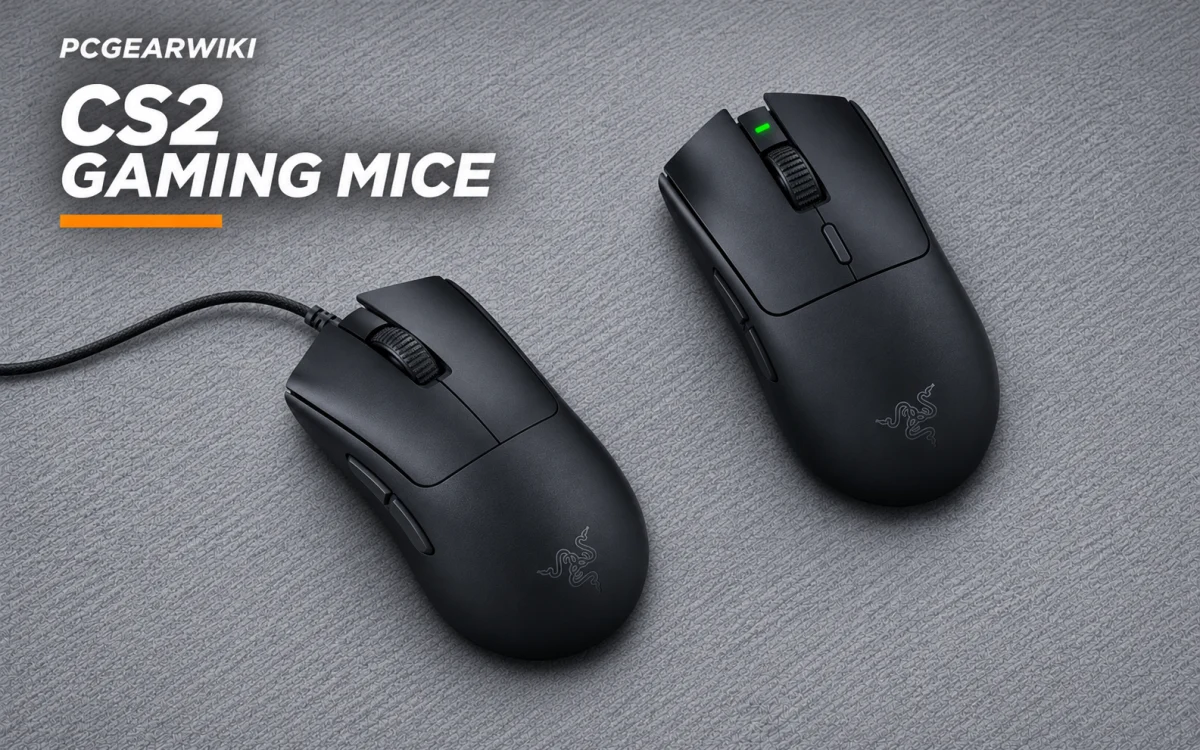
Choose the Razer Viper V3 HyperSpeed Wireless Esports if you prefer a wireless mouse and use claw or fingertip grip; choose the Razer DeathAdder V3 Wired Gaming Mouse if you want an ergonomic shape, lighter listed weight, and wired connection. Neither is a universal fit: compare shape and hand fit first. This mouse-only guide focuses on CS2, not keyboard-and-mouse bundles or claims that a particular mouse improves aim.

Pros
- Ultra-light 59g weight enables fast precise movements
- High-accuracy sensor supports glass and varied surfaces
- Optical switches avoid double-click problems with tactile feedback
- 8K polling delivers near-zero latency for esports
- Ergonomic form supports extended comfortable use
Cons
- Wired connection restricts free movement versus wireless models
- No RGB lighting for users who prefer visual customization
- Full feature access requires additional software installation
| Connectivity Technology | USB |
|---|---|
| Additional Features | 59g Ultra Lightweight, 6 Programmable Buttons - Ergonomic - Speedflex Cable, 8K Hz HyperPolling, Fast Optical Switches Gen-3, Focus Pro 30K Optical Sensor |
| Movement Detection | Optical |
| Button Quantity | 6 |
| Hand Orientation | Right |
| Compatible Devices | Mac, Personal Computer |
| Operating System | Windows, macOS |
| Hardware Platform | PC |
| Power Source | Corded Electric |
| Mouse Maximum Sensitivity | 30000 Dots per Inch |
Best suited to shoppers comparing gaming mice products who specifically need achieve quicker reactions with a 59g design that cuts hand fatigue for longer competitive sessions, Maintain pixel-perfect aim on glass and other surfaces via….
Before buying, compare the exact model’s compatibility, dimensions, core specifications, warranty, recurring owner feedback, and current price against other gaming mice options. Retailer availability and pricing can change after publication.

Pros
- Exceptionally low weight for rapid movements in fast paced games
- Outstanding battery endurance reduces downtime during extended sessions
- Accurate sensor performs well across multiple surface types
- Dependable wireless connection with multi device support
- Durable switches ensure consistent tactile feedback over many uses
Cons
- Relies on replaceable AA batteries instead of a built in rechargeable cell
- Only six programmable buttons limit customization options compared to some rivals
- Maximum polling rate requires purchase of a separate dongle
| Connectivity Technology | USB |
|---|---|
| Additional Features | Wireless |
| Movement Detection | Optical |
| Button Quantity | 6 |
| Hand Orientation | Ambidextrous |
| Compatible Devices | Personal Computer |
| Operating System | Windows 11 |
| Battery Average Life | 280 Hours |
| Number of Batteries | 1 AA batteries required. (included) |
| Hardware Platform | Mac, PC |
Best suited to shoppers comparing gaming mice products who specifically need dominate competitive matches with an 82g balanced lightweight build that enables fast consistent swipes without fatigue, Power through long tournaments on a single AA….
Before buying, compare the exact model’s compatibility, dimensions, core specifications, warranty, recurring owner feedback, and current price against other gaming mice options. Retailer availability and pricing can change after publication.
Compare the two Razer mice
| Mouse | Documented details | Best fit |
|---|---|---|
| Razer Viper V3 HyperSpeed Wireless Esports | 82 g; wireless; Focus Pro 30K optical sensor; up to 280 hours from one AA battery; up to 5 onboard DPI stages. | Claw or fingertip grip; buyer prioritizing wireless use and battery life. |
| Razer DeathAdder V3 Wired Gaming Mouse | 59 g; wired; Focus Pro 30K optical sensor; ergonomic form; up to 8,000 Hz HyperPolling. | Buyer preferring ergonomic shape, lower listed weight, and no battery-powered wireless connection. |
Choose shape before sensor specifications
Both mice list a Focus Pro 30K optical sensor, so that shared specification does not settle the choice. The Viper V3 HyperSpeed is described as optimized for claw or fingertip grip. The DeathAdder V3 has an ergonomic form developed with esports pros, but the supplied information does not specify a matching grip style. Try to check how the shape sits in your hand before buying. Product dimensions are not provided here, so these details cannot establish which mouse fits small hands.
Hand size, grip, and weight
Do not treat low weight as proof of fit. The DeathAdder V3 lists 59 g; the Viper V3 HyperSpeed lists 82 g and uses one AA battery. The supplied specifications do not say whether the Viper weight includes its battery, so verify exact weight and dimensions for the exact US SKU before purchase. Small-hand shoppers should check physical measurements and return terms rather than assume either shape will fit. Claw-grip shoppers have explicit manufacturer guidance for the Viper; the DeathAdder’s listed ergonomic shape may suit buyers who prefer that design, but personal fit remains individual.
Wired, wireless, and polling
The Viper uses HyperSpeed Wireless, described by Razer as low-latency, and needs an AA battery. The supplied details do not confirm receiver inclusion, so check the exact package contents. The DeathAdder uses a Speedflex cable. Its 8,000 Hz polling support is a specification, not independent measured latency. Do not assume a higher polling rate guarantees a perceptible CS2 advantage; confirm compatibility and settings you intend to use.
Sensitivity checks and buying limits
Keep sensitivity stable while comparing mice: record your in-game sensitivity and DPI, then avoid changing both at once. Disable “Enhance pointer precision” in Windows for the manufacturer-recommended accuracy setup. DPI controls and stages differ: Viper has a top-mounted control for five stages; supplied DeathAdder details do not specify onboard DPI controls. Do not infer missing features.
These options are not documented as under-$50 choices, and current delivered prices are not verified. Do not buy either solely to chase a price bracket, polling number, or weight. Validate exact ASIN, dimensions, battery-included weight, receiver contents, warranty, seller, availability, and delivered price before you buy. This comparison uses manufacturer specifications; no independent latency measurements or hands-on tests are claimed.
Add PCGearWiki as a preferred source on Google
Sources and Verification
Research basis: Product identity, dimensions, interfaces, supported features, and warranty terms are checked against available manufacturer documentation and current retailer listings. Price, stock, and aggregate customer ratings can change after publication.
Testing disclosure: Unless this article explicitly states that PCGearWiki performed hands-on testing and describes the test setup, recommendations are research-based editorial evaluations rather than PCGearWiki laboratory measurements. Customer feedback is used to identify recurring ownership patterns, not as proof of technical performance.
Last source review: November 20, 2026. See our Review Methodology, Editorial Policy, and Corrections Policy.


Write Your Review
No reviews yet. Be the first to share your experience!