

Updated: . Added documented K2 HE connection rates, actuation range and version-specific switch support, rather than treating all magnetic switches as interchangeable.
Quick answer: Choose a rapid trigger keyboard for its layout, reliable position sensing and usable configuration controls. Keychron K2 HE, Q1 HE and Q5 HE cover different layout needs; Razer Huntsman V3 Pro provides an analog optical alternative. Rapid trigger is not exclusive to Hall Effect switches, and the smallest advertised actuation distance does not establish the best keyboard for you.
Products discussed in this guide
These listings are comparison references, not a guarantee of price or stock. We may earn a commission from qualifying purchases.
Current price and availability could not be verified.

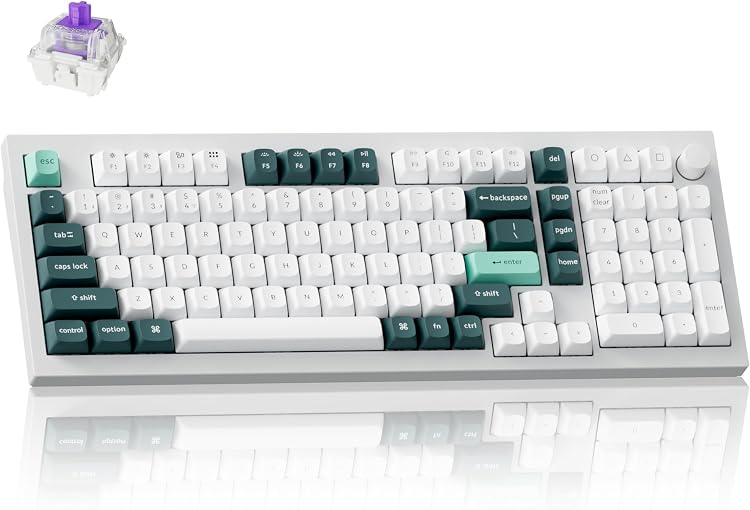

Rapid trigger changes the reset point as a key moves upward, allowing another press without returning to a single fixed reset position. It can be useful for repeated movement inputs. It does not guarantee better aim, lower network delay or a competitive advantage in every game.
Compare the exact version, not just the family name
| Candidate | Layout or sensing distinction | Who should compare it | Check before purchase |
|---|---|---|---|
| Keychron K2 HE, aluminum and wood listing | Compact magnetic-switch keyboard | A shared gaming/work desk that needs more keys than a 60% board | Version, switch family, layout region and receiver contents |
| Keychron Q1 HE | 75% magnetic-switch layout | A compact layout with function and navigation access | The HE version, not a conventional Q1; supported replacement switches |
| Keychron Q5 HE | 96% magnetic-switch layout | Buyers who still need a numpad | Desk width, regional key arrangement and exact switch version |
| Razer Huntsman V3 Pro | Analog optical sensing | Buyers considering adjustable actuation without magnetic switches | Full model and generation; do not transfer specifications from a different 8K version |

Hall Effect is not the only route to rapid trigger
Magnetic keyboards sense switch position through a magnetic field. Analog optical implementations can also detect position and implement dynamic reset. Razer’s Gen 2 analog optical documentation explicitly describes rapid trigger on the Huntsman V3 Pro line. It should not be labeled a Hall Effect board merely because it has the feature.
Polling rate describes reporting frequency, while actuation distance describes travel. Neither is the complete key-to-screen delay. An 8,000Hz reporting interval is 0.125ms by calculation; that is not a measured 0.125ms end-to-end response for a keyboard. This guide does not rank these models using laboratory latency measurements.
Hot-swap does not mean universal switch support
With magnetic switches, physical fit alone is insufficient. Magnet orientation, sensing range and firmware support can differ. Keychron’s K2 HE page distinguishes versions and their supported switch families. Match the actual version in the listing to the support documentation before ordering replacements.
The shortlist therefore uses one K2 HE listing rather than treating two cosmetic or version variants as independent winners. A small rhythm-game keypad is also a different product from a full gaming keyboard; it should not replace a keyboard recommendation for someone who needs typing, shortcuts and movement keys.
K2 HE: verify the switch version and connection mode
| Documented item | What the current K2 HE page states |
|---|---|
| USB wired / 2.4GHz reporting | 1,000Hz |
| Bluetooth reporting | 125Hz |
| Adjustable actuation | 0.2-3.8mm, with 0.1mm sensitivity listed |
| Gateron Nebula Version 1 | Only the supported Gateron Double-Rail Magnetic switch family; not generic Jade or KS-20 |
| Gateron Nebula Version 2 | Supports Keychron Ultra-fast Lime Magnetic switches according to the manufacturer |
Source: Keychron K2 HE specifications and switch-version notes, checked November 2, 2026. Match the physical unit and ordered version to those notes; the ASIN title alone does not settle the revision.
The nominal report interval is 1ms at 1,000Hz and 8ms at 125Hz, calculated from frequency. Those are not measured keyboard latencies. Similarly, a 0.1mm adjustment step is not proof that every press can be resolved with that accuracy under all conditions.
Before buying replacement switches, save the model/revision and the manufacturer’s compatibility confirmation. Before tuning, save the factory profile. This avoids two separate mistakes: installing an unsupported switch and comparing different connection modes as if only the actuation setting changed.
A calibration routine you can actually use
- Install firmware only through the manufacturer’s supported process for the exact model. Save your existing profile first.
- Run the documented calibration with the keyboard on a stable surface and follow its instructions about touching or releasing keys.
- Start from the manufacturer’s normal preset. Change movement keys before changing every key.
- Test press, hold, release and repeated presses in a practice environment. Check whether resting a finger creates unintended movement.
- If inputs are accidental, increase actuation travel or reset distance in small steps. If an input does not release consistently, recalibrate and inspect the profile before lowering thresholds further.
- Save the working profile and confirm whether it persists after disconnecting the configuration software.
There is no single sensitivity value that suits every switch, finger pressure or game. Use a more conservative profile for typing so a gaming setup does not turn normal resting pressure into repeated mistakes.
Rapid trigger and opposing-input priority are different
Rapid trigger concerns actuation and reset. Features that prioritize the latest opposing direction, sometimes marketed with names such as Snap Tap, concern how simultaneous inputs are handled. Do not assume permission for one implies permission for the other. Check the current rules of the game and tournament you enter; disable a feature when its status is unclear.
See Rapid Trigger versus Snap Tap for that distinction, or our mechanical keyboard guide if fixed-actuation switches are enough for your games.
What should decide the purchase?
Choose K2 HE or Q1 HE when the compact layout fits your daily shortcuts; compare Q5 HE when a numpad is essential. Consider Huntsman V3 Pro as an analog optical alternative, not as a magnetic-switch substitute with interchangeable parts. Verify software support, warranty region, return policy and the actual revision before paying. The right keyboard is the one you can configure predictably, not simply the one with the shortest advertised travel.
Evidence and disclosure
This is an editorial buying or setup guide. Manufacturer documentation is linked where used. Assessment relies on manufacturer specifications and published listings. Product links identify the selected listing, and offers, configurations and sellers can change. See our review methodology and affiliate disclosure.
As an Amazon Associate I earn from qualifying purchases.


Write Your Review
No reviews yet. Be the first to share your experience!