

Last updated: October 2, 2026
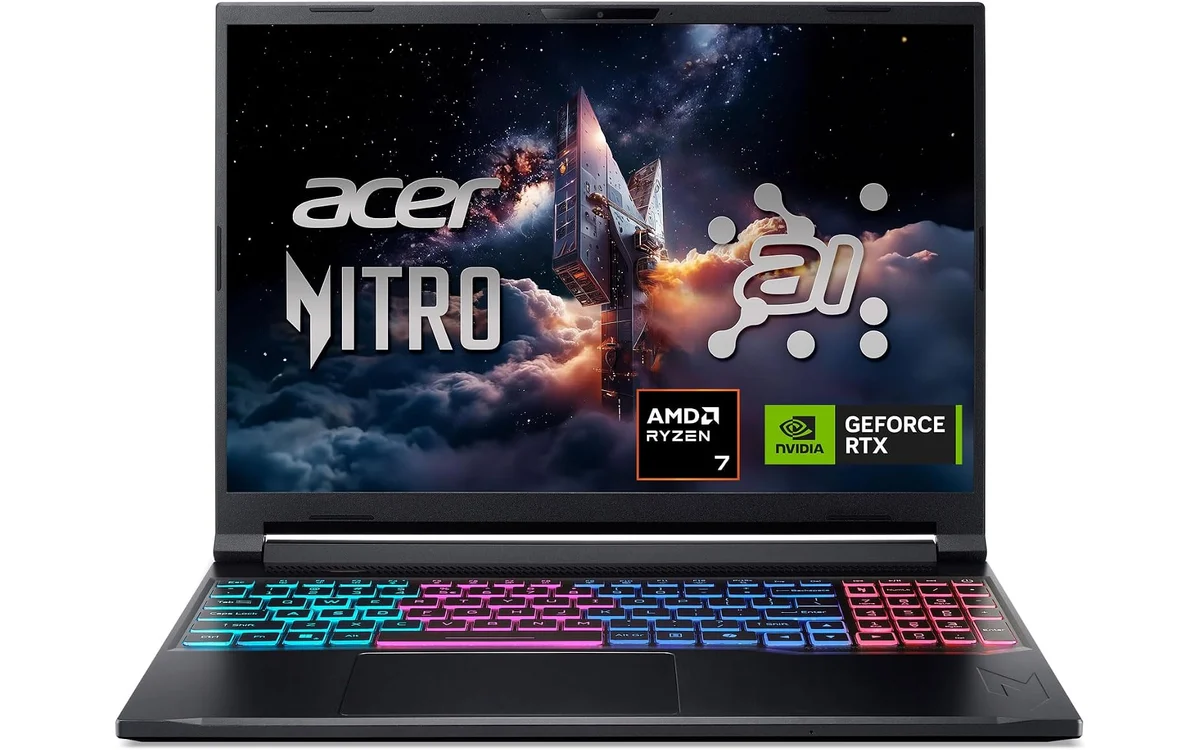
Finding factory 32GB RAM under $1500 proves difficult because most manufacturers cap memory at 16GB to cut costs. Acer Nitro V 16S AI Gaming Laptop breaks this pattern by pairing 32GB DDR5 with AMD Ryzen 7 260 processor and Nvidia GeForce RTX 5060 graphics. This analysis relies on manufacturer technical data sheet specifications rather than internal laboratory benchmark runs.
Specification Overview: Budget 32GB Category
Sub-$1500 market splits between factory-configured high-capacity memory units and base models requiring aftermarket kits. Table outlines hardware reality across category tiers.
| Configuration Type | Processor Tier | Graphics Unit | Factory Memory | Storage Expansion |
|---|---|---|---|---|
| Acer Nitro V 16S | AMD Ryzen 7 260 | RTX 5060 Laptop GPU | 32GB DDR5 (2x16GB) | 1TB Gen4 (1 Open M.2) |
| Standard Sub-$1500 Model | Intel Core i7 / Ryzen 7 | RTX 4060 / 5060 | 16GB DDR5 (Single/Dual) | 512GB–1TB (Varies) |
| Sub-$2000 Baseline Tier | Intel Core i9 / Ryzen 9 | RTX 4070 / 5070 | 32GB DDR5 (Standard) | 1TB–2TB Gen4 |
Shoppers wanting higher GPU tiers with factory 32GB allocations must examine gaming laptops under $2000, where larger memory capacities appear frequently as default setups.
[acms_product asin=”B0F195W823″]Primary Selection: Acer Nitro V 16S AI Gaming Laptop
Acer Nitro V 16S AI Gaming Laptop (Model ANV16S-41-R2AJ) solves capacity limits without user disassembly. System packs AMD Ryzen 7 260 processor featuring built-in neural processing units hitting up to 38 overall platform TOPS. Paired Nvidia GeForce RTX 5060 Laptop GPU utilizes Blackwell architecture, deploying fourth-generation Ray Tracing cores alongside fifth-generation Tensor cores capable of 572 AI TOPS for neural rendering workloads.
Memory architecture utilizes two physical SO-DIMM slots populated with 32GB DDR5 running at 5600MHz. System maximum caps at 32GB according to factory documentation. Dual-channel memory bandwidth prevents CPU memory bottlenecking during asset streaming. Storage configuration supplies 1TB PCIe Gen4 solid state drive, leaving second M.2 PCIe slot accessible for secondary drive installations.
Chassis carries 16-inch IPS screen running 1920×1200 (WUXGA) resolution at 180Hz refresh rate. Panel covers 100% sRGB color gamut, making device practical as gaming laptop for coding and content creation tasks. Connectivity includes Wi-Fi 6 standard. Verify live retail pricing directly on product card before purchase.
Hardware Diagnostic Matrix: 16GB vs 32GB System RAM
Evaluate workload demands before buying. Allocating budget toward memory capacity impacts graphics silicon selection within $1500 ceiling.
| Target Workload | Memory Requirement | Performance Bottleneck Risk | Recommended Action |
|---|---|---|---|
| Competitive Shooters (Valorant, CS2) | 16GB Sufficient | GPU/CPU Frame Rate Ceiling | Prioritize panel refresh speed over extra RAM. |
| Modern AAA Open-World (Cyberpunk, Starfield) | 16GB Minimum, 32GB Preferred | 1% Low Frame Dips, Asset Stutter | Select 32GB configuration to eliminate page-file caching. |
| Heavy Modding (Cities Skylines 2, Minecraft Java) | 32GB Mandatory | System Crash, Out-of-Memory Errors | Buy factory 32GB or plan immediate upgrade. |
| Game Dev, Unreal Engine 5, Blender | 32GB Mandatory | High Page-File Usage, Slow Render | Allocate minimum 32GB RAM with dedicated Nvidia GPU. |
| Simultaneous Gaming and Streaming | 32GB Preferred | OBS Frame Drops, Background Lag | Use 32GB dual-channel memory for smooth encode buffers. |
Factory Memory vs User Upgrade Path
Buyers often debate buying 16GB laptop then installing aftermarket memory. Consider structural constraints below:
- Total Cost: 16GB laptop priced at $1350 plus quality 32GB DDR5-5600 SODIMM kit ($90–$120) approaches or exceeds $1449.99 factory models.
- Warranty Preservation: Some manufacturers void chassis warranty if internal plastic clips break or factory seal stickers puncture during bottom panel removal.
- Memory Speed Compatibility: Many laptop motherboards lack Intel XMP or AMD EXPO support in BIOS. Aftermarket kits default to slow JEDEC fallbacks (4800MHz) instead of rated 5600MHz speeds unless timing tables match motherboard firmware exactly.
- Soldered RAM Danger: Thin gaming chassis designs increasingly solder memory directly to motherboard. Verify presence of physical SO-DIMM slots before planning DIY upgrades across broader gaming laptops catalog models.
Pre-Purchase Verification Checklist
Complete these hardware checks before ordering sub-$1500 configurations:
- Confirm memory layout operates dual-channel (2x16GB) rather than single stick (1x32GB) to protect memory bandwidth.
- Check display resolution matches GPU power: RTX 5060 targets 1080p and 1200p high refresh panels effectively.
- Verify wattage (TGP) allocation for graphics card; higher wattage profiles maximize Blackwell architecture efficiency.
- Inspect secondary storage expansion: look for second PCIe M.2 bay to avoid replacing boot drive later.
- Confirm power delivery specifications: assess barrel jack charger wattage to ensure battery remains stable under full load gaming.
Frequently Asked Questions
Does 32GB RAM increase gaming FPS compared to 16GB?
Average frame rates remain similar when games consume under 14GB total system memory. 32GB stabilizes 1% minimum frame times, eliminates micro-stutter during background multitasking, and prevents paging disk write slowdowns in asset-dense games.
Can Acer Nitro V 16S RAM upgrade past 32GB?
Official manufacturer documentation lists maximum supported memory capacity as 32GB DDR5 across two physical slots. Motherboard BIOS firmware configuration locks memory ceiling at 32GB total allocation.
Is RTX 5060 sufficient for 1200p 180Hz gaming?
RTX 5060 handles 1920×1200 resolution efficiently across modern titles. Competitive esports titles utilize full 180Hz panel refresh ceiling, while demanding titles rely on DLSS neural rendering and Frame Generation technologies to maintain high frame rates.

Pros
- Strong AI graphics performance from RTX 5060 with high TOPS rating
- Portable slim chassis suitable for travel gaming
- High-refresh display supports fluid motion in fast action
- Generous RAM and SSD capacity for multitasking
Cons
- RAM is capped at 32GB with no further upgrades possible
- Cooling fans may produce noticeable noise under load
- Real-world battery endurance remains unverified for extended use
| Color | Black |
|---|---|
| Hard-Drive Size | 1000 GB |
| Operating System | Windows 11 Home |
| Other Special Features of the Product | Backlit Keyboard, Numeric Keypad |
| Graphics Description | Dedicated |
| Graphics Coprocessor | NVIDIA GeForce RTX 5060 |
| Hard Disk Description | SSD |
| Item Weight | 4.63 Pounds |
| Video Processor | AMD |
| Specific Uses For Product | Gaming, Personal, Student |
Best suited to shoppers comparing traditional laptops products who specifically need unlock smooth high-FPS gaming with AI-driven DLSS 4 and full ray tracing for realistic visuals, Handle intensive tasks efficiently using the Ryzen 7 260….
Before buying, compare the exact model’s compatibility, dimensions, core specifications, warranty, recurring owner feedback, and current price against other traditional laptops options. Retailer availability and pricing can change after publication.
Sources and Verification
Research basis: Product identity, dimensions, interfaces, supported features, and warranty terms are checked against available manufacturer documentation and current retailer listings. Price, stock, and aggregate customer ratings can change after publication.
Testing disclosure: Unless this article explicitly states that PCGearWiki performed hands-on testing and describes the test setup, recommendations are research-based editorial evaluations rather than PCGearWiki laboratory measurements. Customer feedback is used to identify recurring ownership patterns, not as proof of technical performance.
Last source review: October 2, 2026. See our Review Methodology, Editorial Policy, and Corrections Policy.


Write Your Review
No reviews yet. Be the first to share your experience!