

Last updated: October 2, 2026
Finding the best wireless gaming headset for PC and PS5 under $150 requires prioritizing native USB dongle cross-compatibility, low-latency 2.4GHz wireless transmission, and balanced driver staging over proprietary software tricks. Both platforms process spatial audio differently, meaning hardware driver quality and raw wireless stability matter far more than PC-only desktop suites. This analysis details top hardware choices under this price threshold based strictly on verified manufacturer specifications rather than hands-on laboratory benchmarks.

PC and PS5 Headset Comparison
Cross-platform wireless functionality relies on class-compliant USB wireless dongles. Verify live prices on individual product cards below, as platform retail costs shift frequently.
| Headset | Wireless Modes | Stated Battery | Driver Size | Mic Type |
|---|---|---|---|---|
| HyperX Cloud III S | 2.4GHz, Bluetooth | Up to 120h (2.4GHz) / 200h (BT) | 53mm Angled | Detachable 10mm Boom |
| Logitech G733 Lightspeed | 2.4GHz Lightspeed | Up to 29h | 40mm PRO-G | Detachable Boom |
Dual-Platform Compatibility Requirements
Sony PlayStation 5 handles spatial sound through Tempest 3D Audio, an onboard DSP system outputting via standard UAC (USB Audio Class) streams. PC relies on Windows Sonic, Dolby Atmos, or native driver-level mixing. Headsets using class-compliant 2.4GHz USB-C or USB-A transmitters work seamlessly across both without driver intervention. For baseline connection standards, review USB vs 3.5mm gaming headsets to evaluate protocol limitations.
Microphone monitoring also differs across platforms. PC environments allow real-time sidetone control via custom desktop firmware, while PS5 requires hardware-level loopback support within the headset hardware itself. Read our technical breakdown on sidetone configuration on gaming headsets to understand feedback loop functionality across console ports.
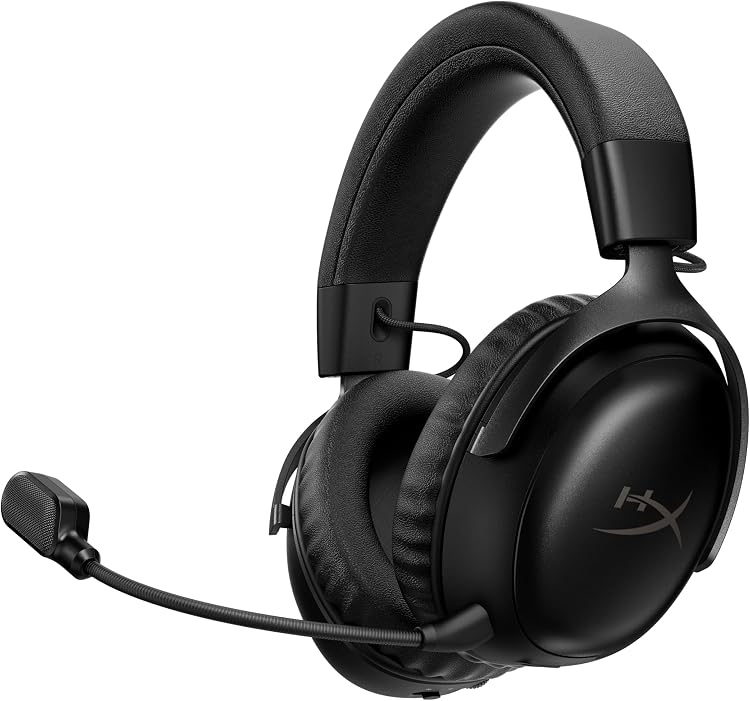
[acms_product asin=”B0F6NZWPTC”]HyperX Cloud III S – Wireless Gaming Headset
HyperX Cloud III S – Wireless Gaming Headset is designed for multi-platform environments requiring long duty cycles. Based on manufacturer specifications, it utilizes 53mm angled drivers aimed at aligning sound waves directly into the ear canal, minimizing cavity reflections. This driver diameter generally favors low-frequency extension without aggressive digital signal equalization, benefiting both PS5 native audio and uncompressed PC audio streams.
The primary advantage of the Cloud III S is power endurance: up to 120 hours via 2.4GHz wireless and up to 200 hours over Bluetooth. The inclusion of both USB-A and USB-C adapters ensures direct connectivity into front-facing PS5 ports as well as standard PC I/O panels. It features an aluminum frame with memory foam ear cushions, addressing long-session structural fatigue. A detachable 10mm boom mic includes an integrated LED mute status indicator, useful for cross-platform play where on-screen UI cues do not match. If you prioritize modular repairability, consult the best gaming headsets with detachable microphones for similar hardware designs.
[acms_product asin=”B081415GCS”]Logitech G733 Lightspeed Wireless Gaming Headset
Logitech G733 Lightspeed Wireless Gaming Headset emphasizes lightweight chassis design and low-latency protocol stability. Built around Logitech’s proprietary 2.4GHz Lightspeed transmission, the headset advertises an active operational range up to 20 meters. Audio delivery relies on 40mm PRO-G hybrid mesh drivers, engineered to reduce non-linear acoustic distortion across mid-to-high register competitive cues.
The structural trade-off centers on battery life and form factor. The G733 delivers up to 29 hours per charge, relying on a fabric suspension headband that distributes weight away from crown pressure points. Players running narrower budgets or weighing lower tiers should check the best wireless gaming headsets under $100 to contrast structural tradeoffs. While Blue VO!CE broadcast vocal processing is limited to PC via G HUB, basic mic transmission functions natively on PS5 hardware. Front-facing dual-zone Lightsync RGB lighting is configurable, though running lighting profiles directly decreases runtime toward the stated baseline.
Hardware Selection and Diagnostic Guide
Choosing between platform-agnostic models depends on structural preference, port layout, and daily operational cycle:
- Long-Session Endurance: Choose HyperX Cloud III S if extended play without recharge cycles is mandatory; 120-hour 2.4GHz endurance significantly outlasts standard battery arrays.
- Weight and Pressure Relief: Choose Logitech G733 if crown pressure causes headaches; suspension headbands mitigate vertical skull clamp forces.
- Multi-Device Switching: Cloud III S supports Bluetooth alongside 2.4GHz, permitting secondary pairing with phones or handhelds. G733 is purely dedicated 2.4GHz Lightspeed.
- Console Port Profile: Ensure front USB-C clearance on PS5 if choosing headsets reliant on wide dongles; use an extension adapter if thermal exhaust or adjacent USB-A ports block the connector.
Setup and Verification Checklist
- Verify wireless transmitter operation: Insert the USB dongle directly into PC motherboard rear I/O or the front USB port of the PS5. Avoid unpowered USB hubs to prevent dropouts.
- Configure PS5 audio output: Navigate to Settings > Sound > Audio Output. Confirm the Output Device is set to the USB Headset. Enable 3D Audio for Headphones.
- Configure PC sound properties: Set the default playback and recording device to the 2.4GHz wireless receiver in Windows Sound Control Panel. Disable aggressive hands-free audio profiles.
- Confirm physical mute switch state: Ensure the hardware boom switch or mute button is disengaged before troubleshooting microphone output in voice apps.
Frequently Asked Questions
Does PS5 3D Audio work on any wireless headset?
Yes. PlayStation 5 processes Tempest 3D Audio directly inside console hardware. Any stereo headset connected through a compliant USB-A or USB-C wireless dongle outputs 3D spatial positioning without requiring dedicated brand-specific processing chips.
Can I adjust PC equalizer profiles and carry them over to PS5?
Typically no. Software-driven EQ suites such as Logitech G HUB or HyperX NGENUITY run as local background processes on Windows. Unless a headset includes physical onboard memory that specifically stores EQ profiles onto the headset EEPROM, settings reset to default flat hardware EQ when plugged into PS5.
Why does a 2.4GHz wireless dongle perform better than Bluetooth for gaming?
Bluetooth introduces noticeable transmission delay, often between 100ms and 200ms, creating audio-visual desync during gameplay. Proprietary 2.4GHz RF wireless connections operate with sub-20ms latency, delivering instantaneous sound vital for positional awareness.
Pros
- Exceptional battery endurance supporting marathon gaming without interruptions
- Versatile wireless options including 2.4GHz and Bluetooth for different use cases
- Comfortable fit from premium memory foam materials
- Robust aluminum frame ensuring longevity
- Easy controls for volume, mute, and mode switching
Cons
- Customization plates require separate purchase
- Heavier build at 344 grams may not suit all users for prolonged wear
- Full feature access like instant pairing restricted to select laptop models
| Brand Name | HyperX |
|---|---|
| Model Number | A59YZAA |
| Model Name | Cloud III S Wireless Black |
| Built-In Media | Cloud III S Wireless Black |
| Age Range Description | Adult |
| Warranty Description | 2 Year Manufacturer |
| Customer Package Type | Standard packaging |
| Number of Items | 1 |
| Series Number | 3 |
| UPC | 198415435590 |
Best suited to shoppers comparing headsets products who specifically need maximize playtime with up to 120 hours of gaming on 2.4GHz wireless or 200 hours via Bluetooth without frequent charging, Achieve superior audio immersion….
Before buying, compare the exact model’s compatibility, dimensions, core specifications, warranty, recurring owner feedback, and current price against other headsets options. Retailer availability and pricing can change after publication.

Pros
- Lightweight construction supports long wear without fatigue
- Broad compatibility across PC and major consoles
- Strong wireless range and battery for cord-free use
- Customizable RGB and audio options add versatility
Cons
- Advanced customization requires separate software
- RGB use shortens battery life compared to minimal settings
- Limited passive noise isolation in loud environments
| Brand Name | Logitech G |
|---|---|
| Model Number | 981-000863 |
| Model Name | G733 LIGHTSPEED |
| Built-In Media | Headset |
| Age Range Description | Kid |
| Warranty Description | Manufacturer’s warranty can be requested from customer service. |
| Number of Items | 1 |
| UPC | 097855155580 |
| Manufacturer | Logitech G |
| External Testing Certification | ANATEL: 82381803229; 53102003229; |
Best suited to shoppers comparing headsets products who specifically need play without cables for up to 29 hours over a stable 20-meter wireless range, Customize lighting and mic settings through software for a personalized….
Before buying, compare the exact model’s compatibility, dimensions, core specifications, warranty, recurring owner feedback, and current price against other headsets options. Retailer availability and pricing can change after publication.
Add PCGearWiki as a preferred source on Google
Sources and Verification
Research basis: Product identity, dimensions, interfaces, supported features, and warranty terms are checked against available manufacturer documentation and current retailer listings. Price, stock, and aggregate customer ratings can change after publication.
Testing disclosure: Unless this article explicitly states that PCGearWiki performed hands-on testing and describes the test setup, recommendations are research-based editorial evaluations rather than PCGearWiki laboratory measurements. Customer feedback is used to identify recurring ownership patterns, not as proof of technical performance.
Last source review: October 2, 2026. See our Review Methodology, Editorial Policy, and Corrections Policy.





Write Your Review
No reviews yet. Be the first to share your experience!