

Last updated: October 2, 2026
Best mini PC for home office work balances multi-thread processor speed, dual-channel RAM, and multi-display video outputs. Pick 16GB RAM for heavy browser multitasking and spreadsheet duty; 8GB configurations hit memory limits under concurrent video conferencing. Low-power units save desk space, cut power draw, and replace bulky tower systems for standard remote enterprise tasks.
Mini desktops fit general productivity setups without cluttering work areas. Users wanting dedicated 3D acceleration or gaming should consult our compact gaming PC buying guide instead. Review the direct hardware comparison below to select based on port selection, storage bus type, and processing silicon.
Mini PC Comparison for Home Office Setups
Note: Recommendations below reflect manufacturer specifications, interface bandwidth limits, and architectural tiers. Units not tested in physical lab environment. Verify live pricing and availability via product cards.
| Model | Processor | RAM | Storage | Display Support | Networking |
|---|---|---|---|---|---|
| BOSGAME E4 Air | AMD Ryzen 5 3500U (4C/8T) | 8GB DDR4 | 256GB SATA SSD | Triple (HDMI, DP, USB-C) | Dual 1GbE, Wi-Fi 5, BT 5.0 |
| Getorli 3501U | AMD Ryzen 5 3501U (4C/8T) | 16GB DDR4 | 512GB NVMe SSD | Dual 4K (Dual HDMI) | Wi-Fi 6, BT 5.3 |
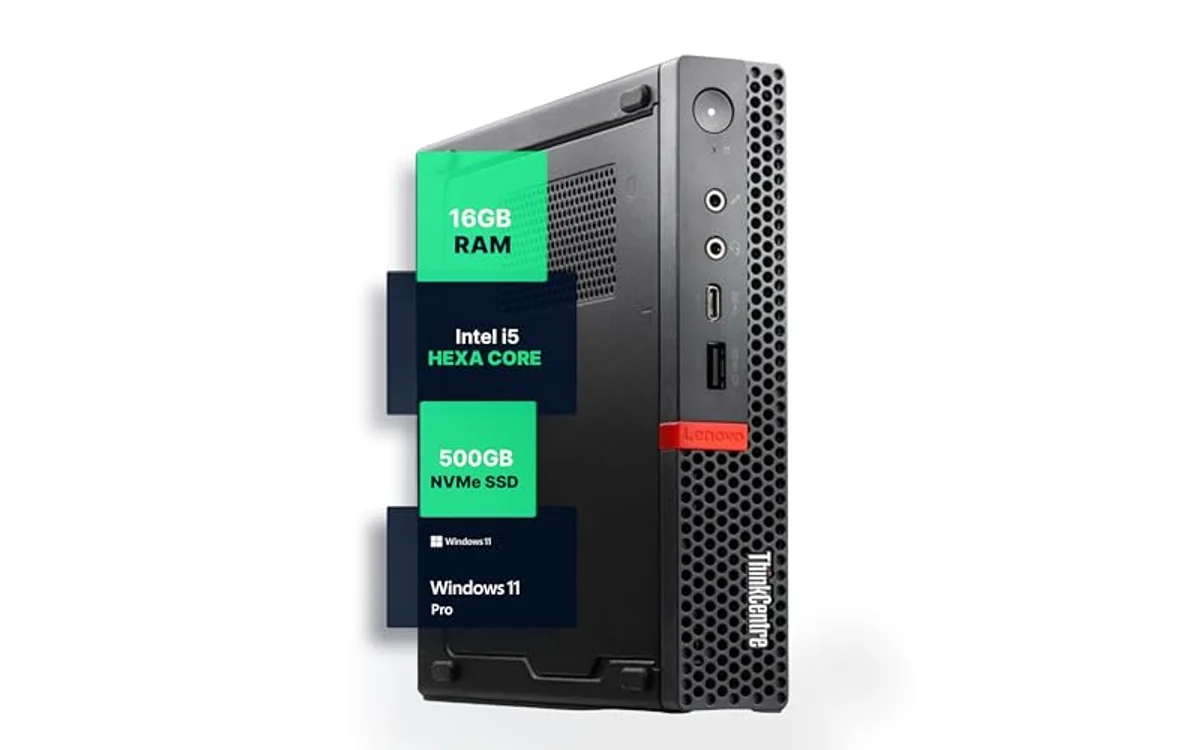
| Lenovo ThinkCentre M720Q | Intel Core i5-8400T (6C/6T) | 16GB DDR4 | 500GB NVMe SSD | Dual (DisplayPort, HDMI) | Gigabit LAN, Wi-Fi, BT |
Home Office Workload Selection Matrix
Match hardware specifications directly to daily software demands. Insufficient memory causes paging delays during screen sharing sessions; slow storage interfaces stall large local database operations.
| Primary Workload | Recommended Model | Key Requirement | Bottleneck Risk |
|---|---|---|---|
| Web browsing, remote terminal, document editing | BOSGAME E4 Air | Low initial hardware cost | 8GB RAM ceiling limits massive browser tab counts |
| Multi-app office multitasking, heavy spreadsheets | Getorli 3501U | 16GB RAM, fast NVMe read/write | Integrated Vega graphics limits workstation rendering |
| Corporate client software, Windows 11 Pro management | Lenovo M720Q | Native OS domain join, hex-core CPU | Older 8th Gen Intel microarchitecture |
BOSGAME E4 Air Mini PC: Budget Multi-Screen Productivity
BOSGAME E4 Air Mini PC, AMD Ryzen 5 3500U 8GB DDR4 handles entry-level office productivity on tight hardware budgets. AMD Ryzen 5 3500U mobile processor provides 4 cores and 8 threads with clock speeds up to 3.7GHz. Integrated Radeon Vega 8 GPU processes 4K video streams without CPU overload. Triple display output via HDMI, DisplayPort, and Type-C allows cheap multi-monitor document comparison without discrete graphics cards.
Hardware limits exist. Factory configuration contains 8GB DDR4 memory and 256GB SATA solid-state drive. SATA bus limits theoretical transfer rates below 550MB/s, noticeably slower than modern NVMe drives. Users managing massive local datasets or hundreds of browser tabs should plan memory upgrade. Dual Gigabit Ethernet ports offer network isolation or hardware firewall utility, uncommon at entry pricing.
- Architecture: 4 cores, 8 threads, Zen+ 12nm process
- Display outs: Triple 4K capable (HDMI, DP, Type-C)
- Memory slot: 8GB DDR4 preinstalled
- Storage bus: 256GB SATA SSD
- Network: Dual RJ45 Gigabit Ethernet, Wi-Fi 5
Getorli Mini PC: Balanced Performance and Modern Connectivity
Getorli Mini PC AMD Ryzen 5 3501U provides balanced hardware specifications for office workers needing immediate out-of-box capability without immediate component upgrades. AMD Ryzen 5 3501U processor operates within 15W to 25W configurable TDP envelope, generating low heat output during long workdays. 16GB DDR4 RAM permits simultaneous execution of Microsoft Teams, bloated web browsers, and enterprise software suites.
512GB NVMe solid-state drive provides significantly faster file indexing, application launches, and boot speeds compared to SATA storage options. Network subsystem includes Wi-Fi 6 and Bluetooth 5.3 chips, reducing latency on busy home wireless routers. Peripheral connectivity includes multiple USB-A ports alongside full-featured Type-C connector. Dual HDMI outputs support dual 4K monitor arrays for clear text display across side-by-side windows.
- Architecture: 4 cores, 8 threads, up to 3.7GHz
- Display outs: Dual HDMI 4K
- Memory: 16GB DDR4 (expandable to 32GB)
- Storage: 512GB NVMe high-speed SSD
- Wireless: Wi-Fi 6 protocol, Bluetooth 5.3
Lenovo ThinkCentre M720Q: Enterprise-Grade Compact Workstation
Lenovo M720Q ThinkCentre Mini PC delivers commercial micro-desktop durability for enterprise home offices. Renewed corporate unit contains Intel Core i5 8th Generation processor with 6 physical computing cores. Hexa-core arrangement handles sustained compute tasks efficiently without virtual hyperthreading overhead. Pre-installed Windows 11 Pro license delivers built-in BitLocker drive encryption, Remote Desktop Host features, and group policy support required by corporate IT departments.
Hardware matches modern productivity standards via 16GB DDR4 RAM and responsive 500GB NVMe M.2 solid-state drive. Industrial chassis allows fast component servicing via single thumbscrew. Low-power 35W T-series desktop processor delivers quiet acoustic profile under load. Users targeting specialized scientific calculations or mobile CAD duty should evaluate dedicated mobile platforms in our work and creator laptops guide or commercial workstations section.
- Processor: Intel Core i5-8400T/8500T (6 cores, 6 threads)
- Operating system: Windows 11 Pro included
- Memory: 16GB DDR4 RAM
- Storage: 500GB NVMe M.2 SSD
- Form factor: 1-liter commercial steel chassis
Home Office Hardware Constraints and Thermal Limits
Mini PCs rely on compact blower fans and laptop cooling mechanisms. Heavy sustained workloads increase chassis temperatures and provoke fan noise. Understand these engineering compromises before deploying micro desktops:
- Expansion: Internal space limits drive additions. Most micro units house single M.2 NVMe slot and optional 2.5-inch drive bay. Check interface clearances before purchasing expansion disks.
- Thermal throttling: Sustained rendering pushes compact copper heat sinks past dissipation limits. CPUs reduce clock frequencies to stay within safe thermal margins.
- Power delivery: Mini PCs utilize external power bricks (45W to 90W). Ensure desk cable management prevents tension on barrel or Type-C DC input plugs.
- RAM topology: Single-channel RAM configurations cut integrated GPU memory bandwidth in half. Always verify system runs dual-channel memory for smooth multi-display scaling. Explore broader compact options inside our mini PCs catalog.
Deployment and Hardware Verification Checklist
Follow this technical sequence when configuring a mini PC for daily office operations:
- Inspect physical ports, chassis ventilation grilles, and external DC power adapter wattage rating.
- Connect display cables using direct HDMI or DisplayPort connections; avoid passive low-cost adapters that introduce signal flicker.
- Boot system into UEFI/BIOS interface. Verify memory operating frequency and confirm dual-channel mode activation.
- Run Windows Memory Diagnostic tool to test preinstalled DDR4 modules for read/write data errors.
- Open Device Manager. Verify all network, audio, and chipset system drivers lack missing hardware flags.
- Execute thermal stress check using built-in diagnostic tools to verify cooling fan ramps up correctly under workload.
Frequently Asked Questions
Can a budget mini PC drive dual 4K office monitors?
Yes. Processors like AMD Ryzen 3500U/3501U and Intel 8th Gen Core chips include integrated graphics silicon capable of driving multiple 4K displays at 60Hz. Verify output ports: dual monitor setups require models featuring dual HDMI ports, DisplayPort connectors, or full-featured USB-C ports with DisplayPort Alternate Mode capability.
Is 8GB RAM sufficient for home office work?
8GB RAM functions for basic word processing, lightweight spreadsheets, and limited browser tabs. It struggles when users run concurrent enterprise video meetings alongside heavy browser sessions. 16GB RAM represents recommended baseline capacity for uninterrupted modern office productivity.
What advantage does Windows 11 Pro offer for remote work?
Windows 11 Pro provides BitLocker full-disk encryption, protecting corporate data on stolen or lost hardware. Pro editions also allow direct connections to enterprise domain controllers, Microsoft Entra ID management systems, and native Remote Desktop host operation without third-party software tools.
How do SATA SSDs differ from NVMe drives in office mini PCs?
SATA solid-state drives top out around 500-550MB/s sequential throughput due to legacy AHCI bus limitations. NVMe drives communicate across high-speed PCIe lanes, achieving speeds between 1500MB/s and 3500MB/s on PCIe 3.0 systems. NVMe drives reduce operating system boot times, hasten program startup, and accelerate search indexing across large local files.

Pros
- Compact space-saving form factor fit tight desks
- Dual 4K video output via twin HDMI ports
- RAM expandable up to 32GB
- WiFi 6 and Bluetooth 5.3 onboard
Cons
- Ryzen 5 3501U architecture unsuitable for heavy AAA 3D gaming
- Type-C port set split between older USB 2.0 and USB 3.2 spec
- Lacks dedicated GPU for heavy video rendering
| Color | R5 3501U+16GB+512GB |
|---|---|
| Size | R5 3501U+16GB+512GB |
| Product Group | Personal Computer |
| Binding | Personal Computers |
Best suited to shoppers comparing minis products who specifically need fast quad-core AMD Ryzen 5 3501U processor power through spreadsheets, video streams, daily office workflows., 16GB DDR4 RAM permit seamless multitasking across dozens of….
Before buying, compare the exact model’s compatibility, dimensions, core specifications, warranty, recurring owner feedback, and current price against other minis options. Retailer availability and pricing can change after publication.

Pros
- Triple 4K monitor support via HDMI, DP, USB-C
- Dual RJ45 Gigabit LAN ports for advanced networking
- Ultra-compact footprint under 1.2 pounds
- Solid multi-threaded performance for daily office work
Cons
- Use older SATA SSD instead of faster NVMe drive
- Base 8GB RAM limit performance under heavy multitasking loads
- Wi-Fi 5 instead of newer Wi-Fi 6 standard
| Color | Black |
|---|---|
| Size | 3500U 8+256GB |
| Dimensions | 5.1 x 5 x 1.8 inches |
| Weight | 1.19 pounds |
| Product Group | Personal Computer |
| Binding | Personal Computers |
Best suited to shoppers comparing minis products who specifically need aMD Ryzen 5 3500U quad-core processor handle office apps, web workflows, 4K streaming easily, Triple display output via HDMI, DisplayPort, USB-C boost multitasking productivity….
Before buying, compare the exact model’s compatibility, dimensions, core specifications, warranty, recurring owner feedback, and current price against other minis options. Retailer availability and pricing can change after publication.

Pros
- Ultra-small form factor fit tight workspaces
- Fast boot and load times with NVMe SSD
- Whisper-quiet thermal operation under normal loads
- Windows 11 Pro pre-installed ready for business use
Cons
- Integrated GPU limit gaming and heavy 3D rendering
- Renewed status mean possible minor exterior marks
- Spec mismatch in source data note both i5-8400T and i5-8500T
| Color | Black |
|---|---|
| Size | 1140 cubic inches |
| Dimensions | 19 x 15 x 4 inches |
| Weight | 2.91 pounds |
| Product Group | Personal Computer |
| Binding | Personal Computers |
Best suited to shoppers comparing minis products who specifically need hexa-core Intel Core i5 CPU power through productivity tasks without slowdown, 16GB DDR4 RAM allow fast multitasking across multiple apps and browser tabs.
Before buying, compare the exact model’s compatibility, dimensions, core specifications, warranty, recurring owner feedback, and current price against other minis options. Retailer availability and pricing can change after publication.
Sources and Verification
Research basis: Product identity, dimensions, interfaces, supported features, and warranty terms are checked against available manufacturer documentation and current retailer listings. Price, stock, and aggregate customer ratings can change after publication.
Testing disclosure: Unless this article explicitly states that PCGearWiki performed hands-on testing and describes the test setup, recommendations are research-based editorial evaluations rather than PCGearWiki laboratory measurements. Customer feedback is used to identify recurring ownership patterns, not as proof of technical performance.
Last source review: October 2, 2026. See our Review Methodology, Editorial Policy, and Corrections Policy.


Write Your Review
No reviews yet. Be the first to share your experience!