

Last updated: September 22, 2026
Quick answer: A quality air cooler is usually the best value and has fewer failure points, while an AIO can provide more radiator area, cleaner socket clearance, and stronger sustained cooling in a compatible case. The correct choice depends on CPU power, case dimensions, noise goals, RAM clearance, radiator support, and expected service life.
Key decision factors
| Factor | What it means | What to check |
|---|---|---|
| Air cooler | Simple and dependable | Value builds and systems with adequate tower clearance |
| 240/280 mm AIO | Flexible socket area and radiator cooling | High-power CPUs in compatible cases |
| 360 mm AIO | More radiator area | Sustained heavy loads where case support is confirmed |
PCGearWiki separates manufacturer specifications from practical buying criteria. See our evaluation process and Review Methodology for how recommendations are assessed.
Choosing between aio vs air cooler solutions is a key decision for anyone building or upgrading a PC. Whether you are assembling a gaming rig, a content creation workstation, or a high-performance desktop, effective CPU cooling directly impacts stability, noise levels, and long-term component life. This guide examines 10 models from Thermalright, CPUSolutions, ARCTIC and more to help you understand the practical differences.
Readers will learn how to evaluate thermal performance, noise output, socket compatibility, installation requirements, and overall value. We compare air coolers such as the Thermalright Peerless Assassin 120 SE against various AIO liquid coolers ranging from compact 120mm units to full 360mm radiators with LCD displays. The goal is to provide clear, data-driven recommendations based on manufacturer specifications and user feedback for builds. For more context on PC assembly topics, see our PC Builds section.
Both aio vs air cooler approaches have distinct strengths. Air coolers generally offer simplicity and zero risk of leaks, while AIO units can deliver superior cooling on high-TDP CPUs in compact cases. We reviewed models priced from $34.59 to $219.99 to cover budget, mid-range, and premium segments.

Pros
- Strong thermal performance for demanding CPUs
- Quiet fan operation across speed ranges
- Broad compatibility with recent Intel and AMD sockets
- Integrated VRM cooling adds reliability
- User-friendly installation process
Cons
- Needs significant case clearance of at least 63mm which limits compatibility with some compact builds
- Total weight of 1915g may require reinforced mounting in certain motherboards
- Lacks RGB lighting for users wanting visual customization
This model supports Intel LGA1851 and LGA1700 as well as AMD AM5 and AM4 sockets.
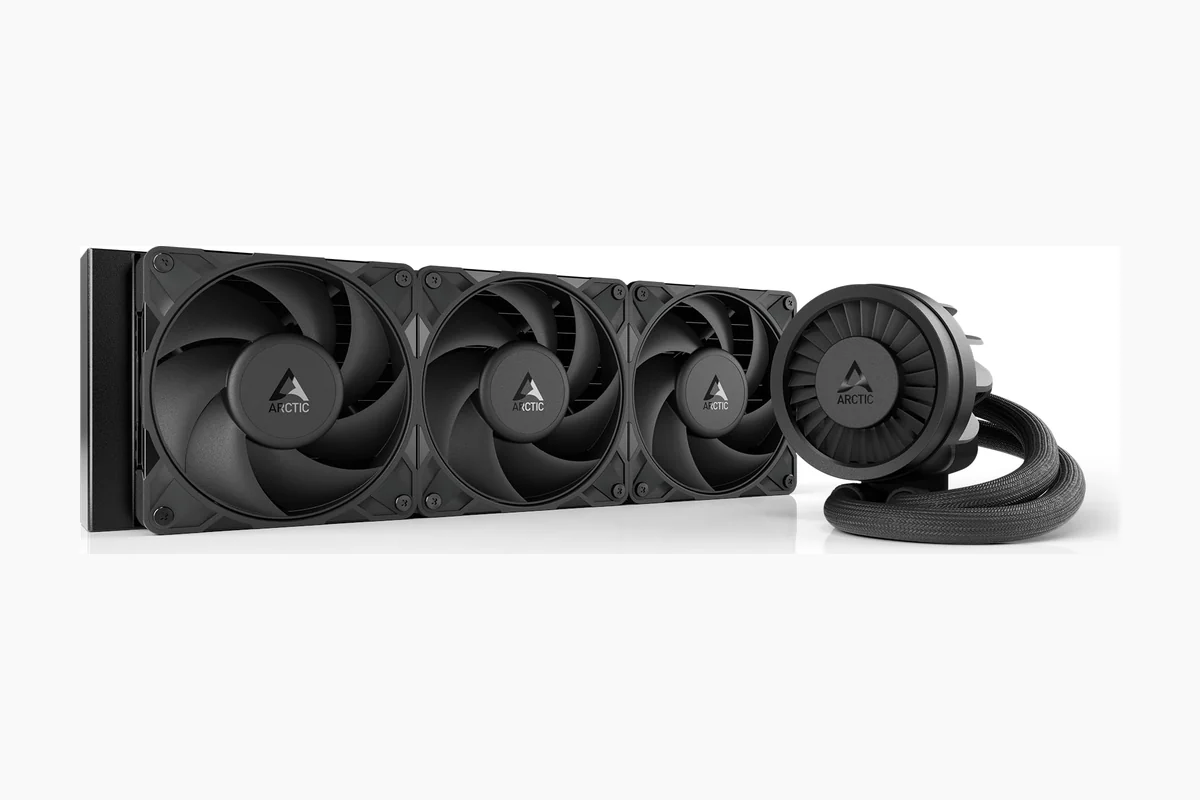
The radiator measures 398mm by 120mm by 38mm with three P12 Pro fans operating from 600 to 3000 rpm.
Pump speeds range from 800 to 2800 rpm while the VRM fan runs between 400 and 2500 rpm.
Tube length reaches 450mm and the unit includes MX-6 thermal paste for application.
| Power Connector Type | 4-Pin |
|---|---|
| Voltage | 12 Volts |
| Wattage | 3.96 watts |
| Cooling Method | Liquid |
| Compatible Devices | Desktop, Gaming Console |
| Maximum Rotational Speed | 3000 RPM |
| Air Flow Capacity | 77 Cubic Feet Per Minute |
| Item Dimensions L x W x H | 15.7"L x 4.7"W x 2.9"H |
| Material Type | Metal, Plastic, Rubber |
| Brand Name | ARCTIC |
Best suited to shoppers comparing water cooling systems products who specifically need delivers superior cooling performance through offset cold plate mounting that targets CPU hotspots effectively, Features quiet yet powerful P12 Pro fans that maintain low….
Before buying, compare the exact model’s compatibility, dimensions, core specifications, warranty, recurring owner feedback, and current price against other water cooling systems options. Retailer availability and pricing can change after publication.

Pros
- Low-noise pump and fans support quiet system operation
- Daisy-chain design reduces wiring complexity
- Wide socket compatibility covers modern platforms
- Convex cold plate improves heat transfer efficiency
- Motherboard-direct ARGB control avoids extra controllers
Cons
- Advanced iCUE control requires separate optional controller purchase
- Pre-applied thermal paste may not suit users preferring manual application
- Daisy-chaining limits some custom fan configurations
| Power Connector Type | 4-Pin |
|---|---|
| Voltage | 12 Volts |
| Wattage | 10 Watt-hours |
| Cooling Method | Water |
| Compatible Devices | Desktop |
| Noise Level | 36 Decibels |
| Maximum Rotational Speed | 2100 RPM |
| Item Dimensions L x W x H | 15.59"L x 4.72"W x 1.06"H |
| Material Type | Aluminium Copper |
| Brand Name | Corsair |
Best suited to shoppers comparing water cooling systems products who specifically need achieves strong CPU cooling performance while maintaining low noise levels for quieter builds, Simplifies installation with direct motherboard connections and daisy-chained fans to reduce….
Before buying, compare the exact model’s compatibility, dimensions, core specifications, warranty, recurring owner feedback, and current price against other water cooling systems options. Retailer availability and pricing can change after publication.

Pros
- Effective cooling for high-TDP processors
- Straightforward installation on supported platforms
- Attractive and customizable ARGB illumination
- Wide temperature stability with included paste
- Quiet performance at typical operating speeds
Cons
- Requires case support for 360mm radiator
- Compatibility limited to listed AMD and Intel sockets
- Minimalist pump design lacks advanced RGB customization
| Power Connector Type | 3-Pin |
|---|---|
| Voltage | 12 Volts |
| Wattage | 3.96 watts |
| Cooling Method | Water |
| Compatible Devices | Desktop |
| Noise Level | 27.2 Decibels |
| Maximum Rotational Speed | 1800 RPM |
| Air Flow Capacity | 71.93 Cubic Feet Per Minute |
| Item Dimensions L x W x H | 15.5"L x 4.7"W x 1.1"H |
| Material Type | Aluminum, Copper, Plastic |
Best suited to shoppers comparing water cooling systems products who specifically need patented Gen S pump boosts water pressure to cool flagship CPUs more effectively, 360mm radiator and optimized fans maintain lower temperatures during heavy loads.
Before buying, compare the exact model’s compatibility, dimensions, core specifications, warranty, recurring owner feedback, and current price against other water cooling systems options. Retailer availability and pricing can change after publication.

Pros
- Broad socket support for latest Intel and AMD platforms
- Durable reinforced tubing and hydrodynamic bearings
- PWM control enables fine-tuned balance of cooling and acoustics
- Includes high-quality MX-6 thermal paste
- Pre-installed components speed up setup
Cons
- Requires minimum 63 mm case clearance for radiator installation
- Peak fan speeds can produce audible noise during heavy loads
- Heavier assembly needs secure case mounting points
| Power Connector Type | 4-Pin |
|---|---|
| Voltage | 12 Volts |
| Wattage | 3.96 watts |
| Cooling Method | Liquid |
| Compatible Devices | Cpu |
| Maximum Rotational Speed | 3000 RPM |
| Air Flow Capacity | 77 Cubic Feet Per Minute |
| Item Dimensions L x W x H | 15.7"L x 4.7"W x 2.9"H |
| Material Type | Copper, Metal, Plastic, Rubber |
| Brand Name | ARCTIC |
Best suited to shoppers comparing water cooling systems products who specifically need offset mounting targets CPU hotspots for faster and more efficient heat transfer, P12 Pro fans deliver strong airflow with quieter low-speed operation and extra….
Before buying, compare the exact model’s compatibility, dimensions, core specifications, warranty, recurring owner feedback, and current price against other water cooling systems options. Retailer availability and pricing can change after publication.

Pros
- Daisy-chain connectivity streamlines builds and minimizes cable management time.
- IPS LCD provides useful real-time monitoring alongside personalization options.
- RX fans deliver strong airflow performance suited specifically for radiator applications.
- Broad socket support covers current high-end Intel and AMD processors.
Cons
- iCUE LINK ecosystem requires the included hub and may add setup steps for non-compatible cases.
- LCD display resolution and animation options are constrained by the 480x480 spec and software limits.
- Advanced features assume familiarity with CORSAIR software for full customization.
| Product Dimensions | 15.59"L x 4.92"H |
|---|---|
| Brand | Corsair |
| Power Connector Type | 4-Pin |
| Voltage | 12 Volts |
| Cooling Method | Water |
| Compatible Devices | Desktop |
| Noise Level | 36 Decibels |
| Material | Aluminum, Copper |
| Maximum Rotational Speed | 2100 RPM |
| UPC | 840440482956 |
Best suited to shoppers comparing water cooling systems products who specifically need customize your PC with a vibrant IPS LCD display for real-time CPU temps or personal images to enhance visual appeal during use., Achieve quieter….
Before buying, compare the exact model’s compatibility, dimensions, core specifications, warranty, recurring owner feedback, and current price against other water cooling systems options. Retailer availability and pricing can change after publication.
Pros
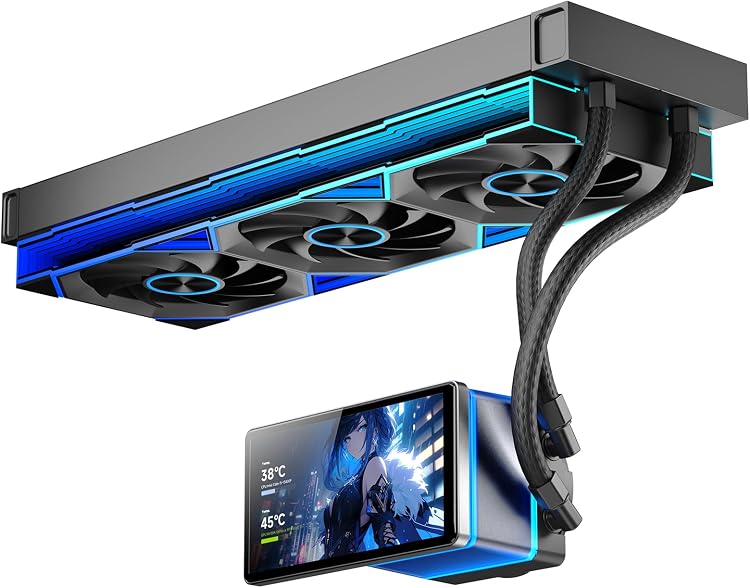
- Effective cooling for demanding high-TDP CPUs
- Innovative customizable LCD display for monitoring and visuals
- Quiet fan performance at high speeds
- Broad compatibility with current Intel and AMD sockets
- Cohesive ARGB lighting that enhances case aesthetics
Cons
- 360mm radiator requires a large compatible PC case for proper fit
- Full LCD customization needs dedicated software installation
- Magnetic screen may require precise alignment during setup
| Power Connector Type | 7-Pin |
|---|---|
| Voltage | 12 Volts (DC) |
| Wattage | 6.1 watts |
| Cooling Method | Liquid |
| Compatible Devices | Desktop |
| Noise Level | 30 Decibels |
| Maximum Rotational Speed | 2000 RPM |
| Air Flow Capacity | 165.1 Cubic Feet Per Minute |
| Material Type | Aluminum |
| Brand Name | Jungle Leopard |
Best suited to shoppers comparing water cooling systems products who specifically need customize system visuals or monitor data on the rotating 5.5-inch magnetic LCD screen for a personalized build, Maintain peak performance with 320W TDP cooling….
Before buying, compare the exact model’s compatibility, dimensions, core specifications, warranty, recurring owner feedback, and current price against other water cooling systems options. Retailer availability and pricing can change after publication.

Pros
- Strong feature set including VRM cooling and offset mounting at a competitive price point.
- Broad socket compatibility covering latest Intel and AMD platforms.
- Compact 240mm size fits more cases than larger 360mm AIOs.
- Fluid dynamic bearings and 6-year warranty for reliable operation.
Cons
- Requires at least 63mm clearance which excludes some compact cases.
- 240mm radiator offers less thermal headroom than 360mm models for extreme high-TDP CPUs.
- Heavier assembly at 3.7 lbs may stress lighter chassis mounts.
| Power Connector Type | 4-Pin |
|---|---|
| Voltage | 12 Volts |
| Wattage | 3.96 watts |
| Cooling Method | Water |
| Compatible Devices | AMD, Intel |
| Maximum Rotational Speed | 3000 RPM |
| Air Flow Capacity | 77 Cubic Feet Per Minute |
| Item Dimensions L x W x H | 10.9"L x 4.7"W x 2.6"H |
| Material Type | Aluminium (Radiator), Copper, Micro Skived Fins (Cold Plate) |
| Brand Name | ARCTIC |
Best suited to shoppers comparing water cooling systems products who specifically need maximizes cooling efficiency with a thick 38mm radiator and high-static-pressure P12 Pro fans for better heat handling during load spikes., Lowers VRM temperatures through….
Before buying, compare the exact model’s compatibility, dimensions, core specifications, warranty, recurring owner feedback, and current price against other water cooling systems options. Retailer availability and pricing can change after publication.

Pros
- Strong cooling for stock and mildly overclocked CPUs
- Broad platform compatibility across modern Intel and AMD sockets
- Quiet operation with automatic speed adjustments
- Attractive synchronized ARGB lighting effects
- Straightforward installation process with included accessories
Cons
- 120mm radiator may struggle with extreme overclocking on high-power CPUs
- ARGB synchronization requires a compatible 5V 3-pin motherboard header
- Fan and pump cables add some clutter during cable management
| Power Connector Type | 4-Pin |
|---|---|
| Voltage | 12 Volts |
| Cooling Method | Water |
| Compatible Devices | Desktop |
| Noise Level | 25.6 Decibels |
| Maximum Rotational Speed | 1500 RPM |
| Air Flow Capacity | 66.17 Cubic Feet Per Minute |
| Item Dimensions L x W x H | 4.72"L x 0.98"W x 4.72"H |
| Material Type | Aluminum |
| Brand Name | Thermalright |
Best suited to shoppers comparing water cooling systems products who specifically need delivers efficient CPU cooling to maintain stable performance during gaming and productivity tasks, Syncs vibrant ARGB lighting with motherboards for customizable visual effects.
Before buying, compare the exact model’s compatibility, dimensions, core specifications, warranty, recurring owner feedback, and current price against other water cooling systems options. Retailer availability and pricing can change after publication.

Pros
- Wide socket compatibility for modern Intel and AMD CPUs
- AGHP technology prevents gravity-related performance drops
- User-friendly mounting system with good contact pressure
- Balanced cooling and noise from dual 120mm fans
Cons
- Requires case clearance verification due to dual-tower dimensions
- AMD installations depend on the motherboard backplate not included in the package
- Maximum fan speed limits suitability for extreme overclocking needs
| Power Connector Type | 4-Pin |
|---|---|
| Voltage | 12 Volts |
| Wattage | 265 watts |
| Cooling Method | Air |
| Compatible Devices | Desktop |
| Noise Level | 25.6 Decibels |
| Maximum Rotational Speed | 1550 RPM |
| Air Flow Capacity | 66.17 Cubic Feet Per Minute |
| Item Dimensions L x W x H | 4.92"L x 5.31"W x 6.1"H |
| Material Type | Aluminium,Aluminum,Metal,Silicone |
Best suited to shoppers comparing cpu cooling fans products who specifically need maintains strong cooling performance in any case orientation with AGHP heat pipe design, Reduces system noise while delivering effective airflow through dual PWM fans.
Before buying, compare the exact model’s compatibility, dimensions, core specifications, warranty, recurring owner feedback, and current price against other cpu cooling fans options. Retailer availability and pricing can change after publication.
Pros
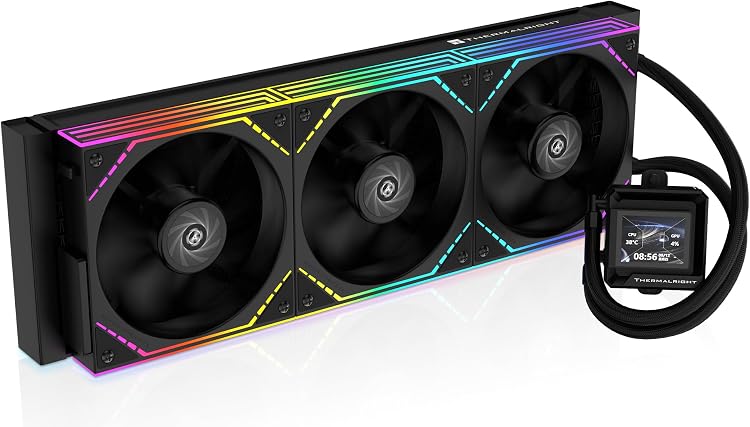
- Effective heat dissipation via 3000RPM pump and 397mm radiator
- Custom LCD screen adds unique functionality and personalization
- Daisy-chain fans minimize wiring for easier setup
- Supports latest mainstream CPU sockets
- Quiet operation at 28.2 dBA maximum
Cons
- Full LCD features require a motherboard USB header connection
- Customization depends on dedicated software installation
- Maximum fan speeds can produce noticeable noise levels
| Power Connector Type | 4-Pin |
|---|---|
| Voltage | 12 Volts |
| Wattage | 3 watts |
| Cooling Method | Water |
| Compatible Devices | Desktop |
| Noise Level | 28.2 Decibels |
| Maximum Rotational Speed | 2000 RPM |
| Air Flow Capacity | 68.9 Cubic Feet Per Minute |
| Item Dimensions L x W x H | 15.63"L x 2.09"W x 4.72"H |
| Material Type | Aluminum |
Best suited to shoppers comparing water cooling systems products who specifically need personalize builds with a customizable 2 inch LCD screen for system monitoring or animated visuals, Maintain stable temperatures during heavy workloads using the high-speed….
Before buying, compare the exact model’s compatibility, dimensions, core specifications, warranty, recurring owner feedback, and current price against other water cooling systems options. Retailer availability and pricing can change after publication.
How to Choose the Right Aio Vs Air Cooler
Thermal Performance
Thermal performance determines how well a cooler keeps your CPU below safe temperature thresholds during sustained loads. According to manufacturer specifications, air coolers like the Thermalright Peerless Assassin 120 SE use six heat pipes and dual 120mm fans to handle moderate to high TDP processors. In contrast, 360mm AIO models such as the ARCTIC Liquid Freezer III Pro 360 and CORSAIR Nautilus 360 RS ARGB move larger volumes of liquid across bigger radiator surfaces for better heat dissipation on flagship CPUs.
For most users running gaming or productivity workloads, a well-designed dual-tower air cooler provides sufficient headroom. Users pushing overclocked or high-core-count chips benefit from larger AIO radiators that maintain lower temperatures under prolonged stress. When comparing aio vs air cooler options, check TDP ratings and radiator size against your CPU’s power draw.
Noise Levels
Noise output affects daily comfort, especially during long sessions. The Thermalright Peerless Assassin 120 SE operates at or below 25.6 dB(A) thanks to its PWM fans, while many AIO pumps add a low-frequency hum even at idle. Models such as the CORSAIR Nautilus 360 RS ARGB advertise pump noise around 20 dBA, and ARCTIC’s P12 Pro fans are noted for strong performance at lower speeds.
Premium units with daisy-chain fans or magnetic dome bearings, including several Thermalright and ARCTIC options, reduce turbulence. If silence is a priority, compare published noise curves rather than peak ratings alone. Larger radiators often allow fans to spin slower for the same cooling effect, lowering audible output in real-world use.
Socket Compatibility
Socket support ensures the cooler fits your motherboard without adapters. Most models listed support current Intel LGA 1700/1851 and AMD AM4/AM5 platforms. The Thermalright Peerless Assassin 120 SE includes mounting hardware for both ecosystems, while AIO units from ARCTIC and CORSAIR often include Intel contact frames for optimized pressure on LGA 1700 and 1851 chips.
Always verify your specific CPU socket before purchase. Some budget AIOs require the motherboard’s stock backplate for AMD installations. Compatibility lists in product data show broad coverage across recent platforms, making most options viable for new builds in.
Installation Ease
Installation complexity varies between aio vs air cooler choices. Air coolers typically require only bracket alignment and fan connection, taking less than 15 minutes. AIO units involve mounting the pump block, routing tubes, and securing the radiator, which can be more time-consuming in tight cases.
Models with pre-applied thermal paste, daisy-chain fans, and offset mounting like the ARCTIC Liquid Freezer III Pro series simplify the process. Thermalright AIOs often include clear instructions and ARGB synchronization. Users new to liquid cooling should factor in extra time and case clearance for radiator and tube routing.
Build Quality and Clearance
Build quality influences durability and fit. Aluminum radiators and copper cold plates appear across the AIO models, while the Thermalright air cooler uses a full aluminum fin stack with sintered heat pipes. Larger 360mm units demand cases with adequate radiator support and front or top clearance.
Check dimensions against your case specifications. Compact 120mm AIOs such as the Thermalright Aqua Elite 120 V3 fit smaller builds where dual-tower air coolers might interfere with RAM height. Premium options with LCD screens add visual appeal but require software setup for customization.
Price-to-Performance Value
Value depends on matching features to your needs without overspending. Budget air coolers deliver strong performance per dollar, while entry-level AIOs add aesthetics and potentially lower temperatures at modest premiums. Higher-priced units with LCD displays or advanced connectivity justify cost for enthusiasts seeking customization.
Across the 10 models, strong value appears in units offering reliable cooling, low noise, and broad compatibility at mid-range prices. Compare published airflow, pressure, and warranty details when assessing long-term return on investment.
Technical Comparison Table
| Model | Key Specification | Best For | Main Strength | Value Rating |
|---|---|---|---|---|
| Thermalright Peerless Assassin 120 SE | 6 heat pipes, dual 120mm PWM fans | Budget builds | High airflow at low noise | Excellent |
| Thermalright Aqua Elite 120 V3 | 120mm AIO, 4th gen pump | Compact cases | ARGB lighting and easy install | Excellent |
| ARCTIC Liquid Freezer III Pro 360 | 38mm radiator, VRM fan, contact frame | High-TDP CPUs | Offset mounting and cable management | Very Good |
| CORSAIR Nautilus 360 RS ARGB | Daisy-chain fans, convex cold plate | Low-noise systems | Direct motherboard connection | Very Good |
| Cooler Master 360L Core | Gen S dual-chamber pump | Custom lighting builds | Optimized fan blades | Good |
Why You Should Trust PCGearWiki
PCGearWiki reviews hardware using available product specifications, manufacturer information, compatibility research, feature comparisons, user feedback, and value analysis. We focus on objective criteria such as published thermal ratings, socket support, and price positioning to help readers make informed decisions.
Our approach emphasizes transparency around affiliate recommendations and avoids unsubstantiated performance claims. Each model is evaluated against competing options within the same price bracket to highlight practical strengths and limitations for different user scenarios.
Final Thoughts
After comparing the 10 models, several stand out for specific use cases. The Thermalright Peerless Assassin 120 SE earns the best budget pick for users seeking reliable air cooling without complexity or leak risk. Its strong feature set and high review volume make it a practical starting point for most builds.
For best value, the Thermalright Aqua Elite 120 V3 offers AIO convenience at an entry-level price with solid cooling and ARGB features. The ARCTIC Liquid Freezer III Pro 360 represents the best overall choice for users needing maximum thermal headroom and refined engineering on current platforms.
The CORSAIR Titan 360 RX LCD serves as the premium pick for enthusiasts wanting customization through its IPS display and iCUE LINK ecosystem. Before finalizing any purchase, cross-reference case clearance and CPU socket requirements. Additional guidance appears in our Comparisons and Buying Guides sections.
Frequently Asked Questions
Is the aio vs air cooler choice important?
Yes, the decision remains relevant because modern CPUs continue to push higher power limits. Matching cooler type to your case size, noise tolerance, and performance goals helps maintain stable operation and acceptable acoustics.
How much should I spend on a aio vs air cooler?
Budget options around $35 deliver capable cooling for mainstream CPUs, while $70–$100 unlocks better radiator surface area and features. Premium units above $150 add displays and advanced connectivity that appeal mainly to enthusiasts.
Is it worth upgrading your aio vs air cooler?
Upgrading makes sense if you are moving to a higher-TDP CPU or notice thermal throttling. Newer models often improve pump efficiency, fan bearings, and mounting systems compared with older units.
Which brands make reliable aio vs air cooler options?
Thermalright, ARCTIC, and CORSAIR appear frequently in user feedback for consistent quality and support. Each brand offers multiple price points with documented compatibility across current sockets.
How long does a aio vs air cooler typically last?
Air coolers often exceed five years with minimal maintenance. Quality AIO units commonly carry three- to five-year warranties, though pump longevity depends on usage conditions and proper installation. See our Reviews section for more hardware longevity topics.



Write Your Review
No reviews yet. Be the first to share your experience!