

Last updated: September 22, 2026
Quick answer: The best ATX 3.1 power supply under $150 for most high-performance gaming PCs is the NZXT C1000 Gold ATX 3.1 because it combines 1000W, native 12V-2×6 connectivity, Gold efficiency, and semi-passive cooling at a comparatively low listed price. The main trade-off is that 850W models cost less, while 1200W capacity leaves less budget for other components.
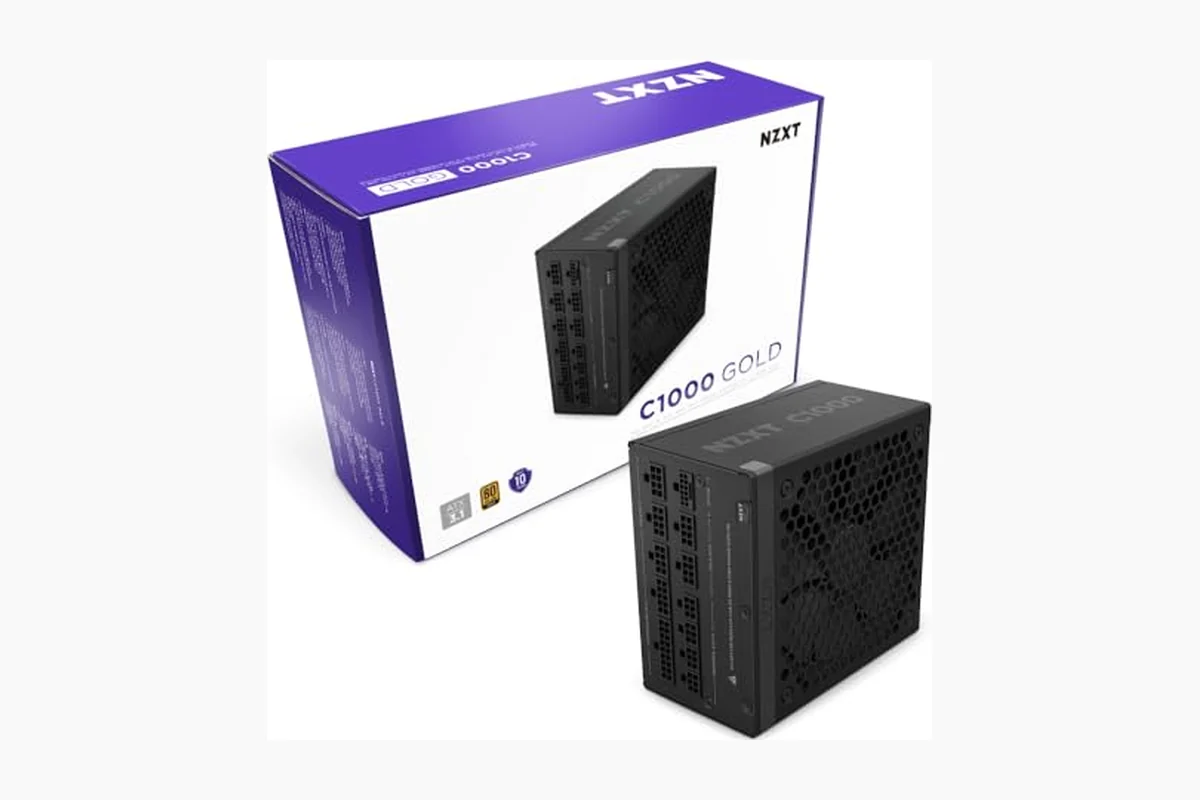
This comparison covers ATX 3.1 fully modular power supplies in the Cooling & PSU category, with listed prices ranging from $119.00 to $149.99. These models target modern gaming systems using PCIe 5.1 graphics cards, including builds that need a native 12V-2×6 cable rather than an older adapter arrangement. The product data and prices supplied for this guide are current for August 2026 and may change.

NZXT C1000 Gold 1000W ATX 3.1 Modular PSU




As an Amazon Associate we earn from qualifying purchases. Product prices and availability are accurate as of the date/time indicated.
Quick Verdict
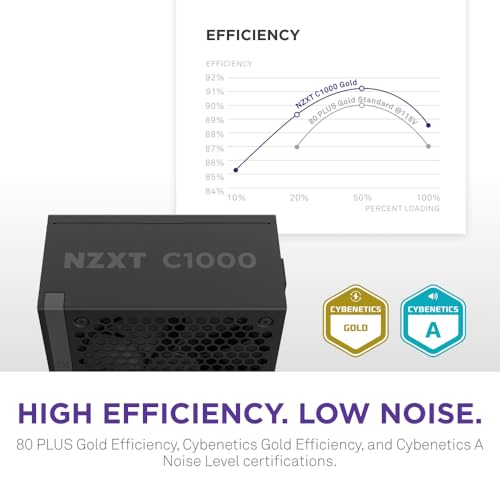
For most users, the NZXT C1000 Gold ATX 3.1 is the strongest all-round pick. Its 1000W output provides more upgrade headroom than an 850W unit, while its native 12V-2×6 connector, 80 PLUS Gold and Cybenetics Gold efficiency certifications, 135mm fluid dynamic bearing fan, and Zero Fan Mode address the main concerns of a modern gaming build.
The main limitation is that product data does not include physical dimensions, connector counts beyond the stated 12V-2×6 connection, or manufacturer warranty information. Buyers should verify those details on the final listing and confirm that the selected capacity suits the exact CPU and GPU combination. For a lower-cost 850W build, the CORSAIR RM850e (2025) is the more economical direction; for maximum capacity under the budget, NZXT C1200 Gold ATX 3.1 is the standout.
How We Evaluated the Best ATX 3.1 Power Supply Under $150
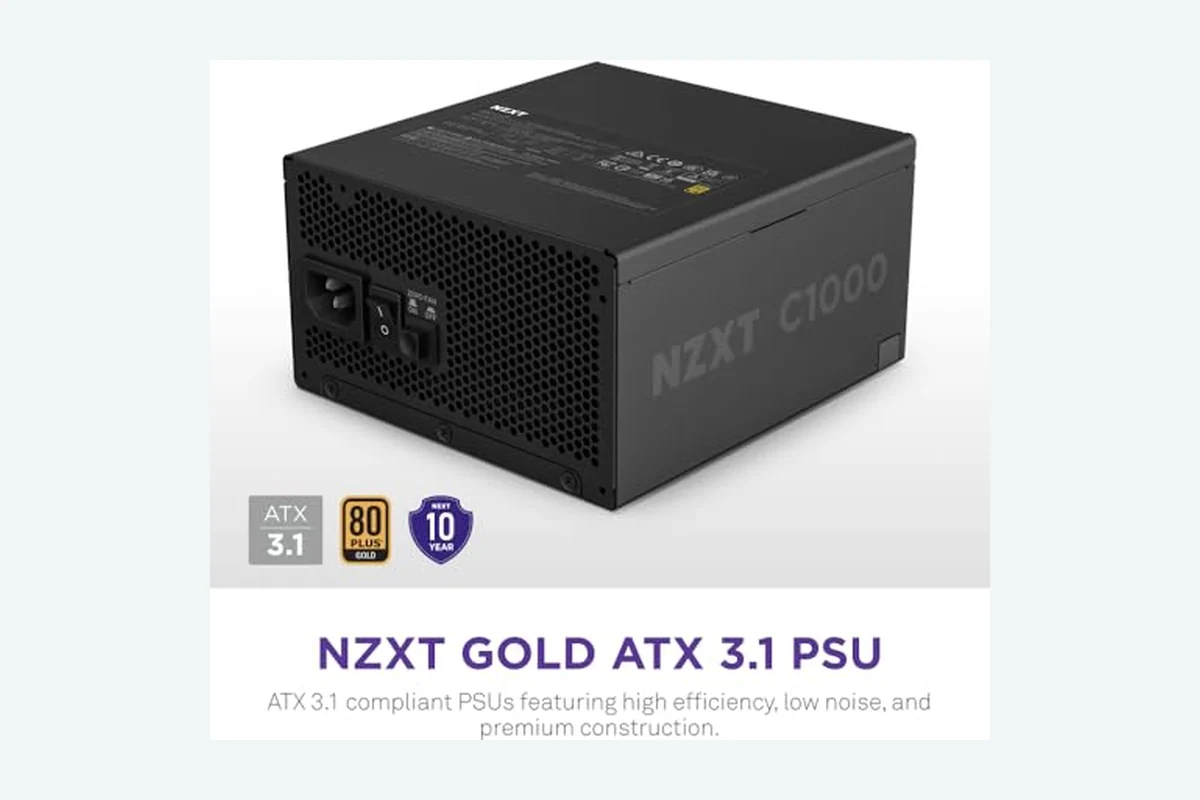
PCGearWiki evaluated the supplied manufacturer specifications, capacity options, ATX 3.1 and PCIe 5.1 compatibility claims, native 12V-2×6 connectivity, efficiency certifications, modular cable design, and cooling features. We compared each model against the others in this shortlist rather than treating every 80 PLUS Gold unit as interchangeable.
This is research-based buying advice, not a report of PCGearWiki laboratory testing. The supplied data contains no PCGearWiki benchmarks, independent measurements, or review text from owners. Price information is also changeable. For more detail on our approach, read the PCGearWiki review methodology.
What Matters Most When Choosing
ATX 3.1 and PCIe 5.1 support: ATX 3.1 is the current power-supply standard represented in this shortlist. The listed Corsair models explicitly pair ATX 3.1 with PCIe 5.1 compliance, while the NZXT and be quiet! products state ATX 3.1 compliance and native 12V-2×6 support. This matters when a graphics card is designed around newer transient-load behavior and a direct high-power GPU connection.
Capacity: The shortlist includes 850W, 1000W, and 1200W units. More wattage is not automatically better, but it can provide useful headroom for a power-hungry graphics card, a high-end CPU, additional storage, or a future GPU upgrade. An 850W model is more sensible when the complete system does not require the extra capacity.
Native 12V-2×6 connectivity: A native 12V-2×6 connector provides a direct connection between the PSU and a compatible graphics card. The supplied NZXT specifications state that the connector can deliver up to 600W to NVIDIA GeForce RTX 40 Series graphics cards. The Corsair RM850x specifically identifies a native 12V-2×6 connector, while the Corsair RM1000e and RM850e list a 12V-2×6 cable.
Cooling and acoustics: NZXT C-series models use a 135mm fluid dynamic bearing fan and Zero Fan Mode that, according to the supplied specifications, remains off below 50% load. The be quiet! Pure Power 13 M also uses semi-passive zero-RPM cooling. Corsair uses a 120mm rifle bearing fan with a calculated fan curve. These are manufacturer-described features, not independently measured noise results.
Efficiency and electrical components: 80 PLUS Gold and Cybenetics Gold certifications indicate the efficiency tier stated in the product information. The NZXT models list 100% Japanese capacitors, Corsair RM1000e and RM850e list 105°C-rated capacitors, and be quiet! lists LLC topology and a single 12V rail. Those specifications help distinguish the models, but they do not replace independent ripple, voltage-regulation, temperature, or noise measurements.
Comparison and Trade-Offs
| Model | Capacity | GPU connection | Cooling or efficiency detail | Best fit |
|---|---|---|---|---|
| NZXT C1000 Gold ATX 3.1 | 1000W | 12V-2×6, up to 600W stated | 80 PLUS Gold, Cybenetics Gold, Cybenetics A; Zero Fan Mode below 50% load | Balanced high-end gaming build |
| CORSAIR RM1000e (2025) Fully Modular Low-Noise ATX | 1000W | 12V-2×6 cable | Cybenetics Gold; 105°C-rated capacitors; Modern Standby | Modern standby and platform compatibility |
| CORSAIR RM850x ATX 3.1 PCIe 5.1 Ready Fully | 850W | Native 12V-2×6 | Cybenetics Gold; up to 91% efficiency stated | 850W build with tidy cabling |
| be quiet! Pure Power 13 M 1000W, ATX 3.1 | 1000W | Native 12V-2×6 plus four PCIe 6+2-pin connectors | 80 PLUS Gold; up to 94.4% efficiency stated; zero-RPM mode | Quiet system with legacy GPU flexibility |
| CORSAIR RM850e (2025) Fully Modular Low-Noise ATX | 850W | 12V-2×6 cable | Cybenetics Gold; 105°C-rated capacitors; Modern Standby | Lower-cost ATX 3.1 gaming PC |
| NZXT C850 Gold ATX 3.1-850W Fully Modular Power | 850W | 12V-2×6, up to 600W stated | 80 PLUS Gold, Cybenetics Gold, Cybenetics A-; Zero Fan Mode below 50% load | Quiet 850W configuration |
| NZXT C1200 Gold ATX 3.1 | 1200W | 12V-2×6, up to 600W stated | 80 PLUS Gold, Cybenetics Gold, Cybenetics A; Zero Fan Mode below 50% load | Maximum capacity under $150 |
The main decision is capacity rather than branding. The NZXT C850 and Corsair RM850e reduce the purchase cost, but the 1000W models provide a more comfortable margin for demanding components. The NZXT C1200 offers the most headroom at the budget ceiling, although many mainstream gaming systems will not need 1200W.
Top Picks
Best Overall: NZXT C1000 Gold ATX 3.1
The NZXT C1000 Gold ATX 3.1 is the best overall option for a powerful gaming PC that needs more than 850W but does not justify a 1200W unit. Its 1000W capacity, ATX 3.1 compliance, native-style 12V-2×6 connection, and stated support for up to 600W to NVIDIA GeForce RTX 40 Series graphics cards align well with current high-end GPU builds.
Its 135mm fluid dynamic bearing fan and Zero Fan Mode are particularly useful for systems that spend significant time at low or moderate load. NZXT also lists 80 PLUS Gold, Cybenetics Gold, and Cybenetics A certifications, along with 100% premium Japanese capacitors. The meaningful limitation is that the supplied data does not provide independent acoustic or electrical measurements. Skip it if your system only needs 850W and the lower price of an RM850e matters more.
Best 1000W Alternative: CORSAIR RM1000e (2025) Fully Modular Low-Noise ATX
The CORSAIR RM1000e (2025) Fully Modular Low-Noise ATX suits builders who want 1000W capacity with explicit Intel ATX 3.1 and PCIe 5.1 compliance. Its fully modular cabling limits unused cables inside the case, while 105°C-rated capacitors and Modern Standby compatibility add platform-specific features that the supplied NZXT listing does not mention.
Corsair specifies a 120mm rifle bearing fan with a calculated fan curve designed to control noise, but this is not a measured noise result. Compared with the NZXT C1000, the RM1000e offers Modern Standby and clearly stated PCIe 5.1 support, while NZXT lists a larger fan and Zero Fan Mode below 50% load. Skip the RM1000e if semi-passive fan operation is your primary requirement.
Best 850W Premium Option: CORSAIR RM850x ATX 3.1 PCIe 5.1 Ready Fully
The CORSAIR RM850x ATX 3.1 PCIe 5.1 Ready Fully is a focused choice for a system that genuinely fits within an 850W power budget. It includes a native 12V-2×6 connector, ATX 3.1 compliance, fully modular cabling, and Cybenetics Gold certification. Its embossed cables and low-profile combs may also appeal to builders who care about cable presentation.
The limitation is capacity: 850W provides less upgrade margin than the 1000W and 1200W alternatives at nearly the same listed price as some of them. Corsair states efficiency of up to 91%, but that figure should be treated as a manufacturer or certification specification rather than a PCGearWiki measurement. Skip it if you are planning a future flagship GPU or a heavily expanded workstation.
Best for Quiet 1000W Builds: be quiet! Pure Power 13 M 1000W, ATX 3.1
The be quiet! Pure Power 13 M 1000W, ATX 3.1 is aimed at quiet gaming, media creation, and upgrade systems that need both modern and older GPU connections. It includes a native 12V-2×6 connector plus four PCIe 6+2-pin connectors, giving it a broader stated connector mix than the other products in this comparison.
Be quiet! lists 80 PLUS Gold certification, efficiency up to 94.4%, a single 12V rail, LLC topology, and semi-passive zero-RPM cooling. Those features make it a compelling alternative to NZXT for a noise-conscious 1000W build. However, the supplied product rating is lower than the other listed ratings, and no review text is available to explain that difference. Skip it if you specifically want the more detailed Cybenetics certifications listed for the NZXT and Corsair models.
Best Budget 850W Pick: CORSAIR RM850e (2025) Fully Modular Low-Noise ATX
The CORSAIR RM850e (2025) Fully Modular Low-Noise ATX is the most budget-oriented option in the supplied list. It provides 850W, fully modular cabling, a 12V-2×6 cable, ATX 3.1 and PCIe 5.1 compliance, Cybenetics Gold efficiency, 105°C-rated capacitors, and Modern Standby compatibility.
Its concrete reason to choose is the lower listed price while retaining the core connection and standard requirements for a current gaming build. The trade-off is that the product data identifies a 12V-2×6 cable rather than explicitly describing a native connector, and 850W leaves less capacity headroom. Skip it if your estimated system demand calls for 1000W or more.
Best Quiet 850W Pick: NZXT C850 Gold ATX 3.1-850W Fully Modular Power
The NZXT C850 Gold ATX 3.1-850W Fully Modular Power fits builders who want 850W without giving up NZXT’s listed 135mm fluid dynamic bearing fan and Zero Fan Mode below 50% load. It also carries 80 PLUS Gold, Cybenetics Gold, and Cybenetics A- certifications, plus a 12V-2×6 connection rated by NZXT for up to 600W to compatible NVIDIA GeForce RTX 40 Series graphics cards.
Compared with the Corsair RM850e, the NZXT model emphasizes semi-passive cooling and Japanese capacitors rather than Modern Standby and 105°C-rated capacitors. Its limitation remains the 850W capacity. Skip it if the small price difference to a 1000W unit buys valuable upgrade headroom for your build.
Best Maximum-Headroom Pick: NZXT C1200 Gold ATX 3.1
The NZXT C1200 Gold ATX 3.1 is the choice for buyers who want the highest stated capacity while remaining under the $150 ceiling. Its 1200W output is appropriate to consider for unusually demanding GPU and CPU combinations, future upgrades, or workstation-style systems where 850W would be restrictive.
NZXT includes the same listed 12V-2×6, 135mm fluid dynamic bearing fan, Zero Fan Mode below 50% load, Gold efficiency certifications, and Japanese capacitors found on the C1000. The limitation is value: most users will not use the additional capacity, and the supplied data does not prove better real-world performance than the lower-wattage NZXT models. Skip it if your system is a conventional midrange or upper-midrange gaming PC.
Key Specifications
| Specification | Details | Why It Matters |
|---|---|---|
| Form factor and standard | ATX 3.1 across the supplied models | Matches modern desktop PSU requirements and transient-load expectations |
| Power capacities | 850W, 1000W, and 1200W options | Determines GPU class, upgrade margin, and system expansion flexibility |
| GPU power connection | 12V-2×6 connector or cable, depending on model | Supports direct connection to compatible next-generation graphics cards |
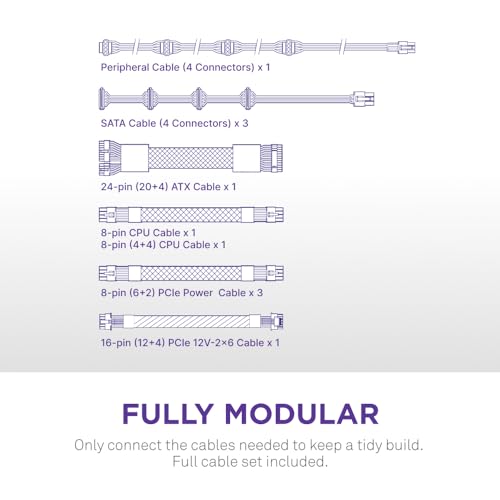
| Cabling | Fully modular across the listed products | Allows builders to install only the cables required by the system |
| Efficiency | 80 PLUS Gold or Cybenetics Gold, depending on model | Identifies the stated efficiency tier; it is not a complete performance test |
| Low-load cooling | NZXT and be quiet! list zero-RPM or Zero Fan Mode features | Can reduce fan activity during light workloads according to manufacturer specifications |
Design and Build Quality
All seven listed products are fully modular ATX power supplies, so the motherboard, CPU, GPU, and peripheral cables connect separately to the PSU. This design reduces unused wiring compared with a fixed-cable unit and can simplify cable routing. The supplied data does not include chassis dimensions, so users building in a compact case must verify PSU clearance independently.
NZXT emphasizes 100% premium Japanese capacitors and uses a 135mm fluid dynamic bearing fan. Corsair RM1000e and RM850e emphasize 105°C-rated capacitors and 120mm rifle bearing fans, while the RM850x adds embossed cables with low-profile combs. Be quiet! combines a single 12V rail, LLC topology, and semi-passive cooling. These are specification-level differences; they should not be interpreted as proof that one unit has superior measured ripple, regulation, or lifespan.
Performance and Real-World Use
In practical use cases, the most important performance question is whether the PSU has enough sustained capacity and the correct GPU connection for the complete build. An 850W unit can be the sensible choice for a system whose CPU and GPU requirements fit that level, while a 1000W model gives more room for high-end components and future changes. The supplied data does not include measured load behavior, temperatures, noise levels, or voltage regulation.
For gaming, native or supplied 12V-2×6 connectivity reduces the need to rely on an older adapter arrangement when the graphics card supports that interface. For productivity and media creation, 1000W or 1200W models may be more appropriate when the system includes a powerful GPU alongside a high-core-count processor and multiple drives, but the correct choice still depends on the components’ manufacturer requirements.
For quiet systems, NZXT and be quiet! offer the clearest manufacturer-described low-load fan-stop features. Corsair’s calculated fan curves target low noise, but the supplied information does not state a zero-RPM threshold. Buyers who need verified acoustic performance should seek independent measurements for the exact model and revision before purchase.
Compatibility
Check the complete PC build rather than selecting a PSU from the GPU name alone. Confirm the graphics card’s recommended PSU capacity, the processor’s platform requirements, the number of PCIe and CPU power connections needed, and whether the case accepts the PSU’s physical dimensions. Dimensions are not included in the supplied product data and must be verified before checkout.
- Confirm that the exact ASIN and model revision match the intended capacity: C850, C1000, and C1200 are not interchangeable.
- Use the supplied 12V-2×6 connector or cable only with a compatible graphics card, and seat the connector fully according to the PSU and GPU instructions.
- Do not mix modular cables from another PSU, even when the connectors appear similar.
- Verify that the case supports the PSU length and that cable-routing space is sufficient near the GPU connector.
- Check whether the graphics card needs additional PCIe 6+2-pin connectors beyond the 12V-2×6 connection.
- Review the final retailer listing for return terms, included cables, stock status, and warranty coverage because those details are not supplied here.
Builders selecting a PSU for an especially demanding graphics card can also compare the requirements discussed in PCGearWiki’s ATX 3.1 PSU guide for RTX 5090 systems. The capacity recommendations for that class of GPU should not automatically be applied to every gaming PC.
Pros and Cons
- ATX 3.1 compliance appears across the supplied shortlist.
- Every listed model uses fully modular cabling.
- Multiple 850W, 1000W, and 1200W capacity choices fit different build targets.
- Each product provides a stated 12V-2×6 connection or cable.
- Several models include manufacturer-described fan-stop or low-noise features.
- Independent electrical, thermal, and acoustic measurements are not supplied.
- Physical dimensions and complete connector inventories are not provided for every model.
- 850W models may offer insufficient upgrade margin for unusually demanding systems.
- The 1200W option may be unnecessary for typical gaming builds.
- Warranty information must be checked separately before purchase.
Who Should Buy It?
Choose the NZXT C1000 Gold ATX 3.1 if you are building a high-performance gaming PC and want a balanced combination of 1000W capacity, direct GPU connectivity, efficiency certifications, and low-load fan-stop operation. It is the most broadly suitable pick in this comparison.
Choose the CORSAIR RM1000e (2025) if explicit PCIe 5.1 compliance, Modern Standby, and 105°C-rated capacitors matter more than a stated Zero Fan Mode. Choose the be quiet! Pure Power 13 M 1000W if quiet operation and four additional PCIe 6+2-pin connectors are central to the build.
Choose an 850W unit when the system’s component requirements support that capacity and the lower purchase cost is more valuable than additional upgrade margin. Choose the NZXT C1200 when maximum capacity is the deciding constraint, not simply because it is the highest wattage available.
Who Should Skip It?
Skip the 1000W and 1200W models if your system is a modest gaming or productivity build whose verified requirements fit comfortably within 850W. The extra capacity may not improve the experience. Skip all models until you confirm case clearance, cable needs, and the exact GPU connector arrangement.
Readers who require independently measured noise, ripple, voltage regulation, temperature behavior, or a confirmed warranty should not make a final decision from the supplied product data alone. Those buyers should locate measurements and official documentation for the exact model revision.
Alternatives to Consider
The Cooling & PSU category contains related power and cooling guidance, but within this shortlist the alternatives are clearly separated by capacity and features. The CORSAIR RM850e (2025) is the cost-conscious choice, the NZXT C850 emphasizes low-load fan-stop behavior, and the RM850x is the 850W option with a specifically stated native 12V-2×6 connector.
At 1000W, the NZXT C1000 is the balanced pick, the Corsair RM1000e adds Modern Standby and 105°C-rated capacitors, and the be quiet! Pure Power 13 M adds four PCIe 6+2-pin connectors and semi-passive cooling. The NZXT C1200 is reserved for systems where the additional capacity is genuinely useful.
Why You Should Trust PCGearWiki
PCGearWiki separates verified specifications from editorial inference. We reviewed the supplied product records for exact model identity, capacity, ATX 3.1 status, 12V-2×6 connectivity, modular cabling, efficiency claims, capacitor descriptions, and cooling features. We then compared those attributes against practical build scenarios instead of assigning an unsupported performance score.
Our value analysis considers the trade-off between wattage and listed price, but prices and availability can change. We do not claim hands-on testing, independent testing, customer sentiment, warranty coverage, or benchmark results when the supplied material does not provide them. PCGearWiki may earn revenue from qualifying affiliate purchases, without changing the product criteria or editorial conclusions.
Final Verdict
The NZXT C1000 Gold ATX 3.1 is the best ATX 3.1 power supply under $150 for most users because it places 1000W capacity, a 12V-2×6 connection, Gold efficiency certifications, and Zero Fan Mode in the same product record. Buy it for a high-performance gaming PC when the case and GPU requirements are confirmed.
Choose the CORSAIR RM850e (2025) for a lower-cost 850W system, the RM850x when its native 12V-2×6 connector and cable presentation are priorities, or the be quiet! Pure Power 13 M for a quiet 1000W build with four PCIe 6+2-pin connectors. Choose the NZXT C1200 only when 1200W headroom is the deciding factor. The final choice should be determined by required wattage, GPU connection, physical fit, and the evidence you can verify for the exact revision.
Frequently Asked Questions
Is the best ATX 3.1 power supply under $150 worth it in 2026?
Yes, if your PC needs ATX 3.1 compatibility, a 12V-2×6 GPU connection, and enough capacity for a modern graphics card. The shortlist includes fully modular 850W, 1000W, and 1200W options below the supplied $150 ceiling. Verify current price, warranty, dimensions, and included cables before ordering.
Who is the best ATX 3.1 power supply under $150 best for?
It is best for PC builders upgrading to a current-generation GPU or assembling a gaming or workstation system that benefits from ATX 3.1 and 12V-2×6 connectivity. The NZXT C1000 suits most high-performance builds, while 850W options fit systems with lower verified power requirements.
Is the best ATX 3.1 power supply under $150 good for gaming?
These models are designed for gaming PCs, provided the selected wattage matches the CPU and GPU combination. Native or supplied 12V-2×6 connectivity supports compatible graphics cards, and fully modular cabling helps with installation. Gaming performance itself depends on the rest of the system; this data does not include frame-rate or benchmark results.
Should I choose 850W, 1000W, or 1200W?
Choose 850W when the complete system’s requirements fit that level with reasonable headroom. Choose 1000W for a high-performance gaming or media-creation build where extra margin is useful. Choose 1200W only when the graphics card, processor, expansion plans, or future upgrade path justify the additional capacity.
What should I compare before buying the best ATX 3.1 power supply under $150?
Compare exact wattage, ATX 3.1 and PCIe 5.1 wording, whether the product includes a native 12V-2×6 connector or cable, required PCIe 6+2-pin connections, case clearance, modular cable compatibility, cooling mode, efficiency certification, current price, return terms, and warranty documentation.
Add PCGearWiki as a preferred source on Google
Sources and Verification
Research basis: Product identity, dimensions, interfaces, supported features, and warranty terms are checked against available manufacturer documentation and current retailer listings. Price, stock, and aggregate customer ratings can change after publication.
Testing disclosure: Unless this article explicitly states that PCGearWiki performed hands-on testing and describes the test setup, recommendations are research-based editorial evaluations rather than PCGearWiki laboratory measurements. Customer feedback is used to identify recurring ownership patterns, not as proof of technical performance.
Last source review: September 22, 2026. See our Review Methodology, Editorial Policy, and Corrections Policy.





Write Your Review
No reviews yet. Be the first to share your experience!