

Last updated: July 12, 2026
Building a modern AMD Ryzen desktop starts with a solid foundation, and selecting the best b650 motherboard remains one of the highest-impact decisions for gamers, creators, and PC builders in July 2026. The B650 chipset sits in the sweet spot of the AM5 platform: it supports Ryzen 7000, 8000, and 9000 series processors, delivers native DDR5, and provides enough PCIe lanes and I/O for most high-performance builds without the higher cost of X670 or X870 boards.
Whether you are planning a mid-range 1440p gaming rig, a compact mATX content-creation PC, or a long-term upgrade path that will last several years, the right board balances VRM quality, memory support, storage connectivity, and wireless features. In this guide we evaluate 15 models across the $89.99 – $175.99 range, focusing on real-world practicality rather than marketing claims. If you are also considering current Intel platforms, our Z890 motherboard buying guide offers a useful side-by-side perspective on feature priorities.
You will learn how to judge power delivery for multi-core CPUs, which PCIe and M.2 layouts actually matter for modern GPUs and NVMe drives, how much DDR5 speed you realistically need, and which BIOS and DIY features reduce build friction. Our recommendations draw on manufacturer specifications, published feature lists, user ratings, and value analysis so you can match a board to your case size, cooler clearance, and budget with confidence.

Pros
- Robust 12+2+2 phase digital VRM for stable power delivery
- PCIe 5.0 M.2 slot enables next-generation SSD speeds
- Built-in AMD WiFi 6E for low-latency wireless connectivity
- DDR5 with EXPO and XMP support simplifies memory optimization
- USB 3.2 Gen2x2 Type-C and comprehensive rear I/O for modern peripherals
Cons
- Realtek GbE LAN lacks multi-gigabit speeds found on some rivals
- B650 chipset prioritizes value over extreme overclocking features of higher-end boards
- Limited independent long-term reliability data available for this specific model
The GIGABYTE B650 Eagle AX is an ATX motherboard designed for AMD AM5 processors, covering Ryzen 7000, 8000, and 9000 series CPUs. It targets mid-range gamers, content creators, and PC builders who need modern features, solid power delivery, and future-ready storage without stepping up to premium X670 boards.
Key strengths include a 12+2+2 phase digital VRM for stable power under load, four DDR5 DIMMs with AMD EXPO and Intel XMP support, and triple M.2 slots featuring one PCIe 5.0 and two PCIe 4.0 interfaces. WiFi 6E and Realtek Gigabit Ethernet handle networking duties, while USB 3.2 Gen2x2 Type-C keeps external devices current. The advanced thermal design and M.2 Thermal Guard help maintain VRM and SSD performance during extended sessions, and Smart Fan 6 plus Q-Flash add practical everyday convenience.
Build quality focuses on functional ATX layout with SMD DIMMs and thoughtful cooling components. Expansion options suit standard mid-tower cases, and the board balances connectivity with value-oriented components suitable for most gaming and productivity builds.
Drawbacks include standard Gigabit Ethernet instead of 2.5GbE common on some competitors, and the B650 platform which trades extreme overclocking headroom for lower cost. As a value-focused board, it may lack premium audio or multi-gig networking extras found higher up the range.
Verdict: the GIGABYTE B650 Eagle AX is a practical choice for AM5 systems that need reliable power, fast storage, and WiFi 6E in one package. It works well for mid-range gaming PCs and workstations seeking balanced performance and upgrade potential.
Socket: AMD AM5 (LGA 1718) for Ryzen 9000/8000/7000 series processors.
Form Factor: ATX. Memory: 4x DDR5 DIMMs with AMD EXPO and Intel XMP support.
Storage: 1x PCIe 5.0 M.2 plus 2x PCIe 4.0 M.2 slots with M.2 Thermal Guard.
Power Design: 12+2+2 phases digital VRM with advanced thermal design.
Networking: AMD Wi-Fi 6E and Realtek Gigabit Ethernet LAN.
Connectivity: USB 3.2 Gen2x2 Type-C, Smart Fan 6, and Q-Flash BIOS utility.


Pros
- Robust power phases ensure consistent CPU performance
- White PCB fits aesthetic PC builds
- Multiple high-speed connectivity options including 2.5Gb LAN
- AI PC readiness for future applications
Cons
- Power phases may constrain heavy overclocking
- Only three M.2 slots available
- Requires discrete GPU as no integrated graphics support
The ASUS B650E MAX Gaming WiFi W serves as a solid foundation for AMD AM5 builds, targeting gamers and enthusiasts who want a white-themed system with modern connectivity. It pairs well with Ryzen 7000, 8000, and 9000 series processors for everyday computing and gaming.
Standout capabilities include PCIe 5.0 slots for graphics and storage alongside Wi-Fi 6E for fast wireless links. The 8+2+1 power design handles standard workloads effectively while memory tuning options unlock higher DDR5 speeds through EXPO profiles.
Build quality benefits from a 6-layer PCB and thermal solutions that keep components cool during extended use. DIY features such as Q-LED Core and BIOS Flashback reduce setup time for new builders.
Drawbacks center on the modest power phase count for extreme tuning and a limit of three M.2 slots. Overall this board earns a recommendation for balanced white PC builds focused on reliability rather than maximum overclocks.



Pros
- 5-year warranty on a renewed board offers strong long-term protection
- Compact mATX size fits smaller PC cases while retaining modern features
- Solid connectivity mix including Type-C and PCIe 4.0 for everyday builds
- User-friendly extras like Q-Flash Plus and EZ-Latch reduce setup hassle
Cons
- Renewed units may have minor cosmetic signs of prior use
- Only 1GbE LAN instead of faster 2.5GbE found on some boards
- mATX layout offers fewer expansion slots than full ATX models
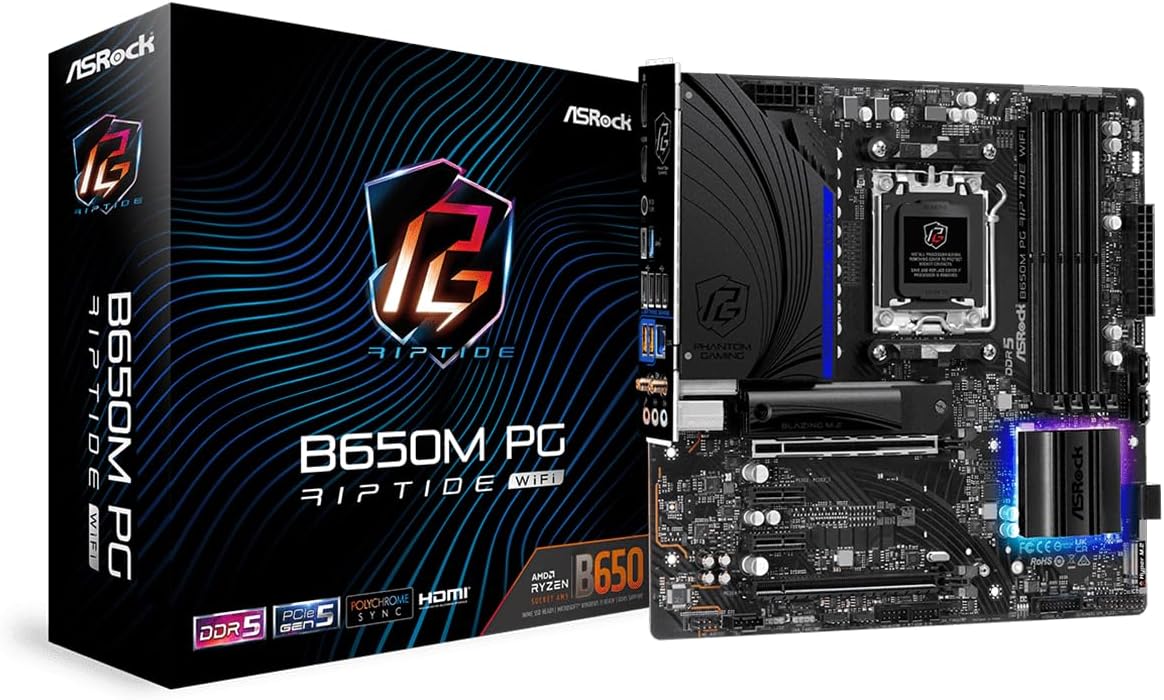
The GIGABYTE B650M C V3 is a renewed micro-ATX motherboard built for the AMD AM5 platform. It targets budget-conscious builders who want to run Ryzen 7000 series processors without paying full retail for a new board. With DDR5 support and essential modern I/O, it serves well as a foundation for mid-range gaming PCs, home workstations, or compact office systems.
Standout features include PCIe 4.0 M.2 storage for fast boot and load times, USB 3.2 Gen1 Type-C for convenient peripheral connections, and 1GbE LAN for reliable networking. Q-Flash Plus lets users update the BIOS without a CPU or RAM installed, while EZ-Latch simplifies M.2 drive mounting. These practical touches improve real-world usability during assembly and maintenance.
As an mATX board, the design prioritizes a smaller footprint that still delivers core expansion options. Build quality appears consistent with GIGABYTE standards for this class, and the 5-year warranty on the renewed unit adds meaningful confidence. The layout keeps essential connectors accessible for clean cable management in compact cases.
Potential drawbacks include the possibility of light cosmetic wear typical of renewed hardware and the absence of multi-gig networking. Expansion slots are fewer than on ATX boards, which may limit multi-GPU or heavy add-in card setups. Still, for most single-GPU builds these limits are minor.
Overall the GIGABYTE B650M C V3 renewed edition is a smart pick for value-focused AM5 upgrades. It balances modern features, ease of use, and warranty coverage effectively. Recommended for builders seeking a reliable entry into the Ryzen 7000 platform without overspending on unused features.
Socket: AMD AM5 (LGA 1718) for Ryzen 7000 series CPUs. Chipset: AMD B650. Form Factor: Micro-ATX for compact builds.
Memory: DDR5 support. Storage: PCIe 4.0 M.2 slot. Expansion: PCIe 4.0 slots. Networking: 1GbE LAN. Rear I/O includes USB 3.2 Gen1 Type-C.
Convenience features: Q-Flash Plus BIOS update without CPU, EZ-Latch tool-free M.2 installation. Covered by a 5-year warranty as a renewed product.

Pros
- Full support for latest Ryzen 9000/8000/7000 series processors
- Built-in WiFi 6E and 2.5GbE for versatile high-speed networking
- Dual PCIe 4.0 M.2 slots for fast primary and secondary storage
- User-friendly EZ-Latch and Q-Flash Plus ease assembly and updates
- Compact mATX design fits smaller cases while retaining core modern features
Cons
- 5+2+2 VRM may limit heavy multi-core overclocking headroom
- mATX form factor offers fewer PCIe and expansion slots than ATX boards
- USB Type-C is limited to 3.2 Gen 1 speeds rather than faster Gen 2
The GIGABYTE B650M D3HP AX is an mATX motherboard built for the AMD AM5 socket and ready for Ryzen 9000, 8000, and 7000 series processors. It is aimed at value-focused builders who want modern connectivity and storage options in a compact form factor that fits smaller cases without sacrificing essential features.
Standout capabilities include dual PCIe 4.0 x4 M.2 slots for high-speed NVMe drives, WiFi 6E for next-generation wireless, and a 2.5GbE LAN port for reliable wired networking. The direct 5+2+2 digital VRM keeps power delivery stable for mainstream gaming and productivity, while four DDR5 DIMMs with EXPO and XMP support make memory optimization straightforward. In everyday use the board handles multitasking, content creation, and gaming sessions efficiently.
Design and build quality emphasize practicality. SMD DIMMs add durability, EZ-Latch simplifies GPU mounting, and Q-Flash Plus lets you update the BIOS without installing a CPU or RAM. The mATX layout keeps the board tidy and cooler-friendly for space-constrained builds.
Potential drawbacks are the modest VRM that may not satisfy extreme overclockers, fewer expansion slots than full ATX boards, and USB Type-C limited to Gen 1 speeds. These trade-offs are expected at this feature level and form factor.
Overall the B650M D3HP AX is a capable, well-rounded choice for builders seeking a reliable AM5 foundation with WiFi 6E, dual M.2, and solid everyday performance. It delivers strong value for mid-range Ryzen systems.
Socket: AMD AM5 supporting Ryzen 9000/8000/7000 series processors.
Form Factor: Micro-ATX (mATX) for compact builds.
Memory: 4x DDR5 DIMM slots with AMD EXPO and Intel XMP support.
Storage: 2x PCIe 4.0 x4 M.2 slots for high-speed NVMe SSDs.
Power Design: Direct 5+2+2 phases digital VRM solution.
Networking: WiFi 6E wireless plus 2.5GbE LAN.
Connectivity: USB 3.2 Gen 1 Type-C, EZ-Latch, and Q-Flash Plus.

Pros
- Full support for current and upcoming AM5 Ryzen processors including 9000 series
- PCIe 5.0 storage and high DDR5 overclocking headroom in a compact board
- 2.5G LAN and modern USB 3.2 Gen2 ports for strong everyday connectivity
- BIOS Flashback simplifies updates even without a CPU installed
- Micro-ATX size suits smaller cases while retaining multi-drive storage options
Cons
- Micro-ATX form factor may not fit every case, so chassis compatibility must be verified
- 8+2+1 VRM is solid for mainstream use but less ideal for extreme high-end CPU overclocking
- Realtek ALC897 audio is capable yet not at the level of premium board codecs
The ASRock B650M Pro RS is a micro-ATX motherboard built for AMD Socket AM5, giving builders a modern base for Ryzen 7000, 8000, and 9000 series processors. It suits gamers, content creators, and value-focused PC builders who want current platform features in a smaller footprint rather than a full-size ATX board.
Key strengths include dual-channel DDR5 with overclocked speeds up to 7200+ MHz, one Blazing M.2 PCIe Gen5x4 slot for ultra-fast NVMe drives, and additional PCIe 4.0 M.2 plus four SATA3 ports for storage growth. The 8+2+1 power phase layout with Dr.MOS keeps mainstream and upper-midrange CPUs stable under load. Dragon 2.5G LAN, rear USB 3.2 Gen2 Type-A and Type-C, and front-panel USB 3.2 Gen1 Type-C cover networking and peripheral needs well. Realtek ALC897 with Nahimic Audio delivers clear onboard sound for games and media.
Design is practical and compact. BIOS Flashback helps with easy firmware updates, and the board layout keeps essential connectors accessible in smaller chassis. Build quality matches expectations for a solid mid-tier B650 board focused on reliability over flashy extras.
Drawbacks are honest and limited. The micro-ATX size requires checking case clearance. The VRM is reliable for typical use but may not satisfy users who want extreme overclocking of top flagship chips. Onboard audio is good enough for most users yet trails higher-end boards with dedicated premium codecs.
Verdict: The B650M Pro RS is a well-rounded, future-ready AM5 micro-ATX choice that balances speed, storage, and connectivity without excess cost or bulk. It is an excellent recommendation for compact gaming and productivity builds that prioritize modern features and everyday stability.
Socket: AMD AM5 for Ryzen 7000, 8000, and 9000 series processors.
Form Factor: Micro-ATX. Memory: 4x DDR5 DIMM slots, dual-channel, up to 7200+ MHz OC, max 256GB.
Storage: 1x Blazing M.2 PCIe Gen5x4, additional M.2 PCIe 4.0 slots, 4x SATA3 6.0 Gb/s ports.
Networking: Dragon 2.5G LAN. Audio: Realtek ALC897 7.1 CH HD Audio with Nahimic Audio.
I/O Highlights: USB 3.2 Gen2 Type-A and Type-C on rear, front-panel USB 3.2 Gen1 Type-C support, BIOS Flashback. Power Design: 8+2+1 phases with Dr.MOS. M.2 Key E for WiFi module support.
Choose this board if you are building a compact AM5 system and want DDR5, PCIe 5.0 storage, and 2.5G networking without paying for a full ATX flagship. It pairs well with midrange to upper-midrange Ryzen CPUs for gaming and productivity.
Before purchase, confirm your case supports micro-ATX and check CPU cooler clearance. Match with DDR5 kits that list high OC profiles if you plan memory overclocking. Add a discrete GPU as needed since this is a standard micro-ATX board without onboard graphics beyond what the CPU provides.
Ideal buyers include first-time AM5 upgraders, SFF and mid-tower builders seeking value, and anyone who wants BIOS Flashback convenience. Skip it only if you need extreme VRM headroom for heavy multi-core overclocking or a larger board with more PCIe expansion slots.
How to Choose the Best B650 Motherboard
Choosing among dozens of B650 boards can feel overwhelming because the chipset itself is relatively consistent; the differences live in VRM design, slot layout, cooling hardware, wireless modules, and firmware quality. Use the criteria below to narrow the field quickly and avoid paying for features you will never use or under-speccing a board that will bottleneck a high-end Ryzen CPU.
VRM Quality and Power Delivery
Voltage regulator modules (VRMs) convert the 12 V rail into the low-voltage, high-current supply the CPU needs. For Ryzen 7000X3D, 8000, and especially 9000-series chips that can pull sustained power under all-core loads, a robust multi-phase design with quality chokes, MOSFETs, and heatsinks is essential. Boards such as the ASUS TUF Gaming B650-PLUS WiFi advertise 14 power stages, while the ASUS ROG Strix B650-A Gaming WiFi uses 12+2 stages and the ASUS B650E MAX Gaming WiFi W uses an 8+2+1 design; higher stage counts generally improve efficiency and thermal headroom when paired with strong cooling.
In practical terms, if you plan to run a Ryzen 9 7900X or 9900X with a high-end air cooler or AIO and leave Precision Boost Unlimited enabled, prioritize boards with larger VRM heatsinks and at least 10–12 effective phases. Budget mATX options like the GIGABYTE B650M D3HP AX with a 5+2+2 phase design are fine for Ryzen 5 and lower Ryzen 7 CPUs but can run warmer under prolonged multi-threaded workloads. Always cross-check the board’s power design against the TDP of your chosen CPU and the airflow of your case.
Look for alloy chokes, solid capacitors, and dedicated VRM heatsinks that do not interfere with tall CPU coolers. DIY-friendly boards often include Q-LED or debug LEDs that help diagnose power-related POST failures. For most mid-range gaming builds a well-cooled 8–12 phase solution is more than adequate; enthusiasts running sustained heavy loads or mild overclocks should step up to the stronger power stages found on TUF, Strix, and Tomahawk boards.
Socket Compatibility and Platform Longevity
Every board in this roundup uses the AMD AM5 socket (LGA 1718) and is specified for Ryzen 7000, 8000, and 9000 series processors. That single fact already gives you multi-year upgrade potential—AMD has publicly committed to supporting AM5 through at least 2027 and likely beyond. Confirm that the specific board you buy ships with a BIOS version that supports your CPU out of the box, or that it includes BIOS Flashback / Q-Flash Plus so you can update without a compatible processor installed.
Be careful with mixed listings: one product in the broader set is a GIGABYTE B550 Eagle WIFI6 board that uses the older AM4 socket and DDR4. That board is not interchangeable with B650 AM5 systems. Always double-check the socket printed on the box and the product page. For pure AM5 builds, models such as the MSI MAG B650 Tomahawk WiFi, ASUS ROG Strix B650-A, and GIGABYTE B650 Eagle AX are purpose-built for the current platform and will accept future Ryzen drops with a BIOS update.
Platform longevity also depends on memory and storage headroom. Boards that support high DDR5 speeds (6000 MT/s EXPO profiles and beyond) and multiple M.2 slots give you more room to grow. If you expect to keep the same motherboard for several CPU generations, invest in a board with solid BIOS support history and accessible flashback tools rather than the absolute cheapest option.
PCIe Support and Expansion Layout
B650 boards typically provide a full x16 PCIe 4.0 or PCIe 5.0 slot for the graphics card plus additional PCIe 4.0 lanes for storage and expansion cards. The ASUS B650E MAX Gaming WiFi W and ASUS TUF Gaming B650-PLUS WiFi advertise PCIe 5.0 x16 SafeSlot support, which future-proofs you for next-generation GPUs even if current cards only need PCIe 4.0. Most other boards in the list, including the MSI MAG B650 Tomahawk WiFi and GIGABYTE B650 Eagle AX, offer PCIe 4.0 x16 which is still more than enough bandwidth for any GPU available today.
Storage is where layouts diverge. The GIGABYTE B650 Eagle AX stands out with triple M.2 slots (one PCIe 5.0 and two PCIe 4.0), while the ASUS ROG Strix B650-A and ASUS B650E MAX also provide three M.2 slots. Entry-level mATX boards such as the GIGABYTE B650M D3HP AX and Asrock B650M Pro RS usually offer two M.2 slots. If you plan a large game library plus a separate OS drive and a content-creation scratch disk, prioritize boards with at least three M.2 slots and proper heatsinks so thermal throttling does not limit sequential speeds.
Also examine secondary PCIe slots. Some boards share lanes between the second x16 slot and M.2 drives; others keep them independent. For multi-GPU (rare) or capture-card users, confirm lane bifurcation and physical spacing so a long graphics card does not block the lower slots. Pairing a strong B650 board with a modern GPU is easier when you also consult our GPU reviews section for power and length clearance data.
Memory Support and DDR5 Performance
All genuine B650 boards support DDR5 exclusively. Most list official JEDEC speeds around 5200–5600 MT/s and EXPO/XMP overclock profiles reaching 6000 MT/s or higher. The MSI PRO B650-S WiFi and Asrock B650M Pro RS both advertise DDR5 memory boost up to 6000+ MHz / 7200+ (OC), which is the practical sweet spot for Ryzen 7000 and 9000 CPUs. Running 6000 MT/s CL30 kits typically yields the best balance of latency and bandwidth on AM5.
Capacity is equally important. Four DIMM slots are standard on ATX boards and allow 128 GB or even 192–256 GB configurations when high-density modules are used. mATX boards such as the GIGABYTE B650M C V3 and Asrock B650M Pro RS also offer four slots on many revisions, but always verify the maximum supported capacity. Dual-rank kits can be more demanding on the memory controller; boards with stronger trace layout and BIOS tuning (often reflected in higher official OC ratings) handle them more reliably.
For gaming, 32 GB (2×16 GB) at 6000 MT/s is the current recommendation. Content creators working with large video timelines or 3D scenes should budget for 64 GB. Enable EXPO in the BIOS after installation and run a memory stress test; most modern B650 boards apply stable EXPO profiles with minimal manual tuning. If you plan aggressive memory overclocking, favor boards known for good IMC synergy and clear voltage control, such as the ROG Strix and TUF models.
Connectivity: Networking, USB, and Wireless
Modern B650 boards diverge sharply in networking and USB. Wi-Fi 6E is now common on mid-to-upper models: MSI MAG B650 Tomahawk WiFi, MSI PRO B650-S WiFi, ASUS ROG Strix B650-A, ASUS TUF B650-PLUS, ASUS B650E MAX, and GIGABYTE B650 Eagle AX all include Wi-Fi 6E plus Bluetooth. Wired Ethernet ranges from 1 GbE on budget boards (GIGABYTE B650M C V3) to 2.5 GbE on the majority of gaming-oriented models. 2.5 GbE is worth having if your router or switch supports it, especially for large file transfers or NAS use.
USB connectivity affects daily usability. Look for rear USB 10 Gbps Type-A and Type-C ports plus a front-panel USB-C header (USB 3.2 Gen 1 or Gen 2). The ASUS B650E MAX Gaming WiFi W highlights rear USB 10 Gbps Type-A & Type-C and front USB 5 Gbps Type-C support. Higher-end boards often add USB 3.2 Gen 2×2 (20 Gbps) Type-C for fast external SSDs. Count the total Type-A ports if you use many peripherals; some mATX boards cut rear ports to save space.
Additional headers for ARGB Gen 2, PWM fans, and Thunderbolt add-in cards expand future options. If wireless reliability is critical (streaming, competitive gaming without Ethernet), prioritize boards that ship with high-gain antennas and a well-reviewed Wi-Fi 6E module. For pure wired setups you can save money by choosing a non-Wi-Fi board and adding a cheap PCIe Wi-Fi card later if needed.
BIOS Features and DIY Convenience
A polished BIOS reduces first-boot frustration and long-term maintenance. Features to prioritize include BIOS Flashback / Q-Flash Plus (update firmware with only a USB stick and power—no CPU or RAM required), clear CMOS buttons or jumpers, and Q-LED / debug code displays that show exactly where POST fails. ASUS boards typically include BIOS FlashBack and Q-LED Core; GIGABYTE boards offer Q-Flash Plus and EZ-Latch for tool-free M.2 and PCIe installation; MSI boards provide Flash BIOS Button and clear CMOS.
Pre-mounted I/O shields, screwless M.2 heatsinks, and PCIe slot release latches (EZ-Latch) make assembly faster and reduce the chance of bent pins or stripped screws. Addressable RGB headers that work with Aura Sync, Mystic Light, or RGB Fusion let you synchronize lighting without extra controllers. For first-time builders these quality-of-life features often matter more than an extra USB port.
After installation, update to the latest BIOS for improved memory training, better Ryzen 9000 support, and security patches. Most vendors publish release notes; reading them helps you decide whether a given update is necessary. Boards with strong BIOS reputations tend to receive more frequent and better-tested updates, which is another reason enthusiast-oriented models such as the Tomahawk, Strix, and TUF remain popular long after launch.
Form Factor, Cooling, and Case Compatibility
ATX boards (MSI MAG B650 Tomahawk WiFi, ASUS ROG Strix B650-A, ASUS TUF B650-PLUS, GIGABYTE B650 Eagle AX, MSI PRO B650-S) offer the most expansion and easiest cable routing. mATX boards (GIGABYTE B650M D3HP AX, Asrock B650M Pro RS, GIGABYTE B650M C V3) fit smaller cases and cost less while still providing four DIMM slots and dual M.2 on many models. Choose mATX only if your case is limited or you want a compact footprint; otherwise ATX remains the more flexible choice.
VRM and M.2 heatsinks, PCH heatsinks, and hybrid fan headers improve sustained performance. The ASUS B650E MAX Gaming WiFi W lists VRM, M.2, and PCH heatsinks plus Fan Xpert 2+ software. Ensure the VRM heatsink does not collide with your CPU cooler’s backplate or fan. Large dual-tower coolers and 360 mm AIOs fit most ATX boards, but always verify cooler height and radiator clearance against your case specifications.
If you are building a silent or high-airflow system, boards with more 4-pin fan headers and good software control (Fan Xpert, Smart Fan, etc.) make it easier to create custom curves. White PCB variants such as the ASUS B650E MAX Gaming WiFi W also appeal to builders matching a specific aesthetic. For broader gaming PC component synergy, browse our top motherboards for gaming collection as well.
Technical Comparison Table
The table below summarizes key specifications for the most relevant B650 models based on available product data. Use it as a quick filter before diving into individual reviews or current pricing.
| Model | Form Factor | Key Spec Highlights | Best For | Main Strength | Value Rating |
|---|---|---|---|---|---|
| ASUS B650E MAX Gaming WiFi W | ATX | 8+2+1 VRM, PCIe 5.0 x16 & M.2, Wi-Fi 6E, 2.5Gb LAN, white PCB | Aesthetic builds & AI PC readiness | PCIe 5.0 + DIY features | High |
| GIGABYTE B650M C V3 | mATX | DDR5, PCIe 4.0 M.2, 1GbE, Q-Flash Plus, 5-year warranty (renewed) | Budget compact builds | Lowest price point | Excellent |
| MSI PRO B650-S WiFi V1 | ATX | DDR5 6000+ OC, 2× PCIe 4.0 x16, 2× M.2 Gen4, Wi-Fi 6E | Balanced productivity | Clean PRO aesthetics | High |
| GIGABYTE B650 Eagle AX | ATX | Triple M.2 (1× PCIe 5.0), USB 3.2 Gen2x2 Type-C, Wi-Fi 6E | Storage-heavy gaming | Three M.2 slots | Excellent |
| GIGABYTE B650M D3HP AX | mATX | 5+2+2 phase, 2× M.2, Wi-Fi 6E, 2.5GbE, EZ-Latch | Compact Wi-Fi builds | Feature-rich mATX | High |
| MSI MAG B650 Tomahawk WiFi | ATX | Strong VRM, Wi-Fi 6E, 2.5Gbps LAN, USB 3.2 Gen 2, HDMI/DP | Gaming & all-round use | Proven reliability & ratings | Very High |
| ASUS ROG Strix B650-A Gaming WiFi | ATX | 12+2 power stages, 3× M.2, 2.5G LAN, Wi-Fi 6E, Aura Sync | Premium gaming aesthetics | Power stages + RGB | High |
| ASUS TUF Gaming B650-PLUS WiFi | ATX | 14 power stages, PCIe 5.0, DDR5, Wi-Fi 6, USB Type-C | Durable high-power builds | VRM strength | High |
| Asrock B650M Pro RS | mATX | DDR5 7200+ OC, 2.5G LAN, BIOS Flashback, M.2 Key E | Budget overclocking | High memory OC claims | Excellent |
Why You Should Trust PCGearWiki
At PCGearWiki we focus on objective, specification-driven comparisons rather than sponsored rankings. Every recommendation in this best b650 motherboard guide is built from publicly available manufacturer data, published feature lists, user rating aggregates, and careful compatibility checks across CPU, cooler, case, and memory ecosystems. We evaluate VRM claims, PCIe and M.2 layouts, networking hardware, and BIOS convenience features so you can see the real differences between similarly priced boards.
We also assess value within the stated price range and highlight trade-offs—such as fewer USB ports on mATX models or the presence of older AM4 boards in mixed listings—so you avoid costly mistakes. Our content is regularly reviewed for accuracy as new BIOS versions and CPU generations appear. Some product links may be affiliate links; this never changes our editorial ranking or the technical criteria we apply. Transparency about data sources and limitations is central to how we operate across all Motherboard Reviews.
When product data is incomplete we state that clearly and rely on the most reliable published specifications rather than speculation. The goal is simple: give PC builders, gamers, and creators the practical information needed to choose the right board the first time.
Final Thoughts
After comparing features, power delivery, connectivity, and real-world usability across 15 options, several clear winners emerge for different budgets and use cases in July 2026.
Best Overall: MSI MAG B650 Tomahawk WiFi. With strong user ratings (thousands of reviews), a well-regarded VRM, Wi-Fi 6E, 2.5 GbE, solid USB selection, and proven BIOS support for Ryzen 7000/8000/9000 CPUs, it remains the safest all-round choice for most gamers and creators. Ideal for mid-to-high-end ATX builds that need reliability without stepping into X670 pricing. The main trade-off is that it uses PCIe 4.0 rather than 5.0 for the primary slot, which is still more than sufficient for current GPUs.
Best Value: GIGABYTE B650 Eagle AX. Triple M.2 slots including one PCIe 5.0, Wi-Fi 6E, USB 3.2 Gen2x2 Type-C, and a competitive price make it an outstanding storage-focused board. Perfect for users who want multiple NVMe drives and future-proofing without overspending. Compared with pricier Strix and TUF models it may have a slightly simpler VRM, but for Ryzen 5 and Ryzen 7 CPUs the difference is negligible.
Best Budget: Asrock B650M Pro RS or GIGABYTE B650M C V3. The Asrock offers high memory OC claims (7200+), 2.5G LAN, and BIOS Flashback in an mATX form factor at an attractive price. The GIGABYTE B650M C V3 undercuts almost everything else and adds a longer warranty on the renewed version. Both suit compact or entry-level AM5 builds; just accept fewer high-speed USB ports and more modest VRM cooling.
Best Premium / Enthusiast Pick: ASUS TUF Gaming B650-PLUS WiFi or ASUS ROG Strix B650-A Gaming WiFi. The TUF’s 14 power stages and PCIe 5.0 support give excellent headroom for high-core-count Ryzen 9 CPUs, while the Strix adds refined aesthetics, three M.2 slots, and Aura Sync. Choose these when you want stronger power delivery, better aesthetics, or maximum DIY features and are willing to pay a modest premium. For white-themed builds the ASUS B650E MAX Gaming WiFi W is also compelling thanks to its white PCB and PCIe 5.0 implementation.
Match the board to your CPU cooler, case size, and storage plans, then pair it with a capable cooler and a quality power supply. If you are still deciding on the rest of the system, our CPU reviews and GPU comparison resources will help complete a balanced build. The best b650 motherboard for you is the one that meets your performance needs today while leaving headroom for tomorrow’s upgrades.
Frequently Asked Questions
What is the best b650 motherboard right now?
For most users the MSI MAG B650 Tomahawk WiFi offers the strongest combination of power delivery, connectivity, BIOS maturity, and user feedback. If you need maximum M.2 storage the GIGABYTE B650 Eagle AX is an excellent alternative, while budget builders should look at the Asrock B650M Pro RS or GIGABYTE B650M C V3.
How much should I spend on a B650 motherboard?
Expect to spend between roughly $90 and $180 for a capable B650 board. Spending $130–$160 typically unlocks Wi-Fi 6E, 2.5 GbE, stronger VRMs, and better heatsinks. Going below $100 is fine for Ryzen 5 builds in small cases, but you may sacrifice wireless, USB ports, or VRM cooling.
Is a B650 motherboard enough for Ryzen 9000 processors?
Yes. Current B650 boards officially support Ryzen 9000, 8000, and 7000 series CPUs once the appropriate BIOS is installed. For high-core Ryzen 9 models, choose a board with a robust multi-phase VRM and good heatsinks such as the TUF B650-PLUS, Strix B650-A, or Tomahawk WiFi. Always verify BIOS version before purchase or use Flashback to update.
Should I buy B650 or step up to X870?
B650 is the better value for the majority of gaming and content-creation builds. X870 (and earlier X670) boards add more USB4 ports, additional PCIe lanes, and sometimes stronger VRMs, but the performance difference in games is usually zero. Only move to X870 if you specifically need the extra I/O or want maximum future-proofing. Our X870 motherboard guide covers those higher-end options in detail.
How long does a B650 motherboard typically last?
With normal use and adequate case airflow a quality B650 board should last 5–8 years or more—often outliving multiple CPU upgrades on the AM5 platform. Capacitor and VRM quality, regular BIOS updates, and dust management are the main factors that determine longevity. Choosing a board from a reputable brand with a solid warranty further reduces risk.
How We Evaluated
PCGearWiki evaluates review and buying-guide recommendations by comparing product specifications, compatibility, real-world use cases, pricing, warranty coverage, and customer feedback patterns. Our goal is to explain not only which products look strong on paper, but which ones make sense for actual PC builds and daily use.
- Specifications, compatibility, performance expectations, pricing, warranty coverage, and long-term value.
- Real-world PC setup fit, feature trade-offs, build quality, software support, and upgrade considerations.
- Customer feedback patterns around reliability, usability, setup experience, and common complaints.
You can read more about our editorial standards and scoring process in our Review Methodology.


Write Your Review
No reviews yet. Be the first to share your experience!