

Last updated: September 30, 2026
The best gaming PC for Fortnite depends on whether you want a competitive, lower-detail setup or a sharper image with demanding visual settings. Start with your monitor resolution and preferred graphics mode, then compare complete configurations rather than buying the largest graphics card you can afford. The desktops below are specification-based candidates, not systems we have benchmarked in Fortnite.
Verified configurations at a glance
| Configuration | CPU | GPU | RAM | Storage |
|---|---|---|---|---|
| CyberPowerPC GXiVR8060A47 | Core i5-14400F | RTX 5060 8GB | 16GB DDR5 | 1TB NVMe |
| MSI Codex Z2 A8NVP-436US | Ryzen 7 8700F | RTX 5070 | 32GB DDR5 | 2TB NVMe |
Choose the Fortnite experience before the hardware
A competitive player and someone who wants rich visual effects may need different spending priorities even when both play Fortnite. A high-refresh monitor makes consistent frame delivery important, but its refresh number is not a promise that the game will maintain that many frames. A more expensive GPU is not automatically the right upgrade when the limiting component is elsewhere. Before replacing a PC, compare the same replay or repeatable scene at lower and higher resolution and inspect frame-time behavior.
Epic Games lists 16GB RAM and an NVMe drive in its recommended requirements. Its separate Epic Quality tier names an RTX 3070 or RX 6700 XT with 8GB VRAM and a Core i7-8700 or Ryzen 7 3700X. These published tiers are useful reference points, not current benchmark results for the exact prebuilts on this page. Do not turn a requirement list into a guaranteed tournament frame rate.
For a new purchase, ask the seller for a Fortnite result using the actual rendering mode, resolution and settings you will use. A screenshot showing the largest instantaneous FPS number is weak evidence. A repeatable test with the configuration, average frame rate and frame-time behavior is much more informative. Keep enough of the budget for a suitable display and peripherals instead of comparing towers in isolation.
Publisher or project reference: official requirements and documentation.
Under $1500 versus a higher-priced visual-quality option

Pros
- Strong entry-level performance for 1080p and 1440p gaming
- Modern DDR5 RAM and PCIe 4.0 SSD for future-proof speed
- Includes WiFi, Bluetooth, and multiple USB ports for easy peripheral connections
- Comes with keyboard, mouse, and Windows 11 preinstalled
Cons
- RTX 5060 8GB limits ultra settings in the most demanding new titles
- Only 16GB RAM may require upgrades for heavy multitasking or content creation
- Zero customer reviews available to confirm long-term reliability
| Color | Black |
|---|---|
| Size | GXiVR8060A47 |
| Dimensions | 18.1102 x 9.25195 x 19.60626 Inches |
| Weight | 28.3073544408 pounds |
| Product Group | Personal Computer |
| Binding | Personal Computers |
Best suited to shoppers comparing towers products who specifically need delivers smooth high-resolution gaming with Intel Core i5-14400F processor handling intensive tasks efficiently, Enables realistic visuals and ray tracing through NVIDIA GeForce RTX 5060….
Before buying, compare the exact model’s compatibility, dimensions, core specifications, warranty, recurring owner feedback, and current price against other towers options. Retailer availability and pricing can change after publication.
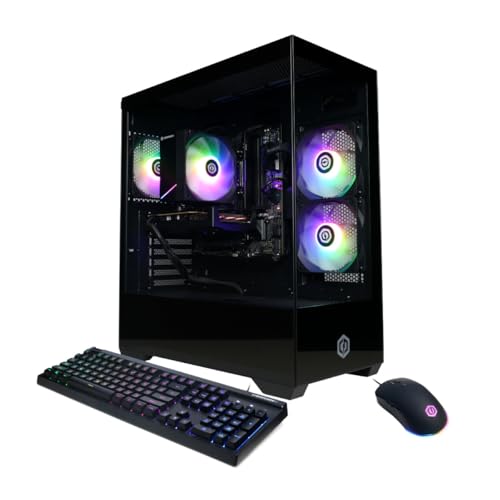
CyberPowerPC GXiVR8060A47
This is the lower-cost candidate to investigate for a budget-focused Fortnite setup. The listing includes an i5-14400F, RTX 5060 8GB, 16GB DDR5 and a 1TB NVMe drive. The observed price was below $1500 when refreshed. Check the live card before treating it as an under-$1500 purchase. Its 16GB capacity matches the publisher recommendation, but that does not verify frame pacing while recording or multitasking.

Pros
- Strong CPU and GPU combo for AAA titles and multitasking
- Ample RAM and storage included out of the box
- Effective multi-fan cooling system
- VR-ready with modern connectivity options
Cons
- Only two memory slots limit future upgrades
- Air cooling may require monitoring under extreme loads
- Prebuilt design offers fewer customization options than DIY builds
| Color | Black |
|---|---|
| Dimensions | 16 x 8.38 x 19 inches |
| Weight | 21.3 pounds |
| Product Group | Personal Computer |
| Binding | Personal Computers |
Best suited to shoppers comparing towers products who specifically need run demanding games smoothly with an 8-core CPU and next-gen GPU architecture for high frame rates., Handle streaming and background apps at once thanks….
Before buying, compare the exact model’s compatibility, dimensions, core specifications, warranty, recurring owner feedback, and current price against other towers options. Retailer availability and pricing can change after publication.
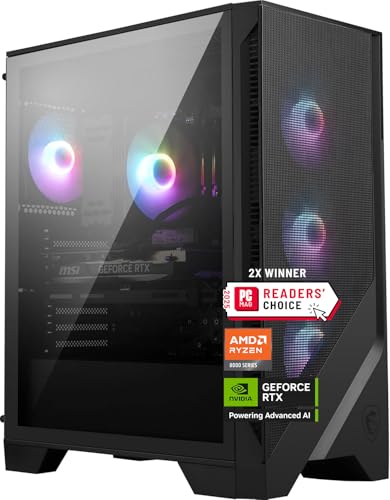
MSI Codex Z2 A8NVP-436US
The Codex Z2 offers an RTX 5070, Ryzen 7 8700F, 32GB DDR5 and a 2TB NVMe drive. The extra memory and storage are concrete differences, while the benefit at your settings still needs benchmark evidence. This listing was above $2000 at review, so it is not a second budget pick. Consider it when higher visual settings and a larger library justify the additional expense.
What to verify before ordering
Save the exact configuration and live price when ordering. Ask for the motherboard model, RAM module layout, power supply details, available expansion slots and warranty terms if they are not documented. A tower name may cover several variants, so a review of a differently equipped version is not sufficient evidence. Confirm the seller return policy in case the delivered machine does not match the description.
Compare the full purchase cost with your existing setup. Include any required memory or storage upgrade, display connection and installation service. When a particular component is undocumented, describe it as an open question rather than assuming a premium part is installed. The product cards show the approved ASINs, but the buyer should still confirm the selected variant at checkout.
Related buying and troubleshooting advice
- Best Gaming PC For Counter-Strike 2: Top Prebuilt Rigs for 2026
- Best Keyboard For Fortnite Buying Guide
- Best Mouse For Fortnite Buying Guide
Frequently asked questions
Will either PC hold 240 FPS throughout a match?
We do not have an exact-configuration benchmark that establishes that result. Scene complexity, settings, software and the rest of the system can affect performance. Require a test matching your use rather than accepting an advertised maximum.
Should I replace the GPU first?
Not without identifying the limitation. Compare frame times, graphics load and settings in a repeatable scene. If lowering resolution changes little, a larger GPU may not address the problem you are trying to solve.
For the broader purchase decision, compare prebuilt gaming PC brands and support options. The supplier warranty, exact configuration and service terms matter alongside the game-specific shortlist.
Add PCGearWiki as a preferred source on Google
Sources and Verification
Research basis: Product identity, dimensions, interfaces, supported features, and warranty terms are checked against available manufacturer documentation and current retailer listings. Price, stock, and aggregate customer ratings can change after publication.
Testing disclosure: Unless this article explicitly states that PCGearWiki performed hands-on testing and describes the test setup, recommendations are research-based editorial evaluations rather than PCGearWiki laboratory measurements. Customer feedback is used to identify recurring ownership patterns, not as proof of technical performance.
Last source review: September 30, 2026. See our Review Methodology, Editorial Policy, and Corrections Policy.


Write Your Review
No reviews yet. Be the first to share your experience!