

Last updated: September 30, 2026
Choosing between systems in our evaluation of the Best Prebuilt Gaming PCs for WARDOGS: RTX 5070 Compared requires balancing CPU platform performance against your target resolution and total system cost. Both systems exceed developer recommended hardware targets, but they diverge significantly on cooling systems, processor tiering, and upgrade flexibility.


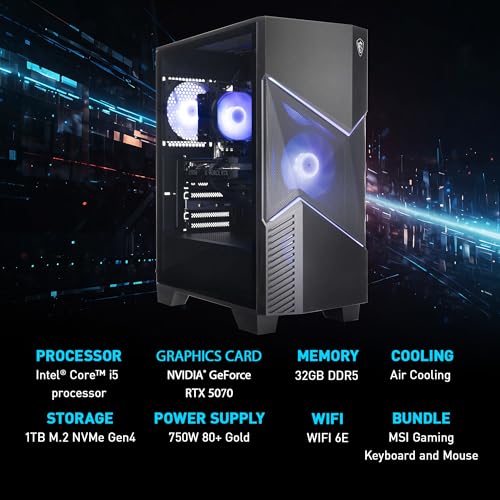
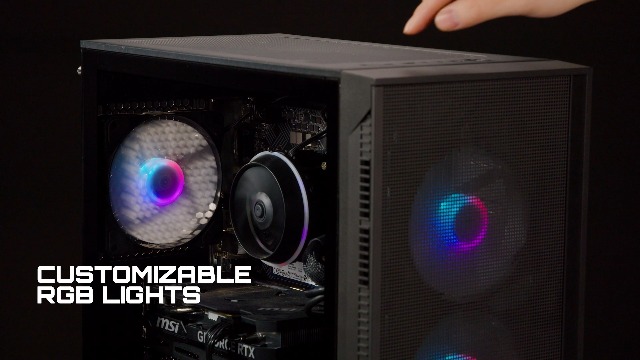
MSI Codex R2 RTX 5070 Gaming PC



As an Amazon Associate we earn from qualifying purchases. Product prices and availability are accurate as of the date/time indicated.
WARDOGS targets modern combat simulation, demanding substantial graphics capability alongside multi-threaded processing. Desktops in the Prebuilt Gaming PCs category featuring the NVIDIA GeForce RTX 5070 12GB graphics card offer access to DLSS 4 Multi-Frame Generation and modern architecture. Examining these configurations confirms how memory speed, cooling capacity, and power delivery affect long-term stability.
Quick Verdict
Based on available product data, the msi Codex R2 Gaming Desktop PC serves as the most straightforward, standardized baseline for 1440p gaming. It pairs an Intel Core i5-14400F with 32GB DDR5 RAM, standard off-the-shelf parts, and air cooling inside an accessible case. Buyers seeking predictable replacement components and standard maintenance should choose this model, skipping it only if heavy workstation multitasking demands higher multi-core thresholds.
The KOTIN G60B Prebuilt Gaming PC targets enthusiasts needing higher compute ceilings. It pairs the RTX 5070 with an AMD Ryzen 7 9700X, 360mm liquid cooling, an 850W Gold power supply, and integrated chassis hardware monitoring. Buy it for simultaneous streaming, heavy creator workloads, or maximum CPU headroom; skip it if your budget is strictly constrained to baseline gaming needs.
Key Specifications
| Feature | MSI Codex R2 (D14NVP5-613US) | KOTIN G60B Prebuilt | Why It Matters for WARDOGS |
|---|---|---|---|
| Processor | Intel Core i5-14400F | AMD Ryzen 7 9700X (up to 5.5GHz) | Handles simulation logic, player tracking, and draw calls |
| Graphics Card | GeForce RTX 5070 12GB | GeForce RTX 5070 12GB GDDR7 | Renders native frames, handles ray tracing and DLSS 4 generation |
| Memory | 32GB DDR5 | 32GB DDR5 6000MHz | Exceeds 16GB game recommendation; prevents asset paging stutters |
| Storage | 1TB NVMe M.2 SSD | 1TB PCIe 4.0 SSD (up to 6000MB/s) | Fast asset streaming; stores base game installs plus patch overhead |
| Cooling Solution | RGB CPU Air Cooler + 4 System Fans | 360mm AIO Liquid Cooler + Digital Display | Dissipates sustained thermal output during extended multiplayer matches |
| Networking | Wi-Fi 6E | Wi-Fi 7 | Determines wireless local band access, throughput, and signal stability |
| Power Supply | 80 PLUS Gold Certified | 850W 80 PLUS Gold | Ensures clean voltage delivery under transient GPU power spikes |
Design and Build Quality
Chassis design dictates airflow efficiency and internal serviceability. The MSI Codex R2 uses a traditional tower layout built using standardized consumer parts. A four-fan configuration manages front-to-back chassis displacement, using an air tower sink across the CPU socket. This layout allows direct physical access to PCIe slots, DIMM channels, and standard power headers without custom bracket interference.
The KOTIN G60B utilizes a showcase chassis housing a top-mounted 360mm liquid cooling radiator and an integrated 11.3-inch smart screen. The secondary display reads hardware states like CPU temperature directly from system sensors. Its chassis accommodates three M.2 storage drives, including one PCIe 5.0 slot, and houses an 850W power supply behind isolated shroud chambers to minimize interior thermal bleed.
Performance and Real-World Use
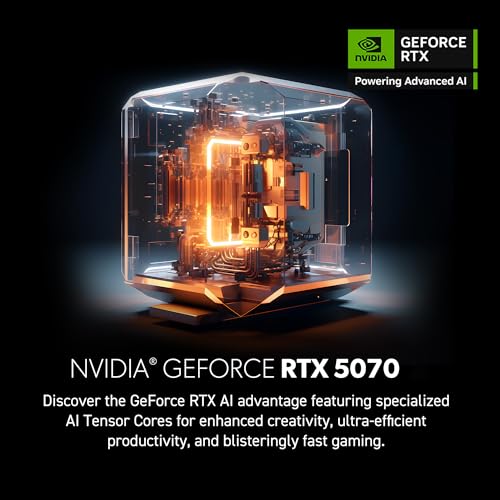
According to manufacturer specifications, both desktop configurations employ NVIDIA’s GeForce RTX 5070 12GB card. This GPU architecture supports DLSS 4 Multi-Frame Generation, Reflex 2 low-latency modes, and hardware-accelerated ray tracing. Developer targets for WARDOGS specify an RTX 3070 or Radeon RX 6700 XT for 1440p Medium settings at 70+ frames per second native. An RTX 5070 class card operates safely above this baseline.
Compute handling marks the core performance split between these two prebuilts. The Core i5-14400F in the MSI desktop provides sufficient core balancing for standard gaming and background utility execution. In contrast, the AMD Ryzen 7 9700X in the KOTIN system delivers higher operational clocks up to 5.5GHz alongside architectural advantages in pure multi-threaded compute, making it better equipped for concurrent high-bitrate streaming or video rendering workloads.
Compatibility
Before buying either machine, inspect your intended setup environment across key points:
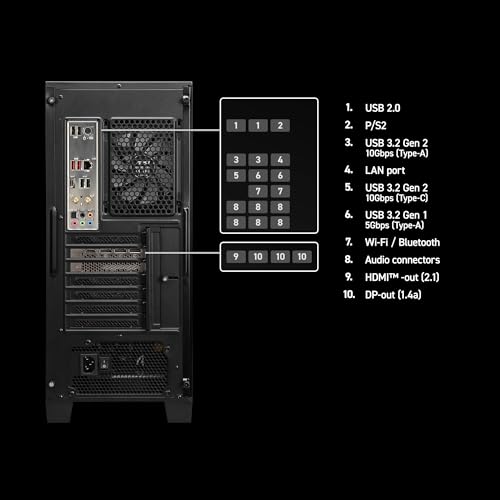
- Display Interface: Both systems require modern DisplayPort or HDMI connections capable of handling high refresh rates at 1440p or 4K resolutions.
- Expansion Footprint: MSI relies on standard internal layouts, allowing easy GPU, RAM, or peripheral upgrades. KOTIN provides three dedicated M.2 slots, including Gen 5 compatibility for high-speed NVMe add-ins.
- Power Requirements: KOTIN specifies an 850W Gold-rated PSU, providing adequate overhead for hardware demands. MSI lists an 80 PLUS Gold supply matching the lower draw of the Core i5 configuration.
- Network Standards: The MSI unit includes Wi-Fi 6E, while the KOTIN tower steps up to Wi-Fi 7. Ensure your home router supports these bands to utilize their respective lower-latency channels.
Pros and Cons
MSI Codex R2:
- Standard, off-the-shelf components simplify future repairs and part swaps.
- Balanced Core i5-14400F pairing lowers total investment costs.
- Pre-installed four-fan cooling layout ensures consistent chassis airflow.
- Included 32GB DDR5 memory eliminates early RAM upgrade requirements.
- Straightforward management via built-in MSI Center software utility.
MSI Codex R2 Drawbacks:
- Air-cooled CPU setup yields higher loaded temperatures than 360mm liquid systems.
- Core i5 tier provides less compute headroom for heavy rendering workflows.
- Limited to Wi-Fi 6E instead of newer Wi-Fi 7 standards.
KOTIN G60B Prebuilt:
- High-frequency AMD Ryzen 7 9700X processor reaching up to 5.5GHz.
- Integrated 360mm AIO liquid loop with an on-pump temperature read-out.
- Integrated 11.3-inch display panel provides direct system telemetry monitoring.
- Robust motherboard expansion supporting 3 M.2 drives and PCIe 5.0 speeds.
- Wi-Fi 7 wireless network integration.
KOTIN G60B Drawbacks:
- Higher price point reflects non-essential luxury additions like the chassis LCD.
- Chassis-integrated display drivers require extra background system configuration.
- Brand identity is less ubiquitous across global retail networks than mainstream vendors.
Who Should Buy It?
Choose the MSI Codex R2 if your objective is getting clean 1440p performance without paying for aesthetic additions. It fits standard gaming desk setups where reliability, standard maintenance, and budget conservation are the primary decision factors. For buyers assessing a broader range of options, reviewing our best prebuilt gaming PC under $1500 selections helps ground comparative pricing metrics.
Select the KOTIN G60B if you want high-tier multi-threaded processing alongside liquid cooling. Gamers who broadcast on Twitch, run multi-monitor dashboards, or produce video benefit from the Ryzen 7 9700X and 850W power reserve. The secondary screen adds immediate value for users wanting live hardware monitoring without in-game overlays.
Who Should Skip It?
Gamers playing primarily at 1080p on entry-level displays should skip both systems. Hardware at this tier is excessive for low resolutions. Buyers on conservative budgets should explore lower tiers, such as systems covered in our best gaming PC under $800 guide or our best gaming PC under $600 breakdown.
Alternatives to Consider
Within this exact comparison, the decision sits between the msi Codex R2 Gaming Desktop PC and the KOTIN G60B Prebuilt Gaming PC. If you are deciding whether a prebuilt platform fits your long-term setup better than building your own machine from parts, consult our detailed analysis on prebuilt vs custom PC.
Why You Should Trust PCGearWiki
PCGearWiki bases hardware evaluations on direct component analysis, manufacturer specifications, published engineering standards, and documented platform limitations. Our assessment relies on manufacturer specifications and published listings. You can review our criteria and analysis workflow by consulting the PCGearWiki review methodology.
Final Verdict
The MSI Codex R2 remains the best overall recommendation for the typical gamer targeting WARDOGS. It delivers the full power of the RTX 5070 alongside an efficient Intel Core i5 processor at a lower overall price. The KOTIN G60B is the premium pick, justified strictly for power users needing liquid thermal dissipation, Ryzen 7 multi-core performance, and built-in hardware monitoring.
Frequently Asked Questions
Is an RTX 5070 required to play WARDOGS?
No, an RTX 5070 is not strictly required. The official recommended requirements list an NVIDIA RTX 3070 or AMD Radeon RX 6700 XT to target 1440p at Medium settings. The RTX 5070 simply provides higher graphics overhead and DLSS 4 support.
Are these prebuilt PCs tested directly in WARDOGS?
Our assessment relies on manufacturer specifications and published listings. Evaluation is strictly based on matching official game requirements against component specifications from the hardware manufacturers.
How much RAM is necessary for modern tactical shooters like WARDOGS?
While the developer recommendation cites 16GB of system RAM, both prebuilt options reviewed here feature 32GB of DDR5. This extra headroom prevents memory paging stutter during heavy background software usage or prolonged gaming sessions.
What should I compare before buying an RTX 5070 prebuilt?
Verify processor capabilities, chassis cooling configuration, power supply wattage and certification, storage expansion slots, and the active seller return policy before completing checkout.
Add PCGearWiki as a preferred source on Google
Sources and Verification
Research basis: Product identity, dimensions, interfaces, supported features, and warranty terms are checked against available manufacturer documentation and current retailer listings. Price, stock, and aggregate customer ratings can change after publication.
Testing disclosure: Unless this article explicitly states that PCGearWiki performed hands-on testing and describes the test setup, recommendations are research-based editorial evaluations rather than PCGearWiki laboratory measurements. Customer feedback is used to identify recurring ownership patterns, not as proof of technical performance.
Last source review: September 30, 2026. See our Review Methodology, Editorial Policy, and Corrections Policy.


Write Your Review
No reviews yet. Be the first to share your experience!